
MP 1501 SD - Mp3 player Trevi - Free user manual and instructions
Find the device manual for free MP 1501 SD Trevi in PDF.


| Product Type | MP3 Player with SD Card Support |
| Brand | Trevi |
| Model | MP 1501 SD |
| Dimensions (approx.) | 100 x 50 x 12 mm |
| Weight (approx.) | 50 g |
| Power Source | Built-in rechargeable lithium-ion battery via USB |
| Supported Audio Formats | MP3, WMA, WAV |
| Storage Expansion | microSD card slot (up to 32 GB) |
| Display | 1.8-inch LCD display |
| Main Functions | Music playback, FM radio, voice recording, folder navigation |
| Battery Life (approx.) | Up to 15 hours music playback |
| Charging Time (approx.) | 2-3 hours via USB |
| Connectivity | USB 2.0 for data transfer and charging, 3.5 mm headphone jack |
| Controls | Physical buttons for volume, playback, navigation |
| Language Support | Multilingual menu (including English, Italian, etc.) |
| Included Accessories | USB charging cable, earphones, user manual |
| Maintenance | Clean with dry soft cloth; avoid moisture and extreme temperatures |
| Safety Precautions | Do not disassemble; keep away from children; use only supplied charger |
| Spare Parts and Repairability | Contact Trevi support for replacement battery or charging port |
| General Information | Manufacturer: Trevi S.p.A. | Compliance: CE, RoHS |
Frequently Asked Questions - MP 1501 SD Trevi
User questions about MP 1501 SD Trevi
0 question about this device. Answer the ones you know or ask your own.
Ask a new question about this device
Download the instructions for your Mp3 player in PDF format for free! Find your manual MP 1501 SD - Trevi and take your electronic device back in hand. On this page are published all the documents necessary for the use of your device. MP 1501 SD by Trevi.
USER MANUAL MP 1501 SD Trevi
cuffia sport MP3 player sport headset MP3 player


Italiano MANUALE UTENTE
MP 1501 SD

P_4

MP 1501 SD
Italiano
natural_image
Black USB device with two black arrows pointing to its body (no text or symbols visible)Fig.1 Fig.2
natural_image
Interior view of a USB flash drive showing internal components and a black arrow pointing to a component (no text or symbols visible)P_11
English USER MANUAL
MP 1501 SD

The information contained in this document can be change without notice.
This publication can't be reproduced or transferred, even partially, in any way, electronic or mechanical, can't be photocopied, copied or translated to other languages for any purpose without the express consent of the manufacturer.
The names, designs and trademarks contained in this manual are property of their respective owners.
Please read carefully this user manual and follow information before the use the product.
Attention! The inappropriate use of battery can cause explosions or overheating.
P_12
WARNING FOR A CORRECT USE OF RECHARGEABLE BATTERY
- Recharge the battery in an ambient temperature between 5°C and 35°C.
- When the recharge is complete the device shows a message/signal (check the user's guide).
- Don't recharge more than the suitable period to prevent the risk of overheating and burst.
- Don't recharge the battery for more than 6 hours.
- Recharging the battery over the suitable period or an extended period of inactivity may reduce battery duration.
- Rechargeable battery is liable to wear and tear and its performance will reduce gradually.
- To extend the duration of the battery use it when is completely charged up to the complete discharging, then recharge it fully before use it again. Recharge a battery not completely consumed, will result a reduced duration. In this case, repeat the full charging/ discharging cycle many times.
- Avoid recharge the battery for the whole night.
English
MP 1501 SD

1. Important Safety Instructions
The manual contains important safety instructions and information of the device's proper usage. Make sure to read carefully and understand all the instructions to avoid accidents.
- Please do not expose the device in the extreme temperature (above 40□), especially in cars with window closed during summer.
- Please do not store it in the humid or dirty area.
- Please avoid the device falling and bumping strongly.
Please do not turn up the volume of the earphones too high while using it. If you feel ringing in your ears stop using the device or turn the volume down. - Please do not disassemble the device by yourself and do not wipe the surface of device with alcohol or benzene or thinners.
- Please do not use the device in areas where electronic devices are prohibited.
- It is not suggested to use the device when you are driving or walking in the street.
2. Function overview
- LCD Display
- Integrated Micro-SD card, support capacity up to 8GB
- Plays MP3, WMA music format file
- Built in Li-polymer battery
- Built in digital voice recording function
- Product Dimension: 83 x 28 x 12 MM

MP 1501 SD
English
1: USB
2: USB Push the knob
3: Power ON/DFF
4: Earphone jack
5: Mode
6: Next
7: Volume
8: Play / Pause
9: Previous
10: Micro SD card slot
11: MIC
12: LCD Display
13: Strap hole
3. Basic Operation
Power on/Power Off:
Push the button to "ON" position to turn on the device.
Long press 38 button for 3 seconds to turn off the device, then push the Power ON/OFF button to "OFF" position.
Remarks: "ON/OFF" position is for you to power on/off completely the battery
English
MP 1501 SD

Power off:
a. In music mode: press [^] (play/stop) button for one second, the music will stop, long press [^] (play/stop) button for three seconds, the player will be turned off.
b. In other modes: long press [“] (play/stop) button for three seconds, the player will be turned off.
c. When battery power is low, system will automatically power off.
Adjusting volume:
Adjusting the volume in music mode, and voice mode, press [ * ] button will enter to volume adjustment interface. Pressing [ * ] button or [ * ] button will increase/decrease the volume one step. Long press [ * ] button or [ * ] button will increase/decrease continuously.
Notice: Do not turn up the volume too high when you put on the earphones, otherwise your hearing will be injured.
4. About Battery
The player adopts a built-in Li-polymer battery with large capacity.
If battery power is low, the screen will display "low power" then will automatically power off. Recharge your battery by connecting to PC via USB.
The screen displays battery icon and impulse when recharging battery. The icon will indicate full when completely recharged.
The battery will be full when charged continuously for 4 hours (the first two times will take 10hrs).
The running time of battery depends on high or low of volume, playing files format, button operation, etc.
The user can set [power off setting] to save power.
5. Main menu
Press ["] button to enter into subsidiary menu: press ["] button or ["] button to select. Save setting: hold ["] button to save and exit from menu.
Music mode: playing music (for more details, refers to "playing music")
Record mode: recording voice (for more details, refers to "recording voice")
- System mode: edit system (for more details, refers to following "system setting")
6. Music mode
Play/Stop Play: In music mode, connect the earphone to the player, then press PLAY/STOP [**] button to play or stop.

MP 1501 SD
English
Select music: Pressing [ * ] button briefly will move to the next songs. Pressing [ * ] button briefly will move to the previous songs.
Music mode menu: In music play mode, pressing ["] button will enter sub-menu. press ["] button or [+] button to select the mode, then press ["] button to confirm selection: Repeat, Equalizer, Replay, Exit
Repeat mode: press [ * ] button and [ * ] button to select repeat mode. Normal; Repeat One; Folder; Repeat Folder; Repeat All; random; intro.
Equalizer mode: JAZZ, CLASSIC, ROCK, POP, NORMAL, SOFT, DBB
Tempo rate: press [ * ] button and [ * ] button to select tempo rate. Moving to positive direction will fast tempo rate and moving to negative direction will slow tempo rate. The digit "0" means normal tempo rate.
Replay: A-B repeat, when "A" in the icon 📋 blinks, swing ["] to confirm start point, swing ["] as "B" point. The player will replay from A to B according to the setting in the replay times.
Lyric display: User can download lyrics from website and save them in the player with the same name of music.
Notice: The player displays lyric name as the same as the MP3 file name. For example, music file name is "song.mp3" and LRC file name must be "song.lrc", they should also be in the same folder.
7. Record mode
In player main menu, press [ " ] button to confirm selecting record mode,
Press the front [ ^** ] Button to start/stop recording. Press M button to save and exit.
Notice:
1) For fine recording, please record in quiet background.
2) Please do not talk before recording and start recording in 5\~6 seconds.
3) Make sure battery power and memory are sufficient.
4) The player support 99 voice recording files storage in each directory. If the screen displays "out of space", which indicates the current directory has already saved 99 voice recording files, the user need to change to a new directory.
5) During recording, only front [**] Button and ["] button can be effective.
English
MP 1501 SD

- System mode
| Press [ * ] button or [ * ] button to select [system], then press [ * ] button briefly to edit. | |
| System Time | Press [ * ] to edit recording time. Swing [ * ] button and the digit of year will increase; swing [ * ] button to edit next digit, push [ * ] or [ * ] button to adjust the digit. Press [ * ] to confirm the setting |
| LCD set | Always light0 Sec3 Sec6 Sec9 Sec12 Sec15 Sec18 Sec21 Sec24 Sec27 Sec30 Sec |
| Language | English, Italian |
| Power off | Off time: set self-power off time when the player is stopped and no button is pressed. The time unit is seconds. 0 means set off the function.Sleep time: set self-power off time after last key pressed, regardless of whether the player is active or stopped. The time unit is minutes. |
| Memory info. | Check the memory size and the remaining memory |

MP 1501 SD
English
| Firmware version | Display the player's firmware version |
| Firmware upgrade | Firmware can be upgraded via connection to PC |
| Exit | Exit from the sub-menu |
9. USB disk function
1) The player can be a large mobile storage device, supports 1GB/2GB/4GB/8GB memory
2) Above windows 98 no driver is required, plug and play to the computer
3) The player supports USB bus-powered and begins to charge when connecting to PC.
4) When connected to a computer, the screen will indicate three different modes while operating:
suspending mode | data downloading |
data uploading |
English
MP 1501 SD

10. Encrypt disk function
User can use the software to set partitions for USB disk. One is normal disk, the other is encrypted disk. (User can see two disk icons in computer. WINDOWS 2K need install SP4, otherwise, user only see one disk icon and selecting [normal only] or [encrypt only] from [online mode] of [system setting]. Encrypted disk would hide all private data, others cannot access data without password.
Notice:
1) Data in encrypted disk cannot be readable in the player.
2) It is necessary for encrypted disk to input user name and password when connecting to computer.
3) Setting partitions will erase data, please backup data in advance. Combining disks would also erase data.
4) Please do not lose username and password. Otherwise, you cannot access encrypted disk. You can combine disks to cancel encrypted disk at risk of damaging data in encrypted one.
12. Upgrading
Use update tool installed in your computer to update and repair the damaged driver.
1) Connect player to the computer
2) Run the software: Start----program----MP3 Player Utilities ---- MP3 Player Upgrade Tool, click [choose new version firmware] button.


MP 1501 SD
English
Find the icon of removable disk in [my computer]. Click the right button of mouse to select [format]. In formatting interface, select FAT system in [file system], then click [start] button to format disk. Notice: formatting disk would erase all the data and please backup data before formatting.
13. Troubleshooting
If the player couldn't play properly, please use trouble-shooting guide to help you.
| Symptom | Solution |
| The player cannot work | Please check the voltage of batteryMake sure the power button is on3. Please check if volume is set to "0" or not and make sure that earphones are connected properly.Damaged music data will make noise in some extent; make sure there are files in the player.choose right FAT file system in dialogue when formatting disk. |
| The player cannot upload /download files; no disk icon in computer | Please check USB cable is correctly connected.Please properly re-install CD driver if under Win 98 |
| The player cannot record | Please check if memory is sufficient.Please check the battery voltage. |
| Strange characters are displayed | Please check if the correct language is selected. |
If you encounter other difficulties with the device during warranty period, please feel free contact our company to help you solve the problem.
English
MP 1501 SD
| Item | Specification |
| Dual color LCD screen | 128X6+4 pixel |
| Operating language | English, Italian |
| USB Interface | USB2.0 |
| File formats supported | Music: MP1、MP2、MP3、WMA、WAV Record : WAV |
| The max output power | (L) 10mW+(R) 10mW (320hm) |
| Micro SD memory | 1GB~8GB |
| Power | 3.7 V Li-polymer battery |
| Operating temperature | -5□~40□ |
| Operating System | WINSE/ME/2K/XP,Mac OS 10 ,Lhx2.4.2(Only WIN98 needs the CD driver) |
| Accessories | User Manual, Earphone, |

16. Support Micro-SD card function
Plug and pull Micro-SD Card:
Plug: Connect Micro-SD Card to the device by inserting the card at its observe side to the socket of device, thus the MP4 player can play the files in the Micro-SD Card.
Full: Push Micro-SD Card, thus Micro-SD Card will rebound a little. Then it's available to take it out.

MP 1501 SD
English
English
MP 1501 SD

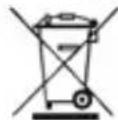
Precautions for correct disposal of the product.
The symbol shown on the equipment indicates that waste must be disposed of in "separate collection" and so the product must not be disposed of together with urban waste.
The user must take the product to special "separate waste collection centres" provided by local government, or deliver it to the retailer against the purchase of a new product.
Separate collection of waste and subsequent treatment, recycling and disposal operations promotes the production of equipment with recycled materials and limits negative effects on the environment and on health caused by improper handling of waste.
Illegal disposal of the product leads to the enforcement of administrative penalties.
WARNING FOR A CORRECT USE OF RECHARGEABLE BATTERY
- Recharge the battery in an ambient temperature between 5°C and 35°C.
- Don't recharge more than the suitable period to prevent the risk of overheating and burst.
- Don't recharge the battery for more than 6 hours.
- Recharging the battery over the suitable period or an extended period of inactivity may reduce battery duration.
- Rechargeable battery is liable to wear and tear and its performance will reduce gradually.
- To extend the duration of the battery use it when is completely charged up to the complete discharging, then recharge it fully before use it again. Recharge a battery not completely consumed, will result a reduced duration. In this case, repeat the full charging/discharging cycle many times.
- Avoid recharge the battery for the whole night.

MP 1501 SD
English
INFORMATION NOTE ON THE REMOVAL AND DISPOSAL OF BATTERIES
Warning: Only high-qualified personnel should perform this operation! BATTERY REMOVAL
The appliance should not be plugged to the mains socket when performing this operation!
I) Remove the screws shown in Pic. I and remove the lower part of the appliance;
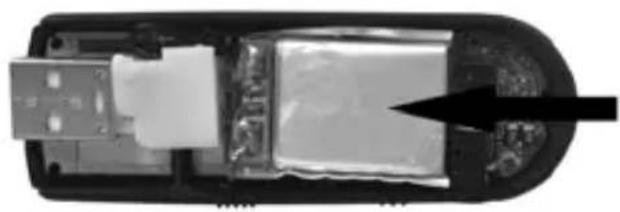
2) Select the battery shown by the arrow in Pic.2;
3) Disconnect and remove the battery.
Used batteries should not be disposed of with household waste or thrown into fire or water. Used batteries should be recycled or disposed of in separate waste collection centres.

natural_image
Top-down view of a black USB device with two arrows pointing to its body (no text or symbols visible)Pic.1 Pic.2

natural_image
Interior view of a USB flash drive showing internal components and an arrow pointing to a component (no text or symbols visible)P_25
Note
MP 1501 SD


MP 1501 SD
Note
P_27


- Italiano MANUALE UTENTE
- English USER MANUAL
- WARNING FOR A CORRECT USE OF RECHARGEABLE BATTERY
- English
- MP 1501 SD
- Important Safety Instructions
- Function overview
- Basic Operation
- Power off:
- Adjusting volume:
- About Battery
- Main menu
- Music mode
- Record mode
- USB disk function
- Encrypt disk function
- Notice:
- Upgrading
- Troubleshooting
- Support Micro-SD card function
- Precautions for correct disposal of the product.
- INFORMATION NOTE ON THE REMOVAL AND DISPOSAL OF BATTERIES
Brand : Trevi
Model : MP 1501 SD
Category : Mp3 player