
MPV 1750 SD - Mp3 player Trevi - Free user manual and instructions
Find the device manual for free MPV 1750 SD Trevi in PDF.


| Product Type | MP3 Player |
| Brand | Trevi |
| Model | MPV 1750 SD |
| Dimensions | Approximately 90 x 40 x 10 mm |
| Weight | Approximately 50 g |
| Power Supply | Built-in rechargeable lithium-ion battery, USB charging |
| Battery Life | Up to 10 hours of playback |
| Storage Capacity | Expandable via microSD card up to 32 GB |
| Supported Audio Formats | MP3, WMA, WAV |
| Display | 1.8-inch color LCD screen |
| Playback Functions | Music player, voice recorder, FM radio, photo viewer |
| Connectivity | USB 2.0, 3.5 mm headphone jack |
| Controls | Buttons for menu, play/pause, volume, next/previous track |
| Languages Supported | English, Italian, and other European languages |
| Maintenance | Clean with a soft dry cloth; avoid moisture |
| Safety Warnings | Do not disassemble; keep away from heat sources; use only provided charger |
| Spare Parts | USB cable, earphones, user manual |
| Reparability | Contact authorized service center for repairs |
| General Information | User manual available for download in PDF format |
Frequently Asked Questions - MPV 1750 SD Trevi
User questions about MPV 1750 SD Trevi
0 question about this device. Answer the ones you know or ask your own.
Ask a new question about this device
Download the instructions for your Mp3 player in PDF format for free! Find your manual MPV 1750 SD - Trevi and take your electronic device back in hand. On this page are published all the documents necessary for the use of your device. MPV 1750 SD by Trevi.
USER MANUAL MPV 1750 SD Trevi
Language ____ English
French
Germany
Italian
Spanish
Power Off Set ____Off time
Sleep time
Memory info
Format Device
Firmware version
Firmware upgrade
MODALITÀ DELETE CHANNEL
Start>Programmi>MP3 Player Utilities:
AMV Converter
MP3 Player Upgrade Tool
MP3, WMA, WAV (musicali),
natural_image
Line drawing of a portable electronic device with control buttons (no text or symbols)Content
Buttons location and usages
Basic Operation
Power on and off
Operation of Music Mode
Repeat Mode
Volume Control
Video Mode
Driver and Software Utilities Installation
Converting different video format to .AMV video
Radio FM
Recorder
Photo
Off time Mode
Technical Specification
Trouble Shooting
Buttons location and usages
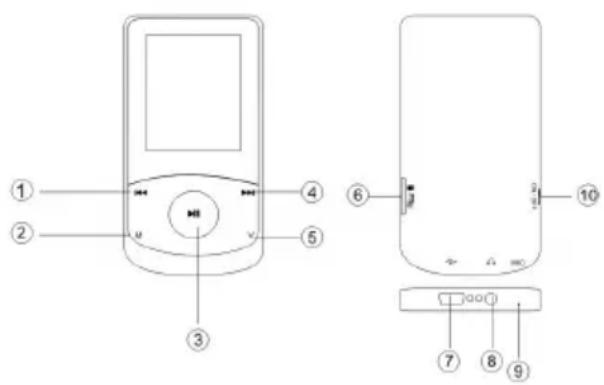
(1) Previous/backward function
(2) Menu button
(3) Play/Pause
(4) Next/forward function
(5) Volume button
(6) Micro SD card slot
(7) USB port
(8) Earphone jack
(9) Microphone
(10) ON/OFF switch

Basic Operation
Micro SD card Slot
Before enjoy music you need to insert a Micro SD card correctly into the slot.
Power on and off
Switch the On/Off button to turn on/off the player.
Operation of Music Mode
After entering the main menu page, select the Music and press to enter playing song mode. In Music Mode, press once to play music. Press again to pause. Press to jump to the next song, and to jump back to the previous song. Hold to fast forward and hold to rewind.
Hold M to return to the main menu.
Repeat Mode
In play mode, you can Press M to enter the sub-menu and select the Setting and press▶| to choose Cycle mode from Normal/Repeat one/Folder/Repeat Folder/Repeat All/Random/Intro and press▶| to confirm
Volume Control
While enjoying your music you can press V button to control the volume. Press ◀◀ to volume down the music and Press ▶▶ to volume up the music

Operation of Video Mode
After entering the Main Menu, select "Video" and press to enter Video mode.
Press|◀/▶| button to select your desired Video. Note: Only files of the .AMV format will be played in Video mode.
Press the ▶ button to start playing the selected .AMV movie. If there are no .AMV files, "Empty Disk" will be shown on the display.
Skip Video
Press ◀◀/▶▶ button to jump to the previous or next movie.
Fast Backward and Forward
Look for a certain passage in a movie file by pressing and holding |◀/▶| while a movie is playing.
Driver and Software Utilities Installation
If you are using Windows® 98/98SE, you must install the driver before downloading any files to your player.
Note: If you are using Windows® Me/2000/XP, you may skip the following installation procedures.
Step 1. Double click on Setup.exe to start the driver installation. Follow the onscreen-menu to complete the installation.
Step 2: After installation is completed, please restart your computer.
Converting different video format to .AMV video
Step 1: After installing the driver and software utilities, click Start button, select All Programs > MP3 Player Utilities 4.25 > AMV Convert Tool
Step 2: Click on the Input File button to select the .ASF video file you want to convert to an .AMV video file.. Also click on the Output File button to select the destination path for the AMV video file.
Step 3: Click Convert button to start converting process. You will see .AMV video file was converted.
Note : The software can convert .DAT, .WMV, .AVI video format into .AMV video also. But if the resolution for the your desired files less than 160x120, you may not convert it correctly.
FM Radio
After entering the main menu page, select the Radio and press ▶ to enter the Radio mode.
In FM mode, Press / to change the frequency by 0.1MHZ, Hold / to start the FM auto search function. It'll stop when an FM channel is detected. Repeat t the above steps to auto search any particular channel.
Recorder
In the main menu page, Press <</▶ to select the Recorder mode and Press ▶ to enter the recording voice mode Press ▶ to start recording and Press ▶ again to stop or continue recording Press ▶ mode till "Saving....." appear on the display to save the recorded voice when you finished the recording.
Photo
After entering the Main Menu, select Photo and press button to enter the Photo Browse function. Press the ◀/▶▶ button to select your desired photo. Note: Only files of the .JPG, .BMP and GIF format will be displayed in the View PHOTO function.
Setting
After entering the main menu page and Press |◀/▶▶ to select Setting and press ▶ to enter the setup page.
Language Setting
After entering the setting page select Language then press ▶|enter the language option. Press |◀/▶ to choose your preferred language and press ▶| to confirm. 5. languages are available: Italian, English, French, Germany, Spanish.
Off Time
In the setting Mode, press▶| to enter the off time setting, then press ◀◀/▶▶ to select which minutes you want the player to automatically shut down and Press▶|again to confirm the setting, and hold M to return to main menu.

Technical Specification
| External Memory Card | Micro SD card up to 32GB |
| MP3 compressed rate supported | MP3,WMA(8 – 320 kbps) |
| Video format supported AMV | |
| Photo format supported | JPEG / BMP / GIF |
| Battery | Li-Polymer battery |
| Interface | USB2.0 full speed |
| Display | 1.8" Color TFT Display |
| Frequency Response | 20Hz – 20KHz |
| Distortion <0.5% | |
| Rate of Signal-to-noise | >85dB |
| Earphones Output Power | 10mW |
| Weight | 26g |
| Dimensions | 40(W) * 6(D) * 79(H) mm |
Trouble Shooting
What should I do if there's no sound when playing?
You should check the volume first. If the volume has been turned up, maybe the memory format of the device is incorrect.

Converting different video format to .AMV video
Step 1: After installing the driver and software utilities, click Start button, select All Programs > MP3 Player Utilities 4.25 > AMV Convert Tool
1) Run "AMV Convert Tools", click 📄 to choose the folder where to save the AMV files, then click 📋 to select the folder where the original files are.
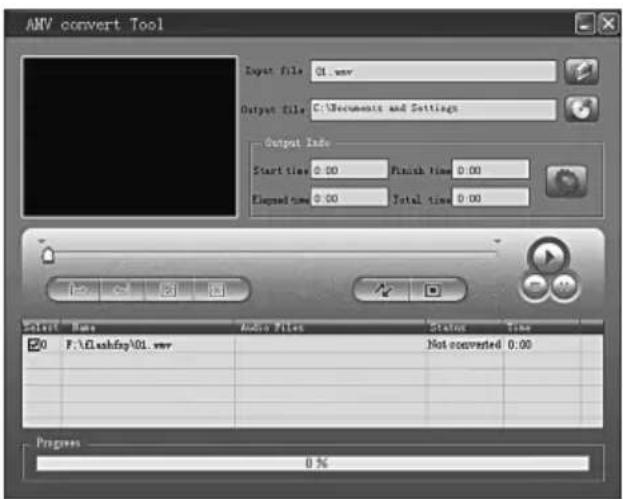
2) Select unprocessed AMV files, then click 📋, the icon will be highlighted into 🔊 and a dialog box will shown. Choosing Pixels of AMV to "160*120" and Frames per second to "middle", then click OK to confirm.
(Note: Only pixels in "160*120" an be supported)
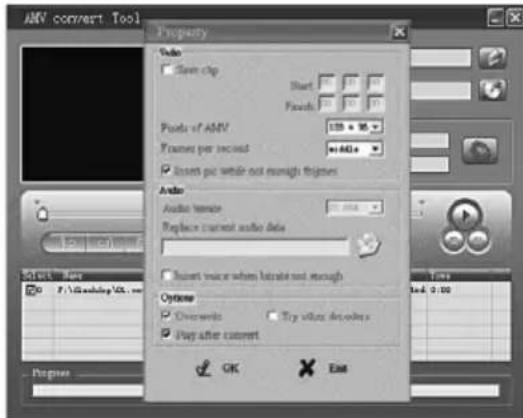
3) Click to start converting.
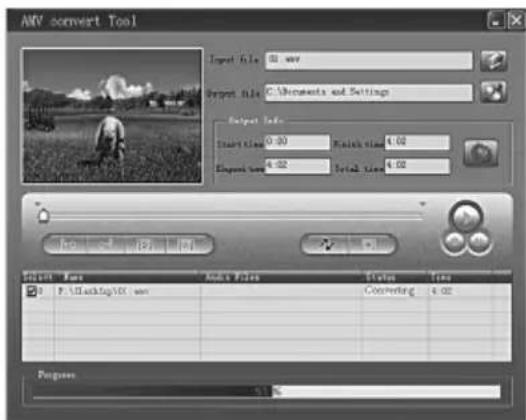
4) After convert, the AMV files will be played automatically.

INFORMATION NOTE ON THE REMOVAL AND DISPOSAL OF BATTERIES
Warning: Only high-qualified personnel should perform this operation!
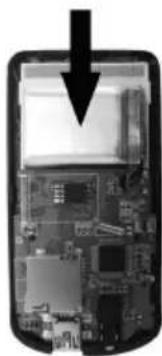
BATTERY REMOVAL
1) Remove the back part of the appliance from cogs;
2) Select the battery shown by the arrow;
3) Disconnect and remove the battery.
Used batteries should not be disposed of with household waste or thrown into fire or water. Used batteries should be recycled or disposed of in separate waste collection centres.
natural_image
Interior view of a smartphone showing internal circuit board and memory (no text or symbols visible)
SE CONNECTER À VOTRE PC ET LE TRANSFERT DE FICHIERS DANS LE LECTEUR DE CARTE MÉMOIRE
ACCÉDER AU MENU PRINCIPAL
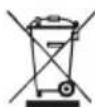
PRECAUTIONS FOR CORRECT DISPOSAL OF THE PRODUCT.

The symbol shown on the equipment indicates that waste must be disposed of in "separate collection" and so the product must not be disposed of together with urban waste.
The user must take the product to special "separate waste collection centres" provided by local government, or deliver it to the retailer against the purchase of a new product.
Separate collection of waste and subsequent treatment, recycling and disposal operations promotes the production of equipment with recycled materials and limits negative effects on the environment and on health caused by improper handling of waste.
Illegal disposal of the product leads to the enforcement of administrative penalties.
WARNING FOR A CORRECT USE OF RECHARGEABLE BATTERY
- Recharge the battery in an ambient temperature between 5°C and 35°C.
- When the recharge is complete the device shows a message/signal (check the user's guide).
- Don't recharge more than the suitable period to prevent the risk of overheating and burst.
Don't recharge the battery for more than 6 hours. - Recharging the battery over the suitable period or an extended period of inactivity may reduce battery duration.
- Rechargeable battery is liable to wear and tear and its performance will reduce gradually.
- To extend the duration of the battery use it when is completely charged up to the complete discharging, then recharge it fully before use it again. Recharge a battery not completely consumed, will result a reduced duration. In this case, repeat the full charging/discharging cycle many times.
- Avoid recharge the battery for the whole night.

RECOMMANDATIONS POUR L'ÉLIMINATION CORRECTE DU PRODUIT.
- MODALITÀ DELETE CHANNEL
- AMV Converter
- MP3 Player Upgrade Tool
- Content
- Buttons location and usages
- Basic Operation
- Technical Specification
- Trouble Shooting
- Micro SD card Slot
- Power on and off
- Operation of Music Mode
- Repeat Mode
- Volume Control
- Operation of Video Mode
- Skip Video
- Fast Backward and Forward
- Driver and Software Utilities Installation
- Converting different video format to .AMV video
- FM Radio
- Recorder
- Photo
- Setting
- Language Setting
- Off Time
- INFORMATION NOTE ON THE REMOVAL AND DISPOSAL OF BATTERIES
- Warning: Only high-qualified personnel should perform this operation!
- SE CONNECTER À VOTRE PC ET LE TRANSFERT DE FICHIERS DANS LE LECTEUR DE CARTE MÉMOIRE
- ACCÉDER AU MENU PRINCIPAL
- PRECAUTIONS FOR CORRECT DISPOSAL OF THE PRODUCT.
- WARNING FOR A CORRECT USE OF RECHARGEABLE BATTERY
- RECOMMANDATIONS POUR L'ÉLIMINATION CORRECTE DU PRODUIT.
Brand : Trevi
Model : MPV 1750 SD
Category : Mp3 player