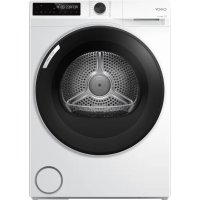
BRS 7N2BXS - Tumble drier CANDY - Free user manual and instructions
Find the device manual for free BRS 7N2BXS CANDY in PDF.



| Brand | Candy |
| Model | BRS 7N2BXS |
| Product type | Condenser tumble dryer with heat pump |
| Nominal capacity | 7 kg |
| Energy efficiency class | D |
| Dimensions (H x W x D) | 850 x 595 x 525 mm |
| Electrical supply | 220-240 V ~ 50 Hz, 2.7 A, 650 W |
| Refrigerant gas | R290 (0.125 kg) |
| Main programmes | ECO, Cotton, Synthetics, Wool, Easy Iron, Quick (14', 20', 30', 45', 59'), Timer |
| Drying levels | Iron (L-1), Ready to wear (L-2), Storage (L-3), Extra dry (L-4) |
| Delayed start | 0.5 h to 24 h in 0.5 h steps |
| Anti-crease function | Yes, up to 6 hours after the cycle |
| Memo function | Memorises preferred settings |
| Remote control | Via hOn app (2.4 GHz Wi-Fi) |
| Child lock | Yes, key lock |
| Filter cleaning | Lint filter and condenser filter: after each cycle |
| Water tank drainage | After each cycle; drainage possible via external hose |
| Weighted sound level | 64 dB(A) for standard cotton programme |
| Supplied accessories | Flexible drain hose, warranty card, user manual |
| Warranty | According to manufacturer's conditions (see warranty card) |
Frequently Asked Questions - BRS 7N2BXS CANDY
User questions about BRS 7N2BXS CANDY
0 question about this device. Answer the ones you know or ask your own.
Ask a new question about this device
Download the instructions for your Tumble drier in PDF format for free! Find your manual BRS 7N2BXS - CANDY and take your electronic device back in hand. On this page are published all the documents necessary for the use of your device. BRS 7N2BXS by CANDY.
USER MANUAL BRS 7N2BXS CANDY

Download on the App Store

Android APP on Google play

EXPLORE IT ON AppGallery

Nota: Registo

Download on the App Store

Android APP on Google play

EXPLORE IT ON AppGallery

BRS 7N2BX-S/BRS 8N2BX-S

Download on the App Store

Android APP on Google play

EXPLORE IT ON AppGallery

Note: Registro
Nota: expelled control remoto
Thank you for purchasing a Candy Product.
Please read this instruction carefully before using the appliance. The instruction contains important information which will guide you in order to have a safe and proper installation as well as daily use and maintenance.
Keep this manual in a convenient place so you can always refer to it for the safe and proper use of the appliance.

Safety notice
WARNING! - Important safety information
General information and tips
Environmental information
Disposal
This marking on the product, accessories or literature indicates that the product and its electronic accessories (e.g. charger, headset, USB cable) should not be disposed of with other household waste at the end of their working life.
To prevent possible harm to the environment or human health from uncontrolled waste disposal, please separate these items from other types of waste and recycle them responsibly to promote the sustainable reuse of material resources.
Household users should contact either the retailer where they purchased this product, or their local government office, for details of where and how they can take these items for environmentally safe recycling. Business users should contact their supplier and check the terms and conditions of the purchase contract.
This product and its electronic accessories should not be mixed with other commercial wastes for disposal.


WARNING!
This appliance is filled with R290 Flammable material risk of fire.
WARNING: In the appliance enclosure or in the built-in structure, keep ventilation openings clear of obstruction.
WARNING: Do not damage the refrigerant circuit.
WARNING!
Risk of injury or suffo cation!
To ensure safety when disposing of an old tumble dryer, disconnect the mains plug from the socket, cut the mains power cable and destroy this together with the plug. To prevent children shutting themselves in the machine, break the door hinges or the door lock.
WARNING!
The appliance must not be powered through an external switching device, such as a timer, or connected to a circuit that is regularly switched on and off by a utility.
1-Safety information. 4
2- Installation 7
3-Practical hints. 10
4- Product description. 11
5- Control panel 12
6-Programmes 16
7- Consumption 17
8-Suggestions.andtips. 18
9-Daily/use. 20
10-Care and cleaning. 23
11-Troubleshooting 25
12-Technical data 27
13- Customer service 29
14-hOn App 30
1-Safety information
EN

WARNING!
Before first use
Make sure there is no transportation damage.
Remove all package and keep it out of children's reach.
Always move the appliance with two people at least because it is heavy.
Daily use
This appliance can be used by children aged from 8 years and above and persons with reduced physical, sensory or mental capabilities or lack of experience and knowledge if they have been given supervision or instruction concerning use of the appliance in a safe way and understand the hazards involved.
Keep away children under 3 years of age from the appliance unless they are constantly supervised.
Children shall not play with the appliance.
Do make sure the room is dry and well ventilated. The ambient temperature should be between 5^ C and 35^ C .
Do not cover any ventilation openings in the base by a carpet or similar object.
Keep the area around the tumble dryer free of dust and lint.
Do make sure that there is only laundry inside the appliance and no pets or children before you use it.
Only touch the mains plug with dry hands and do not touch or use the appliance if you are barefoot or with wet hands or feet
Do not dry unwashed items in the tumble dryer.
Do make sure not to load more than nominal load.
Remove all items such as lighters and matches from pockets.
Fabric softeners, or similar products, should be used as specified by the fabric softener instructions
Do not use or store any flammable sprays or flammable gas in close vicinity to the appliance.
Do not place heavy objects or sources of heat or damp on top of the appliance.
Hold the plug, not the cable, when unplugging the appliance.
Do not touch the rear and the drum during operation, they are hot.

WARNING!
Daily use
Do not use the appliance to dry the following items:
Items which are not washed.
Items which have been contaminated with inflammable substances such as cooking oil, acetone, alcohol, benzine, petrol, kerosene, spot removers, turpentine, waxes, wax removers or other chemicals. The fumes can cause a fire or explosion.
Items that have been soiled with substances such as cooking oil, acetone, alcohol, petrol, kerosene, spot removers, turpentine, waxes and wax removers should be washed in hot water with an extra amount of detergent before being dried in the tumble dryer
Items which contain padding or filling pillows, jackets), as the filling can get out with the risk of causing ignition.
Items such as foam rubber (latex foam), shower caps, waterproof textiles, rubber backed articles and clothes or pillows fitted with foam rubber pads should not be dried in the tumble dryer.
Do not drink the condensed water.
Do not use the appliance without the lint filter or condenser filter in place or with damaged filter.
Notice that the last part of the drying cycle occurs without heat (cool down cycle) to ensure remaining garments are under a temperature which does not damage them.
- Do not leave the appliance unattended during run time for a long time. If a long absence is needed, the drying cycle have to be interrupted by switching off and unplugging the mains.
Do not switch off the appliance until drying cycle is finished.
Never stop a tumble dryer before the end of the drying cycle unless all items are quickly removed and spread out so that the heat is dissipated
Switch off the appliance after each drying program to save electricity and for safety.
Maintenance / cleaning
Make sure children are supervised if they carry out cleaning and maintenance.
Disconnect the appliance from the electrical supply before undertaking any routine maintenance.
1-Safety information

WARNING!
Maintenance / cleaning
Clean the lint filter and the condenser filter after each programme (see CARE AND CLEANING, page 23).
Dno watustearntsp y or s o clean the applian e.
Dnot tuseindustrialchemicals o clean the applian e.
If the suppilybeordyistdammagerna- must replaced ecturer, its service agent or similarly qualified persons in order to avoid a hazard.
Dnottry tor epahe apply by your a self.If repair is needed, please contact our customer service.
Installation
Ensure put the machine in a place which allows opening the door fully. Do not install the tumble dryer behind a lockable door, a sliding door or a door with hinges on the opposite side of the tumble dryer door as this limits the full opening of the door.
Install the appliance in a well-ventilated, dry place.
Never install the appliance in a damp outdoor, or in an area which has the risk of water leakage such as under or near a sink unit. Once a water leakage happened, cut power supply and allow the machine to dry naturally.
Install or use the appliance only in a place where the temperature is above 5^ .
Do not place the appliance directly on a carpet, or close to a wall or furniture.
Do not expose the appliance to any frost, heat or direct sunlight or around any heat sources (e.g. stoves, heaters).
Make sure that the electrical information on the rating plate aligns with the power supply. If it does not, contact an electrician.
Dno tuse multi- plug adapter s and exension cables.
Make sure not to damage the electric cable and the plug. if it is damaged, have it replaced by an electrician.
Use a separate earthed socket for the power supply which is easy access to after installation. The appliance must be earthed.
Only for UK: The appliance's power cable is fitted with 3-cord (grounding) plug that fits a standard 3-cord (grounded) socket. Never cut off or dismount the third pin (grounding). After the appliance is installed, the plug should be accessible.
2.1 Preparation
e Removing the phage, including the polystyrene base firstly. While water drops may be observed. This is normal phenomenon results from water test the factory.

Notice
Dispos of the package in an environmental friendly manner. For information referring to current disposal sites, consult your retailer or the local authorities.

WARNING!
After transportation and installation, you MUST leave the dryer to stand for two hours before use.
2.2 Transport and waiting time
Transport the appliance in horizontal position only. To the maintenance-free lubrication oil is located in the capsule of the compressor. This oil can get through the closed pipe system during slanting transport. Before connecting the appliance to the power supply you have to wait 2 hours so that the oil runs back into the capsule.
2.3 Place the appliance
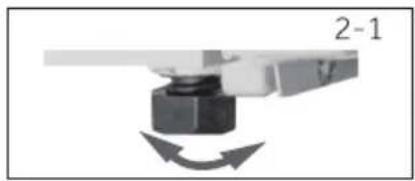
The appliance should be placed on a flat solid surface. Set the feet to the desired level (2-1).
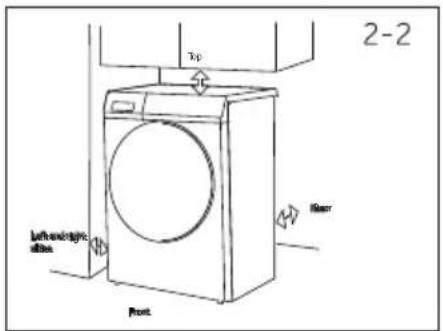
2.4 Installation under worktop
The dimensions of the recess should at least match with the dimensions(Fig. 2-2).
- Put the appliance adjacent to the slot. Make sure that all connections are easily accessible and functional.
- Adjust all feet accurately to get a firm level position.
- Install the appliance prudently into the recess.
- Make sure there is a sufficient ventilation.
2.5 Electrical connection
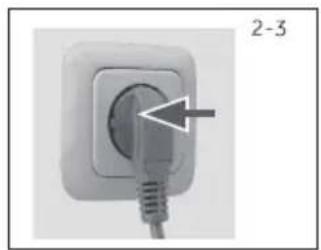
Before each connection check if:
Power supply, socket and fusing are appropriate to the rating plate.
The power socket is earthed and no multi-plug or extension.
The power plug and socket are strictly match.
Only UK: The UK plug meets BS1363A standard.
Put the plug into the socket(Fig.2 -3).

WARNING!
If the supply cord is damaged, it must be replaced by the service agent (see warranty card) in order to avoid a hazard!
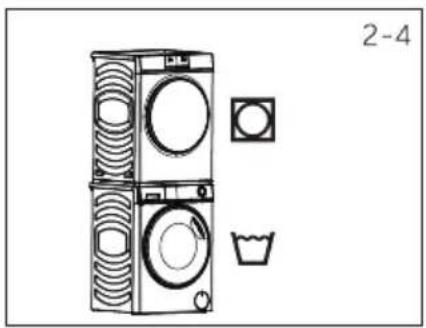
2.6 Wash-dryer stack
It is possible to achieve a washer-dryer stack.(Fig.2 4)- Not every washing machine is suitable for this purpose. Stacking information, as well as the corresponding mounting kit are available via your local dealer. The mounting instructions are supplied with the kit which thoroughly inform the installation steps.
2.7 Level the dryer
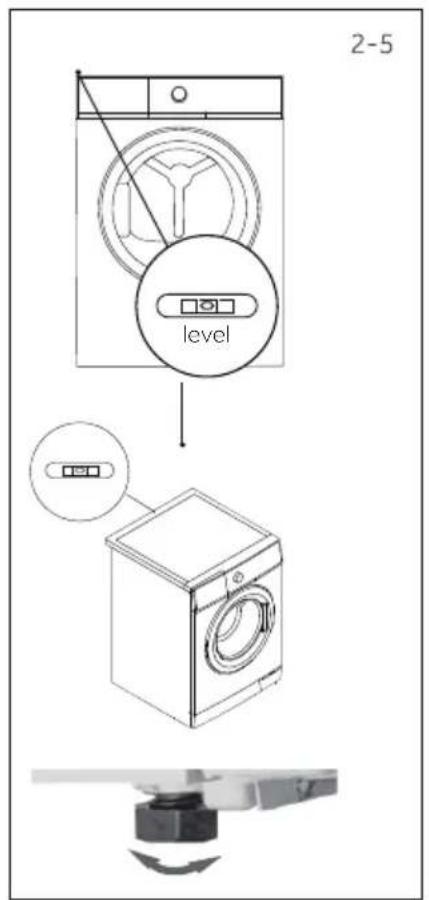
It is important to level the dryer to ensure the machine runs efficiently with minimal noise. The dryer should be levelled in, so it stands balanced ecently on all four feet. Ensure the dryer does not rock in any direction.
Level the dryer side to side(Fig. 2-5):
- Place the gradienter at the centre back of the dryer.
- Adjust the rear feet until the dryer is level side to side.
- Never fully screw the feet completely from their housings.
Level the dryer front to back(Fig. 2-5):
- Place the gradienter on the left side.
- Adjust the front left foot (wind down).
Repeat the above for the right foot.
Double check the dryer is balanced(Fig. 2-5):
- Place the gradienter at the centre front of the dryer.
- Ensure the dryer does not rock in any direction.
- If dryer is not balanced repeat the above steps.
After levelling, the corners of the dryer cabinet should be clear of the floor and the dryer.must not rock in any direction.
2.8 Drainage pipe connected to the outside
During the drying process of clothes, condensed water will be automatically stored in the water box located in the upper left corner of the machine. The water box is full or needs to be emptied after each drying session.
If your dryer is placed near the drainage floor drain, you can directly drain the condensate water into the drain through the drain hose in the attachment, so you don't have to empty the water box every time.
The method of connecting the drainage hose is as follows:
- Remove the black hose from the connection at the back of the dryer(Bottom right of the the back Fig. 2-6).
- Uncoil the grey drain hose (included with your dryer) and connect it to the machine drain port(Fig. 2-7,2-8).
- Place the other end of the drain hose into a tub or standpipe.
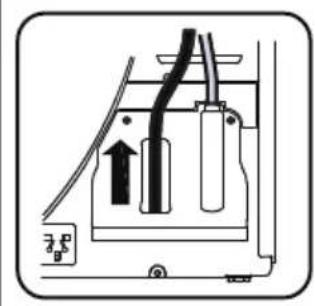
2-6
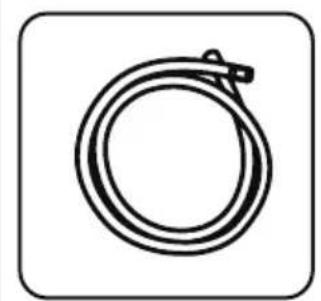
2-7
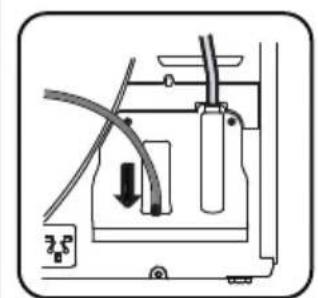
2-8

Note: The external drainage hose must be firm
The gray drainage hose must be securely fixed after being inserted at both ends.
The gray drainage hose cannot be bent.
The gray drainage hose cannot be higher than the top of the machine by 15cm.
3-Practical hints
Intended use
This applian ce is intended for drying items which have been washed in a water solution and are marked on the manufacturer's care label as being suitable for tumble drying.
It is designed exclusively for domestic use inside the house. It is not intended for commercial or industrial use. Changes or modifications to the device are not all owed. Unintended use may cause hazards and loss of all warranty and liability claims.
Standards and directives CE
This product meets the requirements of all applicable EC directives with the corresponding harmonised standards, which provide for CE marking.

onmentally responsible use
Completely spin: Spin the laundry with the maximum spin speed.
Maximum load: Use the maximum filling amount according to the programme table, but do not overload the dryer. To take advantage of the maximum load, the laundry which should be dried "READY to wear", can be first dried easily with "Ironing reminder". When program ends, remove the laundry which should be ironed and dry the remaining laundry then to end.
Loosen up the laundry :Shake out the laundry before putting them into the dryer.
Avoid excess drying: An excessive drying should be avoided. Select the right programme and the appropriate dry level.
Softener unnecessary: Do not use softener when washing, because the laundry will become fluffy and soft in the dryer.
Cleaning of the lint filters :Clean the lint filters after each cycle.
Ventilation: Make sure the appliance is properly ventilated (see INSTALLATION).
Condensed water reuse: The collected condensed water can be used for the steam iron. Before that, it should be poured through a fine sieve or coffee filter paper. Smallest parts will be retained by the filter.

Note:
Due to technical changes and different models, the illustrations in the following chapters may differ from your model.
4.1 Picture of appliance
Front (Fig. 4-1): ear side (Fig. 4-2):
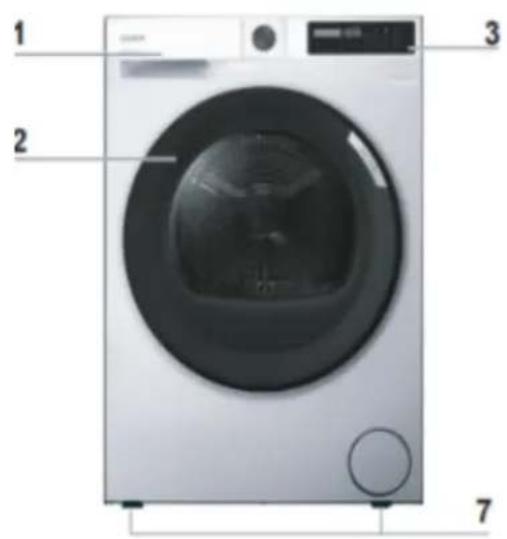
R
4-1
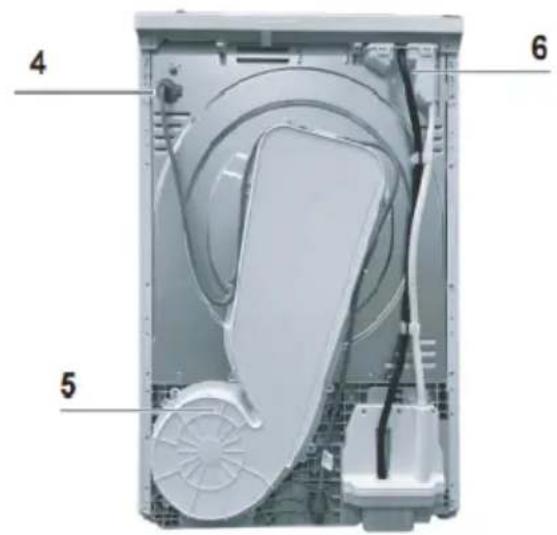
4-2
1 Water tank 4 Power supply cord
2 Tumble dryer door
5 Back plate
6 Drainage outlet3 Control panel
7 Adjustable feet
4.2 Accessories
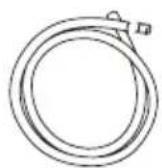
4-3
Drain hose
Energy label
Warranty cards

Instructions
5-Control panel
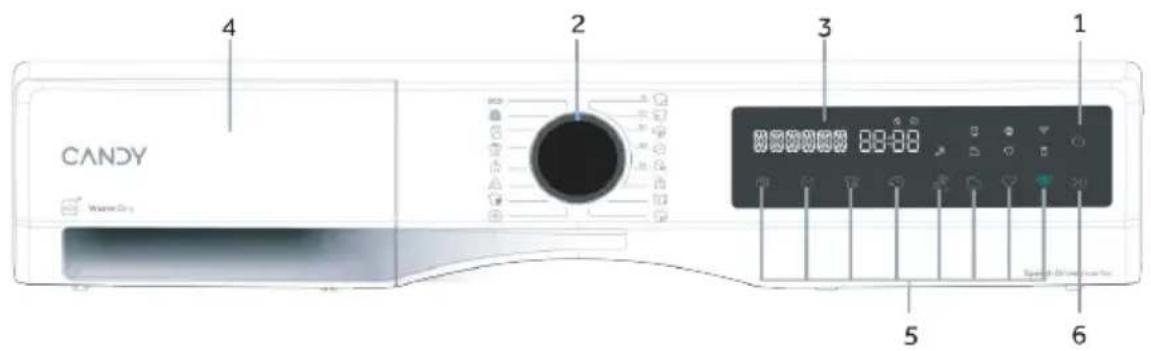
5-1
- Power button
-
Programme selector
-
Display
-
Water tank
-
Function buttons
- Indicator icons
5-2
5.1 Power button
Touch this button(Fig.5-2) for about 3 seconds to switch on, the display is shining, the indicator of the Start/Pause button is flashing. Touch it again for about 3 seconds to switch off. If no panel element or program is activated after specified timing machine will shut down automatically.
5-3
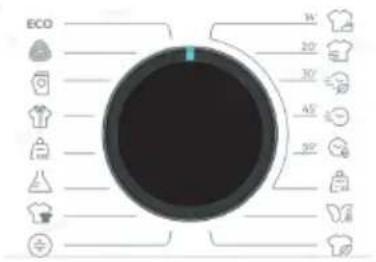
5.2 Programme selector
By turning the knob (Fig.5-3) one of 16 programmes can be selected, its default settings will be displayed.
5-4
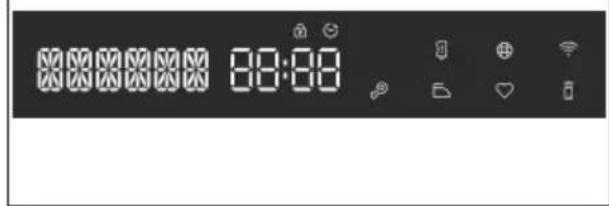
5.3 Display
The display (Fig.5-4) shows following information:
▶ Program name
Remaining time
Reservation remaining time
Alarm information and prompt information
▶ Pause end information
Delay time
Error codes and service information
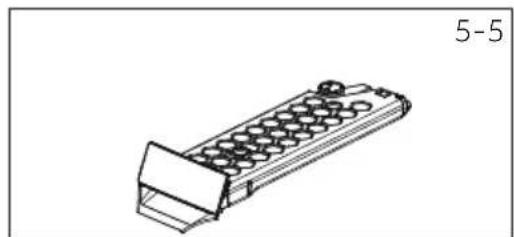
5.4 Water tank
Open water tank, the following components can be seen (Fig. 5-5):
1: water tank.
2: The location of pouring water
5-6

5.5 Function buttons
The function buttons (Fig. 5-6) enable additional options in the selected programme before programme starts. The related indicators are displayed. By switching off the appliance or setting a new programme, all options are displayed. If a button has multiple options, the desired option can be selected by pressing the button sequentially. By touching the buttons, when it is in dull light, the function is unselected; when it is in bright light, the function is selected.

Note: Factory settings
To get best results in each programme Candy has well defined specific default settings. If there is no special requirement default settings are recommended.
5.5.1 Delay button

- Press the button (Fig. 5-7) to set the delay time. The start time can delay from 0.5 hour up to 24 hours in 0.5 hour steps. Touch the Start/Pause button to activate the time delay. When activated, the icon will light up.
5.5.2 Dry Level button

- Press the button (Fig. 5-8) to set the final moisture content of the laundry at the end of cycle.
- There are 4 levels: ironing L-1 / ready-to-wear L-2 / storage L-3 / extra dry L-4.
- When it is in bright light, the function is selected;
- When it is in dull light, the function is unselected;
- When it is completely off, the function cannot be selected.
5-Control panel
5.5.3 Time/Rapid button
- Adjust the time of the automatic program: within the first 3 minutes after running, you can increase the drying time of the drying program (after reaching the end condition, extend the time of setting), and the step size is 10 minutes; After 3min, press the time button(Fig.5-9) and sound 3 invalid tones.
5.5.4 Childlock button
- After selecting a program to s tart, long press the " " button for 3 seconds to open the childlock (Fig.5-10).
- Press and hold the " 3" button for about 3 seconds to unlock the childlock.
- When activated, the icon "0" will light up.
5.5.5 Easy Iron button

- Press the button (Fig. 5-11) to set the Easy iron.
After opening, the drying level automatically adjusts to ironing L-1 - When the ironing function is turned on, the anti wrinkle function is also turned on synchronously, and the default anti wrinkle time is 6 hours.
- When activated, the icon "D" will light up.
$15r6o button ""

- This function is designed to memorize the users preferred settings under each program so that there is no need to adjust it before use.
- When standby, press the button (Fig .5-12) and hold for 3 seconds to memorize the current program.
5.5.7 Start/Pause button""
- Press this button (Fig.5-13) gently to start or interrupt the currently displayed programme.
5.5.8 Settings
tton

- Press the button (Fig.5-14) to enter the setting screen. There are three options:
1.Language:Select language by knob and press button to confirm; 2.Sounds:Select ON/OFF by knob and press button to confirm;
3.Return.
5.5.9 Remote Control button

- Shortly press this button(Fig.5-15) to activate/deactivate the Remote Control of the appliance via the hOn App.
NOTE: To start the pairing procedure, please follow the App instructions. More information, please see the dedicated "hOn App" chapter 14.
5.6 Indicator icons
5.6.1 Door unlock icon
- If the door is open or not closed properly, it (Fig.5-15) will not light up. This icon does light up by default.
- Pressing the start/pause button, the icon will flash;
5.6.2 Child-lock icon
- Child lock is designed to prevent children from adjusting the program setting. When users choose the indicator, the icon (Fig. 5-16) will illuminate.
This icon does not light up by default.
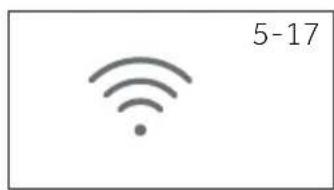
5.6.3 Wifi icon
- During network configuration, the WiFi light flashes (0.5 s on, 0.5 s off), and this icon (Fig. 5-17) stays on after successful network configuration.
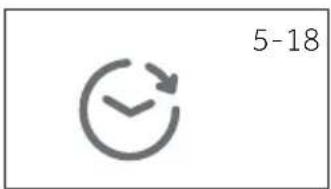
5.6.4 Delay icon
- When choosing the delay program, it (Fig. 5-18) will illuminate. Continuously during the delay time running phase, and turns off after the reservation ends.
This icon does not light up by default.
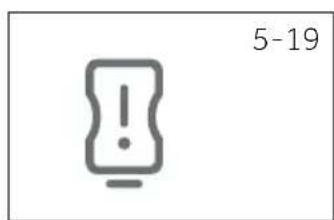
5.6.5 Empty tank icon
- It(5-19) does not light up under normal conditions, but flashes when the water tank is full or the program ends. During operation, the machine pauses when the water tank is full, and the indicator light for the water tank flashes.
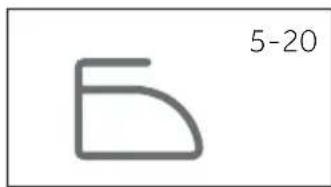
5.6.6 Easy iron icon
After the ironing function is turned on, it (5-20)stays on and flashes when entering the ironing stage. When the ironing function is ineffective, it flashes 3 times.
5.6.7 Clean filter icon
- This indicator is designed to remind users to clean filter before using. When this icon (Fig. 5-21) lights up users should clean the filter before use.
- For the cleaning steps, see Lint filter cleaning or Condenser filter cleaning section of this manual.

Note:
After each cycle, indicator will flash to remind cleaning the filters.
5.6.8 Memo icon
- When choosing the bookmarked program, it (Fig. 5-22) will illuminate.
This icon does not light up by default.
6-Programmes
| Yes / No | ||||||||||||
| Max. Load kg | Dry level | Time/ Rapid | 3" Child -lock icon | Easy Iron | Memo | |||||||
| 7kg 8kg | Max. Max. | Setting | Start delay | Ironing | Ready- to-wear | Storage | Extra Dry | |||||
| ECO | 7 | 8 | ● | ● | ● | ● | ● | ● | / | ● | ● | ● |
| 1 | 1 | ● | ● | / | / | / | / | ● | ● | / | ● | |
| 4 | 5 | ● | ● | ● | ● | ● | ● | ● | ● | / | ● | |
| 3 | 4 | ● | ● | ● | ● | ● | ● | ● | ● | ● | ● | |
| 4.5 | 6 | ● | ● | ● | ● | ● | ● | ● | ● | ● | ● | |
| 3 | 4 | ● | ● | ● | ● | ● | ● | / | ● | ● | ● | |
| 7 | 8 | ● | ● | ● | ● | ● | ● | ● | ● | ● | ● | |
| 3.5 | 4 | ● | ● | / | / | / | / | / | ● | / | ● | |
| 14' | / | / | ● | ● | / | / | / | / | / | ● | / | / |
| 20' | / | / | ● | ● | / | / | / | / | / | ● | / | / |
| 30' | / | / | ● | ● | / | / | / | / | / | ● | / | / |
| 45' | / | / | ● | ● | / | / | / | / | / | ● | / | / |
| 59' | / | / | ● | ● | / | / | / | / | / | ● | / | / |
| 3 | 4 | ● | ● | ● | ● | ● | ● | ● | ● | / | ● | |
| 3 | 4 | ● | ● | / / | / | / | ● | / | ● | |||
| 3 | 4 | ● | ● | / | / | / | / | / | ● | / | ● | |
- EN 61121 test program setting, we recommend that you drain the condensed water externally through the drain hose when drying a full load using the Eco program. This will avoid to empty the water tank during the cycle.
Heat pump technology
The condensation dryer with heat exchanger is outstanding in terms of energy consumption. These are guide values determined under standard conditions. The values may differ from those given, depending on overvoltage and undervoltage, the type of fabric, composition of the laundry to be dried, the residual moisture and the actual loading.
| Program Cotton / Linen | Spin speed in rpm | Residual moisture in % | Time in h:min | Energy consumption in kWh |
| Extra dry(L-4) | 1000 | approx.60 | 1.843:51 | |
| Storage(L-3) | 1000 | approx. 60 | 3:30 | 1.70 |
| Ready-to-wear(L-2) | appl 1000 | ox. 60 | 3:09 | 1.57 |
| ironing(L-1) | 1000 | approx. 60 | 2:48 | 1.21 |
Wool clothing washing and care: BRS 7N2BX-S/BRS 8N2BX-S
The wool drying cycle of this machine has been tested and approved by The Woolmark Company. The cycle is suitable to dry wool garments which are labelled "hand wash" provided that the garments are washed in a Woolmark endorsed hand washing cycle and dried according to the instructions issued by the manufacturer of this machine M2408.


Environmentally responsible use
Spin the laundry as dry as possible before putting it into the tumble dryer.
Shake the laundry loose before putting it into the tumble dryer.
Choose a proper drying program. Make sure the laundry is not dried longer than needed.
Avoid overloading the tumble dryer.
Make sure to use the tumble dryer with cleaned filters.
8-Suggestions and tips
8.1 Starched laundry
Starched laundry leaves a film of starch in the drum and is not suitable for the dryer.
8.2 Softener
Do not use softener when washing, because the laundry will become soft and fluffy in the dryer.
8.3 Soft care cloths
The use of "soft care cloths" can lead to a coating at the lint filters. This can cause a blockage of the filters. In such cases, we recommend either to abstain from adding soft care cloths or to choose a different brand. In any case note the manufacturer's instructions.
8.4 Small amounts of filling
In a quantity of less than 1.0kg , the "Timer"-programme should be selected because the dry level of clothes cannot be sensed sometimes due to the small load.
8.5 Drum interior light
When the appliance is switched on, the drum light will keep on when the door is open.
8.6 Service flap
Make sure that the service flap is always closed during operation.
8.7 Anti crease protection
At the end of the cycle, if the laundry is not taken out, the drum moves time to time to prevent creases.
8.8 Remaining time
The program duration is influenced by the following factors: the type of fabric, the loading quantity, moisture content, the desired dry level, as well as the spin speed during washing. These factors are registered by the electronics during the program and the remaining time will be corrected accordingly.
8.9 Extra large pieces
When cycle ends, if the desired dry level is not achieved, loosen up the laundry and dry again with the time programme (TIMER).
8.10 Especially delicate fabrics
Textiles which can easily shrink or lose their shape, as well as silk stockings, lingerie should not be put in the dryer directly. Put delicate garments inside a laundry bag and avoid over-drying them.
8.11 Flipping clothes
It is recommended to close the zipper and flip it inside and outside before operation.
8.12 Metal ornament
If metal decorations and plastic nail beads are used on the clothing, it should be properly wrapped to avoid hitting the drum and causing damage before operation.
8.13 Acoustic signal
An a coustic signal can be activated:
When the water tank is full.
Failures happen.
Care chart
| Washing | ||||
| 95 | Washable up to 95°C normal process | 60 | Washable up to 60°C normal process | 60 Washable up to 60°C mild process |
| 40 | Washable up to 40°C normal process | 40 | Washable up to 40°C mild process | 40 Washable up to 40°C very mild process |
| 30 | Washable up to 30°C normal process | 30 | Washable up to 30°C mild process | 30 Washable up to 30°C very mild process |
| Wash by hand max. 40°C | Do not wash | |||
| Bleaching | ||||
| Any bleaching allowed | Only oxygen/ non-chlorine | Do not bleach | ||
| Drying | ||||
| Tumble drying possible normal temperature | Tumble drying possible lower temperature | Do not tumble dry | ||
| Line drying | Flat drying | |||
| Ironing | ||||
| Iron at a maximum temperature up to 200°C | Iron at a medial tem- perature up to 150°C | Iron at a low temper- ature up to 110 °C; without steam(steam ironing may cause irreversible damage) | ||
| Do not iron | ||||
9-Daily use
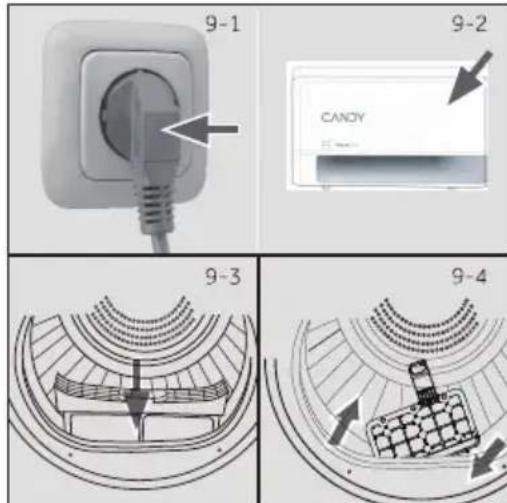
9.1 Prepare the appliance
- Connect the appliance to a power supply (220V to 240V/50Hz) (Fig. 9-1) Please also refer to section INSTALLATION.
- Make sure:
The water tank is empty and properly installed. (Fig.9-2).
The lint filter is clean and properly installed. (Fig. 9-3).
The condenser filter is clean and properly installed (Fig. 9-4).
9.2 Prepare the laundry
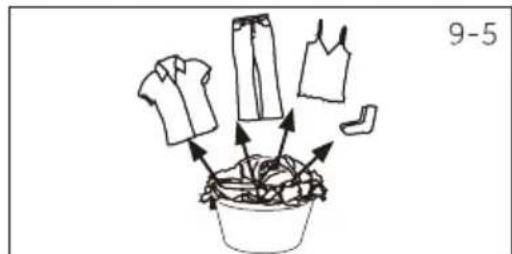
Sort clothes according to fabric (cotton, synthetics, wool etc.). Only dry clothes that have been spun.
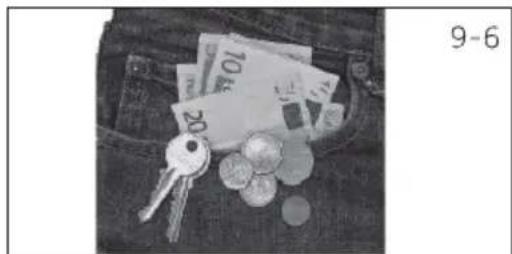
Empty pockets of all sharp or flammable objects such as keys, lighters and matches. Remove hard decorative objects such as brooches.
Zippers up and make sure the buttons are sewn on tightly and place small items such as socks, bras etc. in a wash bag.
Unfold bulky items of fabric such as bed sheets, table cloth etc.
Follow the instructions on the laundry label and dry the garments which can be dried by the machine.
| Load Reference | Composition | Average weight per item |
| Bed sheet (single) | Cotton | Approx. 800 g |
| Blended fabric clothes | / | Approx. 800 g |
| Jackets Cotton | Approx. 800 g | |
| Jeans | / | Approx. 800 g |
| Overalls Cotton | Approx. 950 g | |
| Pyjamas | / | Approx. 200 g |
| Shirts | / | Approx. 300 g |
| Socks Blended fabrics | Approx. 50 g | |
| T-Shirts Cotton | Approx. 300 g | |
| Underwear Blended fabrics | Approx. 70 g |

Tips:
Separate white clothes from coloured ones.
Bed linen and pillowcases should be buttoned, so that small parts cannot stuck inside.
Close zippers and hooks, and tie loose belts without metal parts, apron strings etc. together.
Remove loose metal items from pockets of clothes before putting into dryer.
Do not over-dry easy-care linen. Risk of creases. Allow final drying in open air.
Clothes like knitwear can be over-drying sometimes. "Ironing" dry level are always recommended to choose.
For pre-dried, multi-layered garments or for final drying the time-program should be chosen.
9.3 Load clothes the appliance
Loosen up and insert presorted laundry.
Don't overload.
Close the door carefully. Make sure that clothes are not pinched.
9.4 Take out and add clothes
To remove or add clothes, the program can be interrupted at any time:
The cycle will be interrupted if opening the door.
Be careful when taking out or adding clothes! The Interior of the drum or the clothes themselves may be hot, so that there is danger of burns.
To continue the program, press the "Start/Pause" button after closing the door.

JTION!
Non-textile, as well as small, loose or sharp-edged items may cause malfunctions and damage of clothes and appliance.

RNING!
Never turn the dryer off before the end of the drying cycle unless all items are quickly removed and spread out so that the heat can be released.
9.5 Loading the dryer
- Place the laundry evenly in the drum making sure not to overload the dryer.
- Switch on the tumble dryer by pressing the Power button (Fig.9-7).

Fabric softeners or similar products should be used as specified in the manufacturer's instructions.
- Set functions such as Temperature, Dry level, Delay. Afterwards press the Start/Pause button (Fig. 9-8) to start the dry cycle.
9.6 End of dry cycle
The tumble dryer stops operation automatically when a dry cycle is complete. The display shows END for about 5 seconds. Open the tumble dryer door and take out clothes .
- Switch off the tumble dryer by pressing the Power button(Fig.9-9).
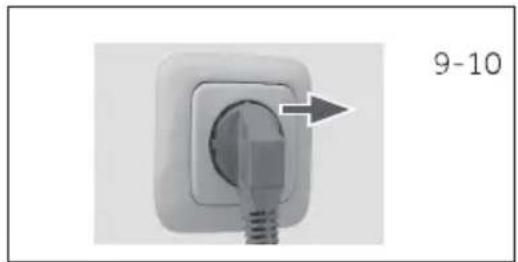
- Unplug the tumble dryer from the power socket (Fig. 9-10).
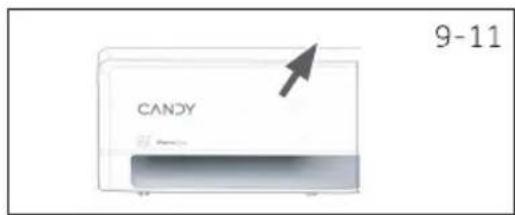
- Empty the water tank after each dry cycle (Fig. 9-11).
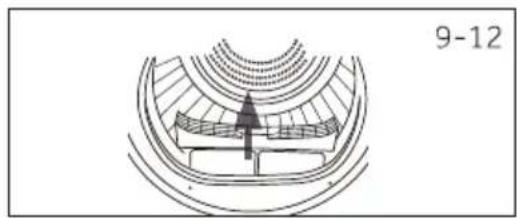
- Clean the lint filter after each dry cycle (Fig. 9-12).
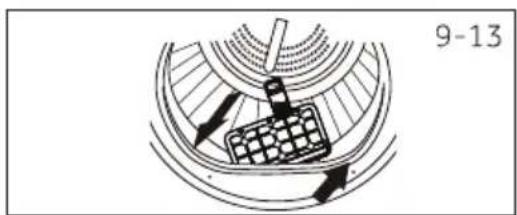
- Clean the condenser filter after each dry cycle (Fig. 9-13).
EN
10-Care and cleaning
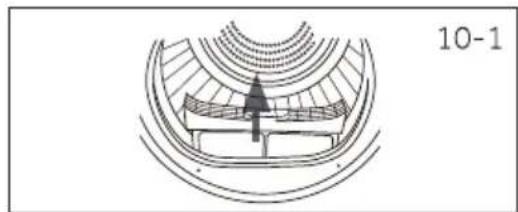
10.1 Lint filter cleaning
Clean the lint filter after each dry cycle.
- Remove the lint filter from the drum (Fig. 1-01).
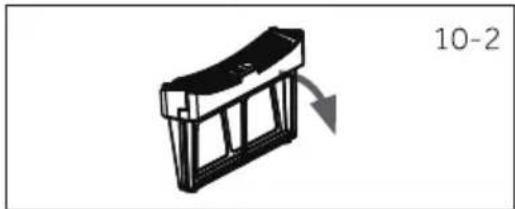
- Open up the lint filter (Fig. 1-0).2
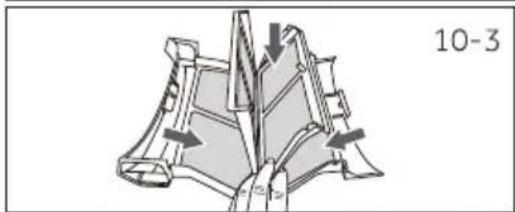
-
Remove the lint residuals from lint filter (Fig. 103).
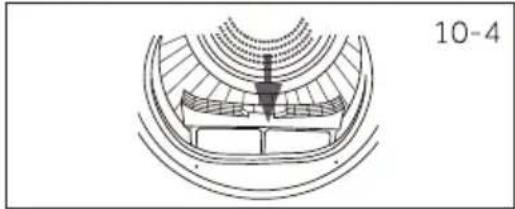
-
Reinstall the cleaned lint filter in the tumble dryer (Fig. 10-4).
10.2 Condenser filter cleaning
Clean the filter after each dry cycle.
- Open the door.
- Pull out the lintfilter from front duct (Fig. 106).
- Pull out the condenser filter from the air duct (fig. 10-7).
- separate the sponge filter from the condenser filter and clean it from any residuals(Fig.10-8).
- Install the sponge to the condenser liter and put it back into the duct.

Notice
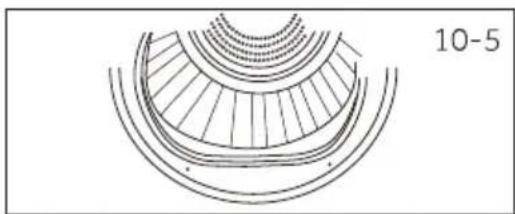
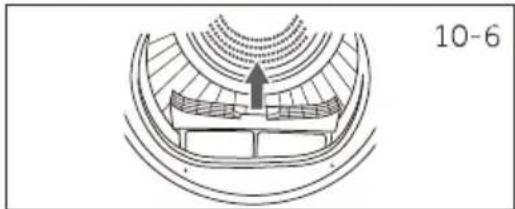
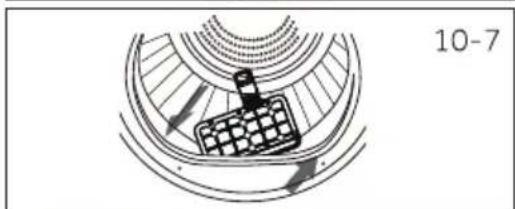
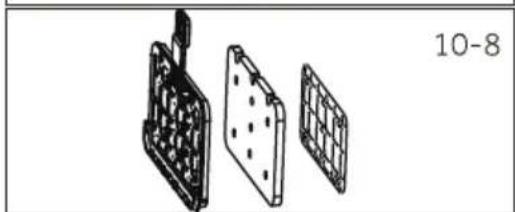
If the lint / the condenser filter is very dirty, it can be cleaned under running water. Let it dry completely before use.
10-Care and cleaning
EN
10.3 Empty the water tank
During operation, steam is condensed into water and collected in the water tank. Empty the water tank after each drying cycle.
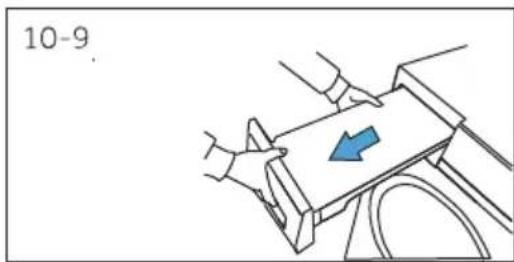
- Pull out the water tank from its housing (Fig. 10-9). When removing the water box, it is necessary to operate it with both hands as shown in Fig.10-9.
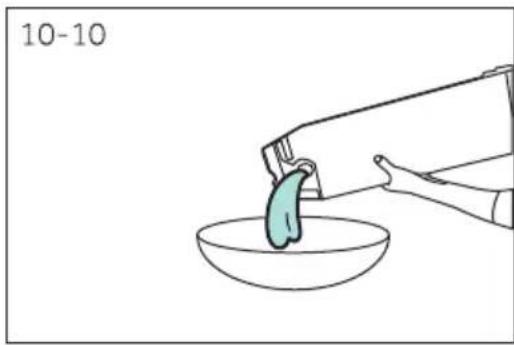
- Empty the water tank (Fig. 10-10).
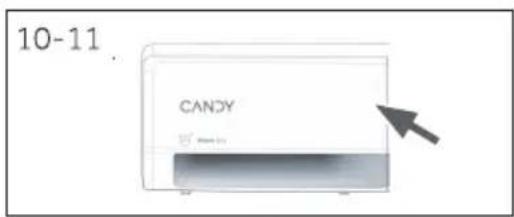
- Reinstall the water tank to the tumble dryer (Fig. 10-11).

Notice
Do not use the water for any kind of drinking or food processing.
10.4 Tumble dryer
Wipe the outside of the tumble dryer and the control panel with a damp cloth. Do not use any organic solvent or corrosive agent to avoid damage to the device.
10.5 Drum
After running for a while, micro elements like calcium and mineral substances contained in the water will result in an invisible film formed inside the drum. Use a damp cloth and some detergent to remove it. Do not use any organic solvent or corrosive agent to avoid damage to the device.
Many problems can be solved by yourself without specific expertise.
Please check all shown possibilities and follow below instructions before you contact an after sales service. See CUSTOMER SERVICE.

WARNING!
Before maintenance, turn the appliance and disconnect the mains plug from the socket.
Electrical equipment should be serviced only by qualified electrical experts, because improper repairs can cause considerable consequential damages.
A damaged power cable should only be replaced by the manufacturer, its service agent or similarly qualified workers in order to avoid a hazard.
| Display | Solution |
| The water tank is full please empty it. | Empty the tank. |
| F2:The drain pump malfunction or the water level switch malfunction. | Contact the customer service. |
| F32:The temperature sensor located at the condenser outlet is broken. | Contact the customer service. |
| F33:The temperature sensor located at the compressor outlet is broken. | Contact the customer service. |
| F4:Abnormal heating. | Contact the customer service. |
| FC2:The power board and the display board communication malfunction. | Contact the customer service. |
| FC0:Main line malfunction. | Contact the customer service. |
| FC1:The motor communication malfunction. | Contact the customer service. |
| F7:The motor malfunction (the motor driver board overload or ghitaehrevo | Contact the customer service. |
11-Troubleshooting
If the error codes appear again after taking measures, switch off the appliance, disconnect the power supply and contact the customer service.
Troubleshooting without display-odes
| Problem Possible cause Possible solution | ||
| Tumble dryer fails to operate. | ·Poor connection to the power supply. ·Power failure. ·No drying program is set. ·Device has not been switched on. ·The door is not closed properly. | ·Check connection to the power supply. ·Check the power supply. ·Set a drying program. ·Switch on the device. ·Close the door properly. |
| Tumble dryer fails to operate and the display shows END. | ·The laundry has reached the dry level defined by the program. | ·Check the program setting is appropriate or not. |
| Drying time is too long and the results are not satisfactory | ·The program setting is not correct. ·The filter is blocked. ·The evaporator is blocked. ·The tumble dryer is overloaded. ·The laundry is too wet. ·The vent duct is blocked. | ·Make sure the program is set correctly. ·Clean the filter screen. ·Clean the evaporator. ·Reduce the amount of laundry. ·Spin the laundry completely before drying. ·Check and clean the vent duct. |
| Remaining time-on the display-stops or skips. | The remaining time will be adjusted continuously based upon the following factors: ·Fabric of laundry. ·Loading weight. ·Moisture degree of the laundry. ·Ambient temperature. | The automatic adjustment is a normal operation. |
| Trade mark | CANDY | |
| Rated capacity(Kg) | 7 | 8 |
| Kind of tumble dryer | Heat Pump | Heat Pump |
| Energy efficiency class | D | D |
| Weighted Annual Energy Consumption (AE in kWh/year1) | 108 | 119 |
| Tumble dryer with or without automatic | with automatic | with automatic |
| Energy consumptionof the standard cotton program3)at full load (kWh/cycle) | 1.60 | 1.81 |
| Energy consumptionof the standard cotton program at partial load (kWh/cycle) | 0.92 | 1.0 |
| Power consumption of the off-mode (W) | 0.3 | 0.3 |
| Power consumption of the left-on mode (W) | 0.5 | 0.5 |
| Duration of the "left-on mode"(min)2) | 16 | 16 |
| Standard drying program3) | ECOB | ECO |
| Condensation efficiency class1) | B | B |
| Weighted condensation efficiency for the standard cotton program3)at full and partial load (%) | 90 | 88 |
| Average condensation efficiency of the standard cotton program3)at full load. | 90 | 88 |
| Average condensation efficiency of the standard cotton program3)at partial load | 90 | 88 |
| Weighted sound power level of the standard cotton program3)atfull load(dB) | 64 | 64 |
| Built-in or freestanding | Freestanding | Freestanding |
12-Technical data
EN
1) Based on 160ng cycles of the standard cotton program at full and partial load, and the consumption of the Tow-power modes. Actual energy consumption per cycle will depend on how the appliance is used.
2) In case there is a power management system.
3) This program used at full and partial load is the standard drying program to which the information in the label and the fiche relates to. This is the program suitable for drying normal wet cotton laundry and it is the most efficient.
4) Class G is the least efficient and Class A is the most efficient.
Additional data
| Power supply (refer to rating plate) - voltage / current / input | (220-240) V / 50 Hz/ 2.7 A/650W |
| Permissible ambient temperature 5°C to 35°C | |
| Fluorinated greenhouse gas | R290 |
| Volume | 0.125kg |
Product dimensions
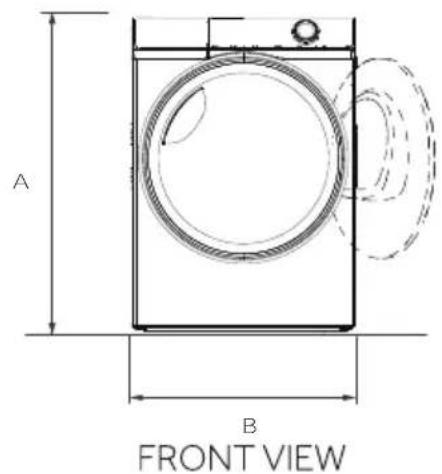
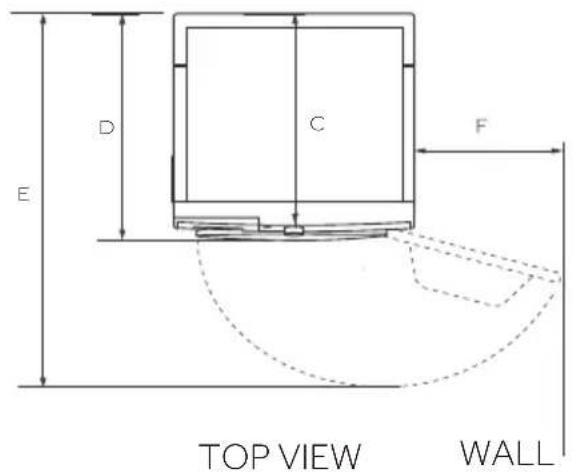
| PRODUCT DIMENSIONS | |
| A Overall height of product (mm) | 850 |
| B Overall width of product (mm) | 595 |
| C Overall depth of product (To main control board size) (mm) | 475 |
| D Overall depth of product (mm) | 525 |
| E Depth of door open (mm) | 1008 |
| F Minimum door clearance to adjacent wall (mm) | 305 |
Note: The exact height of your dryer is dependent on how far the feet are extended from the base of the machine. The space where you install your dryer needs to be at least 30mm wider and 10mm deeper than its dimensions.
We recommend our Candy Customer Service and the use of original spare parts. If you have a problem with your appliance, please first check section TROUBLESHOOTING.
If you cannot find a solution there, please contact:
your local dealer.
- the Assistance Area on the Candy website where you can find information on Warranties, Accessories and Spare Parts and Contact numbers.
To contact our Service, ensure that you have the following data available.
Each product is identified by a unique code, also called the "serial number", printed on a sticker. This can be found inside the door opening.
Model
Serial No.
Also check the Warranty Card supplied with the product in case of warranty.
It is always recommended to use original spare parts, that are available at our Authorised Customer Service Centres.
Warranty
The product is guaranteed under the terms and conditions stated on the certificate included with the product. The certificate has to be stored so as to be shown to the Authorized Customer Service Centre in case of need. You can also check the warranty conditions on our web site. To obtain assistance, please fill in the form on-line or contact us at the number indicated on the support page of our web site.
The standard manufacturer warranty covers faults caused by electrical or mechanical faults in the product due to an act or omission of the manufacturer. If a fault is found to be caused by factors outside the product supplied, miss-use or as a result of the instructions on use not being followed, a charge may be applied.
The manufacturer declines all responsibility for any printing errors in the booklet included with this product. Moreover, it also reserves the right to make any changes deemed useful to its products without changing their essential characteristics.

Note: Deviations
Due to ongoing updates on the hOn App, the funtions and the display interface of the App may differ from the following description.
14.1 General Information
This appliance is equipped with Wi-Fi technology for remote control via the hOn App.

WARNING!
Follow the safety precautions indicated in this manual even when using the appliance through the app. Adhering to these instructions is essential for safe use.
14.2 Requirements
- Wi-Fi Network A router compatible with 802.11b/g/n and 2.4 GHz band is required. Networks operating at 5 GHz and public networks are not supported. The network name (SSID) must be between 1 and 31 characters, and the password between 8 and 64 characters. Encryption options include open, WPA-PSK, and WPA2-PSK.
- Compatible Devices The app is available for Android, iOS and Huawei devices, on both tablets and smartphones.
- Positioning : Install the appliance in an area with a strong Wi-Fi signal.
Wi-Fi Technical Specifications:
Frequency 2400 MHz - 2483.5 MHz
Max. power 20 dBM
Standard IEEE802.11b/g/n & BE 4.2
14.3 Download and Installation of the hOn App
- Download the app by scanning the QR code below or visiting go.haier-europe.com/ download-app.
Download the hOn App



Note: Registration
Creating a profile (sign-up) is only required on first use or if the account has been deleted/disabled. For subsequent uses, simply log in with your mail and password. Use Demo mode in the app to explore the Wi-Fi features.
14.4 Appliance pairing
Note: The home network must be set to 2.4 GHz; networks operating at 5 GHz are not supported. Ensure your smartphone is connected to the same 2.4 GHz Wi-Fi network you want to use to configure the appliance.
- Open the hOn App, create a new profile (or log in if you already have one).
- Tap "Add Appliance" and follow the on-screen instructions on your smartphone to complete the setup.
14.5 Remote Control activation
- Ensure the router is powered on and connected to the Internet.
- Load the laundry and close the door.
- Turn on the appliance.
- Short press the button.
- Start the cycle through the App. The control panel will be disabled, except for the "POWER" and "START/PAUSE" buttons. Only the child lock will be available during the program.
- Remote control can also be activated during the cycle by short pressing the button.
Note:Remote Control Expiration
You can send a command from the App up to 24 hours after Remote Control is enabled.
14.6 Remote Control deactivation
-
During a cycle, you can deactivate Remote Control by short pressing the button; the cycle will continue. You can view the cycle status in the app, but won't be able to send commands (e.g., stop/pause).
-
To resume remote control through the app, make sure the door is closed, then short press the button again.
14.7 End of Cycle with Remote Control
- At the end of the cycle, Remote Control is deactivated.
- After 2 minutes, the appliance will automatically power off.
14 - hOn App
14.8 Turning Off Wi-Fi Module and Clearing Network Credentials
To delete the saved Wi-Fi network information and turn off the Wi-Fi module:
- Power on the appliance.
- Without starting any cycle, press and hold the button for 5 seconds until "ESE" appears.
- Press and hold the button for another 5 seconds until "done" appears.
- The configuration information will be deleted. Select a program or turn off the appliance to exit.
- To reconfigure,remove the appliance from the hOn App and start a new pairing procedure.

Note: Use this procedure only if you intend to sell the appliance.
BRS 7N2BX-S/BRS 8N2BX-S
Download on the AppStore

ANDROID APP ON Google play

EXPLORE IT ON AppGallery

Hinweis: Anmeldung
- Nota: Registo
- BRS 7N2BX-S/BRS 8N2BX-S
- Note: Registro
- Nota: expelled control remoto
- Thank you for purchasing a Candy Product.
- Safety notice
- Disposal
- WARNING!
- Risk of injury or suffo cation!
- 1-Safety information
- Before first use
- Daily use
- Maintenance / cleaning
- Installation
- Preparation
- Notice
- Transport and waiting time
- Place the appliance
- Installation under worktop
- Electrical connection
- Wash-dryer stack
- Level the dryer
- Drainage pipe connected to the outside
- Note: The external drainage hose must be firm
- 3-Practical hints
- Intended use
- Standards and directives CE
- onmentally responsible use
- Note:
- Picture of appliance
- Accessories
- 5-Control panel
- Power button
- Programme selector
- Display
- Water tank
- Function buttons
- Note: Factory settings
- Delay button
- Dry Level button
- Time/Rapid button
- Childlock button
- Easy Iron button
- $15r6o button ""
- Start/Pause button""
- Settings
- Remote Control button
- Indicator icons
- Door unlock icon
- Child-lock icon
- Wifi icon
- Delay icon
- Empty tank icon
- Easy iron icon
- Clean filter icon
- Memo icon
- 6-Programmes
- Heat pump technology
- Wool clothing washing and care: BRS 7N2BX-S/BRS 8N2BX-S
- Environmentally responsible use
- 8-Suggestions and tips
- Starched laundry
- Softener
- Soft care cloths
- Small amounts of filling
- Drum interior light
- Service flap
- Anti crease protection
- Remaining time
- Extra large pieces
- Especially delicate fabrics
- Flipping clothes
- Metal ornament
- Acoustic signal
- Care chart
- 9-Daily use
- Prepare the appliance
- Prepare the laundry
- Tips:
- Load clothes the appliance
- Take out and add clothes
- JTION!
- RNING!
- Loading the dryer
- End of dry cycle
- EN
- 10-Care and cleaning
- Lint filter cleaning
- Condenser filter cleaning
- Empty the water tank
- Tumble dryer
- Drum
- 11-Troubleshooting
- Troubleshooting without display-odes
- 12-Technical data
- Additional data
- Product dimensions
- Warranty
- Note: Deviations
- General Information
- Requirements
- Wi-Fi Technical Specifications:
- Download and Installation of the hOn App
- Note: Registration
- Appliance pairing
- Remote Control activation
- Note:Remote Control Expiration
- Remote Control deactivation
- End of Cycle with Remote Control
- - hOn App
- Turning Off Wi-Fi Module and Clearing Network Credentials
- Hinweis: Anmeldung
Brand : CANDY
Model : BRS 7N2BXS
Category : Tumble drier