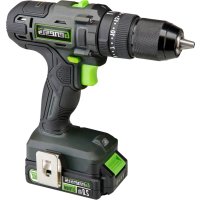
GLHD20B - Electric drill Genesis - Free user manual and instructions
Find the device manual for free GLHD20B Genesis in PDF.



| Product Type | Cordless Hammer Drill |
| Brand | Genesis |
| Model | GLHD20B |
| Voltage | 20 V DC |
| Battery Type | Rechargeable Lithium-ion, 2.0 Ah |
| Compatible Battery Model | GLAB2020B, GLAB2040B |
| Charger | 120 V~ / 60 Hz, 1.7 A |
| No Load Speed (Low/High) | 0-380 / 0-1500 rpm |
| Impact Rate | 0-5300 / 0-21,000 bpm |
| Chuck Capacity | 13 mm (Keyless) |
| Max Torque | 50 Nm |
| Number of Torque Settings | 25 + drill and hammer modes |
| Net Weight | 1.55 kg |
| Main Functions | Drilling, screwdriving, hammering, LED lighting, electric brake, forward/reverse |
| User Manual | Keep manual for future reference |
| Maintenance and Cleaning | Clean with a dry cloth, do not use solvents. Factory permanent lubrication. |
| Recommended Safety Equipment | Safety glasses, hearing protection, dust mask |
| Warranty | 2 years (excluding commercial use) |
| Phone Support | 888-552-8665 (North America) |
| Website | www.genesispowertools.com |
Frequently Asked Questions - GLHD20B Genesis
User questions about GLHD20B Genesis
0 question about this device. Answer the ones you know or ask your own.
Ask a new question about this device
Download the instructions for your Electric drill in PDF format for free! Find your manual GLHD20B - Genesis and take your electronic device back in hand. On this page are published all the documents necessary for the use of your device. GLHD20B by Genesis.
USER MANUAL GLHD20B Genesis
Look for this symbol to point out important safety precautions. It means attention!!! Your safety is involved.

WARNING: Read and understand all warnings, cautions and operating instructions before using this equipment. Failure to follow all instructions listed below may result in electric shock, fire and/or serious personal injury.

WARNING: The Operation of any power tool can result in foreign objects being thrown into your eyes, which can result in severe eye damage. Before beginning too operation, always wear safety goggles or safety glasses with side shields and a full face shield when needed. We recommend a wide vision safety mask for use over eyeglasses or standard safety glasses with side shields. Always wear eye protection which is marked to comply with ANSI Z87.1.
GENERAL SAFETY RULES
WARNING: Some dust created by power sanding, sawing, grinding, drilling, and other construction activities contains chemicals known to cause cancer, birth defects or other reproductive harm. Some examples of these chemicals are:
- Lead from lead-based paints.
- Crystalline silica from bricks and cement and other masonry products.
- Arsenic and chromium from chemically treated lumber. Your risk from these exposures varies, depending on how often you do this type of work. To reduce your exposure to these chemicals: work in a well-ventilated area, and work with approved safety equipment, such as those dust masks that are specially designed to filter out microscopic particles.
WORK AREA SAFETY
- Keep your work area clean and well lit. Cluttered benches and dark areas invite accidents.
- Do not operate power tools in explosive atmospheres, such as in the presence of flammable liquids, gases, or dust. Power tools create sparks which may ignite the dust or fumes.
- Keep bystanders, children, and visitors away while operating a power tool. Distractions can cause you to lose control.
ELECTRICAL SAFETY
- Power tool plugs must match the outlet. Never modify the plug in any way. Do not use any adaptor plugs in any earthed (grounded) power tools. Double insulated tools are equipped with a polarized plug (one blade is wider than the other). This plug will fit in a polarized outlet only one way. If the plug does not fit fully in the outlet, reverse the plug. If it still does not fit, contact a qualified electrician to install a polarized outlet. Do not change the plug in any way. Double insulation
eliminates the need for the three-wire grounded power cord and grounded power supply system.
- Do not expose power tools to rain or wet conditions. Water entering a power tool will increase the risk of electric shock.
- Avoid body contact with earthed or grounded surfaces such as pipes, radiators, ranges and refrigerators. There is an increased risk of electric shock if your body is grounded.
- Do not abuse the cord. Never use the cord for carrying, pulling or unplugging the power tool. Keep cord away from heat, oil, sharp edges or moving parts. Damaged cords increase the risk of electric shock.
- When operating a power tool outside, use an extension cord suitable for outdoor use. These cords are rated for outdoor use and reduce the risk of electric shock.
- Do not use AC only rated tools with a DC power supply. While the tool may appear to work, The electrical components of the AC rated tool are likely to fail and create a hazard to the operator.
PERSONAL SAFETY
- Stay alert, watch what you are doing and use common sense when operating a power tool. Do not use tool while tired or under the influence of drugs, alcohol, or medication. A moment of inattention while operating power tools may result in serious personal injury.
- Use safety equipment. Always wear eye protection. Safety equipment such as dust mask, nonskid safety shoes, hard hat, or hearing protection for appropriate conditions will reduce personal injuries.
-
Dress properly. Do not wear loose clothing or jewelry. Keep your hair, clothing and gloves away from moving parts. Loose clothes, jewelry or long hair can be caught in moving parts. Air vents may cover moving parts and should be avoided.
-
Avoid accidental starting. Ensure the switch is in the Off position before plugging in. Carrying a power tool with your finger on the switch or plugging in a power tool that has the switch on invites accidents.
- Remove any adjusting keys or wrenches before turning the power tool on. A wrench or key that is left attached to a rotating part of the tool may result in personal injury.
- Do not overreach. Maintain proper footing and balance at all times. Loss of balance can cause an injury in an unexpected situation.
- If devices are provided for connection of dust extraction and collection facilities, ensure these are connected and properly used. Use of these devices can reduce dust related hazards.
- Do not use a ladder or unstable support. Stable footing on a solid surface enables better control of the tool in unexpected situations.
- Keep tool handles dry, clean and free from oil and grease. Slippery handles cannot safely control the tool.
TOOL USE AND CARE
- Secure the workpiece. Use clamp or other practical way to hold the workpiece to a stable platform. Holding the workpiece by hand or against your body is unstable and may lead to loss of control.
- Do not force the power tool. The tool will perform the job better and safer at the feed rate for which it is designed. Forcing the tool could possibly damage the tool and may result in personal injury.
- Use the correct power tool for the job. Don't force the tool or attachment to do a job for which it is not designed.
- Do not use a tool if the switch does not turn it on or off. Any tool that cannot be controlled with the switch is dangerous and must be repaired or replaced by an authorized service center.
- Turn the power tool off, and disconnect the plug from the power source and/or battery pack from the power tool before making any adjustments, changing the accessories, or storing the tools. Such preventive safety measures reduce the risk of an accidental start up which may cause personal injury.
- Store idle tools out of reach of children and other inexperienced persons. It is dangerous in the hand of untrained users.
- Maintain power tools with care. Check for proper alignment and binding of moving parts, component breaks, and any other conditions that may affect the tool's operation. A guard or any other part that is damaged must be properly repaired or replaced by an authorized service center to avoid risk of personal injury.
- Only use recommended accessories. Using accessories and attachments not recommended by the manufacturer or intended for use on this type tool may cause damage to the tool or result in personal
injury to the user. Consult the operator's manual for recommended accessories.
- Keep cutting tools sharp and clean. Properly maintained cutting tools with sharp cutting edges are less likely to bind and are easier to control.
- Feed the workpiece in the correct direction and speed. Feed the workpiece into a blade, cutter, or abrasive surface against the direction of the cutting tool's direction of rotation only. Incorrectly feeding the workpiece in the same direction may cause the workpiece to be thrown out at high speed.
- Never leave the tool running unattended, turn the power off. Do not leave the tool until it comes to a complete stop.
BATTERY TOOL USE AND CARE
- Ensure the switch trigger is in the off position before inserting the battery pack. Inserting the battery pack into a power tool that have the switch on invites accidents.
- Recharge only with the charger specified by the manufacturer. A charger that is suitable for one type of battery pack may create a risk of fire when used with another battery pack.
- Use battery tools only with specified battery packs. Use of any other battery packs may create a risk of injury and fire.
- Avoid storing the battery pack in a container with other metal objects such as nails, coins, clips, keys, screws, or other small metal objects that can make a connection from one terminal to another. Always protect the battery terminals when battery pack is not being used. Connecting the battery terminals together may cause burns or a fire.
- Under abusive conditions, liquid may be ejected from the battery. Avoid contact. If contact does occur accidentally, flush with water. If liquid contacts eyes, seek immediate medical assistance. Liquid ejected from the battery may cause irritation or burns.
- Battery tools do not need to be plugged into an electrical outlet, therefore, they are always in operation condition. Be aware of possible hazards when not using your battery tool or when changing accessories. Following this rule will reduce the risk of electric shock, fire or personal injury.
SERVICE
- Have your power tool serviced by a qualified repair person using only identical replacement parts. This will ensure that the safety of the power tool is maintained.
- Service your power tool periodically. When cleaning a tool, be careful not to disassemble any portion of the tool since internal wires may be misplaced or pinched.
SAVE THESE INSTRUCTIONS
If an extension cord is necessary, a cord with adequate size conductors that is capable of carrying the current necessary for your tool must be used. This will prevent excessive voltage drop, loss of power or overheating. Grounded tools must use 3-wire extension cords that have 3-prone plugs and receptacles.
NOTE: The smaller the gauge number, the heavier the cord.
| Recommended Minimum Wire Gauge for Extension Cords (120 Volt) | ||||||
| Nameplate Amperes (At Full Load) | Extension Cord Length (Feet) | |||||
| 25 50 | 75 100 | 150 | 200 | |||
| 0-2 18 18 | 18 18 16 | 16 | ||||
| 2-3.5 18 18 | 18 16 14 | 14 | ||||
| 3.5-5 18 18 | 16 14 12 | 12 | ||||
| 5-7 18 16 | 14 12 12 | 10 | ||||
| 7-12 | 18 | 14 | 12 | 10 | 8 | 8 |
| 12-16 | 14 | 12 | 10 | 10 | 8 | 6 |
IMPORTANT SAFETY INSTRUCTIONS FOR CHARGER & BATTERY
- Save these instructions. This manual contains important safety and operating instructions for your battery and charger.
- Before using the battery charger, read all instructions and cautionary markings on (1) Battery Charger, (2) Battery, and (3) Product using battery.
- Use only the charger which accompanied your product or direct replacements as listed in this manual. Do not substitute any other charger.
- Do not recharge the battery in damp or wet environments. Do not expose the battery pack to water or rain.
- Do not operate the charger with damaged cord or plug. Replace immediately.
- Do not operate a charger if it has received a sharp blow, been dropped or otherwise damaged in any way. Take it to a qualified serviceman.
- Do not disassemble a charger or a battery pack. Take it to a qualified serviceman when service or repair is required. Incorrect reassembly may result in a risk of electric shock or fire.
- Do not charge the battery pack when temperature is below 50^ (10^) or above 104^ (40^) . Store the tool and battery pack in a location where temperature will not exceed 122^ (50^) . This is important to prevent serious damage to the battery cells.
- Place the charger on a flat non-flammable surface and away from flammable materials when re-charging the battery pack.
- To reduce risk of electric shock, unplug the charger from outlet before attempting any maintenance or cleaning.
- If operating time has become excessively shorter, stop operating immediately. It may result in a risk of overheating, possible burns and even an explosion.
- Battery leakage may occur under extreme usage or temperature conditions. Avoid contact with skin and eyes. If liquid comes in contact with your skin, wash immediately with soap and water. If liquid gets into your eyes, wash them out with clear water for at
least 10 minutes, and then seek medical attention right away.
- Do not attempt to use a step-up transformer, an engine generator or DC power receptacle.
- Do not short the battery pack. Do not touch the terminal with any conductive material. Avoid storing battery pack in a container with other metal objects such as nails, coins, etc. Always protect the battery terminals when battery pack is not used.
- Do not charge a battery pack inside a box or container of any kind. The battery must be placed in a well ventilated area during charging.
- Do not allow anything to cover or clog the charger vents.
- Do not incinerate the battery pack even if it is severely damaged or is completely worn out. The battery pack can explode in a fire.
- Disconnect the charger from the power source when not in use. This will reduce the risk to electric shock or damage to the charger if metal pieces should fall into the opening. It also will help prevent damage to the charger during a power surge.
WARNING: A battery short can cause a large current flow, overheating, possible burns and even a breakdown.
IMPORTANT BATTERY INFORMATION: DISPOSING OF THE BATTERY
- Your batteries are LITHIUM-ION rechargeable batteries. Certain Local, State and Federal laws prohibit disposal of these batteries in ordinary trash.
- Consult your local waste authorities for your disposal/recycling options.
- More information regarding battery disposal in U.S. and Canada is available at: http://www.rbrc.org/index.html, or by calling 1-800-822-8837 (1-800-8BATTERY).

SAVE THESE INSTRUCTIONS
SYMBOLS
IMPORTANT: Some of the following symbols may be used on your product and appear throughout the manual. Please study them and learn their meaning for critical information to operate the tool safely.
| SYMBOL | DeScripTion | SYMBOL | DeScripTion | SYMBOL | DeScripTion |
| V | Volts | RPM | Revolutions per minute | ▲ | Warning symbol. Precautions that involve your safety |
| A | Amperes | SPM | Strokes per minute | ▲ | To reduce the risk of injury, read Operator's Manual before using this product |
| Hz | Hertz | OPM | Oscillations per minute | ▲ | Wear safety glasses, ear protection and respiratory protection |
| W | Watts | ~or A.C. | Alternating current | ▲ | Do not dispose with household waste |
| n0 | No Load Speed | ---or D.C. | Direct current | ▲ | Do not touch the running blade |
| kg | Kilograms | Do not use in wet conditions | □ | Class II Double Insulated construction | |
| H | Hours | Battery cannot exceed 59 °C | cIntertek | This symbol designates that this product is listed with U.S. and Canada requirements by ETL testing Laboratories, Inc. | |
| .../min | Per minute | Do not put battery in fire |
SPECIFIC SAFETY RULES FOR CORDLESS HAMMER DRILLS
WARNING: Do not let comfort or familiarity with product (gained from repeated use) replace strict adherence to product safety rules. If you use this tool unsafely or incorrectly, you can suffer serious personal injury!
WARNING: Hold the tool by insulated gripping surfaces when performing an operation where cutting tools may contact hidden wiring or its own cord. Contact with a "live" wire will make exposed metal parts of the tool "live" and shock the operator!
- Do not leave the tool running. Operate the tool only when hand-held.
- Be aware that this tool is always in an operating condition, because it does not have to be plugged into an electric outlet.
- When operating the tool from an elevated position, be aware of people or things beneath you.
- Always hold the tool firmly in your hands before switching the tool "ON". The reaction to the torque of the motor as it accelerates to full speed may cause the tool to twist
- Wear eye and hearing protection. Always use safety glasses with side shields. Unless otherwise specified, everyday glasses provide only limited impact resistance, they are not safety glasses. Use only certified
safety equipment; eye protection equipment should comply with ANSI z87.1 standards. Protective hearing equipment should comply with ANSI s3.19 standards.
- Protect your lungs. Wear a face or dust mask if the operation is dusty. Following this rule will reduce the risk of personal injury.
- Always disconnect the battery pack from the tool or place the switch in the locked or Off position before any assembly, adjustments or changing of accessories. Following this instruction will reduce the risk of serious personal injury.
- Do not place battery tools or their batteries near fire or heat. This will reduce the risk of explosion and possibly personal injury.
- Never use a battery which has been dropped or received a sharp blow. A damaged battery is subject to explosion. Properly dispose of a dropped or damaged battery immediately.
- Use designated battery packs (GenesisTM - Model GLAB2020B or GLAB2040B) and charger for this tool. Use of any other batteries may result in a risk of fire.
WARNING: Read and understand all warnings, cautions and operating instructions before using this equipment. Failure to follow all instructions listed below may result in electric shock, fire and/or serious personal injury.
UNPACKING & CONTENTS
IMPORTANT: Due to modern mass production techniques, it is unlikely the tool is faulty or that a part is missing. If you find anything wrong, do not operate the tool until the parts have been replaced or the fault has been rectified. Failure to do so could result in serious personal injury.
CONTENT IN PACKAGE
| Description | Quantity | Description | Quantity |
| Hammer Drill | 1 | Belt Clip | 1 |
| Battery Pack GLAB2020B | 1 | Screwdriver Bit | 1 |
| Charger | 1 | Operator's Manual | 1 |
SPECIFICATIONS
Motor Power 20V DC
No-Load Speed 0-380/0-1500 RPM, Reversible
Blows Per Minute 0-5300 / 0-21,000
Chuck Size 1/2" (13mm)
Chutch Settings 25+Drill+Hammer Modes
Maximum Torque 450 in-lb
Battery 20V Lithium-ion, 2.0Ah
Charger 120V\~/60Hz,1.7A
Net Weight 3.4 lb.
PRODUCT OVERVIEW
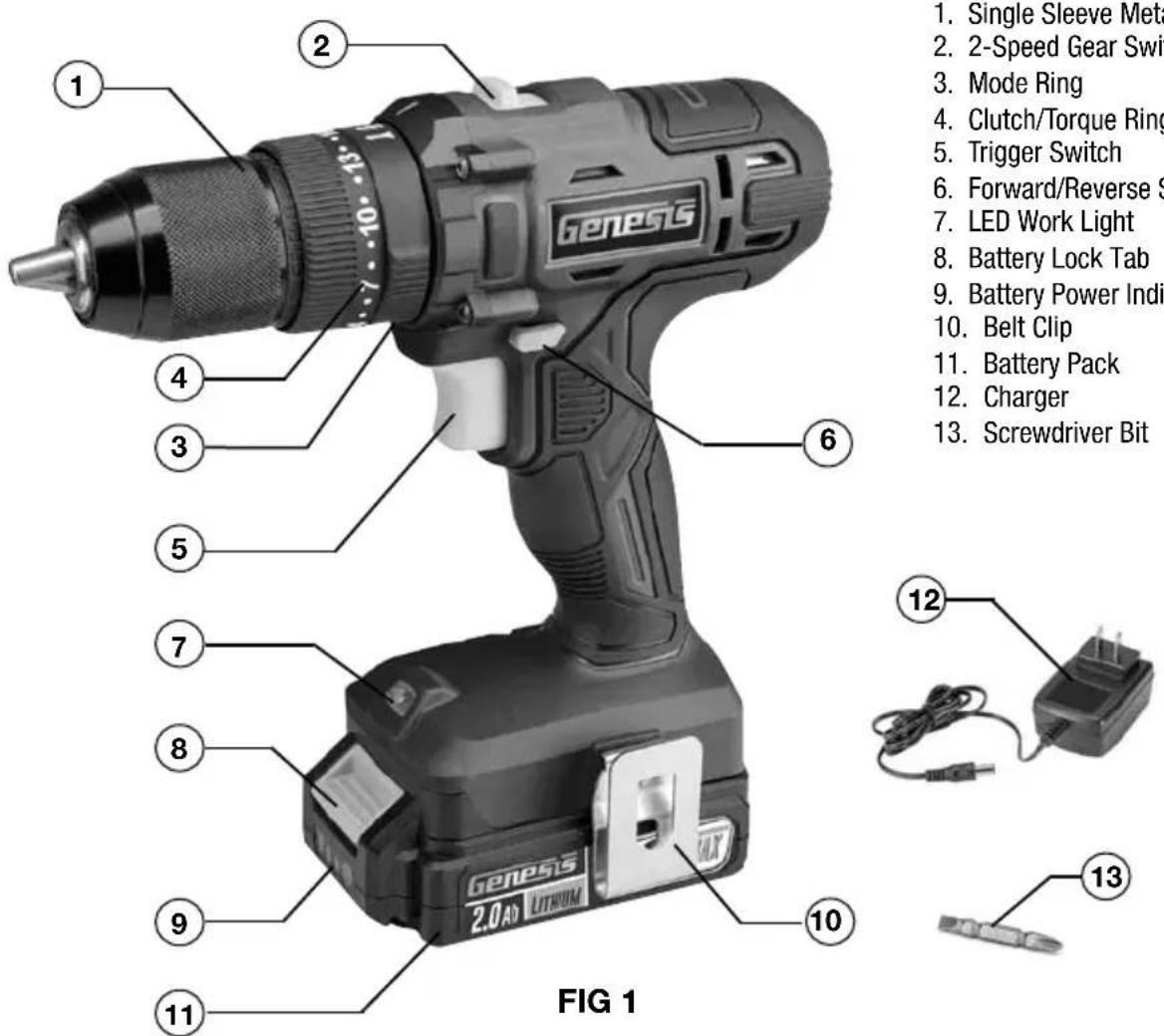
WARNING: To reduce the risk of serious personal injuries, read and follow all important safety warning and instructions before using this tool.
WARNING: Always be sure that the tool is switched off before insertion or removal of the battery pack.
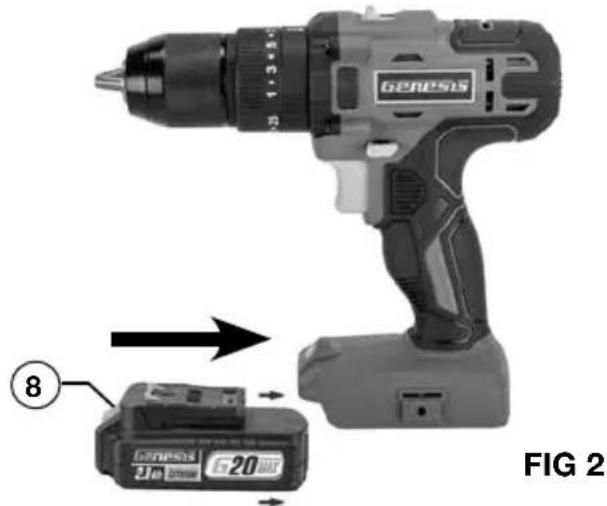
INSTALLING AND REMOVING THE BATTERY PACK (FIG 2)
- To install the battery pack, slide the battery pack into the bottom of the tool housing all the way until it locks in place with a click, as shown in FIG 2. Lightly pull on the battery to ensure it is locked into place and will not accidentally fall out of the tool, causing an injury.
- To remove the battery pack, pull the battery away from the tool while depressing the battery locking tab (8).
CHARGING THE BATTERY (FIG 3)
NOTE: Always check that the power supply corresponds to the voltage on the ratings plate.
- Plug the charger (12) into a 120 Volt AC power source. The green indicator light on the charger will illuminate, confirming it is powered.
- Connect the charger to the battery (11) as shown in FIG 3. The red light on the charger will illuminate, indicating that the battery is charging. Meanwhile, the power indicator lights (9) on the battery pack will flash, indicating the charging status.
- All three indicator lights will turn solid green once charging is complete.
It is normal for the battery pack to become warm while charging. - If the battery pack is hot after continuous use in the tool, allow it to cool down to room temperature before charging. This will extend the life of your batteries.
NOTE: It takes approximately 80 minutes to charge up a completely discharged 2.0Ah battery pack.
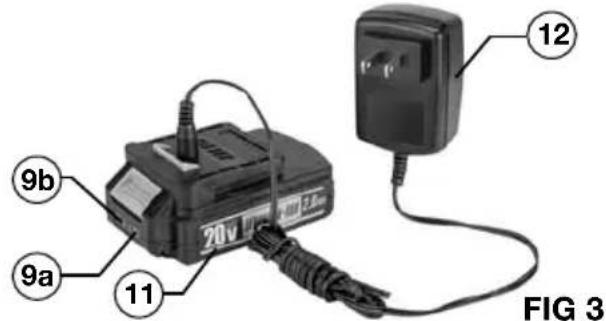
BATTERY POWER INDICATOR (FIG 3)
There is a battery power indicator on the battery pack. It has three green lights (9b).Depress the power indicator button (9a) on the side to check the battery power level. When all three lights illuminate, it indicates the battery is at full power. The battery is at half full power when two lights illuminate. When one light illuminates only, it indicates that the battery is at a low power level and requires immediate charging.
WARNING: Always disconnect the battery pack from the tool or place the switch in the locked or Off position before any assembly, adjustments or changing accessories.
TRIGGER SWITCH ACTION (FIG 4)
- Turn the drill on by depressing the trigger switch (5).
- Depressing the switch further will produce more speed and torque.
- Use the forward/reverse switch (6) to change the direction of rotation of the drill.
- The forward/reverse switch has three positions: Forward, Reverse, and Off (middle).
- Always check the rotation before beginning your work.
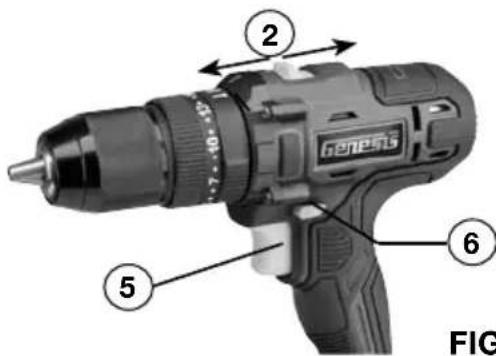
FIG 4
TWO-SPEED GEAR SWITCH (FIG 4)
- Slide the gear speed switch (2) to choose between position 1 for low-speed range (0-380 RPM) and position 2 for high-speed range (0-1500 RPM).
- The low-speed range has more power and torque. Use the low-speed range for higher power and torque applications, and for drilling materials which require a lower speed such as metal.
The high-speed range is for faster drilling and driving applications.
LED WORK LIGHT
The drill has a built-in LED work light (7-FIG 1) to illuminate the work area. When you turn on the tool, the work light will automatically turn on.
ELECTRIC BRAKE
This drill is equipped with an electric brake. Like the torque settings, an electric brake provides you with another element of control during various operations. If the tool consistently fails to quickly stop after the trigger switch is released, have a qualified serviceman examine the tool.
CHUCK (FIG 5)
- Your drill is equipped with a keyless single-sleeve metal ratcheting chuck (1), so you can quickly change bits with no extra tools required.
- To insert or change bits, put the forward/reverse switch in the Off (middle) position. Rotate the chuck sleeve counter-clockwise to open the chuck jaws (1a) to a point where the opening is slightly larger than the bit size you intend to use. Insert the bit. Tighten the chuck jaws by rotating the chuck body clockwise to secure the bit in place. Continue tightening until the chuck stops making a clicking sound.
NOTE: Always make sure that bits are seated firmly between the chuck jaws. Never attempt to operate a bit that is wobbly, unstable, or broken.
- To remove bits, place the forward/reverse switch in the Off (middle) position. Loosen the chuck jaws by rotating the chuck sleeve counter-clockwise. Remove the bit.
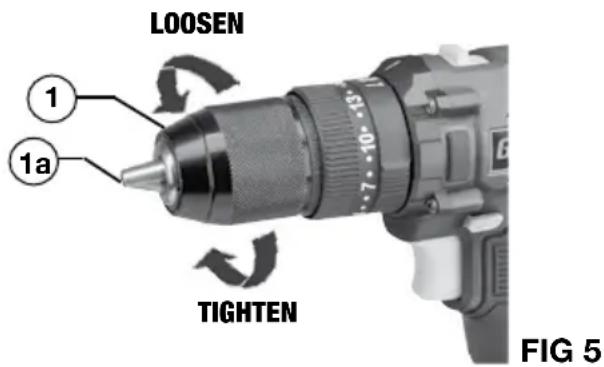
WARNING: Make sure the drill bit is inserted straight into the chuck jaws. Do not insert the drill bit into the chuck jaws at an angle and tighten. This could cause the drill bit to be thrown from the drill, resulting in possible serious personal injury.
MODE AND CLUTCH SETTINGS (FIG 6)
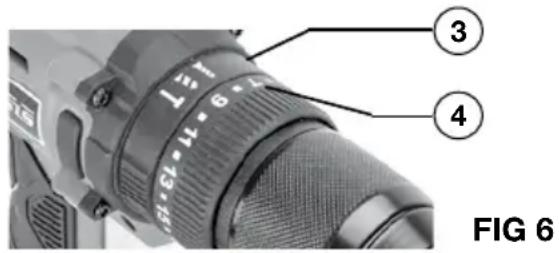
FIG 6
Screwdriving Mode
This feature can be used to adjust the amount of torque (force) to prevent stripping and breaking of screws, or to set a series of screws to a depth that fits your project.
- First set the mode ring (3) to the drive mode (7).
- Next adjust the torque by turning the clutch ring (4) starting with a low setting (1-9) and slowly increasing torque until the desired depth is reached.
- In general, you will find the lower settings more useful with smaller screws and the higher settings more useful for larger screws.
Drill Mode
Drill mode is direct drive (torque is not limited) and used primarily for drilling operations.
- Set the mode ring (3) to the drill mode (2).
- Depending on the material being drilled, select high or low speed range on the gear switch (2-FIG-1).
Hammer Mode
Hammer mode is used specifically for drilling and driving into concrete and masonry using specialty drill bits and fasteners.
- Set the mode ring (3) to the hammer drill mode ( ).
- Make sure the gear switch (2-FIG-1) is set to the best speed range for the material being drilled.
APPLICATIONS
GENERAL SCREWDRIVING
- Secure the workpiece in place with clamps or other means.
- Drill pilot holes for larger screws or when driving screws into hardwoods.
- Exert enough pressure to start the screw and keep it turning. Do not force the screw. Let the tool do the work.
- Use a speed that will not strip the screw head or break the screw. Maintain your balance.
GENERAL DRILLING
- Secure your workpiece. Use the drill mode, then exert enough pressure to start the drill bit and keep drilling. Do not force or stall the bit. Don't bend or twist the bit. Let the tool and the drill bit do the work.
- Maintain your balance and be prepared for binding and for bit breakthrough.
- Chattering or vibration may indicate you need a finer bit or higher speed. If the bit overheats or clogs, it may indicate you need a coarser bit or slower speed setting.
APPLICATIONS
Replace bits when they become dull. Dull bits will produce poor results and may overheat the drill.
- Use a coating of light oil when drilling into metal to help cool the bit, increase drilling action and extend drill bit life.
WARNING:
WARNING: Forcing a drill bit, bending or twisting the bit, or failure to maintain balance in case of binding and breakthrough can result in serious personal injury.
NOTE: To drill more accurately and prevent the drill bit from "walking", using an awl or other sharp tool to make a small dent at the spot to drill will help.
GENERAL HAMMER DRILLING
- Use the hammer mode for drilling and driving into concrete and masonry.
- Use a slow speed to avoid cracking the concrete or masonry.
NOTE: For best results, use masonry bits which are designed for percussion usage.
MAINTENANCE
CLEANING
Avoid using solvents when cleaning plastic parts. Most plastics are susceptible to damage from various types of commercial solvents and may be damaged by their use. Use clean cloths to remove dirt, dust, oil, grease, etc.
WARNING: Do not at any time let brake fluids, gasoline, petroleum-based products, penetrating oils, etc., come in contact with plastic parts. Chemicals can damage, weaken or destroy plastic which may result in serious personal injury.
Electric tools used on fiberglass material, wallboard, spackling compounds, or plaster are subject to accelerated wear and possible premature failure because the fiberglass chips and grindings are highly abrasive to bearings, brushes, commutators, etc. Consequently, we do not recommended using this tool for extended work on these types of materials. However, if you do work with any of these materials, it is extremely important to clean the tool using compressed air.
LUBRICATION
This tool is permanently lubricated at the factory and requires no additional lubrication.
TWO-YEAR WARRANTY
This product is warranted free from defects in material and workmanship for 2 years after date of purchase. This limited warranty does not cover normal wear and tear or damage from neglect or accident. The original purchaser is covered by this warranty and it is not transferable. Prior to returning your tool to store location of purchase, please call our Toll-Free Help Line for possible solutions.
THIS PRODUCT IS NOT WARRANTYED IF USED FOR INDUSTRIAL OR COMMERCIAL PURPOSES. ACCESSORIES INCLUDED IN THIS KIT ARE NOT COVERED BY THE 2 YEAR WARRANTY.
TOLL-FREE HELP LINE
For questions about this or any other GENESISTM Product, please call Toll-Free: 888-552-8665.
Or visit our web site: www.genesispowertools.com
©Richpower Industries, Inc. All Rights reserved
Richpower Industries, Inc.
736 Hampton Road
Williamston, SC 29697
Printed in China, on recycled paper

PERCAGE AU MARTEAU GÉNÉRAL
Richpower Industries, Inc.
736 Hampton Road
Williamston, SC USA
www.genesispowertools.com
- Look for this symbol to point out important safety precautions. It means attention!!! Your safety is involved.
- GENERAL SAFETY RULES
- WORK AREA SAFETY
- ELECTRICAL SAFETY
- PERSONAL SAFETY
- TOOL USE AND CARE
- BATTERY TOOL USE AND CARE
- SERVICE
- SAVE THESE INSTRUCTIONS
- IMPORTANT SAFETY INSTRUCTIONS FOR CHARGER & BATTERY
- IMPORTANT BATTERY INFORMATION: DISPOSING OF THE BATTERY
- SYMBOLS
- SPECIFIC SAFETY RULES FOR CORDLESS HAMMER DRILLS
- UNPACKING & CONTENTS
- CONTENT IN PACKAGE
- SPECIFICATIONS
- PRODUCT OVERVIEW
- INSTALLING AND REMOVING THE BATTERY PACK (FIG 2)
- CHARGING THE BATTERY (FIG 3)
- BATTERY POWER INDICATOR (FIG 3)
- TRIGGER SWITCH ACTION (FIG 4)
- TWO-SPEED GEAR SWITCH (FIG 4)
- LED WORK LIGHT
- ELECTRIC BRAKE
- CHUCK (FIG 5)
- MODE AND CLUTCH SETTINGS (FIG 6)
- Screwdriving Mode
- Drill Mode
- Hammer Mode
- APPLICATIONS
- GENERAL SCREWDRIVING
- GENERAL DRILLING
- WARNING:
- GENERAL HAMMER DRILLING
- MAINTENANCE
- CLEANING
- LUBRICATION
- TWO-YEAR WARRANTY
- TOLL-FREE HELP LINE
- PERCAGE AU MARTEAU GÉNÉRAL
Brand : Genesis
Model : GLHD20B
Category : Electric drill