
GSP1711 - Grinder Genesis - Free user manual and instructions
Find the device manual for free GSP1711 Genesis in PDF.




| Product Type | Variable speed sander/polisher |
| Brand | Genesis |
| Model | GSP1711 |
| Rated Power | 120 V, 60 Hz, 11 A |
| No-load Speed | 600-3000 RPM (variable) |
| Pad Diameter | 178 mm (7 inches) |
| Arbor Size | 5/8 in-11 |
| Net Weight | 4.55 kg |
| Speed Ranges | 6 positions: 600, 900, 1500, 2100, 2700, 3000 RPM |
| Double Insulation | Yes |
| Main Functions | Sanding and polishing |
| Included Accessories | 178 mm foam polishing pad, hook-and-loop backing pad, 36-grit sanding disc, rubber backing pad, auxiliary handle, wrench |
| Maintenance and Cleaning | Clean with a clean cloth; do not use harsh solvents |
| Safety | Arbor lock, lock-on switch, eye protection required |
| Warranty | 2 years (excluding accessories) |
| Telephone Support | 1-888-552-8665 (North America) |
| Intended Use | Sanding and polishing surfaces |
Frequently Asked Questions - GSP1711 Genesis
User questions about GSP1711 Genesis
0 question about this device. Answer the ones you know or ask your own.
Ask a new question about this device
Download the instructions for your Grinder in PDF format for free! Find your manual GSP1711 - Genesis and take your electronic device back in hand. On this page are published all the documents necessary for the use of your device. GSP1711 by Genesis.
USER MANUAL GSP1711 Genesis
7" Variable Speed Sander/Polisher
Model: GSP1711
Rated Power: 120 V~/ 60Hz, 11 A
- No-Load Speed: 600-3000 RPM
- Pad Size: 7"
- Arbor Size: 5/8"11
Net weight: 10 Lbs
Includes: 7" Foam Polishing Pad, Hook and Loop Backing Pad, 7" 36G Sanding Disc, Rubber Backing Pad, Auxiliary Handle, and Wrench.
WARNING: To reduce the risk of injury, user must read and understand this operator's manual before operating this tool. Save this manual for future reference.
Toll-Free Help Line: 1-888-552-8665

WARNING: The operation of any power tool can result in foreign objects being thrown into your eyes, which can result in severe eye damage. Before beginning tool operation, always wear safety goggles or safety glasses with side shields and a full face shield when needed. We recommend Wide Vision Safety Mask for use over eyeglasses or standard safety glasses with side shields. Always wear eye protection which is marked to comply with ANSI Z87.1.

Look for this symbol to point out important safety precautions. It means attention!!! Your safety is involved.
GENERAL SAFETY RULES
WARNING: Some dust created by power sanding, sawing, grinding, drilling, and other construction activities contains chemicals known to cause cancer, birth defects or other reproductive harm. Some examples of these chemicals are:
- Lead from lead-based paints.
- Crystalline silica from bricks and cement and other masonry products.
- Arsenic and chromium from chemically treated lumber.
Your risk from these exposures varies, depending on how often you do this type of work. To reduce your exposure to these chemicals: work in a well ventilated area, and work with approved safety equipment, such as those dust masks that are specially designed to filter out microscopic particles.
WARNING: Read and understand all warnings, cautions and operating instructions before using this equipment. Failure to follow all instructions listed below may result in electric shock, fire and/or serious personal injury.
SAVE THESE INSTRUCTIONS
WORK AREA SAFETY
- Keep your work area clean and well lit. Cluttered benches and dark areas invite accidents.
- Do not operate power tools in explosive atmospheres, such as in the presence of flammable liquids, gases, or dust. Power tools create sparks which may ignite the dust or fumes.
- Keep bystanders, children, and visitors away while operating a power tool. Distractions can cause you to lose control.
ELECTRICAL SAFETY
- Power tool plugs must match the outlet. Never modify the plug in any way. Do not use any adaptor plugs in any earthed (grounded) power tools. Double insulated tools are equipped with a polarized plug (one blade is wider than the other). This plug will fit in a polarized outlet only one way. If the plug does not fit fully in the outlet, reverse the plug. If it still does not fit, contact a qualified electrician to install a polarized outlet. Do not change the plug in any way. Double insulation eliminates the need for the three wire grounded power cord and grounded power supply system.
- Do not expose power tools to rain or wet conditions. Water entering a power tool will increase the risk of electric shock.
- Avoid body contact with earthed or grounded surfaces such as pipes, radiators, ranges and refrigerators. There is an increased risk of electric shock if your body is grounded.
- Do not abuse the cord. Never use the cord for carrying, pulling or unplugging the power tool. Keep cord away from heat, oil, sharp edges or moving parts. Damaged cords increase the risk of electric shock.
- When operating a power tool outside, use an extension cord suitable for outdoor use. These cords are rated for outdoor use and reduce the risk of electric shock.
- Do not use AC only rated tools with a DC power supply. While the tool may appear to work, The electrical components of the AC rated tool are likely to fail and rate a hazard to the operator.
PERSONAL SAFETY
- Stay alert, watch what you are doing and use common sense when operating a power tool. Do not use tool while tired or under the influence of drugs, alcohol, or medication. A moment of inattention while operating power tools may result in serious personal injury.
- Use safety equipment. Always wear eye protection. Safety equipment such as dust mask, non-skid safety shoes, hard hat, or hearing protection for appropriate conditions will reduce personal injuries.
- Dress properly. Do not wear loose clothing or jewelry. Keep your hair, clothing and gloves away from moving parts. Loose clothes, jewelry or long hair can be caught in moving parts. Air vents may cover moving parts and should be avoided.
- Avoid accidental starting. Ensure the switch is in the off position before plugging in. Carrying power tool with your finger on the switch or plugging in power tools that have the switch on invites accidents.
- Remove any adjusting keys or wrenches before turning the power tool on. A wrench or key that is left attached to a rotating part of the tool may result in personal injury.
- Do not overreach. Maintain proper footing and balance at all times. Loss of balance can cause an injury in an unexpected situation.
- If devices are provided for connection of dust extraction and collection facilities, ensure these are connected and properly used. Use of these devices can reduce dust related hazards.
- Do not use a ladder or unstable support. Stable footing on a solid surface enables better control of the tool in unexpected situations.
- Keep tool handles dry, clean and free from oil and grease. Slippery handles cannot safely control the tool.
TOOL USE AND CARE
-
Secure the workpiece. Use clamp or other practical way to hold the workpiece to a stable platform. Holding the workpiece by hand or against your body is unstable and may lead to loss of control.
-
Do not force the power tool. The tool will perform the job better and safer at the feed rate for which it is designed. Forcing the tool could possibly damage the tool and may result in personal injury.
- Use the correct power tool for the job. Don't force the tool or attachment to do a job for which it is not designed.
- Do not use tool if switch does not turn it on or off. Any tool that cannot be controlled with the switch is dangerous and must be repaired or replaced by an authorized service center.
- Turn power tool off, and disconnect the plug from the power source and/or battery pack from the power tool before making any adjustments, changing the accessories, or storing the tools. Such preventive safety measures reduce the risk of an accidental start up which may cause personal injury.
- Store idle tool out of reach of children and other inexperienced persons. It is dangerous in the hand of untrained users.
- Maintain power tools with care. Check for proper alignment and binding of moving parts, component breaks, and any other conditions that may affect the tool's operation. A guard or any other part that is damaged must be properly repaired or replaced by an authorized service center to avoid risk of personal injury.
- Use recommended accessories. Using accessories and attachments not recommended by the manufacturer or intended for use on this type tool may cause damage to the tool or result in personal injury to the user. Consult the operator's manual for recommended accessories.
- Keep cutting tools sharp and clean. Properly maintained cutting tools with sharp cutting edges are less likely to bind and are easier to control.
- Feed the workpiece in the correct direction and speed. Feed the workpiece into a blade, cutter, or abrasive surface against the direction of the cutting tool's direction of rotation only. Incorrectly feeding the workpiece in the same direction may cause the workpiece to be thrown out at high speed.
- Never leave the tool running unattended, turn the power off. Do not leave the tool until it comes to a complete stop.
WARNING: USE OF THIS TOOL CAN GENERATE AND DISBURSE DUST OR OTHER AIRBORNE PARTICLES, INCLUDING WOOD DUST, CRYSTALLINE SILICA DUST AND ASBESTOS. Direct particles away from face and body. Always operate tool in a well-ventilated area and provide for proper dust removal. Use dust collection system wherever possible. Exposure to the dust may cause serious and permanent respiratory or other injury, including silicosis (a serious lung disease), cancer, and death. Avoid breathing the dust, and avoid prolonged contact with the dust. Allowing dust to get into your mouth or eyes, or lay on your skin may promote absorption of harmful material. Always use properly fitting NIOSH/OSHA approved respiratory protection appropriate for dust exposure, and wash exposed areas with soap and water.
SERVICE
- Have your power tool serviced by a qualified repair person using only identical replacement parts. This will ensure that the safety of the power tool is maintained.
- Service your power tool periodically. When cleaning a tool, be careful not to disassemble any portion of the tool since internal wires may be misplaced or pinched.
SAVE THESE INSTRUCTIONS
EXTENSION CORDS
Grounded tools require a three wire extension cord. Double insulated tools can use either a two or three wire extension cord. As the distance from the power supply outlet increases, you must use a heavier gauge extension cord. Using extension cords with inadequately sized wire causes a serious drop in voltage, resulting in loss of power and possible tool damage. Refer to the table shown below to determine the required minimum wire size.
The smaller the gauge number of the wire, the greater the capacity of the cord. For example: a 14-gauge cord can carry a higher current than a 16-gauge cord. When using more than one extension cord to make up the total length, be sure each cord contains at least the minimum wire size required. If you are using one extension cord for more than one tool, add the nameplate amperes and use the sum to determine the required minimum wire size.
Guidelines for Using Extension Cords
- If you are using an extension cord outdoors, be sure it is marked with the suffix "W-A" ("W" in Canada) to indicate that it is acceptable for outdoor use.
- Be sure your extension cord is properly wired and in good electrical condition. Always replace a damaged extension cord or have it repaired by a qualified person before using it.
- Protect your extension cords from sharp objects, excessive heat, and damp or wet areas.
| Recommended Minimum Wire Gauge for Extension Cords (120 Volt) | ||||||
| Nameplate Amperes (At Full Load) | Extension Cord Length | |||||
| 25 Feet 50 Feet 75 Feet 100 Feet 150 Feet 200 Feet | ||||||
| 0-2.0 18 18 | 18 18 16 16 | |||||
| 2.1-3.4 18 18 | 18 16 14 14 | |||||
| 3.5-5.0 18 18 | 16 14 12 12 | |||||
| 5.1-7.0 18 16 | 14 12 12 10 | |||||
| 7.1-12.0 18 14 | 12 10 8 8 | |||||
| 12.1-16.0 14 | 12 10 10 8 6 | |||||
| 16.1-20.0 12 10 | 8 8 6 6 | |||||
SPECIFIC SAFETY RULES FOR SANDERS / POLISHERS
WARNING: DO NOT LET COMFORT OR FAMILIARITY WITH PRODUCT (GAINED FROM REPEATED USE) REPLACE STRICT ADHERENCE TO PRODUCT SAFETY RULES. If you use this tool unsafe or incorrectly, you can suffer serious personal injury!
- Always wear safety glasses or goggles. Normal prescription eye or sunglasses are not safety glasses. Use certified safety equipment. Protective eye wear should comply with ANSI Z87.1 standards
- Use adequate and appropriate respiratory protection. Using this tool to sand some products, paints and woods may expose the user to dust containing hazardous substances.
Always hold the tool firmly. Do not leave the tool running unless hand held. - Use only accessories rated for at least the maximum speed as displayed on the tool's nameplate. Backing pads, discs, and other accessories running at speeds greater than their rated maximum speed may fly apart and cause serious personal injury.
- Check the backing pad for cracks, damage or deformity before operation. Immediately replace cracked, damaged, or deformed pads.
- Never use this tool with wood cutting blades or other saw blades. Using such blades on the sander/polisher frequently kickback, causing loss of tool control resulting in personal injury.
- Keep hands away from rotating parts.
- Before starting the tool make sure the sanding disc or polishing bonnet is not contacting the workpiece.
- Check that the workpiece is properly supported and secured in place.
- Do not release your grip on the tool until the wheel comes to a complete stop. After switching off the tool the wheel will continue to rotate.
- This tool is not waterproofed. Do not use water on the workpiece surface.
- Adequately ventilate your work area when performing sanding operations.
WARNING: Read and understand all warnings, cautions and operating instructions before using this equipment. Failure to follow all instructions listed below may result in electric shock, fire and/or serious personal injury.
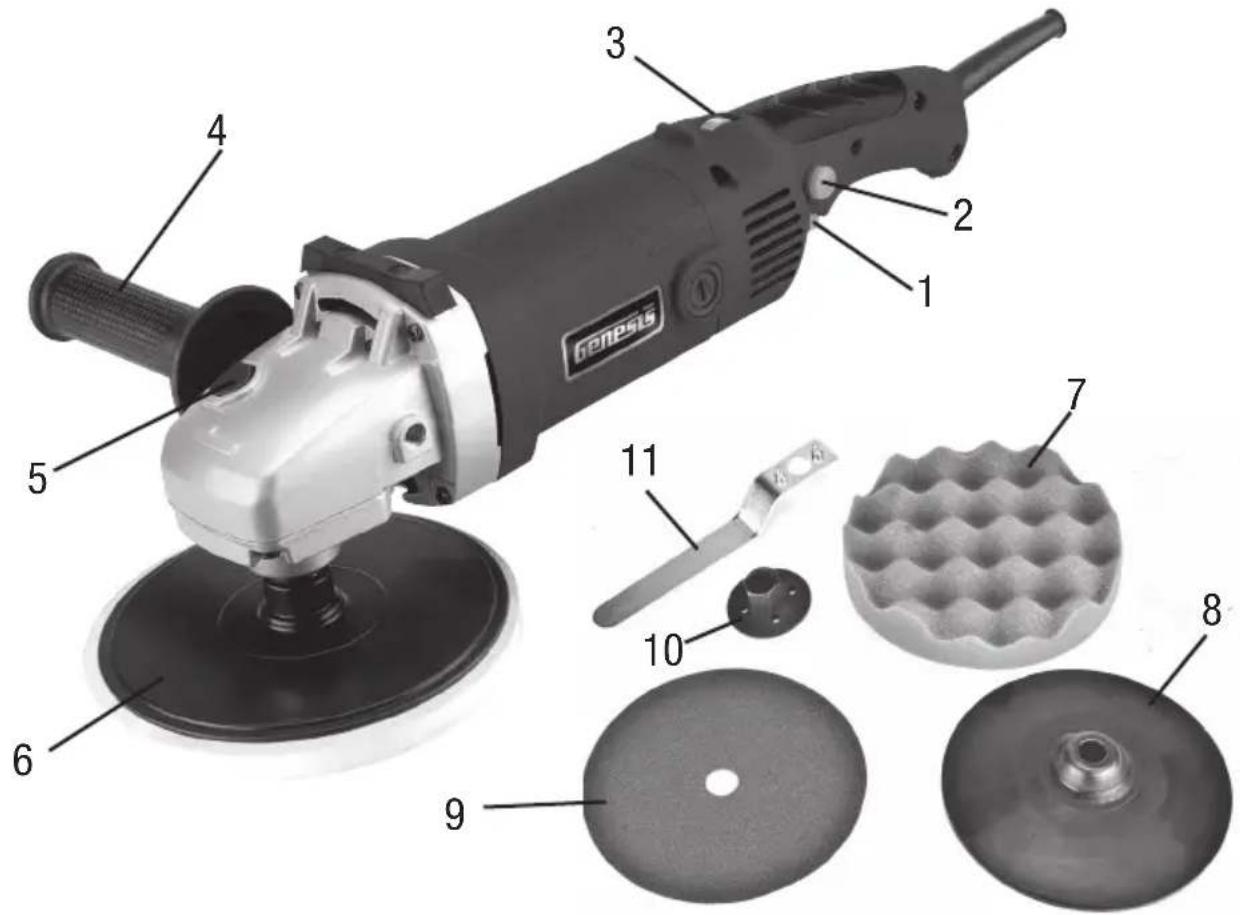
FIG 1
- On/Off Switch
- Foam Polishing Pad
- Lock-on Button
- Rubber Backing Pad
- Variable Speed Dial
- Sanding Disc
- Auxiliary Handle
- Lock Nut
- Spindle Lock
- Wrench
- Hook & Loop Backing Pad
UNPACKING AND CONTENTS
IMPORTANT: Due to modern mass production techniques, it is unlikely the tool is faulty or that a part is missing. If you find anything wrong, do not operate the tool until the parts have been replaced or the fault has been rectified. Failure to do so could result in serious personal injury.
CONTENTS IN PACKAGE
| Description | Q'ty | Description | Q'ty |
| Sander/Polisher | 1 | Sanding Disc 1 | |
| Foam Pad | 1 | Auxiliary Handle 1 | |
| Hook & Loop Backing Pad | 1 | Wrench 1 | |
| Rubber Backing Pad | 1 | Operator's Manual 1 | |
| Lock Nut | 1 |
WARNING: To reduce the risk of serious personal injury, read and follow all important safety warning and instructions before using this tool.
WARNING: Always be sure the tool is disconnected from the power source before making any adjustments or setting up prior to operating. Failure to disconnect or unplug the tool may cause accidental starting, resulting in serious personal injury.
AUXILIARY HANDLE
NOTE: Always be sure the auxiliary handle is installed securely before operating the tool.
An auxiliary handle (4-FIG 1) is included with your sander/polisher to ease tool handling and to help maintain tool control during operation. The gear housing is designed to allow mounting of the auxiliary handle on the left or right side of the tool.
To Install the Auxiliary Handle, screw the handle securely into the threaded hole on the right or left, of the gear housing as desired.
HOOK & LOOP BACKING PAD INSTALLATION/REMOVAL
- Unplug the sander/polisher from the power source.
- Place the tool on a flat, stable surface, with the threaded spindle facing upwards. Screw on the Hook & Loop backing pad by rotating it in a clockwise direction.
- Depress the spindle lock (5-FIG 1) and then rotate backing pad clockwise until the spindle lock engages the spindle shaft so it will no longer rotate.
- Maintain pressure on the spindle lock, preventing the spindle shaft from rotating. Tighten the backing pad by hand rotating the pad until snug. DO NOT OVER TIGHTEN.
- Release the spindle lock.
- To remove the backing pad, be sure the tool is unplugged from the power source, engage the spindle lock and perform the installation procedure in reverse order.
FOAM POLISHING PAD INSTALLATION/REMOVAL
- Unplug the sander/polisher and install the hook & loop backing pad as explained previously.
- Inspect the hook & loop backing pad and clean-off any dirt or debris.
- Align the foam polishing pad over the backing pad. With the pad aligned, push down on the foam polishing pad to engage the hook & loop system. Confirm that the polishing pad is secured over the entire pad.
- To remove the polishing pad, pull it off the backing pad.
ATTACHING A HOOP & LOOP ABRASIVE DISC
- Unplug the sander/polisher and install the hook & loop backing pad as explained previously.
- Center the desire hook & loop grit abrasive disc over the backing pad.
- With the disc aligned, push down on the disc to engage the hook & loop system. Confirm that the disc is secured over the entire pad.
- To remove the disc, pull it off the backing pad.
USING A LOCK-NUT TYPE SANDING DISC (WITH ARBOR HOLE)
1) Unplug the sander/polisher from the power source.
2) Place the tool on a flat, stable surface, with the threaded spindle facing upwards. Slide the Rubber Backing Pad (8-FIG 1) over the spindle face up.
3) Center the sanding disc over the rubber backing pad.
4) Depress the spindle lock button (5-FIG 1) to prevent the threaded spindle from rotating. Then place the enclosed Lock Nut (10-FIG 1) through the center hole in the sanding disc and onto threaded spindle and begin rotating the lock nut clockwise until finger tight.
5) Securely tighten the lock nut with the provided spanner wrench.
6) To remove the sanding disc, reverse the installation procedure after unplugging the tool from power source.
USING A SELF-ADHESIVE SANDING DISC (NO ARBOR HOLE)
1) Unplug the sander/polisher from the power source.
2) Place the tool on a flat stable surface, with the threaded spindle facing upwards. Slide the Rubber Backing Pad (8-FIG 1) over the spindle face up.
3) Depress the spindle lock button (5-FIG 1) to prevent the threaded spindle from rotating. Then place the Lock Nut (10-FIG 1) onto the threaded spindle and begin rotating the lock nut clockwise until finger tight.
4) Securely tighten the lock nut with the provided spanner wrench.
5) Center the self-adhesive sanding disc on rubber backing pad and press firmly.
6) To remove the sanding disc, pull the sanding disc off the rubber backing pad.
OPERATION
WARNING: Always be sure the tool is disconnected from the power source before making any adjustments or setting up. Failure to disconnect or unplug the tool may cause accidental starting, resulting in serious personal injury.
NOTE: Always Check that the power supply corresponds to the voltage on the ratings plate.
WARNING: To avoid accidental start, Check to make sure Lock-on button is not engaged prior to plugging in tool and your finger is not touching the switch.
WARNING: Never depress the Spindle Lock when the spindle is moving.
SWITCH OPERATION
To Start the Tool, depress the On/Off switch (1-FIG 1). To Stop the Tool, release the switch.
The tool can be locked on by depressing the Lock-on button (2-FIG 1) and the On/Off switch (1-FIG 1) at the same time, then releasing pressure on the On/Off switch. The lock-on feature is to relieve fatigue on the trigger finger only. To release the lock on button, simply depress the On/Off switch.
CAUTION: Grip the tool firmly at all times while it is running, and keep both hands away from the Sanding/Polishing wheel.
SPEED ADJUSTMENT DIAL
The speed adjustment dial (3-FIG 1) is located on top of the rear handle. In this position, slightly forward of the On/Off switch, the sander/polisher's speed is easily adjusted by the operator's thumb on the hand grasping the tool by the rear handle.
With the On/Off trigger switch fully depressed and the tool running, the tool speed can be changed by rotating the speed adjustment dial to a numbered setting from 1 to 6. The tool speed increases as the dial is moved in the direction of the number 6 and lower speed is obtained as the dial is turned towards the number 1.
Refer to the Table 1 for the relationship between the number settings on the dial and the approximate tool speed.
To ensure operator control, the tool should always be turned "ON" with the speed adjustment dial in the number 1 position.
TABLE 1
| NUMBER RPM | |
| 1 600 | |
| 2 900 | |
| 3 1500 | |
| 4 2100 | |
| 5 2700 | |
| 6 3000 | |
CAUTION: Continuous operation of the tool at low speeds for a long time will cause the motor to become overheated, possibly resulting in malfunction or tool failure. To cool the motor, occasionally run the tool at high RPM under no load for short periods of time allowing the tool's fan to cool the motor. Be careful not to obstruct the air vents located in the forward gear housing or in the rear handle, near the trigger switch.
CAUTION: The speed adjustment dial can only be rotated as far back as the number 1 or forward to the number 6. DO NOT attempt forcing the dial beyond the numbers 1 or 6, or the speed adjustment dial will be damaged and no longer function.
WARNING: Always wear safety glasses with side shields or a full face shield during tool operation.
WARNING: Never switch on the tool when it is contacting the workpiece or possible injury to the operator or damage to the workpiece may occur.
POLISHING OPERATION
Hold the tool firmly using both handles. With the speed adjustment dial set at "1", turn the tool on and lightly apply the rotating foam pad to the work surface. Allow the tool to operate freely using only the tool's weight as pressure applied to the work surface.
Adjust the tool's speed using the speed adjustment dial as you become more familiar with the tool's operation and the amount of work being performed by the chosen polishing pad. As a general rule, lower speeds are better for polishing.
Maintain the foam pad at a angle of about 15 degrees to the work surface. NEVER USE THE POLISHING PAD FLAT TO THE WORK SURFACE. Use a long sweeping motion, back and forth, while slowly advancing along the surface being polished. To avoid "burning" the surface or causing finish swirls, use a low speed and do not hold the tool in one spot or use circular or spiral like patterns. Work from the highest point on the surface downwards to avoid dust or polish from being thrown onto the completed section.
Always follow the wax and polish manufacturer's application and removal instructions for power polishers. Dirty or clogged pads may be cleaned by washing in warm water with a mild detergent. Allow the cleaned pad to dry completely before reuse.
SANDING OPERATION
WARNING: The tool and sanding disc must completely stop rotating before setting the tool down after use onto a workbench or other surface.
WARNING: Always maintain a firm grip on the tool with both hands at all times. Not doing so may cause the operator to lose control of the tool and may lead to serious personal injury.
Be sure the workpiece is firmly clamped or otherwise secured in place. Remove any objects that may be struck and thrown by the rotating abrasive discs. If using an extension cord, be sure it is held away from the work area.
Hold the tool firmly using both handles. With the speed adjustment dial set at "1", turn the tool on and lightly apply the abrasive disc to the workpiece. NEVER USE THE SANDING DISC FLAT ON THE WORK SURFACE, keep the abrasive disc at an angle of about 15 degrees while working the workpiece surface.
Adjust the tool's speed using the speed adjustment dial as you become more familiar with the tool's operation and the amount of work being performed by the chosen grit abrasive disc. Use working motions as described in the earlier "Polishing" instructions. Do not allow the abrasive disc to sand in one spot too long or an uneven or gouged surface may result. As a general rule, higher speeds are better for sanding.
When the sanding operation is completed, remove the tool from the work surface before turning it off.
CLEANING
Avoid using solvents when cleaning plastic parts. Most plastics are susceptible to damage from various types of commercial solvents and may be damaged by their use. Use clean cloths to remove dirt, dust, oil, grease, etc.
WARNING: Do not at any time let brake fluids, gasoline, petroleum-based products, penetrating oils, etc., come in contact with plastic parts. Chemicals can damage, weaken or destroy plastic which may result in serious personal injury.
Electric tools used on fiberglass material, wallboard, spackling compounds, or plaster are subject to accelerated wear and possible premature failure because the fiberglass chips and grindings are highly abrasive to bearings, brushes, commutators, etc. Consequently, we do not recommend using this tool for extended work on these types of materials. However, if you do work with any of these materials, it is extremely important to clean the tool using compressed air.
LUBRICATION
This tool is permanently lubricated at the factory and requires no additional lubrication.
TWO-YEAR WARRANTY
This product is warranted free from defects in material and workmanship for 2 years after date of purchase. This limited warranty does not cover normal wear and tear or damage from neglect or accident. The original purchaser is covered by this warranty and it is not transferable. Prior to returning your tool to store location of purchase, please call our Toll-Free Help Line for possible solutions.
ACCESSIONS INCLUDED IN THIS KIT ARE NOT COVERED BY THE 2 YEAR WARRANTY.
TOLL-FREE HELP LINE
For questions about this or any other GENESISTM Product, please call Toll-Free: 888-552-8665.
Or visit our web site: www.genesispowertools.com
©Richpower Industries, Inc. All Rights reserved
Richpower Industries, Inc.
736 Hampton Road
Williamston, SC 29697
Printed in China, on recycled paper
PONCEUSE / POLISSEUSE À VITESSE VARIABLE 178 MM
To avoid accidental start, Check to make sure Lockto plugging in tool and your finger is not touching the
on button is not engaged prior to plugging in tool and your finger is not touching the switch.
A VERTISSEMENT:
©Richpower Industries, Inc. All Rights reserved
Richpower Industries, Inc.
736 Hampton Road
Williamston, SC 29697
Printed in China, on recycled paper
©Richpower Industries, Inc. All Rights reserved
Richpower Industries, Inc.
736 Hampton Road
Williamston, SC 29697
Printed in China, on recycled paper
Genesis
Richpower Industries, Inc.
736 Hampton Road
Williamston, SC USA
www.genesispowertools.com
- 7" Variable Speed Sander/Polisher
- Toll-Free Help Line: 1-888-552-8665
- GENERAL SAFETY RULES
- WORK AREA SAFETY
- ELECTRICAL SAFETY
- PERSONAL SAFETY
- TOOL USE AND CARE
- SERVICE
- SAVE THESE INSTRUCTIONS
- EXTENSION CORDS
- Guidelines for Using Extension Cords
- SPECIFIC SAFETY RULES FOR SANDERS / POLISHERS
- UNPACKING AND CONTENTS
- AUXILIARY HANDLE
- HOOK & LOOP BACKING PAD INSTALLATION/REMOVAL
- FOAM POLISHING PAD INSTALLATION/REMOVAL
- ATTACHING A HOOP & LOOP ABRASIVE DISC
- USING A LOCK-NUT TYPE SANDING DISC (WITH ARBOR HOLE)
- USING A SELF-ADHESIVE SANDING DISC (NO ARBOR HOLE)
- OPERATION
- SWITCH OPERATION
- SPEED ADJUSTMENT DIAL
- POLISHING OPERATION
- SANDING OPERATION
- CLEANING
- LUBRICATION
- TWO-YEAR WARRANTY
- TOLL-FREE HELP LINE
- PONCEUSE / POLISSEUSE À VITESSE VARIABLE 178 MM
- A VERTISSEMENT:
- Genesis
Brand : Genesis
Model : GSP1711
Category : Grinder