IRM6 Classic - Wireless Speaker Irradio - Free user manual and instructions
Find the device manual for free IRM6 Classic Irradio in PDF.



| Product type | Wireless speaker |
| Brand | Irradio |
| Model | IRM6 Classic |
| Dimensions (L × H × P) | 24.6 × 8.8 × 9.71 cm |
| Weight | 1.737 kg |
| Output power | 40 Watts RMS |
| Speakers | Dual woofer, dual tweeter, passive resonator |
| Frequency response | 65 Hz - 20 kHz |
| Power supply | DC 5V/2A via USB-C port |
| Built-in battery | 7.4 V, 4000 mAh, 29.6 Wh |
| Charging time | 4 hours |
| Playback time (at 50% volume) | Approximately 6 hours |
| Wireless connectivity | Bluetooth |
| Audio inputs | USB-A, MicroSD, Aux 3.5 mm |
| Main functions | TWS, hands-free kit, equalization (bass, treble, normal), LED light effects, auto power off |
| Cleaning and maintenance | Use a dry cloth, do not use liquids or harsh detergents |
| Safety | Indoor use only, keep out of reach of children under 8 years, do not block the grilles |
| Warranty | 2 years (conventional warranty) |
| Number of pages in the manual | 56 pages |
| Available languages | FR, DE, EN, ES, IT |
Frequently Asked Questions - IRM6 Classic Irradio
User questions about IRM6 Classic Irradio
0 question about this device. Answer the ones you know or ask your own.
Ask a new question about this device
Download the instructions for your Wireless Speaker in PDF format for free! Find your manual IRM6 Classic - Irradio and take your electronic device back in hand. On this page are published all the documents necessary for the use of your device. IRM6 Classic by Irradio.
USER MANUAL IRM6 Classic Irradio
IRRADI O Play the future
IR-M6 Classic Wireless Speaker Cod.550922102
CE
Manuale d'uso | User manual | Manual de instructaciones
Melchioni S.p.a., owner of the Irradio brand, thanks you for purchasing this appliance. It is the result of a careful selection of features and the meticulous refinement of details, with the aim of offering a complete, versatile, reliable and high-performance solution for both the occasional and the most demanding users.
This manual contains important information both for the correct use of the appliance and for its safe operation. It is essential to read and understand its contents before performing any operations in order to obtain the best performance from the appliance. Keep this manual even after reading it, as you may need to refer to it in the future.
The Irradio team is at your disposal for any advice, instructions or suggestions.
2. IMPORTANT INFORMATION FOR CORRECT, SAFE USE OF THE APPLIANCE
The following instructions must be read, understood and complied with before commissioning the appliance. They are especially useful for the protection of the safety, physical conditions and security of the operator and persons nearby, as well as for providing valuable information for preventing faults and malfunctions, for prolonging the service life, for reducing energy consumption and for environmental protection.
- The appliance is designed for household and non-intensive use. Any professional use compromises the safety requirement and is a condition for inapplicability of the warranty.
- The appliance is intended for indoor use and protected from inclement weather: use in an outdoor environment compromises the safety requirement and constitutes a potential hazard for the safety of the operator and persons nearby.
- The appliance must not be used if it shows deformations, bulges, cracks in the casing, missing parts or other structural anomalies. If these conditions occur, switch off and contact qualified technical personnel.
- The appliance must not be used if it emits unusual noises, foul odours, smoke, vapours or any other type of exhalation not related to the cooking in progress. If these conditions occur, switch off and contact qualified technical personnel.
- The appliance must not be stored or used in excessively humid or dusty environments, in the presence of atmospheres saturated with gas, fumes, in excessive or low temperatures or under direct solar radiation.
- The appliance must not be used in explosive atmospheres, near explosive, combustible, detonating or flammable material (e.g. petrol pumps, gas cylinders, etc.). Such use constitutes a serious risk to the safety of the operator and persons nearby and may cause fires or deflagrations.
-
Make sure that each part of the appliance, especially the cord, is placed at a safe distance from heat sources (e.g. electric or gas cookers, heaters, stoves and fireplaces), both during use and when not in use.
-
During use, the appliance must be constantly supervised: do not use it in the absence of operators or persons who are able to constantly check its correct operation.
- During use, the appliance must be placed at a minimum distance of 10cm from surrounding objects on each side: this precaution prevents parts from overheating and improves performance.
- Use only the original accessories supplied. The use of non-original accessories could constitute a danger of damage to the appliance as well as a potential health hazard.
- Do not use the appliance if it is particularly wet, even partially.
- Do not obstruct the grids or exhaust ducts: doing so creates potential fault situations as well as significantly worsening the performance of the appliance.
Periodically check the cleanliness of the grids: refer to the following chapter on cleaning if dust or dirt accumulation is found. - Do not cover the appliance with any material. Doing so will lead to the appliance overheating, with the possibility of breakdowns and danger to the operator or people nearby.
- Do not use the appliance if one or more of the parts listed in the following chapter are missing or damaged: contact your dealer for repair.
Periodically check the conditions of the parts making up the appliance, in particular the charging cord: if any anomalies are found, refrain from using the appliance and contact qualified technical personnel. - Do not use abrasive sponges or aggressive detergents for cleaning operations: refer to the following chapter for complete requirements.
- Cleaning operations must be carried out taking care to disconnect the appliance from the battery charger: refer to the following chapter for the relevant requirements.
- The appliance must be connected to a charging source that meets all electrical safety requirements.
- Do not connect the appliance to extension cords, power strips, multi-socket strips, timers, controlled sockets or other devices that can start it up independently.
If the appliance is not to be used for a prolonged period of time, it is advisable to disconnect the charging cord: this will extend the life of the appliance and help reduce energy consumption. - Do not disconnect the charge by pulling on the cord: grasp the appliance firmly with one hand, grasp the cord plug with the other hand and disconnect with a quick, sharp movement.
- Before disconnecting the appliance, make sure that it is switched off and that there are no programs running, unless you need to disconnect it in an emergency situation due to abnormal behaviour as described in this chapter.
- Do not charge for too long: disconnect the cord after 4 hours of charging. Excessive charging can lead to premature battery damage and a greater chance of failure. Excessive charging also causes significant energy waste.
- Fully charge the battery before first use.
- Do not proceed with excessive use after the low battery warning. Once a warning has been given, charge as soon as possible.
If the appliance is not used for a long time, charge the battery at least once a month. This prolongs its life and ensures good performance when it is restarted.
- Use moderate volume, taking into consideration acoustic system health and the possibility of disturbing people around. Disturbance is generally considered a criminal activity in most legal systems.
The appliance must be kept out of the reach of children under 8 years of age; in any case make sure that it is not used for play.
- If the appliance is used by children, even if they are over 8 years old, or by persons with reduced cognitive, sensory or motor skills, they must be instructed about the dangers of incorrect use of the appliance and it must be guaranteed that the information has been correctly and fully understood. Adequate supervision must however be ensured.
- Do not use the appliance in the vicinity of liquid accumulations or sources, such as tanks, tubs, showers, sinks, other sanitary fixtures, faucets, pipes, sprinklers, bottles, storage vessels, expansion vessels, watercourses, flowerpots and similar. Do not place containers holding liquids on top of the appliance; make sure that the charging cord or electrical plug is never submerged.
- There is no reason to disassemble the appliance, not even after it has been decommissioned. It is composed of parts that could be swallowed by children or persons with reduced cognitive ability.
- Do not carry out any repairs yourself; in the event of a fault, have the appliance inspected by a qualified technician.
- None of the parts of the appliance must be modified under any circumstances: doing so normally constitutes a serious impairment of the safety requirement, a condition for immediate forfeiture of the warranty and does not lead to any increase in performance.
- Do not subject the charging cord to excessive bending or kinking: any internal damage to the cord which cannot be detected constitute a serious safety hazard.
- Place the appliance at an adequate distance from moving parts such as curtains, door and window sashes, hatches or similar in order to avoid accidental contact.
- Place the appliance on a flat, stable surface and ensure that the appliance cannot move independently due to gravity or external forces.
- Keep this manual for future reference.
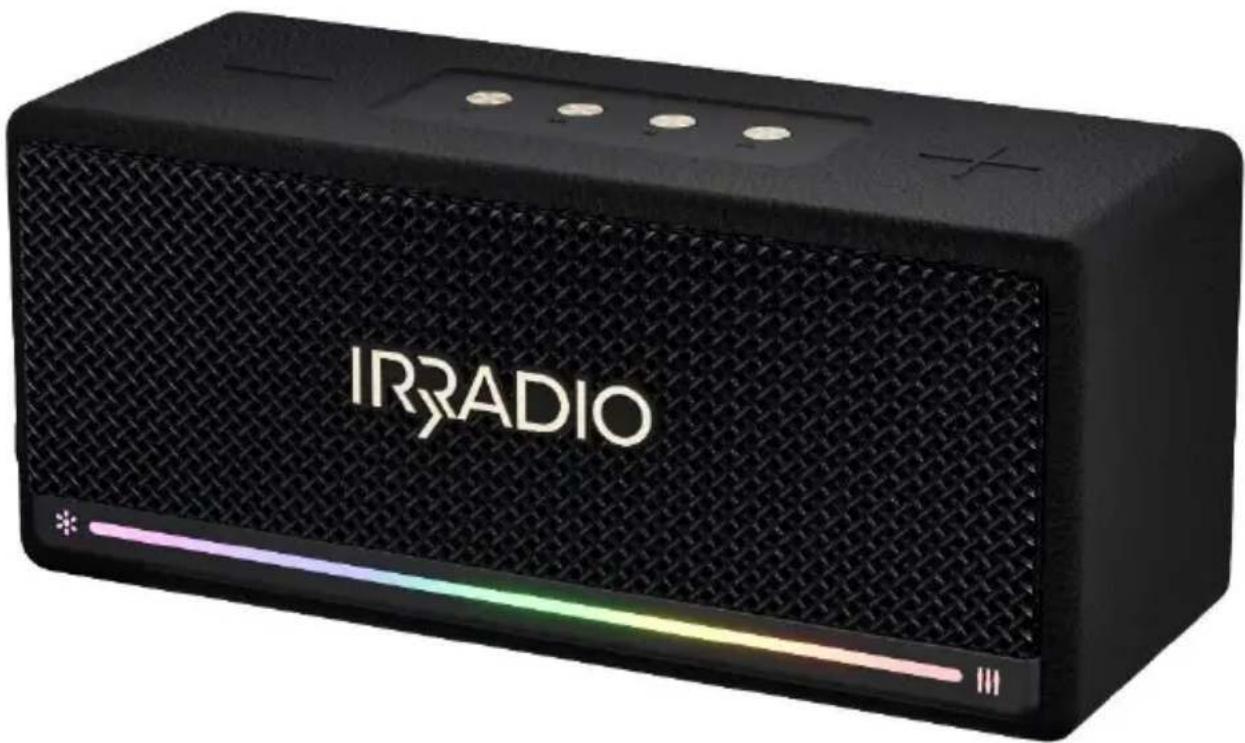
3. IDENTIFICATION OF PARTS
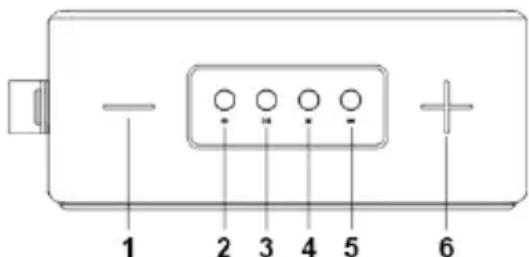
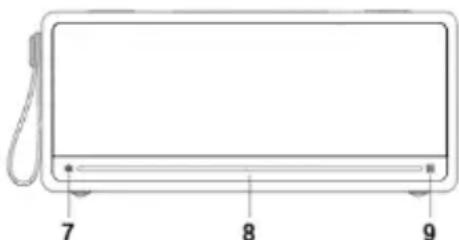
-
- button
- "Power" button
- "Play/Pause" button
- "Mode" button
- "Wireless" button
-
- button
- Light effect button
- LED bar
- Equalisation button
- AUX input
- USB socket
- SD card reader
- USB-C socket
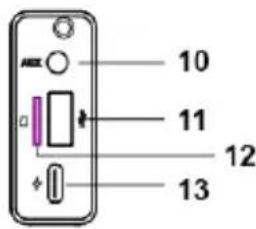
4.COMMISSIONING AND FIRST START-UP
Some preliminary operations are necessary before first use. Proceed as follows:
- Unpack the appliance and check the conditions and completeness of the equipment, as indicated in the previous chapter.
- Keep the packaging for 15 days in case it needs to be returned to the retailer; after this period, dispose of it in accordance with the instructions on the separation of materials indicated on it.
- Read this manual in its entirety, paying particular attention to the instructions for safe use.
- Carefully remove all possible fastening materials from parts, including internal parts.
- Fully remove any stickers from the surface of the appliance.
- Place the appliance on a flat, stable surface, taking care to reserve 10cm of space on all sides, at the rear and above the appliance for the necessary air circulation.
- Refer to chapter 2 for further details and instructions on appliance positioning and installation.
- Connect the supplied cord to the USB-C socket (13) via the small connector, then connect the large connector to a 5V voltage source with USB socket.
- Ensure that the cord does not come into contact with hot parts and that it is not subjected to excessive bending or kinking.
- Wait a few hours until the LED bar turns completely red (5).
- Disconnect the cord from the USB-C socket (13).
- Press the 'Mode' button (4) for a few seconds.
- Verify that the appliance emits a start-up sound (loud bass), followed by the word "wireless", indicating the operating mode.
The appliance can now be used normally.
5. USING THE APPLIANCE
The buttons: meaning and use
| Button | Short press | Double short press | Long press | In call |
| Volume decrease | Double volume decrease | Previous track | Diverts call to phone | |
| No function | No function | Switches the appliance on/off | No function | |
| DIII | Starts/pauses playback, answers call while ringing | No function | No function | Ends the call |
| M | Switches playback mode wireless, USB, MicroSD, Aux-in) | No function | Rejects call while ringing | No function |
| Switches to wireless mode | Disconnects from wireless source/restarts wireless pairing | Starts/stops TWS coupling | No function | |
| Volume increase | Double volume increase | Next track | Diverts call to phone | |
| Changes LED bar graphics (5 variants) | No function | Switches the LED bar on/off | No function | |
| Switches equalisation (bass, treble, normal) | No function | No function | No function |
Wireless pairing:
Switch on the appliance; if already switched on, press the button (4) several times until it switches to wireless mode, which the appliance announces vocally: the LED bar flashes blue. Activate wireless on the mobile device, then search for the "IR-M6 Classic" appliance; when found, carry out the connection operations. Once completed, the appliance will emit a confirmation sound and the LED bar will change colour to the previously selected pattern. Use the player on the connected mobile device to play music from the appliance.
Changing the connected wireless device:
Once the wireless mode has been selected, the appliance attempts to connect with the last connected device in order of time and, if available, connects to it; if you wish to connect a different mobile device, press the button (5) twice in rapid succession: the device goes into wireless pairing mode, signalled by the announcement "wireless pairing". You can now connect a different mobile device as explained in the previous point.
TWS function:
The TWS function allows the use of two IR-M6 Classic devices as left and right speakers of a stereo audio configuration: the appliances are able to recognise each other and automatically assign the correct channel to be played. To use the TWS function, switch on two IR-M6 Classic devices at a short distance from the mobile device, then briefly press the button (5) on both: both devices announce "TWS Pairing" vocally and begin the mutual recognition procedure (a few seconds), at the end of which they announce "TWS paired". Use the mobile device to connect to one of the two "IR-M6 Classic" devices wirelessly as explained above, then use the connected mobile device player to play music from the appliance. To disconnect the connected speakers in TWS mode, briefly press the button (5). While playing in TWS mode, switching off one of the two appliances will also switch off the second, just as both devices will switch to TWS mode if previously paired, if they are switched on within wireless range.
Playback from USB:
The appliance can play back music content saved in MP3 or WAV format on a USB pendrive with a maximum capacity of 32 GB formatted with the FAT32 file system in sequence, according to the alphabetical order of the file name: any sub-folders present will be played back in full and in sequence, according to their own alphabetical order, in exactly the same way as individual music files.
To start playback from a USB pendrive, insert it into the socket (11): the appliance vocally announces "USB mode", confirming that playback has started. If in wireless playback from a different source, the appliance automatically switches over and starts playback from the USB pendrive: the buttons will have the functions shown in the table above.
Playback from Micro SD memory card:
The appliance can play back music content saved in MP3 or WAV format on a MicroSD memory card with a maximum capacity of 32 GB formatted with the FAT32 file system in sequence, according to the alphabetical order of the file name: any subFolders present will be played back in full and in sequence, according to their own alphabetical order, in exactly the same way as individual music files.
To start playback from a MicroSD, insert it into the reader (12): the appliance vocally announces "USB mode", confirming that playback has started. If in wireless playback from a different source, the appliance automatically switches over and starts playback from the USB pendrive: the buttons will have the functions shown in the table above.
Playback from Aux input
The appliance can play an analogue pre-amplified signal, coming from a headphone or line output, from analogue sources such as Hi-Fi components, external tuners, mobile devices or PCs without a wireless connection, etc. The signal plug, coming from the external source, must be connected via a 3.5mm stereo jack plug to the socket (10): once the plug is fully inserted, the appliance automatically switches over to the playback of the incoming signal, vocally announcing the switch with "auxiliary in". Since the analogue communication does not share control with the source, the only functioning buttons will be volume control (1) and (6), source change (4), LED bar management (7) and equalisation (9), as described in the table above. Press button (4) to switch to a different mode, e.g. wireless or USB.
Telephone conversation:
The appliance acts as a speakerphone, amplifying the correspondent's communication when connected to a mobile phone via wireless connection. If a call is received, music playback stops and the appliance emits a ringing tone: the call can be answered by briefly pressing the button (3) or rejected by briefly pressing the button (4), as described in the table above. To make a call using the appliance as a speakerphone, normally make a call from the mobile device during the wireless connection. If you wish to suspend the speakerphone function, reserving the conversation to the telephone only, press button (1) or (6) during the communication: appliance sound will remain muted and the conversation can continue from the telephone.
During playback from USB pendrive, Micro SD or from Aux input, the appliance is not connected to any phone: to provide the speakerphone function, switch to wireless by pressing button (4), then ensure that the appliance connects via wireless to the mobile device.
Automatic shut-down:
The appliance automatically switches off in the following two cases:
- The mobile device to which the device is paired is disconnected for more than ten minutes
- Playback is paused for more than ten minutes in any mode
When switching off, the appliance emits a confirmation sound; to restart the appliance after an automatic shut-down, briefly press the button (4).
Charging:
The appliance signals that the built-in battery needs charging with a specific message ("battery low"), recurring if applicable. To carry out this operation in the best possible way, keep in mind that:
- The appliance must be charged as soon as possible when the need is signalled: excessive use with a discharged battery can compromise subsequent recharges and reduce the efficiency of the battery.
- Charging must not be interrupted if possible.
- Charging in progress is indicated by the LED bar lighting up red progressively: charging is complete when the LED bar is fully lit and no parts of it flash.
- Ideal charging is carried out with a high-powered charger, such as for tablets, i.e. with a current of at least 2 amps: charges with lower currents are generally inadvisable because they could cause partial charging of the battery, as well as take a long time.
- Charging from the USB port of a PC is usually very slow.
To start charging, simply connect the supplied cord to the USB-C socket (7) via the small connector, then connect the large connector to a 5V voltage source with USB socket. Verify the start of charging by paying attention to the LED bar, which should turn red in a sequential and increasing manner.
6. CLEANING AND MAINTENANCE
The appliance does not require maintenance, understood as the replacement of consumables or scheduled servicing; periodic removal of dust with a dry cloth suitable for the function is sufficient. Every cleaning operation must absolutely be carried out with the appliance switched off: the use of a damp
cloth or any atomised detergent must be avoided given the presence of a non-separable battery and given the possibility that certain voltage points may be reached by liquids. Even if stains or accumulations of dirt must be removed, proceed without wetting or soaking the appliance: in any case, avoid aggressive detergents, abrasive sponges, iron wool or other chemical cleaners.
7. TROUBLESHOOTING
Problem: The appliance stays off
Possible cause 1: The battery is flat
Probable solution 1: Charge the battery
PC2: The electrical outlet of the charger is not powered
PS2: Check the switches on the electrical panel
Problem: USB playback does not start
PC1: USB pendrive is not fully inserted
PS1: Insert pendrive fully into socket (6)
PC2: USB pendrive contains no readable content
PS2: Save content to be played back on the USB pendrive in MP3 or WAV format
PC3: Pendrive is not formatted with FAT32 file system
PS3:Reformat the pendrive with FAT32 file system and save the tracks again
Problem: The appliance keypad is not responding
PC1: A software crash has occurred
PS1: Reset by pressing and holding button (2) for 10 seconds
Problem: Wireless connection does not complete
PC1: Mobile device does not have correct wireless protocol
PS1: Use a different mobile device
PC2: Correct protocol is deactivated on the mobile device
PS2: Enable correct protocol on the mobile device, using settings menu
PC3: Too many wireless devices are within range
PS3: Deactivate as many wireless devices as possible within range except the IR-M6 Classic
Should any malfunctions other than those listed above occur, a self-sufficient solution is not feasible and the product must be inspected by a qualified technician.
8. THECNICAL DATA
Output power : 40 Watt RMS
Speaker : Dual woofers, dual tweeters and passive resonator
Frequency response : 65 Hz-20 KHz
Charging voltage : DC 5 V/2 A
Aux-in input : Jack 3.5 mm
Built-in battery : 7.4 V 4,000 mAh, 29.6 W/h
Charging duration : 4:00 hours
Playback duration : Approx. 6 hours with pink noise at 50% volume
Dimensions (L x H x D) : 24.6 x 8.8 x 9.71 cm
Weight : 1.737 Kg
9. COMPLIANCE
The producer Melchioni Spa declares that the product Wireless speaker IR-M6 Classic (cod. 550922102) is in compliance with Directive 2014/35/EU of the European Parliament and of the Council, of 26 february 2014, on the harmonisation of the laws of the Member States relating to the making available on the market of electrical equipment designed for use within certain voltage limits.
SIMPLIFIED EU DECLARATION OF CONFORMITY
Hereby, manufacturer Melchioni Spa declares that the radio equipment type Wireless speaker IR-M6 Classic (cod. 550922102) is in compliance with Directive 2014/53/EU. The full text of the EU declaration of conformity is available at the following internet address: http://www.melchioni.com
The producer Melchioni Spa declares that the product Wireless speaker IR-M6 Classic (cod. 550922102) is in compliance with Directive 2011/65/EU of the European Parliament and of the Council, of 8 June 2011 and subsequent Commission Delegated Directive 2015/863, on the restriction of the use of certain hazardous substances in electrical and electronic equipment.
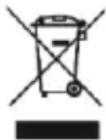
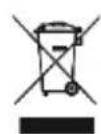
According to Directive 2012/19/EU of the European Parliament and of the Council, of 4 july 2012, on waste electrical and electronic equipment (WEEE), the presence of the crossed-out bin symbol indicates that this appliance is not to be considered as urban waste: its disposal must therefore be carried out by separate collection. Disposal in a non-separate manner may
constitute a potential harm to the environment and health. This product can be returned to the distributor when purchasing a new device. Improper disposal of the appliance constitutes misconduct and is subject to sanctions by the Public Security Authority. For further information, contact the local administration responsible for environmental matters.
Product supplied with battery(ies) model ICR18650-2S-4000 7,4V 4.000mAh, 29,6Wh, imported by Melchioni S.p.A. and compliant with Regulation (EU) 2023/1542 OF THE EUROPEAN PARLIAMENT AND OF THE COUNCIL of 12 July 2023 on batteries and waste batteries, amending Directive 2008/98/EC and Regulation (EU) 2019/1020 and repealing
Directive 2006/66/EC.
10. WARRANTY
Melchioni Spa, based in Milan (Italy), via Colletta 37, recognizes a conventional guarantee on the product for a period of two years from the date of the first purchase by the consumer. This guarantee does not
affect the validity of the legislation in force concerning consumer goods (Legislative Decree 6 September 2005 n. 206 art. 128 and following), of which the consumer remains the owner. This guarantee applies to the entire territory of the European Union.
The components or parts that are found to be defective for ascertained manufacturing causes will be repaired or replaced free of charge through the dealer, during the above warranty period. Melchioni Spa reserves the right to make a complete replacement of the device, if repairability is impossible or excessively expensive, with another device of similar characteristics (Legislative Decree 6 September 2005 no. 206 art. 130) during the warranty period. In this case, the validity of the warranty remains that of the original purchase: the service provided under warranty does not extend the warranty period.
In any case, this appliance will not be considered defective in terms of materials or manufacture should it be adapted, changed or adjusted, in order to comply with national or local safety and / or technical standards, in force in a country other than that for which it is was originally designed and manufactured. This appliance has been designed and built for domestic use only: any other use will invalidate the benefits of the guarantee.
The warranty does not cover:
- parts subject to wear or tear, nor those parts that require periodic replacement and / or maintenance
- professional use of the product
- malfunctions or any defects due to incorrect installation, configuration, software / BIOS / firmware update not performed by authorized Melchioni Spa
- repairs or interventions carried out by persons not authorized by Melchioni Spa
- manipulation of assembly components or, where applicable, of the software
- defects caused by fall or transport, lightning, voltage fluctuations, liquid infiltration, opening of the appliance, bad weather, fire, public disturbances, inadequate ventilation or incorrect power supply
- any accessories, for example: boxes, bags, batteries, etc. used with this product
- home interventions for convenience checks or presumed defects
The recognition of the guarantee by Melchioni Spa is subject to the presentation of a tax document that proves the actual date of purchase. The same must not show any tampering or deletions, in the presence of which Melchioni Spa reserves the right to refuse the provision of treatment under warranty. The warranty will not be recognized if the serial number or model of the appliance is non-existent, abraded or modified. This warranty does not include any right to compensation for direct or indirect damage, of any nature, to people or things, caused by any inefficiency of the appliance. Any extensions, promises or services in this regard, insured by the retailer, will be borne by the latter.
1. NOTA INTRODUCTORIA
directiva 2006/66/CE.