Smart Air Fryer 5.5L - Deep fryer Xiaomi - Free user manual and instructions
Find the device manual for free Smart Air Fryer 5.5L Xiaomi in PDF.



User questions about Smart Air Fryer 5.5L Xiaomi
0 question about this device. Answer the ones you know or ask your own.
Ask a new question about this device
Download the instructions for your Deep fryer in PDF format for free! Find your manual Smart Air Fryer 5.5L - Xiaomi and take your electronic device back in hand. On this page are published all the documents necessary for the use of your device. Smart Air Fryer 5.5L by Xiaomi.
USER MANUAL Smart Air Fryer 5.5L Xiaomi
XIAOMI Smart Air Fryer 5.5L User Manual -01
Read this manual carefully before use, and retain it for future reference.
Thank you for choosing Xiaomi Smart Air Fryer 5.5L. This product is for household use only. Illustrations of product, accessories, and user interface in the user manual are for reference purposes only. Actual product and functions may vary due to product enhancements.
Safety Instructions
- This appliance can be used by children aged from 8 years and above and persons with reduced physical, sensory or mental capabilities or lack of experience and knowledge if they have been given supervision or instruction concerning use of the appliance in a safe way and understand the hazards involved. Children shall not play with the appliance. Cleaning and user maintenance shall not be made by children unless they are older than 8 and supervised.
- Please keep the air fryer and the power cord out of the reach of children aged under 8.
- For household use only.
- If the power cord is damaged or broken, it must be replaced by the manufacturer or after-sales service department to avoid safety hazards.
- The temperature of the accessible surface may rise while the air fryer is working.
- The surface will heat up easily while the air fryer is in use.
- The air fryer should not be operated via an external timer or a separate remote control.
- Do not block the air fryer's air inlet and outlet, nor the heat dissipation vents during use to avoid affecting its normal heat dissipation.
- Any non-professionally trained technicians should not modify the internal wiring of the air fryer.
- Do not use charcoal or other similar fuel sources to heat the basket, frying plate, or grill.
- Do not place the basket on any other heat sources, such as an induction cooker or gas stove.
- Do not plug or unplug the power cord with wet hands to avoid the risk of an electrical shock.
- Do not use a power cord with loose connection or poor contact.
-
Do not let the power cord cross through sharp objects to avoid damage to the power cord.
-
Do not use the air fryer to store any items, especially flammable, explosive, or corrosive items.
- Do not excessively pinch, bend, twist, or place heavy objects on the power cord to prevent from exposing or breaking its core.
- Stop using the air fryer immediately and unplug it from the power source if it doesn't function normally or malfunctions.
- The air fryer cannot be started without the basket being in place.
- Do not touch the basket directly with your hands during or right after use to avoid getting scalded.
- Do not allow children to get close to or play with the cling wrap and packaging to avoid suffocation accidents.
- Do not use any plastic utensils or normal paper wrapping materials to wrap food for cooking.
- Do not drop this air fryer or bump it against hard objects to avoid damage or malfunction.
- Do not insert pins, wires or other objects into any of the openings of the air fryer to avoid an electrical shock or injury.
- Do not use any accessories that are not recommended by the manufacturer.
- The normal operating altitude range of this product is 0-2000 meters.
- Keep a distance of 30~cm or more between the air outlet and other devices during use.
- Do not move or shake the air fryer during use.
- Do not insert any foreign objects into the safety switch to avoid causing any danger.
- When placing the air fryer in a kitchen cabinet, etc., please ensure that it is well ventilated.
- Please be sure to unplug the air fryer before cleaning or repairing it.
- This product must be used on a level, heat-resistant surface to avoid damage to the product or accidents.
- Ensure that the silicone parts of the air fryer do not come into contact with ethanol or solutions that contain more than 50% of alcohol.
-
Please ensure that the electrical outlet the air fryer is plugged into is well grounded to avoid an electrical shock or other safety hazards.
-
Only use a grounded electrical outlet with a rated current of 10A to avoid the risk of fire and other potential hazards.
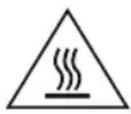
CAUTION: Hot surfaces.
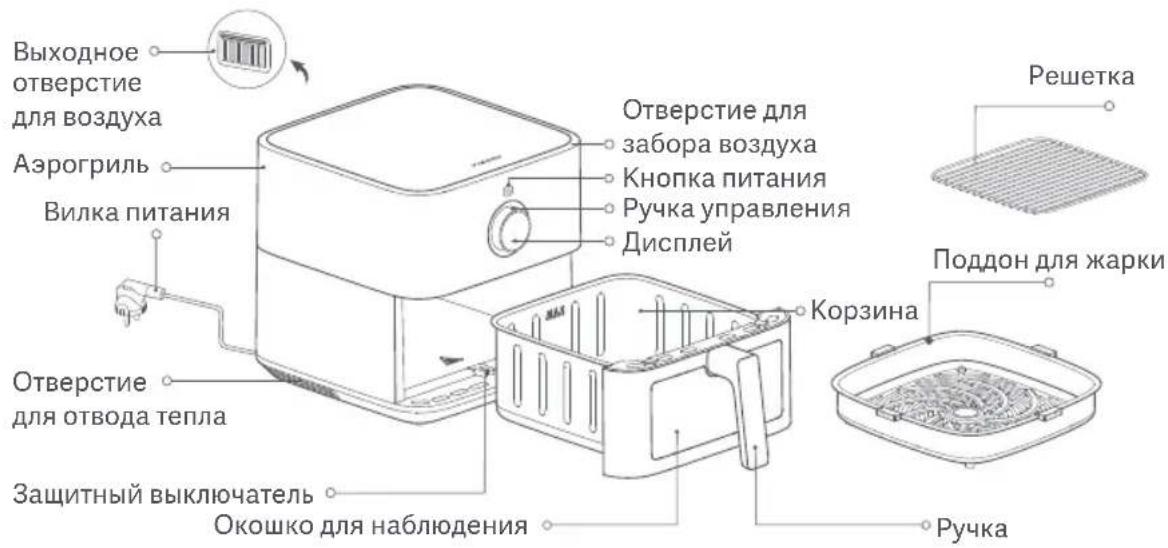
Product Overview
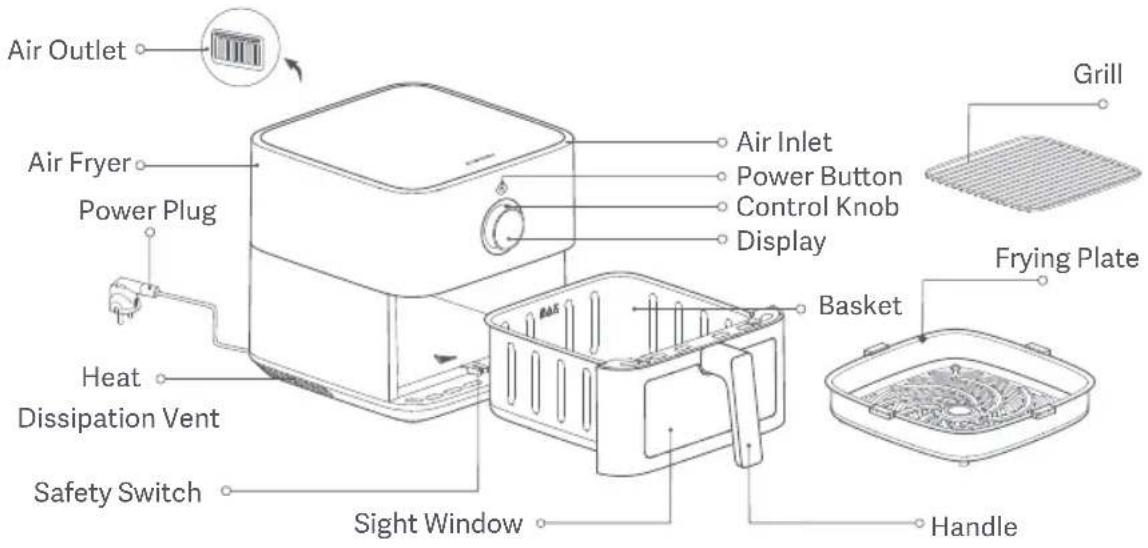
Notes:1. The silicone rubber on the frying plate is made of high temperature resistant food-grade materials to prevent the edges of the frying plate from scratching the coating of the basket and to improve the stability of the frying plate. Do not remove the silicone rubber from the frying plate.
2. Ingredients that are too small are not suitable for use on the grill. Please make sure that ingredients don't fall through the gaps in the grill.
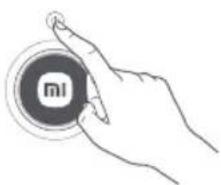
Control Knob
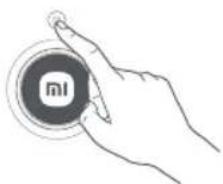
1
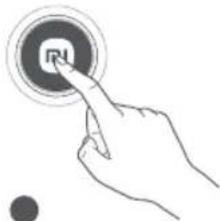
Press the power button to turn on/off.
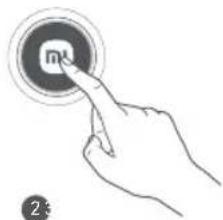
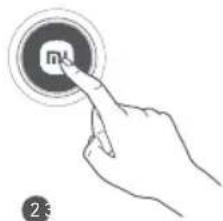
Press to confirm selection.
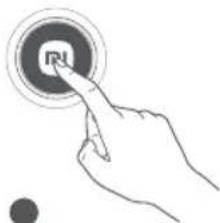
Press and hold for 1 second to return to the previous menu.
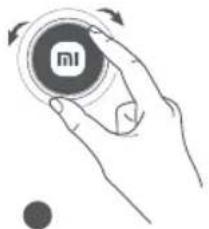
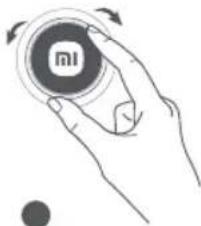
Turn left/right to change functions.
How to Use
Connect the power cord and press the power button to turn on the air fryer.
Notes:1. When the air fryer is turned on for the first time, press the power button and go to the language selection screen, turn the control knob to the desired language, then press the control knob to confirm the selection.
- The air fryer may give off a minor odor on first use. It is recommended to run the air fryer with an empty basket at the maximum temperature (220^) for 5 minutes to remove the odor. The air fryer may emit a small amount of white smoke or an odor while running with an empty basket, which is normal.
Turning on
Connect the power cord and press the power button to turn on the air fryer.
Turning off
Press the power button to turn off the air fryer, regardless of the state it is in.

Setting Wi-Fi
- Resetting Wi-Fi:
Press the control knob to enter "Reset Wi-Fi" while in the "Wi-Fi" screen, then press the control knob to select Yes to reset the Wi-Fi, or turn the control knob to select No to abandon resetting the Wi-Fi.
Enabling/disabling Wi-Fi:
Press the control knob to enter "Enable/Disable Wi-Fi" while in the "Wi-Fi" screen, then press the control knob to select Yes to enable or disable the Wi-Fi, or turn the control knob to select No to abandon the change.
Wi-Fi status indicator
| Awaiting fast connection... | Reconnecting after a disconnection... | Connected successfully | Updating... |
| Wi-Fi indicator blinks slowly | Wi-Fi indicator blinks quickly | Wi-Fi indicator stays on | Wi-Fi indicator blinks quickly |
Note: If the air fryer does not connect to the Wi-Fi for 30 minutes, the Wi-Fi indicator will turn off.
Updating firmware
During a firmware update via the Mi Home/Xiaomi Home app, the display shows that an update is in progress. Upon completion of the update, the air fryer will restart automatically.
Note: The Mi Home/Xiaomi Home app will be able to update the firmware unless the air fryer or its display is turned off, or the Wi-Fi is disconnected. Other operations cannot be performed when the firmware update is in progress.
Connecting with the Mi Home/Xiaomi Home app
This product works with the Mi Home/Xiaomi Home app*. Control your device with Mi Home/Xiaomi Home app.
- Scan the QR code to download and install the app. You will be directed to the connection setup page if the app is installed already. Or search for "Mi Home/Xiaomi Home" in the app store to download and install it.
-
Open the Mi Home/Xiaomi Home app, tap "+" on the upper right, and then follow the instructions to add your device.
-
The app is referred to as Xiaomi Home app in Europe (except for Russia). The name of the app displayed on your device should be taken as the default.
Note: The version of the app might have been updated, please follow the instructions based on the current app version.
Cooking
Preparations
The ingredients can be marinated to taste before cooking.
Note: Do not cook foods containing baking soda (sodium hydroxide), such as pretzel buns, to prevent damage to the air fryer's coating.
Start cooking
- Place the air fryer on a stable, level surface and ensure that there is air circulation around the air fryer.
- Place the frying plate at the bottom of the air fryer and put the prepared food onto the plate. Avoid overfilling or piling the food beyond the frying plate's rim. This will ensure the best cooking results without the need to turn over the food.
Notes: 1. Overstuffing the air fryer with ingredients might interfere with the hot air flow inside it, which could prevent the food from heating evenly. It may be necessary to adjust the cooking time and turn over the food to achieve the ideal cooking effect.
-
If there are more ingredients, use the grill to place them in layers.
-
When the basket is completely pushed into the air fryer, turn the control knob to select the appropriate recipe and set the parameters (such as the amount of ingredients, mode, cooking temperature, and cooking time) accordingly. Then press the control knob to confirm settings and start cooking.
Notes:
- The cooking time and temperature (except for yogurt) can be adjusted during the cooking process without needing to pause. After making the adjustments, press the control knob to confirm the new settings, and the cooking will continue based on these updated parameters.
- Neither the recipe nor the mode can be switched while cooking is underway.
-
Only the cooking time, not the temperature, can be adjusted in the defat mode.
-
When the air fryer's basket is pulled out during cooking, the countdown will blink and cooking will pause. Parameter adjustments are not allowed in this state. Placing the basket back allows the cooking timer to resume, and cooking continues.
Note:For cooking more than 500g of fries, a prompt to flip the ingredients halfway through will be provided.
- Once the cooking countdown ends, the air fryer will give off a long beep to indicate the completion of cooking. Carefully take out the basket and use tongs to remove the food.
CAUTIONS: 1. When cooking is completed, the basket is very hot, so do not touch it to avoid getting scalded.
- If the keep-warm feature is enabled at the end of cooking, the air fryer will automatically transition to the keep-warm mode.
Other Operations
1. Language settings
-
Turn on the air fryer, go to settings, and press the control knob to enter the language selection screen.
-
Turn the control knob to the desired language and press it to confirm.
2. Manual mode
- When the air fryer is turned on, press the control knob to enter the manual mode, then turn the control knob to the desired cooking temperature, press the control knob to set the time and turn the control knob to the desired cooking time, and finally press the control knob to start the manual cooking program.
3. Temperature/time adjustment
The temperature can be adjusted between 40^ and 220^ . The time can be adjusted between 0-24 h.
-
The cooking temperature is adjusted by 5^ for each turn of the control knob.
-
When adjusting or modifying the time parameters in the recipe cooking mode, if the cooking temperature is between 80^ and 220^ , the adjustable cooking time is ≤ 1 hour; if the cooking temperature is < 80^ , the adjustable cooking time is ≤ 24 hours.
-
When adjusting the cooking time or scheduled completion time, pay attention to the speed at which the control knob is turned. When the adjusted time range is ≥ 60 minutes, turning the control knob quickly will adjust the time by 60 minutes, while turning the control knob slowly will adjust the time by 1 minute. When the adjusted time range is < 60 minutes, turning the control knob quickly will adjust the time by 10 minutes, while turning the control knob slowly will adjust the time by 1 minute.
4. Scheduled cooking
- Press the control knob to select the schedule function, turn the control knob to select the scheduled recipe, then set the cooking temperature/time and scheduled time. The air fryer will automatically start cooking at a proper time to ensure that the cooking is completed within the scheduled time, and then enter the keep-warm state or finish cooking once done.
Notes:
- The scheduled time must be longer than the cooking time, but less than 24 hours.
- The scheduled time refers to the total time period within which the cooking process is expected to be completed. For instance, if the display reads "02:40", it indicates that the cooking will be completed within 2 hours and 40 minutes.
- The schedule function is not supported in yogurt, dried fruit, and defrost modes.
5. Keep-warm function
- The keep-warm function is enabled by default. This function can be enabled or disabled by navigating to settings > thermostat settings and pressing the control knob on the display. A press-and-hold action on the display for 1 second is required to disable the keep-warm mode once it is enabled.
- The keep-warm function is set to last for 30 minutes at a temperature of 80^ . If the air fryer's basket is pulled out while this function is enabled, both the function and its timer will pause instantly. If the air fryer is placed back within 1 minute, the function and its timer will resume from where they left off. If the air fryer is not placed back within 1 minute, the function will end, and the air fryer will return to the home screen of the corresponding recipe.
CAUTIONS: 1. When keep-warm is on and the cooking temperature is set to ≥ 80^ , the air fryer will transition to the keep-warm mode after the cooking is completed. Otherwise, the air fryer will skip the keep-warm stage and directly display the cooking completion screen.
- The keep-warm function is not supported in yogurt, vegetables, dried fruit, and defrost modes.
6. Pause/cancel cooking
- When the air fryer is in cooking mode, press the control knob to pause cooking. When the air fryer is cooking or paused, press and hold the control knob for 1 second to enter the canceling cooking screen. Select Yes to cancel cooking and enter the manual mode screen.
CAUTION: During cooking, the control knob can be turned to adjust the temperature and time parameters. The corresponding numbers will blink during adjustment. Once the adjustment is completed, press the control knob to confirm the new parameters.
7. Cloud recipe mode
- When a cloud recipe is selected and executed using the Mi Home/Xiaomi Home app, the air fryer will cook automatically according to the recipe. After cooking, the air fryer will enter the manual mode screen.
Notes: 1. The schedule function is available when executing cloud recipes.
- Cloud recipes cannot be executed under the following circumstances:
① The air fryer or its display is turned off. ② There is no Wi-Fi connection.
③ The air fryer is in the cooking/schedule/keep-warm mode. ④ The air fryer's basket has been pulled out.
8. Defat mode
- The defat mode enables an increase in fat release from food while cooking without oil, contributing to a reduction in fat intake.
- This mode is specifically suitable for items such as chicken wings, beef steak, and lamb chops, but not intended for other recipes or cloud recipes/custom recipes.
- Upon selecting the defat mode, altering the cooking mode or parameters in the schedule status becomes unavailable. Only the cooking time, not the cooking mode or temperature, can be adjusted during cooking.
9. Error message
- When the air fryer detects an error, the display will show "E1" or "E2", and the air fryer will emit three brief beeps.
Cleaning & Maintenance
Unplug the power cord before cleaning and maintaining the air fryer, and wait for it to cool down to a safe temperature before proceeding. Please remove the basket from the air fryer when cleaning the air fryer.
Surface of the air fryer:
The surface of the air fryer can be wiped with a dry, soft cloth or a sponge moistened with a neutral cleaning detergent.
Cavity:
To remove stains from the inside of the air fryer, apply a suitable amount of detergent diluted in hot water to its surface and let it sit for about 10 minutes, then use a soft sponge moistened with water to wipe away the detergent residue.
- Basket:
Clean the air fryer after each use. The basket of the air fryer is coated, so do not use any steel wool or other abrasive cleaning materials to clean it as they may damage the coating.
Frying plate and grill:
Use a soft, cotton cloth or sponge moistened with neutral detergent to wipe it clean, then moisten it with water to wipe away the detergent residue.
Note: The frying plate and grill can be separated and placed in the dishwasher for cleaning; the basket can be washed in water, but cannot be cleaned in the dishwasher; however, the air fryer can neither be washed in water nor be cleaned in the dishwasher.
Cleaning Precautions
- After using the air fryer, please unplug the power plug in time. Do not place the air fryer near a source of fire and do not immerse it in water. Do not place the power plug directly on the air fryer to prevent the plug from scratching its surface.
- Cleaning and maintenance should only be done after the air fryer has cooled down.
- Do not use any corrosive or abrasive cleaning materials or detergents.
Note: Regular cleaning and maintenance of the air fryer will help to extend its service life.
Maintenance Tips
- Only professionally trained and qualified technicians should repair the air fryer.
- Others should not repair the air fryer without permission to avoid serious consequences.
- When the air fryer malfunctions, please refer to Troubleshooting before contacting the after-sales service team.
- If the issue persists, please unplug the power cord to disconnect it and contact the after-sales service team.
Troubleshooting
| Possible Causes Solutionsissue | ||
| The air fryer doesn't function. | The air fryer is not connected to a power supply. | Plug the power cord into a grounded electrical outlet. |
| The basket is not pushed into place. | Pull out the basket and push it back into place. | |
| Display shows E1. | The sensor has a broken circuit. | Contact the after-sales service team. |
| Display shows E2. | The sensor has a short circuit. | Contact the after-sales service team. |
| The fan doesn't rotate. | The fan blade is stuck. | Contact the after-sales service team. |
| The motor is damaged or other components have a broken circuit. | Contact the after-sales service team. | |
| White smoke is coming out. | Cooking oily ingredients. | When you fry ingredients containing more fat, there will be a lot of smoke, which is normal. |
| The air fryer still contains grease residue from the previous cooking program. | Ensure that you clean the air fryer after each cooking program. | |
| Can't insert the basket into the air fryer smoothly. | Too many ingredients in the basket. | The ingredients in the basket can't exceed the maximum mark. |
| The basket is not properly inserted. | Properly insert the basket. | |
| The schedule function doesn't function as requested. | The scheduled time is too short. | The scheduled time should be longer than the cooking time. |
| The scheduled time is not saved. | The scheduled time should be saved and carried out by pressing the control knob. | |
| Wi-Fi can't be connected. | The Mi Home/Xiaomi Home app is not the latest version. | Update the Mi Home/Xiaomi Home app to the latest version. |
| The Wi-Fi signal is weak. | Move to a location where the signal is strong enough. | |
| Unable to connect the air fryer. | Wi-Fi cannot be connected. | Check whether the Wi-Fi is connected normally or reset the Wi-Fi to reconnect. |
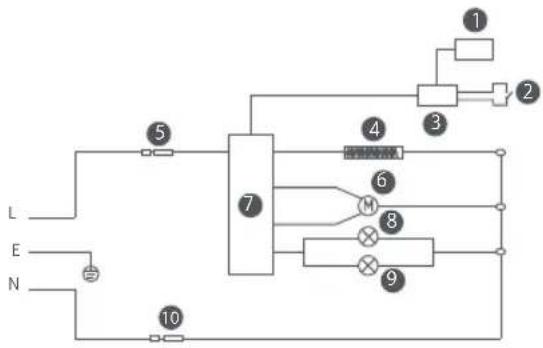
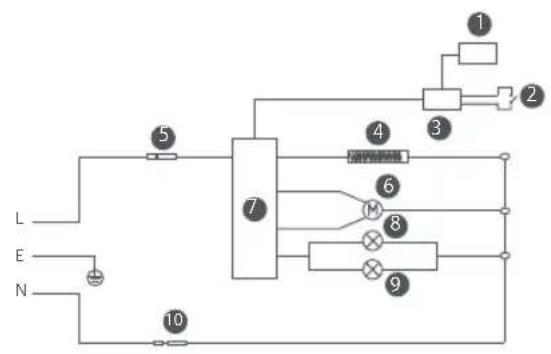
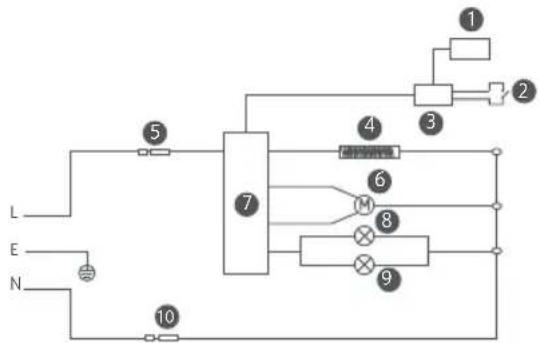
Electrical Diagram
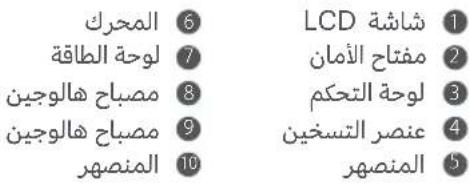
LCD Display
Safety Switch
Control Panel
Heating Element
Fuse
6 Motor
Power Board
Halogen Lamp
Halogen Lamp
10 Fuse
Specifications
| Name: Oven (Air Fryer) | Capacity: 5.5 L | Color: White |
| Model: MAF15 | Rated Frequency: 50–60 Hz | Net Weight: 5.2 kg |
| Rated Power: 1600 W | Rated Voltage: 220–240 V~ | Gross Weight: 6.2 kg |
| Maximum Output Power of the Wi-Fi Module: < 20 dBm Operating Frequency: 2412–2472 MHz | ||
| Operating Temperature: -10°C to 40°C Package Dimensions: 425 × 330 × 330 mm | ||
| Wireless Connectivity: Wi-Fi IEEE 802.11 b/g/n 2.4 GHz | ||
Under normal use of condition, this equipment should be kept a separation distance of at least 20cm between the antenna and the body of the user.

Hereby, Ningbo Careline Electric Appliance Co., Ltd. declares that the radio equipment type Oven (Air Fryer) MAF15 is in compliance with Directive 2014/53/EU. The full text of the EU declaration of conformity is available at the following internet address: http://www.mi.com/global/service/support/declaration.html
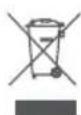
All products bearing this symbol are waste electrical and electronic equipment (WEEE as in directive 2012/19/EU) which should not be mixed with unsorted household waste. Instead, you should protect human health and the environment by handing over your waste equipment to a designated collection point for the recycling of waste electrical and electronic equipment, appointed by the government or local authorities. Correct disposal and recycling will help prevent potential negative consequences to the environment and human health. Please contact the installer or local authorities for more information about the location as well as terms and conditions of such collection points.
Manufactured for: Xiaomi Communications Co., Ltd.
Manufactured by: Ningbo Careline Electric Appliance Co., Ltd.
(a Mi Ecosystem company)
Address: No.558, Wei'er Road, Andong Industrial Zone,
Hangzhou Bay New Area, Ningbo, 315327, Zhejiang, China
For further information, please go to www.mi.com
User Manual Version: V1.0
Indirizzo: No.558, Wei'er Road, Andong Industrial Zone,
Hangzhou Bay New Area, Ningbo, 315327, Zhejiang, China
ATTENTION: Surfaces chaudes.
Adresse: No.558, Wei'er Road, Andong Industrial Zone, Hangzhou Bay New Area, Ningbo, 315327, Zhejiang, China
Hangzhou Bay New Area, Ningbo, 315327, Zhejiang, China
Para Obtener mas informacion, visite www.mi.com
IHctpyKuIN no 6e3oNaChOCTN
- ΘТИМ yCTPOIcTBOM MOryT NOJIb3OBAbCSЯ DeTu B Bo3pacte ot 8 JeT, a TaKxpe IuIa C OrpaHnueHHbIMN φn3nuecknMn, CEHCOPHbIMN IuI yMCTBeHHbIMN CnOCo6HOCTaMn IuI HeIOCTaTOUHbIM ONbITOM N 3HaHnAIMN, eCIn OHN HaxOJaTcN IOd IprncmOTpOM IuI npOuII INHCTpykTaJX NO 6e3OnaChOMY NCNoJIb3OBaHnIO yCTPOIcTBOM N IOHIMaIOT CBra3aHHbIE C HIM OnaCHocTn. DeTu He IdoJXhbl nrgaTb C yCTPOIcTBOM. YnCTky N 06ClyjXnBaHne yCTPOIcTBa MOry TnpOBODntb DeTu CTapWe 8 JeT TOlbKO B TOM Clyuae, eCIn OHa nPoBOIDNTcN IOd nprncmOTpOM.
-Держinte aэрогриишнур ппань В HeIoCTyHOM Ддддддддддддддддддддддддддддддддддддддддддддддддддддддддддддддддддддддддддддддддддддддддддддддддддддд徳 8 leT MeCTe.
ToIbKO dIy6bITOBO rNcNoJIb3OBaHn. - EcIn shHyp nHTaHnI NOBpeKdEn nII nCLOMaH, OH DOJIKeH 6bITb 3aMeHEn Ipon3BOIDNTeLEM nII OTDeJOM NocJePpOdaXHOro 06cLyXnBaHnI BO n36eXaHne yrpo3bl 6e3OpacHOCTn.
- Temnepaotypa doctynhoi nobepxHOCTM MoKet NOBbIaTbcr BO BpeMa pa6Otbl a3pOprnil.
- Поверхноctь 6удет Лergк подаВаТься нагpeBy BO Время ИстпьзOBаня aэрогрил.
3anpeaetcay npabTb aaporpnilem C nOMOuBHeHero TaMepa nn OTdeIbHO rNtTa dNCTaHnOHHO ynpabJeHna.
He nepekpBaIte npedymOTpeHbIe B a3porpnlne OTBepCTne Ira 3a6opa BO3dyxa N BbIXoHoe OTBepCTnA Ira BO3dyxa, a TaKke OTBepCTnA Ira OTBOda Tepna BO BpeM erO nCnoJb3ObaHnA. B IpOTNBHom Clyuae 3TO NOBnIeT Ha HopMaJIbHbI OTBOD TePna.
3anpeaetcmaOnnkaunBHytpenHe npoBokn a3porpnilaHneODROTOBHeHbIX CneuaJIInCTOB.
3anpeaetcncnoB3OBaTb dpBeChb yrolnb npyrne aHaIOrnHbIe nCTOuHNKn TOnJIbA dJa HaPeBa KOp3nHbl, NOdOHa IJr JkapKn nn peWeTKn.
He nomeuTe KOp3nHy Ha KaKne-ln6o dpyrne nCTouHnKn TePna, TaKne KaN HNDyKcNOHHa Nn rA3OBa PnNTa.
He noDCoeHnIe H He OTcoEINHJTe 7Hyp nHTaHn MOKpbIM pykam BO n36exKaHne pncKa nopaxeHn 3JIeKTPnueCKnM TOKOM.
He nCnoJb3yIe 7Hyp nHTaHncaOcIa6JIeHHbIM COeINHeHnEM IINI PLOXIM KOHTaKTOM.
- Cnéinte 3a Tem, yTo6bI shHyp nItaHnHe nepeceKaJ ocTpbx npEdMeTOB BO n36exKaHne erO nobpejdeHn.
He nCnoJb3yIte a3porpnilb IJIa XpaHEnna KaKnx-ll6o npedMeTOB,OCO6eHHOJIeKOBocPImaMeHraUxxCra, B3pbIBOONaCHbIX NIIeDKNX BeueCTB.
He cIeJyET n3JIuShHe nepexKImaTb, crI6aTb nnCKpyuNbTaB shHyp nITaHnA, a TaKKe CTaBNTb Ha HeRo TJaXeJIbI e npEmdtbl, qTO6bl He 06NaXHTb n He NOBpeDntb erO npOBoDky.
- HemeДеленно п配电тnte Incnoь3OBaHne aэрогрпяи OTKЛючITE erO OT nCTouHnka nITaHnay, ecIn erO HopMaJIbHoe ΦункционроваHne hapuSeHo nII B hem o6HapyKeHbI TexHnueckne HeNCnpaBHOcTn.
- Be3 yctaHOBJIeHHoH Na MeCTO KOp3INHbI a3pOprpNJIb He MoXeT 6bITb aKTINBnPOBaH.
He kacaTeCb KOp3nHbI pyKaMn BO BpeMn nIn cpa3y nocJe NcNoJIb3OBAHn BO n36eJxHaHne OXoROB.
He nO3BOJnTe DeTm HaxoINTbcra PaOM nIu nIgpaTb C nIeBOI nIeHKO uYnaKOBKOB BO n36eKaHne yduMb.
He nCnoIb3yIe KaKyIO-Jn6o PnlaCTNkoBvIO NocuDy IJIu ObUHbIe 6ymaxHbIe yNaKOBOUHbIe MaTePnaJbI DJIa yNaKOBKN IpOdyKTOB BO BpEmr npnroTOBLeHnra.
He poHaiTe a3porpnilb n He yIapAitte erO O TBepdble npedMeTbI, uTo6bln36eKaTb NOBpeJdeHnI HnHCnpaBHOCTN.
He BCTaBJaIe 6yIaBKn, npoBoDa nIu npyTne npeDMeTbI B OTBepCTnA3pOgPnJI B O n36ExKaHne npaJKeHnA 3JIeKTPnueCKm TOKOM nIu NOLyUeHn TpaBM.
He nCnoJb3yIte kaKne-Jn6o akCeccCyapbl, He peKOMeHDoBaHHbIe npON3BOdnteJIem.
- HopmaJIbHbI pa6OuN dHaNa3OH BbICOTbl 3TOrO n3dJIInn a coCTaBnAeT 0-2000 MeTpOB.
- Bo BpemnncnoB3OBaHnna CoXpaHnTe dNCTaHnIO He MeHee 30 cm MeJy BbIXoHbIM OTBepCTnEM dJa BO3dYxa N dpyrnnu yctpoiCTBaMn.
He npeBnraTe Hn He BCTpXnBaTte a3porpnilb BO BpeMa NCPOJb3OBaHn.
-Bo n36eXaHne onaCHocTn He BCTaBnaTe noCTOpOHnHe npEdMeTbIB 3aUHTbI BbIKJIIOuAteJIb.
- Pn pa3meHnn a3porpnilB KxohHom shkafo nT. d., y6eNTecb, yTO 3TO xopo0o BeHTnIpyemoe MeCTO.
- Пераюческов плп ремоHTOM aэрогрия обязатьноотклочente erO OT cETN.
-Данhoeи3дeлпсleдуETиСПОЛь3OBaТьHa pOBHOn TepmoCTойКои NOBepxHOCtN,чTOбыИЗБЕжаТь NOВpeжdeHnI N3dEлгИ ИИн HechuaCTHbIX ClyuayEB.
- Cnéinte 3a Tem,чтобьслнковbie DeTaJIи aэрогпя He KOHTaKTHIPOBaJIи C əTaHOLOM nII paCTbOpaMn, coedgekauzm6oJee 50 % cnnpTa.
- Y6eIntecb, yTO 3JIeKTPnuecka pO3eTKa, K KOtOpoI NOdkIIOUeH a3pOgPnIb, xOpoIo 3a3eMJIeHa BO n36eXaHne IopaxeHnA 3JIeKTPnueCKm TOKOM nII n dpyrnx yrpo3 6e30NaChOCTn.
- Исторы Толб КО заимлейную лес各项工作 розду ку с Номинальные{TOKOMВ 10A,BOи36жанne рпсka BO3rogаяни и друг nx Notehцальные уро3.
- Пожаунста, n36eraite cnIbHbIX CTOLKHOBeHn BO BpeMa TpaHCNoPTnPOBKn.
BHIMAHNE: ropaune noBepxHocTn.
OnncanHe n3delen
PnmuueHn: 1. CnIKHObbl kayyK Ha noDoHe nJkapKn n3roToBne H nJkaponpoHbIX MaTePnaIOB, npriOdbix dnniyeBbX npOdyKTOB, yTO6bI npedTbpatntb capanaHne KpaAMn noDoHa dJn JkapKn pOKpbITN KOP3HH bI yUynuMbYcToHNVBOCTb noDoHa dJn JkapKn. He ydaJIte cnIKHObbl kayyK c noDoHa dJn JkapKn. 2.CnIKOM MeKHe INrpeJeHbTI He noDxOaT dJa peWetKn. CJeNTe 3a Tem, YTO6bl INrpeJeHTb He npoBaINBAIMCb CKBO3b OTBepCTra peWetKn.
Pучka ynpablenna
1
HaKmTe KhoNky nTaHn, yTo6bl BKIOuHTb/ BbIKIOUHTb.
HaKMnte, yTo6bl NoTBePnTb Bb6Op.
Haxmteu yepKnBaHTeB TeueHne OHOI CEkyHdbI Dna BO3BpaTa B npdebluyee MeHIO.
NoBepHnTe BBeBO/BnpaBO, UTo6bl MeHrTb fYHKcN.
KaK nCNoJb3OBA Tb
IocoeHHTe Hyp nHaHnHa HaxMnte KhoNky nTaHn, YTo6bIKKIOuHt b a3porpnlb.
IpimueaHn: 1. Pn nepBOM BkIOUeHN a3porpnn HaKmnte KNOKY nTaNn HnepeNtke K3kpaHy b6bopa 3bka. NobepHnTe pyuY npabHeHHa HyKhbl Ra3bIK, 3aTeM HaKmnte Ha Hee, YTO6bl NOITBePHTb Bb6Op. 2. Pn nepBOM NcNoIb3OBAHHo OT a3porpnn MoKeT nTn IerKn 3anax. YTO6bl yCTPAHtB 3anax, pekomehyETc BkIOUHTb a3porpnn C ncyToH Kop3Hoi n OCTaBtB erO BkIOUeHHbIM Ha 5 MInHyT npn MakcmalbHO TemepaType (220^) . Bo BpemBaKIOUeHHa C ncyToH Kop3Hoi ot a3porpnn MoKeT n He6oJIbSA CTpy 6enoro dbima nn 3anax. 3to HopMaJIbHo.
BkJIOueHne
IodcoeHHTe HHP NHTAHN HaKMNTe KHONKY NHTAHN, YTO6bI BKNIOUYNTb a3porpnlb.
BbIKIOueHne
HaKmTe KhoNky nTaHnry, qTo6bI BbIKIOuHTb a3pOprnbl, He3aBNCUMO OT TORO, B KaKOM COCToRHN OH HaxoDNTcR.

Hactpoika cetu Wi-Fi
C6poc coeHHeHnWi-Fi:
HaxMMte pyky ynpaBHeHna, yTo6bI BOITN B MeHIO C6poc Wi-Fi), haxOJaCb Ha 3KpaHe «Wi-Fi». 3aTeM HaxMMte pyky ynpaBHeHna, yTo6bI BB6paTb «Ja» dJa c6poca Wi-Fi, nnn NOBepHnTe ee, yTo6bI BB6paTb «HeT» dJa OTka3a OT c6poca Wi-Fi.
BkIIOueHne/BbIKIOueHne Wi-Fi:
HaxMMte pyky ynpableny, yTO6bI BOITN B MeHIO «BKnIOHTb/OTKIOHTb Wi-Fi», haxOJaCb Ha 3kpaHe «Wi-Fi». 3aTeM HaxMMte pyky ynpableny, yTO6bI Bbl6paTb «Ja» nla BKIOUeHn nn OTKIOUeHn Wi-Fi, nIN nobepHnte ee, yTO6bI Bbl6paTb «HeT» nla OTka3a OTn3MeHneHn.
ИндikatopстуcaWi-Fi
Moxho 3amapuHOBaTb INHrpEeNHTbI NO BKycu neped npuroTOBLeHnEM.
IpnmueaHne:YTO6bI He NOBpeNTb NOKpbITne a3porpnn,He roTOBbTe npOyKbI,coedePkaaune nNtueByIO cOy (rNpOKCN HaTPn), HApnpMep,CoJIeHbIe 6yIoKn.
Haayano roTOBKn
- YctaHOBnTe a3porpnlb Ha yCTOuHByIO POBHyIO NOBepxHocTb N y6eINTEcb, qTO BOKpyr Hero cnpkynpyet Bo3dyx.
2.ПOMeCTHnTe NOdONДЯжAPKNB HNXHIOU qAcTb a3porpynI N BblOxKHTe Ha Hero NOrTOBHeHHbI npOdykTbI.CtapaNTecb He nepenONHbTb NOdONДЯжAPKNI HeklaDbBaTb npOdykTbI Bbiwe erO KpaEB. 3To o6ecneHnAnLyuWne pe3yNbTaTbI nprirotOBHeHn63 Heo6xOaIMOCTNpepeBopauHBaTb npOdykTbI.
IpimueaHn:1. Upe3meepna 3arpy3ka a3porpnuia INrpeiennTAMM MoKet npeTCTBOBaTB CBO6OHNOMy DINXeHHIO ropye BOzdyxa BHTPN Heo, TTO MOKeT NOMEaTb paBHomePOMy HArpeBy NIIu. IJIa DOCTNKeHn IdeaIbHOro 30fkeKTa pInrOToBLeHn MOnKet nOTpe6oBaTcra peYInpOBKa BpeMeHn pInrOToBLeHn I nepeBopaunBaHne NIIu. 2.Ecn INrpeiNeHToB 60bIe, INcNoIb3yIte PeWETky, YTO6bl pa3MeCTntb INx B HEckOJbKO cnoE.
- Korda kop3nHa nonHocBbO BCTaBHeHa b a3porpnilb, nobepHnte pyky npabLeHnry, yTO6bl Bbl6paTb COOTBeTcByUoIy peuENT n UcTaHOBnTB COOTBeTcByUoIy ne napaMeTpbl (HaNPmep, KOJIneCTBO INHRpeDIneHTOB, pexIM, TeMnepatpy n Bpemn npiroTOBleHnra). 3aTeM haxMTe pyky unpaBHeHnry, yTO6bl NOITBepdNtB HAcTpoKn n Haatb npiroTOBleHnne.
Ppimechn:
1.Bpemn TEmnepatpy npiroTOBHeHn (Kpome NOrypTa) MoxHO perynipOBaTb B npocece roTOBKn 6e3 HeoXIOIMOCtn DeAtpayy. Iocne BHeCHeHn N3MeHHeHn HaxMnte pyky npabHeHn, YTo6bl NoTBePnTb HOBbI HAcTpOKn, IN piroTOBHeHne npdoJKNCTc Ha OCHOBE 3TNX 6OBHBeHHbIX napaMetPOB.
2.BoBpem npirotoBHeHnIb3a nepeKIOuOaTb Hn peoent, Hn peKIM rTOBKn.
3.BpeKmE 06e3xnpBbAHnMoXHO 13MeHHTb ToIbKO BpEma PnIrTOBHeHn, Ho He TemNepaTyP.
- EcnBbVpem npnroTOBHeHn BblDlnHyt bKOp3nHy a3porpnna, 6paTHbI OTcHT HauHET Mrratb, a npoueCC npnroTOBHeHn npnoCTaHOBNTcR. B 3OM COCTOHN HeJIb3r I3MeHHT npaMeTpbl. Ecn 3aDbHcyb KOp3nHy 6paTHo, OTcHT BpeMeHn npnroTOBHeHn Ha TaImepe BO306HOBNTcN INPOueCC rOTOBKn pNOJOKTcN.
PpmeaHne: npn npiroToBleHnn 6olee 500 r KaptoeJy dpn B cepeJeH npoceca npiroToBleHn 6ydet npedloKeHO nepMeMaTb INrpeJeHtbl.
- По okohaHHn O6paTHoro OTCuTe a3porpInb n3dact dHHbI 3ByKOBoi CnHai, yka3bBAIOUHn Ha 3aBepseHne npiroTOBJIeHn. OctopoxKHO n3BleKeNte KOp3Hny n C nOMOsbIO uINIOB DOCTaHbTe eNy.
IPEIOCTEPEXEHN:1.No 3aBephenn npiroToBHeHn KOp3nHa 6yTeOeHb ropae, noTOMy He npKacaiTecb K He, yTO6bl He O6KeueC8.
2. Ecn yHKcua noDorpeBa no OKOHcHnIO npiroToBHeHna AKTUBnpOBaHa, a3porpnilb ABTomatueckn nepeIeT B pexm noDorpeBa.
Дргпе Функции
1.HactpoKnЯ3bika
BkIIOUHTe a3porpnilb, npeiDITE K hactpoiKam n HaxMMTe pyky ynpabHeHn IJRA BXOJa B 3kpaH Bbl6opa J3bika.
-Повораивая руку упраьен,在, b6ePte hyxHbIЯ3bIK, 3aTeM haxMnTe Ha pyky uрразел,在 IONTBepKdEHN.
2. Puchno peKm
Korda a3porpnilb BkIIOueH, HaxMnte Ha pyUky ynpablennna IJRA BXOJa BpyHOn peKIM, 3aTeM NOBepHnTe ee do JxelaemOn TeMnepaTpybI nprirotoblennHa. HaxMnte Ha pyUky ynpablennHa, YTO6bl yCTaHOBnTB BpeM, 3aTeM NOBepHnTe ee do JxelaemOn BpeMeHN nprirotoblennHa, HAKoHeu, HaxMnte Ha pyUky ynpablennHa, YTO6bl 3aNycTnTB nporpaMMy nprirotoblennBApyHOMpeKIme.
3. Perynipobka TemnepaTypb/BypeMeHH
- Tempepatypa mojket 6bItb 3aHaB Dnana3oHe ot 40^ do 220^ . Bpem Mojket 6bItb 3aHaBO Dnana3oHe ot 0 do 24 yacob.
- Temnepa typa roTOBk nperynpyeTc c 7arom 5^ npi kaxdom nobopote ypkn ynpablenia.
Korda Bblpeynpye Te nn MeHare Te HacTpoKn BpeMeHN B peXnme roTOBKn no pecenty, To ecnn TemnepaTypa rotOBKn haoDntcB dnaana3OHe ot 80^ do 220^ perynpyembI dnaana3OH BpeMeHN rOTOBKn ≤ 1 cac; ecnn TemnepaTypa rotOBKn < 80^ ,perynpyembI dnaana3OH BpeMeHN rOTOBKn ≤ 24 cacob.
Korda bbl 3aadaTe Bpem npiroTOBHeHn nn nlaHpyEmoe Bpem 3aBepWeHn roTobKn, CJeNTe 3a TeM, c KaKoN CKOpocTbO bbl BpaAaete pyky ynpabEnHn. Ecn perynpyEmi dnaanazOn BpemeHn ≥ 60 MNHTam, npn 6bictpom nobopote pykny npabEnHn Bpema 6ydet MeHrbcn C warom B 60 MNHT; ecn Bpaatb pyky ynpabEnHn MeJenHo -Bpema 6ydet MeHrbcn C warom B 1 MNHTy. Ecn perynpyeBm Dnaana30n BpemeHn < 60 MNHT, npn 6bictpom nobopote pykny npabEnHn Bpema 6ydet MeHrbcn C warom B 10 MNHT; ecn Bpaatb pyky ynpabEnHn MeJenHO -Bpema 6ydet MeHrbcn C warom B 1 MNHTy.
4.Пи���н no paicncaHIO
Haxmte pyky ynpaBHeNn Iy Bb6opa fynKcun roTOBKn no pacncacnIO. NobepHte pyky ynpaBHeNn, TTo6bl Bb6paTb 3anlaHnpoBaHHb peceNT, 3atem ycTaHOBe TeMnepaTy pRTOBKn/npoJoxHtBJHoCTb nprTOBLeHn I 3anlaHnpoBaHHoe BpEm nprTOBLeHn. A3porpInb abTomatueckn NaHET nprTOBLeHne B 3adHaHOe BpEm n rapaHTnpoBaHHo 3aBepiHT nprTOBLeHne B 3anlaHnpoBaHHoe BpEm, a 3aTe mpeEnDeT b pexIM NOORpeBA NIN 3aKOHHT nprTOBLeHne NocIe 3aBepSeHn BCEx DeCTBn. Pmmehn:
1.BpemnncnoHeHn nporpaMmbdoJxHo 6bItb 60JIbe BpeMeHnpriTOBHeHn,HO MeHbse 24 yacob.
2.3aHnOBAHHe Bpem OTHocntc K oBseMy nepnoy BpeMeHN, B TeueHne KOtporo Oxndaetc 3abepeHne npceca npiroToBHeHn. Hanpimep, ecn Ha nCnnee oTo6paXaETc 02:40 , 3to 03naeT, TTO npoecc npiroToBHeHn 3abePwntcyee3 2 uaca n 40 MNHT.
3.Функця roTOBkn no paacncaHIO He noIepxNBAeTcB pexKIm npiroTOBneHryIryptOB, BbicyuennbIX cykTob IN bpeKImpeaMopaxNbaHn.
5.Функциюогревa
·ФункциноordpeBa BkIooheHaNo yMOnuahHIO.3Ty fynKcHIO MOxHO BkIooHTb HIN OTKIOHTb, npeiB MeHIO «HactpoiKN > HactpoiKN TepMoCTaTa» n Haxab pyKy ynpabHeHnHa DnCnlee. UTo6bl OKIOUHTb peXIM NOoRpeBa Nocle erO aKTINBaUN, Heo6xoDIMO HaxaTb Ha DnCnIeN uYdepXNBaTb Hxatne B TeueHne 1 cekyHdbI.
·Функция поорреввьклюается ha 30 mHyт пri TemпаType 80°C.Еси BBIDINHytб кори hy aэPORpnil, KOrda 3ta Функция Вьлоча,TO DeiCTBne Функции n OTCeT BpeMeHn Ha TaIMepe cpa3y ke npnoctaHOBATc. EcIn Kop3INA aэPORpnilc 6ydet BCTabHeHa 6bpatHO B TeueHne 1 MHytbl,ФункциЯ n ee TaImeP BO3O6HOBAT CBOE DeiCTBne C TORO MeCTa, rde OHN OCTaHOBNIICb. EcIn Kop3INA aэPORpnil He 6ydet BCTabHeHa 6bpatHO B TeueHne 1 MHytbl,ФункциЯ OTKIOHTc, n aэPORpnilnbpeKIIIOHTcHа HaualbHbI 3kpaH COOTBETCTByIOUeRo peuNTa.
IPEIOCTEPEXEHNIA:1.EcnIyHKnuaNoorpeBa BkIoueHa n TempeaTypa npiroTOBHeHn yctahOBHeHa ≥ 80^ ,noce3aBepweHn npiroTOBHeHn a3porpnilb nepeiTet B pexm nooRpeBa. B npotnbHom cnyae a3porpnilb nponyCTt 3tan noorpeBa n cpa3y nepeKIOUHTcna H kpaan 3aBepWeHn npiroTOBHeHn.2.FyHKnuaNoorpeBa He NoidepKInBaETcB pexnme npiroTOBHeHn IogypTob, OBOe, BbCySeHHbIXfpyKToB n B pexnme pa3MopaxHBHn.
6.ПoctaHObKaHa nay3y/OTMeHa rOTOBKN
Korda a3porpnilpa6otaetBpejnme roTOBkn,naKMite Ha pykU ynpaBneHnA,TO6bI nOCTaNTb npouecc roTOBkn Ha na3y.Korda a3porpnilpa6otaet Bpejnme roTOBkn nn CToNT Ha na3e,naKMITE pykU ynpaBneHn UydepKnBaute ee B teueHne 1 cekynbl,TO6bI nepeTn Ha 3kpan OTMeHbI roTOBkn. Bb6epnte 己 dIra OTMeHbI npouecca npiroTOBHeHn Edbi n nepexoda Ha 3kpan pyuHoro peXIma.
BHIMAHHE: B npocce npiroTOBHe nEbl npn nooOn nobopoTa pykN ynpaBHe NMOHO MeHb npapMeTbp TeMepaTpbl nBpeMeHN. Bo BpMa perynopBKn COOTBeCTByIOue YncIOBle 3NaeHn6dyT MraTb. Pocne 3aBepHeHH perylnpoBKn HaxmTe Ha pykN ynpaBHeN, T06bl NOITBePdNTb Bb6Op HObIX npaMeTPOB.
7. Pekim peceentob n3 oblaKa
- Ecnn B npnnojeknn Mi Home/Xiaomi Home Bb6paTb N BblnoHnTb peeent n3 o6naKa, a3porpnilb abTomatnueckn npnroTOBNT 61I0o B COOTBeTCTBn C TaKIM peeENTOM. PocJIe 3aBepweHnraTOBKn a3porpnilb nepeiIet Na 3kpan pyHoro peKIma.
PpmeaHn:1.BBpemr rOToBKn ebl no oIbauHbIM peeentam doctynHa fHKnnpriroTOBHeHn no pacnncanIO. 2.FOTOBKa ebl no oIbauHbIM peeentam HeoctynHa npri cneDuOnx OcbTeTbcTBax:
①AporpuiB uI erO duCnJIe BbKIOUeHbI.
②OTcyTCTByET Wi-Fi-noKnIOueHne.
③ Aəporpɪnɪb haxoɪntcB pexmɪne npriroTOBJIeHɪŋ eβI/roTobKɪ n paɪncaHɪŋ/NoDOrpeBa.
④Kop3nHa a3pOprpInI IN3BneUeHa.
8. PeknM 06e3KupnbHnA
- Pexim 06e3xupBaHnI NO3BOLaET yBeIuHTb BblJeHne Xnpa n3 Niun npn npiroTOBHeHn 6e3 Macna, YTO cnOCO6CTByET CHNXeHnIO NOTpe6JeHnXnpa.
- ΘTOT pejxim o6o6eHHo nOxODHT dIy TaKnx npOyKTOB, KaK KypnHbIe KpbIbIiKN, cTeiK i3 ROYAnHbI 6apAHbN OTbHBbIe, Ho He npEJaHa3HaueH dJI pyrnx peuentOB nn 06Nauchbx/NoJb3OBAteJIbcknx peuentOB.
- Пи Вьборе ржима обeзкпрваня ИЗмение ржима пригоровеня Или napametpoB roTOBКI NO paCnucAHIO CTaHOBNTcR HeOCTuNbIM. Bo BpeM nprirotoblenia MoxHo peYInpOBaTb TOnbKO BpeM nprirotoblenia, HO He pexKIM priptotoblenia IIN TemnepaTyP.
9. Coo6eHne 06 own6ke
- Ecnn B npocecc 3kcnnyataun a3porpniln npou30niet kaka-jn6o own6ka, Na nncnlee noBntc coo6eHne «E1» nIn «E2» n npo3Byat Tpn KopoTknx cnHaHa.
YnCTka n TexHnueckoe 06cnyxnbHne
Ipeed nctkoi n 06cnyxnbHnem a3porpnilr OTOeHNHTe HHypr nITAHn I DOxKNTecb, noka n3dJIne oCTbHET do 6e3oNaCHOn TeMnepaTpybl, npexke yem npoJXHTb. Ipeed ouNCTkoI a3porpnilr, noKaanynta, n3BLeKeHte n3 Hero Kop3nHy.
COOTBETCTBNE TEXHmpeJAmeHTam:
TP TC 020/2011 «ЛжтpoMaHHTHa RA COBmecTmOcTb TexHnuecknx CpeDCTB»
TP TC 004/2011 «O 6e3oanachoctn Hn3koBolbTHorO 6obpyoBaHnra
TP EA3C 037/2016 «O6 orpaHnueHn npImeHnnaOnaChbix BeeCTB
I3dennx 3JNEKTPoTeXHnKIN paDIO3JIeKTPoHnKIN
Изотовену дlya: Xiaomi Communications Co., Ltd.
M3rotobteIb: Ningbo Careline Electric Appliance Co., Ltd.
(KOMNaHnE KocnCTembMi)
Ampes: No.558, Wei'er Road, Andong Industrial Zone,
Hangzhou Bay New Area, Ningbo, 315327, Zhejiang, China
Yto6bI noJyUHbDonoJIHHTeBHyIO INΦOpMaIIO, nocTeTc caT www.mi.com
Dara n3rTOBHeHn: CM. HaynakOBKe
CenahOBKnTae
IpaBnna u ycnobna peaun3aunm:6e3 orpauHneHn.
CBeDHHN 6MnOpTepe N KOHTaKTHa
HOpMaunr OTeJa nocnepoJxHoro
06cIyKmbaHnYka3aHbHa ynaKOBke.
Bepcya pykoobctba nonb30baTea:V1.0
jlll pagg jgljll lsswll lalalal g g
JlabJj JlabJl Jgluoo n 1jg jgog g.aaal
Igjg kJ lo aiaaall g fabai Jlae bJlaa Jg jJg.
.8
.8 8 8
.bjzaiI pss
aagglgllabwlglllwwgglal
.4oJll jblz0 wjg llo 4o
.
.
.
gI gI gI aI I I I I I I I I I I I I I I I I I I I I I I
.
.12 1 1 1 1 1 1 1 1 1 1 1 1 1 1 1 1 1 1 1
aal aal llll 1 1 1 1 1 1 1 1 1 1 1 1
.
JlaiIg lia ral 1s I aI Iw p
.
gJluea aIbIaI slgall IaI Lw g, algo sI nn jzj Jgll oalp
.
gioJ dIc aIe eI g o9 g I aJ g I aI g I aJI bIaI c bI aI g bJ J
.
15 15
JbcIgIgAeBooa Jos
.
joo o p 1000000000000000000000000000000000000
.
g g j 11111111111111111111111111
.
aabll aobll lU aIle aagolgglg kswy jlgj
Jbc gJr jg g iJy aLg y Jg aIgell oJooJI baw
aIgell lallll 10n o gglgulwolwol
.1g 1auiyjgS aodol j
.aaai aill 5k wll no lgo go ciaao sI pddw
.2000-0 111111111111111111
oJgIgglgll 30 aLwO lcbol, pdswll s
.
.1s wll 15i a gll oal jg gl
.
aaiol aagalall aaulll aaoaaagg aalll jzaiwll aaiol alal lalal
Jusitssuasulpsaillaa
220) 5g aal jlll alge aie alaag gall oiaa aaiy qay. yj gll golalw uae ay gll oaa aaii
aol liang, ajla alwai yalglll alall jao jiaol g jiaol all jao ayao aas ciei 19. axiljll all jy g35 5 80


J
Jaaalall jucle baoiag aallllw Jogy
aalglll aolll
Jz
aaiagll aalal jiaaa aaiy aaalil jie baoi
Lgulngsglallalall
Wi-Fi 1261 b
:Wi-Fi a1aw b2aw ola!
psill jao oie bol p, "Wi-Fi" aowg g no gai losic "Reset Wi-Fi" 11 gai uoi ao aoi bai .Wi-Fi bao oalei ne gai ruiu No jauo oai ao qay ng ygi g. Wi-Fi bao oalei Yes jia
gabll gabll gabll gabll
a/0jJ 3
aclw 24-0 n y gll jg aagg aagio a220 g agio a240 40 n y ojolal aeg
aill aao 0g jagg agio c1j5 jao yall ao jral all aoo
220gagioa 80n jy gabll oJr JcI51, aaggl gabgog g cagll claloo yjde gla
gabllagoggyagioa80> gabll aJraaogolioe aclw 1geyall Jalall gabll agnggyagio
acl 24≥ J_Ja I JIaII
gblj gky loisie. pckll jao yag d aee w l! oaiyll jy Jgdoal elqiyll ag g ig bgylo gaa loisie
gj 60 jao 60 60 60
a 60>Jseoll cagll glbi nglc loisic.aas1 jaaay cagll bfo ll sby paoill aao
1jdaaygllbdo ybaeaoaagaaegydsgsw 10laaaycbgll bdo aee
dd
JgJJI 4
pJgJgJgJgJgJgJgJgJgJgJgJgJgJgJgJgJgJgJgJgJgJgJgJgJgJgJgJgJgJgJgJgJgJgJgJgJgJgJgJgJgJgJgJgJgJgJgJgJgJgJ
Jlaisll iie gall no ggl lly blaal all Jd s Jgall cgl gl
| x - 2| = | x - 4| = 1
aclw 24 yo JgJgall Cag no Jgbl Jgaxll Cgll n jy
02:40" aIaIaIaIaIaIaIaIaIaIaIaIaIaIaIaIaIaIaIaIaIaIaIaIaIaIaIaIaIaIaIaIaIaIaIaIaIaIaIaIaIaIaIaIaIaIaIaIaIaIaI
40gclaw2glgagwggalljlllg
aJg aagaaagagtaagllg gagglg Lgog 00g2o zo giojllg jgsaagaaabg.3
abiall yai cawol slally allto aociai w pwi,cbwll gil 10 owl fsl as jlg
:ALWJ
aai slgo gl sssu aalj aalbo aggll olaol yolal alll .sulw Jy aigell oiaall cbbi
aalal cally lai jui li jia bui yabws
:agwJgJall
abioIy IaJ Gwol slly lly p, giaig gauo cbiy ailo axinow! g acli aibg wlaag abp ooi
olalll juej syy jyglg:glblall aullglg lgaai jy slg. clll gdlal lwlj yagai jil glblall alwet glaogg aglgllg glall gdo jao:do
gbllll alw e gabb jglgall ygeel
#
JU 1
Lgabwssllsddalglallolallglraa aalll gaacll alrass
aalgll alal alg 2.2
.ahwslgJlSlluauuulolabio glcabi slgo pssui 3
Lg2o3 jao yooj g oaioo aolglal J aygall alalglalil:
aiall lai
aalglallalgLaLggo Ljdrdsslll j
a a a a a a a a a a a a a a a a a a a a a a a a a a a a a a a a a a a a a a
.
.8J 102056 342342342342342342342342342342342342342342342342342342342342342342342342342342342342342342342342342342
| الله抗衡الله抗衡 | الله抗衡 | |
| الله抗衡الله抗衡 | الله抗衡 | الله抗衡 |
| الله抗衡الله抗衡 | الله抗衡 | الله抗衡 |
| الله抗衡 | الله抗衡 | الله抗衡 |
| الله抗衡 | الله抗衡 | الله抗衡 |
| الله抗衡 | الله抗衡 | الله抗衡 |
| الله抗衡 | الله抗衡 | الله抗衡 |
| الله抗衡 | الله抗衡 | الله抗衡 |
| الله抗衡 | الله抗衡 | الله抗衡 |
| الله抗衡 | الله抗衡 | الله抗衡 |
| ال Hordeologic | الله抗衡 | ال Hordeologic |
| ال Hordeologic | ال Hordeologic | ال Hordeologic |
| ال Hordeologic | ال Hordeologic | ال Hordeologic |
| ال Hordeologic | ال Hordeologic | ال Hordeologic |
| ال Hordeologic | ال Hordeologic | ال Hordeologic |
| ال Hordeologic | ال Hordeologic | ال Hordeologic |
| ال Hordeologic | ال Hordeologic | ال Hordeologic |
| ال Hordeologic | ال Hordeologic | ال Hordeologic |
| ال Hordeologic | ال Hordeologic | |
| ال Hordeologic | ||
| ال Hordeologic | ||
| ال Hordeologic | ||
| ال Hordeologic | ||
| ال Hordeologic | ||
| ال Hordeologic | ||
| ال Hordeologic | ||
| ال Hordeologic | ||
| ال Hordeologic | ||
| ال Hordeologic | ||
| ال Hordeologic | ||
| ال Hordeologic | ||
| ال Hordeologic |
yJyI yJyI yJyI
gall
| ال:gَلْفْن | الَّزِير | (العَلْفْن عَلْدُ لَلَسَمْرْبْ | الَّزِير |
| ال:gَلْفْن الحَلُّن | الَّزِير | 60 15 50 | MAF15 :العَلْفْn |
| ال:gَلْfْن الحَلُّن | ~ 240 | 220 | blg 1600 :العَلْفْn |
| ال:gَلْfْn الحَلُّن | blg | 20 > :Wi-Fi | a |
| ال:gَلْfْn الحَلُّن | blg | 20 > :Wi-Fi | a |
| ال:gَلْfْn الحَلُّن | blg | 20 > :Wi-Fi | a |
| ال:gَلْfْn الحَلُّن | blg | 20 > :Wi-Fi | a |
| ال:gَلْfْn | blg | 20 > :Wi-Fi | a |
| ال:gَلْfْn | blg | 20 > :Wi-Fi | a |
| ال:gَلْfْn | blg | 20 > :Wi-Fi | a |
| ال:gَلْfْn | blg | 20 > :Wi-Fi | a |
| ال:gَلْfْn | blg | 20 > 2.4 | Wi-Fi IEEE 802.11 b/g/n :a |
pssuill pws g jgll 20e jai alol aolw jlglll iel ay gail plwl ell
(a)gall (a) (1) Ningbo Carline Electric Appliance Co., Ltd. a5, 120000000000000000000000000000000000000000000000000000000000000000000000000000000000000000

auiuull lalil bll (2012/19/EU aagglg WEEE) aagglg aayeglll clllai yoi jol li Jaoi ciiaai o
Xiaomi Communications Co., Ltd. :a5sJnng
Ningbo Careline Electric Appliance Co., Ltd.: aJg (JolMi pni J)
No.558, Wei'er Road, Andong Industrial Zone, jangzhou Bay New Area, Ningbo, 315327, Zhejiang, China www.mi.com gao jLJIaJiJIeJiJiLog
1.0J2011:poitouall Jds J201
IpeepnpiroToyBaHHm iHrpeiEHTN MOxHa 3aMapuHyBaTn 3a CMAKOM.
PnIMtKa: He roTyIe npOyKtn, 0oMiCTaXapOBy coy (riDPOKcnHaTpiIO), HApNkna6 ByOuKn 3 KpeHdEJaMn, 0o6 3anobirn noWKOJKeHHIO nOKpTTA pOHTOpHNci.
NouataOK npurotoBaHHa
-
NocTabTe pntuopHnucu Ha ctiKy, pIBHy noBepxHIO i 3a6e3neue Te unpKyIauio nobitpa HABKOHO Hei.
-
Nomicitb pntu npTu Ha nHO pntu npHui i BnKlaiTb Ha Hei niIroTOBneHi npOdyKT YnkaTe nepenOBHeHH a6o HarpomadXeHH npOdyKTIB 3a Kpaem pntuopHOI nnTt. Lc e 3a6e3neHTb HauKpau pe3yltan nprirotuyBaHH 6e3 Heo6xIdnoCTi nepeBeptatn iky.
Pnmtkn: 1. PepenanOBHHe HpntOpHnui iHrpeiEHTAMMOKe nepeWkoDHTNOKU rapyoro NOBITPR BCEpENHI HeI, OMOKe nepeWkoDHTPiBHOMIPHOMy HarpiBaHHIO xki. IaDOcRHeHHaIDEaJIbHOrO eFekTy nprirotyBaHHa Moke3HaDoBnTcBjDperyJIOBAAHHa Yacy nprirotyBaHHa i npeperpTaHHa xki.
2.ЯкwoihrpeiendtB3aHaTo6aTaTo,BVKOpncTObyTe rPnIb,zo6 BvKnlaCTnx WapamN.
- Koln KoWNIOBHCIO BCTABNEH N y fPNTIOPOHNUO, NOBepHIb pyUky KepyBaHHa, 0o6 Bn6patN BiINOBiHN peCNT i BiINOBiHO BCTAHOBHTN napamETPN (HaNPKlaD, KInbKiCTb IHRpeIeHTIB, pEXHM, TeMnepatyp Ta uac npriroTyBaHHa). Notim HATNCHTb pyUky KepyBaHHa, 0o6 NiITBepdINTu HanaSTyBaHHa Ta po3NoVAtn npriROTyBaHHa.
PnmuTkn:
- Hac i temnepatpy npirotoybaHHa (3a BnHrKOM Norytpy) MoXHa peryIOBAtn iD ac npocecy npirotoYbHH, He np3ynHnoH noRo. Iicna BnKOHaHH haNaWtBuHb HaTCHiB Ha pyky KepyBaHH, 06 niTBePHTN HOi npametpn, i npirotoybaHH npoOBkntbca 3 ypaXyBaHHm cXu OHOBHeHX npamaTpB.
2.ПдчрпirotybaHH He moKHa 3mIHOBaTH Hi peCenT, Hi peKIM.
3.YpeKIMi 3HeKnpeHHa MoKHa perynBoAtu Nlue cac npuroTyBaHn, ahe He TempeaTyp.
4.Якwoi nd yac npirotoybaHHBnTaryHHTN KOwIK φpntuOpHnci,3BopOTHN BiDlK noYe 6IImaTn,a npirotoybaHH np3ynnHnTbcR.Y cboMy cTaHI peryIIOBaHH napaMeTpIB HEMOXJIbE.Якwo NOBepHyT N KOwIK Ha Micce,TaIMeP npirotoYbaHH BiHOBtB BiDlK acy,i npirotoYbaHH npoDobXHTbcR.
PpIMtKa: y pa3i npiroToyBaHH noHa5 500 r kaptonni φpi 3'ABNTcR niKa3ka nepeBepHyT nIHrpediEHTn y cepdiHn i npoccy npiroToyBaHH.
5.ПисязakihueHH3BOPOTHOro BiDnkiKу acy ФрntIOpHnca BndaCTb DOBrn 3ByKObN cnHan, lo cnoBIaepno 3abepseHH npiroTOyBaHH. O6epeXHO BnIMtB KoWnk i 3a donomorOu uinucB dictaHbTe iKy.
PONEPEDXEHH:1. Nicna 3abepeHH npiroToBaHH Kowik dyxge rapyM, Tomy He TopkaTeCnoro, 0o6 He oBneKTHcN. 2. Kaio fYHKciIO nirdpiBy BBIMKHyTN B kINCI npiroToBaHH, PpntOpHNca ABTomaTuHNo nepeJeB pexmniirpiBy.
Ihwi onepaui
1.HaTaTbAHnMoBn
OuHnHnI TexHiue O6cLyroByBaHHa
Ipeed uHHeHM i 06cLyroBvBaHHm fprTIOpHnui BiJ'edHaNte wHyp JxNBHeHH i 3aYeKaHTe, nOKu BOHa OXoLoHe do 6e3neuHOi TeMnpaTyPi, nepw HIX npOdoBxyBaTu. Iid qac uHHeHH fprTIOpHnui, 6yNb NaCKa, BnMIb KoUHK 3 He!.
-Поверхняфрптюрни:
IobepxHIO fpiuHnCi MOKHa npotnpaTu cyXOIO M'koIO TKaHHIO a6o r6KOIO, 3MOueHOyHBepcalbHM Muouum 3ac06OM.
BHytpiunn noBepxHn:
Uo6BuaHnTnIaMn3BHytpiHbOIO nobepxhi pprTOpHnci,HaheCtBa II NOBepXHIO BIDNOBIHy KInbKiCTb MIOUOrO 3ac06y,p03BeJeHO B rapAei BOi,i 3aIIuTe npN6n3HO Ha 10 XBNHn,a NotIM M'JAKOIO r6KOIO,3MOeHO y BOi,BHTpITb 3aIIuKm MIOUOrO 3ac06y.
·KoWNK:
OuHauTe pHTOpHnIIO nICna KOKHORO BnKOpNCaHHa. KoWNK pNTIOpHnCi MaE NOkPITT, TOMy He BnKOpNCOTByTE IJIa YNSeHHa CTaJIeBY MoaIKy a60 iHwi a6pa3NBHi YNCTaYi MaTePiAn, OCKINBKN BOHN MOKyTB NOnKOJNTN NOKPITTT.
-Фпиюрна плтугеля:
BnKOpncTObyTe M'ky 6aBoBnHy TkaHnHy a6o r6ky, 3MooyeHy yHIBepcaIbHm MNIOUHM 3ac06om, 106 npoteptu Ioro, a Notim 3MoOITb BOIOU, 106 BuaJIHTu 3aIIuIKN MNUOYOr 3ac06y.
PpIMtKa: pnpTIOpH pIITy I rpiNb MOxHa BiOKePMnI INOKNaCTn B NocyDMnHy MaunHy dJe OOnuHHe; KOWK MOxHa MNTy BODi, aIe He MOxHa MNTB NocydomnHi MaunHi; Ondak pnpTIOpHnIO He MOxHa Hi MNTy B OBDi, Hi MNTu B NOcyDMnHi MaunHi.
3axo#n 6e3neKn p#d qac u#n#eHn#
1.ПияВИКОРИСТАнHAфпг�рнц,6ydьIacka,BuacHO BnMaJte WTeNCEьHbY BnKy 3 po3eKn. He cTaNTEфпг�рнц6iЯДжеретаBorHIOHe 3aHypioTe II y Bodу. He KlaJIt b WTeNCEьHbY BnKy 6e3nocepeDhBOHaфпг�рнц,Io6 BOHa He noDPraJaII nobepxHIO.
2. YnueHHa Ta texHicHe o6cnyroByBaHHa CIId npOBoNTu TlBKn nCna TorO, k pntIOpHnua OxonoHe.
3.He BnKOpNCToBMyTe JODHnx KOp03iHnx a6o abpa3NBHX MaTepiIb IJra YNuSeHHa 6o MNUOvX 3acO6IB.
PpimtKa:peyIapHe OunueHH Ta texHicHe 06cLyroBaHH FpHTOpHNiDOnOMOKe PPOOBKINr TepMin II Cnyk6n.
Iopadn 0oOo 6cLyroByBaHHa
- PemontybaTn pntuopHnucno NOBHHI TlkbN npofoeciHo nIroTOBHeHi Ta KBaJIΦIKOBaHI cneuiianictn.
- IHsi oco6n He noBHHi peMOHTyBaTn φpntIOphNtio 6e3 Do3BOly, 0o6 yHNKHyTN cepNo3Hnx HacnIqkIB.
- Y pasi HecnpabHocti φπιθρηις 3ερηίβεγο Φοπδιν «BunipieHH npo6nem», περι hix 3BepTaTic n do cnjκυπιν πιληnpodaxHHOr o6cLyroByBaHH.
- RaKIO npo6IeMa He 3Hnkae, BiD'EnHaIte WHyp KInBHeHHa BID po3eTKn Ta 3BepHITbCn DO cnJx6n nicIaInpOdaXHo 06cnyroByBaHH.
| Можліві prічіні Пішеніпіробіма | ||
| Фрітіюріиця He npаціо. | Φрітіюріиця He підкіючena do джерета жів\'ьенny. | Підкіючіtschypжів\'ьенny do заз\'м\'ьіоіе\'el\'ь\'ь\'ь\'ь poz\'ькі. |
| Кошіні He bCTaHOBLeNo Ha mіцe. | Вuit\'гіntь кошіні i bCTaВte и\'о\ у\'о\ mіцe. | |
| Ha din\'спіе' bіidobpaЖа\'ься E1. | Датчіні мae розірвані la`nціr. | З\'ьріntьс\'do с\'ь\'ь\ п\'с\'л\'р\'д\'ak\'н\'о\ ob\'с\'л\'у\'罗\'в\'ь\ н. . |
| Ha din\'спіе' bіidobpaЖa\'ься E2. | Датчіні мae коротke замік\'ань. | З\'ьріntьс\'do с\'ь\'ь\ п\'с\'л\'р\'д\'ak\'н\'о\ ob\'с\'л\'у\'罗\'в\'ь\ н. . |
| В\'ent\'л\'я\'тup He obep'ta\'ь\'ь. | З\'аст\'ял\'я\'л\'а\'тUp. В\'eHTNl\'я\'тUp. | З\'ьріntьс\'do с\'ь\'ь\ п\'с\'л\'р\'д\'ak\'н\'о\ ob\'с\'л\'у\'罗\'в\'ь\ н. . |
| П\'ош\'к\'яно д\'ь\'ун a\'б\ obipbaNo l\'an\'ц\r'B i\`shux kom\'no'Hentax. | З\'ьріntьс\'do с\'ь\'ь\ п\'с\'л\'р\'д\'ak\'н\'о\ ob\'с\'л\'у\'罗\'в\'ь\ н. . | |
| В\'ix\'ODI\`t6 bілій д\'IM. | Г\'ot\'yO\'ь\'с\'ж\"р\"i c'tpavn. | Колі в\'с\'м\'ж\"te\`in\r'pe\`i\'e\`HTN, zo\'m\'c\'Ть\'Баг\"ato\`J\"kp\`u,\`byde 6\'arato\`d\`m\`u,\`о\`e Hoprma'l\bHm\`Я\'n\`eM. |
| U'\ф\'р\'T\'o\r'H\P\'s\`Za\`l\`a\`O'T\Bc\`Za\`l\`u\`Kj\rpy n\'ic\`n non\'e\r\'e\`d\`hbo\`O'pr\r\rpa\`mɪ pr\r\'o\`r\`O\`Yb\`Hn\`. | О\'ob\'я\'з\'Ков\`O``u\`a\`Te ф\'р\'T\'o\r'H\P\'s\`O\`c\`J\r\'ko\`H\`o\`I pr\r\rpa\`mɪ pr\r\'o\`r\`O\`Yb\`Hn\`. . | |
| He b'da\'ь\'ся п\'л\'в\'H bCTaВИТи ко\'иk y ф\'р\'т\'\'\'\'\'\'\`u. | U'ko\`ик' 3azabato i'Hre\r\'e\`I\`Tib. | IHR\'pe\`i\`HTN B Koi\`u\`Kny He mo\'ж'tь п\'e\`e\`N\`u\`yBaT\`n MaKCSmAlbHy no\`3Ha\`Cu\`y. |
| Hen\r\'a\`p\`v\`lb\`H O B C T A B L E N\`n ko\`u\`k. | I\r\'a\`p\`v\`lb\`H O B C T A B L E N\`n ko\`u\`k. | |
| Ф\'ун\'ція «П\'pr\'ro\`T\`u\`B\`H\`n\`H 3a\r\'o\`k\`l\`a\`D\`O\`M» He p\'ra\`qu\`e bіd\'no\`i\`d\`O\`3a\`n\`t\`u. | 3a\'p\`a\`n\`o\`H\`a\`n\`u\`H Ko\r\'o\`T\`k\`n\`H. | 3a\'p\`a\`n\`o\`H\`a\`u\`H 6\'y\`t\`d\`O\`b\`u\`H\`m 3a\`u\`c pr\r\ro\`r\`O\`y\`u\`H\`n\`H. . |
| 3a\'p\`a\`n\`o\`H\`a\`u\`H 36e\r\'e\`x\`H\`o. | 3a\'p\`a\`n\`o\`H\`a\`u\`H 6\'y\`t\`d\`O\`b\`u\`H\`m 3a\`u\`c pr\r\ro\`r\`O\`y\`u\`H\`n\`H. . | |
| He b'da\'ь\'ся п\'д\'КЛ\'u\`H\`H Wi-Fi. | I\r\'o\r\r\r\r\r\r\r\r\r\r\r\r\r\r\r\r\r\r\r\r\r\r\r\r\r\r\r\r\r\r\r\r\r\r\r\r\r\r\r\r\r\r\r\r\r\r\r\r\r\r\r\r\r\r\r\r\r\r\r\r\r\r\r\r\r\r\r\r\r\r\r\r\r\r\r\r\r\r\r\r\r\r\r\r\r\r\r\r\r\r\r\r\r\r\r\r\r\r\r\r | O'Hob\`t\`n\r\r\r\r\r\r\r\r\r\r\r\r\r\r\r\r\r\r\r\r\r\r\r\r\r\r\r\r\r\r\r\r\r\r\r\r\r\r\r\r\r\r\r\r\r\r\r\r\r\r\r\r\r\r\r\r\r\r\r\r\r\r\r\r\r\r\r\r\r\r\r\r\r\r\r\r\r\r\r\r\r\r\r\r\r\r\r\r\r\r\r\r\r\r\r\r\r\r\r |
| Сл\'a\`k\`n\Crig\`H\`LWi-Fi. | I\r\'e\`d\`I\`t\`y M\`c\`e, de\`c\`r\`H\`a\`n doCTa\`H\`b\`O\`H\`n\`H. . | |
| He b'da\'ь\'ся п\'д\'КЛ\'u\`H\`H Ф\'р\'t\'\'\'\'\'\`u. | He b'da\'ь\'ся п\'д\'КЛ\'u\`H\`H Wi-Fi. | I\r\'e\`p\`i\`r\`e\`y M\`p\`H\`a\`H pi\`k\`l\`u\`e\`H\`o\`Wi-Fi, a\`o\`s ck\`h\`b\`e\`H\`a\`u\`T\`y\`b\`H\`n\`Wi-Fi dI I \`no'BtopHOrO O P\`k\`l\`u\`H\`H. |
EneKtpnHa cxema
PK-dncnnne
3anobixHHN BUMNKaY
3 PanaheIb ynpablinHH
HarpibalbHn eJeMeHT
3anobixHHNK
6 BnYH
7ПлаТЖИВЛЕнHA
8 TanoReHOBA JAmna
9 TanoReHOBaJaMaNa
3an06jxHnK
XapakTepeNCTIKN
Ampca: No.558, Wei'er Road, Andong Industrial Zone,
Hangzhou Bay New Area, Ningbo, 315327, Zhejiang, China
Ioo dbiHaTnc 6Inbwe, BIDBidaTe caT www.mi.com
Ka3ak tiinideri 3neKtpoHdbIK HyCKayIbIKTbI any ywiH TeMeHderi QR KoDbIH cKaHepeHi3.