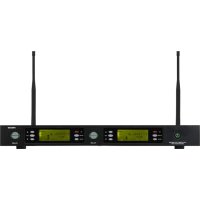
MSHR46D570 - Speaker FoneStar - Free user manual and instructions
Find the device manual for free MSHR46D570 FoneStar in PDF.


| Product type | Double true diversity receiver for UHF wireless microphones |
| Brand | FoneStar |
| Model | MSHR46D570 |
| Frequency bands | 512-525 MHz, 631-645 MHz or 570-582 MHz (32 channels each) |
| Frequency response | 40-18,000 Hz |
| Audio outputs | 2 balanced XLR, 2 unbalanced 6.3mm jacks, 1 mixed 6.3mm jack |
| Signal-to-noise ratio | >105 dB |
| Receiver power supply | 12.8V DC, 450 mA |
| Dimensions (W × H × D) | 420 × 45 × 187 mm |
| Weight | Approximately 2 kg |
| Included accessories | 19" rack mounts, 2 x 6.3mm jack cables, rechargeable batteries |
| Main functions | Auto scan, infrared synchronization, manual channel selection, battery and RF indication, channel lock |
| Safety | Compliant with directive 2014/53/EU |
| Maintenance and cleaning | Clean with a dry cloth, keep away from moisture and heat sources |
| Spare parts and repairability | Removable antennas, replaceable output cables, external power supply |
Frequently Asked Questions - MSHR46D570 FoneStar
User questions about MSHR46D570 FoneStar
0 question about this device. Answer the ones you know or ask your own.
Ask a new question about this device
Download the instructions for your Speaker in PDF format for free! Find your manual MSHR46D570 - FoneStar and take your electronic device back in hand. On this page are published all the documents necessary for the use of your device. MSHR46D570 by FoneStar.
USER MANUAL MSHR46D570 FoneStar
THIS MANUAL IS FOR THE FOLLOWING MODELS:
MSH-883 Wireless system with 1 tie-clip microphone and wireless belt-pack transmitter.
MSH-887 Wireless system with 1 hand-held wireless microphone.
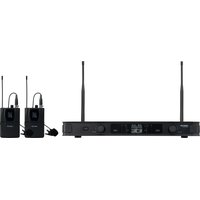
MSH-892 Wireless system with 2 tie-clip microphones and 2 wireless belt-pack transmitters.
MSH-895 Wireless system with 2 hand-held wireless microphones.
MSH-898 Wireless system with 1 hand-held wireless microphone and 1 tie-clip microphone.
OPTIONAL MODELS:
MSHR-45 Individual True Diversity receiver.
MSHR-46D Double True Diversity receiver.
MSHT-40M Wireless hand-held microphone.
MSHT-45P Tie-clip microphone and wireless belt-pack transmitter.
ANG-5L Mountt for assembly in a 1 U 19" rack.
MSC-2 Wireless microphone recharge docking station. Simultaneous capacity 2 microphones.
MSC-12 Wireless microphone recharge docking station. Simultaneous capacity 12 microphones.
DESCRIPTION
Wireless microphone system for the transmission of the audio signal in the UHF band 863-865 MHz. Composed of a receiver/transmitter or a pair of receivers/transmitters according to the model. Each receiver/transmitter set can work independently.
Both the receiver and the transmitter have an LCD display incorporated, allowing you to set and visualize the state of the equipment at all times.
The wireless system receiver has 2 aerials and 1 True Diversity circuit that continually compares and selects the best signal from the aerial.
CONTROLS AND FUNCTIONS
INDIVIDUAL RECEIVER (models MSH-883 and MSH-887)
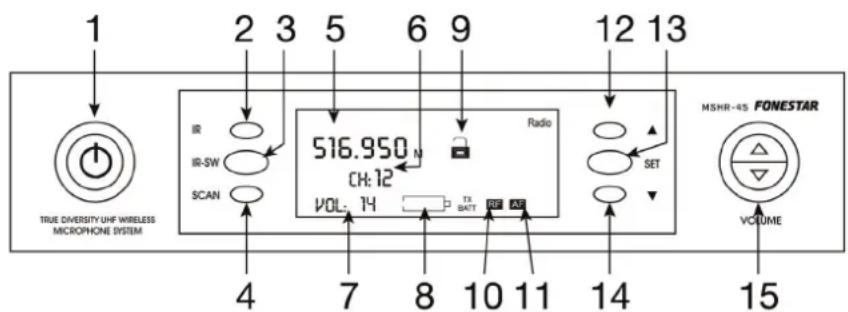
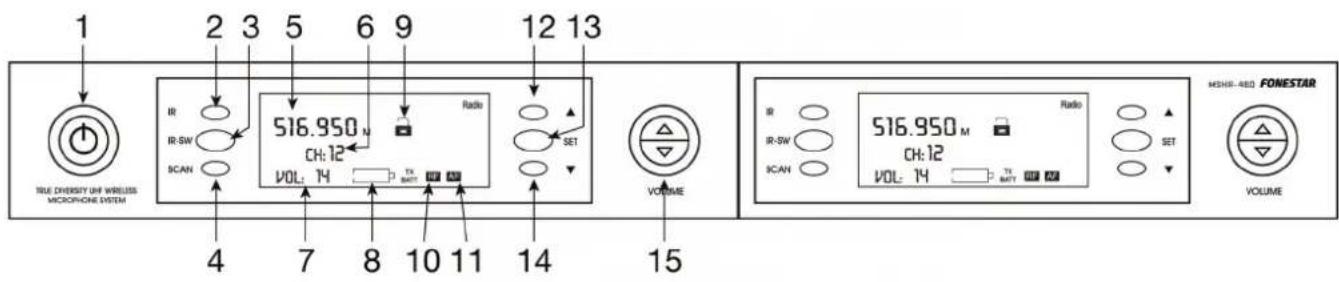
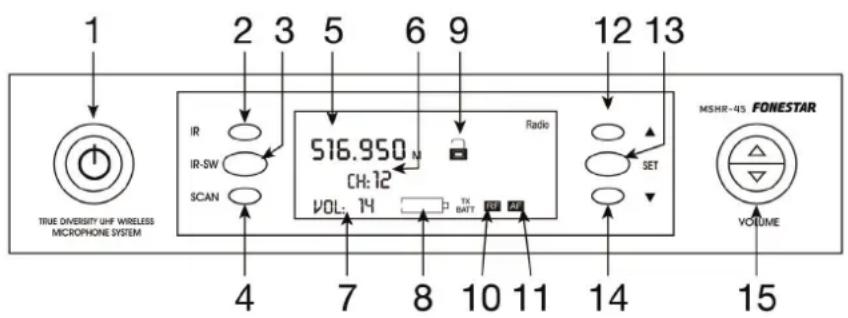
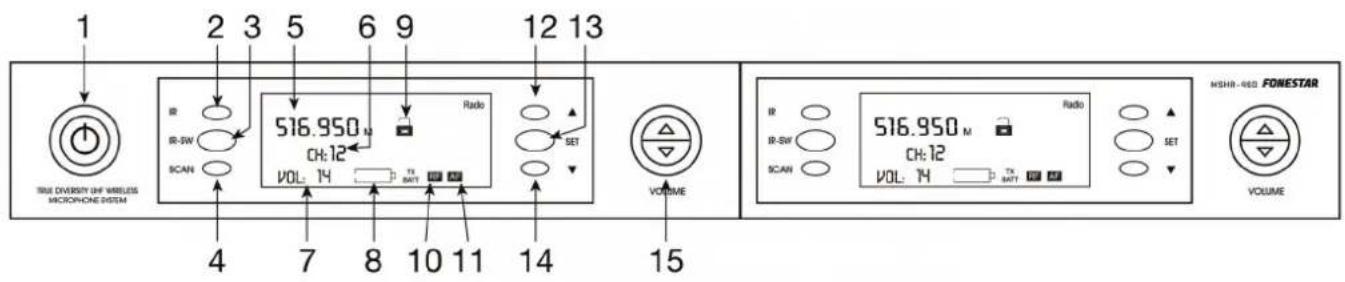
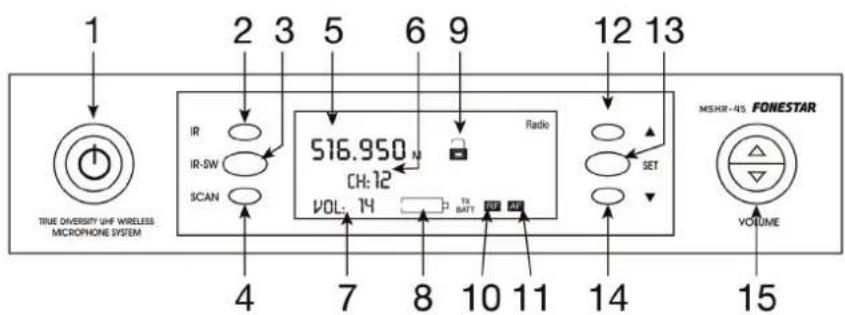
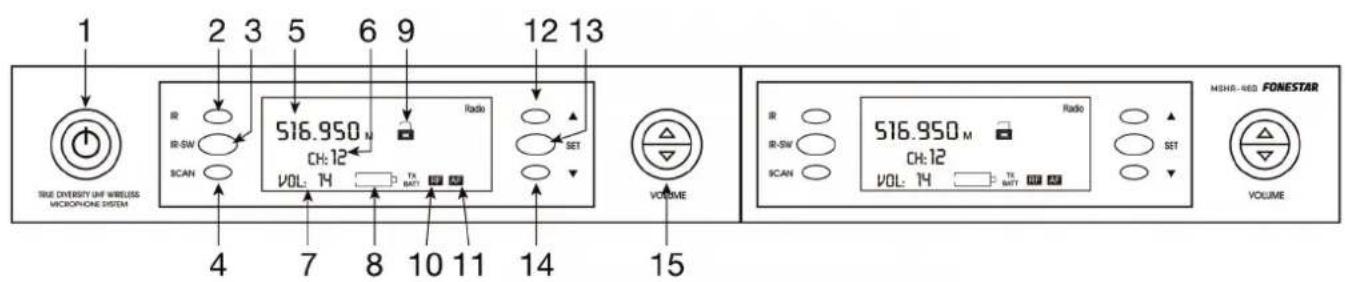
1.-STANDBY: on/off button for the receiver in standby mode.
2.- IR: infrared receiver.
3.- IR-SW: by pressing this button the receiver transmission channel is sent to the transmitter microphone. Then, place both the IR receivers opposite each other. The transmitter as well as the receiver will be tuned into the same frequency and the same channel number.
4.- SCAN: this lets you automatically select an interference free channel
5.- Information display.
6.- Channel number and transmission frequency indicator.
7.- Volume level indicator.
8.- Wireless microphone battery level indicator. The battery level is shown when the microphone has been tuned into the same channel as the receiver. If the level is low, the display lights up red.
9.- Receiver lock indicator.
10.- Radiofrequency signal level indicator.
11.- Audio signal level indicator.
12.- for selecting the following channel on the list.
13.- SET: manual mode channel selection. Press the button and then press the / buttons to choose the desired channel. Once the channel has been selected, wait approximately 2 seconds until the option stops blinking on the display and the channel will have been automatically selected. The channel can also be locked by pressing this button after the channel selection option has been blinking.
14.-: for selecting the previous channel on the list.
15.- VOLUME: controls for regulating the audio output volume.
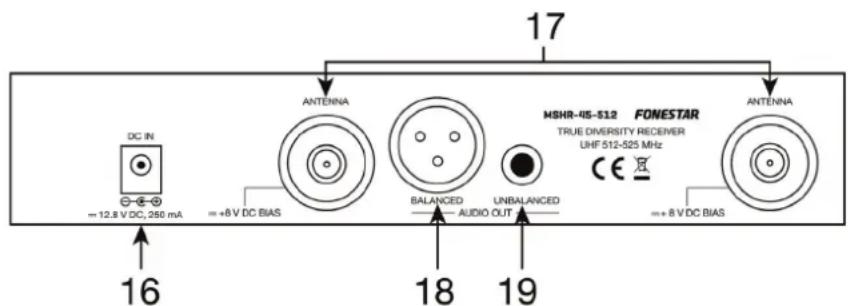
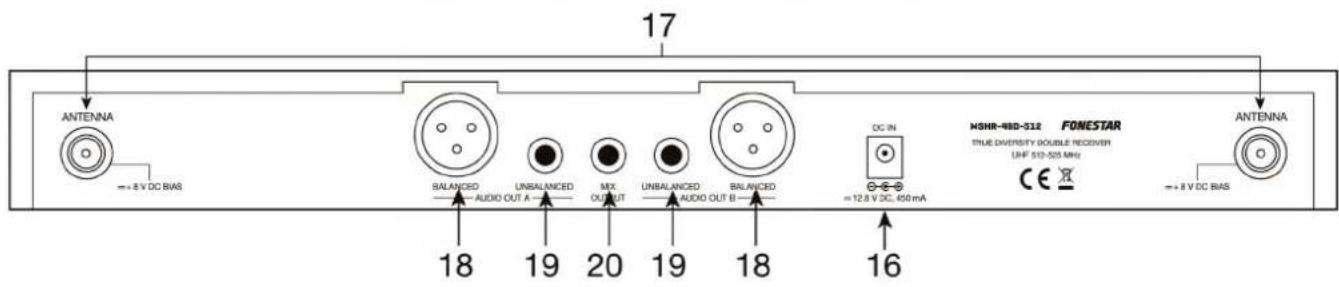
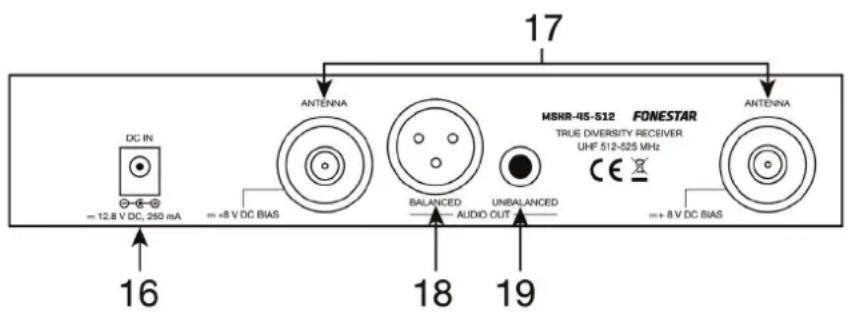
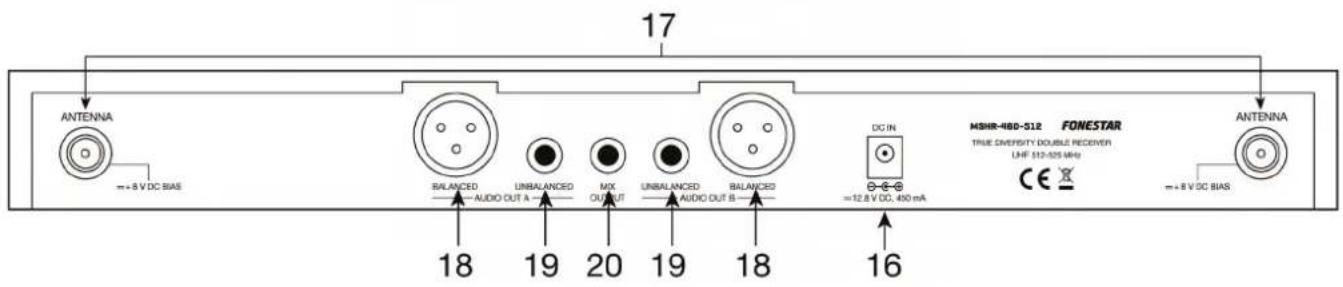
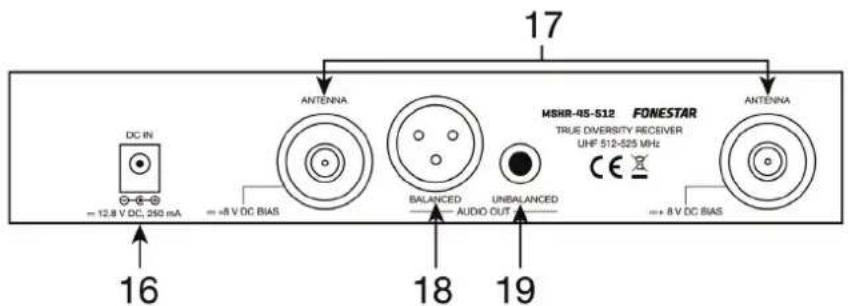
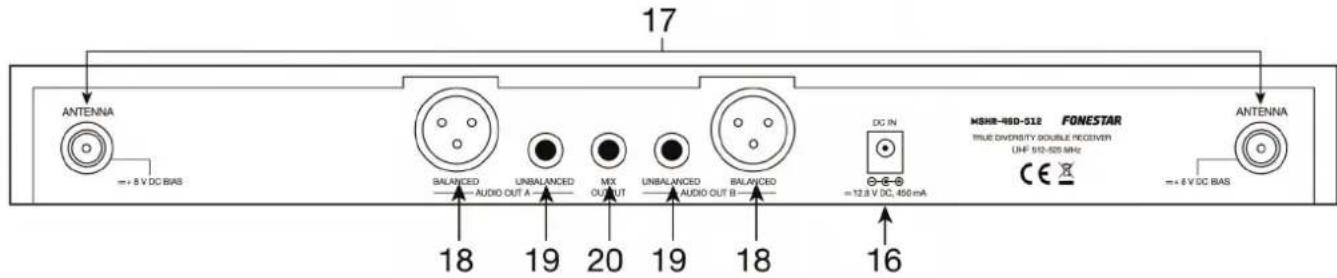
16.- DC IN: DC power supply input. With 230 V AC/12.8 V DC adapter included.
17.- ANTENNA: female TNC aerial connector allowing the connection of the aerials supplied.
18.-BALANCED: balanced audio output, XLR connector.
19.- UNBALANCED: unbalanced audio output, 6.3 mm mono jack connector.
20.- MIX OUTPUT: mixed audio output for the 2 receivers, 6.3mm mono jack connector.
HAND-HELD MICROPHONE (mod.MSHT-40M)
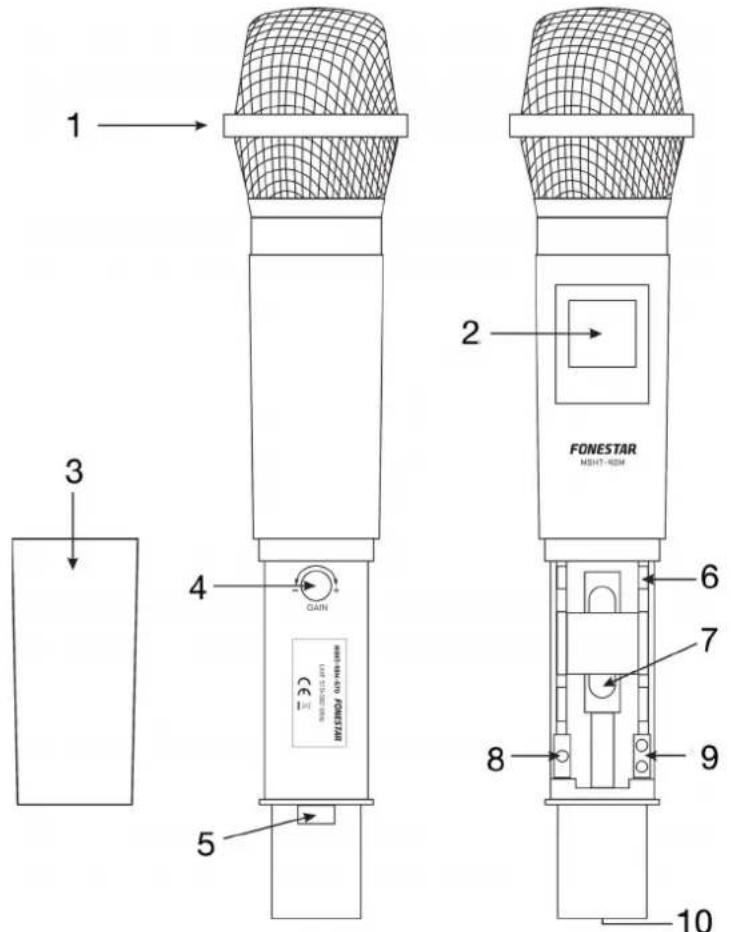
- Grille: for protecting the microphone capsule and helping to reduce breathing noises and the wind.
2.- Display: this shows information on the tuned frequency, such as the channel number, battery level, RF signal level and audio signal. If the battery level is low, the display will light up red.
3.- Battery cover: unscrew this cover to get to the battery compartment.
4.- GAIN: the audio input sensitivity adjustment.
5.- on/off switch for the hand-held microphone.
6.- IR: wireless hand-held microphone infrared receiver. For tuning the receiver and the wireless hand-held microphone, press the IR-SW button on the receiver and then place this IR receiver opposite the one on the receiver. - Battery compartment: use two 1.5 V LR6-AA type batteries, alkalines or rechargeable. When you insert the batteries, make sure that the polarity is correct.
8.- SET: this button lets you select between the following setup options: channel number and frequency, RF transmission level (high/low), battery type selection (1.2 V - rechargeable/1.5 V - alkaline) to show the battery level correctly and the microphone transmitter lock. To do this, press the SET button consecutively and use the buttons to select the options.
9.- / : for selecting menu options to set the hand-held wireless microphone.
10.- Contacts for recharging the rechargeable batteries in the wireless microphone in the recharge docking station mod. MSC-2 or MSC-12..
Note: when you press the SET button to setup the different microphone parameters, a MUTE indicator appears on the display and the microphone no transmits audio when the parameters are being set.
BELT-PACK MICROPHONE (mod.MSHT-45P)
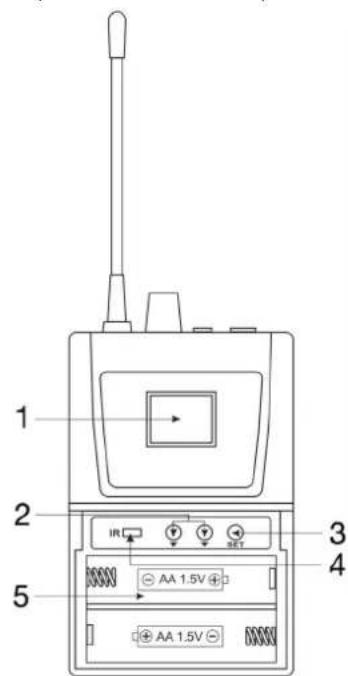
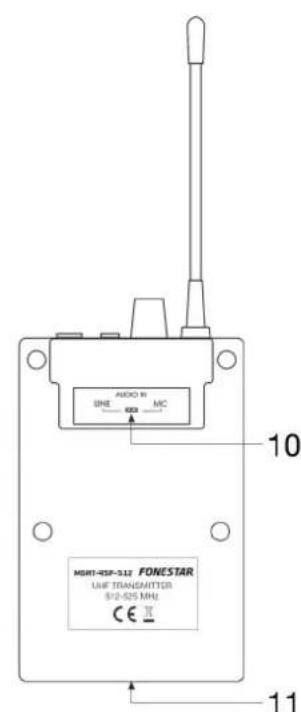
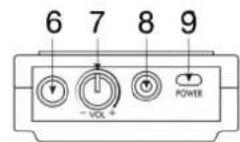
1.- Display: This shows information on the tuned frequency, such as the channel number, battery level, RF signal level and audio signal. If the battery level is low, the display will light up red.
2.- / : for selecting desired options to set the wireless belt-pack microphone.
3.- SET: This button lets you select between the following setup options: channel number and frequency, RF transmission level (high/low), battery type selection (1.2 V - rechargeable/1.5 V - alkaline) to show the battery level correctly and the microphone transmitter lock. To do this, press the SET button consecutively and use the / buttons to select the options.
4.- IR: Wireless hand-held microphone infrared receiver. For tuning the receiver and the wireless hand-held microphone, press the IR-SW button on the receiver and then place this IR receiver opposite the one on the receiver.
5.- Battery compartment: Use two 1.5 V LR6-AA type batteries, alkalines or rechargeable. When you insert the batteries, make sure that the polarity is correct.
6.- Aerial.
7.- VOL: Wireless belt-pack transmitter volume control.
8.- 3.5 mm mono jack connector for connecting a microphone or a desired audio source.
9.- ON/OFF:Transmitter on/off switch.
10.- GUITAR LINE/MIC.: input sensitivity selector.
11.- Contacts for recharging the rechargeable batteries in the wireless microphone in the recharge docking station mod. MSC-2 or MSC-12.
Note: when you press the SET button to setup the different microphone parameters, a MUTE indicator appears on the display and the microphone does not transmit audio when the parameters are being set.
CONNECTION
SITUATION
Place the receiver on a horizontal surface at a distance of 1m minimum from the floor, walls or metal surfaces. Keep the equipment away from sources of electric noise, such as lighting fixtures, motors, digital equipment, etc.
CONNECTION
Connect the audio output to the input on a mixer or amplifier with connection best adapted to your needs: Using the balanced XLR connector or the unbalanced 6.3 mmmono jack connector. The unbalanced 6.3 mm mono jack mixed line signal can also be used.
Do not use the 3 outputs at the same time as it could cause signal loss and noise.
Connect the aerials and position them as a V.
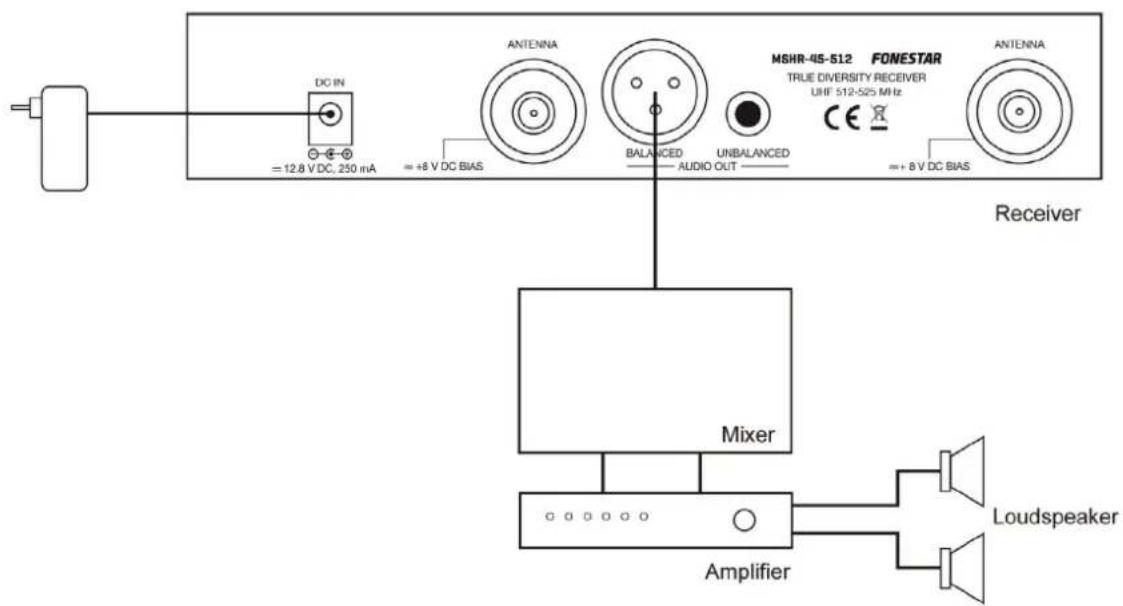
To improve reception, if you have multiple receivers, use a DA-864 antenna distributor, AMP-818G antenna amplifiers and ADU-830 directional antennas. Or, for a single receiver you can directly use an AMP-811 antenna amplifier with ADU-830 antenna or the ADU-823AMP antenna with amplifier.
INSTALLATION IN 19" RACK
The individual receivers (mods. MSH-883 and MSH-887) are supplied with a short bracket for assembly in a 19" rack and a connection plate to join 2 individual receivers, so that you can combine 2 receivers to be installed in a 1 U 19" rack cabinet.
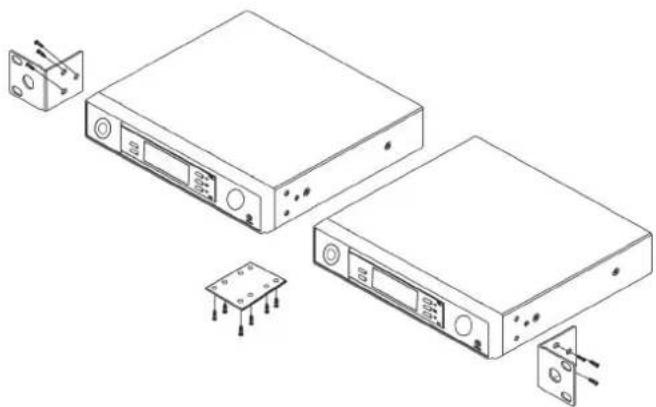
Note: Remove the excess connection plate as it is not necessary for assembly.
If you want to install just one individual receiver in a 1 U 19" rack cabinet, you will need a long bracket (mod. ANG-5L).
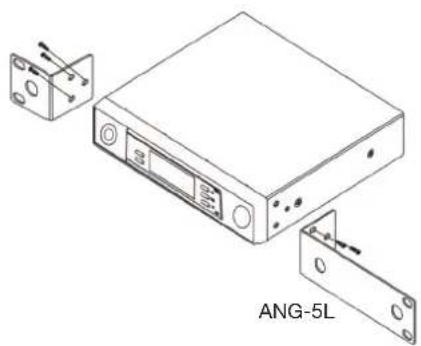
The double receivers (mods. MSH-892, MSH-895 and MSH-898) are supplied with some short front brackets allowing assembly in 19" rack cabinets.
1.- Install the receiver and make the connections in accordance with the CONNECTION section.
2.- After making the connections, switch on the wireless microphone.
3.- Select the receiver output volume.
Note: do not use balanced and unbalanced outputs at the same time as it could cause signal loss and noise.
4.- Insert the batteries in the wireless microphone (hand-held or belt-pack): open the battery compartment cover and insert the batteries respecting the polarity.
Switch the wireless microphone on and observe the battery level on the display. If the battery level is too low, the charge indicator will be at its minimum and will light up red. In this case, change the batteries or use the wireless microphone recharge docking station mod. MSC-2 or MSC-12 to charge them if they are rechargeable.
5.- Transmission channel selection (frequency):
The transmitter (wireless microphone) and the receiver must be tuned into the same channel. Select a channel that is free from interference in the receiver and select the same channel in the transmitter (wireless microphone). For more information on the different ways to select a channel, see the section SELECTING CHANNELS IN THE RECEIVER.
2 transmitters (wireless microphones) cannot be used in the same channel (frequency).
If you are using 2 or more transmitters (wireless microphones) simultaneously, leave at least 4 channels between the channel being used by the transmitter and the other, to avoid interference. A maximum of 4 transmitters being used simultaneously is recommended.
6.- Hand-held microphone adjustments:
- Switch the receiver on and check the channel (frequency).
- Adjust the receiver volume to an intermediate position.
- Switch the microphone and the amplifier on (or the mixer and the power amp).
- Test the microphone and adjust the amplifier levels (or the mixer levels).
7.- Belt-pack transmitter adjustments:
- .Switch on the receiver and check the channel (frequency).
- Adjust the receiver volume to an intermediate position.
- Connect the microphone to the audio input connector.
- Switch on the microphone and the amplifier (or the mixer and the power amp.)
- Check the microphone and adjust the levels in the amplifier (or in the mixer) or in the microphone itself.
CHANNEL SELECTION MODES IN THE RECEIVER MANUAL MODE
To select an interference-free channel manually, follow the steps below:
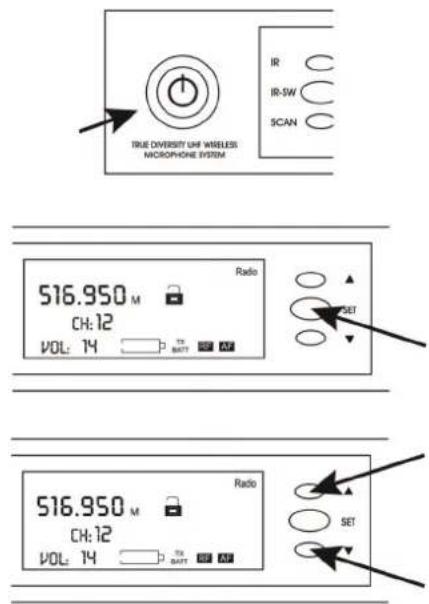
Press the on/off button to switch the receiver on.
Press the SET button on the receiver.
Use the buttons to select a channel and a certain frequency.
AUTO-SCAN MODE
To select an interference-free channel automatically, follow the steps below:
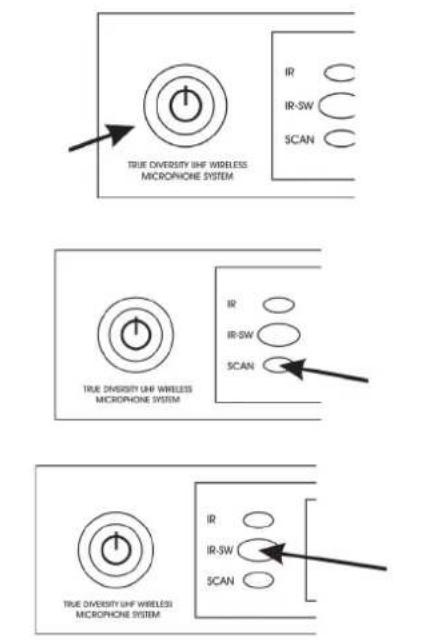
Press the on/off switch to switch the receiver on.
Press the SCAN button on the receiver and the receiver will automatically scan for and select an interference-free channel.
Press the IR-SW button on the reciever and position the infrared receivers from the receiver opposite those on the transmitter to synchronize the frequency in both.
CHANNEL TABLE 512-525 MHz CHANNEL TABLE 570-582 MHz
| CHANNEFREQUENCY | CHANNEFREQUENCY |
| 1512.55 MHz | 17 518.95 MHz |
| 2512.95 MHz | 18 519.35 MHz |
| 3513.35 MHz | 19 519.75 MHz |
| 4513.75 MHz | 20 520.15 MHz |
| 5514.15 MHz | 21 520.55 MHz |
| 6514.55 MHz | 22 520.95 MHz |
| 7514.95 MHz | 23 521.35 MHz |
| 8515.35 MHz | 24 521.75 MHz |
| 9515.75 MHz | 25 522.15 MHz |
| 10516.15 MHz | 26 522.55 MHz |
| 11516.55 MHz | 27 522.95 MHz |
| 12516.95 MHz | 28 523.35 MHz |
| 13517.35 MHz | 29 523.75 MHz |
| 14517.75 MHz | 30 524.15 MHz |
| 15518.15 MHz | 31 524.55 MHz |
| 16518.55 MHz | 32 524.95 MHz |
CHANNEL TABLE 631-645 MHz
| CHANNEFREQUENCY | CHANNEFREQUENCY |
| 1 631.55 MHz | 17 637.95 MHz |
| 2 631.95 MHz | 18 638.35 MHz |
| 3 632.35 MHz | 19 638.75 MHz |
| 4 632.75 MHz | 20 639.15 MHz |
| 5 633.15 MHz | 21 639.55 MHz |
| 6 633.55 MHz | 22 639.95 MHz |
| 7 633.95 MHz | 23 640.35 MHz |
| 8 634.35 MHz | 24 640.75 MHz |
| 9 634.75 MHz | 25 641.15 MHz |
| 10 635.15 MHz | 26 641.55 MHz |
| 11 635.55 MHz | 27 641.95 MHz |
| 12 635.95 MHz | 28 642.35 MHz |
| 13 636.35 MHz | 29 642.75 MHz |
| 14 636.75 MHz | 30 643.15 MHz |
| 15 637.15 MHz | 31 643.55 MHz |
| 16 637.55 MHz | 32 643.95 MHz |
TROUBLE SHOOTING
| PROBLEM | SOLUTION |
| No audio - Check the power supply to the microphone and receiver. - Check that the transmitter and the receiver are tuned into the same frequency/channel. - Check that the amplifier is on and the receiver audio output is connected to an amplifier input. - Check if the transmitter is too far from the receiver. - Check if the receiver is positioned close to metal objects or there are obstacles between the receiver and the transmitter. | |
| Interference - Check the positioning of the aerial. - When using two or more transmitters simultaneously, check that the selected channels do not interfere with each other. - Check if the interference comes from another wireless microphone system, TV, radio, etc | |
| Distortion - Check if the receiver volume is too high or too low. - Check if the interference comes from another wireless microphone system, TV, radio, etc | |
TECHNICAL SPECIFICATIONS
| MSH-883 MSH-887 | ||
| CHARACTERISTICS | True diversity receiver with tie-clip microphone with unidirectional electret condenser capsule and wireless belt-pack transmitter. Auto-scan function. Channel transmission to the microphone through IR. Dismountable aerials. | True diversity receiver with wireless hand-held microphone with unidirectional electret condenser capsule. Auto-scan function. Channel transmission to the microphone through IR. Dismountable aerials. |
| RECEIVER/MICROPHONE | 3 bands of frequency PLL UHF available: 512-525 MHz (32 channels), 631-645 MHz (32 channels) or 570-582 MHz (32 channels) | |
| RESPONSE | 40-18,000 Hz | |
| OUTPUTS | Audio: 1 balanced, XLR 1 unbalanced, 6.3 mm mono jack | |
| S/N RATIO | >105 dB | |
| MICROPHONES | MSHT-45P: 1 tie-clip microphone with unidirectional electret condenser capsule and wireless belt-pack transmitter with mic./line input sensitivity selector | MSHT-40M: 1 wireless hand-held microphone with unidirectional electret condenser capsule. |
| POWER | 10 mW maximum | |
| POWER SUPPLY | Receiver: 12.8 V DC, 250 mA Microphone transmitter: 2 x LR6-AA batteries Accepts rechargeable batteries | |
| DIMENSIONS | Receiver: 210 x 45 x 156 mm depth | |
| ACCESSORIES | Mounts for assembly of 2 receivers in 1 U 19" rack 6.3 mm mono jack cable Rechargeable batteries | |
| OPTIONAL | MSC-2, MSC-12: wireless microphones recharge docking statios ANG-5L: mount for assembly in 19" rack | |
| MSH-892 MSH-895 MSH-898 | |||
| FEATURES True Diversity double receiver with 2 tie-clip microphones with unidirectional electret condenser capsule and 2 wireless belt-pack transmitters. Auto scan function. Infrared channel to microphone transmission. Detachable aerials. | True Diversity double receiver with 2 wireless hand-held microphones with unidirectional electret condenser capsule. Auto scan function. Infrared channel to microphone transmission. Detachable aerials. | True Diversity receiver with 1 hand-held wireless microphone with unidirectional electret condenser capsule and 1 tie-clip microphone with unidirectional electret condenser capsule and wireless belt-pack transmitter. Auto scan function. Infrared channel to microphone transmission. Detachable aerials. | |
| RECEIVER/MICROPHONE | 3 bands of frequency PLL UHF available 512-525 MHz (32 channels), 631-645 MHz (32 channels) or 570-582 MHz (32 channels) | ||
| RESPONSE 40-18.000 Hz | |||
| OUTPUTS Audio: | 2 balanced, XLR 2 unbalanced, 6.3 mm jack 1 unbalanced line mixed signal, 6.3 mm jack | ||
| S/N RATIO | >105 dB | ||
| MICROPHONES MSHT-45P: 2 tie-clip microphones with unidirectional electret condenser capsule and wireless belt-pack transmitter | MSHT-40M: 2 wireless hand-held microphones with unidirectional electret condenser capsule | MMSHT-40M: 1 wireless hand-held microphone with unidirectional electret condenser capsule. MSHT-45P: 1 tie-clip microphone with unidirectional electret condenser capsule and wireless belt-pack transmitter | |
| POWER 10 mW maximum | |||
| POWER SUPPLY Receiver: 230 V AC/12.8 V DC, 450 mA Transmitter microphone: 2 x LR6-AA batteries. Accepts rechargeable batteries | |||
| DIMENSIONS Receiver: 420 x 45 x 187 mm depth | |||
| ACCESSORIES Mounts for assembling in 1 U 19" rack 2 x 6.3 mm mono jack cable Rechargeable batteries | |||
| OPTIONAL | MSC-2, MSC-12: wireless microphone recharge docking stations | ||
ESTE MANUAL CORRESPONDE A LOS SIGUIENTES MODELOS:
MSHR-45 Receptor individual true diversity.
MSHR-46D Receptor doble true diversity.
RECEPTOR INDIVIDUAL (mods. MSH-883 y MSH-887)
MSHR-45 Recetor individual true diversity.
MSHR-46D Recetor duplo true diversity.
RECETOR INDIVIDUAL (mods. MSH-883 e MSH-887)
SIMPLIFIED EU DECLARATION OF CONFORMITY
FONESTAR SISTEMAS S.A. hereby declares that UHF Wireless microphone systems MSHT-40M, MSHT-42S, MSHT-43C, MSHT-45P and Wireless microphone receivers MSHR-45, MSHR-46D comply with the Directive 2014/53/EU.
The complete text of the EU Declaration of Conformity is available at the following internet address:
fonestar.com/MSHT-40M-512 fonestar.com/MSHT-42S-512
fonestar.com/MSHT-43C-512 fonestar.com/MSHT-45P-512
fonestar.com/MSHR-45-512 fonestar.com/MSHR-46D-512