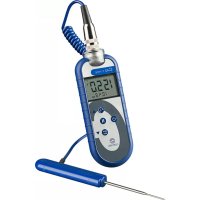
C42F - Thermometer Comark - Free user manual and instructions
Find the device manual for free C42F Comark in PDF.


User questions about C42F Comark
0 question about this device. Answer the ones you know or ask your own.
Ask a new question about this device
Download the instructions for your Thermometer in PDF format for free! Find your manual C42F - Comark and take your electronic device back in hand. On this page are published all the documents necessary for the use of your device. C42F by Comark.
USER MANUAL C42F Comark
C40 SERIES THERMOMETERS
C42C
C42F
C46
C48
C48C
For C42C Model only:
Meets the requirements of DIN EN 13485:2002
"Thermometers for measuring the air and product temperature for the transport, storage and distribution of chilled, frozen, deep-frozen/quick frozen food and ice-cream"
Introduction

Comark C40 series thermometers have either a Lumberg connector or a sub-miniature connector. All models are designed for use with interchangeable probes. They have a high strength, polycarbonate case with rubber over moulding. This offers a high level of strength and durability. All models incorporate a clock, countdown timer, MAX/MIN and data hold feature.
Safety Information
Prevent Electric Shock
• To avoid electric shock do not allow the probe to come into contact with live electrical parts.
Maintaining Product Safety & Preserving Comark Warranty
- Only use the instrument for its intended purpose.
- Do not use in a microwave oven.
- Pocketherm is not dishwasher safe.
- Do not use the instrument beyond its operating temperature range.
Waste Electrical & Electronic Equipment Directive (WEEE)
- This instrument must not be disposed of in general waste. Instead take it to your local authority's recycling centre for small electrical goods. Within the European Union, Comark operates a Take Back scheme for our end-of-life products. Contact us for details.
- Dispose of waste batteries in local recycling facilities.
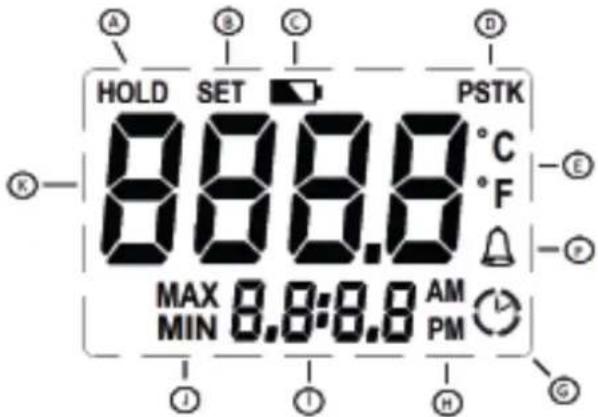
Overview of display symbols
text_image
HOLD SET PSTK 8:8:8 °C °F MAX 0.8:8.8 AM MIN PMA Indicates the HOLD has been selected
B Setting menu item to ON/OFF
C Indicates low battery
D Indicates probe type
E Indicates the temperature scale in use
F Alarm indication
G Indicates countdown active
H Indicates AM or PM for clock
I Clock, countdown and timer display
J Indicates MAX or MIN has been selected
Operation
Connecting Probes to the Thermometers
C40 series thermometers have either Lumberg or sub-miniature sockets for probe connection and off er a class leading choice between Comark thermistor, type T thermocouple or type K thermocouple probes.
The polarity of the connector must always be checked before connecting thermocouple probes to C40 series thermometers. A probe of the correct thermocouple type must also be selected to match the specific thermometer. C40 series thermometers with Lumberg sockets will automatically detect the sensor type of the probe connected. The LCD will then indicate thermistor probes as "PST", and type T thermocouple probes as "T". Models with Sub-Min connector are of fixed thermocouple type, see specifications for details
Switching On and Off

Press and hold the “ON/OFF” button on the keypad to switch the thermometer on. After a short pause, the display will show the current model of the instrument and will then revert to normal temperature display. The current time is also permanently displayed on the LCD. To switch off is a long press on the “ON/OFF” button.
Data Hold

All C40 series thermometers have a data hold facility. If the “HOLD” button is pressed at any time during normal temperature mode, the current temperature will be held on the display. To release press “HOLD”.
MAX/MIN

All C40 series thermometers have a MAX/MIN function. Press “MAX/MIN” for MAX temperature reading and again for MIN temperature reading. Press “MAX/MIN” to resume normal temperature readings. To clear MAX/MIN, press and hold “MAX/MIN” until the display returns to normal measurement.
Countdown Timer

All C40 series thermometers have a countdown timer. This function is activated from the Set-Up Menu – see section below, and can be calibrated in seconds or minutes. Pressing the countdown timer button will start this function. Pressing the button again during the countdown period will stop the count. The instrument will beep for 30 seconds at the end of a countdown period to indicate to the user that it has been completed.
Auto Switch Off /Power Saving Mode
C40 series thermometers have a selectable auto-switch off feature. This is set to 3 minutes from the factory. Auto-switch off timer starts on the last button press. Please refer to Set-Up Menu for instructions on changing this setting.
Set-Up Menu
C40 series thermometers have a hidden menu structure that is used to set up a number of parameters within the instrument.
To enter the set-up menu fi rst ensure the instrument is off, then press the Count Down button and keep this held down while pressing the "ON/OFF" button to switch the instrument on. After the
thermometer has completed its self-checks, it will enter the menu.
N.B. After each menu item use the "ON/OFF" button to save and move to the next menu item.
Clock selection is the first item in the menu:
Clock – the display will show 'CLOC'
Use the UP and DOWN buttons to adjust the clock time up or down.
Countdown Timer – the display will show 'Cd'
Use the UP and DOWN button to select timer on or off. Use the UP and DOWN buttons to scroll up and down in seconds up to 5 minutes then in 1 minute intervals up to 60 Minutes.
Auto Power OFF – the display will show 'AOFF'
Use the UP and DOWN Buttons to scroll between the available options of None, 3, 10, and 30 minutes.
Scale – the display will show 'SCAL'
After entering the SCALE menu, use the UP and DOWN Buttons to scroll between the available scales.
High Alarm – the display will show 'HIAL'
Use the UP and DOWN Buttons to select or de-select high alarms, then select the required high alarm value.
Low Alarm – the display will show 'LOAL'
Use the UP and DOWN Buttons to select or de-select low alarm, then select the required low alarm value.
On Alarm the speaker will bleep, press any key to stop.
Maintenance
Cleaning
C40 series thermometers are dust and splash proof and will withstand harsh environments. Use a damp cloth or warm soapy water to remove deposits and prevent them from hardening or becoming sticky.
Use only domestic kitchen cleaners or mild detergents to clean this instrument. Do not use aggressive cleaning chemicals or solvents, these will attack plastics and cause damage.
Caution: Do not place any C40 series thermometers in a dishwasher.
Battery Replacement
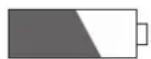
The low battery symbol appears on the display when the battery voltage has reduced. Battery replacement is recommended at this time.
To replace the battery, remove the battery cover retaining screw on the rear of the instrument, using the correct size *screwdriver. Remove the two cells, wait for a minimum of 30 seconds and replace with Alkaline or Lithium (L91) cells. Be careful to observe the correct polarity. Take care not to over-tighten the screw when refi tting the cover.
Note: The C40 series thermometers will not work if the battery compartment is incorrectly fitted or missing. In this instance, the display will show 'OPEn'. Please note the small pip on the inside of
the battery cover, which must fit into the hole provided in the back of the case.
* Philips No 1 or 5mm fl at blade screwdriver.
Technical Support
Please see:
www.comarkinstruments.com or
www.comarkUSA.com for details.
Warranty
Each Comark product is warranted to be free from defects in material and workmanship under normal use and service. The warranty period is one (1) year, unless otherwise stated, and the warranty period begins on the date of shipment. Temperature probes are warranted for six (6) months.
The warranty extends only to the original buyer or end-user of a Comark authorized reseller. This warranty does not cover damage resulting from normal wear and tear, abuse, misuse, accidental breakage, negligence, defects caused by modifi cations, repair and servicing not made or authorised by Comark Instruments, damage caused by handling, operating, storing, or using the product outside the intended uses described by our product literature. Disposable batteries are also exempt from warranty.
Warranties on dishwasher safe models apply only where the product has been used in a commercial dishwasher.
Comark Instruments products are not suitable for use or cleaning in domestic dishwashers.
Comark's warranty obligation is limited, at Comark's option, to refund of the
purchase price, free of charge repair, or replacement of a defective product returned within the warranty period. Products must be returned to Comark or one of Comark's authorized service agents.
This warranty is the buyer's sole and exclusive remedy and is in lieu of all other warranties, express or implied, including but not limited to any implied warranty of fi tness for a particular purpose. Comark shall not be liable for any special, indirect, incidental or consequential damages or losses, including loss of data, whether arising from breach of warranty or based on contract, tort, reliance or any other theory. Since some countries or states do not allow limitation of the term of an implied warranty, or exclusion or limitation of incidental or consequential damages, the limitations and exclusions of this warrant may not apply to every buyer.
To obtain service during the warranty period, visit the Service and Repair page on our website - www.comarkinstruments.com or www.comarkUSA.com for instructions on obtaining a Return Material Authorization (RMA) then send the product to our Service Centre with a description of the problem.
Specification General Specification
| Measurement |
| Measurement RangeThermistorType T ThermocoupleType K Thermocouple |
| Scales |
| Displayed Resolution0.1°1° |
| Instrument AccuracyThermocouple |
| System AccuracyThermistorType T Thermocouple* |
| Temperature Coeffi cientThermistorThermocouple |
| Ambient Temperature Range |
| Display |
| Power |
| Battery Life (continuous) |
| Enclosure Ingress Protection |
| Thermistor 10 K Ohms unicurveThermocouple type T and K6-pin Lumberg and Sub-Min Connectors | |
| -40°C to +125°C / -40°F to +257°F-200°C to +400°C / -328°F to +752°F-200°C to 1372°C / -328°F to +2502°F | |
| °C / °F | |
| >-100°<1000°≤ -100°≥ 1000° | |
| 0.1% ±0.2°C / ±0.4°F full range @ +23°C /+73°F Ambient | |
| ±0.3°C 0°C to +70°C / ±0.6°F +32°F to +158°F±0.5°C -20°C to +100°C / ±0.9°F -4°F to+212°F±0.5°C 0°C to +70°C / ±0.9°F +32°F to +158°F*Typical accuracy with a Comark probe | |
| < 0.005 degree/degree< ± 0.01 % of reading ±0.02 °C/°C change from+23°C / ±0.02°F/°F change from +73°F | |
| -20°C to +50°C / -4°F to -122°F operating | |
| 4 digit, 12.5 mm LCD | |
| Two Type I.E.C. LR6 Size AA – Alkaline or*Lithium recommended.*Lithium is recommended for Low Temperatureenvironments, constantly below 10°C/50°F andwill give approximately 50% increased batterylife when used in lieu of Alkaline. | |
| Up to 5000 hours | |
| IP65 |
Weight & Measures
| DimensionsCase SizeWeight |
| Case MaterialsCase |
| 152 x 58 x 22/27 mm / 6" x 2.3" x 1.1"178g / 6.3 ozs | |
| Mixed: ABS & PC with BioCote® anti-microbial protection moulded in. |
Compliance
EMC Directive
EMC Standard
Radiated RF emissions 30MHz-6GHz
Electrostatic discharge
Radiated RF immunity *
Power frequency magnetic fi eld immunity
Broadband Data Transmission Systems -
Essential Requirements
Radio Equipment-Common Requirements
Broadband Data Transmission Systems
Product Safety
RoHS Directive
* Readings may be temporarily affected in the prese
| EC Directive 2014/30/EUEN 61326-1:2013, EN 61326-2-1:2013 (Portable Equipment Environment)EN 55011:2009+A1:2010EN 55022:2010 CFR 47 Part 15.109EN 61000-4-2:2009EN 61000-4-3:2006+A1:2008+A2:2010EN 61000-4-8:2010EN 300 328 1.8.1 (2012-06)EN 301 489-1 1.9.2 (2011-09)EN 301 489-17 2.2.1 (2012-09) | |
| EN 61010-1:2010 Safety requirements for electrical equipment for measurement, control and laboratory use. Part-1: General requirementsEN 60950-1:2006+A11:2009+A1:2010+A12:2011 ITE Safety | |
| EC Directive 2011/65/EU RoHS |
nce of radio frequency interference.
Appendix 1
C40 Series Model Range Options
| Models | C42 C42 | TType | C48KType | C26 |
| Part No. | C42C C | 42F C48 | C48C | C26 |
| Options | ||||
| Countdown Timer | √ | √ | √ | √ |
| Data Hold | √ | √ | √ | √ |
| Real Time Clock | √ | √ | √ | √ |
| MAX/MIN | √ | √ | √ | √ |
| Scale Selection | √ | √ | √ | √ |
| High Alarm | √ | √ | √ | √ |
| Low Alarm | √ | √ | √ | √ |
| Type T | √ | √ | - | √ |
| Type K -- | √ | - | ||
| Thermistor | √ | √ | - | - |
| Connector* L | L S S | |||
| Auto Off | √ | √ | √ | √ |
| Splash-proof | √ | √ | √ | √ |
* L – Lumberg
S – Sub-Miniature
Introduction

text_image
HOLD SET PSTK 8:8:8 °C °F MAX 8.8:8.8 AM MIN PM J I H GAssistance technique
text_image
HOLD SET PSTK 8:8:8 °C °F MAX 0.8:8.8 AM MIN PM J I H Gtext_image
HOLD SET PSTK 8:00.0 °C °F MAX 8.8:8.8 AM MIN PMtext_image
HOLD SET PSTK 8:00.0 °C °F MAX 8.8:8.8 AM MIN PMEmissioni RF irradiate 30 MHz-6 GHz
52 Hurricane Way, Norwich,
Norfolk NG6 6JB United Kingdom
Tel: +44 (0) 207 942 0712
Email: sales@comarkinstruments.com
Website: www.comarkinstruments.com
Comark Instruments
PO Box 500
Beaverton, OR 97077 USA
Tel: 503 643 5204
Email: sales@comarkusa.com
Website: www.comarkusa.com
Part No 20581-1 (02-19)
© 2019 Comark Instruments