
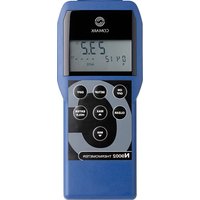
N9005 - Thermometer Comark - Free user manual and instructions
Find the device manual for free N9005 Comark in PDF.


| Product Type | Digital Thermometer |
| Brand | Comark |
| Model | N9005 |
| Category | Thermometer |
| Measurement Type | Contact (Probe) |
| Temperature Range | -50°C to +300°C (-58°F to +572°F) |
| Accuracy | ±0.5°C (±0.9°F) in range -20°C to +150°C; ±1°C elsewhere |
| Resolution | 0.1°C / 0.1°F |
| Response Time | Approximately 5 seconds (in liquid) |
| Probe Type | Type K Thermocouple |
| Probe Length | 120 mm (4.7 inches) |
| Display Type | LCD |
| Display Resolution | 3½ digits |
| Backlight | Yes |
| Auto Power Off | Yes, after 10 minutes of inactivity |
| Battery Type | 1 x CR2032 (3V lithium coin cell) |
| Battery Life | Approximately 200 hours of continuous use |
| Calibration | User calibration via ice point and boiling point |
| IP Rating | IP54 (splash proof) |
| Weight | 50 g (1.8 oz) including battery |
| Dimensions | 150 × 30 × 20 mm (5.9 × 1.2 × 0.8 inches) |
| Material | ABS plastic casing with stainless steel probe |
| Warranty | 1 year (excluding battery and probe) |
| Certifications | CE, UKCA |
| Included Accessories | 1x battery (installed), 1x probe cover, user manual |
Frequently Asked Questions - N9005 Comark
User questions about N9005 Comark
0 question about this device. Answer the ones you know or ask your own.
Ask a new question about this device
Download the instructions for your Thermometer in PDF format for free! Find your manual N9005 - Comark and take your electronic device back in hand. On this page are published all the documents necessary for the use of your device. N9005 by Comark.
USER MANUAL N9005 Comark
N9005 and N9094 OPERATOR MANUAL
PAGE
General Information 3
Calibration, Certification and Service.... 4
- Introduction to the N9005 and N9094 5
- N9005 and N9094 Thermometers with BioCote® Protection.... 5
- Overview of Display Symbols.... 6
- Connecting Probes to the Thermometer.... 6
- Switching On and Off 7
- Data Hold 7
- Countdown Timer.... 7
- Auto Switch Off/Power Saving Mode 7
- Set Up Menu 8
9.1 Clock 8
9.2 Countdown Timer 8
9.3 Scale 8
9.4 Type 9
9.5 Hi Alarm 9
9.6 Lo Alarm.... 9
9.7 Auto Power Off.... 9
9.8 Clock Alarms 9
9.9 Resolution 9
-
Before Using Your Thermometer 10
-
Taking Temperature Measurement.... 11
- Probe Selection 11
- Care of the Thermometer.... 14
- Sealed for Life Battery 15
15. SPECIFICATION 16
FIGURES
1 — PX22L Penetration Probe.... 11
2 — AK28M Fast Air Probe 12
3 — ST23L Between Pack Probe 12
4 — SK21M Surface Probe 12
5 — IT21L Deep Fat Probe 13
6 — ST38L Heavy Duty Pallet Probe.... 13
7 — DX31L Food Simulant Probe 13
It is recommended that you read the safety and operation instructions before using this instrument.

WARNING
TO AVOID ELECTRIC SHOCK DO NOT ALLOW ANY PROBE OR SENSOR TO COME INTO CONTACT WITH LIVE ELECTRICAL POWER CONDUCTORS WITH VOLTAGES IN EXCESS OF 30V AC RMS OR 60V DC.
TO AVOID DAMAGE OR BURNS, DO NOT MAKE TEMPERATURE MEASUREMENTS IN MICRO-WAVE OVENS.
CAUTION
Temperature Measurement Probes
This precision instrument has been designed for use with the extensive range of Comark temperature probes. The use of other probes may impair the performance and accuracy of the instrument. Full details of Comark probes and sensors can be obtained from Comark Customer Support department or your local distributor.
This instrument is manufactured in accordance with the Company's ISO 9000:2000 Quality Approved System.

This instrument complies with the Electromagnetic Compatibility Directive EN 61326-1.
Declarations of Conformity available. Contact Comark Customer Support or your local Distributor.
In line with its policy of continuous development, Comark Instruments reserves the right to alter the instrument specification without prior notice. Further information is available from Comark Instruments or your distributor.

No. 0451
Certification
Comark can provide certificates of calibration for its whole product range, to suit ISO 9000 and other quality assurance procedures, food hygiene regulations, HACCPs and environmental regulations. Comark certificates are produced by independent quality controlled processes which compare product performance against agreed National Standards. For peace of mind and best practice Comark recommend annual certification/recalibration.
Two levels of certification are available for infra-red temperature and non temperature instruments, excluding humidity:- UKAS certificates via an external accredited laboratory and NPL traceable certificates from the Comark calibration laboratory.
Three levels of certification are available for contact temperature products and these are detailed here:
a) UKAS Temperature Certification
The Comark UKAS (United Kingdom Accreditation Service) accredited temperature calibration laboratory is one of the finest in the UK. Comark UKAS certificates can offer the lowest uncertainty of 0.01°C and provide independent proof of correct calibration using equipment and procedures audited by UKAS inspectors. The equipment used is fully traceable to the National Physical Laboratory.
b) UKAS Humidity Certification
In addition to the Comark temperature laboratory, the humidity laboratory continues the tradition of high accuracy certification and a wide range (25% to 90%RH) with uncertainties of 2.8% of reading. This range also includes Dew point measurements.
c) NPL Traceable Certification
Comark NPL certificates are traceable to the National Physical Laboratory and can offer uncertainty as low as 0.3°C.
Conformance
Certificates of conformance can be supplied for new, serviced and recalibrated instruments. These confirm that instruments are within their original manufactured specification.
Service/Repairs
Regular servicing and any required repairs, under warranty or after, are available from the Comark Service Department.
For more information on all Comark certification, calibration and service facilities please call Comark Customer Support or contact your local distributor.
The N9005 and N9094 handheld thermometers represent a leap forward in specification and performance and have a number of new features.
Both instruments have the existing Comark premium case for ultimate strength and durability. This offers the highest level of strength, durability and protection against dust and water ingress. The instruments are certified to meet IP68. Features include a clock, countdown timer, timer alarms, high and low temperature alarms, selectable sensor type, variable auto-off and data hold.
2. N9005 AND N9094 THERMOMETERS WITH BIOCOTE® PROTECTION
BioCote® is a silver based anti-microbial agent that is impregnated into the instrument case during moulding. BioCote® effectively inhibits the function, growth and reproduction of a wide range of micro-organisms and its protection is increasingly accepted as part of HACCP, due diligence and health and safety procedures to reduce cross contamination. BioCote® protection lasts for the life of the instrument, because the agent is present throughout the case plastic and cannot rub off or be washed or leached out.
Biocote® active ingredients are registered with the US Environmental Protection Agency (EPA).
Although BioCote® inhibits the growth of micro-organisms on the instrument case, it does not protect individuals against such harmful organisms or remove the need to maintain the highest standards of personal and product hygiene and cleanliness.
3. OVERVIEW OF DISPLAY SYMBOLS

A – Indicates that HOLD has been selected.
B – Setting menu item to ON/OFF
C – Indicates Low Battery.
D – The Set Up menu is active.
E – Indicates probe type.
F – Main Display for Temperature
G - Clock Indicator.
H – Display for time and countdown timer.
I – Indicates countdown active.
J – Alarm indication
4. CONNECTING PROBES TO THE THERMOMETERS
The N9094 thermometer has a Lumberg socket for probe connection and offer a class leading choice between Comark thermistor, type T thermocouple or type K thermocouple probes.
The N9094 thermometer will automatically detect the sensor type of the probe connected. The LCD will then indicate thermistor probes as "PST", and type T or K thermocouple probes as "T" or "K".
The N9005 thermometer has a sub-miniature connector for probe convection and offers the choice between type T and type K thermocouple probes.
Note: Type T or K must be selected in the setup menu, see Section 9.
Display Test/Mode

The ‘ON/OFF’ button on the keypad is used to switch on the thermometer. After a short pause the display will show the current model of the instrument and will then revert to normal temperature display. The current time is also permanently displayed on the LCD.
6. DATA HOLD

The N9005 and N9094 thermometers have a data hold facility. If the 'II' button is pressed at any time during normal temperature mode, the current temperature will be held on the display. To release press 'II'.
7. COUNTDOWN TIMER

The N9005 and N9094 thermometers have a countdown timer. This function is activated from the Set Up Menu – see section below, and can be calibrated in seconds/minutes or hours. Pressing the countdown timer button will start this function. Pressing the button again during the countdown period will stop the count. The instrument will beep for 30 seconds at the end of a countdown period to indicate to the user that it has been completed.
8. AUTO SWITCH OFF/POWER SAVING MODE
The N9005 and N9094 thermometers have a selectable auto-switch off feature. This is set to 3 minutes from the factory. Please refer to Set Up Menu for instructions on changing this setting.
The N9005 and N9094 thermometers have a hidden menu structure that is used to set up a number of parameters within the instrument.
The Set Up Menu can be entered when the instrument is switched on.
If the instrument is already on, it must be turned off.
Press the countdown button and keep this held down while pressing the on button to switch the instrument on. After the thermometer has completed its self-checks, it will enter the menu.
N.B. After each menu item use the ON/OFF button to save and move to the next menu item.
Clock selection is the first item in the menu:
9.1 Clock – the display will show 'CLOC'
Use the countdown timer button and the hold button to adjust the clock time up or down. The clock itself is a 12 hour clock with setting for AM or PM. Moving through 12 noon will change the clock from AM to PM and so on.
9.2 Countdown Timer – the display will show 'Cd'
Use the countdown timer button and the hold button to select timer on or off. Use the hold and countdown timer buttons to scroll up and down in seconds up to 5 minutes then in 1 minute intervals up to 24 hours.
9.3 Scale – the display will show 'SCAL'
After entering the SCALE menu, use the countdown timer button and the hold button to scroll between the available scales.
9.4 Type – the display will show 'tYPE'
Use either the countdown timer button or the hold button to scroll between thermistor sensors plus either type T or K thermocouples. The default is thermistor and type T, with the latter for probes with brown or blue leads. Thermistor and type K is available for probes with either red or green leads.
9.5 High Alarm – the display will show 'HIAL'
Use the countdown button and the hold button to select high alarm on or off. Use the hold and countdown timer buttons to scroll up or down in degrees C or F to the limits of the chosen thermocouple type.
9.5 Low Alarm – the display will show 'LOAL'
Use the countdown button and the hold button to select low alarm on or off. Use the hold and countdown timer buttons to scroll up or down in degrees C or F to the limits of the chosen thermocouple type.
9.7 Auto Power OFF – the display will show 'AOFF'
Use the countdown timer button and the hold button to scroll between the available options of 3, 10, 30 minutes.
9.8 Clock Alarms
Use the countdown button and the hold button to select clock alarm 1, on or off. Use hold and countdown timer buttons to set the alarm time - 12 hour clock. Repeat for alarms 2 and 3.
9.9 Resolution
Use the countdown and the hold button to select or deselect temperature display in high resolution 0.1^ or low resolution 1^ .
Before using the thermometer make sure you have the right probe for the job. There are specific probes for measuring product, air, ‘between pack’, surface and deep fat temperatures. For permanent installation there is also a choice of ‘damped’ sensors and food simulants.
The N9094 is compatible with thermistor and type T and K thermocouple sensors to give ultimate system accuracy and fastest speed of response. It is compatible with all existing N9091/N9092 probes and thermistor test caps. It self configures to the particular sensor type. All you have to do is choose the right probe for the job.
The N9005 is compatible with all industry standard type T and type K probes with sub-miniature connectors.
Both the N9005 and the N9094 can be tested using a C9040 thermocouple simulator. (C9040K type K sub-miniature, C9040TM type T sub-miniature and C9040TL type T Lumberg).
Before measuring product temperatures make sure that the probe is adequately cleaned. Use bactericidal wipes (PW175T - Tub of 175 probe wipes or PW70T - tub of 70 probe wipes) or immerse the shaft in a suitable food quality sterilising solution. Remember to read the instructions carefully and allow the specified time.
Thermometers need to be checked at regular intervals to confirm that their accuracy is within specification. It is recommended that thermometers are regularly checked (every three months). The N9094 can be checked by comparing the measured reading with a certified test cap.
Comark test caps allow you to check N9094 instrument accuracy at specific points to improve your confidence in the measurement. These can be used on a frequent basis if required.
N9005 and N9094 thermometers and their probes can also be regularly checked using melting ice. Simply use a beaker full of ice cubes, add cold water and stir for a few minutes. Insert the penetration probe and stir it for a further two minutes. The thermometer should then read between -0.5^ and +0.5^ . The accuracy can be checked against a reference thermometer such as the KM20REF. Make sure you use sufficient ice cubes and stir long enough for the water to cool down properly.
Should you wish to check the accuracy of your thermometer at other temperatures it is more difficult without sophisticated equipment.
If you intend to use your thermometer to check other equipment or processes as part of a BS5750/ISO9000 procedure or to check compliance with other codes of practice, you may require either UKAS or National Standards certification. Comark can offer calibration to both standards. Please contact our UKAS accredited laboratory for further details.
11. TAKING A TEMPERATURE MEASUREMENT
Position the probe in the place you wish to take the measurement and record a reading when the temperature has stabilised.
Note: Do not expose thermistor probes to temperatures outside the range -80^ to +150^ and avoid thermally shocking probes by rapid heating or cooling.
12. PROBE SELECTION
Penetration Probes
For product temperatures use the stainless steel ‘penetration’ probe. Insert the probe at least 25mm into the product or preferably to the centre of the product. Allow sufficient time for the reading to stabilise. Typically you will need to wait 30 seconds in a liquid and up to 2 minutes in a dry powder. Try some experiments yourself.
Note: To avoid cross contamination properly clean your probe after each measurement.
Order: Thermistor - PX22L (White cap), PX23L (Red cap), PX24L (Green cap) or PX25L (Blue cap)
Thermocouple - PK24M, PT22M

natural_image
Technical line drawing of a handheld electric shaver with lever and probe (no text or symbols)FIG.1 PX22L PENETRATION PROBE
(MAX. TEMP. +150°C)
Fast Air Probe
For air temperatures always use the fast response air probes. Try to place the probe in a moving air flow, or if you can wave the probe around to speed up the response. (Still air is a very good thermal insulator so in a closed refrigerator you may need to wait minutes for the readings to finally stabilise). Order:
AK28M
FIG.2 AK28M FAST AIR PROBE
(MAX. TEMP. +250°C)
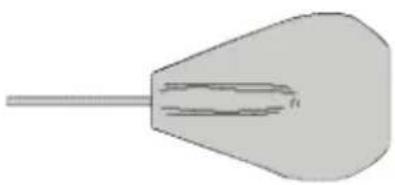
Between Pack Probe
For fast temperature checks of packaged goods without damaging the pack, this fl exible probe should be placed between two similar packs. It can be shaped to exactly fit the required surfaces.
Order ST23L
natural_image
Simple 3D illustration of a conical object with a long shaft and internal horizontal lines (no text or symbols)FIG.3 ST23L BETWEEN PACK PROBE
(MAX. TEMP. +70°C)
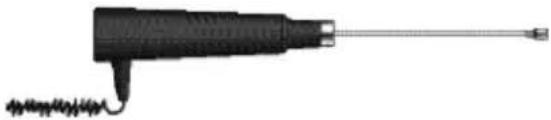
Surface Probe
For measuring the temperature of fl at surfaces like chilled display cases or hot plates. Ensure that the surface is wiped clean before use. Take extra care when measuring hot surfaces.
Order: SK21M
natural_image
Illustration of a handheld electronic device with a metallic tip and coiled cable (no text or symbols)FIG.4 SK21M SURFACE PROBE
(MAX. TEMP. +250°C)
Deep Fat Probe
For temperature measurement in deep fat fryers. This probe is made from a very fl exible material that can be reshaped time and time again. Crank the shaft of the probe so that the fat temperature can be measured without your hand needing to be above the fat itself. Never take the measurement with your hand directly above the fat. Take adequate precautions. Remember the probe will be very hot on withdrawal from the fat. Order:
IT21L

natural_image
Simple line drawing of a medical or laboratory device with a pointed tip and long rod (no text or symbols)FIG.5 IT21L DEEP FAT PROBE
(MAX. TEMP. +400°C)
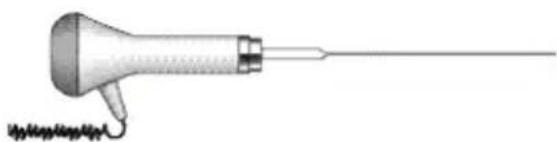
Pallet Probe
This probe allows the measurement of the temperature of cartons on a pallet. By carefully sliding the fl attenued surfaces of the probe between adjacent cartons their temperature can be sampled without the need to unstack the pallet. Order: ST38L
natural_image
Illustration of a handheld medical or laboratory instrument with a pointed tip and attached probe, emitting sound waves (no text or symbols)FIG.6 ST38L HEAVY DUTY PALLET PROBE
(MAX. TEMP. +250°C)
Food Simulant Probe
The simulant has been designed to replicate the temperature characteristics of the most temperature sensitive packaged food. Left permanently in place it gives ultimate confidence that the most representative method of monitoring is being used.
Order: DX31L

natural_image
Simple diagram of a rectangular block with a long horizontal line extending from its top (no text or symbols)FIG.7 DX31L FOOD SIMULANT PROBE
(MAX. TEMP. +70°C)

WARNING
The N9005 and N9094 thermometers are dust and waterproof as stated in the specifications and will withstand harsh environments. Use a damp cloth or warm soapy water to remove deposits and prevent them from hardening or becoming sticky. Do not use solvent-based cleaners or methylated spirits, etc.
Caution: Do not place any thermometer in a dishwasher.
Never use the thermometer/probes:-
To measure the temperature of live power conductors
To lift, lever or hammer
In a microwave oven ... the door will not close properly and the microwave radiation could damage the thermometer and oven
In a normal oven ... the plastic parts may melt
Don't try to clean the plastic case or probe handle with any form of solvent ... it may attack the plastic or cause it to become brittle. It is just as effective to use a damp cloth and normal kitchen cleaner ... regularly.
Don't forget to regularly check your thermometer. Try to build cross checks into your everyday operations so that potential problems are immediately identified.
Always:
Keep your instrument and probe clean.
Use the correct probe for the particular job.
Remove the battery if you are storing your instrument for long periods.
Take care when inserting the penetration probe into hard substances. The sharp point can easily penetrate flesh. keep records of the temperatures you have measured. It may provide useful evidence if there is ever a problem.
The N9005 and N9094 have a long life Lithium cell fitted inside the sealed battery compartment on the reverse of the instrument. This is designed to last up to 10 years in normal usage. However should the symbol BAT appears on the display when the battery voltage has reduced. Battery replacement is recommended at this time. This can only be carried out by Comark or Approved Distributor so please return the instrument as appropriate for battery replacement.
Do not attempt to change the battery yourself as this will result in damage to the instrument and a loss of waterproof rating.
| Sensor TypesType T ThermocoupleType K Thermocouple | Thermistor (PST) |
| Measurement RangeThermistorType TType K | -50°C to +150°C, -58°F to +302°F-200°C to 400°C, -328°F to +752°F-200°C to +1372°C, -328°F to +2501°F |
| Scales °C and °F | |
| Displayed Resolution>-100° < +1000°C 0.1°≤ -100° ≥ +1000°C 1° | |
| System Accuracy(Thermistor)* *At +23°C/+73°F0°C to +70°C, +32°F to +158°F<±0.3°C/0.6°F-25°C to 100°C, 13°F to +212°F ±0.5°C/0.9°F | |
| Instrument AccuracyType K or T full range | *At +23°C/+73°F0.1% of reading ±0.2°C/0.4°F |
| Operating TemperatureRange | -25°C to +50°C/-13°F to +122°F |
| Display | 4-digit, 12.5 mm LCD |
| Countdown Timer Interval | 1 second to 24 hours |
| Battery | 2 x AA 3.6V Lithium cells 2.7 Ah,non replaceable |
| Battery Life | 10 years @ 4 hours use per day,365 days per year (using thermistorprobes) |
| Dimensions | L183mm x W68/79mm x D31/27mmL7.2" x W3.11" x D1.22" |
| Weight | 270g/9.5oz |
| Degree of Protection | IP68, BS EN 60529, IEC529 |
| EMC | Tested to EN 61326-1Criteria B Performance |
Comark Instruments
52 Hurricane Way,
Norwich, Norfolk, NR6 6JB United Kingdom
Tel: +44 207 942 0712
Email: sales@comarkinstruments.com
Website: www.comarkinstruments.com
Comark Instruments
PO Box 500, Beaverton,
OR 97077 USA
Tel: 503 643 5204
Email:sales@comarkusacom
Website: www.comarkusa.com

- N9005 and N9094 OPERATOR MANUAL
- PAGE
- General Information 3
- SPECIFICATION 16
- FIGURES
- WARNING
- CAUTION
- Temperature Measurement Probes
- Certification
- a) UKAS Temperature Certification
- b) UKAS Humidity Certification
- c) NPL Traceable Certification
- Conformance
- Service/Repairs
- N9005 AND N9094 THERMOMETERS WITH BIOCOTE® PROTECTION
- OVERVIEW OF DISPLAY SYMBOLS
- CONNECTING PROBES TO THE THERMOMETERS
- Display Test/Mode
- DATA HOLD
- COUNTDOWN TIMER
- AUTO SWITCH OFF/POWER SAVING MODE
- Clock – the display will show 'CLOC'
- Countdown Timer – the display will show 'Cd'
- Scale – the display will show 'SCAL'
- Type – the display will show 'tYPE'
- High Alarm – the display will show 'HIAL'
- Low Alarm – the display will show 'LOAL'
- Auto Power OFF – the display will show 'AOFF'
- Clock Alarms
- Resolution
- TAKING A TEMPERATURE MEASUREMENT
- PROBE SELECTION
- Penetration Probes
- Fast Air Probe
- AK28M
- Between Pack Probe
- Order ST23L
- Surface Probe
- Order: SK21M
- Deep Fat Probe
- IT21L
- Pallet Probe
- Food Simulant Probe
- Order: DX31L
- Never use the thermometer/probes:-
- Always:
Brand : Comark
Model : N9005
Category : Thermometer