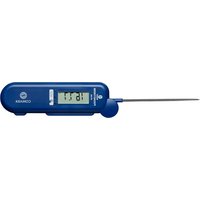
P19W - Thermometer Comark - Free user manual and instructions
Find the device manual for free P19W Comark in PDF.


| Product Type | Digital Thermometer |
| Brand | Comark |
| Model | P19W |
| Temperature Range | -50°C to +300°C (-58°F to +572°F) |
| Accuracy | ±1°C (±1.8°F) between -20°C and +150°C, ±2°C elsewhere |
| Resolution | 0.1°C/°F |
| Probe Type | Stainless steel needle probe, 130mm length |
| Display | LCD, 3.5 digits, 10mm high |
| Power Supply | 1 x CR2032 3V lithium battery |
| Battery Life | Approximately 200 hours of continuous use |
| Auto-Off | After 10 minutes of inactivity |
| Functions | Hold, Max/Min, °C/°F switch |
| Dimensions | 125 x 20 x 20 mm (4.9 x 0.8 x 0.8 in) |
| Weight | 30 g (1.1 oz) including battery |
| Material | ABS plastic body, stainless steel probe |
| Water Resistance | IP67 (immersion up to 1m for 30 min) |
| Certification | CE, NSF, FDA compliant |
| Warranty | 2 years |
| Included Accessories | Battery, manual, probe cover |
| Calibration | User re-calibration possible via ice bath method |
| Usage | Food temperature, cooking, grilling, catering |
Frequently Asked Questions - P19W Comark
User questions about P19W Comark
0 question about this device. Answer the ones you know or ask your own.
Ask a new question about this device
Download the instructions for your Thermometer in PDF format for free! Find your manual P19W - Comark and take your electronic device back in hand. On this page are published all the documents necessary for the use of your device. P19W by Comark.
USER MANUAL P19W Comark
text_image
15.0°F HOLD COMARKP19W FOLDING THERMOMETER
USER MANUAL
20818-3
PRODUCT
text_image
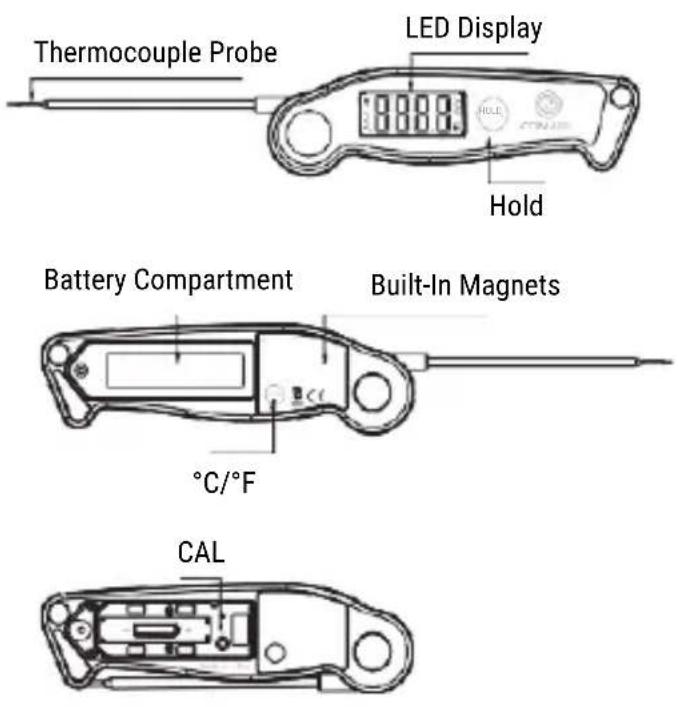
Thermocouple Probe LED Display Hold Battery Compartment Built-In Magnets °C/°F CAL-
LED Display: Displays the current temperature.
-
°C/°F: Hold for 3 seconds to switch between °C and °F.
-
HOLD: Press once to hold the current temperature for 5 seconds, press again to un-hold.
-
Temperature Probe: Insert the probe into food to get an internal temperature reading.
-
Battery Compartment: Use 1 x AAA battery to power the unit.
-
Super-Fast Thermocouple Probe: High-precision sensor, you can get a temperature readout within 3 secs.
-
Calibration Function.
-
Waterproof: IP65
SPECIFICATIONS
- Temperature range: -58°F to 572°F (-50°C to 300°C). If the temperature is below -58°F (-50°C) or above 572°F (300°C), LLL or HHH will show on the screen.
- Three Buttons: HOLD,°C/°F,CAL
- 90 second auto-off feature.
- Resolution: 0.1 °C/°F.
- Temperature Accuracy: ±0.9°F (±0.5°C) in range between 14 to 212°F (-10 to 100°C).
- Battery: 1 x AAA 1.5V included.
- 180° auto-rotating display.
BEFORE FIRST USE
-
Insert 1 x AAA battery with correct polarity (+) and (-) as indicated.
-
Wash probe tip with warm soapy sponge or cloth, then rinse and dry.
-
Wash under running water without fear!
-
PLEASE READ AND FOLLOW ALL INSTRUCTIONS.
-
Your P19W Folding Thermometer is now ready to use.
TO MEASURE FOOD TEMPERATURE
- Pull the probe away from the body of the thermometer to turn on the thermometer, and fold in the probe to turn off the thermometer.
- Press and hold °C/°F button for 3 seconds to switch between °C and °F. Please note that the temperature unit selected will remain when you turn on the thermometer next time.
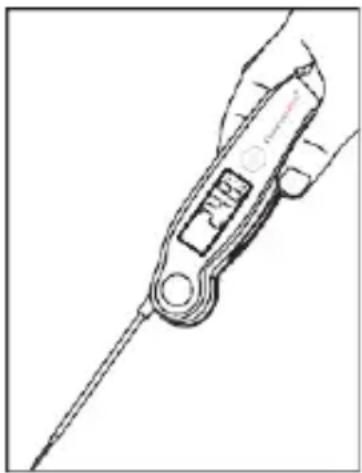
- Insert the tip of the probe into food being cooked as shown in the picture below. The thermometer will start to measure the internal food temperature.
natural_image
Line drawing of a medical or surgical tool with a long rod and internal components (no text or symbols)- Wait until temperature reading stabilizes on the display.
- Temperature reading can be displayed with a 180^ global viewing angle
- Press the HOLD button to hold the temperature for 5 seconds.
-
Wash the thermometer under running water after use.
-
Thermometer will automatically turn off if the probe is not folded in and no button has been pressed in 90 seconds.
- If the thermometer is sleeping with the probe not folded in and then picked up or moved, the thermometer will automatically power on.
CALIBRATION
The thermometer comes with a Calibration feature. In most cases, the thermometer was calibrated precisely at our manufacturing facility, and generally you do NOT need to calibrate the thermometer. However, after a long period of use and you believe that the temperature reading displayed by the thermometer is not accurate, you may follow the process below to re-calibrate the thermometer:
- Use distilled or purified water to make ice cubes in your refrigerator;
- Get a thermal insulated bottle. If you don't have one, use a beaker or a regular cup;
-
Fill the bottle with ice cubes (no less than 70% of the volume), then top off with cold distilled or purified water (no greater than 30% of the volume);
-
Stir the mixture and let it sit for 10 minutes to allow the ice and water to reach its temperature equilibration;
-
Turn on the thermometer, unscrew and take off the battery cover.

natural_image
Line drawing of a hand using a screwdriver to adjust a small component (no text or symbols present)-
Immerse the probe in the ice/water mixture and make sure not to touch the sides of the container. Wait till the temperature reading drops to its lowest value, which should be around 32°F or 0°C. If the temperature of the ice/water mixture is not within 28°F to 36°F (or -2°C to +2°C), the calibration can't be continued: you will need to follow the above steps to re-make the ice/water mixture;
-
Press and hold the CAL button for 5 seconds to enter the Calibration mode. CAL will display for 3 seconds, and current temperature will display on the screen.
-
Press the CAL button once to confirm the calibration mode and exit the calibration mode.
Note:
The Calibration mode will only last for 15 seconds. If you're unable to finish the calibration within 15 seconds, the thermometer will automatically exit Calibration mode.
UNDO CALIBRATION
If you want to undo the calibration and go back to the default calibration setting, please follow the below steps:
-
Turn on the thermometer and press the "CAL" button 5 seconds to enter Calibration mode;
-
Press the HOLD button to undo the calibration and it will reset to the default setting.
HELPFUL HINTS
- When measuring different foods or meat, it may be desirable to cool the probe first by rinsing the tip with cold water.
- It is recommended that you wipe the probe tip clean between readings. This is especially important when taking temperature readings from different foods or meat.
- The thermometer is designed for temporary, hand-held use.
- Do NOT use in an oven.
- Do NOT leave it in extremely hot foods or liquid (anything over 572°F) for more than 1 minute.
- Always take your reading in the thickest available portion of meat. Thin portions of meat are difficult to measure because they tend to cook through fast.
- Avoid touching bone. If the tip touches the bone or heavy fat area of the meat, or if the tip is not deep enough, take a second reading to ensure accuracy.
- Not intended for use by persons under age 12.
CARE OF YOUR THERMOMETER
- Do not touch the stainless portion of the thermometer during or right after measuring temperatures since it will be very hot.
- Do not place the unit in dishwasher or immerse in any liquid. To clean, wipe the probe tip with a damp soapy cloth or sponge and then dry.
- Do not leave exposed to extreme high or low temperatures since this will damage electronic parts and plastics.
- Do not keep the thermometer inserted in food during cooking. Remove batteries if store for more than four months.
DISPOSAL
Waste Electrical & Electronic Equipment Directive (WEEE)
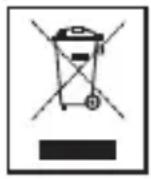
This instrument must not be disposed of in general waste. Instead take it to your local authority's recycling centre for small electrical goods. Within the European Union, Comark operates a Take Back scheme for our end-of-life products.
Contact us for details.
Dispose of waste batteries in local recycling facilities.
WARRANTY
Each Comark product is warranted to be free from defects in material and workmanship under normal use and service. The warranty period is one (1) year, unless otherwise stated, and the warranty period begins on the date of shipment. Temperature probes are warranted for six (6) months.
The warranty extends only to the original buyer or end-user of a Comark authorized reseller. This warranty does not cover damage resulting from normal wear and tear, abuse, misuse, accidental breakage, negligence, defects caused by modifications, repair and servicing not made or authorized by Comark Instruments.
Damage caused by handling, operating, storing, or using the product outside the intended uses described by our product literature. Disposable batteries are also exempt from warranty.
Warranties on dishwasher safe models apply only where the product has been used in a commercial dishwasher.
Comark Instruments products are not suitable for use or cleaning in domestic dishwashers.
Comark's warranty obligation is limited, at Comark's option, to refund of the purchase price, free of charge repair, or replacement of a defective product returned within the warranty period. Products must be returned to Comark or one of Comark's authorized service agents.
This warranty is the buyer's sole and exclusive remedy and is in lieu of all other warranties, express or implied, including but not limited to any implied warranty of fitness for a particular purpose. Comark shall not be liable for any special, indirect, incidental or consequential damages or losses, including loss of data, whether arising from breach of warranty or based on contract, tort, reliance or any other theory. Since some countries or states do not allow limitation of the term of an implied warranty, or exclusion or limitation of incidental or consequential damages, the limitations and exclusions of this warrant may not apply to every buyer.
To obtain service during the warranty period, visit the Service and Repair page on our website -
www.comarkinstruments.com or www.comarkUSA.com for instructions on obtaining a Return Material Authorization (RMA) then send the product to our Service Centre with a description of the problem.
CONTACT
Comark Instruments
52 Hurricane Way,
Norwich, Norfolk, NR6 6JB United
Kingdom
Tel: +44 207 942 0712
Email: sales@comarkinstruments.com
Website: www.comarkinstruments.com
Comark Instruments
PO Box 500, Beaverton,
OR 97077 USA
Tel: 800-555-6658
Email: sales@comarkusa.com
Website: www.comarkusa.com
© Comark Instruments 2022