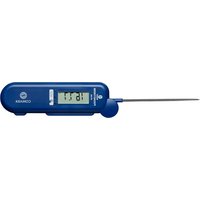
BT250 - Thermometer Comark - Free user manual and instructions
Find the device manual for free BT250 Comark in PDF.


| Product Type | Bluetooth Digital Thermometer |
| Brand | Comark |
| Model | BT250 (Pocketherm) |
| Main Use | Checking frozen, refrigerated, cooked food and frying oil in catering |
| Probe Type | Portable, waterproof foldable probe |
| Communication | Bluetooth to Comark Kitchen Checks app |
| Temperature Range | From -50°C to 300°C (estimated for food use) |
| Power Supply | 2 AA alkaline batteries |
| Battery Life | Auto-off after 10 minutes for energy saving |
| Indicators | LCD screen, blue activity light, audible recording signal, low battery icon |
| Water Resistance | Yes, cleanable under running water (not submersible) |
| Material | Durable plastic |
| Warranty | 2 years against material and workmanship defects |
| Country of Origin | United Kingdom (Comark brand) |
| Maintenance | Wipe probe with Comark wipe; mild detergent, no solvents |
| Battery Replacement | Phillips or flat screwdriver; observe polarity; check seal |
| Safety | Do not use in microwave, do not measure body temperature, avoid contact with live components |
| Spare Parts | AA batteries, Comark probe wipes |
| Repairability | Return to Comark customer service via RMA form |
Frequently Asked Questions - BT250 Comark
User questions about BT250 Comark
0 question about this device. Answer the ones you know or ask your own.
Ask a new question about this device
Download the instructions for your Thermometer in PDF format for free! Find your manual BT250 - Comark and take your electronic device back in hand. On this page are published all the documents necessary for the use of your device. BT250 by Comark.
USER MANUAL BT250 Comark
BLUETOOTH POCKETHERM THERMOMETER
BT125
BT250
USER MANUAL

Introduction

Bluetooth Pocketherm BT125, and BT250 are pocket sized waterproof handheld folding probe digital thermometers. Pocketherm thermometers are intended for quick checks on frozen, chilled or cooked food in catering environments. In addition BT250 can be used for checking frying oil temperatures.
Comark Bluetooth Pocketherm thermometers are designed for use with the Comark Kitchen Checks App. To automate your HACCP records download the Comark Kitchen Checks App from Google Play or Apple Store. For larger organizations the Comark API can be used to integrate Bluetooth thermometers into existing HACCP programs.
When connected via Bluetooth, temperature updates are sent to the tablet or phone and displayed by the App. A touch sensitive record button signals the App to record the currently displayed temperature.
For more information visit: www.comarkinstruments.com/kitchen-checks-pro.
Safety Information

prevent Electric Shock
- To avoid electric shock do not allow the probe to come into contact with live electrical parts.

maintaining Product Safety & Preserving Comark Warranty
- Only use the instrument for its intended purpose.
- Do not use in a microwave oven.
- Pocketherm is not dishwasher safe.
- Do not use the instrument beyond its operating temperature range.

void excessive force on the probe tip.
- Do not use the probe as a lever.

Personal Safety
- The probe tip is sharp and can cause injury if misused.
- Do not measure body temperatures with Pocketherm.

aste Electrical & Electronic Equipment Directive (WEEE)
- This instrument must not be disposed of in general waste. Instead take it to your local authority's recycling centre for small electrical goods. Within the European Union, Comark operates a Take Back scheme for our end-of-life products. Contact us for details.
- Dispose of waste batteries in local recycling facilities.

FCC Safety Warning
This device complies with Part 15 of the FCC Rules. Operation is subject to the following two conditions:
(1) This device may not cause harmful interference, and
(2) This device must accept any interference received, including interference that may cause undesired operation.
Operation
Switching On/Off
Swing out the probe to switch on the thermometer. Swing back the probe to switch off. Clip the tip behind the retainer to avoid damage to clothing or injury.
At switch on, the Bluetooth radio will await connection for 60 seconds, if after this time a successful connection is not made, the Bluetooth radio will shut down, leaving only the thermometer active. To re-attempt making a Bluetooth connection, fold back the probe to switch off the thermometer and then swing out again to switch on.
To conserve battery life, the thermometer will automatically switch off after 10 minutes. Fold back then unfold the probe to continue use.
Low Battery Indication
Low battery is indicated by an empty battery symbol appearing in the top left corner of the display. Replace the battery as soon as possible after this symbol appears.
If the battery is too low, BATT is displayed briefly before the instrument switches itself off.
Connection to Comark Kitchen Checks App
To connect the Bluetooth Pocketherm to Comark Kitchen Checks App, please follow the instructions provided online. When successfully connected to the App, the blue ACTIVITY LED on the front of the Bluetooth Pocketherm will flash at a rate of once per second to indicate that communication is in progress. Disconnection is as simple as folding away the probe to switch off the Pocketherm, or exiting the App.
Taking Measurements
Having successfully connected the Bluetooth Pocketherm to Comark Kitchen Checks, check that the blue ACTIVITY indicator is flashing.
Insert the tip of the probe approximately 20mm (3/4") into the food item to be checked. Allow a few seconds for the probe to reach stable temperature. To record the reading touch the record button to the right of the display.

The Bluetooth Pocketherm will bleep once to confirm the touch press and the blue ACTIVITY indicator will light. The app will guide you through storing the temperature record.
Note: If your Bluetooth Pocketherm is placed face down onto a metal surface unwanted temperature readings may be recorded.
Take care to either:
(a) Only place face up onto metal surfaces.
(b) Ensure the App is not in recording mode, or is stopped.
(c) Switch off the Pocketherm after each use.
Maintenance
Cleaning
To maintain probe hygiene wipe regularly with Comark probe wipe.
The instrument is waterproof and can be washed under a running tap but is not to be submerged.
Use only domestic kitchen cleaners or mild detergents to clean this instrument. Do not use aggressive cleaning chemicals or solvents, these will attack plastics and cause damage.
Battery Replacement
To replace the battery, firstly close the probe then remove the battery cover retaining screws on the rear of the instrument using a Philips or fl at blade screwdriver.* Remove the two cells and dispose in local recycling facilities. Replace with AA size alkaline cells only carefully observing the correct polarity. Visually check that the battery cover and compartment are clean and free of debris. Check that the seal in the battery compartment is not displaced from the locating groove before refi tting the cover. Do not to over-tighten the screws when refi tting the cover. Should OTA appear on the display, simply close and reopen the probe before use.
Technical Support
Please see:
www.comarkinstruments.com or
www.comarkUSA.com for details.
Warranty
This Comark Instruments product will be free from defects in material and workmanship for two years from the date of purchase and applies worldwide. This warranty does not cover fuses, disposable batteries, or damage from accident, neglect, misuse, alteration, contamination, or abnormal conditions of operation or handling. To obtain service during the warranty period, visit the Service and Repair page on our website - www.comarkinstruments.com or www.comarkUSA.com for instructions on obtaining a Return Material Authorization (RMA) then send the product to our Service Centre with a description of the problem.
Activation/désactivation
Assistance technique
Rendez-vous sur :
General Specification
| Sensor TypeBT125BT250 | ThermistorType T Thermocouple |
| Measurement RangeBT125BT250 | -40°C to +125°C /-40°F to +257°F-50°C to +250°C /-58°F to +482°F |
| ScalesBT125BT250 | °C°F |
| Displayed Resolution 0.1° | |
| System AccuracyBT125 (-20°C to +30°C operating)BT250 (0°C to +40°C / +32°F to +104°F operating) | ±0.5°C, -20°C to +70°C/±0.9°F, -4°F to +158°F ±1°C full range< +125°C / +257°F, 0.3% ±(0.75°C / 1.35°F)> +125°C / +257°F, 0.7% ±(0.25°C / 0.45°F) |
| Response Time (T99) 5s | |
| EnvironmentOperating TemperatureStorage TemperatureHumidity | -20°C to +50°C /-4°F to +122°F-30°C to +70°C /-22°F to +158°F10 to 90% non-condensing |
| Power 2 x alkaline AA cells (ANSI 15A IEC LR6) | |
| Battery Life 1000h | |
| Enclosure Ingress Protection IP65 | |
| BluetoothVersionRangeCertifi cation | Bluetooth Ver 4.0 Low Energy (BLE)10m typicallyContains FCC ID: PI4BL600 |
Weight & Measures
| DimensionsCase SizeProbe lengthWeightPacking Box | 170 x 52 x 20 mm110mm140g (incl. battery)175 x 56 x 29 mm |
| Case MaterialsCaseProbe | Mixed: ABS & PC with BioCote® anti-microbial protection moulded in.316 Stainless Steel |
Compliance
| EMC DirectiveEMC StandardRadiated RF emissions 30MHz-6GHzElectrostatic dischargeRadiated RF immunity *Power frequency magnetic fi eld immunityBroadband Data Transmission Systems - Essential RequirementsRadio Equipment-Common RequirementsBroadband Data Transmission Systems | EC Directive 2014/30/EUEN 61326-1:2013, EN 61326-2-1:2013 (Portable Equipment Environment)EN 55011:2009+A1:2010EN 55022:2010 CFR 47 Part 15.109EN 61000-4-2:2009EN 61000-4-3:2006+A1:2008+A2:2010EN 61000-4-8:2010EN 300 328 1.8.1 (2012-06)EN 301 489-1 1.9.2 (2011-09)EN 301 489-17 2.2.1 (2012-09) |
| Product Safety EN 61010-1:2010 Safety requirementsfor electrical equipment for measurement, control and laboratory use. Part-1: General requirementsEN 60950-1:2006+A11:2009+A1:2010+A12:2011 ITE Safety | |
| RoHS Directive EC Directive 2011/65/EU RoHS | |
* Readings may be temporarily affected in the presence of radio frequency interference.
Comark Instruments
52 Hurricane Way, Norwich,
Norfolk NG6 6JB United Kingdom
Tel: +44 (0) 207 942 0712
Fax: +44 (0) 207 942 0714
Email: sales@comarkinstruments.com
Website: www.comarkinstruments.com
Comark Instruments
PO Box 500
Beaverton, OR 97077 USA
Tel: 503 643 5204
Fax: 503 644 5859
Email: sales@comarkusa.com
Website: www.comarkusa.com
Part No 20451-2 (01/18)
© Comark Instruments

- BLUETOOTH POCKETHERM THERMOMETER
- INTRODUCTION
- SAFETY INFORMATION
- PREVENT ELECTRIC SHOCK
- MAINTAINING PRODUCT SAFETY & PRESERVING COMARK WARRANTY
- VOID EXCESSIVE FORCE ON THE PROBE TIP
- PERSONAL SAFETY
- ASTE ELECTRICAL & ELECTRONIC EQUIPMENT DIRECTIVE (WEEE)
- FCC SAFETY WARNING
- OPERATION
- SWITCHING ON/OFF
- LOW BATTERY INDICATION
- CONNECTION TO COMARK KITCHEN CHECKS APP
- TAKING MEASUREMENTS
- MAINTENANCE
- CLEANING
- BATTERY REPLACEMENT
- TECHNICAL SUPPORT
- WARRANTY
- ACTIVATION/DÉSACTIVATION
- ASSISTANCE TECHNIQUE
- GENERAL SPECIFICATION
- COMARK INSTRUMENTS
Brand : Comark
Model : BT250
Category : Thermometer