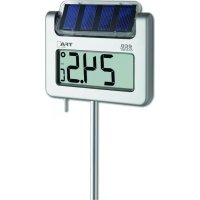
Avenue 30.2026 - Thermometer TFA - Free user manual and instructions
Find the device manual for free Avenue 30.2026 TFA in PDF.


| Product type | Garden thermometer with solar lighting |
| Brand | TFA |
| Model | Avenue 30.2026 |
| Dimensions (W x D x H) | 175 x 38 x 1145 mm |
| Weight | 592 g (device only) |
| Power supply | 1 rechargeable battery 1.2 V AA (lighting) + 1 battery 1.5 V AA (general operation) |
| Temperature measurement range | -25 °C to +70 °C (-13 °F to +158 °F) |
| Accuracy | ±1 °C (0 °C to +45 °C) ; ±1.5 °C (elsewhere) |
| Resolution | 0.1 °C |
| Display | Large LCD screen with 3 modes: current temperature, alternating temperature/time, alternating min/max/current temperature/time |
| Clock functions | Clock with automatic summer/winter time change (DST), 12/24 h format |
| Lighting | Automatic at nightfall, programmable activation via ECO switch |
| Solar panel | Rotatable 180°, requires 8-10 h of exposure per day |
| Screen modes | Position A (current temperature), B (alternating temperature + time), C (alternating max/min/current temperature + time) |
| Min/max values | Automatic reset at 8 a.m. (max) and 8 p.m. (min) |
| °C/°F switch | Yes, via +1 button |
| Temperature sensor | Silver probe, handle with care |
| Mounting rod | Aluminum, cuttable, to be pushed into the ground |
| Weather resistance | Yes |
| Maintenance | Clean the solar panel with a soft cloth, possibly with a little window cleaner; no solvents or abrasives |
| Safety | Do not expose to shocks, extreme temperatures; batteries out of reach of children; do not open or repair yourself |
| Battery replacement | 1.5 V AA battery (alkaline) when display becomes dim; rechargeable battery for lighting |
| Package contents | Thermometer, rod, batteries (1 rechargeable 1.2 V AA + 1 battery 1.5 V AA), instructions |
Frequently Asked Questions - Avenue 30.2026 TFA
User questions about Avenue 30.2026 TFA
0 question about this device. Answer the ones you know or ask your own.
Ask a new question about this device
Download the instructions for your Thermometer in PDF format for free! Find your manual Avenue 30.2026 - TFA and take your electronic device back in hand. On this page are published all the documents necessary for the use of your device. Avenue 30.2026 by TFA.
USER MANUAL Avenue 30.2026 TFA
Operating Instructions
Mode d'emploi


AVENUE – Garden thermometer with solar lighting
GB
Thank you for choosing this instrument from TFA.
-
Before you use this product
-
Please make sure you read the instruction manual carefully.
- Following and respecting the instructions in your manual will prevent damage to your instrument and loss of your statutory rights arising from defects due to incorrect use.
- We shall not be liable for any damage occurring as a result of non-following of these instructions. Likewise, we take no responsibility for any incorrect readings or for any consequences resulting from them.
- Please pay particular attention to the safety notices!
-
Please keep this instruction manual safe for future reference.
-
Field of operation and all the benefits of your new Instrument at a glance
-
Clear functional design
• Large digital display with 3 different modes: - Current temperature
- Current temperature and time in sequence
- Current, highest and lowest temperature and time in sequence
• Maximum and minimum values with auto reset
• Automatic backlight at dark - Rod (separable) in aluminium
- For putting in the ground
• Solar panel - 180° rotatable -
Weather resistant
-
For your safety
-
This product is exclusively intended for the field of application described above. It should only be used as described within these instructions.
- Unauthorised repairs, modifications or changes to the product are prohibited.

Caution!
Risk of injury:
- Keep this device and the batteries out of reach of children.
- Small parts can be swallowed by children (under three years old).
11
AVENUE – Garden thermometer with solar lighting

- Batteries contain harmful acids and may be hazardous if swallowed. If a battery is swallowed, this can lead to serious internal burns and death within two hours. If you suspect a battery could have been swallowed or otherwise caught in the body, seek medical help immediately.
- Batteries must not be thrown into a fire, short-circulted, taken apart or recharged. Risk of explosion!
- Low batteries should be changed as soon as possible to prevent damage caused by leaking.
- Avoid contact with skin, eyes and mucous membranes when handling leaking batteries. In case of contact, immediately rinse the affected areas with water and consult a doctor.

Important Information on product safety!
- Attention: The solar panel is fragile. Do not drop the instrument and avoid collisions, vibration or extreme temperatures.
- Do not expose the device to extreme temperatures, vibrations or shocks.
4. Elements
LCD display (Fig. 1):
A: Battery symbol B: Indication time/temperature
C: Symbol Daylight Saving Time (DST) D: Automatic reset (Auto Reset)
E: Display mode A, B or C
F: PM at 12-hours system
G: Symbol maximum temperature
H: Symbol minimum temperature
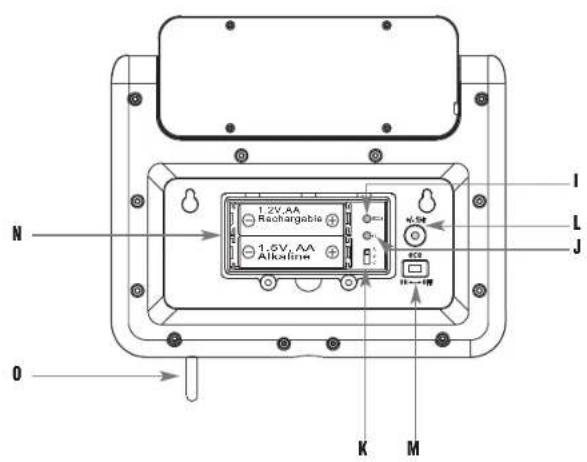
Buttons (Fig. 2):
I: MODE button (in the battery compartment)
J: +1 button (in the battery compartment)
K: Switch A-B-C (in the battery compartment)
L: +/- 1Hr button
M: ECO slide
Housing (Fig. 1-2):
N: Battery compartment (screwed)
O: Temperature probe
P: Solar panel
AVENUE – Garden thermometer with solar lighting

5. Getting started
- Open the battery compartment by a screw driver.
- Insert the batteries (above: rechargeable battery 1 × 1.2 V AA for the illumination; down: battery 1 × 1.5 V AA for all functions) into the battery compartment, observing the correct polarity
- ATTENTION: The 1.2 V rechargeable battery for the backlight is not fully charged when shipped. For maximum efficiency it is advisable to have the rechargeable battery fully charged by the solar panel on a sunny day before the first use. Alternatively, the rechargeable battery can be recharged with an ordinary battery charger.
- Pull the protective foil off the display.
• The unit is now ready to use. - All LCD segments will light up for about a few seconds
- 00:00 appears on the display and the DST symbol is flashing.
- Do we have Daylight Saving Time, press +1 button for confirmation while the symbol is flashing and the DST symbol ⏰mains on the display.
- During standard time press +1 button once again and the DST symbol 🔒 disappears.
- Is there no confirmation within 15 seconds the DST symbol stops flashing and disappears.
- For a simple time switch with only one keypress you have to have a correct setting (see point: Daylight Saving Time / Standard Time switch)
- The buttons are located inside the battery compartment.
5.1 Setting of the clock
- Slide the switch to position B or C.
- As soon as the time appears in the display press MODE button to enter the setting mode.
• The hour digit is flashing. - Press +1 button to set the hours. Hold and press the button for a fast count.
- Press MODE button again and set minutes in the same way.
- Press MODE button again and you will return to normal mode.
- The instrument will quit the setting mode, if there is no button used within 15 seconds period.
5.2 Display change °C/°F
- When the display shows the current temperature, press +1 button to change between °C or °F as temperature unit, at the same time the time system changes from 24 to 12 hour-system.
AVENUE – Garden thermometer with solar lighting

• PM appears on the display after noon.
- Close the battery compartment again.
5.3 Daylight Saving Time / Standard Time switch
- When the time appears on the display hold +/-1 Hr button outside the battery compartment for 3 seconds and summertime changes in to wintertime and vice versa (+/-1 hour).
- Please pay attention to the correct setting at the startup procedure.
5.4 Select display mode
- Switch position A: Current temperature (display: >)
- Switch position B: Current temperature and time alternately (display: >>)
- Switch position C: Current temperature, highest/lowest temperature and time alternately (display: >>>)
5.5 Maximum and minimum temperatures
- There is an automatic update of maximum temperature at 8:00 and minimum temperature at 20:00. Please set the actual time to activate this function.
• Auto Reset flashes on the LCD.
5.6 Temperature probe
- The silver pin is the temperature probe. Please take care of it and do not break it. The temperature probe has no adjusting function. It only measures the temperature.
5.7 Backlight and fixing
- The supplied battery will be recharged in an environmentally friendly manner by the solar panel.
- Please consider when choosing a location that the solar panel needs at least 8-10 hours of light per day to guarantee a long-term sufficient power supply. Attention: Direct sunshine falsifies the measurement.
- The thermometer is provided with a light sensor to turn on the light automatically at dark between 5 and 9 o'clock and 18 and 23 o'clock. Avoid the closeness of artificial light (like: street lighting).
- With the ECO slide it is possible to turn the time controlled illumination on (left) or off (right)
AVENUE – Garden thermometer with solar lighting

- If the ECO mode is not active the illumination will turn on automatically as soon as the light sensor indicates darkness.
- When the battery symbol appears on the display, the voltage of the rechargeable battery is low and the back light function can be temporarily disabled, until the power supply by the solar panel is sufficient again.
- Press the plate firmly into the ground.
- Mount the rod and put it into the ground passing through the hole in the middle of the plate. Fix the thermometer on the rod and turn the solar panel (rotatable 180° ) to the direction where it receives the highest light supply.
6. Care and maintenance
- For best function keep the solar panel always clean. Clean it with a soft cloth and maybe a little glass- or display cleaner. Do not use solvents or scouring agents.
- Remove the battery if you do not use the product for a long period of time.
6.1 Battery replacement
- Please change the 1.5 V AA battery when the display becomes weak.
- Use alkaline batteries only. Observe correct polarity.
7. Troubleshooting
Problem Solutions
No display → Ensure correct polarity when inserting the battery
Incorrect indication → Change the battery
No illumination → Make sure that no objects cover the solar panel (see point 5.7)
8. Waste disposal
This product and its packaging have been manufactured using high-grade materials and components which can be recycled and reused. This reduces waste and protects the environment. Dispose of the packaging in an environmentally friendly manner using the collection systems that have been set up.
AVENUE – Garden thermometer with solar lighting


Disposal of the electrical device
Remove non-permanently installed batteries and rechargeable batteries from the device and dispose of them separately.
This product is labelled in accordance with the EU Waste Electrical and Electronic Equipment Directive (WEEE).
This product must not be disposed of in ordinary household waste. As a consumer, you are required to take end-of-life devices to a designated collection point for the disposal of electrical and electronic equipment, in order to ensure environmentally-compatible disposal. The return service is free of charge. Observe the current regulations in place!

Disposal of the batteries
Batteries and rechargeable batteries must never be disposed of with household waste. They contain pollutants such as heavy metals, which can be harmful to the environment and human health if disposed of improperly, and valuable raw materials such as iron, zinc, manganese or nickel that can be recovered from waste. As a consumer, you are legally obliged to hand in used batteries and rechargeable batteries for environmentally friendly disposal at retailers or appropriate collection points in accordance with national or local regulations. The return service is free of charge. You can obtain addresses of suitable collection points from your city council or local authority.
The names for the heavy metals contained are: Cd=cadmium, Hg=mercury, Pb=lead. Reduce the generation of waste from batteries by using batteries with a longer lifespan or suitable rechargeable batteries. Avoid littering the environment and do not leave batteries or battery-containing electrical and electronic devices lying around carelessly. The separate collection and recycling of batteries and rechargeable batteries make an important contribution to relieving the impact on the environment and avoiding health risks.

WARNING!
Damage to the environment and health
through incorrect disposal of the batteries!
AVENUE – Garden thermometer with solar lighting

- Specifications
| Measuring range temperature: -25 °C...+70 °C (+13 °F...+158 °F) | |
| Accuracy: | ±1°C |
| 0°C...+45°C (+32°F...+113°F) | |
| ±1.5°C | |
| -25°C...0°C (-13°F...+32°F) and +45°C...+70°C (+113°F...+158°F) | |
Resolution: 0.1 °C
Power consumption: 1x 1.2 V AA rechargeable battery and
1x 1.5 V AA battery
Housing dimension: 175 x 38 x 1145 mm
Weight: 592 g (instrument only)
TFA Dostmann GmbH & Co.KG, Zum Ottersberg 12, 97877 Wertheim, Germany
No part of this manual may be reproduced without written consent of TFA Dostmann. The technical data are correct at the time of going to print and may change without prior notice.
The latest technical data and information about this product can be found in our homepage by simply entering the product number in the search box.
www.tfa-dostmann.de 02/22
16
17



- AVENUE – GARDEN THERMOMETER WITH SOLAR LIGHTING
- CAUTION
- RISK OF INJURY
- IMPORTANT INFORMATION ON PRODUCT SAFETY
- ELEMENTS
- LCD DISPLAY (FIG. 1)
- BUTTONS (FIG. 2)
- HOUSING (FIG. 1-2)
- GETTING STARTED
- 5.1 SETTING OF THE CLOCK
- 5.2 DISPLAY CHANGE °C/°F
- 5.3 DAYLIGHT SAVING TIME / STANDARD TIME SWITCH
- 5.4 SELECT DISPLAY MODE
- 5.5 MAXIMUM AND MINIMUM TEMPERATURES
- 5.6 TEMPERATURE PROBE
- 5.7 BACKLIGHT AND FIXING
- CARE AND MAINTENANCE
- 6.1 BATTERY REPLACEMENT
- TROUBLESHOOTING
- PROBLEM SOLUTIONS
- WASTE DISPOSAL
- DISPOSAL OF THE ELECTRICAL DEVICE
- DISPOSAL OF THE BATTERIES
- WARNING
- DAMAGE TO THE ENVIRONMENT AND HEALTH
Brand : TFA
Model : Avenue 30.2026
Category : Thermometer