Cosy Baro 35.1154.01 - Measuring equipment TFA - Free user manual and instructions
Find the device manual for free Cosy Baro 35.1154.01 TFA in PDF.



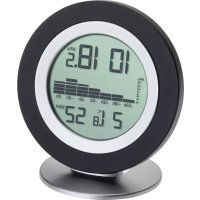
| Product type | Digital barometer thermometer hygrometer |
| Brand | TFA |
| Model | Cosy Baro 35.1154.01 |
| Dimensions (with stand) | 104 × 104 × 77 mm |
| Weight (unit only) | 86 g |
| Power supply | 2 AAA 1.5V batteries (not included) |
| Temperature range | -10 °C to +60 °C (14 °F to 140 °F) |
| Humidity range | 1% to 99% RH |
| Atmospheric pressure range | 913 to 1113 hPa |
| Temperature accuracy | ±1 °C |
| Humidity accuracy | ±5% (10% to 90% RH), ±7.5% beyond |
| Pressure accuracy | ±3 hPa (950-1050 hPa at 20-30 °C) |
| Radio frequency | 868 MHz |
| Max. radio power | < 25 mW |
| Display | LCD: pressure, temperature, humidity, 24h histogram |
| Main functions | Relative/absolute pressure measurement, temperature, humidity, 24h histogram, relative pressure setting, °C/°F unit, WeatherHub connection (optional gateway) |
| Maintenance | Clean with a soft, damp cloth. No solvents. |
| Safety | Keep out of reach of children. Do not open or modify. Batteries: do not dispose of in fire, do not recharge. |
| Spare parts available | AAA batteries (standard) |
| Repairability | Not user serviceable. Contact the seller. |
| Included accessories | Instruction manual |
| Optional accessories | WeatherHub gateway (e.g., 31.4001.02) |
| Intended use | Indoor, on a stand or wall-mounted |
Frequently Asked Questions - Cosy Baro 35.1154.01 TFA
User questions about Cosy Baro 35.1154.01 TFA
0 question about this device. Answer the ones you know or ask your own.
Ask a new question about this device
Download the instructions for your Measuring equipment in PDF format for free! Find your manual Cosy Baro 35.1154.01 - TFA and take your electronic device back in hand. On this page are published all the documents necessary for the use of your device. Cosy Baro 35.1154.01 by TFA.
USER MANUAL Cosy Baro 35.1154.01 TFA
COSY BARO – Barometer-Thermometer-Hygrometer

Thank you for choosing this product from TFA.
1. Before you use this product
- Please make sure you read the instruction manual carefully.
This information will help you to familiarize yourself with your new device, to learn all of its functions and parts, to find out important details about its first use and how to operate it and to get advice in the event of a malfunction. - Following and respecting the instructions in your manual will prevent damage to your instrument and loss of your statutory rights arising from defects due to incorrect use. We shall not be liable for any damage occurring as a result of non following of these instructions.
- Likewise, we take no responsibility for any incorrect readings or for any consequences resulting from them.
- Please take particular note of the safety advice!
- Please keep this instruction manual safe for future reference.
2. Delivery contents
• Digital barometer-thermometer-hygrometer
- Instruction manual
COSY BARO – Barometer-thermometer-hygrometer GB
3. Range of application and all the benefits of your new instrument at a glance
- Indication of atmospheric pressure, indoor temperature and humidity
• Bar graph indication of atmospheric pressure for the last 24 hours - Connection with WeatherHub gateway (not included) enables numerous additional functions via smartphone app
- Standard functions: display of measured values, 90-day history, alarm features
• PRO functions: charts, max. min. values, data export
4. For your safety
- This product is exclusively intended for the range of application described above. It should only be used as described within these instructions.
- Unauthorized repairs, alterations or changes to the product are prohibited.

Caution! isk of injury:
- Keep this instrument and the batteries out of reach of children.
- Batteries must not be thrown into a fire, short-circuited, taken apart or recharged. Risk of explosion!
COSY BARO – Barometer-thermometer-hygrometer GB
- Batteries contain harmful acids and may be hazardous if swallowed. If a battery is swallowed, this can lead to serious internal burns and death within two hours. If you suspect a battery could have been swallowed or otherwise caught in the body, seek medical help immediately.
- Low batteries should be changed as soon as possible to prevent damage caused by leaking.
- Never use a combination of old and new batteries together, nor batteries of different types.
- Wear chemical-resistant protective gloves and safety glasses when handling leaking batteries.

Important information on product safety!
- Do not expose the device to extreme temperatures, vibrations or shocks.
- Protect it from moisture.
5. Elements
Display (Fig. 1)
A: Atmospheric pressure
B: Pressure history graph of the last 24 hours
COSY BARO – Barometer-thermometer-hygrometer GB
C: Indoor temperature and humidity
D: Battery symbol
Buttons (Fig. 2)
E: SET/+ button
F: °C/°F/- button
Housing (Fig. 2)
G: Wall mounting hole
H: Battery compartment
I: Stand
J: QR code for WeatherHub app
6. Getting started
- Open the battery compartment and insert two new AAA 1.5 V batteries, polarity as illustrated.
- All segments will be displayed briefly and subsequently the number and version number of the software and the absolute actual atmospheric pressure measured by the sensor.
• The indoor temperature and humidity appear on the display.
• The device is ready for use.
COSY BARO – Barometer-thermometer-hygrometer GB
7. Settings
7.1 Atmospheric pressure setting
- The barometer has to be adjusted first to your local altitude.
- Ask for the current relative atmospheric pressure of your home area (local weather service, www).
- Press and hold the SET/+ button for 5 seconds to enter the setting mode. The pressure value (default 1013 hPa) flashes.
- Press the SET/+ and °C/°F/- button to set the relative atmospheric pressure.
- Press and hold the buttons for fast mode.
- Wait 5 seconds until the display returns to normal mode to confirm the setting.
7.2 Temperature unit setting
- Press the °C/°F/- button to change between °C (Celsius) or °F (Fahrenheit) as temperature unit.
8. Pressure history graph of the last 24 hours
- The bar chart indicates the air pressure history trend over the last 24 hours in 7 steps, 0h, -3h, -6h, -9h, -12h, -18h, and -24h.
COSY BARO – Barometer-thermometer-hygrometer GB
- The "Oh" in the middle of this scale is equal to the current pressure and each change (± 2, ± 4, ± 6) represents how high or low in "hPa" the past pressure was compared to the current pressure.
- If the bars are rising it means that the weather is getting better due to the increase of air pressure. If the bars go down, it means the air pressure has dropped and the weather is expected to get worse from the present time "Oh".
9. Live healthier by controlling the temperature and humidity
- Checking indoor temperature and humidity can help to achieve a comfortable and healthy living environment and may even save you money on heating costs.
- Excessive humidity indoors promotes the formation of mould. But air that is too dry is also bad for your health.
- Ideally, the indoor temperature should be between 18^ - 22^ and the relative humidity between 40 - 60% .
10. Setting of the WeatherHub connection (only in conjunction with the WeatherHub system)
- You can connect the station with the WeatherHub System gateway (not included). Your data will be transmitted wirelessly through the gateway and the Internet directly to a server.
- Once connected, you can monitor the values measured at your home on your smartphone and use numerous additional functions.
- Open the WeatherHub App and the overview will be displayed. Tap "Add new sensor" and scan the QR code on the back of the station.
- For more information and a detailed description, go to www.tfa-dostmann.de/weatherhub
10.1 Required accessories:
- WeatherHub Starter set with gateway, e.g.: Cat. No. 31.4001.02, 31.4002.02
11. Hanging or table standing
- With the suspension device you can fix the instrument with a nail or a screw at the wall.
- For table standing plug the device to the attached support.
12. Care and maintenance
- Clean the device with a soft damp cloth. Do not use solvents or scouring agents.
COSY BARO – Barometer-thermometer-hygrometer GB
- Remove the batteries if the device will not be used for an extended period of time.
- Keep the device in a dry place.
12.1 Battery replacement
- Change the batteries when the battery symbol appears on the display.
- Open the battery compartment and insert two new AAA 1,5 V batteries. Make sure the polarities are correct.
- Close the battery compartment again.
- In the event of changing batteries, readjust the relative atmospheric pressure by following the setting up procedures.
13. Troubleshooting
Problem Solution
No / incorrect indication → Ensure the batteries' polarities are correct
→ Change the batteries
If your device fails to work despite these measures, contact the retailer where you purchased the product.
This product has been manufactured using high-grade materials and components which can be recycled and reused.

Never dispose of empty batteries and rechargeable batteries with ordinary household waste.
As a consumer, you are required by law to take them to your retail store or to an appropriate collection site depending on national or local regulations in order to protect the environment.
The symbols for the contained heavy metals are: Cd = cadmium, Hg = mercury, Pb = lead
This product is labelled in accordance with the EU Waste Electrical and Electronic Equipment Directive (WEEE).
Please do not dispose of this product in ordinary household waste. As a consumer, you are required to take end-of-life devices to a designated collection point for the disposal of electrical and electronic equipment, in order to ensure environmentally-compatible disposal.
COSY BARO – Barometer-thermometer-hygrometer GB
15. Specifications
Temperature
Measuring range -10 °C... +60 °C /14 °F... 140 °F
Resolution 0.1°C
Accuracy ±1 °C
Humidity
Measuring range 1% ...99% r. F.
Resolution 1 %
Accuracy ±5% from 10%...90%,
otherwise ±7.5%
Measuring interval
Temperature + humidity 6 seconds
Atmospheric pressure
Measuring range 913 ... 1113 hPa
Accuracy ±3 hPa
(950 hPa...1050 hPa @ +20°C...+30°C)
Measuring interval 1 minute
| WeatherHubMeasuring interval 6 minutes |
| Transmission frequency 868 MHz |
| Maximumradio-frequency power < 25mW |
| Power consumption Batteries 2 x 1,5 V AAA (not included) |
| Dimensions 104 x 20 (77) x 104 mm |
| Weight 86 g (device only) |
COSY BARO – Barometer-thermometer-hygrometer GB
No part of this manual may be reproduced without written consent of TFA Dostmann. No part of this manual may be reproduced without written consent of TFA Dostmann. The technical data are correct at the time of going to print and may change without prior notice. The latest technical data and information about this product can be found in our homepage by simply entering the product number in the search box.
EU Declaration of conformity
Hereby, TFA Dostmann declares that the radio equipment type 35.1154 is in compliance with Directive 2014/53/EU. The full text of the EU declaration of conformity is available at the following Internet address:
www.tfa-dostmann.de
- COSY BARO – Barometer-Thermometer-Hygrometer
- Before you use this product
- Delivery contents
- COSY BARO – Barometer-thermometer-hygrometer GB
- Range of application and all the benefits of your new instrument at a glance
- For your safety
- Caution! isk of injury:
- Important information on product safety!
- Elements
- Buttons (Fig. 2)
- Housing (Fig. 2)
- Getting started
- Settings
- Atmospheric pressure setting
- Temperature unit setting
- Pressure history graph of the last 24 hours
- Live healthier by controlling the temperature and humidity
- Setting of the WeatherHub connection (only in conjunction with the WeatherHub system)
- Required accessories:
- Hanging or table standing
- Care and maintenance
- Battery replacement
- Troubleshooting
- Problem Solution
- Specifications
- Temperature
- Humidity
- Atmospheric pressure
- EU Declaration of conformity
- www.tfa-dostmann.de
Brand : TFA
Model : Cosy Baro 35.1154.01
Category : Measuring equipment