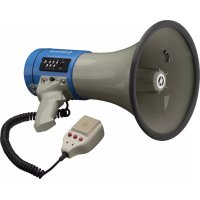
TM17M - Megaphone Monacor - Free user manual and instructions
Find the device manual for free TM17M Monacor in PDF.



| Product type | Megaphone with MP3 player |
| Brand | Monacor |
| Model | TM-17M |
| Dimensions | 230 mm × 340 mm |
| Weight | 1.3 kg |
| Peak power | 25 W |
| Average sound pressure | 110 dB |
| Power supply | 8 batteries 1.5 V type R14 (C) or external 12 V / 2 A |
| Playback media | USB flash drive (type A), microSD[HC] card |
| Audio formats | MP3 |
| Max recording time | 20 seconds |
| Functions | Announcement, siren, recording, MP3 playback |
| Volume adjustments | Separate for microphone and MP3 (VOLUME and V+/V-) |
| LED indicators | POWER, REC, MP3 status |
| Shoulder strap | Included |
| Operating temperature | 0°C to 40°C |
| Cleaning | Soft, dry or slightly damp cloth |
| Recycling | Dispose of at electronic waste collection point |
Frequently Asked Questions - TM17M Monacor
User questions about TM17M Monacor
0 question about this device. Answer the ones you know or ask your own.
Ask a new question about this device
Download the instructions for your Megaphone in PDF format for free! Find your manual TM17M - Monacor and take your electronic device back in hand. On this page are published all the documents necessary for the use of your device. TM17M by Monacor.
USER MANUAL TM17M Monacor
TM-17M
English ...... Page 7
Français ...... Page 10
Italiano.... Pagina 13
Megaphone with MP3 Player
These instructions are intended for users without any specific technical knowledge. Please read the instructions carefully prior to operation and keep them for later reference. All operating elements and connections described can be found on page 2.
1 Features
TM-17M is a powerful megaphone with handheld microphone. It can be operated via batteries or via external power supply (e.g. electrical system of a car) and offers a peak power of 25 W. The megaphone features a recording function (recording time: 20 seconds max.) and a siren. It is also equipped with a reproduction module for MP3 audio files to be replayed from a USB flash drive or a microSD card. It is provided with separate volume controls so that announcements and MP3 reproductions can be mixed as desired.
2 Operating Elements and Connections
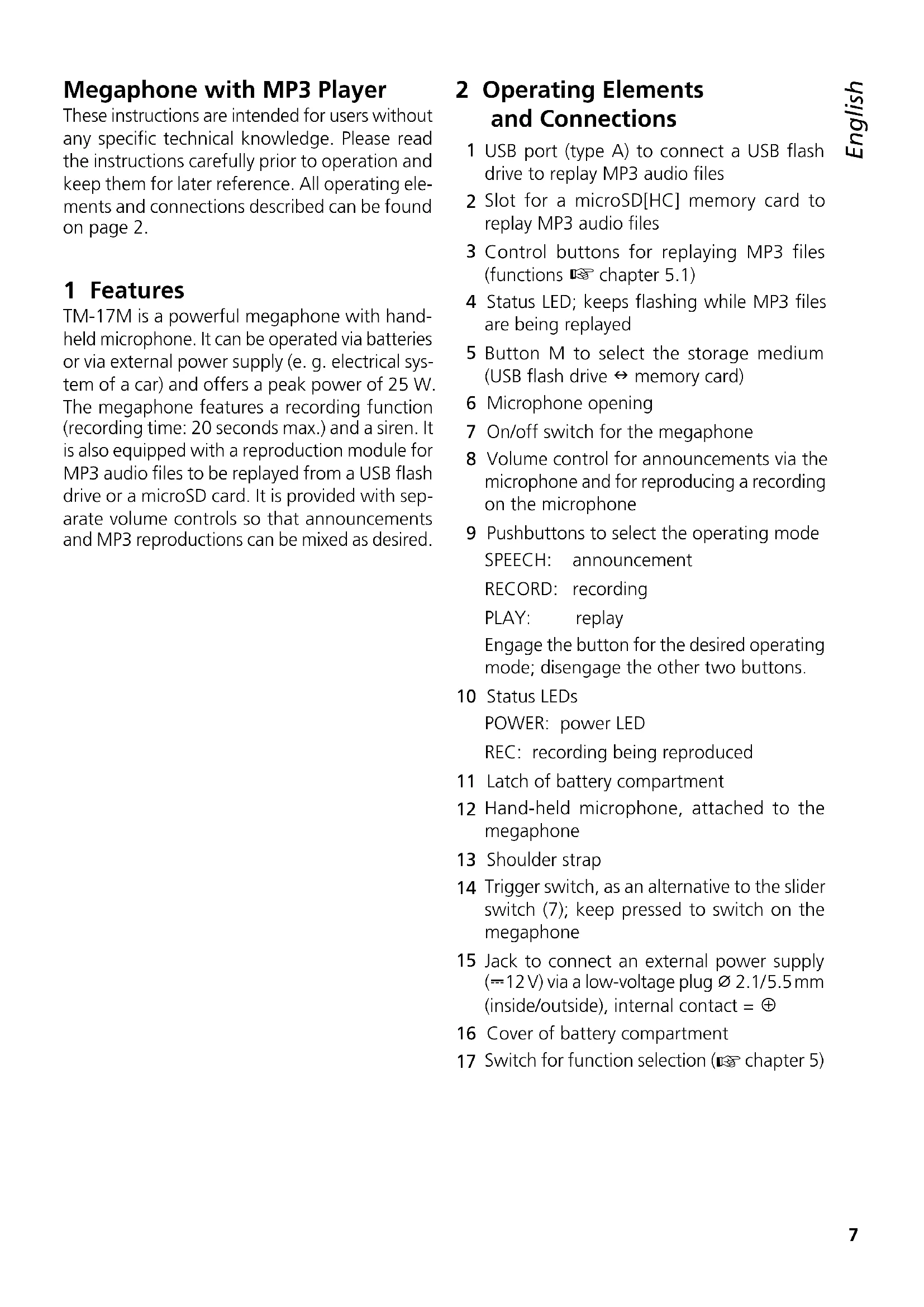
1 USB port (type A) to connect a USB flash drive to replay MP3 audio files
2 Slot for a microSD[HC] memory card to replay MP3 audio files
3 Control buttons for replaying MP3 files (functions 📄 chapter 5.1)
4 Status LED; keeps flashing while MP3 files are being replayed
5 Button M to select the storage medium (USB flash drive ⇔ memory card)
6 Microphone opening
7 On/off switch for the megaphone
8 Volume control for announcements via the microphone and for reproducing a recording on the microphone
9 Pushbuttons to select the operating mode SPEECH: announcement
RECORD: recording
PLAY: replay
Engage the button for the desired operating mode; disengage the other two buttons.
10 Status LEDs
POWER: power LED
REC: recording being reproduced
11 Latch of battery compartment
12 Hand-held microphone, attached to the megaphone
13 Shoulder strap
14 Trigger switch, as an alternative to the slider switch (7); keep pressed to switch on the megaphone
15 Jack to connect an external power supply ( ≈ 12 V) via a low-voltage plug 2.1/5.5 mm (inside/outside), internal contact =
16 Cover of battery compartment
17 Switch for function selection (▶ chapter 5)
3 Safety Notes
The unit corresponds to all relevant directives of the EU and is therefore marked with C€
CAUTION

Never operate the megaphone close to another person's ears; the amplified voice or howling (feedback) may damage their hearing.
- Never put down the unit in humid environments and protect it against extreme temperatures (admissible ambient temperature range: 0–40°C).
- Never use the unit in the rain. Make sure that no liquid will get inside the unit.
- For cleaning only use a soft cloth, dry or slightly wet; never use chemicals or aggressive detergents.
- No guarantee claims for the unit and no liability for any resulting personal damage or material damage will be accepted if the unit is used for other purposes than originally intended, if it is not correctly operated, or if it is not repaired in an expert way. Likewise, no liability will be accepted for any data loss as a result of operating errors or a defect or for any consequential damage caused by this data loss.
If the unit is to be put out of operation definitively, take it to a local recycling plant for a disposal which is not harmful to the environment.
4 Before Operation
The megaphone can either be operated via batteries or externally supplied with power, e. g. via the 12 V electrical system of a car or a 12 V power supply unit.
When an external power supply is connected, the batteries inserted will be switched off.
4.1 Inserting batteries
1) To open the battery compartment, unlock the latch (11) and fold down the cover (16).
2) Insert eight 1.5 V batteries of size C into the compartment. Always observe the correct polarity (see imprint in battery compartment).
3) Close the battery compartment: Fold up the cover (16) and lock the latch.
If the megaphone is not in use for a longer period of time (e. g. more than a week), always remove the batteries to prevent damage due to battery leakage.
Never put discharged batteries or defective rechargeable batteries in the household waste. To protect the environment, always take them to a special waste disposal (e.g. collection container at your retailer).
4.2 External power supply
For connection to the power supply jack DC 12 V (15), a low-voltage plug ∅2.1/5.5mm (inside / outside diameter) with positive polarity at the internal contact is required. A connection cable with car cigarette lighter plug (positive centre contact) is supplied with the megaphone. When using the car cigarette lighter socket, make sure to remove any ashes to ensure good electrical contact. Clean the socket with a soft dry cloth, if necessary.
5 Operation
Always check the position of the switch (17) before switching on the megaphone. Change the position, if required.
| Position | Functions | |||
| loud siren | announce-ment | recording/ replay | MP3 replay | |
| SIREN | ♦ | |||
| SPEAK | ♦ | ♦ | ||
| MP3 | ♦ ♦ | ♦ | ||
Use the slider switch (7) on the microphone to switch on the megaphone (position ON) or keep
the trigger switch (14) on the handle pressed. The POWER LED (10) lights up. Depending on the position of the switch (17), the siren will sound or the megaphone will operate in one of the following operating modes when the corresponding pushbutton [SPEECH, RECORD, PLAY (9)] is engaged:
| Switch Operating mode | |
| SPEECH Direct announcements via the microphone | |
| RECORD | Recording via the microphone (20 seconds max.)Speak into the microphone. The current recording will overwrite any recording made previously.To stop the recoding, disengage the button. |
| PLAY | Replay of the recordingThe LED REC (10) lights up.The replay will be continuously repeated.To stop the replay, disengage the button. |
To select a function, engage one of the three buttons and disengage the other two buttons.
When speaking into the microphone (12), hold the microphone opening (6) as close to your mouth as possible. Either hold the microphone in your hand or put it onto the hook on the rear of the megaphone.
For reproductions and for direct announcements, adjust the volume on the side of the microphone with the control VOLUME (8). In case of howling (feedback) during an announcement, turn back the control accordingly.
To save the batteries, switch off the megaphone after use and between operations. Set the switch (7) on the microphone to the position OFF and release the trigger switch (14) on the handle.
5.1 Replay of MP3 files
Regardless of the other functions of the megaphone, the integrated audio player is able to reproduce audio files in MP3 format. USB flash drives or microSD[HC] cards can be used as storage media.
Note: Due to the large number of storage device manufacturers and device drivers, it cannot be guaranteed that all storage media are compatible with the audio player.
Connect a USB flash drive to the USB port (1) or / and insert a microSD[HC] card into the Subject to technical modification.
slot (2), contacts to the USB port, until it engages. To remove the card, push the card into the slot until it disengages.
Set the switch (17) to the position MP3. When the megaphone is switched on, the replay from the storage medium most recently selected will start. When a storage medium is connected during operation, the replay will start from this medium. The LED (4) keeps flashing during the replay.
The control buttons (3, 5) of the MP3 module have the following functions:
| Button Function | |
| ▶II | Pause the replay (and go to the beginning of the current title when the button is kept pressed for a while) or continue the replay |
| ▶▶I | Go to the next title, go to the last title of the current storage medium when the button is kept pressed for a while |
| |◀◀ | Go to the previous title, go to the first title of the current storage medium when the button is kept pressed for a while |
| RPT | Switch to repeat of individual titles or return to repeat of all titles of the current storage medium |
| V+/- | Increase / reduce the volume for replaying MP3 files |
| M | Select the other storage medium (USB port ↔ memory card) |
6 Specifications
Peak power of amplifier: ..25W
SPL: 110 dB
Power supply: ....8 × 1.5 V battery of size C or external power supply ==12V/2A
Dimensions: 230 mm × 340 mm
Weight: 1.3 kg
zewn. zasilacz = 12V/2A
Wymiary: 230 mm × 340 mm
Waga: 1,3 kg
Brand : Monacor
Model : TM17M
Category : Megaphone