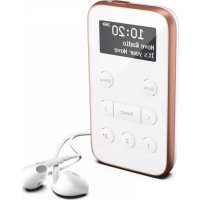
Move R3 - Alarm clock radio PURE - Free user manual and instructions
Find the device manual for free Move R3 PURE in PDF.


| Product Type | Digital DAB/DAB+ and FM RDS alarm clock radio |
| Brand | Pure |
| Model | Move R3 |
| Dimensions (H x W x D) | 102 mm x 56 mm x 15 mm |
| Weight | 100 g |
| Power Supply | 5 V DC, 1 A via micro-USB (mains adapter not supplied); built-in rechargeable 1000 mAh lithium-ion battery |
| Battery Life | Up to 20 hours (radio listening) |
| Display | 1.6 inch OLED |
| Main Features | DAB/DAB+ and FM RDS radio; alarm; sleep timer; 10 digital and 10 FM presets; auto tuning; key lock; built-in equalizer (Normal, Rock, Pop, Classic, Jazz, Speech, Custom) |
| Headphones | 3.5 mm headphone jack; supplied in-ear headphones (serve as antenna) |
| Connectivity | Micro-USB port (charging and software updates); 3.5 mm headphone jack |
| Maintenance and Cleaning | Unplug before cleaning; use a soft dry cloth; do not use abrasive products or solvents |
| Safety | Do not expose to water or drips; do not open the product (no user-serviceable parts); do not listen at high volume for prolonged periods; battery not replaceable by user |
| Spare Parts and Repairability | Built-in non-replaceable battery; no spare parts available; repairs only by authorised personnel |
| General Information | Compliant with RED Directive 2014/53/EU; do not dispose of with household waste (recycle); warranty and support at pure.com |
Frequently Asked Questions - Move R3 PURE
User questions about Move R3 PURE
0 question about this device. Answer the ones you know or ask your own.
Ask a new question about this device
Download the instructions for your Alarm clock radio in PDF format for free! Find your manual Move R3 - PURE and take your electronic device back in hand. On this page are published all the documents necessary for the use of your device. Move R3 by PURE.
USER MANUAL Move R3 PURE
Thank you for choosing the Move R3. This manual will get you up and running in n If you need more help, visit support.pure.cc
Safety
Before you use yourMove R3,read the following safety instructions.
- Read all the safety information and instructions be fore using the product. When passing this product to so include all documents.
- If you do not follow the ope rating instructions p roided, it may compromise the safety of your product invalidate the warranty.
- Do not expose the product to dripping or splashing.Do not place objects filled with liquids,suchas vases,o product. If liquid or water spills onto the product,switchit off immediately and contact yourdealer. If youare using amains-powered adapte r, do not touchthe product with wet hands.
- The internalbattery inthis product is not user replaceable. Do not expose the battery to excessive heat flames. Ensure adequate ventilation and airflow around the product, particularly when charging. Dispse of the product in accordance with local environmental rules.
- Using the product inrooms or climates withhighhumidity and temper ratures may cause condensationto for the product, whichcandamage the product.Use the product inmoderate climate s only.
- Do not use your product inextremely hot or cold temperature. Keep the device away from heat source radiators or gas/electric fires. Do not expose your product to naked flames, such as lighted candles.
- To charge yourproduct,onlyconnect it to asupply source that meets the safety isolationrequirements of EN 60065 or EN 60950-1 for anaccessible safety extra low voltage circuit. For this connection,use either supplied micro-USB cable or a suitably CE approved power adapte r with the correct USB output rating.
- Power the product using anexternal5 V DC1 A power supply. The maximum output current is 1 A,protect internalcircuit.
- Before you charge your product, ensure that the available supply voltage corresponds with the required operational voltage of the product.
- Disconnect your product from the charging power supply if you will not use your product for a long period (for example, if you are going on holiday).
- Always unplug yourproduct from the charging power supply before cleaning. Whencleaning the product, d use any type of abrasive pad or abrasive cleaning solutions as these may damage the product's surface
- To reduce the risk of electricshock,do not remove anyscrews.The product does not containanyuser-serviceable parts inside. Product repairs should only be carried out by authorised personnel.
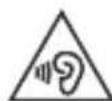
To prevent possible hearing damage, do not listen at high volume levels for long pe riods exposure to high volumes when using headphones can damage your hearing. Always check the before you insert headphones into your e ars.Use of headphones othe r thanthose supplied expose youto hearing damage, as the high level volume warning onthe device may be in he adphones while operating a vehicle is not recommende d and is illegalinsome areas.If to your Move is distracting while op rating any type of vehicle or performing anactivit atte ntion.stop list eng to yourMove.
END
User:The battery is not user se rviceable. Do not attempt to replace the internalbattery in the product Se rvice Personnelonly:Danger of explosion if battery is incorrectlyreplaced.Replace only withthe same or type.
Riskof injury when charging the product indirect sunlight.Only charge the product whenit is not indirect
Ensure adequate ventilation and airflow around the product, particularly when charging.
Cease to use the device if there are any abnormalities during operation, such as hightemperature, di bulging,leakage ,and so on.
Symbols on the product and in the user manual
Potentially serious risk to your personal safety. To avoid possible injury or death, obey all safe symbol.

Caution.Read the use r manualbefore use.

Caution. Avoid listening at high volume levels for long periods of time.
5VDC1A
5V DC 1A power supply.

Where to switch on the product or put it in standby.
Contents
Introduction 1
Safety 2
Contents 4
Overview 5
What's in the box 5
Controls 6
Connections 7
Display 8
Getting started 9
Charging your Move 9
Switching on for the first time 9
Locking and unlocking your Move 10
Digital radio 12
Listening to di gital radio 12
Changing the radio station 12
Performing an autotune 12
FM radio 13
Listening to FM radi o 13
Changing the radio station 13
Changing search settings for radio stations 13
Changing between stereo and monoreception 14
Presets 15
Storing presets to preset 1 or 2 15
Storing presets to the preset list 15
Listening to presets 16
Timers 17
Setting a sleep timer 17
Settings 18
Clock settings 18
Display settings 19
Changing the audio settings 20
Changing the language 21
Resetting to factory settings 21
Updati ng the software 21
Performing a battery reset 22
Specifications 23
Overview
What's in the box
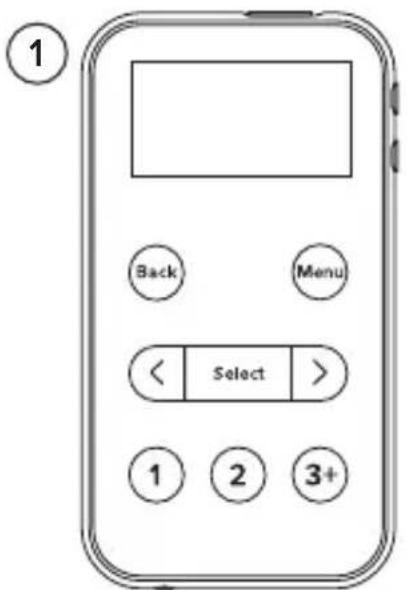
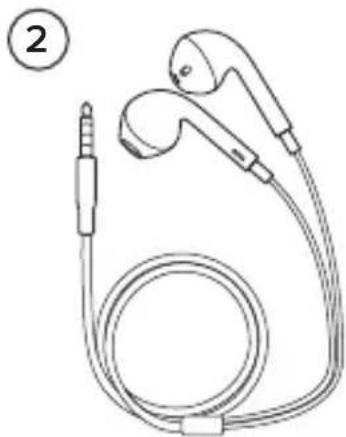
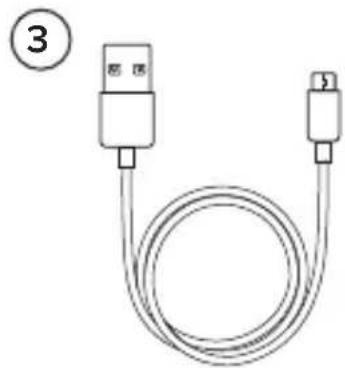
1 Move R3 3 Micro-USB cable (for power only)
2 Headphones
EN
Controls
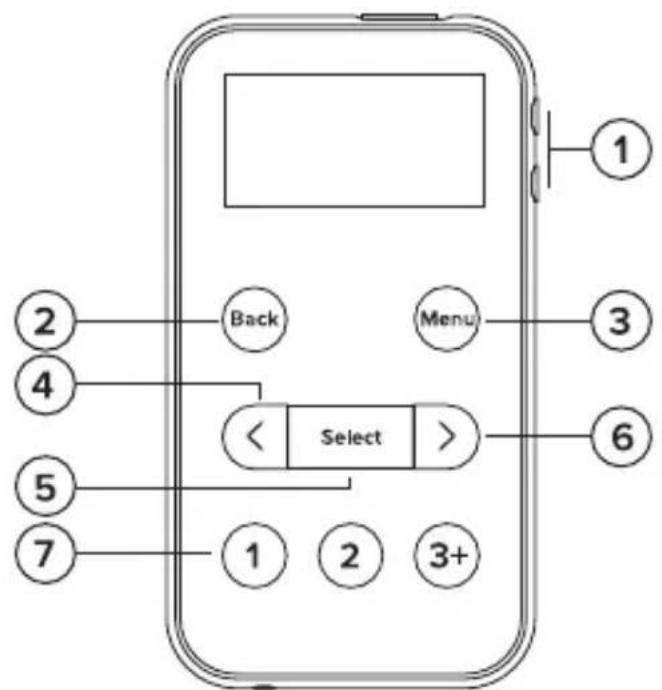
1 Volume Press to change the volume.
2 Back Press to go back to the previous menu.
3 Menu Press to open the main menu.
4 Previous Press to choose the previous radio station or menu option.
5 Select Press to select a radio station or menu option.
6 Next Press to choose the next radio station or menu option.
7 Presets Press to listen to your presets. Press and hold to store the current rad station to a preset.
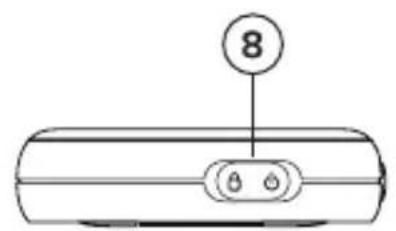
8 Power/Lock Slide to the position to lock the buttons. Slide to the middle position unlock the buttons.
Slide to the position to switch on your Move. Slide to the position hold to switch off your Move.
Connections
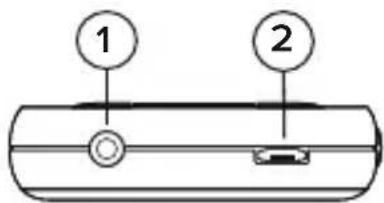
1 3.5 mm headphone socket
2 Micro-USB socket
Display
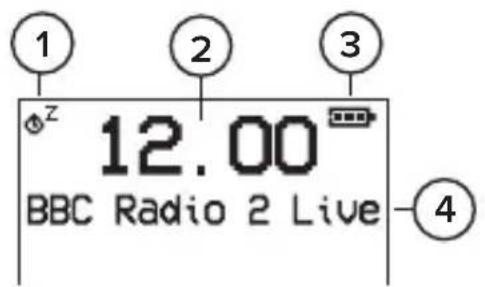
1 Sleep timer active 3 Battery level
2 Current time 4 Text area
Getting started
Before using your Move, read the safety information on page 2.
Charging your Move
- Connect the micro-USB cable to the micro-USB port on your Move.
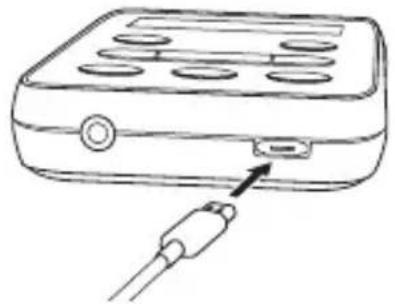
- Connect the other end of the micro-USB cable to a power outlet, power adapter. You can also charge the battery by connecting your a computer's USB port.
The on the display shows the battery charging.
Switching on for the first time
Before you switch on your Move for the first time, charge the batte 3 hours.
- Connect the headphones into the headphone socket on your Move. The headphones are also the aerial for your Move.
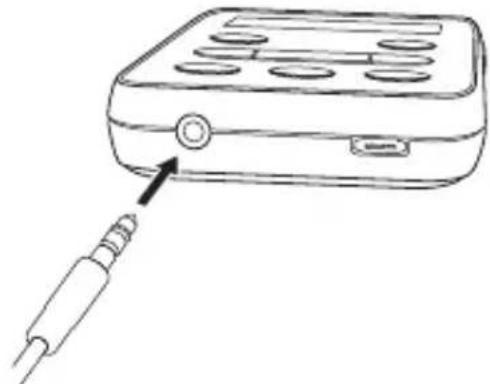
- Slide the Power/Lock switch into the position, then release the switch. Your Move switches on and starts tuning to digital radio stations. After autotune is complete, you can start listening to digital radio.
Locking and unlocking your Move
You can lock the buttons on your Move, so you don't accidentally press
When your Move is switched off, lock the buttons so you don't accide switch it on.
-
To lock the buttons on your Move, slide the Power/Lock switch position.
-
To unlock the buttons on your Move, slide the Power/Lock switch middle position.
Digital radio
Listening to digital radio
When you are listening to FM radio, you can change to digital radio.
- Press Menu.
- Press and Select to choose Digital radio.
Changing the radio station
- Press or to browse the available radio stations.
- Press Select to choose a radio station.
Performing an autotune
When you first switch on your Move, it automatically searches for radio st search for digital radio stations again, perform an autotune.
- Press Menu.
- Press and Select to choose Autotune.
FM radio
Listening to FM radio
When you are listening to digital radio, you can change to FM radio.
- Press Menu.
- Press and Select to choose FM radio.
Changing the radio station
To move to the previous or next radio station, press and hold or
- To tune to a specific radio station frequency, press or to increase decrease the frequency. The frequency steps up or down by 0.05 M
Changing search settings for radio stations
When you press and> hold to change radio stations, you can include all stations or only include radio stations with a strong signal.
- Press Menu.
- Press and Select to choose Scan setting.
- Press and Select to choose Strong stations only or All stations.
EN
Changing between stereo and mono reception
By default, your Move uses stereo reception for FM radio. If radio stations weak signal, mono reception may improve the signal strength.
- Press Menu.
- Press and Select to choose Stereo.
- Press and Select to choose FM stereo or Mono.
Presets
You can store your favourite radio stations as presets.
On the front of your Move, there are three preset buttons. Use 1 or 2 for quick access to your favourite radio stations. Use 3+ to open a list of all your presets.
You can save up to 10 digital radio stations and up to 10 FM radio presets list.
Storing preset to preset 1 or 2
- Tune to the radio station you want to store.
- Press and hold 1 or 2 until Preset stored is displayed.
If there is already a radio station saved to the preset you've's new station replaces it.
Storing preset to the preset list
- Tune to the radio station you want to store.
- Press and hold 3+ until the preset list is displayed.
- Press<and Select to choose a preset number.
If there is already a radio station saved to the preset you've's new station replaces it.
Listening to presets
- To listen to preset 1 or 2, press 1 or 2.
- To listen to any preset, press 3+ to open the preset list. Press and Select to choose a preset number.
Timers
Setting a sleep timer
The sleep timer switches off your Move after a set amount of time.
- Press Menu.
- Press and Select to choose Sleep timer.
- Press and Select to choose the duration of the timer.
is shown on the display and the timer starts counting down.
To cancel the sleep timer, enter the Sleep timer menu and choose Sleep off.
EN
Settings
The current value for most settings is indicated on the display by an
Clock settings
Setting the time and date
- Press Menu.
- Press and Select to choose Clock > Set time/date.
- Press and Select to set the time and then the date.
Changing the time or date format
- Press Menu.
- Press and Select to choose Clock.
- Choose whether to change the time format or date format.
To change the time format, press and Select to choose Set 12/24 hour.
To change the date format, press and Select to choose Set date format.
- Press<and Select to choose a format.
Changing how the clock updates
. Your Move can automatically update its clock using the FM or digit
- Press Menu.
- Press and Select to choose Clock > Auto update.
- Press and Select to choose how the clock updates.
Display settings
Changing the information shown on the display
- Press Menu.
- Press and Select to choose Display > Info.
-
Press and Select to choose a setting.
-
Scrolling text. Displays information provided by the radio station, such as the current song's title and artist.
- Signal quality. Displays the signal quality, from 0 to 100, of the current radio station. Only available for digital radio.
- Signal strength. Displays the signal strength of the current radio station. Only available for digital radio.
- Date. Displays today's date.
Changing the display brightness
- Press Menu.
- Press and Select to choose Display > Brightness.
- Press and Select to choose a brightness level. To make the display brighter, choose a higher number.
By default, the display turns off after 10 seconds of inactivity. To make display always stay on, press Menu and choose Display > Duration > Always on.
Changing the audio settings
Use the equaliser to get the most out of your audio. There are several settings set up already. For example, to hear classical music at its best, equaliser setting to Classic. You can also customise the equaliser to change the treble and bass.
- Press Menu.
- Press and Select to choose Audio.
- Choose an equaliser setting.
To choose an existing equaliser setting, press and Select. You can choose from Natural, Rock, Pop, Classic, Jazz, or News.
To customise the equaliser, press and Select to choose Custom. Then press and Select to change the treble and bass.
Changing the language
- Press Menu.
- Press and Select to choose Settings > Language.
- Press<and Select to choose a language.
Resetting to factory settings
If you reset your Move to factory settings, it removes stored presets, cl station list and resets all settings to default.
You cannot undo a factory reset.
- Press Menu.
- Press and Select to choose Settings > Factory reset.
- Press and Select to choose Yes.
Updating the software
We may provide software updates to improve your Move. To check for software updates, visit support.pure.com.
To be contacted when software updates are available, you can register at account.pure.com.
Note: The Micro-USB cable supplied with your Move does not support sc updates. To update the software, use a Micro-USB data cable.
Performing a battery reset
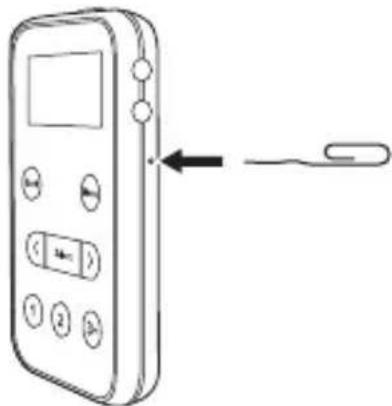
If the controls on your Move stop responding, perform a battery reset.
To perform a battery reset, use a paper clip to press the reset button side of your Move.
Specifications
Radio DAB/DAB+ and FM (RDS)
Frequencies Digital: Band III 174-240 MHz, FM: 87.5-108 MHz
Headphones 32 ohm 14 mm diameter driver
Receiving power supply 5V (1A) DC micro-USB (cable supplied)
Lithium-ion rechargeable battery (1000 mAh)
Inputs 5V DC (1A) Micro-USB power socket (al so for software updates)
The supplied Micro-USB cable is only suitable for charging
Outputs 3. 5mm stereo headphone socket
Presets 10 digital presets, 10 FM presets
Display 1.6" OLED
Software version v1.0
Operational temperature 0^ C to +40^ C
Dimensions 102 mm (H) x 56 mm (W) x 15 mm (D)
Weight 100 g
Aerial Supplied in-ea r hea dphones act as aerial
Approvals CE marked
C
Correct
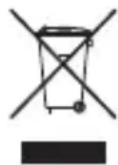
disposal of this product
This marking indicates that this product should not be disposed with other household throughout the EU. To prevent possible harm to the environment or human health from uncontrolled waste disposal, recycle it responsibly to promote the sustainable reuse of material resources. To return your used device, please use the return and collection system conta ct the retail where the product was purchased. They can take this product 1 environment I safe recycling.
Copyright
Copyright 2017 by Pure Internati ona I Limited. All rights reserved. No part of this publication may be or di stributed, transmitted, transcribed, stored in a retrieval system, or translated into any human or computer I language, in a ny form or by a ny means, electronic, mecha nical, magneti c, manual or d disclosed to th rd parties wi thout the express written permission of Pure Internati ona I Limited. For and disclaimer i information, visit pure.com.
Trademarks
Move, Pure and the Pure logo are trademarks or registered trademarks of Pure International Limited. All other product names are trademarks of their respective companies. Version 1 February 2016.
Einführung
Dimensions 102 mm (H) x 56 mm (L) x 15 mm (P)
Poids 100 g
Radio DAB/DAB+ e FM (RDS)
Frequenze Digitali: Banda III 174 - 240 MHz, FM: 87,5-108 MHz
Hore pa digital radio
Hodetelefoner 32 ohm 14 mm diameter driver
Mottakende strømforsyning 5V (1A) DC mikro-USB (medfølgende kabel)
Oppladbart li tium-ionbatteri (1000 mAh)
Innganger 5V DC (1A) mikro-USB stikkontakt (ogsfor programvareoppateringer)
Medfolgende Mikro-USB-kabel er kun egnet for lading
Utganger 3,5 mm stereohodetelefonkontakt
Pure International Limited Pure