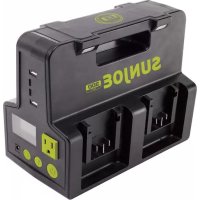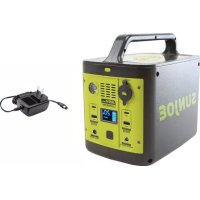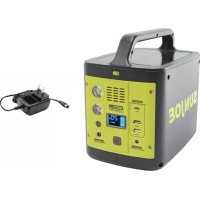
PPG300 - Generator Sun Joe - Free user manual and instructions
Find the device manual for free PPG300 Sun Joe in PDF.



| Brand | Sun Joe |
| Model | PPG300 |
| Product Type | Portable Power Station / Generator |
| Battery Capacity | 24000 mAh |
| Battery Voltage | 13.8 VDC |
| AC Output Waveform | Modified Sine Wave |
| AC Output (Outlet) | 120 VAC, 60 Hz, 230 W (peak) |
| Total Energy Capacity | 307 Wh |
| DC Output (Barrel Connector) | 12 VDC, 10 A (max) |
| USB-A 2.0 Ports | 5 VDC, 2.4 A |
| USB-A 3.0 Ports | 5 VDC, 3 A / 9 VDC, 2 A / 12 VDC, 1.5 A |
| USB-C Port | 5 VDC, 3 A / 9 VDC, 2 A / 12 VDC, 1.5 A |
| LED Work Light | 2 x 3 W lamps |
| Charge Time (AC Adapter) | Approximately 10 hours |
| Charge Time (12V Car Charger) | Approximately 5 hours (optional accessory) |
| Net Weight | 4 kg |
| Display | LCD screen with charge, power, status indicators |
| Built-in Protections | Overload, short circuit, overheat (AC, DC, USB) |
| Intended Use | Backup power for small devices (phone, computer, lamp, etc.) |
| Maintenance | Wipe with a soft, dry cloth; do not use solvents |
| Warranty | 2 years for residential use |
| Customer Service | 1-866-SNOWJOE (1-866-766-9563) |
Frequently Asked Questions - PPG300 Sun Joe
User questions about PPG300 Sun Joe
0 question about this device. Answer the ones you know or ask your own.
Ask a new question about this device
Download the instructions for your Generator in PDF format for free! Find your manual PPG300 - Sun Joe and take your electronic device back in hand. On this page are published all the documents necessary for the use of your device. PPG300 by Sun Joe.
USER MANUAL PPG300 Sun Joe
All Operators Must Read These Instructions Before Use
Read all safety warnings and instructions. Failure to follow the warnings and instructions may result in electric shock, fire and/or serious injury.
Notice the personal safety alert symbol used in this manual to draw your attention to a WARNING given along with the particular operating instruction. This means that the operation requires special ATTENTION, CAUTION, and AWARENESS.
CHARGE BEFORE USE!
CHARGE BEFORE FIRST TIME USE until full. Recharge every 3 months to prevent degrading the battery.
WARNING! Risk of impact, fire and explosion!
Mishandling and improper use of the product may damage the battery and pose a fire hazard for users. Follow all warnings statements in the manual.
WARNING! Shock or Fire Hazard!
This product generates the same potentially lethal AC current as a typical electrical wall outlet. Please use with caution.
WARNING! Do not use this device to power life support systems or any other medical equipment or device.
When using this product, basic precautions should always be followed, including the following:
- Keep the device away from children. Do not allow children to operate the power station.
- Do not allow persons unfamiliar with the use and function of this device, as well as to those with physical or mental disabilities to use the power station.
- Do not expose the device to rain or wet conditions. Water entering the unit will increase the risk of electric shock.
-
Do not use accessories that are not recommended by the manufacturer. Using unapproved accessories may result in fire, electric shock, or personal injury.
-
Do not operate the device with a damaged power cord or plug. If damaged, replace the power cord or plug immediately.
- If the device is subjected to violent impact, drop or damage, do not continue operation. Contact Snow Joe ^念 Sun Joe Customer Service Center at 1-866-SNOWJOE (1-866-766-9563).
- Do not disassemble this device. Improper reassembly may lead to electric shock or fire.
- Do not attempt to use or charge a damaged or modified device. A damaged or modified device may exhibit unpredictable behavior resulting in fire, explosion, or risk of injury.
- Do not use the device in an enclosed space or in an environment prone to sparks, flames or smoke.
- Do not use the product in environments with fine metal particles to prevent the risk of internal short circuits. Remove personal metal items such as rings, bracelets, necklaces and watches when operating this product. The built-in battery may produce a short-circuit current high enough to weld a ring or the like to metal, causing a severe burn.
- Do not use the device in humid environments.
- To reduce the risk of electric shock, unplug all connections before cleaning, servicing, and storage.
- Do not insert fingers or any other foreign object into any ports or receptacles.
- Do not smoke around the product. Do not use this product in vicinity of spark or flame. Exposure to fire or temperature above 212^ (100^) may cause explosion.
- Do not expose the product to fire or excessive temperature. Exposure to flames or high temperatures may cause an explosion.
- Charge in a well-ventilated area. Do not block the charger vents. Keep them clear to allow for proper ventilation. Do not allow smoking or open flames near the charging unit. Vented gases may explode.
- Observe all Input/Output connectors ratings. To avoid fire or electrical shock hazard, observe all ratings on unit, and products you intend to use.
- Keep the unit clean and dry. Inspect the unit for dirt, dust, or moisture on a regular basis.
- The power station cannot be used and charged at the same time.
Safety Symbols
The following table depicts and describes safety symbols that may appear on this product. Read, understand, and follow all instructions on the machine before attempting to assemble and operate.
Symbols SymbolsDescriptions Descriptions

READ THE OPERATOR'S
MANUAL(S) - Read, understand, and follow all instructions in the user manual(s) before attempting to assemble and operate.
SAFETY ALERT - Indicates a precaution, a warning, or a danger.

WARNING! Do not expose the unit to rain or wet conditions. Keep dry.
WARNING! Electrical shock hazard.
Know Your Portable Power Station
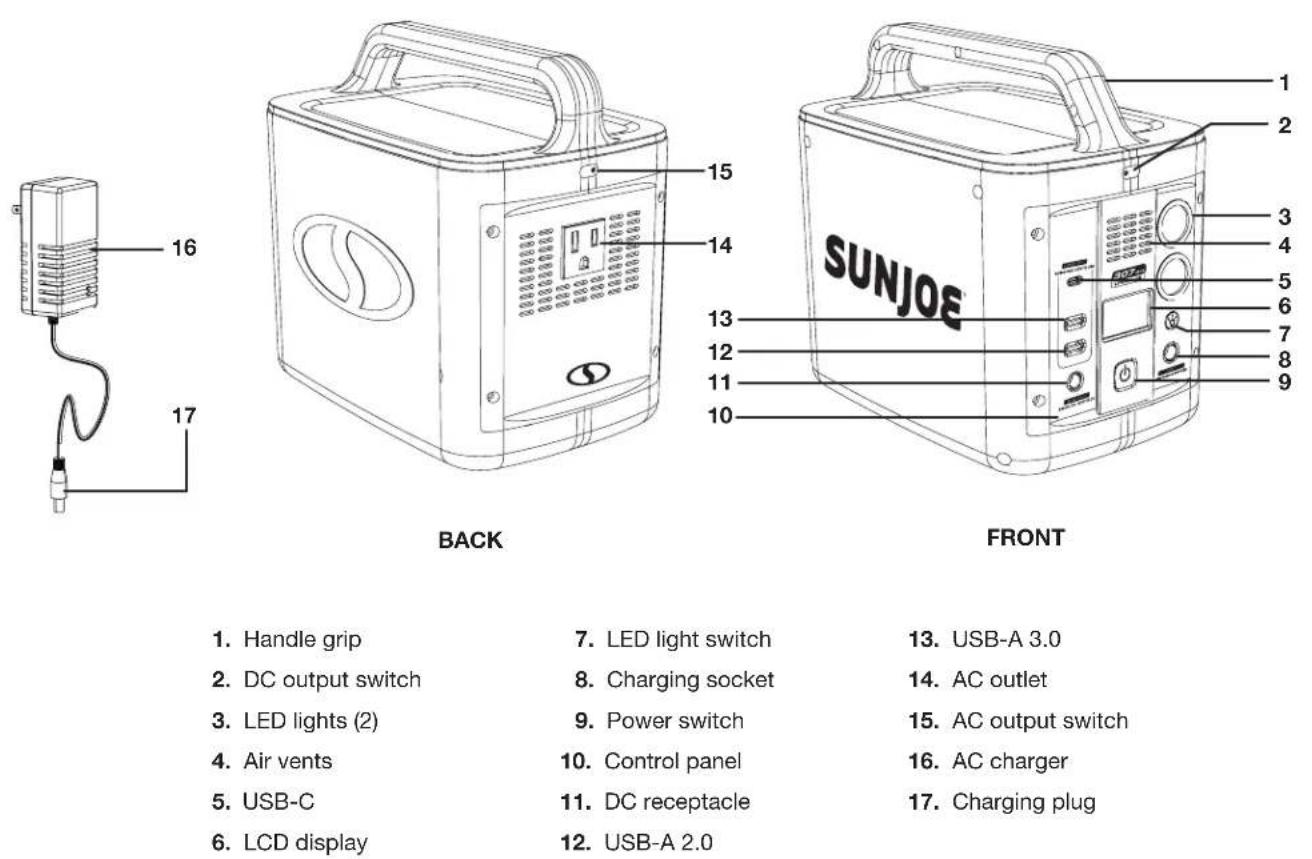
Read the owner's manual and safety instructions carefully before operating this portable power station. Compare the illustration below to the portable power station in order to familiarize yourself with the location of the various controls and adjustments. Save this manual for future reference.
Technical Data
Battery Voltage Max. 13.8V DC
AC Output1 120V AC | 60 Hz | 230 W for 2s
Battery Capacity 24000 mAh
DC Output Max 12V DC | 10 A
Nominal Power Output 307 Wh
USB-A 2.0 Output .5V DC | 2.4 A
AC Charger Input 100 - 240V AC | 50/60 Hz | 1.3 A max
USB-A 3.0 Output .........5V DC, 3A | 9V DC, 2A | 12V DC, 1.5A
AC Charger Output 15.2V DC | 3 A
USB-C Output 5V DC, 3A | 9V DC, 2A | 12V DC, 1.5A
Charge Time AC Adapter: 10 hours
LED Light 3 W x 2
12V DC Car Charger (Sold Separately: 5 hours . .8.8 lbs (4 kg)
Output Waveform Modified wave
Initial no-load voltage, when fully charged, peaks at 13.8 volts; nominal voltage under typical load is 12.8 volts. | Initial no-load out, peaks at 230 W for 2s; nominal output under typical load is 200 W. | Based on optimal charging situation; the actual charging time may vary based on different set-ups.
Unpacking
Carton Contents
- Portable power station
- AC charger
-
Manual with registration card
-
Carefully remove the power station and check to see that all of the above items are supplied.
- Inspect the product carefully to make sure no breakage or damage occurred during shipping. If you find damaged or missing parts, DO NOT return the unit to the store. Please call the Snow Joe ^圆 + Sun Joe ^圆 customer service center at 1-866-SNOWJOE (1-866-766-9563).
NOTE: Do not discard the shipping carton and packaging material until you are ready to use your new power station. The packaging is made of recyclable materials. Properly dispose of these materials in accordance with local regulations.
IMPORTANT! The equipment and packaging material are not toys. Do not let children play with plastic bags, foils or small parts. These items can be swallowed and pose a suffocation risk!
Operation
WARNING! Do not allow familiarity with this product to make you careless. Remember that a careless fraction of a second is sufficient to inflict serious injury.
WARNING! Do not use any attachments or accessories not recommended by the manufacturer of this product. The use of attachments or accessories not recommended can result in serious personal injury.
WARNING! Do not modify or attempt to repair the power station except indicated in the instructions for use and care.
WARNING! The device shall be stored indoors. The unit shall not be charged outdoors. When in use, cautions should be taken to reduce the exposure to rain, sleet, and snow.
Intended Uses
This power station is used for supplying electrical power for operating compatible small electronics and USB-powered devices. The continuous output wattage of this product is limited to 307 W total when supplying backup power. This limit applies to the total of all items plugged into the power station.
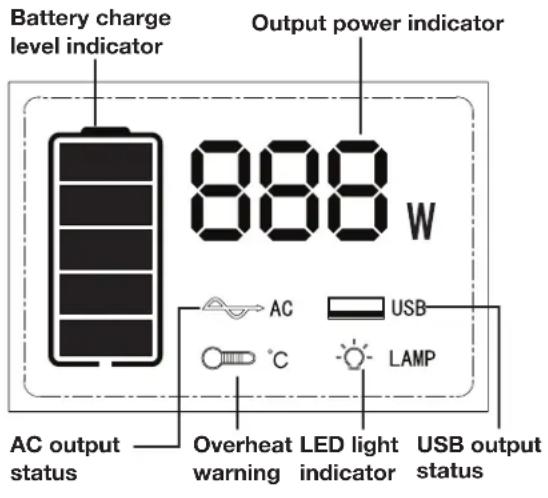
LCD Screen (Fig. 1)
Fig. 1
- Battery charge level indicator - This icon indicates the remaining power in the battery. Refer to the table below for the meaning for each symbol.
| 20% 40% | 60% 80% | 100% | ||
NOTE: The power station must be recharged when the power drops to 20% or less.
- Output power indicator - indicates the actual output power when there are devices connected and running/ being charged by the power station.
NOTE: When the total output is less than 5 W, the power station may not be able to detect the output power due to the small power output. The output power indicator will show 0 W. This will not affect the actual output to the connected device. - AC output status - After turning on the power station, the AC icon will light up when the AC output switch is pressed.
- USB output status - After turning on the power station, the USB icon will light up when the DC output switch is pressed.
- LED light indicator - After turning on the power station, the LAMP icon will light up when the LED lights are turned on.
- Overheat warning - The warning icon will light up if the power station overheats during operation, at which point it will stop working.
If the power station overheats during the charging process, the power station will resume working once the temperature has dropped and the internal battery has cooled down.
If the power station overheats during the discharging process, turn off the power station and wait until the power station cools down. Then restart the power station to resume usage.
Charging Operations
This power station must be fully charged before use or storage. Check the LCD screen for the remaining power in the built-in battery. If the power drops to 20% or less, stop using the power station and charge it as soon as possible.
The power station can be charged by:
The included AC charger
12V DC car charging cable (sold separately)
NOTE: Do not use the power station to power/charge other devices while the power station is being charged.
Follow the instruction below to charge the power station.
AC CHARGER
- Check whether the mains voltage is the same as that marked on the AC charger. Then, plug the AC charger into an electrical wall outlet.
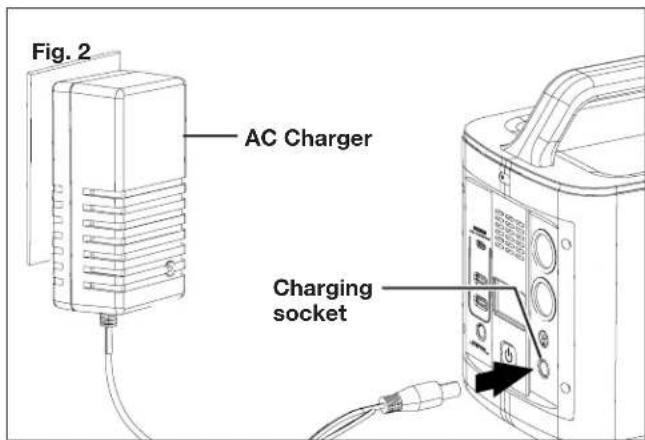
- Turn off the power station and remove all loads connected with the power station. Connect the charger plug into the charging socket to start charging (Fig. 2).
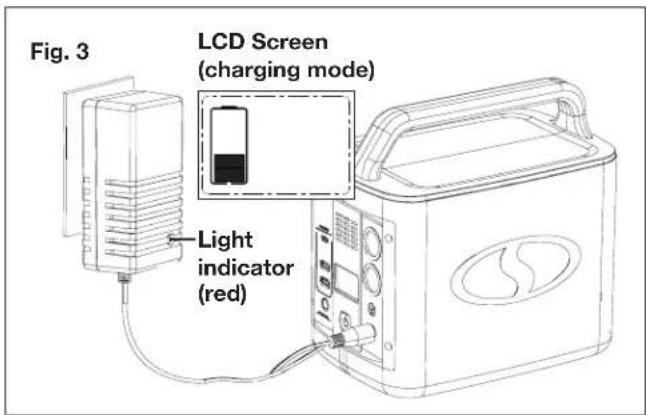
- During the charging process, the battery charging level indicator on the LCD screen will light up and flash to indicate the charging process. The indicator light on the AC charger adapter will light up in red (Fig. 3).
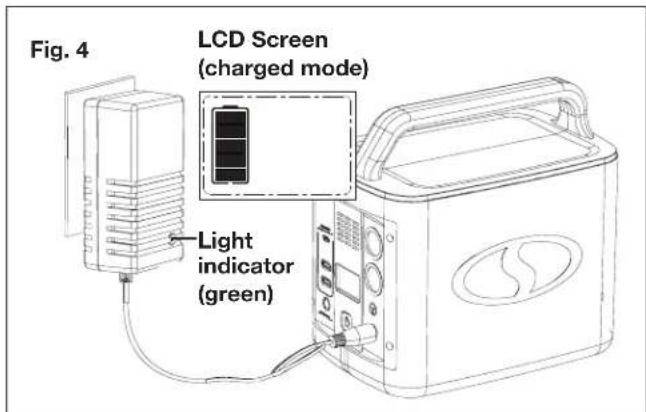
- It will take approximately 10 hours to fully charge the power station. When charging is complete, the battery charging level indicator will stop flashing and light up solid. Additionally, the light indicator on the AC charger will turn green. Unplug the charger when the power station is fully charged (Fig. 4).
CAR CHARGER
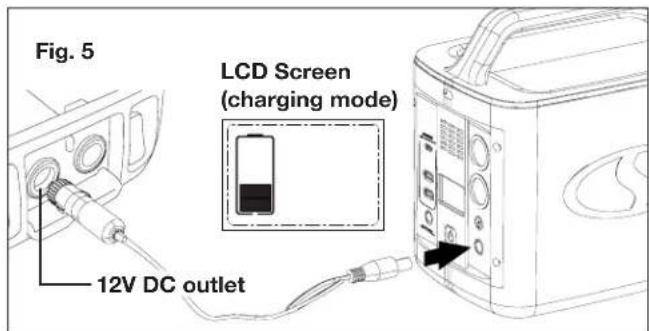
- While the car is running, use the optional 12V DC car charging cable (PPG-CARCHRG sold separately) to connect the power station to the car's 12V DC outlet (Fig. 5). Charging will start as soon as the power station is connected.
- It will take approximately 5 hours to fully charge the power station. Disconnect the charging cable when the power station is fully charged.
Discharging Operations
Only AC devices that are under 200W and DC devices under 120W can be powered or charged using this power station. These include many small electronics and appliances. Check the table below for some common devices and their power requirements.
| PRODUCTS PORT | RUN TIME (h)/RECHARGES (X) |
| Smart phone USB port 12X | |
| Laptop AC jack 2X | |
| Tablet USB port 7X | |
| Drone DC barrel jack 4X | |
| Light bulb AC jack 15h | |
| 32 inch TV AC jack 4h | |
| Mini fridge | DC barrel jack 24h |
NOTE:
- Average power consumption as measured on loads tested under regular operating conditions. Rated power may be different from average power consumption.
- Runtime measured on tested loads.
- If a high powered device is plugged in (e.g. a large refrigerator), the charge level will deplete more rapidly leading to shorter run times. If devices that draw lower power are plugged in, you will get closer to the rated run times.
IMPORTANT! The power station is not suitable for use with certain products and loads. The continuous output wattage of this product is limited to 307 W total when supplying backup power from its battery. This limit applies to the total devices plugged into this power station.
The power station is not sufficient to run devices designed to produce large amount of heat, like a space heater or a pellet stove igniter.
POWERING ON THE POWER STATION
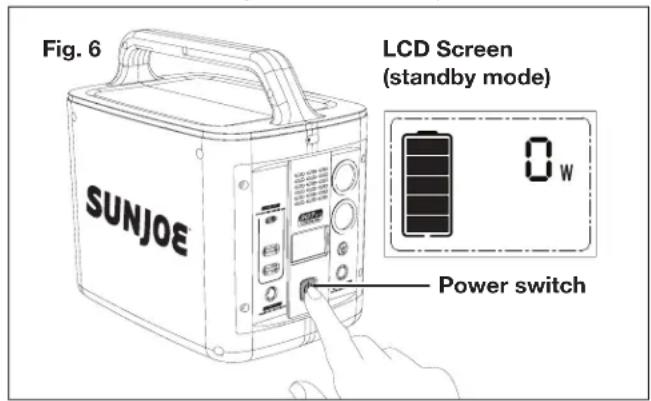
Turn on the power station by pressing and holding the power switch until the LCD screen illuminates to show the standby mode (Fig. 6).
WARNING! Do not insert a nail, wire, etc. into any ports or receptacles. Otherwise a circuit short may cause smoke or fire.
NOTE: Before plugging in, verify the device is suitable for use with the power station. All of the power station output ports have their own max power capacity. Refer to the Technical Data section to ensure your device is compatible.
POWERING AC DEVICES
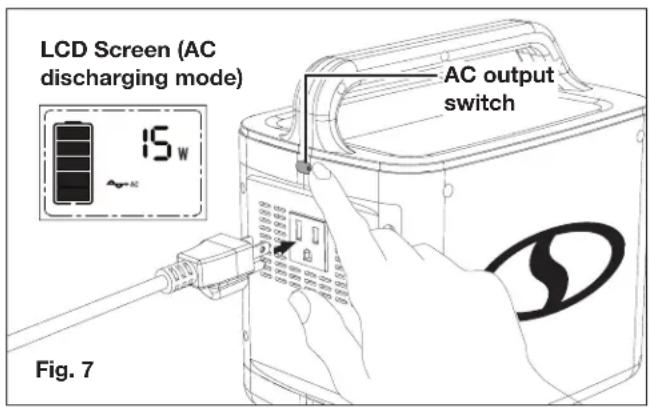
To use the power station to power an AC device, first press the AC output switch, and connect the plug of the device's power cord to the AC outlet of the power station. The LCD screen will light up and show the output (Fig. 7).
AC OUTPUT PROTECTION: If the AC output has a short circuit or the output is overloaded, the unit will turn off the AC circuit for protection. If this happens, please troubleshoot and re-activate the AC output according to the table below. Some electrical equipment, such as refrigerators, ice makers, laser printers may require a peak power to start-up. This peak power may exceed the power station's output wattage, which will activate the unit's overload protection mode. Such devices are not compatible with the unit.
AC OUTPUT PROTECTION
| Protection | Problem Solution | |
| Overload protection | No AC output while DC output can work normally. | Remove the extra load and press the AC output switch again to recover. |
| Short circuit protection | The power station shuts down. No output from any ports. No display on LCD screen. | Remove the device causing the short circuit. Press the power switch and the AC output switch again to recover. |
NOTE: If the AC output does not detect a connected device for 6 hours (a device which draws less than 10W cannot be detected), the AC circuit will switch off automatically. Press the AC output switch again to reactivate the AC circuit.
POWERING DC DEVICES
The power station can also power a 12V DC device such as DC fans and LED lights. Press the DC output switch to activate DC power, and connect the appliance to the DC receptacle of the power station. The LCD screen will light up and show the output (Fig. 8).
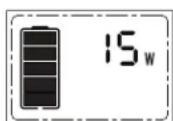
Fig. 8
LCD Screen (DC discharging mode)
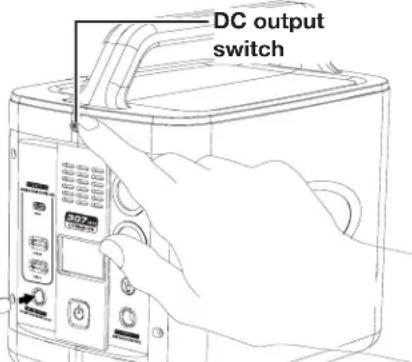
DC OUTPUT PROTECTION: If the DC output is shorted or overloaded, the device will shut down for protection. Check the table below for details.
DC OUTPUT PROTECTION
| Protection | Problem Solution | |
| Overload protection | No DC or USB output while AC output can work normally. | Remove the extra load and press the DC output switch again to recover. |
| Short circuit protection | The device shuts down. No output from any ports. No display on LCD screen. | Remove the device that caused the short circuit. Press the power switch and the DC output switch again to recover. |
NOTE: The DC output voltage will decrease as the battery capacity decreases, which may cause the connected DC device to shut down or to suspend charging.
NOTE: If the DC output doesn't detect a connected device for more than 2 hours (an output less than 2W is considered not detectable), the DC circuit will switch off automatically. Press the DC output switch again to reactivate the DC circuit.
POWERING USB DEVICES
To power USB devices, press the DC output switch to activate power to the USB ports. Then connect your USB cable into either the USB-C port or into either of the USB-A ports on the power station to charge your device (Fig. 9).
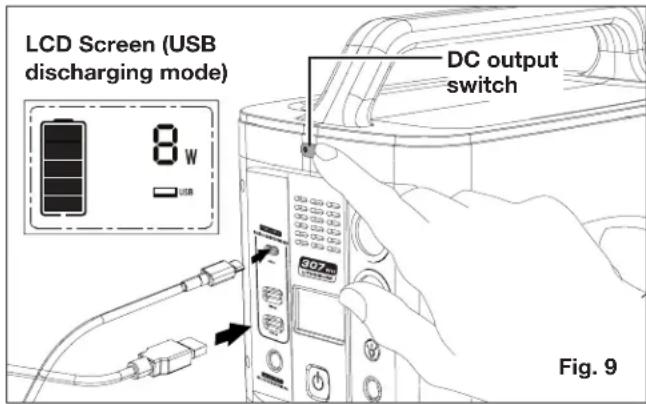
USB OUTPUT PROTECTION:
USB OUTPUT PROTECTION
| Protection | Problem Solution | |
| Overload protection | The overloaded USB port(s) will have no output. Other receptacles can work normally. | Remove the extra load from the receptacle(s). |
| Short circuit protection | The short-circuited USB receptacle(s) will have no output. Other receptacles can work normally. | Remove the device from the receptacle(s). |
Using the LED lights
- Turn on the power station by pressing and hold the power switch until the LCD screen shows the standby display (Fig. 6).
- Press the LED light switch to turn on the worklight (both LEDs). Press it again to turn off the worklight (Fig. 10).
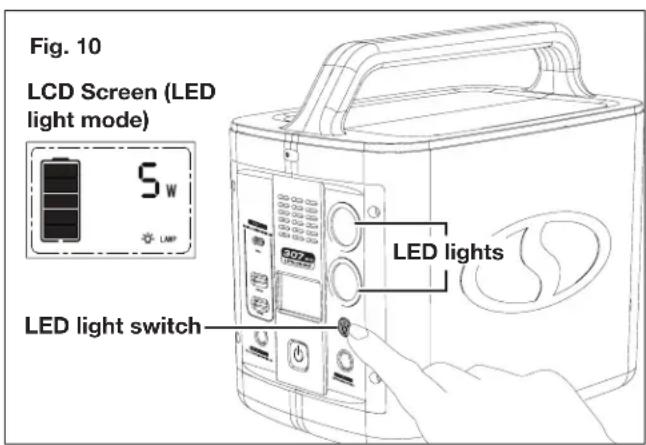
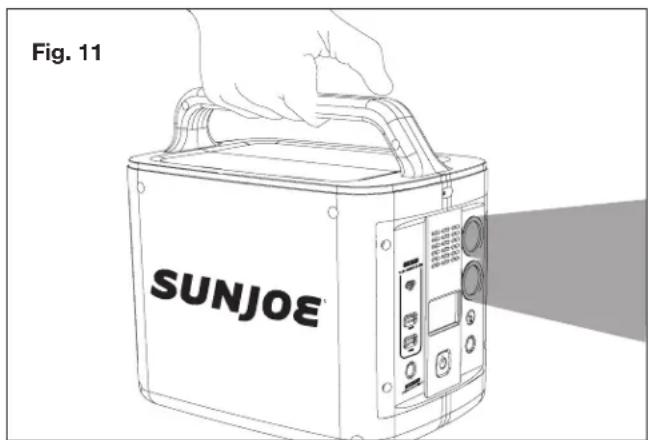
3. Hold the power station by the handle to use it as a spotlight (Fig. 11).
Turning off the Power Station
NOTE: To avoid depleting the battery power, make sure to turn off the power station when not in use.
- Switch off the working circuit by pressing the corresponding output switch and disconnect all devices.
- Press the power switch to turn off the power station.
Operation Tips
- This product may become hot during charging, this is normal.
-
Avoid storing this device near coins, jewelry, keys, and other metal objects. An accidental electrical discharge may cause damage.
-
Do not place the unit near or under intense heat or fire.
- The unit is not waterproof, avoid water and other liquids.
- Do not drop the unit. Do not place heavy objects on the product.
- Do not cover this product with towels, clothing during use.
- Do not charge the power station longer than the time required to fully charge.
Maintenance
WARNING! Always switch the product off and disconnect any devices plugged in before performing inspection, maintenance, and cleaning work.
WARNING! When servicing, use only identical replacement parts. Use of any other parts could create a hazard or cause product damage.
General Maintenance
Avoid using solvents when cleaning plastic parts. Most plastics are susceptible to damage from various types of commercial solvents and may be damaged by their use.
WARNING! Do not at any time allow brake fluids, gasoline, petroleum-based products, penetrating oils, etc to come into contact with plastic parts. Chemicals can damage, weaken or destroy plastic, which could result in serious personal injury.
Storage
- Switch off the power station, disconnect all appliances. Thoroughly clean the housing with a soft, dry cloth.
- Store the device indoors in a safe location out of the reach of children. Keep away from corrosive agents, such as garden chemicals and de-icing salt.
Disposal
Recycling the Device
- Do not dispose this power station as unsorted municipal waste. Use appropriate collection facilities.
- Contact your local government agency for information regarding the collection systems available.
- If electrical appliances are disposed of in landfills or dumps, hazardous substances can leak into the groundwater and get into the food chain, damaging your health and wellbeing.
- When replacing old appliances with new ones, the retailer is legally obligated to take back your old appliance for disposal at least free of charge.
Recycling + Disposal
The product comes in a package that protects it against damage during shipping. Keep the package until you are sure that all parts have been delivered and the product is functioning properly. Recycle the package afterwards or keep it for long-term storage.
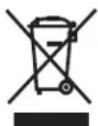
WEEE symbol. Waste electrical products should not be disposed of with household waste. Please recycle where facilities exist. Check with your local authority or local store for recycling regulations.
Service + Support
If your Sun Joe® portable power station needs service or maintenance, please call the Snow Joe® + Sun Joe® customer service center at 1-866-SNOWJOE (1-866-766-9563).
Model + Serial Numbers
When contacting the company or reordering parts, you will need to provide the model and serial numbers of your product. These are found on the decal affixed to the housing of your portable power station. Copy these numbers into the space provided below.
Record the following numbers from the housing or handle of your new product:

Federal Communications Commission (FCC)
This device complies with part 15 of the FCC Rules. Operation is subject to the following two conditions: (1) This device may not cause harmful interference, and (2) this device must accept any interference received, including interference that may cause undesired operation.
CAUTION! Changes or modifications to this unit not expressly approved by the party responsible for compliance could void the user's authority to operate the equipment.
NOTE: This equipment has been tested and found to comply with the limits for a Class B digital device, pursuant to part 15 of the FCC Rules. These limits are designed to provide reasonable protection against harmful interference in a residential installation. This equipment generates, uses and can radiate radio frequency energy and, if not installed and used in accordance with the instructions, may cause harmful interference to radio communications. However, there is no guarantee that interference will not occur in a particular installation. If this equipment does cause harmful interference to radio or television reception, which can be determined by turning the equipment off and on, the user is encouraged to try to correct the interference by one or more of the following measures:
- Reorient or relocate the receiving antenna.
- Increase the separation between the equipment and receiver.
- Connect the equipment into an outlet on a circuit different from that to which the receiver is connected.
- Consult the dealer or an experienced radio/TV technician for help.
Optional Accessories
WARNING! ALWAYS use only authorized Snow Joe ^念 + Sun Joe ^念 replacement parts and accessories. NEVER use replacement parts or accessories that are not intended for use with this power station. Contact Snow Joe ^念 + Sun Joe ^念 if you are unsure whether it is safe to use a particular replacement part or accessory with your power station. The use of any other attachment or accessory can be dangerous and could cause injury or mechanical damage.
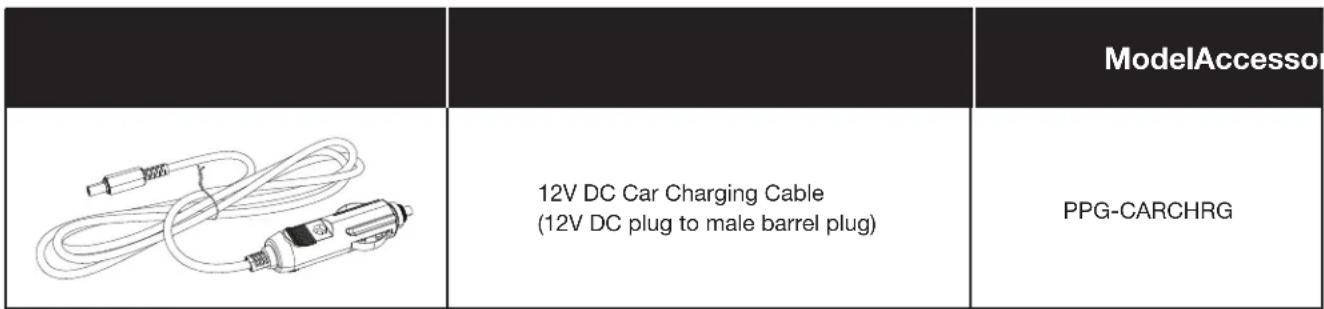
NOTE: Accessories are subject to change without any obligation on the part of Snow Joe® + Sun Joe® to provide notice of such changes. Accessories can be ordered online at sunjoe.com or via phone by contacting the Snow Joe® + Sun Joe® customer service center at 1-866-SNOWJOE (1-866-766-9563).
SNOW JOE ^® + SUN JOE ^® CUSTOMER PROMISE
ABOVE ALL ELSE, Snow Joe, LLC ("Snow Joe") is dedicated to you, our customer. We strive to make your experience as pleasant as possible. Unfortunately, there are times when a Snow Joe®, Sun Joe®, or Aqua Joe® product ("Product") does not work or breaks under normal operating conditions. We think it's important that you know what you can expect from us. That's why we have a Limited Warranty ("Warranty") for our Products.
OUR WARRANTY:
Snow Joe warrants new, genuine, powered and non-powered Products to be free from defects in material or workmanship when used for ordinary household use for a period of two years from the date of purchase by the original, end-user purchaser when purchased from Snow Joe or from one of Snow Joe's authorized sellers with proof of purchase. Because Snow Joe is unable to control the quality of its Products sold by unauthorized sellers, unless otherwise prohibited by law, this Warranty does not cover Products purchased from unauthorized sellers. If your Product does not work or there's an issue with a specific part that is covered by the terms of this Warranty, Snow Joe will elect to either (1) send you a free replacement part, (2) replace the Product with a new or comparable product at no charge, or (3) repair the Product. How cool is that!
This Warranty gives you specific legal rights, and you may also have other rights which vary from State to State.
PRODUCT REGISTRATION:
Snow Joe strongly encourages you to register your Product. You can register online at snowjoe.com/register, or by printing and mailing in a registration card available online from our website, or calling our Customer Service Department at 1-866-SNOWJOE (1-866-766-9563), or by e-mailing us at help@snowjoe.com. Failure to register your Product will not diminish your warranty rights. However, registering your Product will allow Snow Joe to better serve you with any of your customer service needs.
WHO CAN SEEK LIMITED WARRANTY COVERAGE:
This Warranty is extended by Snow Joe to the original purchaser and original owner of the Product.
WHAT IS NOT COVERED?
This Warranty does not apply if the Product has been used commercially or for non-household or rental applications. This Warranty also does not apply if the Product was purchased from an unauthorized seller. This Warranty also does not cover cosmetic changes that do not affect performance. Wearing parts like belts, augers, chains and tines are not covered under this Warranty, and can be purchased at snowjoe.com or by calling 1-866-SNOWJOE (1-866-766-9563).
IMPORTANTE!
Salida USB 3.0 .5 V CC, 3 A | 9 V CC, 2 A | 12 V CC, 1.5 A
Salida USB-C. 5 V CC, 3 A | 9 V CC, 2 A | 12 V CC, 1.5 A
LuzLED 3W×2
| 20% 40% | 60% 80% | 100% | ||