Sydney - Speaker Urbanista - Free user manual and instructions
Find the device manual for free Sydney Urbanista in PDF.


| Product Type | Bluetooth Speaker |
| Brand | Urbanista |
| Model | Sydney |
| Wireless Connection | Bluetooth |
| Power Source | Built-in rechargeable battery |
| Power On | Press and hold the Power button for 3 seconds |
| Pairing | Automatic, device search |
| Dual Speaker Mode | Pair two speakers for stereo sound |
| Controls | Volume, play/pause, next/previous track, call |
| Hands-free Function | Yes |
| Voice Assistant | Siri (double press) |
| LED Indicator | White flashing every 10 seconds when connected |
| Warranty | 1 year from date of purchase |
| Standards | Compliant with CNR, IC: 26612-SYDNEY |
| Precautions | Do not expose to water, do not drop |
| Package Contents | Speaker, USB cable (likely) |
| Safety | Not suitable for children under 3 years old |
Frequently Asked Questions - Sydney Urbanista
User questions about Sydney Urbanista
0 question about this device. Answer the ones you know or ask your own.
Ask a new question about this device
Download the instructions for your Speaker in PDF format for free! Find your manual Sydney - Urbanista and take your electronic device back in hand. On this page are published all the documents necessary for the use of your device. Sydney by Urbanista.
USER MANUAL Sydney Urbanista
natural_image
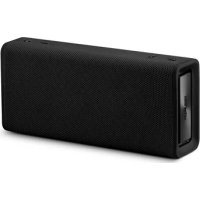
Black rectangular electronic device with textured surface and label 'Lemon' on side (no readable text or symbols beyond branding)urbanista
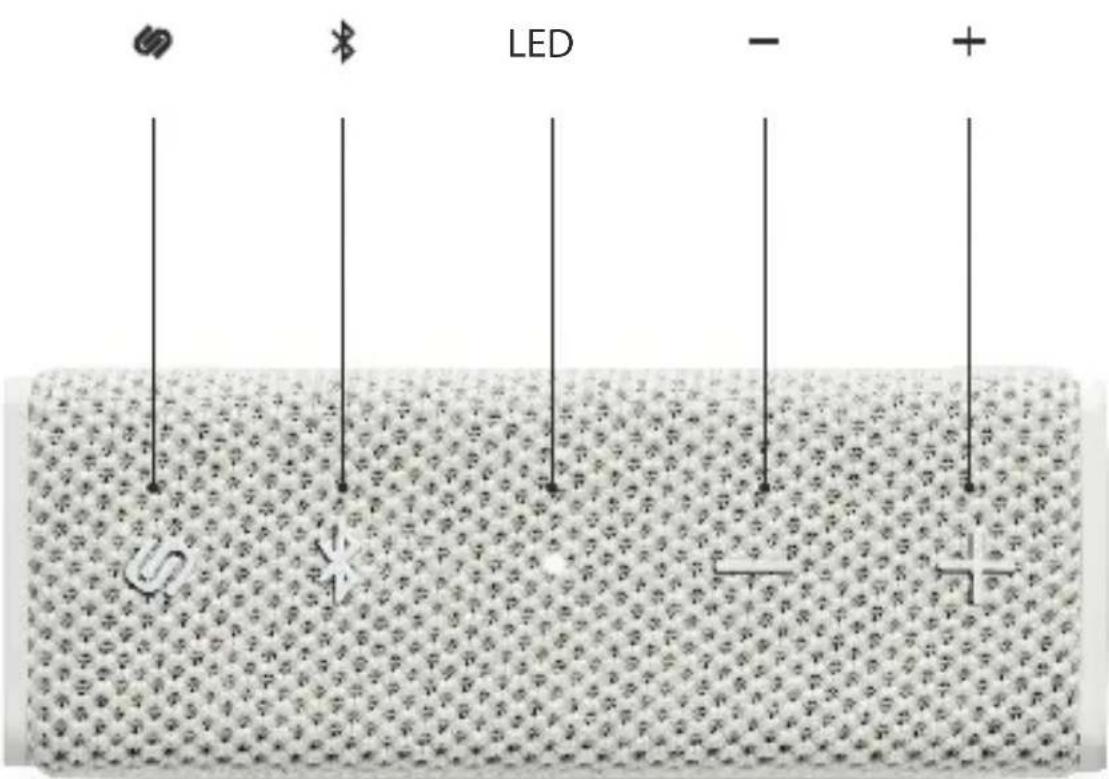
ENGLISH (ENG) 04
ESPAÑOL ^(ESP) 10
FRANÇAIS (FRA) 14
SYDNEY MANUAL (SINGLE SPEAKER)
(ENG)
CONNECT TO DEVICE
Turn on the speaker via 📞button and then turn on the Bluetooth on your device. Select "Urbanista Sydney". Upon successful pairing, the LED breathes white every 10 sec.
If the speaker have been connected to a device before, it will automatically -ly go into pairing mode and connect to the device when powered on.
RESET PAIRING
Press ✝ to disconnect the current device and search for a new device. Press ✝ again to reconnect to the previous device.
BUTTON CONTROLS
TURN ON/OFF - Hold 📋 for 3 seconds.
PLAY/PAUSE MUSIC - Press once.
VOLUME INCREASE - Press + once.
VOLUME DECREASE - Press — once.
PREVIOUS TRACK - Hold —for 1 second.
NEXT TRACK - Hold + for 1 second.
ANSWER/END A CALL - Press once.
REFUSE A CALL - Hold 📋 for 1 second.
USE SIRI - Press twice.
SYDNEY MANUAL (TWO SPEAKERS)
(ENG)
PAIRING 2 SPEAKERS
Turn on the speakers without being paired to any device.
Hold the ✝ on both speakers for 1 second until the LED indicators flash red and white. Upon successful pairing, you will hear a "bip" sound. LED on main speaker will flash white, and the second speaker will flash white every 10 second.
DISCONNECT 2 SPEAKER MODE
Press twice on either speaker. The main speaker will keep playing and the second will go into pairing mode.
CONNECT TO DEVICE
When the speakers are ready to be connected to a device, turn on the Bluetooth in your device and choose "Urbanista Sydney". Upon successful connection, both speakers LED lights will flash white every 10 seconds. Main speaker will act as left channel and the second speaker will act as right channel.
DISCONNECT DEVICE
Press *on the main speaker to disconnect the current and search for a new one. Press again to reconnect to the same device.
WARRANTY / SAFETY INSTRUCTIONS
(ENG)
All Urbanista speakers are designed and manufactured to meet high expectations and to provide the best customer experience.
We are devoted to producing only high quality items featuring the latest technology. However, in exceptional cases, electronic products may have malfunctions due to manufacturing defects. That is why we offer a full one (1) year warranty from the date of original retail purchase, which covers defects in materials and workmanship.
Urbanista AB hereby warrants that, under normal use, this product will be free from defects in materials and workmanship for a period of one (1) year starting with the original retail purchase date. The replacement warranty is valid only if the original proof of purchase issued to the purchaser, specifying the date of purchase, is presented with the product to be replaced.
How does it work? If you believe this product is defective, carefully repack the unit and return the product to your authorized dealer within the warranty period, with the original proof of purchase. Your authorized dealer will replace the product, provided a defect in materials or workmanship is identified. Should your authorized dealer not have the equivalent product or color in stock, Urbanista AB will promptly provide you with a new product.
This limited replacement warranty does not apply in cases of abuse or misuse of the product, use contrary to the Urban -ista AB instructions, ordinary wear and tear, incorrect connection, force majeure or unauthorized repair. Any lawsuit for breach of this limited warranty shall be commenced, if at all, within one (1) year of the date that the claim accrues.
Urbanista AB shall not be liable for special, indirect, incidental or consequential damages resulting from the use or the inability to use this product, regardless of the legal theory on which the claim is based.
This warranty gives you specific legal rights, and you may have other rights, which vary from country to country. This warranty does not restrict the rights of the consumer mandated under applicable laws. This product shall not be treated as house - hold waste. Instead it shall be handed over to the applicable collection point for the recycling of electrical and electronic equipment. This product was produced after April 1st, 2019.
Please read and keep all safety and use instructions. Important Safety Instructions
- Only use attachments / accessories specified by the manufacturer.
WARNING/ CAUTIONS
- To reduce the risk of fire or electric shock, do not expose this product to rain or moisture
- Do not place naked flame soucres, such as lighted candels, on or near the product.
SAFETY INSTRUCTIONS
(ENG)
- Do not expose this apparatus to dripping or splashing, and do not place objects filled with liquids, such as vases, on or near the apparatus. As with any electronic products, use care not to spill liquids into any part of the product. Exposure to liquids may create a failure and/or fire hazard
- Do not place naked flame soucres, such as lighted candels, on or near the product.
- Do not subject batteries to mechanical shock.
- In the event of a battery leaking, do not allow the liquid to come in contact with the skin or eyes. If contact has been made, wash the affected area with copious amounts of water and seek mdeical advice.
- Do not use any charger other than that specifically provided for use with the equipment
- Do not leave a battery on prolonged charge when not in use.
• After extended periods of storage, it may be necessary to charge and discharge the batteries several times to obtain maximum performance. - Batteries give their best performance when they are operated at normal room temperature 68^ (20^)± 9^ (5^)
- The battery provided with your system is not user servicable. Contact Urbanista customer service for all battery related issues.

Contains small parts which may be a choking hazard. Not suitable for children under age 3.

This product contains magentic material. Consult your physician on whether this might affect your implantable medical device.
Do NOT make unauthorized alterations to this product.
NOTE: This equipment has been tested and found to comply with the limits for a Class B digital device, pursuant to Part 15 of the FCC Rules. These limits are designed to provide reasonable protection against harmful interference in a residential installation. This equipment generates, uses and can radiate radio frequency energy and, if not installed and used in accordance with the instructions, may cause harmful interference to radio communications. However, there is no guarantee that interference will not occur in a particular installation. If this equipment does cause harmful interference to radio or television reception, which can be determined by turning the equipment off and on, the user is encouraged to try to correct the interference by one or more of the following measures:
- Reorient or relocate the receiving antenna.
- Increase the separation between the equipment and receiver.
- Connect the equipment into and outlet on a circuit different from that to which the receiver is connected.
- Consult the dealer or an experienced radio/TV technician for help.
Changes or modifications not expressly approved by Urbanista AB could void the users authority to operate this equipment. This device complies with part 15 of the FCC Rules and with Industry Canada license-exemp RSS standard(S). Operation is subject to the following two conditions:
SAFETY INSTRUCTIONS
(ENG)
(1) This device may not cause harmful interference, and (2) this device must accept any interference received, including interference that may cause undesired operation.
This device complies with FCC and Industry Canada radiation exposure limits set forth for general population. It must not be co-located or be operating in conjunction with any other antennas or transmitters.
FCC ID: 2AJD8UN-SYDNEY Model: Urbanista Sydney CAN ICES-3 (B)/NMB-3(B) Management Regulation for Low-power Radio-frequency Devices
REGULATORY INFORMATION

Strax GmbH hereby declares that this product is in compliance with the essential requirements and other relevant provisions of Directive 2014/53/EU and all other applicable EU directive requirements.
The complete Declaration of Conformity can be found at: www.strax.com/compliance
For Europe: Frequency band of operation 2400 to 2483.5 MHz:
- Bluetooth: Maximum transmit power less than 20dBm EIRP.
- Bluetooth Low Energy: Maximum power spectral density less than 10 dBm/MHz EIRP.
DO NOT attempt to remove the rechargeable lithiumion battery from this product. Contact your local Urbanista retailer or other qualified professional for removal.
Please dispose of used batteries properly, following local regulations. Do not incinerate.

This symbol means the product must not be discarded as household waste, and should be delivered to an appropriate collection facility for recycling. Proper disposal and recycling helps protect natural resources, human health and the environment. Fore more information on disposal and recycling of this product, contact your local municipality, disposal service, or the shop where you bought this product.
Removal of the rechargeable lithiumion battery in this product should be conducted only by a qualified professional. Please contact your local Urbanista retailer or see www.strax.com/compliance for further information.
The Bluetooth ^® word mark and logos are registered trademarks owned by Bluetooth SIG, Inc. and any use of such marks by Urbanista AB is under license.
EU Importer: Strax GmbH, Belgische Allee 52 - 54, 53842 Troisdorf
Urbanista AB. No part of this work may be reproduced, modified, distributed or otherwise used without prior written permission.
FCC (ENG)
Caution: The user is cautioned that changes or modifications not expressly approved by the party responsible for compliance could void the user's authority to operate the equipment.
This device complies with Part 15 of the FCC Rules. Operation is subject to the following two conditions: (1) this device may not cause harmful interference, and (2) this device must accept any interference received, including interference that may cause undesired operation.
NOTE: This equipment has been tested and found to comply with the limits for a Class B digital device, pursuant to Part 15 of the FCC Rules. These limits are designed to provide reasonable protection against harmful interference in a residential installation. This equipment generates, uses and can radiate radio frequency energy and, if not installed and used in accordance with the instructions, may cause harmful interference to radio communications. However, there is no guarantee that interference will not occur in a particular installation.
If this equipment does cause harmful interference to radio or television reception, which can be determined by turning the equipment off and on, the user is encouraged to try to correct the interference by one or more of the following measures:
- Reorient or relocate the receiving antenna.
- Increase the separation between the equipment and receiver.
- Connect the equipment into an outlet on a circuit different from that to which the receiver is connected.
- Consult the dealer or an experienced radio/TV technician for help.
When test standard is FCC section 15.247 or 15.407 (such Bluetooth, Wifi) Mobile Device
FCC Radiation Exposure Statement
This equipment complies with FCC radiation exposure limits set forth for an uncontrolled environment. This equipment should be installed and operated with a minimum distance of 20cm between the radiator and your body.
This transmitter must not be co-located or operating in conjunction with any other antenna or transmitter.
Portable Device
A device designed to generally be used at a separation distance of within 20 centimeters is normally maintained between the transmitter's radiating structure(s) and the body of the user.
"This device complies with Industry Canada licence-exempt RSS standard(s).
Operation is subject to the following two conditions: (1) this device may not cause interference, and (2) this device must accept any interference, including interference that may cause undesired operation of the device."
The digital apparatus complies with Canadian CAN ICES-3 (B)/NMB-3(B).
IC: 26612-SYDNEY
MANUAL DE SYDNEY (ALTAVOZ ÚNICO)
(ESP)
- Not suitable for children under age three: it contains small parts which may be a choking hazard.
- Choose a low volume setting before using the speaker.
- Long-term exposure to loud music or sounds may cause hearing damage. It is best to avoid high volume levels when using this product, especially for extended periods.
CAUTIONS
- Using these speaker limits your ability to hear noises around you, regardless of listening volume. Please be cautious when using these speakers.
- Do not drop, sit on, or allow the speakers to be immersed in water.
For any questions or concerns contact:
support@urbanista.com
SYDNEY MANUAL (ENCEINTE SIMPLE)
(FRA)
SYDNEY MANUALE (DOPPIA ALTOPARLANTE)
(IT)