34272 - Gas detector CHACON - Free user manual and instructions
Find the device manual for free 34272 CHACON in PDF.



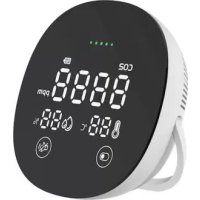
| Product type | Gas detector (CO2) |
| Brand | Chacon |
| Model | 34272 |
| Dimensions | 100 x 100 x 30.5 mm |
| Weight | 128 g |
| Power supply | DC 5V/1A (micro USB), lithium battery 3.7V 2000mAh |
| Battery life | Approximately 12 hours after full charge |
| Main functions | CO2 detection (400-5000 ppm), temperature measurement (0-65°C), humidity measurement (0-100% RH), 80 dB audible alarm, LED display |
| CO2 measurement accuracy | ±50 ppm ±5% |
| Temperature accuracy | ±1°C |
| Humidity accuracy | ±5% RH |
| Installation | Wall mounting via magnetic plate or placement on furniture with support stand |
| Care and cleaning | Clean with a soft, damp cloth, without solvents or detergents |
| Safety | Do not expose to water, do not paint, do not obstruct ventilation openings, do not disassemble |
| Product lifespan | 10 years |
| Battery lifespan | 2000 mAh, rechargeable |
| Spare parts and repairability | Not user-serviceable, contact customer service |
| General information | Indoor use only. Keep the manual. In case of poisoning, call emergency services. |
Frequently Asked Questions - 34272 CHACON
User questions about 34272 CHACON
0 question about this device. Answer the ones you know or ask your own.
Ask a new question about this device
Download the instructions for your Gas detector in PDF format for free! Find your manual 34272 - CHACON and take your electronic device back in hand. On this page are published all the documents necessary for the use of your device. 34272 by CHACON.
USER MANUAL 34272 CHACON
Thank you for using this product.
- Please read all instructions carefully before using the product.
- Do not attempt to disassemble or repair the product yourself, as this will invalidate the warranty.
- The CO2 sensor detects temperature, humidity and CO2 concentration. When the CO2 concentration in the room reaches a certain level, the alarm sounds an 80dB tone.
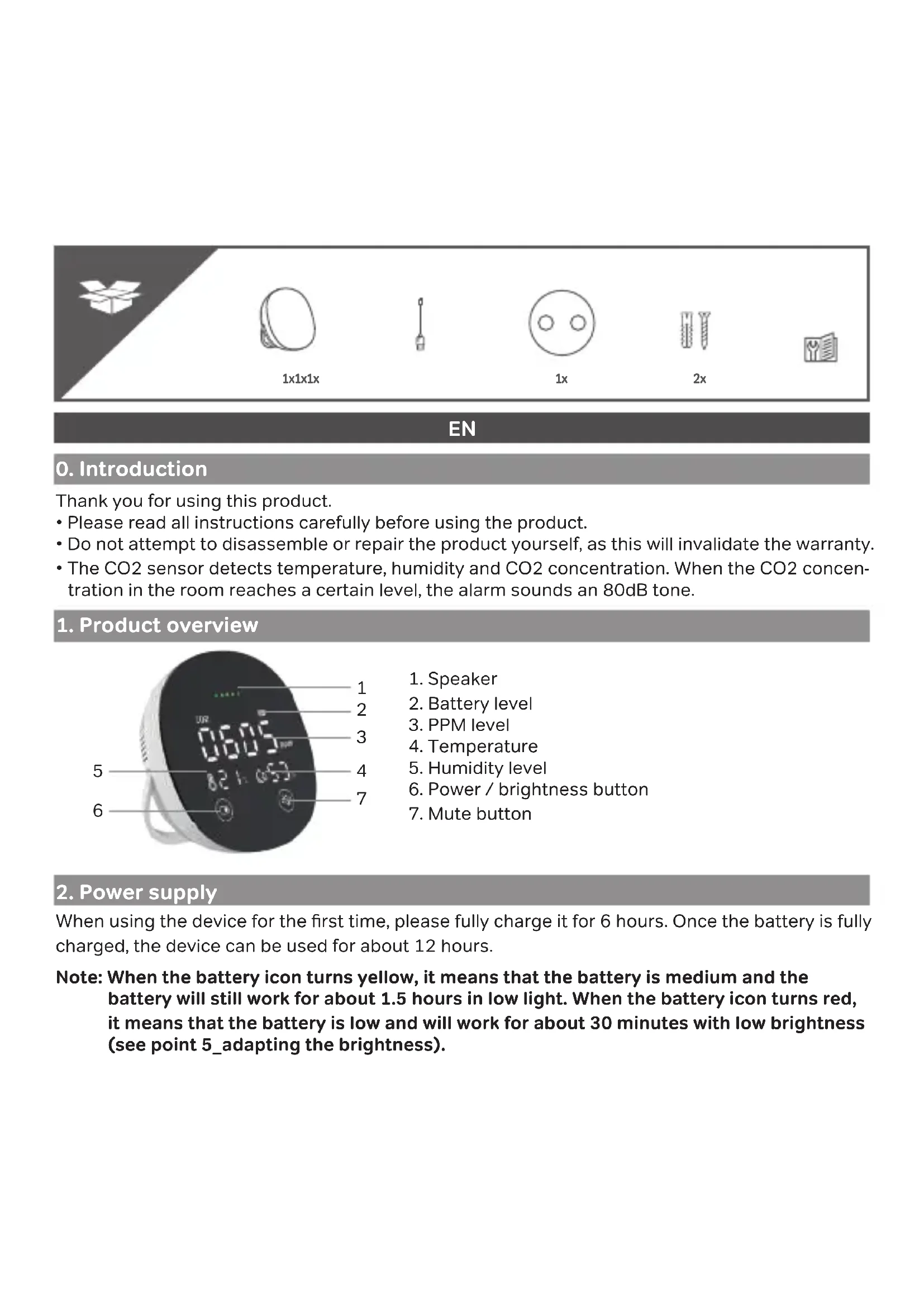
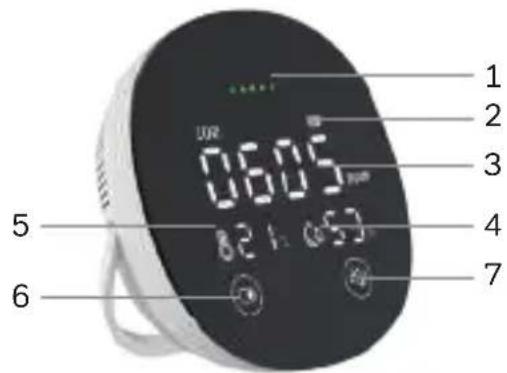
1. Product overview
text_image
1 2 3 4 5 6 7 06:05 8:24 05:05- Speaker
- Battery level
- PPM level
- Temperature
- Humidity level
- Power / brightness button
- Mute button
2. Power supply
When using the device for the first time, please fully charge it for 6 hours. Once the battery is fully charged, the device can be used for about 12 hours.
Note: When the battery icon turns yellow, it means that the battery is medium and the battery will still work for about 1.5 hours in low light. When the battery icon turns red, it means that the battery is low and will work for about 30 minutes with low brightness (see point 5_adapting the brightness).
3. Operating instructions
| BUTTONS | ON MODE OFF MODE | |||
| LONG PRESS SHORT PRESS LONG PRESS | PRESS SHORT PRESS$ | |||
 | At least 1.5sec. for switching off | Brightness adjustment | At least 1.6sec. to switch on | No operation |
 | At least 1.5sec. to decrease volume | Mute or unmute the alarm | No operation No operation | |
Note: The CO2 concentration is 550ppm at start-up, please wait 30s for self-calibration before using.
Note: When your device is plugged in, the temperature level is higher than normal.
4. Detector installation
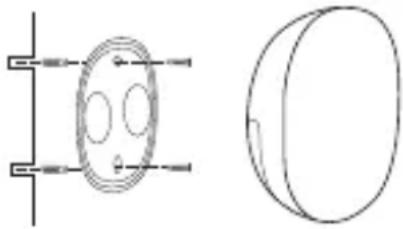
There are two possibilities, either wall mounting or simply placing it on your furniture using the integrated support foot.
Wall mounting:
natural_image
Pure technical line drawing of a mechanical component with no text or symbols- Using a pencil and the magnetic wall plate, mark the drilling points for better accuracy.
- Add the dowels to the holes.
- Place the mounting plate and tighten with the screws.
- Place the Co2 sensor on the plate. The plate will stick magnetically due to the built-in magnets.
5. Adjusting the brightness
To change your lighting, simply press the power/brightness button once (see diagram). You can choose between 3 lighting levels.
6. Battery indicator
| Battery status | Charger connected Charger not connected | |||
| ON mode OFF | mode ON mode OFF mode | |||
| Battery full Green | No battery icon Green | |||
| High battery Green | Green Green | |||
| Medium battery Green (flashing) | Green (flashing) Yellow | No battery icon | ||
| Low battery Green (flashing) | Green (flashing) Red | |||
| No battery Green (flashing) | Green (flashing) Off | |||
Note: The device will automatically turn off when the battery is too low. The battery indicator flashes red 3 times with a beep when trying to switch on if there is no battery, and the charger is not connected.
7. Low battery warning
If the battery icon turns yellow and the device beeps twice every 10 seconds, the battery is half discharged. The time to power off is approximately 1.5 hours in low light conditions. In case of low battery, the battery icon will turn red and the alarm will beep twice every 5 seconds. The time to power off will be approximately 30 minutes with low light.
Note: Please note that the mute mode cannot be activated when the battery is low. The alarm will only stop after connecting the charger.
8. Mute alarm
The mute button allows you to slightly lower the volume of the device or to mute the alarm when it is sounding.
To lower the volume when you press the buttons on the device, simply hold the mute button for about 1.6 seconds.
If you want to deactivate the alarm when it sounds, press quickly 1x.
9. Failure warning
- The unit displays 0000 and recalls the CO2 sensor weakness when it detects that the sensor is damaged.
- The unit displays 25^ , 30% when it detects that the temperature and humidity sensor is damaged.
10. What is carbon dioxide?
Not to be confused with carbon monoxide (CO), CO2 is produced by the human body and is found in the air when we exhale. CO2 is a colourless, odourless gas that humans cannot detect, so having a CO2 meter is useful in offices, schools, homes where many people are present together. The CO2 meter tells you when you need to ventilate a room.
11. Symptoms following high CO2 exposure
At high concentrations, carbon dioxide can displace oxygen from the air, thus depriving the body of oxygen, which can cause loss of consciousness. A lack of oxygen can cause a variety of symptoms including rapid breathing, rapid heart rate, dizziness, emotional reaction, fatigue, nausea and vomiting, collapse or in more severe cases; convulsions, coma or death.
Note: Elderly people and those at risk (diabetics, thrombosis risks...) may be more vulnerable. If you experience even mild symptoms, please consult your doctor immediately!
12. Safety advice
- As the coverage area of CO2 detection is limited, we recommend that you install CO2 detectors in every room of your home to effectively protect the whole family.
- Do not spray chemical sprays such as deodorant, hairspray, perfume, insecticide or spray paint near the alarm.
- Clean with a soft, damp cloth, without using solvents or detergents that will damage the device.
- Please recharge the device regularly if it is stored for a long time.
- Do not paint the CO2 alarm and do not block or cover the alarm's ventilation hole with glue or other objects.
- Do not attempt to disassemble or repair the product yourself.
- The control panel is not waterproof. Do not expose it to rain or immerse it in water.
- Please keep these instructions for use in a safe place.
- In case of carbon dioxide poisoning, call the emergency services for help. Do not return home until the alarm has stopped and the air has returned to normal.
13. Technical specifications
• Power supply: DC 5V/1A (micro USB)
- Battery cell: Built-in 3.7V lithium battery
- Battery capacity: 2000mAh
- Battery life: 12 hours
• Product lifetime : 10 years
• CO2 measurement range: 400 \~ 5000ppm
• CO2 measurement accuracy: 1ppm
• CO2 measurement tolerance: ±50ppm + ±5%.
• Temperature measuring range: 0 \~ 65°C
• Temperature measurement tolerance: ±1°C
• Humidity measuring range: 0 \~ 100%RH
• Humidity measurement tolerance: ±5%RH
- Button type: Touch button
- Display type: LED
• Size: 100*100*30.5mm
Don't throw batteries or out of order products with the household waste (garbage). The dangerous substances that they are likely to include may harm health or the environment. Make your retailer take back these products or use the selective collect of garbage proposed by your city.

For indoor use only
FR
0. Introduction
natural_image
Pure technical line drawing of a mechanical component with no text or symbolsnatural_image
Technical line drawing of a circular component with internal features, shown in two orthogonal views (no text or symbols)natural_image
Pure technical line drawing of a mechanical component with no text or symbolsnatural_image
Technical line drawing of a circular component with internal holes and mounting brackets (no text or symbols)natural_image
Technical line drawing of a circular mechanical component with internal features (no text or symbols)natural_image
Technical line drawing of a circular component with internal features and mounting brackets (no text or symbols)Support www.chacon.com/support
Chacon S.A. – Avenue Mercator 2 – 1300 – Wavre – Belgium – www.chacon.com
Made in P.R.C