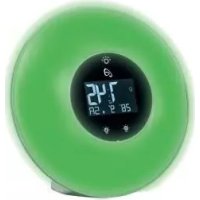
IAN 317287 - Light alarm clock AURIOL - Free user manual and instructions
Find the device manual for free IAN 317287 AURIOL in PDF.



| Product type | Light alarm clock with FM radio |
| Brand | Auriol |
| Model | IAN 317287 / HG05056-DCF |
| Main power supply | AC adapter 100-240 V~, 50/60 Hz, 0.8 A max, output 5 V, 3 A |
| Backup battery | 1 CR2032 battery (3 V) already inserted |
| USB charging port | Output 5 V, 2.1 A (for charging external devices) |
| Radio frequency band | FM 87.5 – 108 MHz |
| Time reception | DCF signal 77.5 kHz (automatic synchronization) |
| Alarm functions | Optical alarm (dawn simulator) + acoustic alarm (8 natural sounds or radio) |
| Snooze function | Repetition every 10 minutes |
| Sleep timer | Adjustable duration from 5 to 60 minutes with sound and light |
| Integrated lamp | White lamp (intensity 0-18) + colored ambient light (8 colors + automatic gradient) |
| Radio memory | 8 preset stations |
| Display | Time, date, day of week, time zone, 12/24 h format, adjustable backlight |
| Protection class (alarm clock) | III (SELV) |
| Protection class (adapter) | II |
| Maintenance and cleaning | Unplug the adapter and clean with a soft, dry cloth |
| Safety | Use only the supplied adapter; do not expose to moisture; keep out of reach of children |
| Warranty | 3 years |
Frequently Asked Questions - IAN 317287 AURIOL
User questions about IAN 317287 AURIOL
0 question about this device. Answer the ones you know or ask your own.
Ask a new question about this device
Download the instructions for your Light alarm clock in PDF format for free! Find your manual IAN 317287 - AURIOL and take your electronic device back in hand. On this page are published all the documents necessary for the use of your device. IAN 317287 by AURIOL.
USER MANUAL IAN 317287 AURIOL
natural_image
Digital climate clock with digital display showing 7:45, 28:00, and 5:00 (no text or symbols on face)FUNK-LICHTWECKER MIT RADIO / WAKE-UP LIGHT ALARM CLOCK WITH RADIO / RADIO-RÉVEIL SIMULATEUR D'AUBE RADIOGUIDÉ
DE AT CH
FUNK-LICHTWECKER MIT RADIO
Operation and safety notes
NL BE
DRAADLOZELICHTWEKKER METRADIO
GB / IE Operation and safety notes Page 34
Intended use......Page 37
Parts description......Page 37
Scope of delivery....Page 38
Technical data......Page 38
General safety instructions......Page 39
Safety instructions for batteries / rechargeable batteries....Page 41
Before use......Page 43
Setting up the product......Page 43
Operation Page 44
Reception of DCF radio signal......Page 44
Displaying summertime (DST) Page 46
Turn on / off the automatic radio time receive function......Page 46
Setting the LC display backlight......Page 47
Adjusting the time......Page 47
Alarm functions......Page 48
Setting the alarm....Page 49
Switching off the alarm....Page 51
Set radio......Page 52
Station scan......Page 52
Save station......Page 52
Rapid test Page 53
Use as a light......Page 53
Mood light......Page 54
Sleep timer mode......Page 54
Battery operation ......Page 55
Replacing battery......Page 56
Cleaning and care......Page 56
Troubleshooting Page 57
Simplified EU declaration of conformity......Page 57
| List of pictograms used | |||
 | Time display |  | Volt(Alternating current) |
 | Alarm clock Safety |  II II | |
 | Sleep timer Safety |  III III | |
 | FM Radio |  | Polarity of output terminal |
 | Radio-controlled For  or use or use | ||
 | Touch button |  | This icon indicates that the product is mains operated. |
 | SMPS (Switch mode power supply unit) |  | Batteries included |
 | Short-circuit-proof safety isolating transformer |  | Rated maximum ambient temperature |
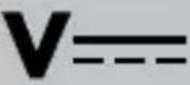 | Volt(Direct current) | ||
Wake-up light alarm clock with radio
- Introduction
We congratulate you on the purchase of your new product. You have chosen a high quality product. The instructions for use are part of the product. They contain important information concerning safety, use and disposal. Before using the product, please familiarise yourself with all of the safety information and instructions for use. Only use the product as described and for the specified applications. If you pass the product on to anyone else, please ensure that you also pass on all the documentation with it.
Intendeduse
The product displays the time, date and day of the week and features visual and acoustic alarm functions as well as an electronic alarm signal and radio reception.


This product is intended for private use in dry rooms. The product is not intended for commercial use or for use in other applications.
Partsdescription
1 Illuminated panel
2 Light "On/Off" touch button/"SNOOZE" touch button
3 LC-display
4 "Light +" touch button
5 "Light -" touch button
6 Reset button
7 LCD backlight slide switch
8 Speaker
9 Battery compartment
10 USB output socket

11 Cable aerial
12 DC input socket
13 Battery
14 Battery compartment cover
15 "T" button
16 "FM" button
17 "Volume -" button
18 "Volume +" button
19 "+" button
20 " - " button
21 "Clock" button
22 "Alarm" button
23 "SNOOZE" display zz
24 "Clock" display
25 Alarm tone display


26 Day of the week display
27 Sleep timer mode display
28 Alarm mode display
29 Radio frequency display
30 Date display
31 Radio memory display
32 Radio mode display
33 Clock PM display
34 Light on display
35 Time zone display
36 Radio control clock
function display
37 DC plug
38 Power adaptor

- Scope of delivery
1 Wake-up light alarm clock with radio
1 Power adaptor
1 Battery CR2032
(pre-installed)
1 Set of instructions for use
●Technicaldata
Wake-up light alarm clock with radio:
DCInput:5V
= = = (direct current), 3000 mA
Protection class: III/

Backup battery: 1 x 3V
(direct current), coin / button cell, CR2032 (pre-installed)
Model no.:
HG05056-DCF
USB output: 5 V (direct current) 2.1 A (for charging other devices use only)
FM Frequency band: 87.5 MHz to 108 MHz
Radio signal: DCF
Frequency Band: 77.5 kHz
Power adaptor:
Input: 100-240V\~50/60Hz, max. 0.8A
Output ◇@◆: 5V (direct-current), 3000 mA
Protection class: II /
Model no.: CZH024050300EUWH (GS certified)

General safety instructions
Before using the product, please familiarise yourself with all of the safety information and instructions for use! When passing this product on to others, please also include all the documents! The light alarm clock is only suited for use with the included power adaptor (model no. CZH024050300EUWH).

WARNING! DANGER TO LIFE AND RISK OF ACCIDENTS FOR INFANTS AND
CHILDREN! Never leave children unattended with
the packaging material. The packaging material represents a danger of suffocation. Children frequently underestimate the dangers.
This product may be used by children age 8 years and up, as well as by persons with reduced physical, sensory or mental capacities, or lacking experience and / or knowledge, so long as they are supervised or instructed in the safe use of the product and understand the associated risks. Do not allow children to play with the product. Cleaning and user maintenance should not be performed by children without supervision.
Before using the product, verify the available mains voltage corresponds with the operating voltage required for the power adaptor (100-240V\~50/60Hz)!
Before using the product, verify the light alarm clock and the power adaptor and the cable connection aren't damaged! Never operate a damaged product!
The power adaptor must be plugged into an easily accessible socket so it can easily be unplugged in the event of an emergency.
This product does not contain any parts that can be serviced by the user. The bulbs cannot be replaced.
- Do not place open fire (e.g. candle) on the product.
The product is only suited for use with the included power adaptor (CZH024050300EUWH).
Please note that the power adaptor continues to draw a small amount of power even if the product is turned off as long as the power adaptor is plugged into a power outlet. To switch the product off completely, unplug the power adaptor from the socket.

Safety instructions for batteries / rechargeable batteries
■ DANGER TO LIFE! Keep batteries/rechargeable batteries out of reach of children. If accidentally swallowed seek immediate medical attention.

DANGER OF EXPLOSION! Never recharge non-rechargeable batteries. Do not short-circuit batteries/rechargeable batteries and/or open them.
Overheating, fire or bursting can be the result.
■ Never throw batteries / rechargeable batteries into fire or water.
Do not exert mechanical loads to batteries / rechargeable batteries.
Risk of leakage of batteries / rechargeable batteries
- Avoid extreme environmental conditions and temperatures, which could affect batteries / rechargeable batteries, e.g. radiators / direct sunlight.
If batteries / rechargeable batteries have leaked, avoid contact with skin, eyes and mucous membranes with the chemicals! Flush immediately the affected areas with fresh water and seek medical attention!
WEAR PROTECTIVE GLOVES! Leaked or

damaged batteries / rechargeable batteries can cause burns on contact with the skin. Wear suitable protective gloves at all times if such an event occurs.
In the event of a leakage of batteries / rechargeable batteries, immediately remove them from the product to prevent damage.
Only use the same type of batteries / rechargeable batteries. Do not mix used and new batteries / rechargeable batteries.
■ Remove batteries / rechargeable batteries if the product will not be used for a longer period.
Risk of damage of the product
Only use the specified type of battery / rechargeable battery!
- Insert batteries / rechargeable batteries according to polarity marks (+) and (-) on the battery / rechargeable battery and the product.
Clean the contacts on the battery / rechargeable battery and in the battery compartment before inserting!
■ Remove exhausted batteries / rechargeable batteries from the product immediately.
Notes for coin / button cell batteries
WEHEMICAL BURN HAZARD! Do not ingest the battery.
This product contains a coin / button cell battery.

If the coin / button battery is swallowed, it can cause severe internal burns in just 2 hours and can lead to death.
Keep new and used batteries away from children. If the battery compartment does not close securely, stop using the product and keep it away from children.
If you think battery might have been swallowed or placed inside any part of the body, seek immediate medical attention.
Before use
Note: Remove all packing materials before use.
Note: Remove protection foil on light field 1 LC-display 3 and anti-slip surface on the bottom before use.
Note: Unplugged from the mains the light alarm clock only has two emergency functions (clock and electronic alarm signal). An electric connection is therefore required prior to use.
☐ First remove the protective film from the LC-display 3 of the light alarm clock.
☐ A plastic strip protrudes from the battery compartment cover 14 on the rear side of the light alarm clock. Remove this plastic strip to utilise the inserted battery.
☐ Plug the DC plug 37 of the power adaptor 38 into the DC input socket 12 of the light alarm clock. Then plug the power adaptor 38 into an easy to access socket.
- Setting up the product
CAUTION! When choosing a position for the product, make sure that it is not exposed to direct sunlight, vibrations, heat, cold damp or dust. Do not install the product close to heat sources, e.g. radiators. There is otherwise a danger that the product will be damaged.
- Place the product on a flat, level surface.
- Do not place the product on valuable or sensitive surfaces without suitable protection. The surfaces may otherwise be damaged.
Your light alarm clock is now in clock mode. The clock starts at 00:00.
Radio time signal (DCF):
The DCF-radio signal (time signal transmitter) is made up of time pulses transmitted from one of the highest precision clocks in the world close to Frankfurt / Main in Germany.
The time code signal can be received upto 1.500 km from Frankfurt / Main. Reception of the DCF radio signal generally takes approx. 3–10 minutes.
☐ If it does not work properly, restart the DCF radio signal reception process. To do this, keep the “+” button 19 pressed for approx. 2 seconds.
Reception can be considerably impaired by obstacles (e.g. concrete walls) or sources of interference (e.g. other electrical devices). In the event of reception problems, change the position of the product (e.g. to somewhere near a window).
Operation
- Reception of DCF radio signal
The product automatically starts to search for the DCF radio signal after 3 minutes when the product is activated or reset. The radio control clock function display ▲36 is flashing on the LC-display ▢3 indicates that the product is searching for the DCF radio signd.
In order to correct any deviations from the exact time, the product is automatically synchronised with the DCF radio signal every day at 1:00, 2:00 and 3:00.
It is also possible to start reception of the DCF radio signal manually on the product.
☐ Press and hold the “+” button 19 for approx. 2 seconds. The product attempts to receive the DCF radio time signal. This process takes several minutes and is indicated in the LC display 3 by a flashing radio symbol. To stop receive DCF radio time signal, press and hold the “-” button 20 for approx. 2 seconds.
Note: When either light function, radio, alarm is activating, automatic radio time receive function will be skipped. You can receive the DCF radio time signal manual.
☐ Press and hold the "+" button 19 for approx. 2 seconds. The product attempts to receive the DCF radio time signal.
Note: If the product cannot pick up the DCF radio signal on account of an error, it is also possible to set the time manually. As soon as reception of the DCF signal is successful, the manual settings are overwritten.
Time zone
Note: Should you be in a country in which the DCF signal can be received but the time is different to your current local time, you
can use the time zone setting to have the product display your current local time. If you find yourself in a country in which, for example, the local time is an hour ahead of Central European Time (CET), you set the time zone to +01.
The product is now still controlled by DCF but shows the time as one hour ahead of CET.
- Displaying summertime (DST)
Summertime is automatically indicated on the LC-Display 3. The product receives the information as to whether it is summertime or not from the DCF radio signal.
- Turn on / off the automatic radio time receive function
If the reception of the DCF radio signal continues to be interrupted, you can turn on / off the automatic radio time receive function manually.
Press and hold down the "+" button 19 and the "-" button 20 for about 2 seconds. («») 36 is shown in the LC display, the automatic radio time receive function is turned off. Now you can set the time and date manually.
☐ Press and hold down the “+” button 19 and the “-” button 20 for about 2 seconds again. («») 36 disappear, the automatic radio time receive function is turned on. The product will start the reception of the radio time during early morning.
- Setting the LC display backlight
☐ Use the LCD backlight slide switch ☐ to adjust the backlight intensity on the LC-display ☐ Choose from the settings OFF, LO, ME and HI.
- Adjusting the time
☐ In clock mode, press the "Clock" button Ⓠ 21 for approx. 3 seconds to enter setup mode.
☐ Press the “+” button 19 or the “-” button 20 to change the respective flashing value.
TIP: Holding the "+" 19 button or the "-" button 20 will rapidly scan forward or backward through the numbers. When no button is pressed for 30 seconds, the light alarm clock with automatically return to clock mode.
Briefly press the "Clock" button 21 to confirm the setting. This will take you to the next clock settings option.
☐ This allows you to successively adjust the following values:
•Year
• Month
• Day
• Hour
- Minute
- 24/12 hour display - in 12 hour mode the time from 12 to 23:59 will show PM next to the time.
• Time zone (+2, +1, 0, -1, -2)
• Language for displaying the day of the week
-A bbreviations for languages: GE for German, EN for English, FR for French, DU for Dutch, SP for Spanish, IT for Italian.
☐ Set the desired language by pressing the "Clock" button 21. The light alarm clock will then return to clock mode.
Note:
☐ Under 24 hour mode, the date display 30 will be shown in "D/M".
☐ Under 12 hour mode, the date display 30 will be shown in "M/D".
Alarmfunctions
The light alarm clock features an acoustic and a visual alarm.
The visual alarm is a light which appears in the illuminated panel 1. The brightness is adjustable. You may further set a lead time.
The lead time is the time from the alarm time setting during which the brightness of the light field will gradually increase from zero to the set value (sunrise simulation).
Choose from eight different soundscapes, an electronic alarm signal sound or radio reception as the acoustic alarm signal. The volume of the acoustic alarm signal can be selected. The alarm signal starts at the set alarm time at a low volume and adjusts to the set value within a few minutes.
The alarm features an alternate simple alarm function and snooze function.
When selecting the simple alarm function, shut off the alarm with a simple button of a button.
When selecting the snooze function the alarm signal will turn off and sound again 10 minutes later. This process can be repeated any number of times until the alarm finally shuts off.
- Setting the alarm
☐ In clock mode, hold the "Alarm" button ⚙ 22 for 3 seconds to enter alarm setup mode.
☐ Press the "+" button 19 or the "-" button 20 to change the respective flashing value.
TIP: Holding the "+" button 19 or the "-" button 20 will rapidly scan forward or backward through the numbers. When no button is pressed for 30 seconds, the light alarm clock with automatically return to clock mode.
Briefly press the "Alarm" button 📁 22 to confirm the setting. This will take you to the next alarm settings option.
• Hour
- Minute
- Select alarm mode: Chose from the following alarm mode display 🔊 28 symbols:


: sleep

: simple alarm
No display: alarm function deactivated
☐ Select alarm signal: Choose from the following alarm signals, indicated by the numbers 01 to 07 with the note sign ♪ flashing:
Note:
01-07 are indicated by these symbols:

08 is indicated by this symbol: FM
Select one of the following alarms:
01: Bird Chirping
02: Funky Monkey
03: Rainy Shower
04: Harmonious Joy
05: Morning Forest
06: Relaxing Piano
07: Mystery Dance
08: Radio
☐ Acoustic alarm volume: A flashing VO will appear along with a number which can be adjusted from 0 to 18. The higher the number the louder the alarm signal sound.
Note: During the acoustic alarm is activate, depend on select alarms, a flashing “♪” or “FM” symbol will appear in the LC-display 3. The symbol will be static once the alarm switched off.
Sunlight/Mood light mode: Used to set the colour of the visual alarm. The two digit is flashing on LC-display 3:01 (Sunlight mode) or 02 (Mood light mode). Press "Alarm" button ⚙️22 to select the light mode.
Under 02 (mood light mode), colour selection from C1 to C8 is available: → red → orange → greenish → light green → green → sky blue → purple → automatic colour change
Press "Alarm" button ⚙ 22 to select the colour in mood light mode.
☐ Visual alarm brightness: The higher the number selected, the brighter the illuminated panel 1 will be.
In Sunlight mode, a flashing number will appear from 0 to 18.
In Mood light mode, a flashing number will appear from 0 to 5 only.
Press "Alarm" button 🏠 22 to select the visual alarm brightness.
☐ Visual alarm lead time: This sets the duration of the lead time. Choose from the following lead times: OFF (no lead time), 5, 10, 15, 20, 25 or 30 minutes.
Note: During the visual alarm lead time a flashing will appear in the LC-display 3. With the visual alarm going off at the same time as the acoustic alarm, the symbol will be static.
- Switching off the alarm
If no button is pressed after the alarm automatically activates, the alarm will automatically switch off after one hour and will only reactivate the next time the alarm time occurs.
When the alarm sounds, you can switch it off with the "SNOOZE" touch button 2.
When using the snooze function, the alarm will sound again in 10 minutes. To completely switch off the alarm with the snooze function activated, hold the "SNOOZE" touch button 🎨2 for 3 seconds or press the "Alarm" button 🔊22 once.
The alarm will then remain off until the next alarm time reoccurs.
Note: In clock mode, press the "Alarm" button ⚠22 once to quickly switch between the "Alarm on" / "Alarm on with snooze" / "Alarm off".
- Set radio
Station scan
The radio will receive FM stations at frequencies between 87.5 MHz to 108 MHz via the cable aerial [11]. To scan for stations proceed as described below:
- Press the "FM" button 16. The light alarm clock is now in radio mode. The radio frequency display 29 will be displayed. - Hold the "+" button 19 or the "-" button 20 for 3 seconds. The radio will start scanning for stations. The station scan will stop on the first station found.
☐ When pressing the "+" button 19 or the "-" button 20 for 3 seconds again, the radio will continue scanning stations.
☐ The "Volume +" button 18 increases the volume.
☐ The "Volume -" button 17 lowers the volume.
□ Aim the cable aerial 11 so the radio has optimal reception.
☐ Press the "FM" button 16 for the light alarm clock to return from radio mode to clock mode.
- Save station
With the light alarm clock in radio mode there are 8 memory locations for saving stations.
☐ Hold the "FM" button 16 for 3 seconds until a station you found has been saved. The display will flash the memory location suggested by the radio.
Press the "Volume +" button 18 or "Volume -" button 17 to select the memory location you wish to use. Press the "FM" button 16 to confirm your selection.
☐ To recall a saved station repeatedly press the "T" button 15 with the light alarm clock in radio mode until the desired memory location appears in the LC-display 3.
☐ When switching the radio off by pressing the "FM" button 16 the radio will play the last station selected when turned back on.
- Rapid test
Note: The light alarm clock must be in clock mode for the rapid test.
☐ Press the "T" button 15. The light alarm clock will scan the settings for the selected alarms. The advance alarm will not be run. Instead, the light will be adjusted to the set value, then the alarm will sound.
- Use as a light
☐ Touch the light "On / Off" touch button ⚙️ 2 A white light will appear in the illuminated panel 1
☐ Touch the light "On / Off" touch button 2 again to switch the light off again.
☐ Touch the "Light +" touch button 4 or "Light -" touch button 5 to adjust the light intensity from level 00 (low) to 18 (high).
The visual alarm will also work when the light is on. The light will then be deactivated and will reappear after the alarm.
- Mood light
Note: When selecting "02 mood light mode" after this appears for colour selection "C1-C9" and then the light intensity can be adjust in 5 steps.
The mood light function activates a dim coloured light in the illuminated panel 1.
Press the "Light +" touch button ☎ 4 or "Light -" touch button ☎ 5 to activate the mood light. Repeatedly press the "Light +" touch button ☎ 4 to increase the brightness 1-5, and to switch it off. Or press the "Light -" touch button ☎ 5 to change the colour scale as follows C1-C9:
→ red → orange → greenish → light green → green → sky blue → purple → automatic colour change → fix the current color of the color change function
Activating the mood light does not impact the functionality of the visual alarm. The mood light will be switched off and on again after the alarm.
- Sleep timer mode
In clock mode, touch the light "On/Off" touch button 2 for approx. 2 seconds to enter sleep timer mode. Sleep timer mode display 27 will appear in LC display 3.
This sets the duration of the sleep timer. Choose from the following times: OFF (no timer), 5, 10, 15, 20, 30, 45 or 60 minutes. The timer will appear and flashing in the LC-display 3. Press "+" button 19 or "-" button 20 to choose the value. Touch the light "On / Off" touch button 2 to confirm the timer setting.
☐ Select sound by choose from r1 or r2, or choose the radio sound, or "OFF" to turn off the sound. Press "+" button 19 or "-" button 20 to choose the value. Touch the light "On / Off" touch button 🔒 2 to confirm the setting.
☐ Then select light intensity by choose from 0 to 18. Press “+” button 19 or “-” button 20 to choose the value. Touch the light “On / Off” touch button ⚙️ 2 to confirm the setting.
☐ To turn off Sleep timer mode, touch the light "On / Off" touch button 2 for approx. 2 seconds. Sleep timer mode display 27 will disappear in LC display 3.
- Battery operation
The inserted battery is only to backup the clock display and alarm function. In the event of a power failure the light alarm clock will automatically switch to battery mode.
The clock will continue running in battery mode. To save energy, only the electronic alarm will sound. All light functions and the radio are non-operational.
Once power returns via the DC plug 37, all functions of the light alarm clock will be available again.
- Replacing battery
Battery should be replaced at least once a year to ensure reliable function of the light alarm clock.
☐ To replace the battery 13, proceed as shown in figure B. Open the battery compartment 9 by turning the battery compartment cover 14 anticlockwise towards to the lock open symbol using a coin. Remove the old battery 13 and replace this with a new battery.
☐ Please note the polarity when inserting the battery 13. This is shown in the battery compartment 9 (see fig. B).
Turn the battery compartment cover 14 clockwise towards to the lock close symbol onto the battery compartment 9 using a coin to close it.
Note: If the product is not connected with power adaptor 38, when the battery has been removed, all information will be deleted.
- Cleaning and care
☐ Unplug the power adaptor 38 from the socket before cleaning the product.
☐ The product should only be cleaned on the outside with a soft dry cloth.
- Troubleshooting
The product contains delicate electronic components. For this reason it is possible that it can be disrupted by radio transmitting equipment in the immediate vicinity. Electrostatic discharges can lead to malfunctions. In this case, press the "Reset" button 6. This will reset the light alarm clock and perform a brief test of the LC-display 3. The light alarm clock is then ready for use again.
Please note, resetting will erase all settings.
● Simplified EU declaration of conformity
Hereby, OWIM GmbH & Co. KG, Stiftsbergstraße 1, DE-74167 Neckarsulm, GERMANY, declares that the product (Wake-up light alarm clock with radio HG05056-DCF), is in compliance with Directives 2014/53/EU, 2011/65/EU and 2009/125/EC.
The full text of the EU declaration of conformity is available at the following internet address: www.owim.com
●Disposal
The packaging is made entirely of recyclable materials, which you may dispose of at local recycling facilities.

Observe the marking of the packaging materials for waste separation, which are marked with abbreviations (a) and numbers (b) with following meaning: 1–7:
plastics / 20-22: paper and fibreboard / 80-98: composite materials.

The product and packaging materials are recyclable, dispose of it separately for better waste treatment. The Triman logo is valid in France only.

Contact your local refuse disposal authority for more details of how to dispose of your worn-out product.
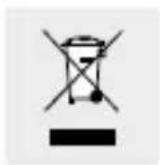
To help protect the environment, please dispose of the product properly when it has reached the end of its useful life and not in the household waste. Information on collection points and their opening hours can be obtained from your local authority.
Faulty or used batteries / rechargeable batteries must be recycled in accordance with Directive 2006/66/EC and its amendments. Please return the batteries / rechargeable batteries and / or the product to the available collection points.
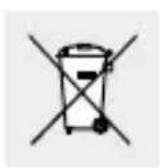
Environmental damage through incorrect disposal of the batteries / rechargeable batteries!
Batteries / rechargeable batteries may not be disposed of with the usual domestic waste. They may contain toxic heavy metals and are subject to hazardous waste treatment rules and regulations. The
chemical symbols for heavy metals are as follows: Cd = cadmium, Hg = mercury, Pb = lead. That is why you should dispose of used batteries / rechargeable batteries at a local collection point.
Warranty
The product has been manufactured to strict quality guidelines and meticulously examined before delivery. In the event of product defects you have legal rights against the retailer of this product. Your legal rights are not limited in any way by our warranty detailed below.
The warranty for this product is 3 years from the date of purchase. Should this product show any fault in materials or manufacture within 3 years from the date of purchase, we will repair or replace it – at our choice – free of charge to you.
The warranty period begins on the date of purchase. Please keep the original sales receipt in a safe location. This document is required as your proof of purchase. This warranty becomes void if the product has been damaged, or used or maintained improperly.
The warranty applies to defects in material or manufacture. This warranty does not cover product parts subject to normal wear, thus possibly considered consumables (e.g. batteries) or for damage to fragile parts, e.g. switches, rechargeable batteries or glass parts.
CE
= = = (courant continu), 3000 mA
Signal radio (DCF) :
natural_image
Simple line drawing of a house with a 'He' label, no text or symbols presentLEVENSGEVAARCHUWING!
EN KANS OP ONGEVALLEN VOOR KLEU- TERS EN KINDEREN! Laat kinderen nooit zon-


- FUNK-LICHTWECKER MIT RADIO / WAKE-UP LIGHT ALARM CLOCK WITH RADIO / RADIO-RÉVEIL SIMULATEUR D'AUBE RADIOGUIDÉ
- FUNK-LICHTWECKER MIT RADIO
- DRAADLOZELICHTWEKKER METRADIO
- General safety instructions......Page 39
- Before use......Page 43
- Setting up the product......Page 43
- Operation Page 44
- Set radio......Page 52
- Rapid test Page 53
- Use as a light......Page 53
- Mood light......Page 54
- Sleep timer mode......Page 54
- Battery operation ......Page 55
- Replacing battery......Page 56
- Cleaning and care......Page 56
- Troubleshooting Page 57
- Simplified EU declaration of conformity......Page 57
- Wake-up light alarm clock with radio
- - Introduction
- Intendeduse
- Partsdescription
- - Scope of delivery
- ●Technicaldata
- Wake-up light alarm clock with radio:
- Power adaptor:
- General safety instructions
- WARNING! DANGER TO LIFE AND RISK OF ACCIDENTS FOR INFANTS AND
- Safety instructions for batteries / rechargeable batteries
- Risk of leakage of batteries / rechargeable batteries
- Risk of damage of the product
- Notes for coin / button cell batteries
- Before use
- - Setting up the product
- Radio time signal (DCF):
- Operation
- - Reception of DCF radio signal
- Time zone
- - Displaying summertime (DST)
- - Turn on / off the automatic radio time receive function
- - Setting the LC display backlight
- - Adjusting the time
- •Year
- Note:
- Alarmfunctions
- The light alarm clock features an acoustic and a visual alarm.
- The alarm features an alternate simple alarm function and snooze function.
- - Setting the alarm
- - Switching off the alarm
- - Set radio
- Station scan
- - Save station
- - Rapid test
- - Use as a light
- - Mood light
- - Sleep timer mode
- - Battery operation
- - Replacing battery
- - Cleaning and care
- - Troubleshooting
- ● Simplified EU declaration of conformity
- ●Disposal
- Environmental damage through incorrect disposal of the batteries / rechargeable batteries!
- Warranty
- CE
- Signal radio (DCF) :
- LEVENSGEVAARCHUWING!
- EN KANS OP ONGEVALLEN VOOR KLEU- TERS EN KINDEREN! Laat kinderen nooit zon-
Brand : AURIOL
Model : IAN 317287
Category : Light alarm clock