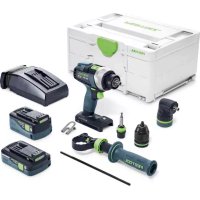
TDC 184 5 24 0 ISet - Drill FESTOOL - Free user manual and instructions
Find the device manual for free TDC 184 5 24 0 ISet FESTOOL in PDF.



| Product type | Cordless drill/driver |
| Brand | Festool |
| Model | TDC 184 5 24 0 ISet |
| Nominal voltage | 18 V |
| No-load speed (1st gear) | 0 – 500 rpm |
| No-load speed (2nd gear) | 0 – 800 rpm |
| No-load speed (3rd gear) | 0 – 2350 rpm |
| No-load speed (4th gear) | 0 – 3600 rpm |
| Max. torque (soft screwdriving) | 50 Nm |
| Max. torque (hard screwdriving) | 75 Nm |
| Adjustable torque (1st/2nd gear) | 2 – 20 Nm |
| Chuck capacity | 1.5 – 13 mm |
| Max. drilling diameter (wood) | 70 mm |
| Max. drilling diameter (metal) | 13 mm |
| Weight (according to EPTA, with 6.2 Ah battery) | 2.6 kg |
| Weight (without battery, with Centrotec) | 1.4 kg |
| Power supply | Festool BP 18 Li battery (Li-ion 18 V series) |
| Main functions | Drilling, screwdriving, screw tightening |
| Maintenance and cleaning | Keep ventilation slots clear and clean; clean connection contacts |
| Safety | Additional handle mandatory, hearing protection, safety glasses, dust mask; emergency stop in case of jamming |
| Spare parts and repairability | Original Festool spare parts; repair by authorized service center (www.festool.fr/services) |
| General information | Data recording chip; Bluetooth® for battery connection; integrated LED lamp |
Frequently Asked Questions - TDC 184 5 24 0 ISet FESTOOL
User questions about TDC 184 5 24 0 ISet FESTOOL
0 question about this device. Answer the ones you know or ask your own.
Ask a new question about this device
Download the instructions for your Drill in PDF format for free! Find your manual TDC 184 5 24 0 ISet - FESTOOL and take your electronic device back in hand. On this page are published all the documents necessary for the use of your device. TDC 184 5 24 0 ISet by FESTOOL.
USER MANUAL TDC 184 5 24 0 ISet FESTOOL
Head of Product Development

Ralf Brandt
Head of Product Conformity
valid in combination with battery pack/
valid in combination with Bluetooth® battery pack/
Declaration of Conformity
We as the manufacturer Festool GmbH, Wertstraße 20, 73240 Wendlingen, Germany declare under our sole responsibility that the product(s):
Designation:
Designation of Type[s]:
Serial number(s) 11:
Cordless drill
TDC 18/4
10039318
fulfills all the relevant provisions of the following UK Regulations:
S.I. 2008/1597
S.I. 2016/10912]
S.I. 2017/120631
S.1.2012/3032
Supply of Machinery (Safety) Regulations 2008
Electromagnetic Compatibility Regulations 2016
Radio Equipment Regulations 2017
Restriction of the Use of Certain Hazardous Substances in Electrical and Electronic Equipment Regulations 2012
and are manufactured in accordance with the following designated standards:
BS EN 62841-1: 2015
BSEN62841-2-1:2018
BS EN 55014-1:2017
BS EN 55014-2:2015
EN 300 328:2016 V2.1.1
EN301489-1:2017V2.1.13)
EN301489-17:2017V3.1.1
BS EN IEC 63000:2018
in the specified serial number range (S-Nr.) from 40000000 - 49999999
21 valid in combination with battery pack BP 18 Li 5,2 AS, BP 18 Li 6,2 AS, BP 18 Li 3,1 C, BP 18 Li 4,0 HPC-AS
31 valid in combination with Bluetooth® battery pack BP 18 Li 5,2 ASI, BP 18 Li 6,2 ASI, BP 18 Li 3,1 Cl, BP 18 Li 4,0 HPC-ASI

Place and date of declaration: Wendlingen, 31.03.2021
Signed on behalf of and in name of Festool GmbH
Inhaltsverzeichnis
1 Symbols. 15
2 Safety warnings. 15
3 Intended use 17
4 Technical data. 17
5 Parts of the device. 17
6 Battery pack. 18
7 Commissioning. 18
8 Settings. 18
9 Tool holder, attachments. 19
10 Working with the electric power tool. 19
11 Warning signals. 20
12 Service and maintenance. 20
13 Environment. 20
14 General information. 20
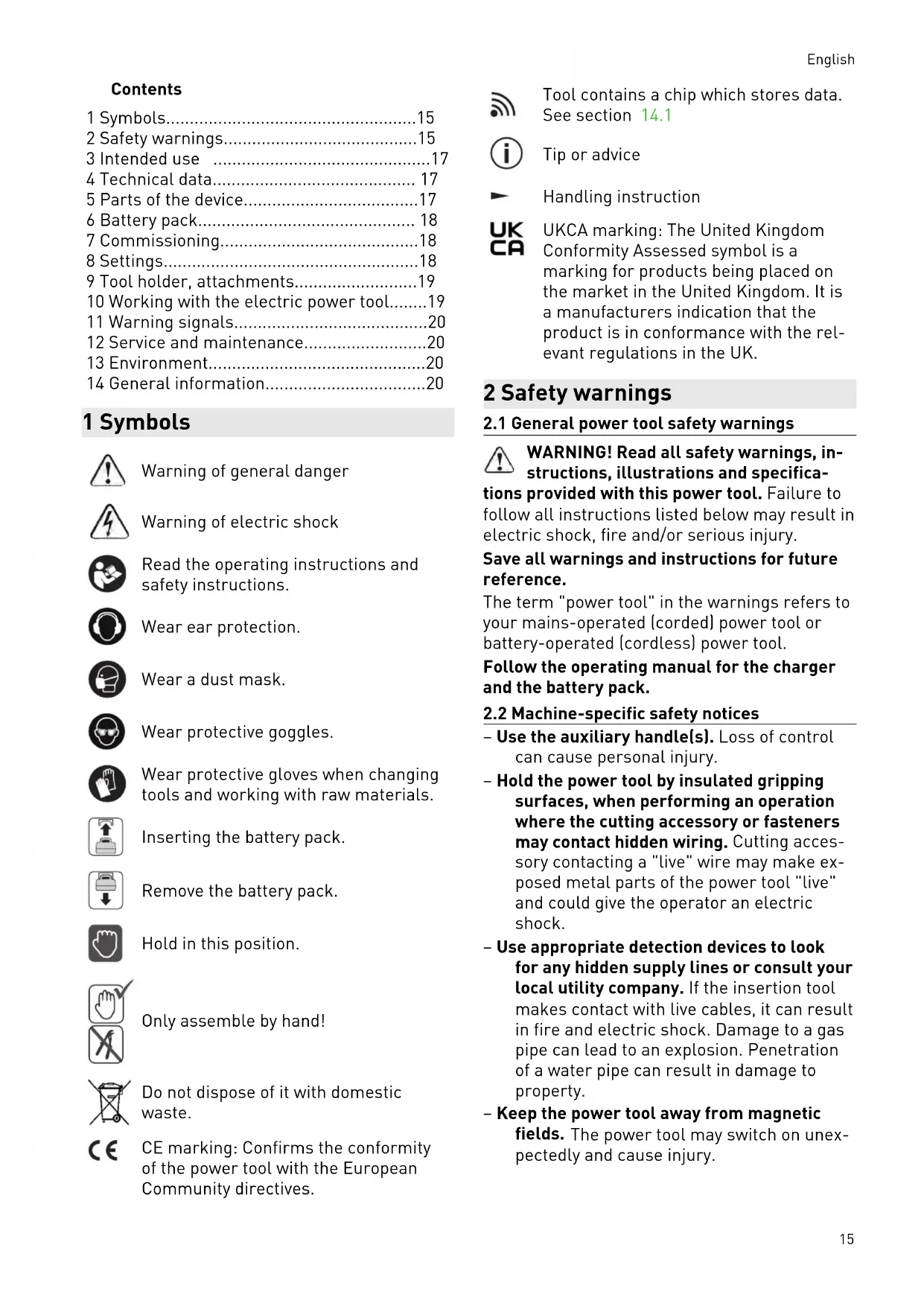
1 Symbols

Warning of general danger

Warning of electric shock

Read the operating instructions and safety instructions.

Wear ear protection.

Wear a dust mask.

Wear protective goggles.

Wear protective gloves when changing tools and working with raw materials.

Inserting the battery pack.

Remove the battery pack.

Hold in this position.

Only assemble by hand!

Do not dispose of it with domestic waste.

CE marking: Confirms the conformity of the power tool with the European Community directives.

Tool contains a chip which stores data. See section 14.1

Tip or advice

Handling instruction

UKCA marking: The United Kingdom Conformity Assessed symbol is a marking for products being placed on the market in the United Kingdom. It is a manufacturers indication that the product is in conformance with the relevant regulations in the UK.
2 Safety warnings
2.1 General power tool safety warnings

WARNING! Read all safety warnings, instructions, illustrations and specifica
tions provided with this power tool. Failure to follow all instructions listed below may result in electric shock, fire and/or serious injury.
Save all warnings and instructions for future reference.
The term "power tool" in the warnings refers to your mains-operated (corded) power tool or battery-operated (cordless) power tool.
Follow the operating manual for the charger and the battery pack.
2.2 Machine-specific safety notices
- Use the auxiliary handle(s). Loss of control can cause personal injury.
- Hold the power tool by insulated gripping surfaces, when performing an operation where the cutting accessory or fasteners may contact hidden wiring. Cutting accessories contacting a "live" wire may make exposed metal parts of the power tool "live" and could give the operator an electric shock.
- Use appropriate detection devices to look for any hidden supply lines or consult your local utility company. If the insertion tool makes contact with live cables, it can result in fire and electric shock. Damage to a gas pipe can lead to an explosion. Penetration of a water pipe can result in damage to property.
- Keep the power tool away from magnetic fields. The power tool may switch on unexpectedly and cause injury.



Wear suitable personal protective equipment: Ear protection, safety goggles, a dust mask for work that generates dust.

CAUTION! Power tool can jam and cause sudden kickback! Switch off immediately!
- Firmly hold the power tool with both hands, with one hand on the handle [1-10] and the other hand on the auxiliary handle [1-7]. Make sure the speed is adjusted correctly when screwdriving. Be prepared for a high reaction torque, which may cause the power tool to turn and lead to injury.
- Do not use the power tool in the rain or in damp surroundings. Moisture in the power tool may cause a short circuit and fire.
- Wait until the power tool has come to a complete halt before placing it down. The insertion tool can get caught and lead to a loss of control of the power tool.
- Avoid unintentional activation. Carrying the electric power tool with your fingers on the on/off switch can lead to accidents. If you are not using the power tool, set the rotational direction switch/safety lock [1-9] to the centre position to lock the on/off switch.
- Do not use power supply units or third-party battery packs to operate cordless power tools. Do not use third-party chargers to charge the battery packs. The use of accessories not expressly authorised by the manufacturer can result in electric shocks and/or serious accidents.
- Only for AS/NZS: The tool shall always be supplied via residual current device with a rated residual current of 30mA or less.

Warning of harmful light radiation.
Do not look into the light beam for long periods. Do not direct the light beam towards other people or animals. Optical radiation can damage the eyes - [4].
- Use a dust extractor when working with dust.
- Only use tools and accessories which have been approved by Festool for this power tool. The use of tools or accessories which have not been approved may increase the risk of injury and seriously unbalance the
machine. This may decrease the quality of the working results and accelerate wear on the power tool.
2.3 Safety instructions when using long drill bits
- Never operate at higher speed than the maximum speed rating of the drill bit. At higher speeds, the bit is likely to bend if allowed to rotate freely without contacting the workpiece, resulting in personal injury.
- Always start drilling at low speed and with the bit tip in contact with the workpiece. At higher speeds, the bit is likely to bend if allowed to rotate freely without contacting the workpiece, resulting in personal injury.
- Apply pressure only in direct line with the bit and do not apply excessive pressure.
Bits can bend causing breakage or loss of control, resulting in personal injury.
2.4 Emission levels
Sound pressure level L_PA , sound power level L_WA and uncertainty K measured in accordance with EN 62841:
L_PA[dB(A)] L WA [dB(A)] K [dB]
Screwdrive- 73845
ing
Drilling 73845


CAUTION
Noise generated when working Risk of damage to hearing
Use ear protection.
Vibration emission level a_h (vector sum for three directions) and uncertainty K measured in accordance with EN 62841:
a_h[m / s^2]K[m / s 2]
Screwdriving < 2.5 1.5
Drilling 3 1.5
The specified emission levels (vibration, noise)
- are used to compare machines.
- They are also used for making preliminary estimates regarding vibration and noise load during operation.
- They represent the primary applications of the power tool.

CAUTION
The emission values may deviate from the specified values. This is dependent on how the tool is used and the type of workpiece being machined.
The actual load during the entire operating cycle must be evaluated.
- Depending on the actual load, suitable protective measures must be defined in order to protect the operator.
3 Intended use
Cordless drill suitable
- for drilling in metal, wood, plastics and similar materials,
- for screwing in and tightening screws.
- intended for use with BP Festool battery packs of the same voltage class.
The user is liable for damage and accidents caused by improper and non-intended use; this also includes damage and wear caused by continuous industrial operation.
4 Technical data
| Cordless drills TDC 18/4 | ||
| Motor voltage 18 V | ||
| No-load speed* 1. gear | 0-500 rpm | |
| 2. gear | 0-800 rpm | |
| 3. gear | 0-2350 rpm | |
| 4. gear | 0-3600 rpm | |
| Max. torque Soft material (wood) 50 Nm | ||
| Hard material (metal) 75 Nm | ||
| Adjustable torque** 1st gear/2nd gear 2-20 Nm | ||
| Chuck clamping range 1.5-13 mm | ||
| Max. drill diameter Wood 70 mm | ||
| Metal 13 mm | ||
| Screwdriving in spruce Max. Ø 10 mm | ||
| Tool holder in drill spindle 1/4 ″ | ||
| Weight as per EPTA Procedure 01:2014 (with auxiliary handle, BP 18 Li 6.2 AS battery pack and chuck) | 2.6 kg | |
| Weight incl. Centrotec, excl. auxiliary handle and battery pack. 1.4 kg | ||
- Speed values based on fully charged battery pack.
** The maximum speed (value for clockwise rotation) is reduced in the lower torque settings.
5 Parts of the device
[1-1] Buttons for releasing the battery pack
[1-2] Capacity indicator button on battery pack
[1-3] Capacity indicator
[1-4] LED light
[1-5] On/off switch
[1-6] Collar
[1-7] Auxiliary handle
[1-8] Gear switch
[1-9] Rotational direction switch and safety lock/transport lock
[1-10] Handle
English
[1-11] Thumbwheel for torque/drilling/lighting duration on and duration off
[1-12] belt clip
[1-13] Bit store
[1-14] Insulated gripping surfaces (grey shaded area)
Accessories shown or described are not always included in the scope of delivery.
The specified illustrations appear at the beginning of the Operating Instructions.
6 Battery pack
Before using the battery pack, check that the battery interface is clean. Any contamination of the battery interface may impair correct contact and lead to the contacts being damaged.
A faulty contact may result in the machine overheating or being damaged.
[2A]

Remove the battery pack.
Insert the battery pack - until it clicks into place.
Further information about the charger and battery pack with capacity indicator can be found in the corresponding operating manual.
7 Commissioning

CAUTION
Risk of injury
- Only assemble when the power tool is switched off!
7.1 Belt clip [1-12]
The belt clip allows the power tool to be attached to work attire for brief periods. It can be attached to the right or left of the power tool using a screw [3].
7.2 Fitting the auxiliary handle [5]
WARNING! Always use the auxiliary handle.
- Check that the auxiliary handle [5-1] is securely in place.
7.3 Inserting the stop bar [6]
The drilling depth can be adjusted using the stop bar [6-1].
7.4 Switching on/off [1-5]
Press = 0N release = 0FF
The speed can be continuously adjusted, relative to the pressure applied to the on/off switch.
Set the rotational direction switch [1-9] to the centre position to lock the on/off switch.
The LED light [1-4] lights up when the on/off switch [1-5] is pressed, see section 8.4.
8 Settings

CAUTION
Risk of injury
- Only adjust the settings when the power tool is switched off.
8.1 Changing direction of rotation [1-9]
- Switch to the left = clockwise rotation
- Switch to the right = counterclockwise rotation
8.2 Changing gear
The gear switch [1-8] can be used to switch the gear unit when the power tool is switched off.
8.3 Adjusting the torque [1-11]
Screwdriving
Torque corresponding to setting at the thumbwheel [1-11]:
Position 1 = low torque
Position 13 = high torque
There is a signal when the set torque is reached and the power tool switches off. The power tool only starts up again if the on/off switch [1-5] is released and pressed again.
Drilling
Marking shows the drill symbol v = maximum torque.
8.4 Adjust lighting [1-11]
Configure lighting at the thumbwheel [1-11].
Marking shows position 1 to 13 or drill symbol The LED light [1-4] automatically switches on and off with the power tool. The LED light has an afterglow for a short time after the tool has been switched off.
![FESTOOL TDC 184 5 24 0 ISet - Adjust lighting [1-11] - 1](/content/2026/03/556828/images/5ea88e7493dd5faa5f4e80d6890475682060bcb71c94a167a1f0d58b89fcd0be.jpg)
Marking shows lighting duration on/ maximum torque. Briefly apply pressure
on the on/off switch [1-5] to permanently switch the LED light on. After ten minutes, the LED light automatically switches off.
![FESTOOL TDC 184 5 24 0 ISet - Adjust lighting [1-11] - 2](/content/2026/03/556828/images/6f87beacd61d5c45fa334ffee76feee73ee57e8b95bdd3942fc89a2f25ccd6ff.jpg)
Marking shows lighting duration off/ maximum torque. The LED light is perma
nently switched off.
8.5 Festool Work App
The power tool can be configured with the Festool Work app.
The battery pack is connected via Bluetooth, see the operating manual for the battery pack.
9 Tool holder, attachments

WARNING
Risk of injury
- Remove the battery pack from the power tool before performing any work on the power tool.

CAUTION
Risk of injury from hot and sharp insertion tool
- Do not use any blunt or faulty insertion tools.
Wear protective gloves when handling an insertion tool.
i Prior to initial use: Apply some multipurpose grease to the drill spindle.
9.1 CENTROTEC tool chuck [7]
Fast changeover of tools with CENTROTEC shaft.
WARNING! Only clamp CENTROTEC tools in CENTROTEC tool chucks.
![FESTOOL TDC 184 5 24 0 ISet - CENTROTEC tool chuck [7] - 1](/content/2026/03/556828/images/fa55883e9fdcc50d360ac1e9ea8f0da6f6a37e518a2501e57603601d28f59631.jpg)
Wear gloves when replacing tools.
9.2 Chuck [8]
For clamping drill bits and bits with max. shaft diameter of 13mm
WARNING! Clamp the tool centrally in the chuck.
9.3 Angle attachment [9]
Drilling and screwdriving at right angles to the power tool (available as an accessory depending on the model).
9.4 Tool holder in the drill spindle [10]
Bits can be inserted directly into the hexagon socket holder of the drill spindle.
9.5 Eccentric adapter [11]
Screwdriving close to edges with bits according to ISO 1173 (available as an accessory depending on the model).
9.6 Depth stop [12]
The depth stop (available as an accessory depending on the model) allows a screw to be tightened with a defined depth. You can set the dimension to which the screwhead is to project over the workpiece surface, or to which it is to be inserted.
![FESTOOL TDC 184 5 24 0 ISet - Depth stop [12] - 1](/content/2026/03/556828/images/2ef805fc01c34717143d2d7d0fec43574b050a02636f4061780e9092a075afbc.jpg)
Depth adjustment
Firmly set the required screw-in depth by turning the housing [12-1]. Each catch alters
the screw-in depth by 0.1mm
To unscrew a screw, the A/B sleeve must first be removed.
10 Working with the electric power tool

WARNING
Risk of injury
- Only position the power tool on the screw when it is switched off.
Always secure the workpiece in such a manner that it cannot move during machining. - Keep hands away from the rotating tools.

CAUTION
Risk of burns
The tool holder and tool may become very hot during operation.
- Allow them to cool down before attaching them to the belt clip.
10.1 Kickback stop

WARNING
Risk of injury
The kickback stop does not guarantee complete protection against a kickback.
Always concentrate on your work and refer to the safety instructions and warnings.

The kickback stop is triggered if the tool is jammed, causing the power tool to rotate around the screw axis suddenly
and unexpectedly. The power tool switches off, beeps once and the LED light flashes continuously.
After the kickback stop has been triggered:
Release the on/off switch [1-5].
Eliminate the cause of the jam.
Press the on/off switch again.
10.2 Bit store [1-13]
![FESTOOL TDC 184 5 24 0 ISet - Bit store [1-13] - 1](/content/2026/03/556828/images/a4c50454a9d965adc05302705885ddb5d283dc82c851728060ea870e9d342c37.jpg)
CAUTION
Risk of injury from metal cuttings in the bit store.
Clean the bit store regularly and clear out metal cuttings.
Magnetic, for storing bits and bit holders.
11 Warning signals
Warning signals occur and the power tool switches off in the following operating states:
Signal LED light Cause Action
| Beeps once. - Battery pack empty/incom- | patible. | Charge/change the battery pack. |
| Power tool overloaded. Reduce the load on the pow-er tool. | ||
| When pressing the on/off switch: Power tool has over-heated. | Once it has cooled down, re-start the power tool. | |
| Beeps once. Flashes continuously. Kickback stop triggered. See section 10.1 | ||
| Beeps twice. | - Preset torque reached. - | |
| Beeps continuously. | - The power tool is faulty. Contact the manufacturer to rectify the fault. | |
12 Service and maintenance

WARNING
Risk of injury, electric shock
Always remove the battery pack from the power tool before performing any maintenance or service work.
- All maintenance and repair work which requires the motor housing to be opened should always be carried out by an authorised service workshop.

Customer service and repairs must only be carried out by the manufacturer or service workshops. Find the nearest address at: www.festool.co.uk/service
Always use original Festool spare parts. Order no. at: www.festool.co.uk/service
To ensure constant air circulation, always keep the cooling air openings in the motor housing clean and free of blockages.
Keep the contacts on the power tool, charger and battery pack clean.
13 Environment

Do not dispose of the device in the household waste! Recycle devices, accessories and packaging. Observe appli-national regulations.
EU only: In accordance with the European Directive on waste electrical and electronic equipment and implementation in national law, used power tools must be collected separately and handed in for environmentally friendly recycling.
Information on REACH: www.festool.com/reach
14 General information
Imported into the UK by
Festool UK Ltd
1 Anglo Saxon Way
14.1 Information on data privacy
The power tool contains a chip which automatically stores machine and operating data. The data saved cannot be traced back directly to an individual.
The data can be read in a contactless manner using special devices and shall only be used by Festool for fault diagnosis, repair and warranty processing and for quality improvement or enhancement of the power tool. The data shall not be used in any other way without the express consent of the customer.
14.2 Bluetooth®
The Bluetooth® word mark and the logos are registered trademarks of Bluetooth SIG, Inc.; they are used by TTS Tooltechnic Systems AG & Co. KG, and therefore by Festool, under licence.
Sommaire
9.1 Mandril CENTROTEC [7]
Pressione = ON, rilascio = OFF
9.1 CENTROTEC gereedschapshouder [7]
Varning for allman risk
![FESTOOL TDC 184 5 24 0 ISet - CENTROTEC gereedschapshouder [7] - 1](/content/2026/03/556828/images/9c4ec5eb859027d952ef58c41e83b6ab59d2fdac425b8105efac91e33a34d484.jpg)
Varning for elstotar
![FESTOOL TDC 184 5 24 0 ISet - CENTROTEC gereedschapshouder [7] - 2](/content/2026/03/556828/images/81584a07202badff0bbc058b9ab2ac44532e92de39dd5e1b1cb941c1c5a33254.jpg)
Tryk = TEND, slip = SLUK
LPA [dB(A)] L WA [dB(A)] K [dB]
Skruing 73845
Boring 73 84 5
![FESTOOL TDC 184 5 24 0 ISet - CENTROTEC gereedschapshouder [7] - 3](/content/2026/03/556828/images/c71bc4e35b10a6470d6e23eba56ac5e54a127a2488cde5ff28ded2d4070d1e34.jpg)
FORSIKTIG
OToeHnHTe aKkMyJyTOp.

YnepKnBaTbB3tOM NIOJNOKeHnN.

ToIbKOpyHOnMOHTaX!

He BbIbpaCbIbAaIe BMeCTe C 6bITOBbIMN OTXoJaMn.

MapknpoBka CE: POnTBePxJaet cooT-BETCTBnE 3JIeKTPoHnHCTpyMeHTa OCHOB-NbIM Tpe6OBAHNm INpeKtNB EC.

B uHcTpymente yctaHOBlen qin dIy coxpaehn daHHbIX. Cm. pa3deJ 14.1

HctpyKu,peKoMeHdaun

HCTpyKunnoNCnObl30BaHHIO
2 Yuka3aHnno TeXnKe 6e3oNaChOcTH
2.1 06иуka3aHnno TeXnKe 6e3oNaChocTn ДЯ 3JIeKTPoHnHcTpymeHTOB

OCTOPOXHO!Почтnte Bce yka3aHnno nToxHnke 6e3oNaChOcTn n NnCtpyKuHn.
HeToUHoe c6JIIOJeHne yKa3aHn MoKeT CTaTb npuHOn yIapa 3JIeKTpuecKm TOKOM, noXapa n/IIn cepbE3HbIX TpaBM.
CoxpaHnTe Bce yKa3aHnNo TeXnKe 6e3- onaChocTn N HcTpPyKuN dJa cJeDyUoJero noIb30BaTeJIa.
NcnoJb3yEmbI B yka3aHnX No TexHnke 6e3-ONaCHOCTN TepMHN «3JIeKtpOnHCTpyMeHT> OTHOCNTcK CeTeBbIM 3JIeKtpOnHCTpyMeHTam (C ceTeBbIM Ka6eJEM) n aKKymJrToPbIM 3JIeKtpOnHCTpyMeHTam (6e3 ceTeBOrO ka6eJRA).
CobIoJaIte yKa3aHnB pyKoBOdCTBe nO 3KcNpyaTuIN 3apJHOrO yCTpoiCTBa N aKKyMnyIaTopa.
2.2 Yka3aHnno TeXnke 6e3oNaChocTn npn noJb30BaHnn nHcTpymeHTOM
-ПользуйТecь ДОпОнHтЕльбHоРУКОТКо/pyKoTkAmn. ПOTеря КОТрОЯ Нд ИСТPy-MeHTOM MOЖET ПИВECTN K TpaBMe.
-При Вьлолненpa60ТВ6Ли3nСКрытОиЗлЕКТрОпpoBOДКИДерЖИTe ИНсТpyмЕТToЛбКоЗИЗOLINPOBAHHBIE NOВeРхHOCHTnyKoTKN.ПriN KOntaKaTE C TOKOnpoBODAI-UIM ПpoBOdOM MeTaNIIueCKNe DeTaJI NHCtPyMeHTa MOrTy OKa3aTbCЯ NOД HAnpЯжЕHNEM I npIBeCTN K NopaxKeHNU OJIeKTPuYeCKIM TOKOM.
-ИспобьунTe NOДхОДУше DeTeKTOpblДЯ OBHApUxKeHnя CkpyIToN 3JIeKTPoPBOOdKN, ra30-N BODOnpOBOOb, ИлnpBVeKNTe K pa6Ote CneuAInCTOB MeCTHOJ 3Heproc- Ha6XaUошЕОprHn3aUH. ПркontakTe c TOKOpBOOДУшIM NOBoDOM MeTALINue- CKNeЧАТи INHCTPyMeHTa MOrY OKa3aTbCЯ ПОД HAnPryKeHnEМ CTaTB ПрчHNoI Nopa- XeHnI 3JIeKTPuYeCKM TOKOM Илк BO3rO- paHnI. ПОВpeЖdEHnE ra3OpPBOOda MoKET CTaTB ПрчHNoB B3PbIBa.ClyuayHoe nona- DAHnE Shypuna B BODOnpOBOdHyTOpy6y CTa- Het PPrUnHn MaTePnaIbHOrO yUeP6a.
-Деркnte 3ЛeКТponHCTpyMeHT BdaJIH OTHcToUHKnOB 3ЛeKTpOmaHHTbIX NOJIeN.
3neKtpoHHCTpymeHT moXeT HeoxnDaHNO BKIOuHTbCn I npuHNHTb TpaBMy.



Ppna60tax c 6pa3oBAHnem NbIIN NC- noIb3yIte nOxOJaUe CpeDCTBa HnDnBnuaIbHOJ 3aunTbI: 3aunTHbIe HayuHNK, 3aunTHbIe OUK, pecnPapTop.

OCTOPOXHO! Bo3moXHa 6IoknpoBka 3JIeKtpoHcTpymEHTa N BHe3aHna
otdau! HemeJeHHo BbIKJouHte!
- Pn pa6oTe KpeKo DePxKnte 3JeKtpOnHCTpyMeHT oBeHMn pyKaMn: OndHou pyKoJ 3a pyKoTky [1-10], a npyro - 3a DonOpHNTeIbHyIO pyKoTky [1-7]. OTperyNpyuTe qactOty BpaueHn npn 3aBnHcBaHn. ByIbTe roTOBbl K NOBHeHIO BbICOKOr peAKTNBHoro (o6paTHoro) MOMeTa, KOTo-pbIM MoKeT Bbl3BaTb BpaueHne 3JeKTPOnHCTpyMeHTa n cTaTb npuHNo TpaBMnpOBaHHra.
- He ИспльбуйTe элктуонстумент подождем сдь Вь влжно ср ded. Пonaдане Влари BHyтpb элктуонстумента может пивецки К корOTКOMу 3amblkaHию ИВОЗгоранio.
-Перд Tem КАнлОЖNTь ИСТсРМЕТ, NOДОЖДNTe, NOKA BДВИгATEЛЯ NOПНOCТБIO OCTAHOBITc.ВnpOTиBHom cIvyae BO3-Mожно 3aцeплесни ВрашаюшиХся DeTa-Jeн,чTO npINBEdET K ПOTepe KOHTpoJЯ Hab INHCTPМEHTOM. - He donyckaite clyuahorOBkIoueHn HNCTpyMeHTa. Ipehenocka 3JIeKtpoIHcTpyMeHTa c ydepkxIBaHem NaJIbca Ha BbIKIO-QuTeJe MoKeT npVBecTu K HeCuaCTHbIM ClyuJaM.
B nepepbixbax b pa6oTe yctaHaBnBaIte nepekIouateIb peBepca [1-9] B cpeJHee noJIoXKeHne IJIg 6JIOKupOBKn KHOJKN BKJIIOUeHN/BBIKIOUeHN.
-He nCnoJb3yIte 6Iokn nHTaHnna aKKymJyTopbl cTOpOHnX npOn3BOJnteJeI Jra 3aNtBIBAHnA aKKymJyTopHO nHcTpymEHa. He nCnoJb3yIte 3apAnhble ycTpoJCTBa cTOpOHnX npOn3BOJnteJeI Jra 3apJKn aKKymJyTopOB. IcNoJIb3OBAHne He peKomeHDoBaHHo N3rTOBnTeJeM OC-HaCTKN MoKeT pINBeCTN K yAp4y 3JIeKTPn-ueCKIM TOKOM n/IInn TjXeJIbIM TpaBMam.

IpeynpeJdeHne O BpeHOM CBeHm3nyeHn. HeIb3a DOIro CMOTpeTb HaC CBeta. He HaprabJIte CBeTOBOJ LyuJIIOe IIN JXNBOTbIX. CBeTOBOJ NOToKJXkET NOBpeNTb rna3a — [4].
- Pn o6pa6oTke nbIJIaIcx MaTePnaIIOB pa6oTaIte c nbIeYdaIaeHneM.
-ИсpoьзуиTe pa6oune HNCTpyMeHbI n OcHacTKy, KOTOpBle DoNyUeHbI KOMnHaHneFestoolДЯ daHoro 3JeKtpOnHCTpyMeH-Ta.ИсpoЛьЗOBaHne HeOnyUeHHbIX pa6OuNX INHCTpyMeHTOB IIN OCHAcTKn IOBbIuaetОNaCHOCTb TpaBMnPoBaHnI N MoXe TpNBecTn K 3HaunTeJbHOMy Dnc6aJahCy, KOToPbIOTpNiCaTeJbHO Cka3bIBAeTCr Ha KaueCTBepa60tbl n CoKpaUaET cpoK cnjx6bl 3JeK-TPoHNCTpyMeHTa.
2.3 Yka3aHnno TeXnKe 6e3oNaChocTn npna6oTe c dnnHHbIMN CBeplaMn
- Hn B Koem clyuae He npebbwaite donyctmyo yactoty bpaueHna CBepna. B npoTINBHom clyuae cbepno MOKeT NOrHyTbcnPn Cbo6oHOM BpaueHn BHe DeTaJI INpnuHHITb TpaBMy.
- Hauhnaite CBepnntb Ha Hn3Knx 06opotax, npncTabB CBepno K DeTann. B npOTNBHom clyuae CBepno MoKeT NOrHyTbcr npn CBO-6oHOM BpaueHn BHe DeTaN n npnuHHTb TpaBMy.
- He npNKlaIbIbAaTe Upe3MepHoe ycIIne K HnCTpyMeHTy, npNKlaIbIbAaTe ycIIne ToIbKO BIOJIb OCN CBepNa. CBePna MoryT NOrHyTbcra IN CJLOMaTbcra INI pNBeCTn K NoTepe KOHTpOJa 3a INHCTpyMeHTom I, KaK CJIeDCTBue, K TpaBMnpOBaHHU.
2.4 YpOBHn Wyma
YpoBHeb 3ByKOBOrO daBHeHnRA, ypoBHeb MOUHOCTn 3ByKOBbIX KOJIe6aHn LWA n IORpeuHocTb K, onpeJeIeHHbIe no EN 62841:
| L_{\text{PA}} [ДБ(A)] L_{\text{WA}} [ДБ(A)] | K [ДБ] | |
| Завинчин-BAнne | 73 84 5 |
CbepeHne 73845


BHIMAHNE
Uym,Bo3HnKaIOuI np pa6oTe NobpeKdEHe opraHOB clyxa
Pa6oTaIeB3aUHTbIXHayuHnKaX.
3HaueHne Bn6paun a, no TpE M OcA M (BeKtop-Ha cymma) n Ko3ΦphiuNHe NT NOrpeWHoCTn K, onpeJeHHbIe no EN 62841:
ah [M/c2] K [m/c 2]
3aBnHcBaHHe < 2,51,5
CbepeHne 31,5
Yka3aHHbIe 3NaueHnryypoBnryuyma/Bn6paunn
-cnyjxatIJnCpaBHeHnIHcTpymeHTOB;
- MoXHo TaKKe IcNoIb3OBaTb IJI ppeBapNTeIbHOI OueHKn 7yMoBOI IN Bn6paCnoHHOHarpy3KN BO BpeMa pa60TbI;
- OtpaKaIO T OCHOBhIe 06JIaCTn IprIMHeHnIy 3JIeKTpOuHcTpyMeHTa.

BHMAHNE
ФаКТиЧeCKne yPoBn N Wb6paCnN MoRy OTKIoHЯTbCra OT npNBeDEHHbIX 3decb 3Ha-ueHn. 3To 3aBnCt OT ycNoBn NcNoJb3OBA-HnI HnCTpyMeHtA N OT o6pa6aTbIbAemoro MaTePnAna.
Heo6xOIMo OueHnTb WymOBoe Bo3deiCTBnE BpeaIbHbIX ycIOBnX 3KcIIpyaTuNC yUeTOM BCEx 3TaNOB npOn3BOdCTBeHHOrO uNKla.
IcxOJa n3 OueHKn WymOBoTO Bo3deJeCTBnBpeaJIbHbIX ycIOBnX 3KcIIyatauN, Heo6-XoJIMO npEeInpHnMaTb COOTBeTCTByUoNeMepbl no oxpaHe Tpyda pa60THNKOB.
OToCoeUHHTe aKKyMylTOp.
BcTaBbTe aKKymyIaTOp -do _UKCAU
i Iopnp6nHa HOpMaun O 3apAHom ycTpoNCTBe n aKKyMylTope C INHnKaTopom EMKoCTn CoepXHTcB COOTBeTCTByOuixx pyKOBODTBax No 3Kcnnyataun.
7 Побrotовka к pa6ote

BHIMAHNE
Onachoctb TpaBMPOBaHna
MoHTaXToIbKO npu BbIKIOueHHOM 3JIeK- TPOINHCTpyMeHTe!
7.1 3aKIM-epKaTeJIb Ha peMeHb [1-12]
3axm-epkateIb npeHa3NaueH dJI KpaTKOBpeMeHHOro KpeJIeHnJ 3JIeKtpOnHCTpyMeHTa Ha pa6Oey oJekJe. 3axm ycTaHabNBAeTcra Ha IHCTpyMeHTe cnpaba IIn CJIeBa C NOMOuB BuHTa [3].
7.2 YcTaHOBka DoNoJIHHTeJIbHoJ pyKoIaTkn [5]
OCTOPOXHO! Bcerda noIb3yITeCb dOnoHn-TeIbHoI pyKoTkoI.
-Проверяп Te Naджнocь креленяdo-noHnTeJbHoN pyKoTkn [5-1].
7.3 YctaHOBka ynpHoro wTnΦTa [6]
C noMoUbO ynopHoro 7TnΦTa [6-1] moXHo pe-ryInpoBaTb rIy6uHy cBepJeHna.
7.4 BkIIOueHHe/ByIKJIIOueHHe [1-5]
Haxatne BKJI, oTnyckaHne BblKJI
CnnoHaKaTnaHa BbIKIouaTeIb MoXHo nlaBHO perylnpoBaTb YacToTy BpaueHnra.
YcTaHOBnTe NepeKJIouaTeIb peBepca [1-9] BCpeJHee noLoXeHne IJI 6IoKIpOBKn KHOJKN BKJIouEHN/BBIKJIouEHN.
CBeToIIOHaJ lamna [1-4] rOpNT npn HaxKaToH KHOIIKe BkJIooHeHn/ByIKJIIOueHnra [1-5], cm. pa3-DeI 8.4.
8 Hac troponk

BHIMAHNE
OnachOcTb TpaBMnpoBaHna
BbIopHnIe HacTpoiKu Tolbko npN Bbl- KInoueHHOM 3JeKTpOuHcTpyMeHTe!
8.1 N3MeHeHne HnpaBLeHnBbAeHn [1-9]
- BbIKnHouaTeIb BJIeBO = npaBoe BpaueHne
- BbIKIOuataTeIbBnpaBO = IeBoe BpaueHne
8.2 IpekeKluoyeHne cKopoocTn
IpeeknouateIb ckopoctn [1-8] npedHa3HaueH IJIa nepeKIOUeHnpeyKTopa npi BbIKIOUeH-HOM 3JIeKTPoIHcTpymHe.
8.3 PeruInpoBka KpyTaeero MOMeHTa [1-11]
3aBHHyBaHne
KpyTMyMOn MOMeH corJaHcHToPoKe Ha peRyJInpOBOuHOM KOJIecNke [1-11]:
9.1 NaTpoh CENTROTEC [7]
БыICTpa CMeHa pa6oOero NHcTpymeHTa c XBOCTOBUKOM CENTROTEC.
OCTOPOXHO! 3axmMaTe nHcTpymeHTbIC XBOCTOBuKOM CENTROTEC TOnbko B NaTpoHe CENTROTEC.
![FESTOOL TDC 184 5 24 0 ISet - NaTpoh CENTROTEC [7] - 1](/content/2026/03/556828/images/489d86b9941f8038a448a243a656e9927cfc9ed3963ac5fb524a2fa2835d5ade.jpg)
Ipn 3aMeHe pa6oOero nHcTpymeHTa Ha-DeBaIte 3aUHTbIe nepuATkn!
9.2 ZaHroBbI naTpoN [8]
Для зжима CBeрл n 6nt c MaKc. ДиametpOM XBOCTOBUka 13 MM.
OCTOPOXHO! 3axmaite pa6oyn nHctpyMeHT B NaTPOHe No ceHTpy.
9.3 YrIIOBa HacaIka [9]
I03B0JareT CBePnITb N 3aBopauBaTb BnHTbI IoI npMbIM yIOM K dpeJI (B KOMnIeKTe nnn onu).
9.4 3aXnMHoe npncno6JeHne B shnHdene [10]
BntbMOxHO BCTaBJIaTb HeNOCpeIcTBeHHo B 3aXIM C BHyTpEHHM WeCTnIgpaHHNKOM (Ha WnH-ene).
9.5 3KcueHTpIKOBaHa cαdka [11]
3aBnHcBaHne upynoB 6bIn3n Kpa8 6ntamn no ISO 1173 (B komPKeTe nIu onuia).
9.6OrpaHnUHTeIb rny6uHbI [12]
OrpaHnHTeIb rIy6HbI (B KOMJIeKTe NIN OI-
Tn) npedHa3HaueH dIra 3aBopauBaHna Wypy
NoBa ONpeDeEHHyU rIy6Hy. Bbl MoKeTe Ta
KIMo 6pa30m 3aDaTb BeJIuHHy, Ha KOtOpYIO
NoBka Wypya DoJxHa IIn6o BblCTynatb Hnd No
BepXHOCTbIO 6pa6aTbIBaEMoJ DeTaII, JIn6O
YtaNnBaTbcR B Hei.
![FESTOOL TDC 184 5 24 0 ISet - 9.6OrpaHnUHTeIb rny6uHbI [12] - 1](/content/2026/03/556828/images/aa36e19700f854424d38760bfe686cb0e93ca904cd085f4a8888dffe4309f586.jpg)
PerynpoBka rny6HbI 3aBopauBaHnA
3aJaIe HxKHyIO rLy6nHy 3aBopaunBaHn, NObopaunBa
Kopnyc [12-1].KaJIOe QIKCnpoBaHoe noLoXKeHne COOTBeTCTByeTe N3MeHeHIO rIy6nHbHa 0,1 MM.
IЯ BbIbopaunBaHnBnHTa HxHo npeDbapntelbHO cHrTb rnlb3y A/B.
10 Pa6oTa c
3JIeKTpOHHCTpyMeHTOM

PPEyPExKdEHN
Onachoctb TpaBMnpoBaHna
PpncTaBnIe K BnHTy TOnbKO BbIKHueH HbI INCTpyMeH!
Bcerda 3akpenIaIte 3arotOBky TaK, TTo6bI OHa He cDnurajac npu o6pa6oTke.
-ДерхиTe pyкн Ha 6e3oanHom pacctOHHN OT BpaauuOerocpa6oerynHcTpymeHTa.

BHIMAHHE
Onachoctb oxora
3aXHMHoi NaTPOH N āepKaTeJIb 6NT MOrγT OueHb CNIbHO HArpeBaTbcra BO BpeMa pa60-Tbl!
- Ipeep KpennneHnem Ha peMHe c NOMOu3aXmMa-dePkaTeIaNTe INHCTpyMeHTy ocTbITb.
10.1 KickbackStop

PPEyPExKdEHN
Onachoctb TpaBMnpoBaHna
Cnctema KickbackStop He rapaHTnpyET nonHoi 3aunTbI OTOTdauNnnbl.
- TOMy Bcerda KOHcHTpnpuTecb Ha pa6ote n co6JIOaTe npabnla TexHNKn 6e3-0NaCHOCTN.

YcTpoNCTBO KickbackStop cpa6aTbIbAeT, KOrda 3aklnHbAeT pa6oyn nHcTpymENT n N3-3a 3TOrO 3JIeKToPOnHcTpymENT
HaunHaeT BpaueHne Bokpyr Ocn Cbepna. 3JeKTPoHHCTpyMeHT OTKJIIOuaeTCra, pa3daETcOdH 3ByKOBoN CNHaJ N HaunHaet MmTaTb CBeTO- DnOHaJ lamna.
Pocne cpa6aTbVbHnK KickbackStop:
OTnyctnte KhoNky BKIOueHn/BBIKIOueHHra[1-5].
YctpaHnTe npuHy 3aKInHbAHn.
Pycckn
- IOBTOPO HAXMITE KHOKNY BKJIIOUeHn/ BbIKIIOUeHn.
10.2 OTeK dIa 6nT [1-13]
![FESTOOL TDC 184 5 24 0 ISet - OTeK dIa 6nT [1-13] - 1](/content/2026/03/556828/images/7b5c2120bc4c7730db2d9ccbd1861a0539fa00bcc7fd593dd1120b7502f15485.jpg)
BHHMAHNE
OnachocTb TpaBMnpoBaHnMaMeTaJIInuecknMn OOnJIkAmN, ocedaIOUImMn B OTeKe dIa 6nt.
PeryyraHo ouuuaTe oTceK dIa 6nt ot onnIOK.
MaHHTbIepeKaTeIbIJIaΦHKcaIIN 6NT I depKaTeIe 6NT.
11 Ppeynpekdaoune cnrhaIbI
Bcneyuux cnyaex noaOTc 3ByKOBbI npdeynpejkaIOune cnHaJIbI n 3JeKTPoHCTpyMeHT BblouaeTc:

- Declaration of Conformity
- Inhaltsverzeichnis
- Symbols
- Safety warnings
- General power tool safety warnings
- Machine-specific safety notices
- Safety instructions when using long drill bits
- Emission levels
- CAUTION
- Noise generated when working Risk of damage to hearing
- The emission values may deviate from the specified values. This is dependent on how the tool is used and the type of workpiece being machined.
- Intended use
- Technical data
- Parts of the device
- English
- Battery pack
- Commissioning
- Risk of injury
- Belt clip [1-12]
- Fitting the auxiliary handle [5]
- Inserting the stop bar [6]
- Switching on/off [1-5]
- Settings
- Changing direction of rotation [1-9]
- Changing gear
- Adjusting the torque [1-11]
- Screwdriving
- Drilling
- Adjust lighting [1-11]
- Festool Work App
- Tool holder, attachments
- WARNING
- Risk of injury from hot and sharp insertion tool
- CENTROTEC tool chuck [7]
- Chuck [8]
- Angle attachment [9]
- Tool holder in the drill spindle [10]
- Eccentric adapter [11]
- Depth stop [12]
- Depth adjustment
- Working with the electric power tool
- Risk of burns
- Kickback stop
- After the kickback stop has been triggered:
- Bit store [1-13]
- Risk of injury from metal cuttings in the bit store.
- Warning signals
- Service and maintenance
- Risk of injury, electric shock
- Environment
- General information
- Imported into the UK by
- Information on data privacy
- Bluetooth®
- Sommaire
- Mandril CENTROTEC [7]
- CENTROTEC gereedschapshouder [7]
- FORSIKTIG
- Yuka3aHnno TeXnKe 6e3oNaChOcTH
- 06иуka3aHnno TeXnKe 6e3oNaChocTn ДЯ 3JIeKTPoHnHcTpymeHTOB
- Yka3aHnno TeXnke 6e3oNaChocTn npn noJb30BaHnn nHcTpymeHTOM
- -Деркnte 3ЛeКТponHCTpyMeHT BdaJIH OTHcToUHKnOB 3ЛeKTpOmaHHTbIX NOJIeN.
- OCTOPOXHO! Bo3moXHa 6IoknpoBka 3JIeKtpoHcTpymEHTa N BHe3aHna
- Yka3aHnno TeXnKe 6e3oNaChocTn npna6oTe c dnnHHbIMN CBeplaMn
- YpOBHn Wyma
- BHIMAHNE
- Uym,Bo3HnKaIOuI np pa6oTe NobpeKdEHe opraHOB clyxa
- BHMAHNE
- ФаКТиЧeCKne yPoBn N Wb6paCnN MoRy OTKIoHЯTbCra OT npNBeDEHHbIX 3decb 3Ha-ueHn. 3To 3aBnCt OT ycNoBn NcNoJb3OBA-HnI HnCTpyMeHtA N OT o6pa6aTbIbAemoro MaTePnAna.
- Побrotовka к pa6ote
- Onachoctb TpaBMPOBaHna
- 3aKIM-epKaTeJIb Ha peMeHb [1-12]
- YcTaHOBka DoNoJIHHTeJIbHoJ pyKoIaTkn [5]
- YctaHOBka ynpHoro wTnΦTa [6]
- BkIIOueHHe/ByIKJIIOueHHe [1-5]
- Hac troponk
- OnachOcTb TpaBMnpoBaHna
- N3MeHeHne HnpaBLeHnBbAeHn [1-9]
- IpekeKluoyeHne cKopoocTn
- PeruInpoBka KpyTaeero MOMeHTa [1-11]
- 3aBHHyBaHne
- NaTpoh CENTROTEC [7]
- ZaHroBbI naTpoN [8]
- YrIIOBa HacaIka [9]
- 3aXnMHoe npncno6JeHne B shnHdene [10]
- 3KcueHTpIKOBaHa cαdka [11]
- 9.6OrpaHnUHTeIb rny6uHbI [12]
- PerynpoBka rny6HbI 3aBopauBaHnA
- Pa6oTa c
- 3JIeKTpOHHCTpyMeHTOM
- PPEyPExKdEHN
- BHIMAHHE
- Onachoctb oxora
- KickbackStop
- Pocne cpa6aTbVbHnK KickbackStop:
- Pycckn
- OTeK dIa 6nT [1-13]
- BHHMAHNE
- Ppeynpekdaoune cnrhaIbI
Brand : FESTOOL
Model : TDC 184 5 24 0 ISet
Category : Drill