ManualGo.com
Vitamine - Basket Airforce - Free user manual and instructions
Find the device manual for free Vitamine Airforce in PDF.



Download the instructions for your Basket in PDF format for free! Find your manual Vitamine - Airforce and take your electronic device back in hand. On this page are published all the documents necessary for the use of your device. Vitamine by Airforce.
USER MANUAL Vitamine Airforce
INSTRUCTIONS ON MOUNTING AND USE
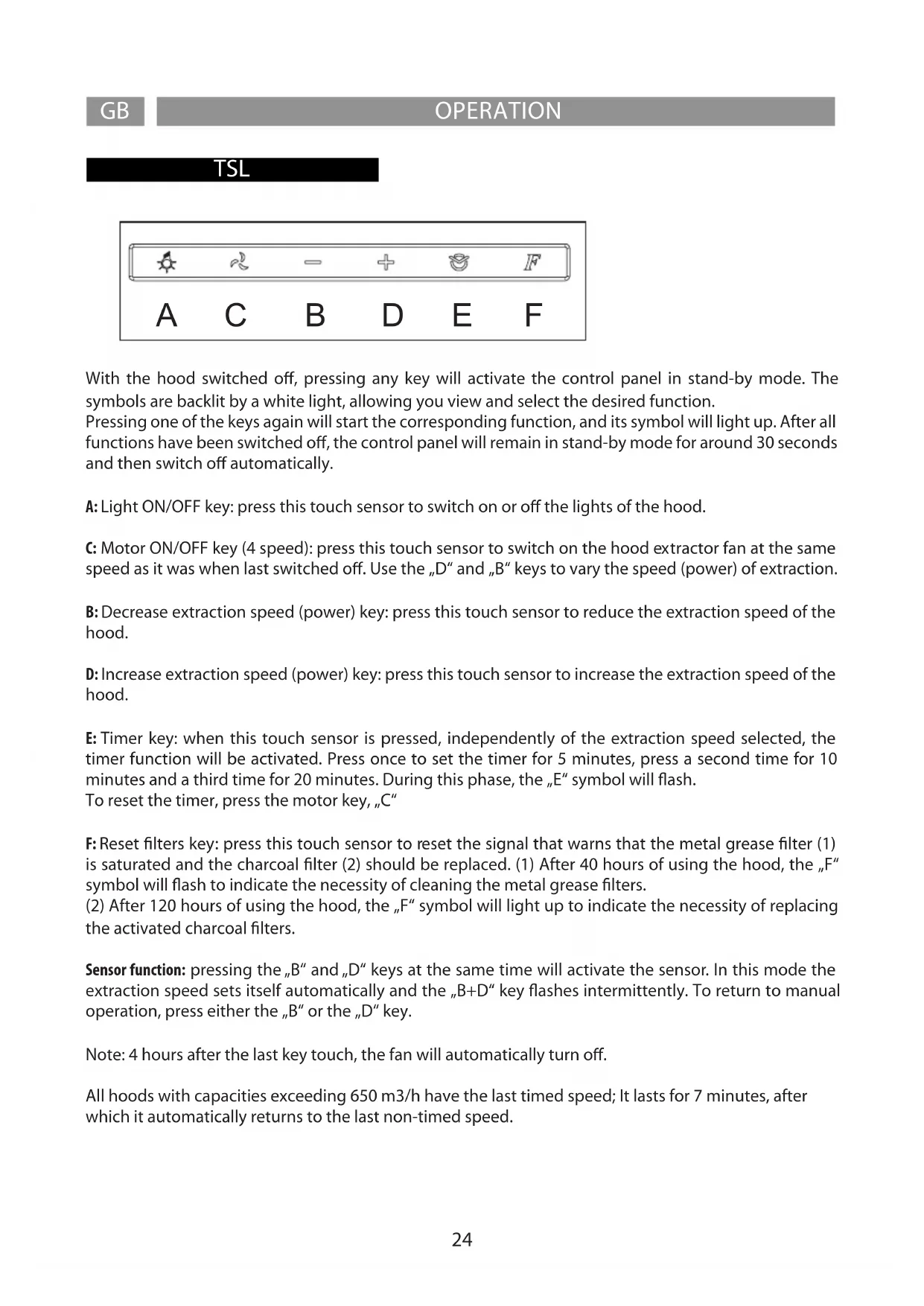
With the hood switched o, pressing any key will activate the control panel in stand-by mode. The symbols are backlit by a white light, allowing you view and select the desired function. Pressing one of the keys again will start the corresponding function, and its symbol will light up. After all functions have been switched o, the control panel will remain in stand-by mode for around 30 seconds and then switch o automatically. A: Light ON/OFF key: press this touch sensor to switch on or o the lights of the hood. C: Motor ON/OFF key (4 speed): press this touch sensor to switch on the hood extractor fan at the same speed as it was when last switched o. Use the „D“ and „B“ keys to vary the speed (power) of extraction. B: Decrease extraction speed (power) key: press this touch sensor to reduce the extraction speed of the hood. D: Increase extraction speed (power) key: press this touch sensor to increase the extraction speed of the hood. E: Timer key: when this touch sensor is pressed, independently of the extraction speed selected, the timer function will be activated. Press once to set the timer for 5 minutes, press a second time for 10 minutes and a third time for 20 minutes. During this phase, the „E“ symbol will ash. To reset the timer, press the motor key, „C“ F: Reset lters key: press this touch sensor to reset the signal that warns that the metal grease lter (1) is saturated and the charcoal lter (2) should be replaced. (1) After 40 hours of using the hood, the „F“ symbol will ash to indicate the necessity of cleaning the metal grease lters. (2) After 120 hours of using the hood, the „F“ symbol will light up to indicate the necessity of replacing the activated charcoal lters. Sensor function: pressing the „B“ and „D“ keys at the same time will activate the sensor. In this mode the extraction speed sets itself automatically and the „B+D“ key ashes intermittently. To return to manual operation, press either the „B“ or the „D“ key. Note: 4 hours after the last key touch, the fan will automatically turn o. All hoods with capacities exceeding 650 m3/h have the last timed speed; It lasts for 7 minutes, after which it automatically returns to the last non-timed speed.GBOPERATION TSL 3
General notes: Any function can be activated by pressing softly the button under the symbol. A. ON/OFF light button: By essing this button the hood’s lights switch on. B. ON/OFF motor button: By pressing this button the extracting motor can be activated/stopped.
1.2.3.4. Speed regulator button: By progressing this button the hood activates the selected extracting
speed. Funzione Timer: By pressing once again the Selectedspeed button,the timer will last for 5 minutes. This function can be applied to all 4 available speeds. Grease lter saturation: After every 40 hours of use of the hood, the button B or 3+4 indicator shows byashing slowly that the grease lters need to be washed. Charcoal lter saturation: After every 120 hours of use of the hood, the button B or 3+4 indicator by asihing fast shows that the charcoal lters need to be replaced. Note: By pressing for at least 5 minutes the button 3+4 will reset the lters saturation indicator. Attention! This function should only be used after performing the maintenance of the lters. Automatic functioning through the heath sensor: By pressing the button 1 2 at the same time, the hood starts the automatic functioning. The indicators of the 4 speeds will ash in sequence . After more or less 30 seconds the temperature sensor will start the motor choosing the right extracting speed.The speed will change according to the heath coming from the hob. By pressing B the manual functioning can be restored. Always clean the glass of the control for a correct functioning. All hoods with capacities exceeding 650 m3/h have the last timed speed; It lasts for 7 minutes, after which it automatically returns to the last non-timed speed.ELX
GB OPERATION The hood is provided with ve buttons. The form of the buttons can be oval or round depending on the design, without any dierence in the operating modes. Light Button: when in ON position the led is white (oval buttons) or blue (round buttons). Speed Reduction Button: when functioning the led is green. The led ashes when the speed is at the minimum level. On/O Button: when in ON position the led is green. The hood starts working at the same speed used before switching it o the last time. To reset keep the ON/OFF button pressed for a few seconds. Speed Increase Button: when functioning the led is green and ashes when the speed is at the maximum level. Timer: when functioning the led is red (oval buttons) or orange (round buttons). When in ON position the hood keeps on functioning for some minutes and then stops automatically. The led ashes when the metal lters have to be washed after about 40 hours of use. Electronic Operating Mode In this operating mode the motor speeds are automatically activated by the means of the he- at-sensor located in a sheltered position inside the hood body. This kind of operating mode is suggested in case of intensive use of the cooking top only (two or more burners at a time), otherwise with just one burner the manual operating mode is recommended. To start the automatic operating mode push the speed reduction and increase buttons at the same time. The red led switches on and the three central buttons (green leds) start ashing after approx thirty seconds The hood starts the automatic function and the heat sensor automatically adjusts the motor speed according to the temperature produced by the hob. To go back to the manual operating mode push the ON/OFF button. The correct performance of the heat sensor depends on the distance between the exhausting surface of the hood and the cooking top: the higher the appliance is located the more dicult it will be for the heat sensor to detect the temperature. It has to be considered that the sensor is located quite near the lamps, for this reason it may happen that, due to the temperature produced by the lights, the hoods keep on functioning for a little bit even though you have stop using the burns of the cooking top. All hoods with capacities exceeding 650 m3/h have the last timed speed; It lasts for 7 minutes, after which it automatically returns to the last non-timed speed.27 OPERATION GB Maintenance Prior to any maintenance operation ensure that the cooker hood is disconnected from the electrical outlet. Cleaning The hood must be cleaned frequently both inside (apart from the area behind the grease lter) and outside. Use a cloth moistened with denatured alcohol or neutral liquid detergents. Never use products containing abrasives. Warning Failure to carry out the basic standards of the cleaning of the cooker hood and replacement of the lters may cause re risks. Therefore we recommend observing these instructions. Anti-grease Filter must be cleaned once a month, with non abrasive detergents, by hand or in dishwasher on low temperature and short cycle. When washed in a dishwasher, the grease lter may discolour slightly, but this does not aect its ltering capacity. Charcoal Filter - (only for lter version) The active charcoal lters F are not washable nor regenerative. It should be changed every 6 months in normal use. The active charcoal lters capture unpleasant cooking odours. Replacing lightbulbs Warning! Prior to touching the light bulbs ensure they are cooled down. Led Light If the lighting group LED does not work, please contact the technical service center in order to replace the whole group. Reducing environmental impact: To reduce energy consumption, we recommend you always use the lowest suction speed among those suitable for the cooking mode currently active, avoid leaving the appliance running for more than 15 minutes after burner shutdown and switch o the lights if you leave the cooking area.28 TSL F ENTRETIEN