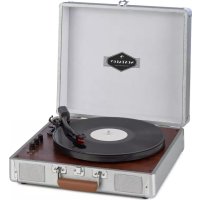
Jerry Lee BT - Turntable Auna - Free user manual and instructions
Find the device manual for free Jerry Lee BT Auna in PDF.


| Brand | Auna |
| Model | Jerry Lee BT |
| Product type | Turntable |
| Article number | 10032869 |
| Power supply | 220-240 V ~ 50/60 Hz (9 V DC power adapter) |
| Main functions | Vinyl playback, Bluetooth, USB recording, USB playback, AUX input, built-in speaker |
| Connectivity | Bluetooth, USB, RCA (line out), headphone jack, AUX input |
| Speakers | Built-in speaker |
| Maintenance | Clean the stylus with a soft brush, replace the cartridge |
| Cleaning | Soft cloth, mild detergent for the platter, never use solvents |
| Safety | Do not open the casing, avoid moisture, heat and vibrations |
| Compliance | Directives 2014/35/EU, 2011/65/EU, 2014/53/EU |
| Declaration of conformity | https://use.berlin/10032869 |
| Spare parts | Replacement cartridge (stylus) |
| Repairability | Replacement of cartridge possible |
| Recycling | Compliant with directive 2012/19/EU, do not dispose of in household waste |
Frequently Asked Questions - Jerry Lee BT Auna
User questions about Jerry Lee BT Auna
0 question about this device. Answer the ones you know or ask your own.
Ask a new question about this device
Download the instructions for your Turntable in PDF format for free! Find your manual Jerry Lee BT - Auna and take your electronic device back in hand. On this page are published all the documents necessary for the use of your device. Jerry Lee BT by Auna.
USER MANUAL Jerry Lee BT Auna
INHALTSVERZEICHNIS
natural_image
Symbol of a trash bin crossed with a diagonal line, no text or numbers presentCongratulations on purchasing this equipment.
Please read this manual carefully and take care of the following hints to avoid damages. Any failure caused by ignoring the items and cautions mentioned in the instruction manual is not covered by our warranty and any liability. Scan the QR code to get access to the latest user manual and other information about the product:

CONTENT
Safety Instructions 10
Product Overview 10
Buttons and Jacks 11
Start and Operation 11
Care and Maintenance 12
Hints on Disposal 13
TECHNICAL DATA
| Item number 10032869 | |
| Power supply 220-240 V ~ 50/60 Hz | |
| Power adaptor 9 V DC |
DECLARATION OF CONFORMITY

Producer:
Chal-Tec GmbH, Wallstraße 16, 10179 Berlin, Germany.
This product is conform to the following European Directives:
2014/35/EU (LVD)
2011/65/EU (RoHS)
2014/53/EU (RED)
The complete declaration of conformity of the manufacturer can be found at the following link: https://use.berlin/10032869
SAFETY INSTRUCTIONS
-
Choose a safe location and avoid placing the unit in direct sunlight or near any heat source.
-
Avoid environments subject to vibration, excessive dust, cold or moisture.
-
Due to the risk of electrical shock, do not open the cabinet. Should a foreign object accidentally find its way into the interior of the unit, contact your local dealer.
-
Do not attempt to clean the unit with chemical solvents as this might damage the finishing. A clean, dry cloth is recommended for cleaning.
-
Keep this manual for future reference.
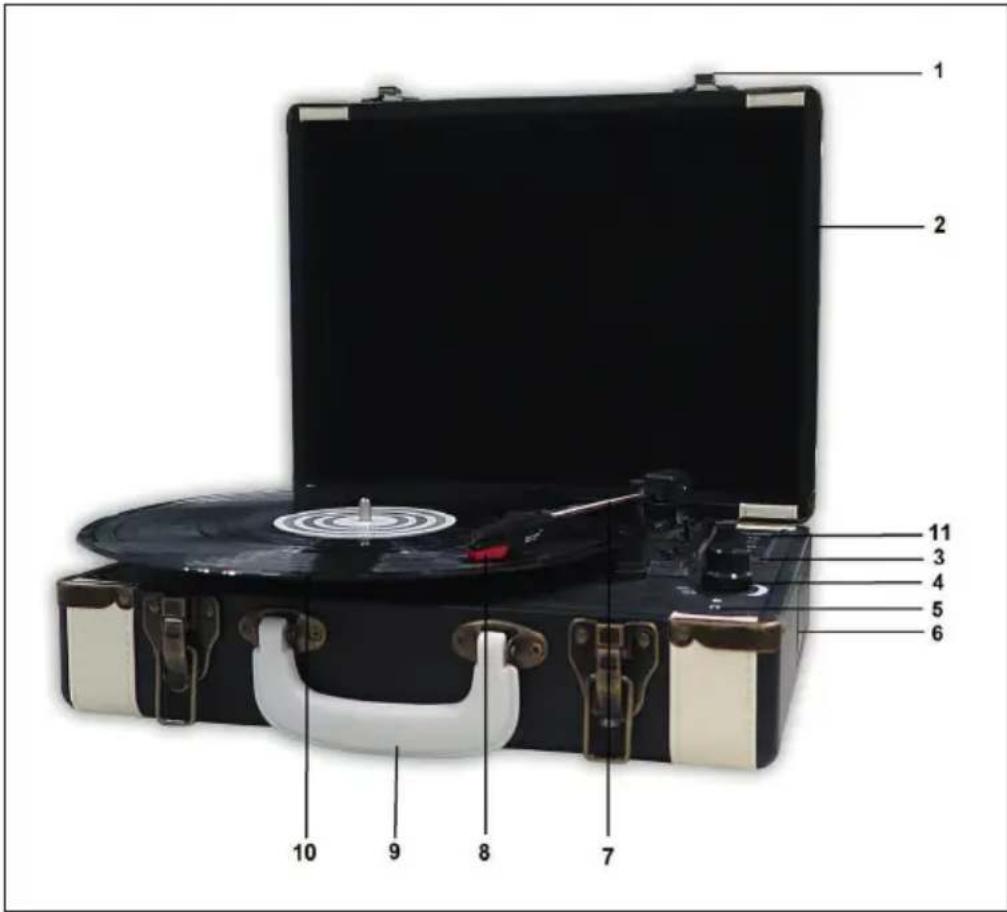
PRODUCT OVERVIEW
1 Lock catch
2 Dust cover
3 Power light
4 Volume control
5 Headphone jack
6 Speaker
7 Tone arm
8 Cartridge
9 Carrying
10 Turntable plate
11 USB connector
BUTTONS AND JACKS
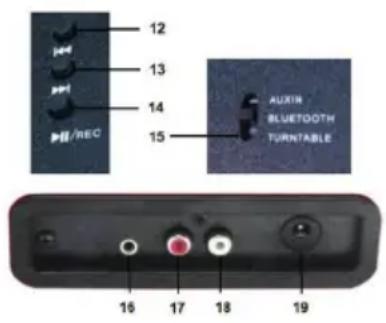 | 12 Previous music13 Next music14 Pause / Play15 Mode / AUX IN / BT / Turntable16 AUX IN in jack17 R channel18 L channel19 DC power jack |
START AND OPERATION
Mains Connection
Ensure that the mains voltage of your home corresponds to the operating voltage of the unit. Your unit is ready to be connected to a mains voltage of 9 V DC adaptor.
Amplifier Connection (optional)
Whilst you can listen to your new turntable using the built in speakers you may wish to connect it to your existing Hi Fi system. Connect the audio plugs to the Line input on your mixer or amplifier using an RCA cable (not supplied)
USB recording
1 Select the turntable mode.
2 Connect the USB memory and press the REC button twice. The BT light goes on and indicates that recording is being started.
3 To stop recording, press REC again or raise the tone arm.
USB player
Select USB mode. A beep will sound and the music will play automatically.
BT mode
Select the BT mode. A signal tone sounds and the BT lamp lights up. Open the BT device list on your smartphone and select „Jerry Lee“. As soon as the devices are successfully connected, an acoustic signal sounds.
CARE AND MAINTENANCE
Installing a new stylus cartridge
Note: Before replacing the cartridge, turn off the unit and unplug it from the power outlet.
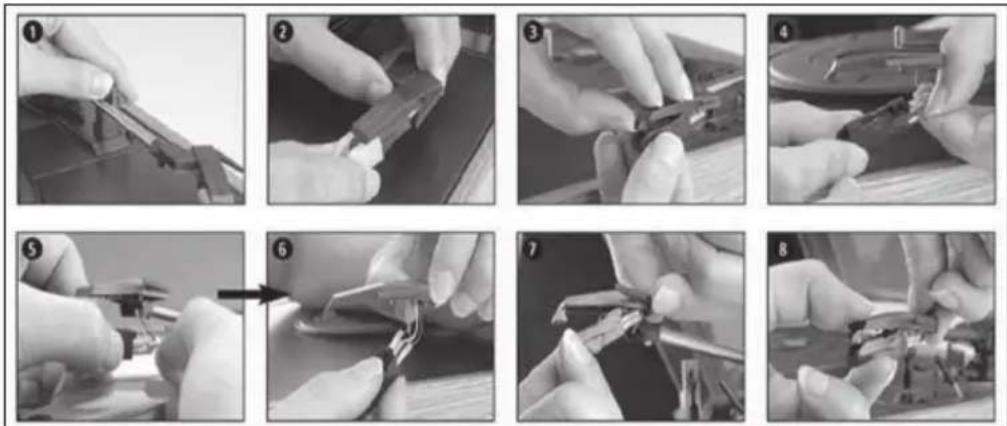
| 1 Release the tonearm lock. |
| 2 Remove the cartridge. |
| 3 Disconnect the cartridge from the base. |
| 4 Remove all audio cables. |
| 5 Now proceed in reverse order. |
| 6 Attach the audio cables. |
| 7 Place the new cartridge on the base. |
| 8 Close the cartridge. |
Note: Replace the cartridge with extreme care to avoid damaging the tonearm and audio cables.
Notes on cleaning and care
- When opening or closing the turntable cover, handle it gently.
- Do not touch the needle tip with your fingers; avoid bumping the needle against the turntable platter or record edge.
- Frequently clean the needle tip-use a soft brush in a "back-to-front" motion only.
- If you must use a needle cleaning fluid, use very sparingly.
- Gently wipe the turntable player housing with a soft cloth. Use only a small amount of mild detergent to clean the turntable player.
- Never apply harsh chemicals or solvents to any part of the turntable system.
HINTS ON DISPOSAL
natural_image
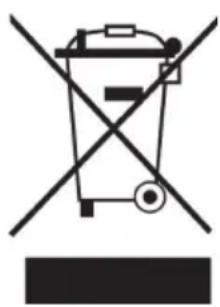
Symbol of a trash bin crossed with a diagonal line, representing no waste or discharge (no text or labels)According to the European waste regulation 2012/19/EU this symbol on the product or on its packaging indicates that this product may not be treated as household waste. Instead it should be taken to the appropriate collection point for the recycling of electrical and electronic equipment. By ensuring this product is disposed of correctly, you will help prevent potential negative consequences for the environment and human health, which could otherwise be caused by inappropriate waste handling of this product. For more detailed information about recycling of this product, please contact your local council or your household waste disposal service.
Estimado cliente:
ÍNDICE DE CONTENIDOS
natural_image
Symbol of a trash bin crossed with a diagonal line, representing no waste or discharge (no text or labels)SOMMAIRE
DÉCLARATION DE CONFORMITÉ

Fabricant :
Chal-Tec GmbH, Wallstraße 16, 10179 Berlin, Allemagne.