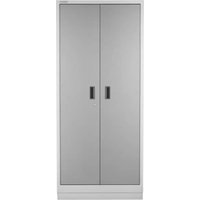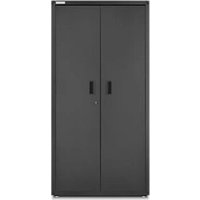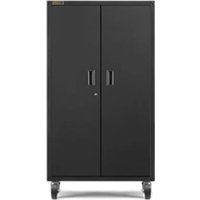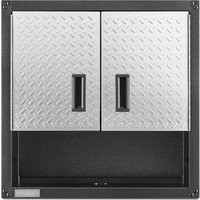
GALS48M4JW - Wardrobe Gladiator - Free user manual and instructions
Find the device manual for free GALS48M4JW Gladiator in PDF.



User questions about GALS48M4JW Gladiator
0 question about this device. Answer the ones you know or ask your own.
Ask a new question about this device
Download the instructions for your Wardrobe in PDF format for free! Find your manual GALS48M4JW - Gladiator and take your electronic device back in hand. On this page are published all the documents necessary for the use of your device. GALS48M4JW by Gladiator.
USER MANUAL GALS48M4JW Gladiator
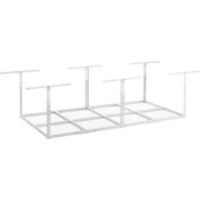
OVERHEAD 4 FT X 8 FT
GEARLOFT™ STORAGE RACK
Assembly Instructions
ÉTAGÈRE DE RANGEMENT
SURELEVÉE DE 1,22 M X 2,44 M GEARLOFT™
ASSEMBLY INSTRUCTIONS......5
Unpack the Overhead Gearloft™
Storage Rack......5
Tools and Parts 5
Overhead Gearloft™ Storage Rack
Use Requirements ....5
Assembling the Rack 6
Installing Overhead Gearloft™
Storage Rack 9
Optional Configuration....10
Storage Rack Care....10
Registering Your Product......10
WARRANTY 11
SÉCURITÉ DE L'ÉTAGÈRE DE
RANGEMENT SURELEVEE
GEARLOFT™....12
DIMENSIONS (INSTALLATION
NORMALE)....13
PIÈCES ....14
INSTRUCTIONS D'ASSEMBLAGE...15
www.gladiatorgarageworks.com
www.gladiatorgarageworks.ca
OVERHEAD GEARLOFT™ STORAGE RACK SAFETY
Your safety and the safety of others are very important.
We have provided many important safety messages in this manual and on your appliance. Always read and obey all safety messages.

This is the safety alert symbol.
This symbol alerts you to potential hazards that can kill or hurt you and others.
All safety messages will follow the safety alert symbol and either the word "DANGER" or "WARNING."
These words mean:
DANGER
You can be killed or seriously injured if you don't immediately follow instructions.
WARNING
You can be killed or seriously injured if you don't follow instructions.
All safety messages will tell you what the potential hazard is, tell you how to reduce the chance of injury, and tell you what can happen if the instructions are not followed.
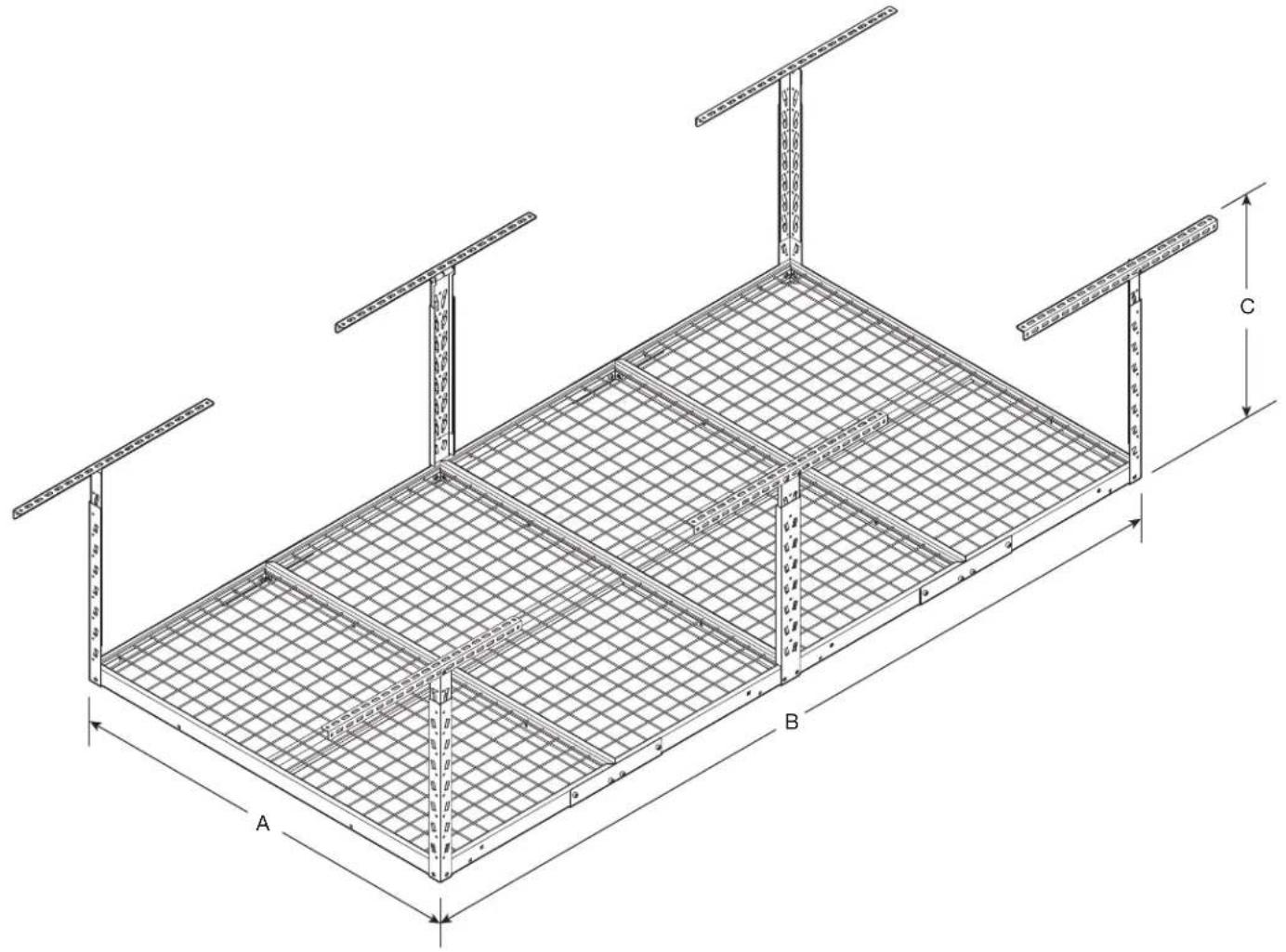
DIMENSIONS (TYPICAL INSTALL)
text_image
A B C| MODEL | GALS48M4JG - Hammered GraniteGALS48M4JW - Hammered White |
| A 48" (122 cm) | |
| B 96" (244 cm) | |
| C 23" (58.4 cm) min. and 37.8" (96 cm) max. | |
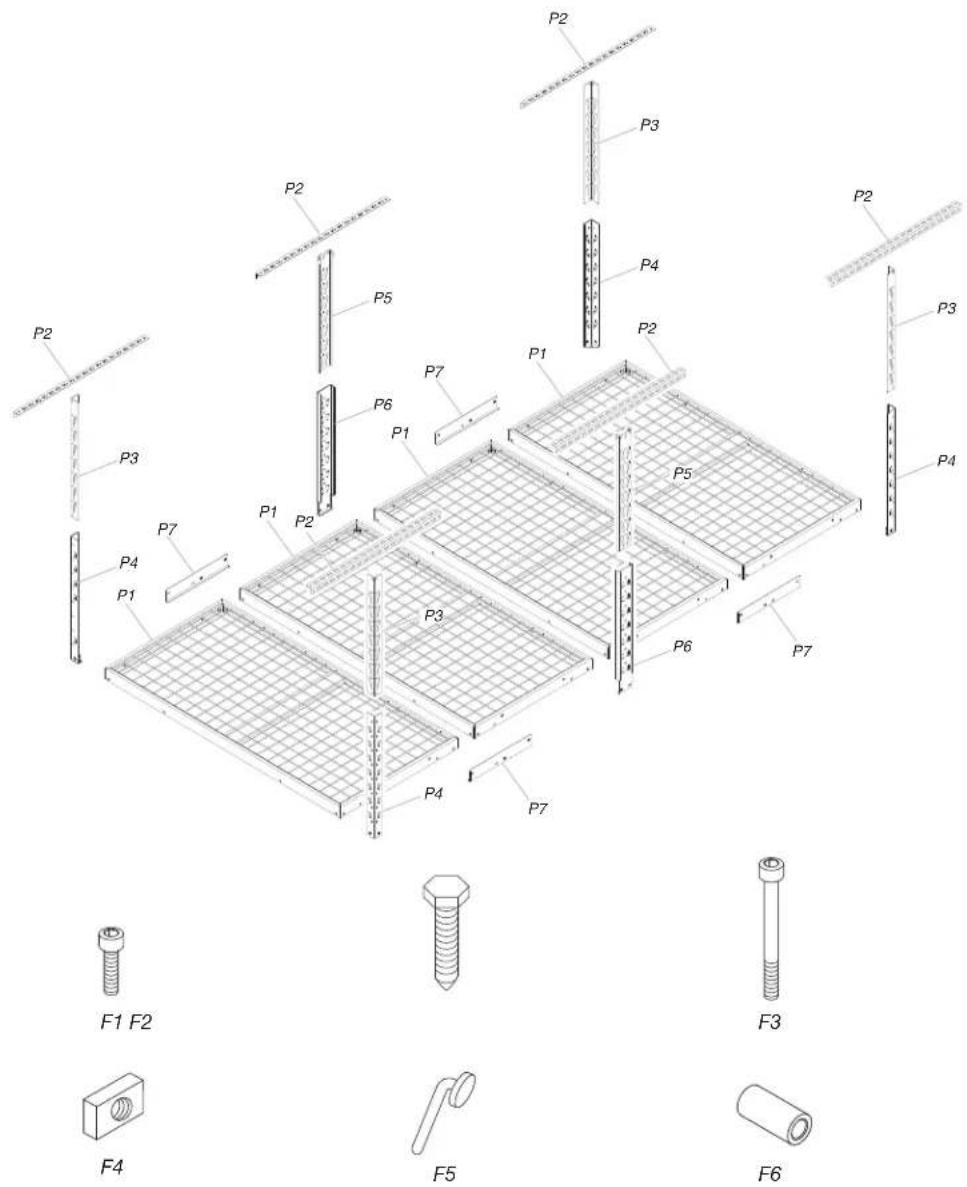
PARTS
text_image
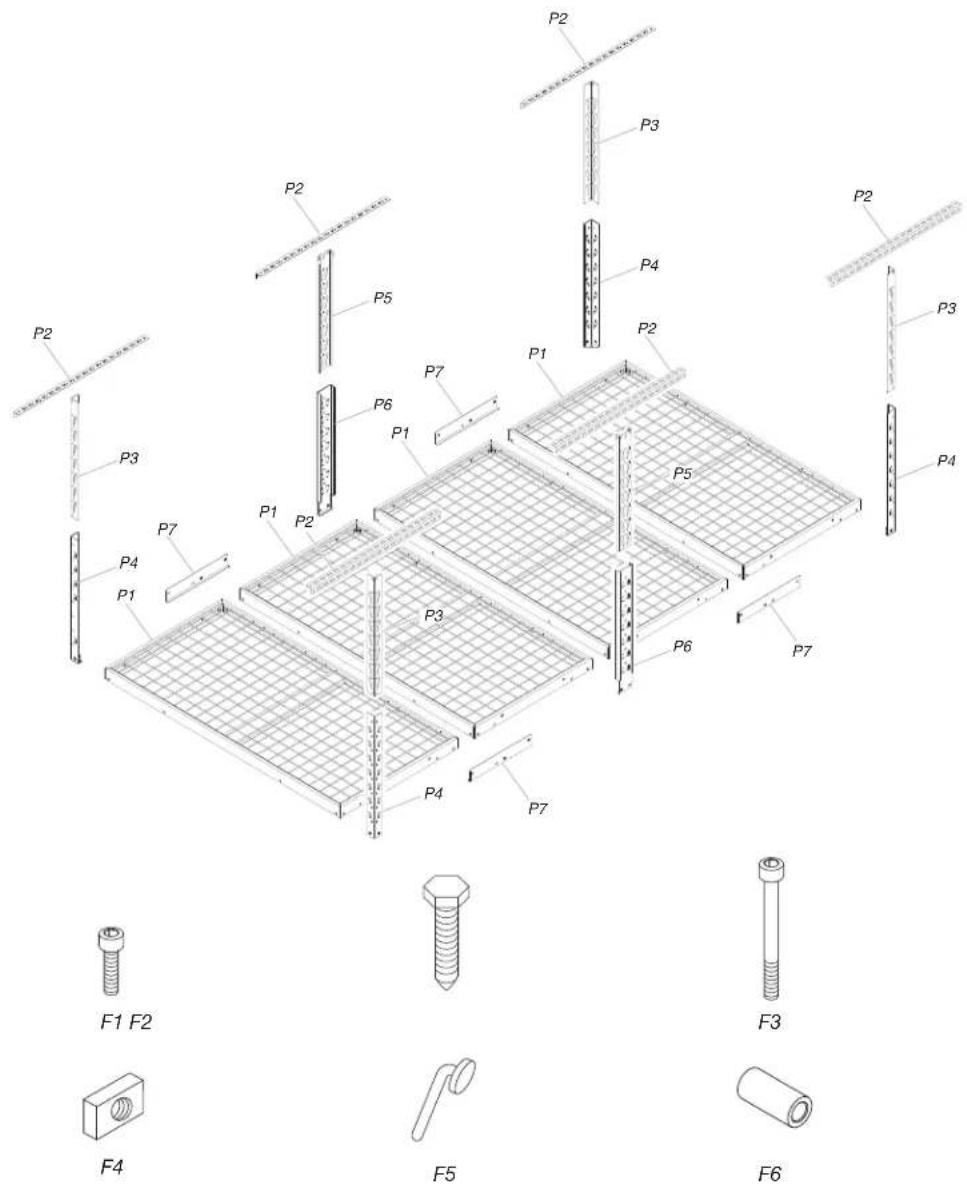
P2 P3 P4 P2 P3 P5 P7 P1 P6 P1 P2 P4 P7 P3 P4 P1 P2 P3 P5 P6 P7 F1 F2 F4 F5 F3 F6| Label Description Quantity | |
| P1 2' x 4' Rack section 4 | |
| P2 Ceiling bracket 6 | |
| P3 Vertical corner support - upper 4 | |
| P4 Vertical corner support - lower 4 | |
| P5 Vertical center support - upper 2 | |
| P6 Vertical center support - lower 2 | |
| P7 Rack connection bracket 4 | |
| F1 M8 - 1.25 x 15 Socket-head cap screw 42 | |
| F2 5/16" x 3" Lag bolt 12 | |
| F3 M8 - 1.25 x 75 Socket-head cap screw | 2 |
| F4 M8 - 1.25 Rectangular nut | 14 |
| F5 EZ Connect lock pin | 6 |
| F6 Spacer | 4 |
ASSEMBLY INSTRUCTIONS
Unpack the Overhead Gearloft™ Storage Rack
- Unpack the rack sections, support sections, ceiling brackets and all hardware. Verify contents. See "Parts".
- Dispose of all packaging materials properly.
Tools and Parts
■Install overhead Gear loft storage rack according to manufacturer's instructions and any local codes.
■Only use provided fasteners. Do not use an alternate form of mounting. Do not alter or modify any components included with this product.
■Gather the required tools and parts before starting assembly.
■Read entire manual before starting assembly.
WARNING
Excessive Weight Hazard
Use two or more people to move storage rack.
Failure to do so can result in back or other injury.
Tools Needed
■Electric drill
■Drill bit (3/16") - Included
■1/2" Socket wrench and/or 1/2" open end wrench
■6 mm Allen wrench - Included
■Stud Finder (If ceiling has drywall covering joists/rafters)
■Tape measure
■Step stool or step ladder
■Pencil / Marker
■Masking Tape
Overhead Gearloft™ Storage Rack Use Requirements
- Intended for garage use, installed into a wood framed/traditional wood structure type dwelling.
- To be used for storing light-weight items overhead and out of the way.
- Recommended to be positioned 6'-8" minimum above floor (standard door opening height)
- Check for clearance of all doors, vehicles, or any items to be positioned under the storage rack.
- The maximum weight of all items combined on the rack not to exceed 750 lbs.
Assembling the Rack
- Determine the ceiling locations
text_image
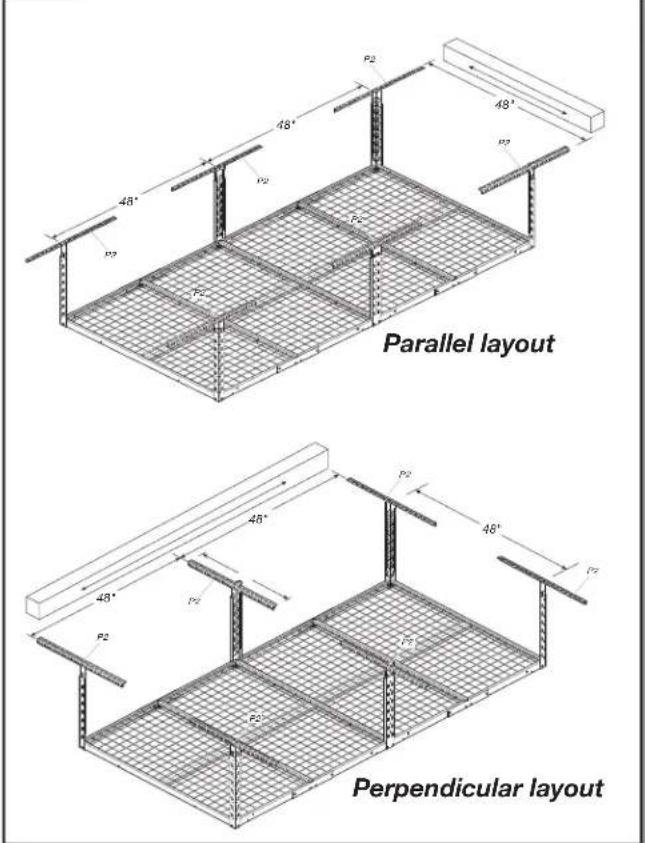
Parallel layout Perpendicular layoutThe garage overhead storage rack can be positioned parallel or perpendicular to the wood ceiling joists/rafters. Determine the application required for your desired installation. If drywall is on the ceiling, use a stud finder to determine the joist/rafter locations and mark with masking tape. For application requiring installation of the brackets perpendicular to the joists/rafters, the maximum distance between them is 24". The brackets included allow for a 24" maximum span. See figure for typical ceiling layouts. Mark the location of the ceiling brackets on the joists/rafters or drywall, making sure the vertical supports can be positioned between the lag bolts used to attach the brackets. Position the center of the brackets on a 48" grid as shown in figure.
- Attach the ceiling brackets
text_image
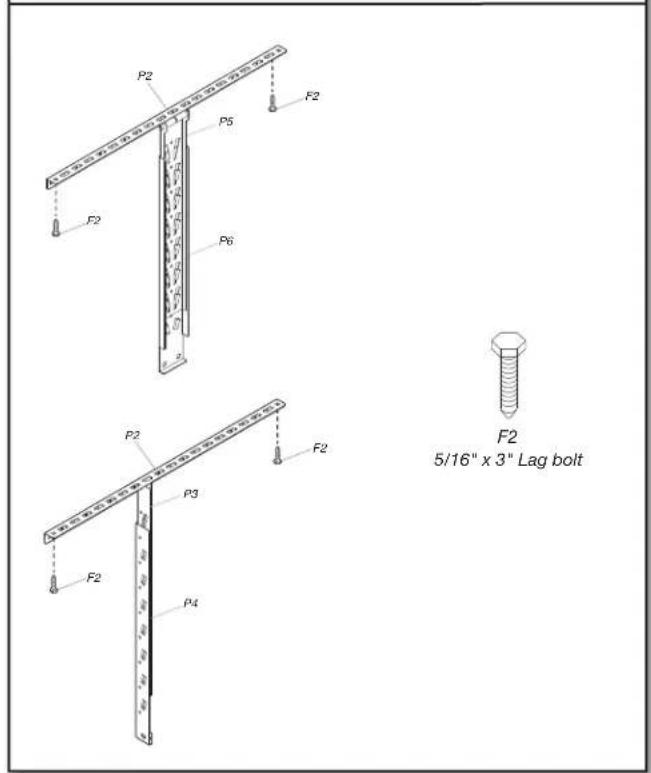
P2 F2 P5 F2 P6 P2 F2 5/16" x 3" Lag bolt P3 F2 P4Using the provided drill bit (3/16"), drill all pilot holes in the center of the joists/rafter. Two lag bolts must be used on each bracket - one on each side of the vertical support. Mount the 6 ceiling brackets (P2) using 5/16" x 3" Lag bolts (F2) (12).
- Connect the racks
text_image
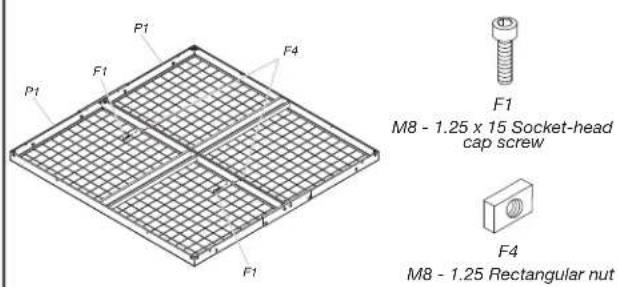
P1 F1 F4 P1 F1 F1 M8 - 1.25 x 15 Socket-head cap screw F4 M8 - 1.25 Rectangular nutLay two rack sections upside down on the floor. Assemble the rack sections (P1) together using M8 - 1.25 x 15 Socket-head cap screws (F1) (2) and M8 - 1.25 Rectangular nuts (F4) (2). Repeat this with the other remaining two rack sections.
- Attach double rack sections
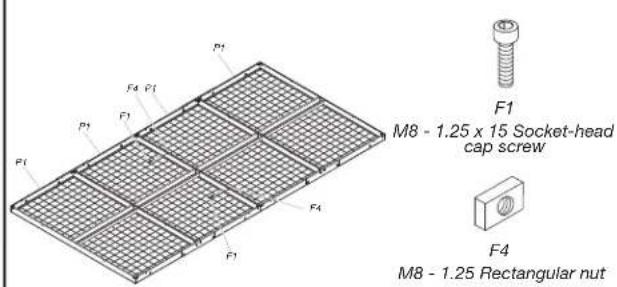
text_image
F1 M8 - 1.25 x 15 Socket-head cap screw F4 M8 - 1.25 Rectangular nutAttach the two double rack sections together using M8 - 1.25 x 15 Socket-head cap screws (F1) (2) and M8 - 1.25 Rectangular nuts (F4) (2).
- Attach lower center supports
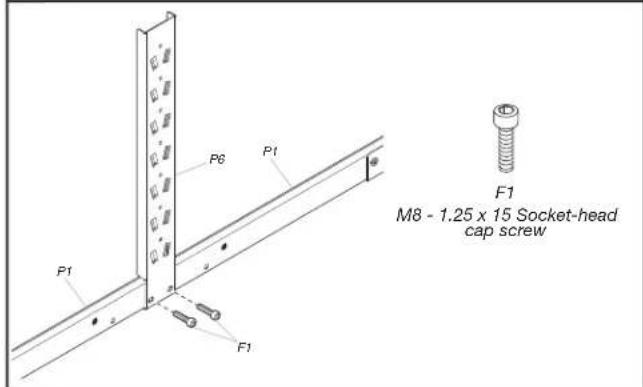
text_image
P6 P1 P1 F1 F1 M8 - 1.25 x 15 Socket-head cap screwAttach the two lower center supports (P6) to the rack assembly using M8 - 1.25 x 15 Socket-head cap screws (F1) (4).
- Attach the racks brackets
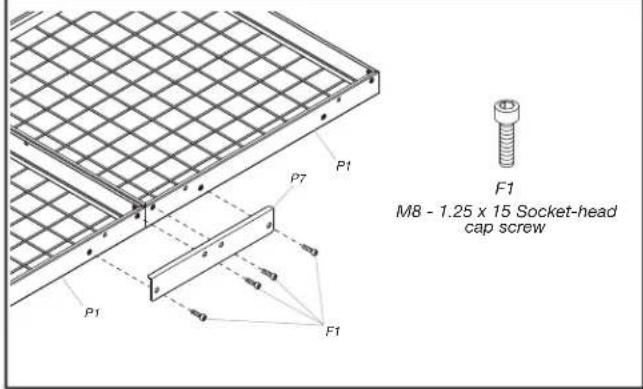
text_image
P1 P7 F1 M8 - 1.25 x 15 Socket-head cap screw P1 F1Attach the rack connection brackets (P7) to both sides of the two bolted together rack sections using M8 - 1.25 x 15 Socket-head cap screws (F1) (8). Repeat this on the other two bolted together rack sections.
- Attach lower corner supports
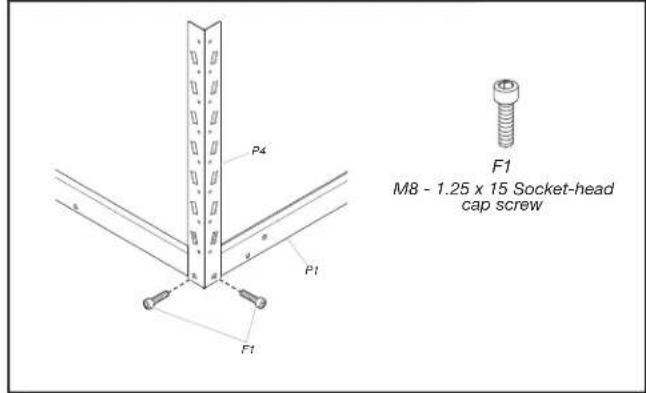
text_image
P4 P1 F1 F1 M8 - 1.25 x 15 Socket-head cap screwAttach the four lower corner supports (P4) to the rack corners using M8 - 1.25 x 15 Socket-head cap screws (F1) (8).
- Attach upper corner supports
text_image
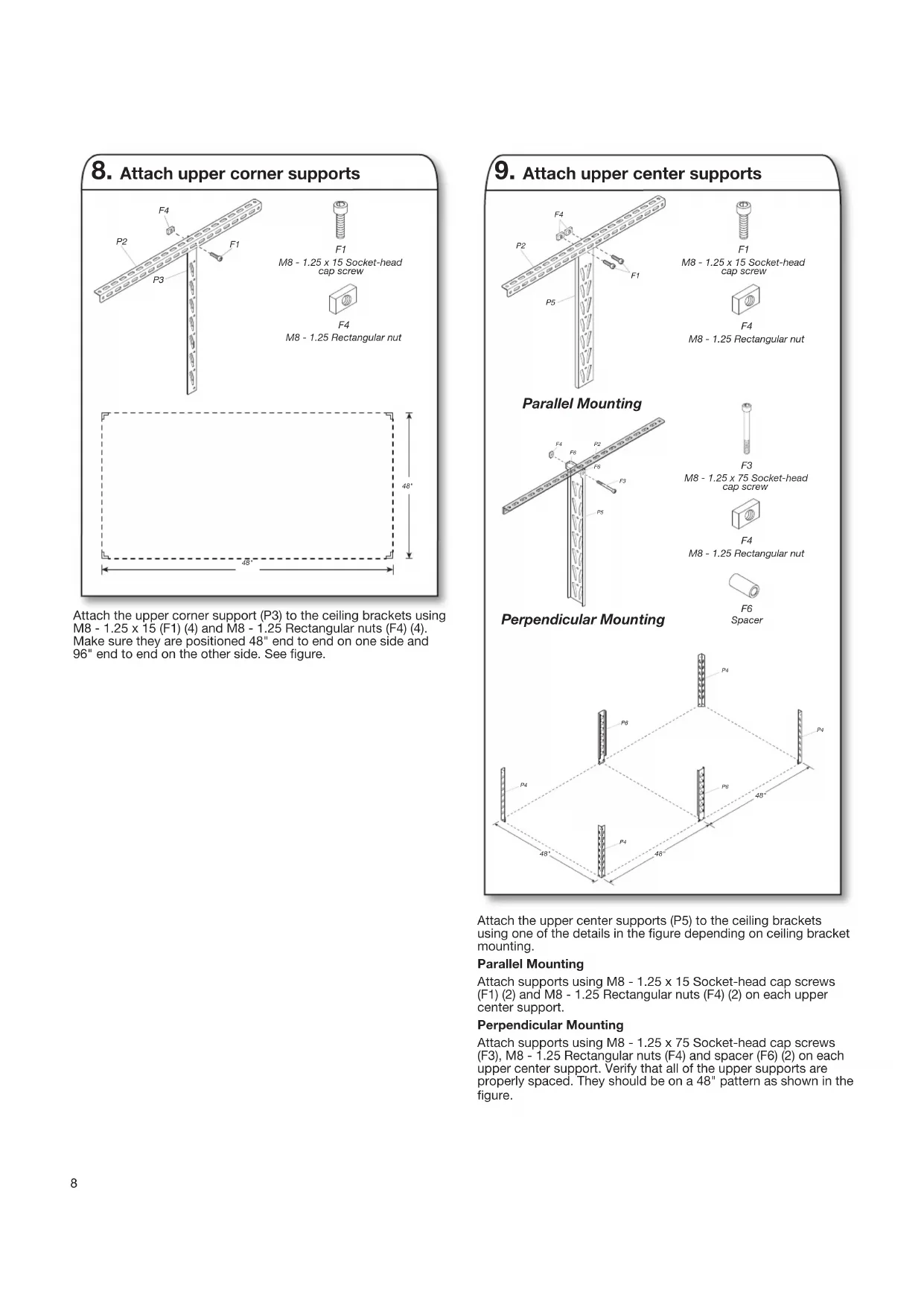
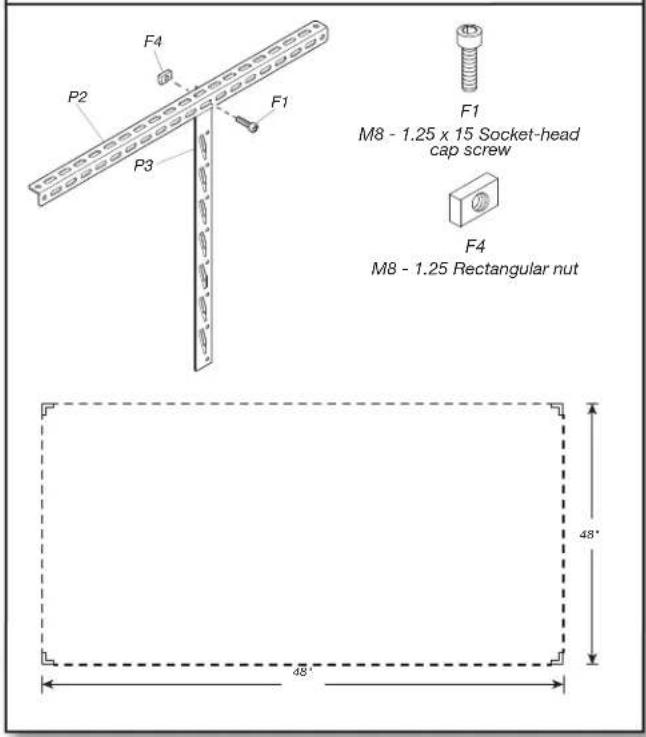
F4 P2 F1 P3 F1 M8 - 1.25 x 15 Socket-head cap screw F4 M8 - 1.25 Rectangular nut 48° 48°Attach the upper corner support (P3) to the ceiling brackets using M8 - 1.25 x 15 (F1) (4) and M8 - 1.25 Rectangular nuts (F4) (4). Make sure they are positioned 48" end to end on one side and 96" end to end on the other side. See figure.
- Attach upper center supports
text_image
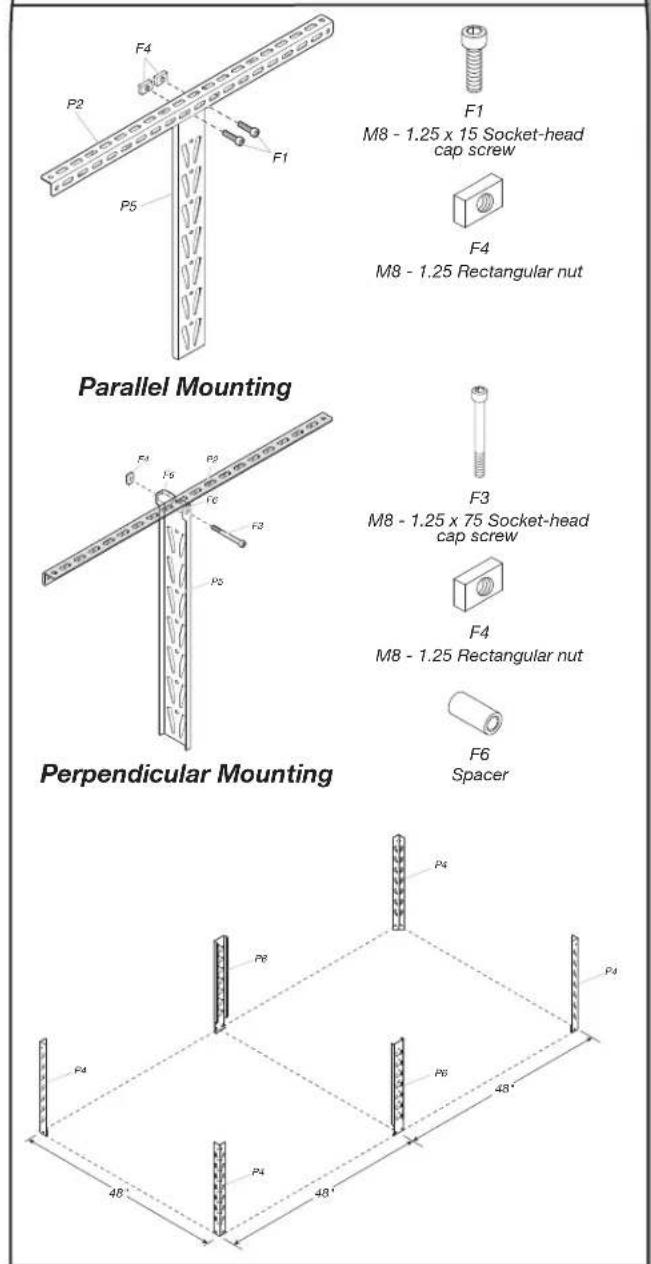
F4 P2 F1 P5 F1 M8 - 1.25 x 15 Socket-head cap screw F4 M8 - 1.25 Rectangular nut Parallel Mounting F3 M8 - 1.25 x 75 Socket-head cap screw F4 M8 - 1.25 Rectangular nut F6 Spacer Perpendicular Mounting P4 P6 P4 P4 48' 48'Attach the upper center supports (P5) to the ceiling brackets using one of the details in the figure depending on ceiling bracket mounting.
Parallel Mounting
Attach supports using M8 - 1.25 x 15 Socket-head cap screws (F1) (2) and M8 - 1.25 Rectangular nuts (F4) (2) on each upper center support.
Perpendicular Mounting
Attach supports using M8 - 1.25 x 75 Socket-head cap screws (F3), M8 - 1.25 Rectangular nuts (F4) and spacer (F6) (2) on each upper center support. Verify that all of the upper supports are properly spaced. They should be on a 48" pattern as shown in the figure.
Installing Overhead Gearloft™ Storage Rack
WARNING
Excessive Weight Hazard
Use two or more people to move storage rack.
Failure to do so can result in back or other injury.
- Attach the EZ connect supports
natural_image
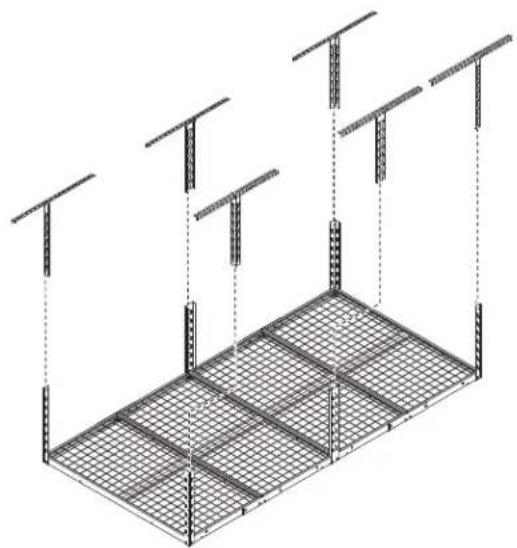
Isometric technical diagram of a structural grid framework with vertical supports and horizontal beams (no text or symbols)Using two or more people, the rack system can be easily lifted and positioned overhead. The EZ connect feature allows for positioning 23" to 37" from the ceiling. Lift the rack into place and connect all 6 lower supports to the upper supports. Make sure the rack supports are all in the same position and the rack is level.
- Complete the assembly
text_image
P2 P5 F5 P6
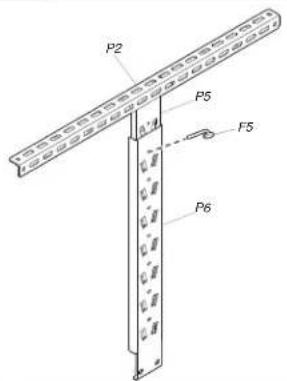
F5 EZ Connect lock pin
Make sure all bolts and screws are tight. Once the rack is in the desired location below the ceiling, place an EZ connect lock pin (F5) (6) in a hole on each of the corner and center supports to lock/retain them together. The pins go through both upper and lower supports.
NOTE : The rack system can be repositioned up or down by removing all lock pins and relocating the EZ connect position on the supports. Use two or more people to relocate the rack and replace the EZ connect lock pins (F5) (6).
Optional Configuration
- The Gladiator Overhead Gearloft™ Storage Rack can be installed in one of several configurations.
- When using an optional configuration, never span the vertical supports more than 48" (two rack section widths).
Possible configuration with this kit :
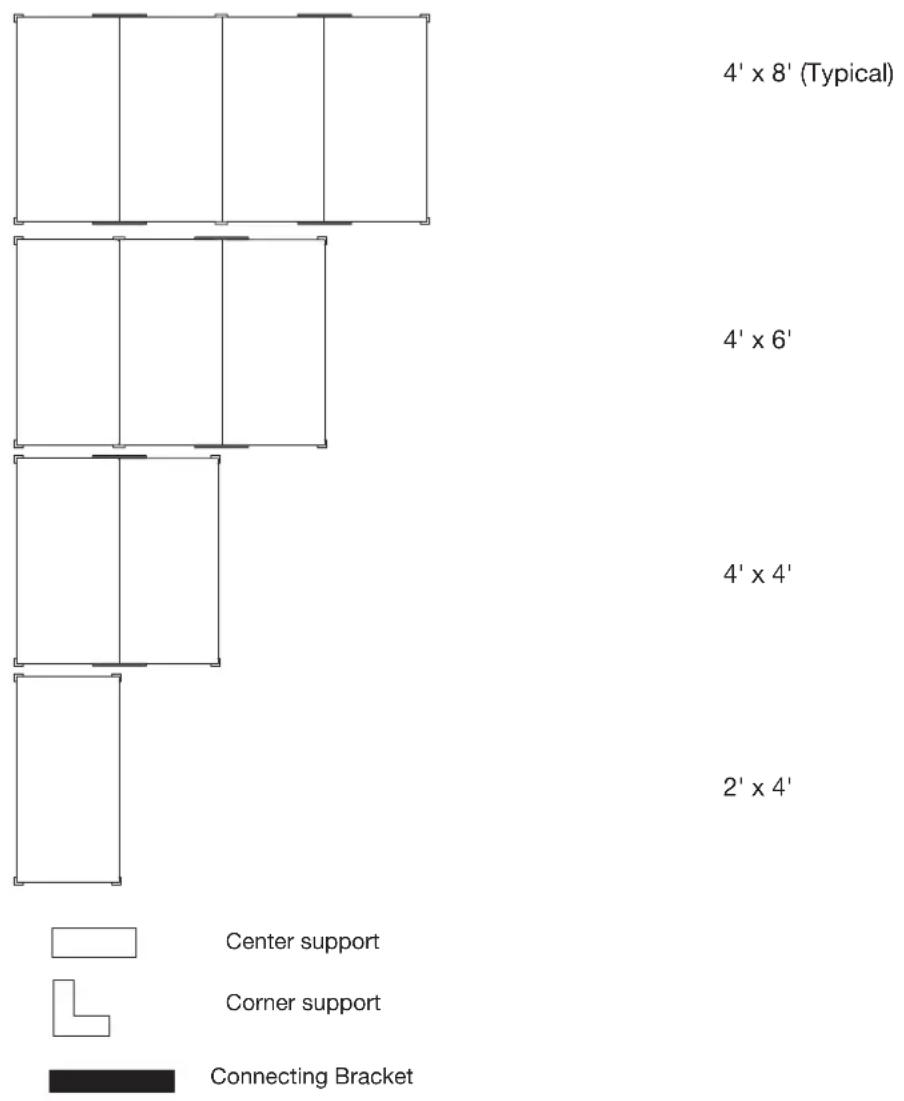
text_image
4' x 8' (Typical) 4' x 6' 4' x 4' 2' x 4' Center support Corner support Connecting BracketStorage Rack Care
■ Wash storage rack with a mild liquid detergent and warm water using a soft, clean cloth.
■Check fastener tightness annually.
Registering Your Product
There are many benefits of registering your product. Find out more and register your product online at www.gladiatorgarageworks.com. In the USA, call 1-866-342-4089. Consumers in Canada can call 1-800-807-6777.
WARRANTY
For warranty information:
In U.S.A. call 1-866-342-4089 or visit our website at
www.GladiatorGW.com
In Canada call 1-800-807-6777 or visit our website at
www.gladiatorgarageworks.ca
There are many benefits for registering the product. Find out more and register the product online at www.gladiatorgarageworks.com.
SÉCURITÉ DE L'ÉTAGÈRE DE RANGEMENT SURÉLEVÉE GEARLOFT™
DIMENSIONS (INSTALLATION NORMALE)

text_image
A B C| MODÈLE | GALS48M4JG – Ardoise marteléeGALS48M4JW – Blanc martelé |
| A 48 po (122 cm) | |
| B 96 po (244 cm) | |
| C 23 po (58 | 4 cm) min. et 37,8 po (96 cm) max. |
PIÈCES
text_image
P2 P3 P4 P2 P3 P5 P7 P1 P6 P1 P2 P4 P7 P3 P4 P1 P2 P3 P5 P6 P7 F1 F2 F3 F4 F5 F6natural_image
Isometric line drawing of a modular shelving unit with grid layout and vertical supports (no text or symbols)www.gladiatorgarageworks.ca
natural_image
Isometric technical diagram of a structural grid framework with vertical supports and horizontal beams (no text or symbols)natural_image
Pure architectural floor plan lines without any text, numbers, or symbols


Soporte central
Soporte de esquina
Soporte de conexión
$$ 4 ^ {\prime} \times 8 ^ {\prime} (\text { típica }) $$
$$ 4 ^ {\prime} \times 6 ^ {\prime} $$
$$ 4 ^ {\prime} \times 4 ^ {\prime} $$
$$ 2 ^ {\prime} \times 4 ^ {\prime} $$
www.gladiatorgarageworks.ca
www.gladiatorgarageworks.com.