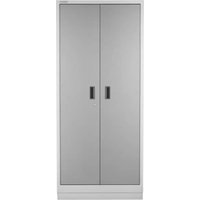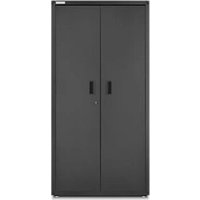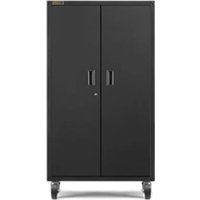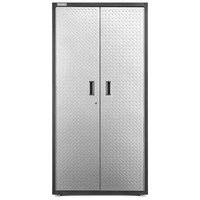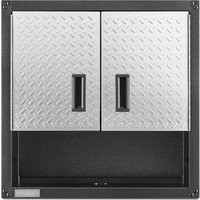
GAWG28KDYG - Wardrobe Gladiator - Free user manual and instructions
Find the device manual for free GAWG28KDYG Gladiator in PDF.


User questions about GAWG28KDYG Gladiator
0 question about this device. Answer the ones you know or ask your own.
Ask a new question about this device
Download the instructions for your Wardrobe in PDF format for free! Find your manual GAWG28KDYG - Gladiator and take your electronic device back in hand. On this page are published all the documents necessary for the use of your device. GAWG28KDYG by Gladiator.
USER MANUAL GAWG28KDYG Gladiator
text_image
GLADIATOR® GARAGEWORKS BY WHIRLPOOL CORPORATIONAssembly Instructions
ASSEMBLY INSTRUCTIONS....3
Cabinet Use Requirements....3
Unpack Cabinet Parts....3
Assemble Cabinet Frame 3
Attach Back Panels....3
Install Shelves 4
Install Doors 4
INSTALLATION INSTRUCTIONS ....5
Install Cabinet to GearWall® Panels
or GearTrack ^® Channels ....5
Standard Wall Mount 6
WARRANTY 7
Montage mural standard.... 18
GARANTIE 19
IT'S TIME TO RETHINK THE GARAGE.®
www.gladiatorgarageworks.ca
CABINET/LOCKER SAFETY
Your safety and the safety of others are very important.
We have provided many important safety messages in this manual and on your appliance. Always read and obey all safety messages.

This is the safety alert symbol.
This symbol alerts you to potential hazards that can kill or hurt you and others.
All safety messages will follow the safety alert symbol and either the word "DANGER" or "WARNING."
These words mean:
DANGER
You can be killed or seriously injured if you don't immediately follow instructions.
WARNING
You can be killed or seriously injured if you don't follow instructions.
All safety messages will tell you what the potential hazard is, tell you how to reduce the chance of injury, and tell you what can happen if the instructions are not followed.
text_image
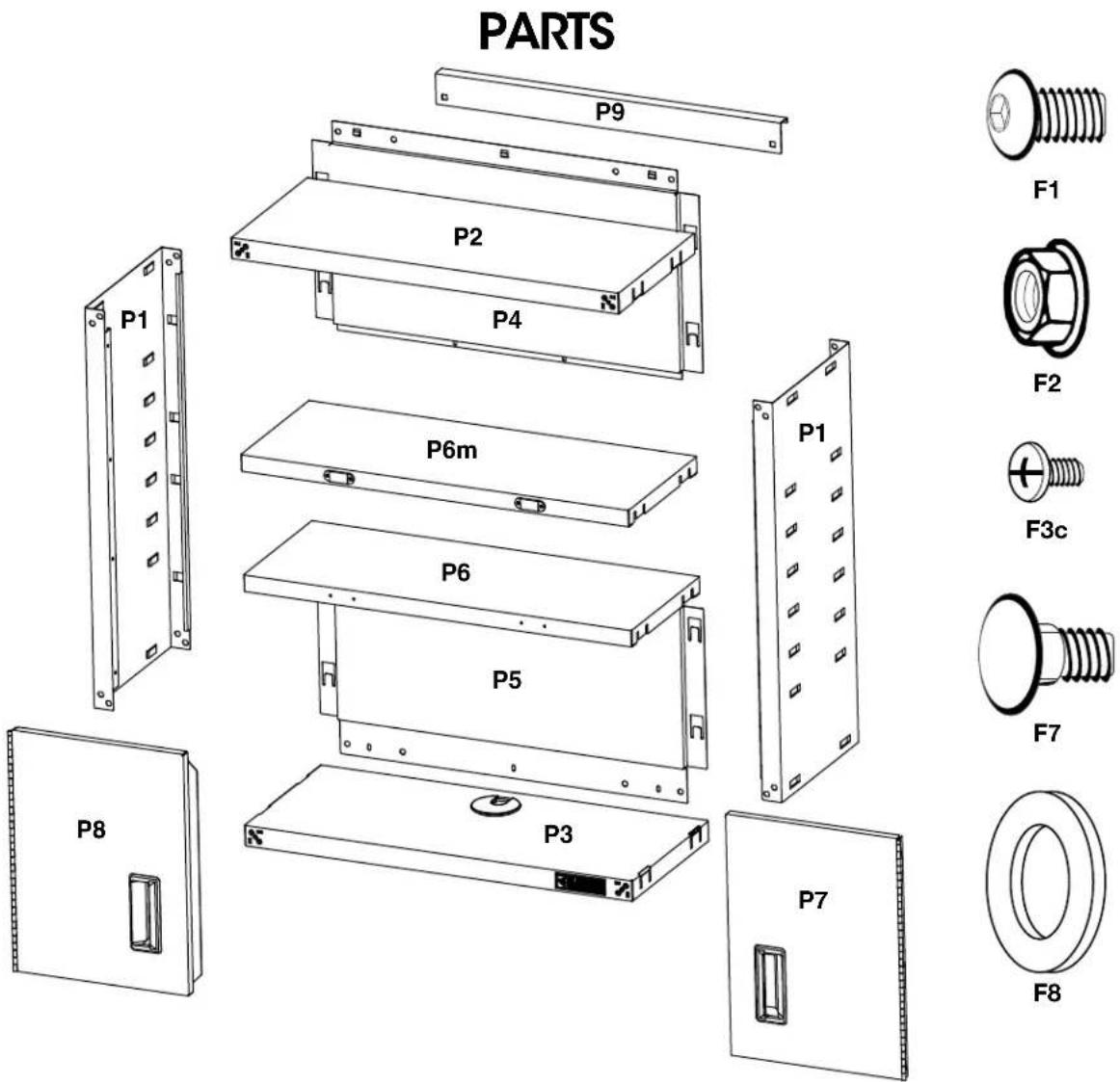
PARTS P9 P2 P4 P1 P6m P6 P5 P8 P3 P7 F1 F2 F3c F7 F8P6 Shelf (available on some models)
ASSEMBLY INSTRUCTIONS
Cabinet Use Requirements
■Intended for use in a garage
■ Maximum weight limit is 40 lbs (18 kg) for each shelf.
■Maximum weight limit is 150 lbs (68 kg) for the cabinet.
Unpack Cabinet Parts
- Remove and verify the contents. Contents include a hex key and the parts and fasteners shown in "Parts."
- Dispose of/recycle all packaging materials.
Assemble Cabinet Frame
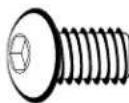
F1
F1. 516 " hex-head bolts (16)
Gather the required tools before starting installation.
Tools Needed
■ 1/2" wrench
■ Phillips screwdriver
Tools Supplied
■Hex key
IMPORTANT:
■Two people may be required to complete the assembly.
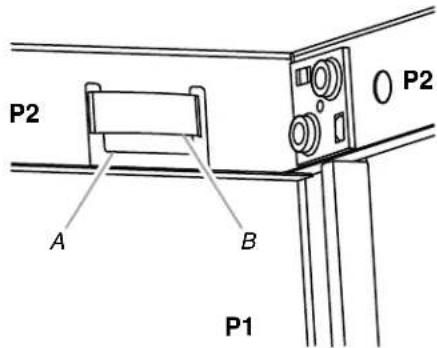
The cabinet top (P2) is intentionally designed so that the tabs will only match with the loops on the sides when it is positioned correctly. If the tabs on the cabinet top do not match up with the loops on the side panel (P1), turn the cabinet top around.
1. Place side panel (P1) on a flat, firm surface so that the edge with the loops is facing up.
2. Align the tabs in the cabinet top (P2) with the loops in the cabinet side (P1). Slide the cabinet top between the edges of side panel.
NOTE: Check that each tab is inserted fully behind the loop.
text_image
P2 A B P1 P2A. Tab
B. Loop
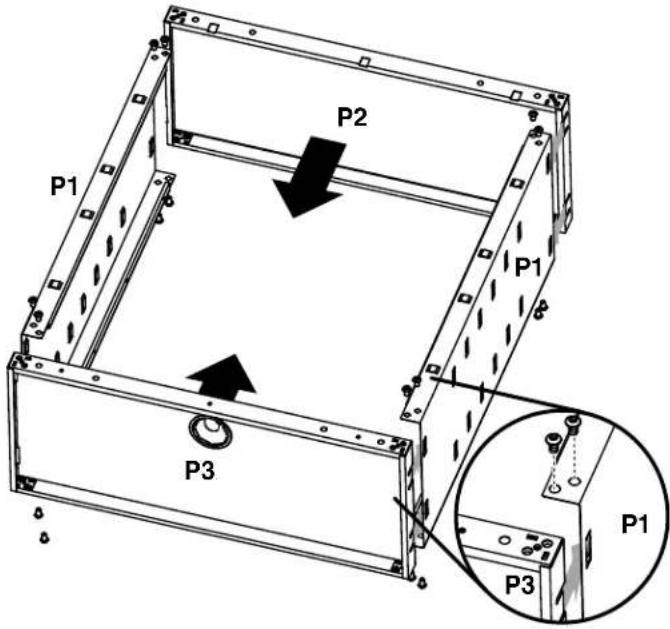
- Align the 2 holes in each corner. Using hex-head bolts (F1), fasten the side panel (P1) to the cabinet top (P2) as shown. Do not tighten completely.
- Repeat steps 2 and 3 for the other cabinet side (P1).
-
With the smooth side toward the cabinet interior, align the 4 tabs in the cabinet bottom (P3) with the loops in the cabinet sides (P1). Slide the cabinet bottom between the edges of side panels. NOTE: Check that each tab is fully inserted behind the loop.
-
Align the 2 holes in each corner. Using hex-head bolts (F1), fasten the side panels (P1) to the cabinet bottom (P3) as shown. Do not tighten completely.
text_image
P1 P2 P1 P3 P1 P3Attach Back Panels

F3c
F3c.Phillips-head screws (5)
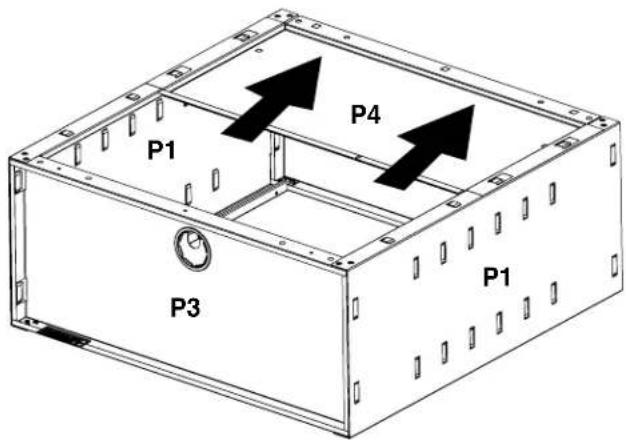
- Align the 7 tabs in the upper back panel (P4) with the loops in the cabinet top (P2) and cabinet sides (P1).
- Slide the upper back panel (P4) toward the cabinet top (P2) until the upper back panel is firmly in place.
NOTE: Check that each tab is inserted fully behind the loop as shown.
text_image
P1 P3 P4 P1- Align the 4 side tabs on the lower back panel (P5) with the loops in the cabinet sides (P1).
- Slide the lower back panel (P5) upward until the top of the lower back panel is under the upper back panel (P4).
NOTE: The upper back panel will slightly overlap the lower back panel.
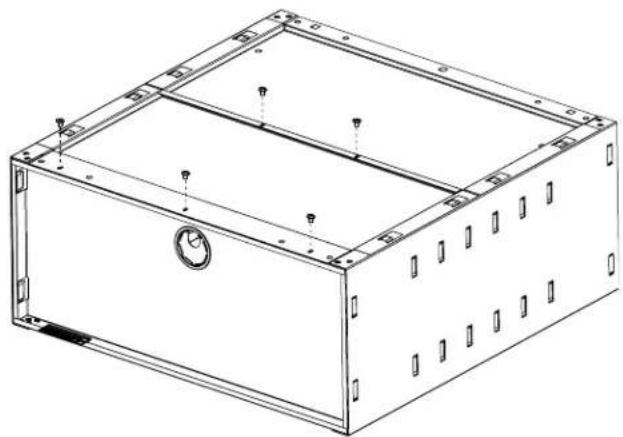
- Using Phillips-head screws (F3c), fasten the upper back panel (P4) to the lower back panel (P5) and the lower back panel to the cabinet bottom (P3).
natural_image
Technical line drawing of a rectangular enclosure with mounting holes and a central pressure gauge (no text or symbols)-
Tighten all back panel screws completely.
-
Starting with the front of the cabinet, and using the Allen wrench (provided), tighten all of the bolts completely.
Install Shelves
NOTE: Some models do not have P6 shelf.
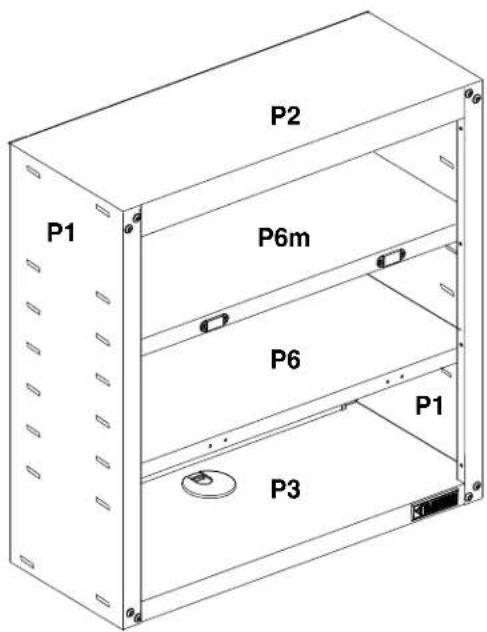
Plan your shelf heights and install the shelf or 2 shelves (P6 and P6m, depending on model) starting from the bottom. The shelves are supported by the metal loops on the side walls of the cabinet.
-
Determine the placement of the 2 shelves (P6-1 shelf without magnets (on some models), P6m-1 shelf with magnets).
-
Place the shelf in the cabinet so that the long edge with the holes (P6) or the long edge with the magnets (P6m) is toward the front of the cabinet.
-
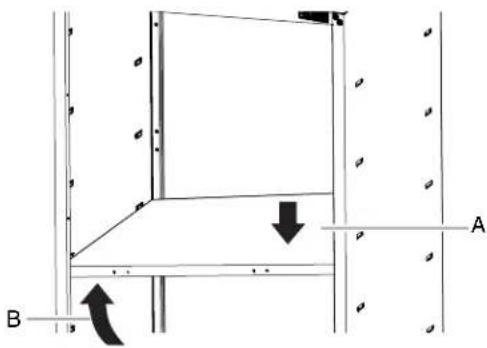
Tilt the shelf so that one end is higher than the other as shown. NOTE: The higher end of the shelf should be directly above the cabinet loop at the desired height.
text_image
Technical diagram showing a structural component with labeled points A and B, and directional arrows indicating movement or force.A. Push down
B. Lift up
-
Push the shelf edge down so that the shelf tabs go into the cabinet loops.
-
Lift up on the lower end of the shelf so that it is above the desired cabinet loop and push the shelf down into place.
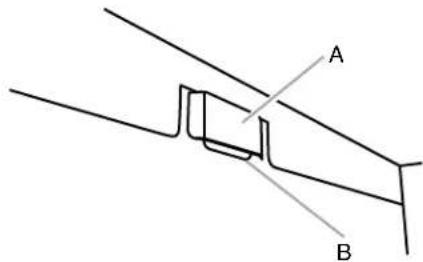
NOTE: Check that the shelf tabs are in place behind all the cabinet loops as shown.
- Repeat steps 2 through 5 to install the other shelf, if needed.
text_image
A BA. Cabinet loop
B. Shelf tab
text_image
P1 P2 P6m P6 P1 P3 K1P6 Shelf (available on some models)
Install Doors

F3c
F3c.Phillips-head screw (6)
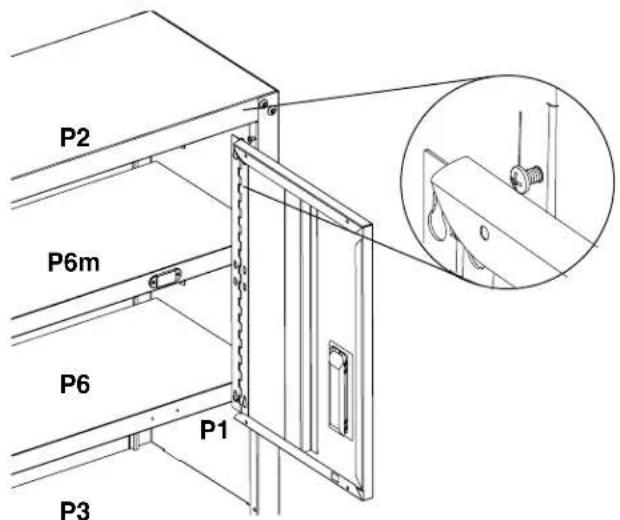
The door hinges are designed with keyhole slots at the top and bottom so the door will hang on the cabinet while you are fastening the screws.
-
Start Phillips-head screws (F3c) in both the top and bottom holes on each side of the cabinet.
-
Hang the right-hand side door (P7) from the top and bottom screws, and hand tighten.
-
Insert the middle screw through the door hinge into the cabinet and hand tighten.
text_image
P2 P6m P6 P1 P3P6 Shelf (available on some models)
- Repeat steps 2 and 3 to attach the left-hand door (P8).
- Align the doors and tighten the screws completely.
INSTALLATION INSTRUCTIONS
WARNING
Excessive Weight Hazard
Use two or more people to move, assemble or install cabinet.
Failure to do so can result in back or other injury.
IMPORTANT: The cabinet can be mounted to Gladiator® GearWall® panels, GearTrack® channels or directly to a standard wall as described below. Follow the instructions that apply to your installation.
Install Cabinet to GearWall® Panels or GearTrack® Channels
IMPORTANT:
■Be sure the GearWall ^ panels or GearTrack ^ channels are installed with mounting screws in every slot and at every stud location with a maximum of 24" (60.96 cm) horizontally between screws.
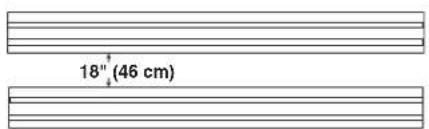
■If you are mounting the cabinet on GearTrack * channel, a second channel should be installed 18" (46 cm) below the bottom of the supporting channel so the cabinet will hang level.
text_image
18" (46 cm)Attach Mounting Bracket
F7 F8 F2
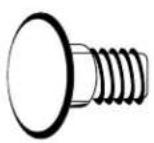
F7. Carriage-head bolt (2)
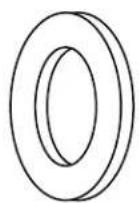
F8. Washer (2)
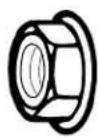
F2. 516 " Flange nut (2)
- With the mounting bracket (P9) rim pointing down, align the 2 bracket holes with the two holes in the top back panel (P4).
- Working from the back, insert 2 carriage bolts (F7) through the bracket and top back panel (P4).
- Working from the cabinet interior, fasten each bolt with a washer (F8) and a flange nut (F2). Tighten the bolts completely.
- Close the cabinet doors.
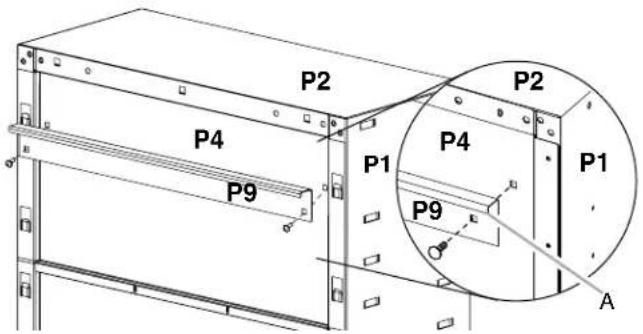
text_image
P2 P4 P9 P1 P2 P4 P9 AA. Bracket rim pointing down
Mount on GearWall® Panel or GearTrack® Channel
- Determine the cabinet mounting location on GearWall ^ panels or GearTrack ^ channels.
- Using 2 or more people, engage the mounting bracket into the wall slot by lifting up, pushing toward the wall and lowering the bracket rim into the slot.
- Inspect the cabinet from the sides to ensure the wall-mounting bracket is fully engaged in the slot as shown.
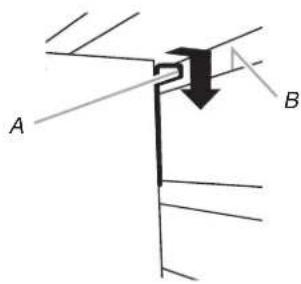
text_image
A BA. Bracket rim B. Slot
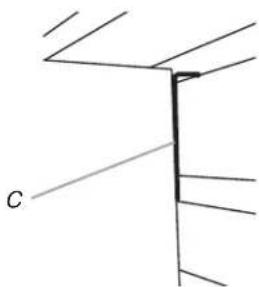
natural_image
Pure technical line drawing of a mechanical joint or bracket (no text or symbols)C. Mounting bracket fully engaged
Standard Wall Mount
Tools and Parts Needed
■Wrench
■ 5/16" x 1½" lag screws (4)
■5/16" flat washers (4)
IMPORTANT: The round holes in the top and bottom cabinet back panels are spaced to allow you to mount the wall cabinet to your garage wall studs.
- Locate the wood studs in your garage wall. Align 2 holes at the top and 2 holes at the bottom with the wood studs, and mark the location of the holes.
-
While 2 or more people hold the cabinet against the wall, attach the wall cabinet to the garage wall using 516 " flat washers and 516 " x 112 " lag screws (not provided).
-
Using a wrench, tighten the screws completely.
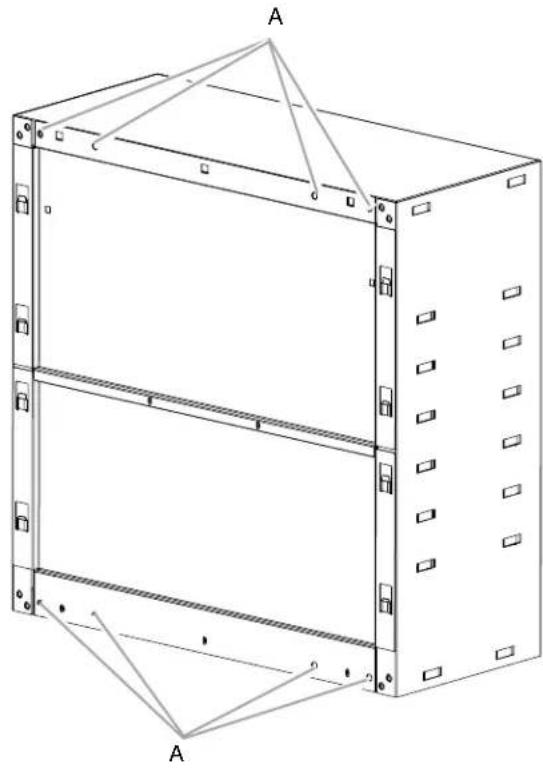
natural_image
Technical line drawing of a multi-level server rack unit with mounting holes and triangular supports (no text or symbols)A. Holes for standard wall mounting
GLADIATOR® GARAGEWORKS 10 YEAR LIMITED WARRANTY
For ten years from the original date of purchase, when this product is installed, operated and maintained according to the instructions attached to or furnished with the product, Gladiator® GarageWorks brand of Whirlpool Corporation or Whirlpool Canada, LP (hereafter "Gladiator"), at its sole discretion, will replace the defective product or provide factory specified replacement parts with identical or similar item(s) to correct defects in materials or workmanship that existed when the product was purchased. If replaced, the product will be covered under the remaining ten-year limited warranty of the original unit.
YOUR SOLE AND EXCLUSIVE REMEDY UNDER THIS LIMITED WARRANTY SHALL BE PRODUCT OR PART REPLACEMENT AT OUR DISCRETION AS PROVIDED HEREIN. Warranty service may only be arranged by contacting the Gladiator Customer eXperience Center. This limited warranty is valid in the United States or Canada and applies only when the product is used in the country in which it was purchased. This limited warranty is effective from the date of the original consumer purchase. Warranty coverage is not transferable and proof of original purchase date is required to obtain replacement parts or product under this limited warranty.
ITEMS EXCLUDED FROM WARRANTY
This limited warranty does not cover:
- Service calls to correct the installation of any Gladiator ^® products or to instruct you on how to use or install them.
- Damage resulting from improper handling or shipping of products, or products damaged by accident, misuse, abuse, fire, flood, improper installation, acts of God, neglect, corrosion, modification or mishandling.
- Shipping or freight fees to deliver replacement products or to return defective products.
- Factory specified replacement parts or product when your product is used in other than normal, single-family household use, such as a commercial environment or handled in any way inconsistent with the installation instructions included with the product.
- Cosmetic damage including scratches, dings, dents or cracks that do not affect the structural or functional capability of the product.
- Replacement parts or product for Gladiator ^® products used or installed outside the United States or Canada.
- Travel or transportation expenses for customers who reside in remote areas.
- Any labor costs during the limited warranty period.
- Damage resulting from improper loading beyond the specified maximum weight capacity outlined in the assembly instructions provided with the product, including overloading of hooks, baskets, shelves, cabinets, and other Gladiator ^® accessories used with the product.
- Product damage due to prolonged exposure to sunlight resulting in warping, fading, discoloration, cracking or peeling or product damage due to chemical interaction resulting in corrosion of paint or metal.
- Replacement keys or locking mechanism.
- Loss of product contents due to theft, fire, flood, accident or acts of God.
The cost of repair or replacement under these excluded circumstances shall be borne by the customer.
DISCLAIMER OF IMPLIED WARRANTIES
IMPLIED WARRANTIES, INCLUDING ANY IMPLIED WARRANTY OF MERCHANTABILITY OR IMPLIED WARRANTY OF FITNESS FOR A PARTICULAR PURPOSE, ARE LIMITED TO ONE YEAR OR THE SHORTEST PERIOD ALLOWED BY LAW. Some states and provinces do not allow limitations on the duration of implied warranties of merchantability or fitness, so this limitation may not apply to you. This warranty gives you specific legal rights, and you also may have other rights that vary from state to state or province to province.
LIMITATION OF REMEDIES; EXCLUSION OF INCIDENTAL AND CONSEQUENTIAL DAMAGES
YOUR SOLE AND EXCLUSIVE REMEDY UNDER THIS LIMITED WARRANTY SHALL BE PRODUCT REPAIR AS PROVIDED HEREIN. GLADIATOR® GARAGEWORKS SHALL NOT BE LIABLE FOR INCIDENTAL OR CONSEQUENTIAL DAMAGES. Some states and provinces do not allow the exclusion or limitation of incidental or consequential damages, so these limitations and exclusions may not apply to you. This warranty gives you specific legal rights, and you also may have other rights that vary from state to state or province to province.
Outside the 50 United States and Canada, this warranty does not apply. Contact your authorized Gladiator® GarageWorks dealer to determine if another warranty applies.
If you need service, call the Gladiator® GarageWorks Customer eXperience Center, 1-866-342-4089 (toll-free), from anywhere in the U.S.A. In Canada, contact your Whirlpool Canada LP designated service company or call 1-800-807-6777.
In the United States, Gladiator ^® GarageWorks means Whirlpool Corporation, Benton Harbor, Michigan 49022. In Canada, Gladiator ^® GarageWorks means Whirlpool Canada LP, Mississauga, ON L5N 3A7. 7/13
Keep this book and your sales slip together for future reference. You must provide proof of purchase or installation date for in-warranty service.
Write down the following information about your Gladiator® product to better help you obtain assistance or service if you ever need it. You will need to know your complete model number and serial number. You can find this information on the model and serial label located on the back of the product.
| Dealer name |
| Address |
| Phone number |
| Model number |
| Serial number |
| Purchase date |
natural_image
Technical line drawing of a rectangular enclosure with mounting holes and a central dial (no text or symbols)text_image
Technical diagram showing a structural component with labeled points A and B, and directional arrows indicating movement or force.text_image
18" (46 cm)natural_image
Pure technical line drawing of a structural joint or bracket (no text or symbols)natural_image
Technical line drawing of a multi-level industrial storage unit with mounting holes and triangular supports (no text or symbols)natural_image
Technical line drawing of a rectangular electronic enclosure with mounting holes and a central pressure gauge (no text or symbols)text_image
Technical diagram showing a structural component with labeled points A and B, including directional arrows and a downward arrow indicating movement.A. Enfoncer
B. Soulever