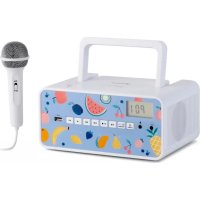
Kidsbox - Mp3 player Auna - Free user manual and instructions
Find the device manual for free Kidsbox Auna in PDF.


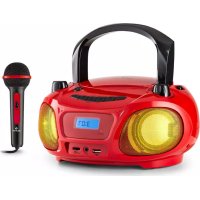
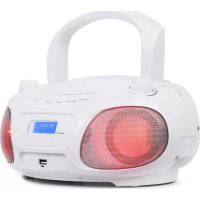
| Product type | Portable CD/MP3 player with FM radio, Bluetooth and karaoke microphone |
| Brand | Auna |
| Model | Kidsbox |
| Power supply | Mains 230 V~ 50 Hz (5 W) or batteries 2× LR14 (not included) |
| RMS power | 2× 1 W |
| Main functions | CD player (CD/CD-R/CD-RW/MP3), FM radio, USB, Bluetooth, karaoke microphone, 2 headphone jacks |
| FM radio | Yes, with memory up to 30 stations |
| Bluetooth | Yes, range approx. 10 m, remembers last paired device |
| USB port | Yes, for MP3 file playback |
| Microphone | Yes, with wired microphone included (MIC jack) |
| Headphone jack | 2× 3.5 mm jack |
| Auto standby | After 15 minutes of inactivity |
| Laser class | 1 |
| Accessories included | Power cable, microphone |
| Maintenance | Clean with a soft, dry cloth; do not use chemicals |
| Spare parts and repairability | No user-serviceable parts; contact customer service |
| Manufacturer | Chal-Tec GmbH, Wallstraße 16, 10179 Berlin, Germany |
| Declaration of conformity | Available at https://use.berlin/10033900 |
Frequently Asked Questions - Kidsbox Auna
User questions about Kidsbox Auna
0 question about this device. Answer the ones you know or ask your own.
Ask a new question about this device
Download the instructions for your Mp3 player in PDF format for free! Find your manual Kidsbox - Auna and take your electronic device back in hand. On this page are published all the documents necessary for the use of your device. Kidsbox by Auna.
USER MANUAL Kidsbox Auna
The lighting flash and arrow head within the triangle is warning sign alerting you of dangerous voltage inside the product
CAUTION
RISK OF ELECTRIC SHOCK DO NOT OPEN
CAUTION:TO REDUCE THE RISK OF ELECTRIC SHOCK DO NOT REMOVE COVER (OR BACK).NO USER SERVICIABLE PARTS INSIDE.REFER SERVICING TO QUALIFIED SERVICE PERSONNEL.

The exclamation point within the triangle is a warning sign alerting you of important instructions accompanying the product
Unit 6 Riverside Business Centre
Brighton Road
Shoreham-by-Sea
BN436RE
United Kingdom
Congratulations on purchasing this equipment. Please read this manual carefully and take care of the following hints to avoid damages. Any failure caused by ignoring the items and cautions mentioned in the instruction manual are not covered by our warranty and any liability. Scan the QR code to get access to the latest user manual and other information about the product.

CONTENTS
Technical Data 17
Safety Instruction 19
Device Description and Function Keys 21
First Steps 23
Radio (FM) 24
CD Player Operation 25
Programmed Play Mode 27
USB Operation 28
Headphone 28
Microphone 28
BT Operation 29
Troubleshooting 30
Disposal Considerations 31
TECHNICAL DATA
| Item number 100 | 33900, 10033902, 10035357, 10035358 |
| Power supply 230 V~ 50 Hz | |
| Power input 10 W | |
| RMS power 2 x 1 W | |
| BT Frequency range: 2402-2480 MHzMax. output power: 2 dBm | |
WARNING

The lighting flash and arrow head within the triangle is warning sign alerting you of dangerous voltage inside the product
CAUTION
RISK OF ELECTRIC SHOCK DO NOT OPEN
CAUTION:TO REDUCE THE RISK OF ELECTRIC SHOCK DO NOT REMOVE COVER (OR BACK).NO USER SERVICIABLE PARTS INSIDE.REFER SERVICING TO QUALIFIED SERVICE PERSONNEL.

The exclamation point within the triangle is a warning sign alerting you of important instructions accompanying the product
CAUTION: TO REDUCE THE RISK OF ELECTRIC SHOCK AND SERIOUS PERSONAL INJURY,DO NOT REMOVE ANY COVER.NO USER-SERVICABLE
PARTS INSIDE. REFER SERVICING TO QUALIFIED SERVICE PERSONNEL ONLY.
WARNING: TO REDUCE THE RISK OF FIRE OR ELECTRICAL SHOCK, DO NOT EXPOSE THIS PRODUCT TO WATER, RAIN OR MOISTURE.
| 4 | Triangle with lightning plus explanation as follows: DANGEROUS VOLTAGE: The lightning flash with arrowhead symbol within the equilateral triangle is intended to alert the user to the presence of uninsulated dangerous voltage within the product's enclosure that may be of sufficient magnitude to constitute a risk of electric shock to persons. |
| ! | Triangle with exclamation point plus explanation as follows: ATTENTION: The exclamation point within the equilateral triangle is intended to alert the user to the presence of important operating and maintenance (servicing) instructions in the literature accompanying this product. |
| CAUTION: Danger of personal injury Never touch or look into the optical lens within the CD compartment. This is a CLASS-1 laser product. |
|  | CAUTION: Danger of hearing damage To avoid possible hearing damage, do not listen to this Retro turntable at high volume levels for long periods of time. Always keep the volume within reasonable limits. |
SAFETYINSTRUCTION
Please read these instructions fully before installing or operating.
General safety information
- Keep the product and all its parts out of reach of small children.
- This product is not intended for use by persons (including children) with reduced physical, sensory or mental capabilities, or lack of experience and knowledge, unless they have been given supervision or instruction concerning the use of the appliance by a person responsible for their safety.
- Do NOT place foreign objects into the CD compartment. Use of controls or adjustments other than those specified herein, may result in hazardous laser light beam exposure. Do NOT open the cover and do NOT attempt to repair it yourself. Refer servicing to qualified personnel. This product does not contain any user serviceable parts. Unauthorized handling of the device may damage it and will void your warranty.
Power source
- Only use the power supply that came with the product. Using an unauthorised power supply will invalidate your guarantee and may irrecoverably damage the product.
- Disconnect your Retro Turntable from the mains power supply during thunderstorms.
- Always check that you have completely switched off your Retro Turntable, before you change or disconnect the power supply.
- Where the mains power plug or an appliance coupler is used as the disconnect device, the disconnect device shall remain readily operable.
- The power socket must be within easy reach
- In order to avoid electric shock, do not bend, stretch or pull the power supply cable.
- Switch the Retro Turntable off at the mains power socket and unplug it if you are leaving it unattended for a long period of time (holidays etc).
- Do not attempt to open the product. This product does not contain any user serviceable parts.
- Unauthorised handling of the product may damage it and will void your warranty.
Moisture and water: To reduce the risk of fire or electric shock:
- Do not use this product near water or moisture.
-
Do not use this product near a bath or sink, near a swimming pool or anywhere else that water or moisture is present.
-
Do not place objects filled with water, such as a vase, on or near the product.
- Keep it dry. Avoid exposure to precipitation, humidity and liquids which could all affect the product circuitry.
Heat sources and flames
- Do not leave this product in high temperatures as electronic devices and plastic parts may warp in heat.
- Keep it away from bright sunlight or heat sources, such as a radiator.
- Never place any type of candle or naked flame on top of, or near the product.
DEVICE DESCRIPTION AND FUNCTION KEYS
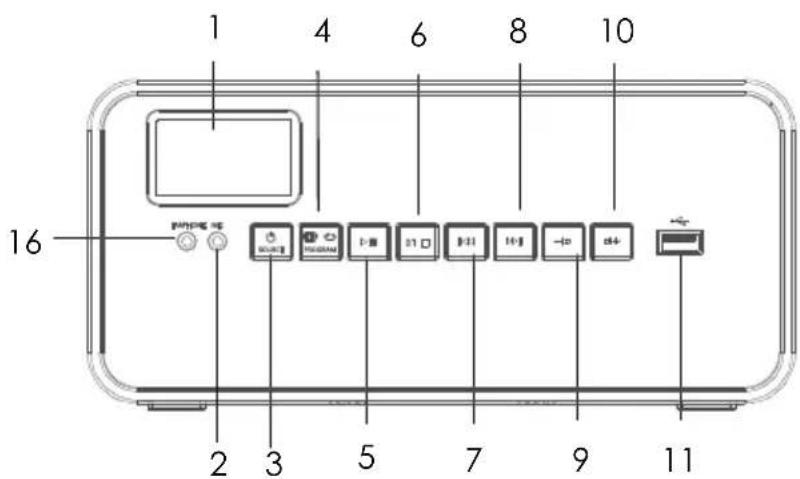
Front
1 Display
6 BT pair/stop button
2 Mic socket
7 Backward button
3 Power/Source button
8 Forward button
4 Program/Repeat/Preset button
9 Volume "-" button
5 Play/Pause button
10 Volume "+" button
14 Headphone socket

Top
11 USB port 12 CD doorHandle
Back

13 AC IN socket
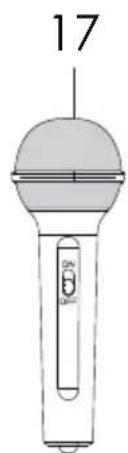
16 Microphone
FIRST STEPS
Battery operation
The unit can be operated using batteries alone.
- Remove the battery cover.
- Insert six UM-2 size batteries into the battery compartment. Make sure all batteries are inserted with the correct polarity as shown on the inside of the battery compartment.
- Replace the battery cover.
NOTE: If the unit is not to be used for a prolonged period of time, remove the batteries to avoid damage by battery leakage.
Mains operation
- Place the player on a flat stable surface.
- Plug the mains lead into the AC socket located on the rear of the player ensuring that the plug is pushed fully into the jack.
- Plug the other end of the mains lead into the mains socket.
NOTE: The mains socket used for the player must remain accessible during normal use. In order to disconnect the player from the mains, the mains plug should be removed from the mains power socket completely.
Switching on the unit
- Press power button to turn on the unit.
- If there is no operation within about 15 minutes, the unit will turn off automatically.
- Press power button to turn on the unit again.
- Press and hold the power button to turn off the unit.
RADIO (FM)
- Extend the telescopic aerial.
Note: Fully extend and reposition the aerial for optimum reception.
- Repeatedly press Power/Source button until the radio mode is selected.
The display first shows "rAd" and then "P01".
- Repeatedly press Volume "+"/ "-" to set a desired volume level.
- Press and hold Play/Pause button, scanning stations automatically and then save stations automatically.
Presetting your favourite radio stations
Up to 30 FM radio stations could be preset.
- Follow the above steps and tune in to the station that you wish to preset.
- Press the Program button. Then press forward /backward to select the station you desired.
- Press and hold Forward/Backward button, search for radio stations half-automatically.
- Press Program button and hold one second, then press Forward/ Backward button to choose the storage location.
To listen to preset radio stations, repeatedly press preset button to select the desired radio station.
CD PLAYER OPERATION
Handling of compact discs
- Never write on a CD or attach any sticker to the CD. Always hold the CD at the edge and store it in its box after use with the label facing up.
- To remove dust and dirt, breathe on the CD and wipe it with a soft, lint free cloth in a straight line from the centre towards the edge.
- Cleaning agents may damage the CD.
- Do not expose the CD to rain, moisture, sand or to excessive heat.
CD/CD-R/CD-RW/MP3 discs
- The player can playback CD/CD-R/CD-RW/MP3 discs that have been finalised upon completion of recording.
- The player may fail to playback some discs due to poor recording and wide variation in quality of the discs.
Inserting a disc
- Pull the right corner of the CD door to open it.
- Insert a disc on the disc tray with the label side facing up.
- Close the CD door.
Playing a CD
- Repeatedly press mode button to select the CD operation mode. Playback will start automatically from the first track. The track number and elapsed time will be displayed during playback.
- Adjust the volume by repeatedly pressing Volume "+"/"" button.
- To interrupt playback, press play button. The symbol and the elapsed time will flash on the display.
- To resume playback, press play button again. The symbol and the elapsed time will stop flashing.
- To stop playback, press stop button. The total number of tracks will appear on the display.
Notes:
- The CD door should only be opened when the CD is in stop mode.
- If no disc is loaded into the compartment or the disc is placed upside down, the display will show "NO".

Use only Digital Audio CDs with the symbol.
Selecting a track
While the CD is playing, repeatedly press forward or backward button to play the desired track.
For MP3 disc, when the number of tracks on the disc exceeds 10, first press play button and then repeatedly press forward or backward button to select the desired track.
If the MP3 disc contains more than one folder, press and hold play button for about 2 seconds to play the first track in the next folder.
Search function
While the disc is playing, press and hold forward or backward button. Release the button when the desired point (passage) of the track is reached. Playback will start again from this point.
Disc repeat mode
While the disc is playing, repeatedly press repeat button to select the desired repeat mode.
| Symbol on the display Description | |
| REPEAT 1 To repeat a single | track |
| REPEAT FOLDER To repeat all tracks in the folder (for MP3 only) | |
| REPEAT ALL To repeat all tracks | |
| RAND Random playback | |
PROGRAMMED PLAY MODE
In programmed play mode, you can program the play order of the tracks on your CD. You can program up to 20 tracks in total.
NOTE: To set up programmed play mode, the CD must be stopped in the CD compartment and must not be paused or playing.
In CD mode, with the CD you wish to programme in the CD compartment and stopped:
- Press and release the PROG button to enter CD programmed play mode. "P01" will be displayed.
- Press the forward /backward button to go to the track number that you would like to program to play first. Press and release the Preset button to confirm.
- "P02" will now be displayed and you can select the second track that you would like to programme. Continue to select each track as in Step 2 above, up to a total of 20 tracks. Press and release the Preset button again to confirm the last track in the programmed play mode list. If you have programmed 20 tracks, "FUL" will be displayed.
- Press and release the play button to play the programmed tracks.
- To exit programmed play mode, press and release the button twice.
NOTE: You can program up to 99 tracks for MP3.
USB OPERATION
Inserting and removing a USB memory device
Carefully insert a USB memory device into the USB port. To remove the USB memory device simply pull it out.
Selecting USB mode
Repeatedly press mode button to select the USB mode.
Playback control in USB mode is similar to CD mode.
NOTE: The USB memory device should not be removed during playback as damage or corruption of files may occur.
HEADPHONE
You can connect a set of headphones / earphones (not provided) to the 3.5 mm headphone jack on the front of the unit.
NOTE: When the earphone is connected, the main speakers are muted automatically. Playback volume can be adjusted as usual by turning the volume control volume.
MICROPHONE
There is a "MIC" input jack and an included microphone that allows you to sing to the sound of the available audio sources.
- Plug the provided microphone into "MIC" jack.
- Start playback as described on CD PLAYBACK instruction page.
- Slide the "MIC's ON/OFF" switch to the "ON" position and sing along.
- Adjust the "VOLUME" control (14) to desired level.
NOTE: The microphone sound level was 80% of master volume.
- To shut off the microphone, slide the "MIC's ON/OFF" switch to the "OFF" position.
NOTE: Please always switch the "MIC's ON/OFF" to "OFF" position when placing to the unit -MIC holder. Otherwise, very high frequency echo noise will be heard.
BT OPERATION
By using the BT connection, you can listen to the sound of the BT audio device from this unit wirelessly.
Pairing BT devices
- Turn on the BT function of the device and place the device near this unit.
- If this unit is already connected to a BT device, disconnect it.
- Repeatedly press mode button to select the BT mode. - "bt" will flash on the display.
- Select "Kidsbox" from the BT device's BT menu.
- Once pairing is successful, "bt" will stop flashing.
- Start play on the BT device.
Notes
- The effective operation range between the unit and the paired BT device is approximately 10 metres in the open area.
- Once the BT device is connected for the first time, the speaker will remember the paired setting and will automatically reconnect to the same BT device the next time they are in range.
TROUBLESHOOTING
| Problem Possible Cause Possible Solution | ||
| The player will not play.. Un | it not in CD mode. Select CD | mode. |
| CD is not installed or installed incorrectly. | Load a CD with label side up. | |
| CD skips while playing. | Disc is dirty or scratched. | Wipe the disc with a cloth or use another disc. |
DISPOSAL CONSIDERATIONS

If there is a legal regulation for the disposal of electrical and electronic devices in your country, this symbol on the product or on the packaging indicates that this product must not be disposed of with household waste. Instead, it must be taken to a collection point for the recycling of electrical and electronic equipment. By disposing of it in accordance with the rules, you are protecting the environment and the health of your fellow human beings from negative consequences. For information about the recycling and disposal of this product, please contact your local authority or your household waste disposal service.
This product contains batteries. If there is a legal regulation for the disposal of batteries in your country, the batteries must not be disposed of with household waste. Find out about local regulations for disposing of batteries. By disposing of them in accordance with the rules, you are protecting the environment and the health of your fellow human beings from negative consequences.
DECLARATION OF CONFORMITY

Manufacturer:
Chal-Tec GmbH, Wallstrasse 16, 10179 Berlin, Germany.
Importer for Great Britain:
Chal-Tec UK limited
Unit 6 Riverside Business Centre
Brighton Road
Shoreham-by-Sea
BN436RE
United Kingdom
The complete declaration of conformity of the manufacturer can be found at the following link: https://use.berlin/10033900
Chere cliente, cher client,
Lecture programme 43
Lecture USB 44
Casque 44
Micro 44
Lecture BT 45
The lighting flash and arrow head within the triangle is warning sign alerting you of dangerous voltage inside the product
CAUTION
RISK OF ELECTRIC SHOCK DO NOT OPEN
CAUTION:TO REDUCE THE RISK OF ELECTRIC SHOCK DO NOT REMOVE COVER (OR BACK).NO USER SERVICIABLE PARTS INSIDE.REFER SERVICING TO QUALIFIED SERVICE PERSONNEL.

The exclamation point within the triangle is a warning sign alerting you of important instructions accompanying the product
ATTENTION : POUR RÉDUIRE LES RISQUES DE CHOÇS ÉLECTRIQUES, NE DEMIONTEZ AUCUN Cache. L'APPAREIL NE CONTIEN AUCUNE PIECE À ENTRETENIR. ADRESSEZ-VOUS UNIQUÉMENT À DES PERSONNELS QUALIFIÉS POUR LA MAINTENANCE.
MISE EN GARDE : POUR RÉDUIRE LE RISQUE D'INCENDIE ET DE CHOC ÉLECTRIQUE, NE PLONGEZ PAS L'APPAREIL DANS L'EAU ET NE L'EXPOSEZ PAS À LA PLUIE OU À L'HUMIDITÉ.

6 Jumelage BT / Stop
2 Prise micro
7 Titre précédent
Unit 6 Riverside Business Centre
Brighton Road
Shoreham-by-Sea
BN436RE
United Kingdom
The lighting flash and arrow head within the triangle is warning sign alerting you of dangerous voltage inside the product
CAUTION
RISK OF ELECTRIC SHOCK DO NOT OPEN
CAUTION:TO REDUCE THE RISK OF ELECTRIC SHOCK DO NOT REMOVE COVER (OR BACK).NO USER SERVICIABLE PARTS INSIDE.REFER SERVICING TO QUALIFIED SERVICE PERSONNEL.

The exclamation point within the triangle is a warning sign alerting you of important instructions accompanying the product
ATENCION: NO ABRIR LA CARCASA PARA EVITAR UNA DESCARGA ELECTRICA Y LESIONES PERSONALES GRAVES. EN EL INTERIOR NO EXISTE NINGUN COMPONENTE QUE EL CLIENTE PUEDA REPARAR. CONTACTE EXCLUSIVAMENTE CON UN SERVICIO TECNICO CUALIFICADO.
ADVERTENCIA: PARA REDUCIR EL PELIGRO DE INCENDIO O DESCARGA ELECTRICA, NO EXPONGA EL APARATO AL AGUA, A LA LLUVIA O A LA HUMEDAD.

m = 311 ;
Unit 6 Riverside Business Centre
Brighton Road
Shoreham-by-Sea
BN43 6RE
United Kingdom
The lighting flash and arrow head within the triangle is warning sign alerting you of dangerous voltage inside the product
CAUTION
RISK OF ELECTRIC SHOCK DO NOT OPEN
CAUTION:TO REDUCE THE RISK OF ELECTRIC SHOCK DO NOT REMOVE COVER (OR BACK).NO USER SERVICIABLE PARTS INSIDE.REFER SERVICING TO QUALIFIED SERVICE PERSONNEL.

The excclamation point within the triangle is a warning sign alerting you of important instructions accompanying the product
ATTENZIONE: NON APRIRE LA CUSTODIA PER EVITARE SCOSSE ELETTRICHE E LESIONI SERIE ALLE PERSONE. ALL'INTERNO NESSUNO DEI COMPONENTI ACCESSIBILI DAL CLIENTE. RIFERIRSI ESCLUSIVAMENTE A PROFESSIONISTI QUALIFICATI.
AVVERTENZA: PER RIDURRE IL RISCHIO DI INCENDIO O SCOSSE ELETTRICHE, NON ESPORRE QUESTO PRODOTTO IN ACQUA, PIOGGIA O UMIDITA.

Unit 6 Riverside Business Centre
Brighton Road
Shoreham-by-Sea
BN436RE
United Kingdom
- CAUTION
- RISK OF ELECTRIC SHOCK DO NOT OPEN
- CONTENTS
- TECHNICAL DATA
- WARNING
- SAFETYINSTRUCTION
- General safety information
- Power source
- Moisture and water: To reduce the risk of fire or electric shock:
- Heat sources and flames
- DEVICE DESCRIPTION AND FUNCTION KEYS
- FIRST STEPS
- Battery operation
- Mains operation
- Switching on the unit
- RADIO (FM)
- Presetting your favourite radio stations
- CD PLAYER OPERATION
- Handling of compact discs
- CD/CD-R/CD-RW/MP3 discs
- Inserting a disc
- Playing a CD
- Notes:
- Selecting a track
- Search function
- Disc repeat mode
- PROGRAMMED PLAY MODE
- USB OPERATION
- HEADPHONE
- MICROPHONE
- BT OPERATION
- Pairing BT devices
- Notes
- TROUBLESHOOTING
- DISPOSAL CONSIDERATIONS
- DECLARATION OF CONFORMITY
- Manufacturer:
- Importer for Great Britain:
- Chere cliente, cher client,
Brand : Auna
Model : Kidsbox
Category : Mp3 player