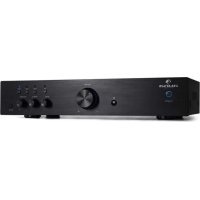
USER MANUAL AV2CD508 Auna
Member of Berlin Brands Group
Handwerkerstr. 11
15366 Dahlwitz-Hoppegarten
Deutschland
Berlin Brands Group UK Ltd
PO Box 1145
Oxford, OX1 9UW
United Kingdom
Congratulations on purchasing this equipment. Please read this manual carefully and take care of the following hints to avoid damages. Any failure caused by ignoring the items and cautions mentioned in the instruction manual is not covered by our warranty and any liability. Scan the QR code to get access to the latest user mannaual and other information about the product:
CONTENT
Safety Instructions 14
Product Overview 14
Connections 16
Operation and Functions 18
Troubleshooting 19
Disposal Considerations 20
Declaration of Conformity 20
TECHNICAL DATA
| Item number 10008978, | 10008979, 10008980, 10004933 |
| Power supply 220-240 V ~ 50/60 Hz |
| BT specifications | |
| Frequency band | 2402-2480 MHz |
| Maximum radio-frequency power | <20 dBm |
SAFETY INSTRUCTIONS
- Choose a safe location and avoid placing the unit in direct sunlight or near any heat source.
- Avoid environments subject to vibration, excessive dust, cold or moisture
- Due to the risk of electrical shock, do not open the cabinet. Should a foreign object accidentally find its way into the interior of the unit, contact your local dealer.
- Do not attempt to clean the unit with chemical solvents as this might damage the finishing. A clean, dry cloth is recommended for cleaning.
- Keep this manual for future reference.
PRODUCT OVERVIEW
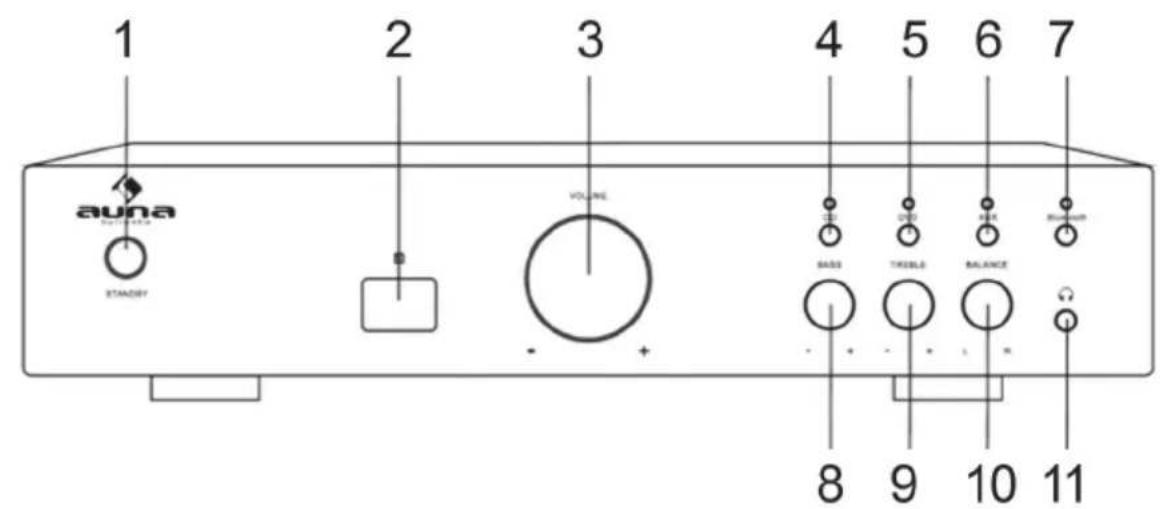
Front
| 1 | Standy/On Switch | 7 | BT input mode. |
| 2 | Receiver Singal Head | 8 | Adjust the bass volume |
| 3 | Volume | 9 | Adjust the treble volume |
| 4 | CD input mode. | 10 | Adjust the balance volume |
| 5 | DVD input mode. | 11 | Headphone plug |
| 6 | Selects AUX input mode. | | |
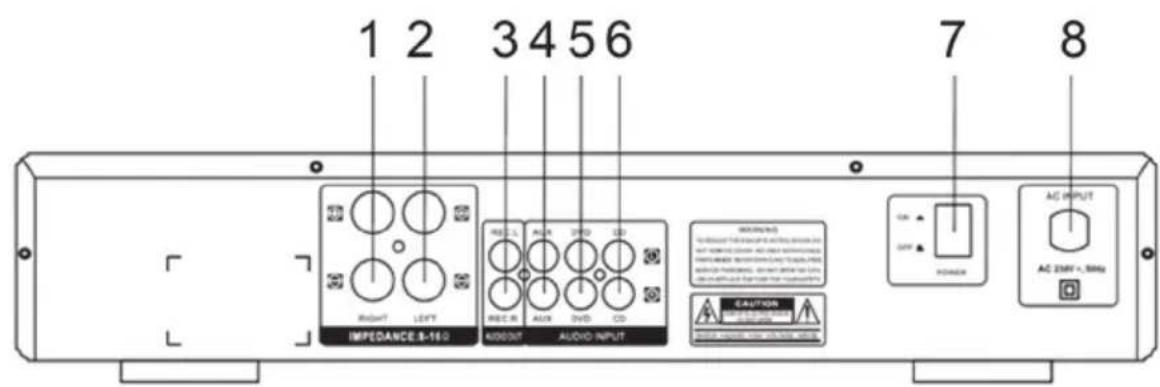
Rear
| 1 | Front speaker (right) | 5 | DVD audio input jack |
| 2 | Front speaker (left) | 6 | CD audio input jack |
| 3 | REC/audio output jack | 7 | Power switch |
| 4 | AUX/audio input jack | 8 | AC input |
Remote Control
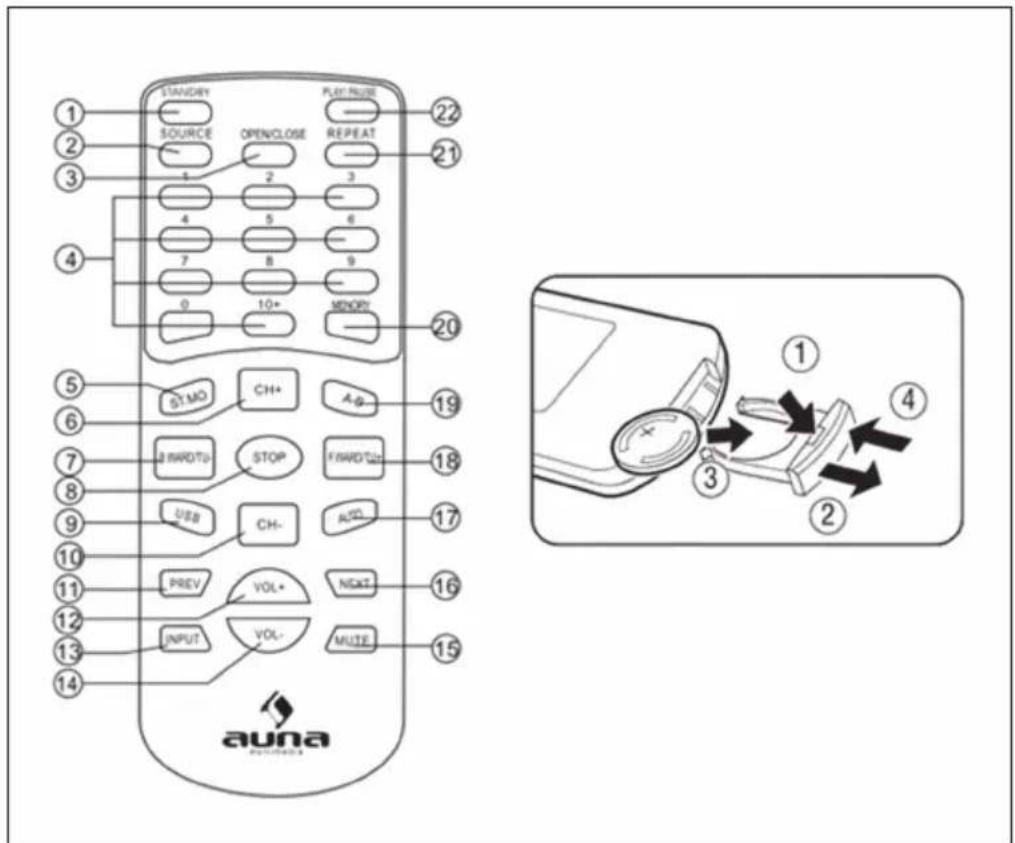
1 Standby
2 Source
3 Open/Close
4 Number Button
5 Stereo/Mono
6 Channel+
7 B.ward/Tuning
8 Stop
9 USB
10 Channel
11 Previous
12 Volume+
13 Input
14 Volume-
15 Mute
16 Next
17 Auto
18 F.ward/Tuning+
19 A-B
20 Memory
21 Repeat
22 Play/Pause
CONNECTIONS
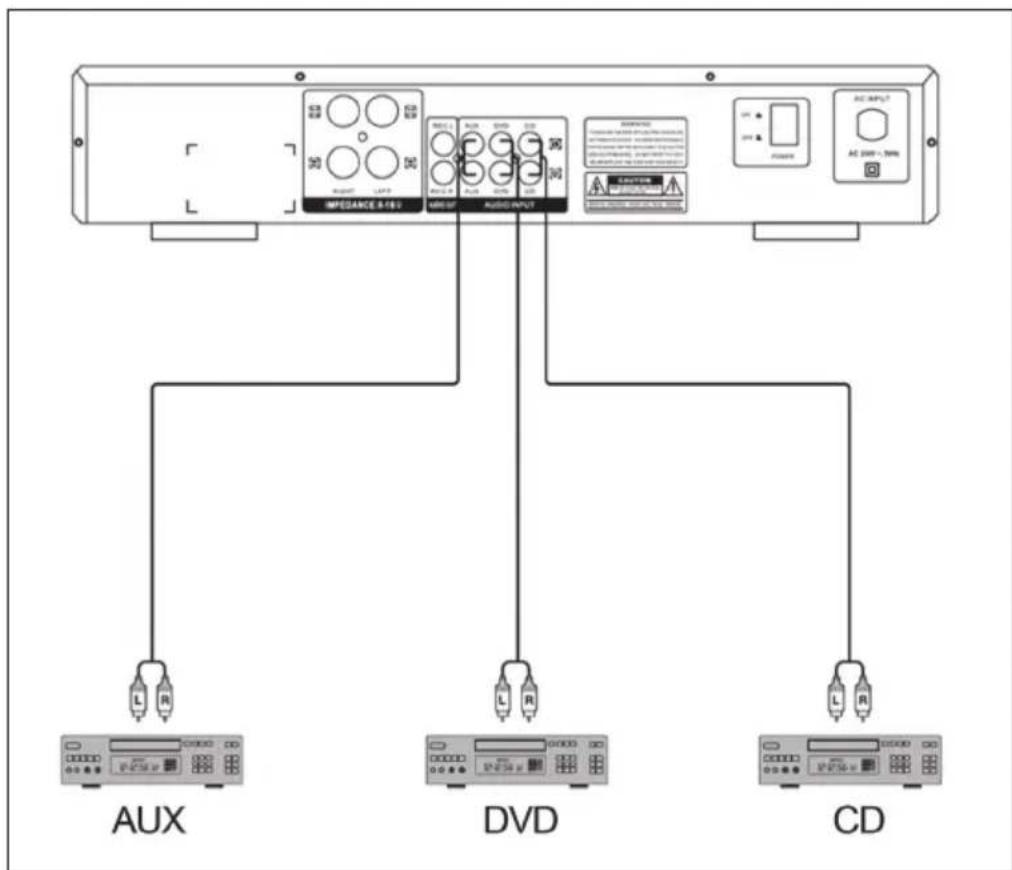
System Connection
- Do not let the bare speaker wires touch each other or any other metal parts as this could damage this unit or speakers.
- Make sure the polarity of speaker wires is correct, + to +, and - to -, if these wires are incorrectly connected, the sound will be unnatural.
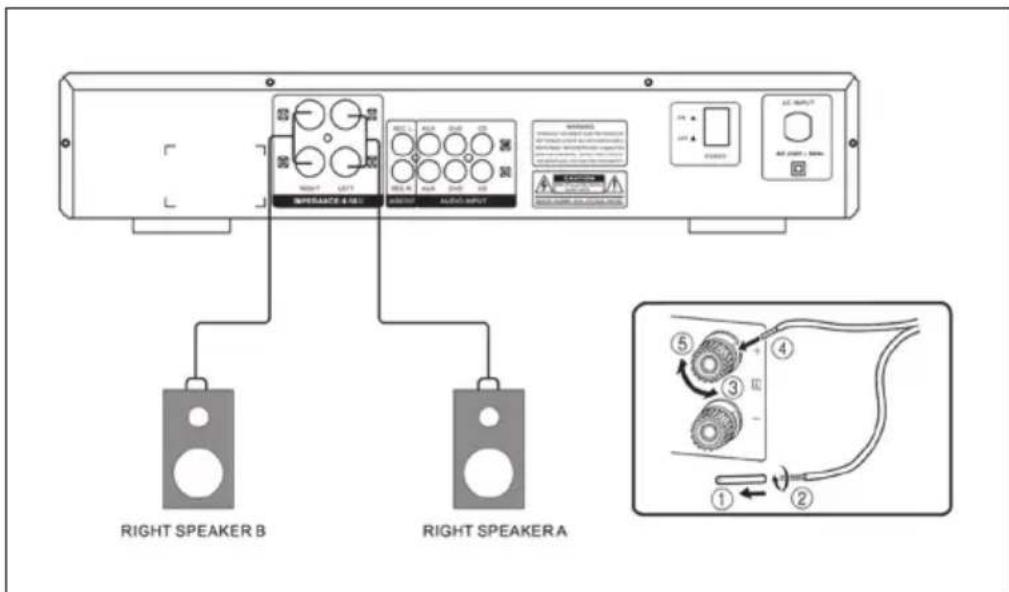
Speaker Connection
- Do not let the bare speaker wires touch each other or any other metal parts as this could damage this unit or speakers.
- Make sure the polarity of speaker wires is correct, + to +', and - to -, if these wires are incorrectly connected, the sound will be unnatural.
OPERATION AND FUNCTIONS
Normal-Funktion
- Select audio source by pressing the INPUT key on the front panel or the DVD,AUX,CD,BLUETOOTH on the remote control.
- Adjust the knob VOLUME on the front panel or the key VOL+/- on the remote control to adjust the setting of the main volume control to your listening level.
- Press the TREBLE key on the front panel to increase or decrease music treble effect. Press the BASS key on the front panel to increase or decrease music bass effect. Press the BALANCE key on the front panel to increase or decrease music balance effect.
- Press the MUTE key on the remote control to mute, press it again to reset.
BT Connection (only 10008978 and 10008979)
1 Turn off any Bluetooth devices previously paired (linked) with this unit.
2 Turn on the Bluetooth features on your phone or music player.
3 Turn on and set this unit in the Bluetooth mode.
4 Set your phone or music players to search for Bluetooth devices.
5 Select CD508-BT from search results on your phone or music player.
6 Select OK or Yes to pair this unit with your phone or music player.
7 If protected, enter 0000 for passkey.
TROUBLESHOOTING
| Problem Possible Cause Suggested Solution | |
| The indicator is not lit and there is no sound coming from the speakers. | The mains plug is not connected correctly. | Check the cable and connection. |
| The indicator is lit but there is no sound from the speakers. | The speakers are not connected properly. | Check the cable and connection of the speakers. |
| The volume control is set to minimum. | Use the volume control. |
| No sound from Centre channel. | The speaker connection is disconnected. | Check the cable and con- nection of the speakers. |
| The cable connection of the input source is inter-rupted. | Check the cable connec- tion of the input source. |
| Balance control is not set correctly. | Check the balance control setting. |
| The stereo sound is distorted (left / right reversed, the sound seems to come from a distance). | Polarity problem. Check that | the speakers and input channels are properly connected. Connect (+) to (+) and (-) to (-). |
| The remote control does not work properly. | The battery is empty. Replace the battery. | |
| The battery is not inserted correctly. | Insert the battery correctly. |
| The remote control is too far away from the unit. | Reduce the distance. |
| Obstacles in the way Remo- ve the obstacles. | |
| Wrong key pressed. Use the correct button. | |
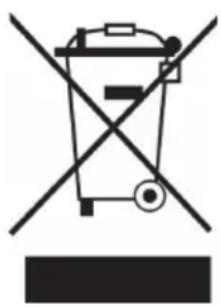
If there is a legal regulation for the disposal of electrical and electronic devices in your country, this symbol on the product or on the packaging indicates that this product must not be disposed of with household waste. Instead, it must be taken to a collection point for the recycling of electrical and electronic equipment. By disposing of it in accordance with the rules, you are protecting the environment and the health of your fellow human beings from negative consequences. For information about the recycling and disposal of this product, please contact your local authority or your household waste disposal service.
This product contains batteries. If there is a legal regulation for the disposal of batteries in your country, the batteries must not be disposed of with household waste. Find out about local regulations for disposing of batteries. By disposing of them in accordance with the rules, you are protecting the environment and the health of your fellow human beings from negative consequences.
CE UK CA
Manufacturer:
Chal-Tec GmbH, Wallstrasse 16, 10179 Berlin, Germany.
Importer for Great Britain:
Berlin Brands Group UK Ltd
PO Box 1145
Oxford, OX1 9UW
United Kingdom
Hereby, Chal-Tec GmbH declares that the radio equipment type AV2-CD508BT is in compliance with Directive 2014/53/EU. The full text of the EU declaration of conformity is available at the following internet address: use.berlin/10008978
For Great Britain: Hereby, Chal-Tec GmbH declares that the radio equipment type AV2-CD508BT is in compliance with the relevant statutory requirements. The full text of the declaration of conformity is available at the following internet address: use.berlin/10008978
Estimado cliente:
Berlin Brands Group UK Ltd
PO Box 1145
Oxford, OX1 9UW
United Kingdom
Berlin Brands Group UK Ltd
PO Box 1145
Oxford, OX1 9UW
United Kingdom
Berlin Brands Group UK Ltd
PO Box 1145
Oxford, OX1 9UW
United Kingdom