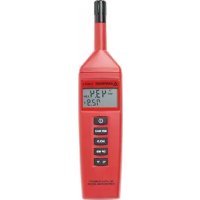
THWD3 - Temperature Controller Amprobe - Free user manual and instructions
Find the device manual for free THWD3 Amprobe in PDF.



| Product type | Digital thermometer-hygrometer, temperature, humidity, dew point and wet bulb temperature measurement |
| Brand | Amprobe |
| Model | THWD-3 |
| Dimensions | 240 × 54 × 34 mm |
| Weight | Approx. 180 g |
| Power supply | 9 V battery (NEDA 1604, JIS 006P or IEC6F22) |
| Battery life | 85 hours continuous (alkaline battery) |
| Display | Dual LCD display |
| Humidity measurement range | 0 to 99% RH |
| Humidity accuracy (10-90% RH) | ±3% RH |
| Humidity accuracy (<10, >90% RH) | ±5% RH |
| Humidity resolution | 0.1% RH |
| Temperature range | 0°C to 40°C (32°F to 104°F) |
| Temperature accuracy | ±0.8°C (±1.6°F) |
| Temperature resolution | 0.1°C/°F |
| Main functions | Temperature and humidity measurement, dew point and wet bulb temperature display (THWD-3), HOLD function, MIN/MAX mode, relative function, auto power off |
| Maintenance and cleaning | Rehydrate the sensor if drifting (exposure to dry environment): keep between 20 and 30°C at >75% RH for 12 hours. |
| Safety | Auto power off after 30 minutes, low battery indicator, indoor use up to 2000 m altitude |
| Included accessories | 9 V battery, user manual |
| Warranty | 1 year (except battery and abnormal use) |
Frequently Asked Questions - THWD3 Amprobe
User questions about THWD3 Amprobe
0 question about this device. Answer the ones you know or ask your own.
Ask a new question about this device
Download the instructions for your Temperature Controller in PDF format for free! Find your manual THWD3 - Amprobe and take your electronic device back in hand. On this page are published all the documents necessary for the use of your device. THWD3 by Amprobe.
USER MANUAL THWD3 Amprobe
Relative Humidity and Temperature Meters
User Manual
ENGGER
FRE
ITA
SPA
SWE
THWD-3 and TH-3 Relative Humidity and Temperature Meters

Relative Humidity Temperature Meters
Introduction. 3
Safety Information 3
Symbols Used in this Manual 3
Operating Instructions 4
Power-Up. 4
Selecting Temperature Units 4
Data-Hold Operation 4
Relative Operation 4
MIN/MAX Operation 4
Auto Power Off 4
Dew Point and Wet Bulb Temperature 4
Low Battery Condition 5
Wet Bulb Temperature Readings 5
Psychrometric Chart 5
Humidity Sensor Reconditioning 5
Recall Factory Calibration Data 5
Repair 6
WARRANTY 7
Specifications 8
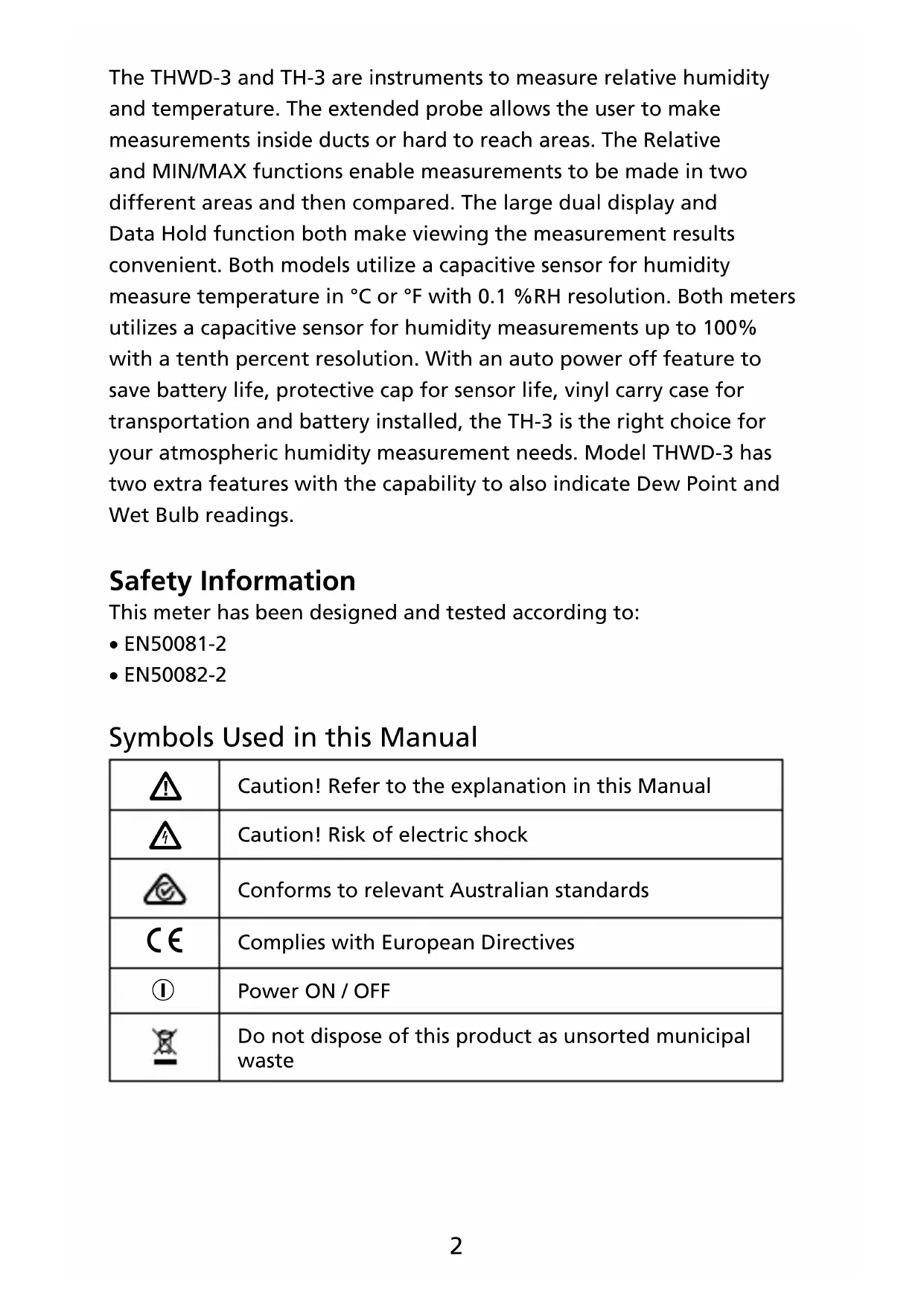
The THWD-3 and TH-3 are instruments to measure relative humidity and temperature. The extended probe allows the user to make measurements inside ducts or hard to reach areas. The Relative and MIN/MAX functions enable measurements to be made in two different areas and then compared. The large dual display and Data Hold function both make viewing the measurement results convenient. Both models utilize a capacitive sensor for humidity measure temperature in ^ C or ^ F with 0.1% RH resolution. Both meters utilizes a capacitive sensor for humidity measurements up to 100% with a tenth percent resolution. With an auto power off feature to save battery life, protective cap for sensor life, vinyl carry case for transportation and battery installed, the TH-3 is the right choice for your atmospheric humidity measurement needs. Model THWD-3 has two extra features with the capability to also indicate Dew Point and Wet Bulb readings.
Safety Information
This meter has been designed and tested according to:
EN50081-2
EN50082-2
Symbols Used in this Manual
| A | Caution! Refer to the explanation in this Manual |
| A | Caution! Risk of electric shock |
| C | Conforms to relevant Australian standards |
| CE | Complies with European Directives |
| 1 | Power ON / OFF |
| X | Do not dispose of this product as unsorted municipal waste |
Operating Instructions Power-Up
- Press the ① key to turn the Humidity/Temperature meter ON or OFF.
Selecting Temperature Units
When the meter is first powered on, the default scale setting is set to the Celsius (°C) scale. To change to Fahrenheit (°F) press the button. Press again to revert to Celsius. The next time the meter is turned on, the scale setting will be the same as it was when you powered off last time.
Data-Hold Operation
The present reading may be held on the display by pressing the HOLD button. When the held data is no longer needed, release the data-hold operation by pressing the HOLD button again. When the meter is in the Data Hold mode, the REL, MIN MAX, and ^ C^ F buttons are disabled.
Relative Operation (TH-3 only)
Pressing the button causes the meter to memorize the present reading. The difference between the new reading and the memorized data will be displayed. Press the button again to exit the Relative mode.
MIN/MAX Operation
Pressing the MIN MAX button places the meter in the MIN/MAX mode. In this mode the maximum value and minimum value is kept in the memory simultaneously and updated with every new data reading. Pressing the MIN MAX button displays the MAX indicator and the Maximum value on the display. Pressing MIN MAX again will display the MIN indicator and the Minimum value on the display. Pressing MIN MAX again causes the MAX and MIN indicators to blink together. This means that these data have been updated in the memory and the reading is the present temperature and humidity. When the meter is in MIN/MAX mode, the REL and ^ C 'F buttons are disabled. To exit MIN/MAX mode, press and hold MIN MAX for two seconds.
Dew Point and Wet Bulb Temperature (THWD-3 only) Operation
The Meter displays ambient temperature when first turned on. To display dew point (DP) temperature, press DP WB once. Press DP WB again to switch to wet bulb (WB) temperature. Pressing DP WB a third time returns the Meter to ambient temperature. The display indicates when dew point and wet bulb temperatures are selected.
Auto Power Off
By default, when the meter is powered on, it is in the auto power off mode. The meter will power itself off after 30 minutes if no key operation is performed. To disable the auto power off feature, press and hold the button and then power on the meter, The auto power off symbol will disappear to indicate that auto power off is disabled.
Low Battery Condition
When the battery voltage is under proper operation requirement, the + symbol displays on the LCD and the battery needs to be replaced.
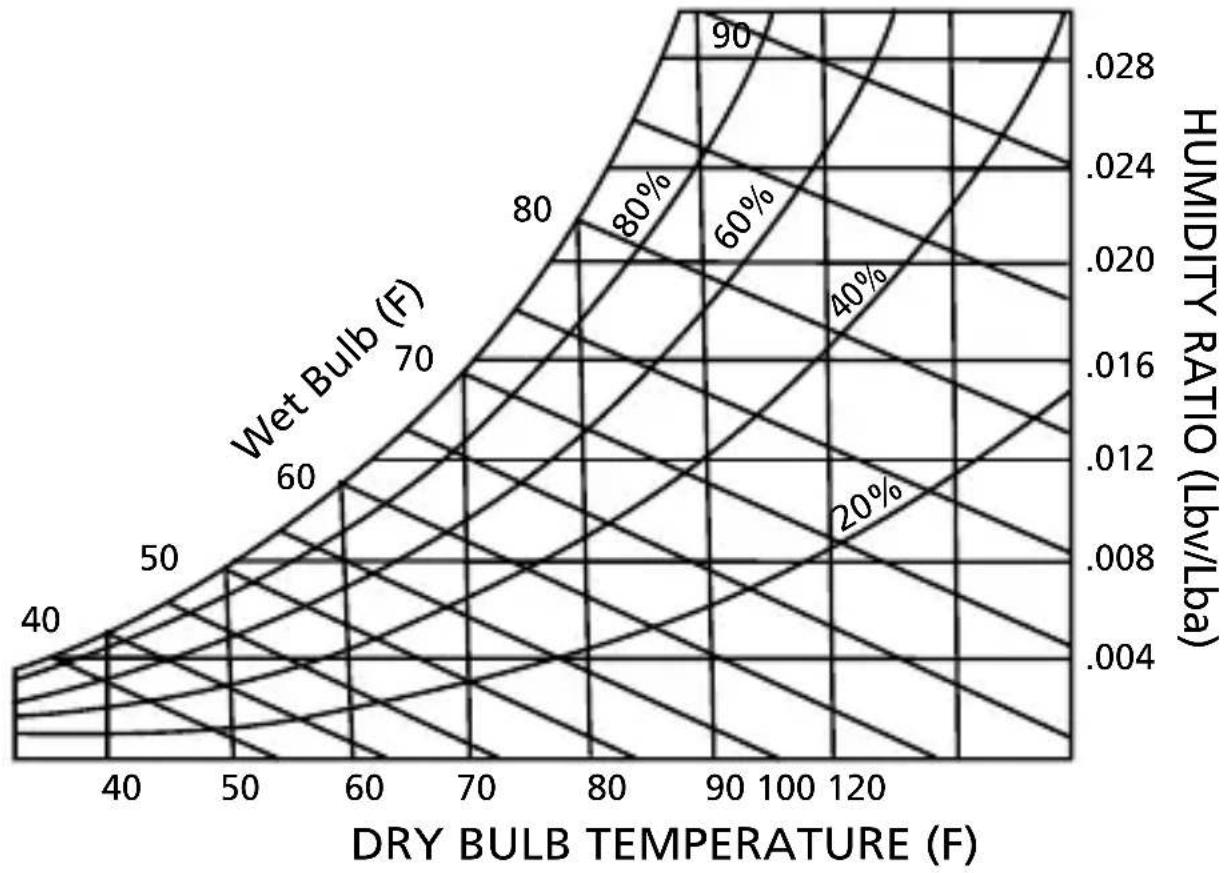
Wet Bulb Temperature Readings (TH-3)
Occasionally the Wet Bulb temperature is required. Use the following procedure and your TH-3 to obtain the wet bulb temperature.
- Determine RH% condition with the TH-3.
- Determine temperature (dry-bulb) with the TH-3.
- Locate dry bulb (DB) temperature line on the Psychrometric chart (vertical line across the bottom of the chart).
- Locate relative humidity (RH) line on the chart (curved line across the chart).
- Find the intersection of the DB and RH lines on the chart.
- Draw a diagonal line, starting at your intersection point, until the Wet Bulb (WB) point is determined. (The wet bulb temperature line is at the outmost curve of the chart).
For example, locate the DB temperature of 78^ on the Psychrometer chart. Locate the RH conditions of 50% RH on the chart. Draw a diagonal line up to the 65^ WB point.
Psychrometric Chart
Humidity Sensor Reconditioning
If the unit is found to be out of specification for humidity, the sensor could be offset due to long exposure in a dry environment. This condition is typical of polymer type humidity sensors. The sensor will need to be rehydrated.
To rehydrate the sensor, keep it in a 20^ to 30^ environment that is >75% RH for at least 12 hours.
Recall Factory Calibration Data
- Turn OFF the meter.
- Press and hold “°C/°F” and “HOLD” button, then press ① to power ON the meter. The display will blink for 3 seconds. While the display is blinking, press “MIN MAX” button to recall factory calibration data.
- A long beep indicates the meter has reset to factory calibration data.
Limited Warranty and Limitation of Liability
Your Amprobe product will be free from defects in material and workmanship for 1 year from the date of purchase. This warranty does not cover fuses, disposable batteries or damage from accident, neglect, misuse, alteration, contamination, or abnormal conditions of operation or handling. Resellers are not authorized to extend any other warranty on Amprobe's behalf. To obtain service during the warranty period, return the product with proof of purchase to an authorized Amprobe Test Tools Service Center or to an Amprobe dealer or distributor. See Repair Section for details. THIS WARRANTY IS YOUR ONLY REMEDY. ALL OTHER WARRANTYES - WHETHER EXPRESS, IMPLIED OR STAUTORY - INCLUDING IMPLIED WARRANTYES OF FITNESS FOR A PARTICULAR PURPOSE OR MERCHANTABILITY, ARE HEREBY DISCLAIMED. MANUFACTURER SHALL NOT BE LIABLE FOR ANY SPECIAL, INDIRECT, INCIDENTAL OR CONSEQUENTIAL DAMAGES OR LOSSES, ARISING FROM ANY CAUSE OR THEORY. Since some states or countries do not allow the exclusion or limitation of an implied warranty or of incidental or consequential damages, this limitation of liability may not apply to you.
Repair
All test tools returned for warranty or non-warranty repair or for calibration should be accompanied by the following: your name, company's name, address, telephone number, and proof of purchase. Additionally, please include a brief description of the problem or the service requested and include the test leads with the meter. Nonwarranty repair or replacement charges should be remitted in the form of a check, a money order, credit card with expiration date, or a purchase order made payable to Amprobe® Test Tools.
In-Warranty Repairs and Replacement – All Countries
Please read the warranty statement and check your battery before requesting repair. During the warranty period any defective test tool can be returned to your Amprobe® Test Tools distributor for an exchange for the same or like product. Please check the "Where to Buy" section on www.amprobe.com for a list of distributors near you. Additionally, in the United States and Canada In-Warranty repair and replacement units can also be sent to a Amprobe® Test Tools Service Center (see address below).
Non-Warranty Repairs and Replacement - US and Canada Non-warranty repairs in the United States and Canada should be sent to a Amprobe® Test Tools Service Center. Call Amprobe® Test Tools or inquire at your point of purchase for current repair and replacement rates.
In USA In Canada
Amprobe Test Tools Amprobe Test Tools
Everett, WA 98203 Mississauga, ON L4Z 1X9
Tel: 877-AMPROBE (267-7623) Tel: 905-890-7600
Non-Warranty Repairs and Replacement - Europe
European non-warranty units can be replaced by your Amprobe® Test Tools distributor for a nominal charge. Please check the "Where to Buy" section on www.amprobe.com for a list of distributors near you.
European Correspondence Address*
Amprobe® Test Tools Europe
In den Engematten 14
79286 Glottertal, Germany
Tel.: +49 (0) 7684 8009 - 0
*Correspondence only - no repair or replacement available from this address. European customers please contact your distributor.)
Specifications
Display: Dual display
Operating Conditions: 0^ to 40^; < 80% RH
Storage Conditions: -10^ to 60^; < 70% RH
Altitude: Up to 2000 meters, Indoor operation.
Sample Rate: 2.5 times per second
Battery: 9 V Battery, NEDA 1604 or JIS 006P or IEC6F22
Battery Life: 85-hours continuous; (with alkaline battery)
Dimension: 240 × 54 × 34 mm( 9.5 × 2.1 × 1.3in)
Weight: Approx.180g (6.4 oz.)
Accessories: Battery, instruction manual
TH-3, THWD-3
Humidity: 0% RH to 99% RH at 23^
0^ C to 55^ C
32^ to 131^
Range Accuracy
10% RH to 90% RH ± 3% RH
<10, >90%RH ± 5% RH
Temperature Coefficient: 0.1x(specified accuracy)/ °C
$$ (< 2 3 ^ {\circ} \mathrm {C} \text {o r} > 2 3 ^ {\circ} \mathrm {C}) $$
Sensor hysteresis: +/-1 %RH
Resolution: 0.1% RH
Response Time (@ t90; in slowly moving air): 180 sec
TH-3, THWD-3
Temperature:
Range Accuracy
-20°C to 60°C ± 0.8 °C
-4°F to 140°F ± 1.6°F
THWD-3
Wet Bulb Temperature:
Range
Accuracy
0^ C to 55^ C ± 0.8^ C
32^ to 131^ ± 1.6^
Dew Point Temperature:
0^ C to 55^ C ± 0.8^ C
32^ to 131^ ± 1.6^
Resolution: 0.1^ / 0.1^
Response Time (@ t90; in slowly moving air): 10 sec
THWD-3 and TH-3 Relative Humidity and Temperature Meters

12/2017, 6009982 Rev C
©2017 Amprobe.
All rights reserved. Printed in Taiwan.
Relative Humidity Temperature Meters
Amprobe Test Tools Amprobe Test Tools
Everett, WA 98203 Mississauga, ON L4Z 1X9
THWD-3 and TH-3 Relative Humidity and Temperature Meters
upstn
12/2017, 6009982 Rev C
©2017 Amprobe.
All rights reserved. Printed in Taiwan.
Relative Humidity Temperature Meters
Symbole in thisem Handbuch
Amprobe Test Tools Amprobe Test Tools
Everett, WA 98203 Mississauga, ON L4Z 1X9
Tel.: 877-AMPROBE (267-7623) Tel.: 905-890-7600
THWD-3 and TH-3 Relative Humidity and Temperature Meters
Relative Humidity Temperature Meters
THWD-3 and TH-3 Relative Humidity and Temperature Meters
Relative Humidity Temperature Meters
Amprobe Test Tools Amprobe Test Tools
Everett, WA 98203 Mississauga, ON L4Z 1X9
Tel.: 877-AMPROBE (267-7623) Tel.: 905-890-7600
Resolution: 0,1% RH
THWD-3 and TH-3 Relative Humidity and Temperature Meters
Relative Humidity Temperature Meters
Amprobe Test Tools Amprobe Test Tools
Everett, WA 98203 Mississauga, ON L4Z 1X9
Tel: 877-AMPROBE (267-7623) Tel: 905-890-7600
Visit amprobe.com for
- Catalog
Application notes
Product specifications - User manuals
Amprobe
amprobe.com
info@amprobe.com
Everett, WA 98203
Tel: 877-AMPROBE (267-7623)
Beha-Amprobe
beha-amprobe.com
In den Engematten 14
79286 Glottertal, Germany
Tel.: +49 (0) 7684 8009 - 0

Please
Recycle
- THWD-3 and TH-3 Relative Humidity and Temperature Meters
- Relative Humidity Temperature Meters
- Safety Information
- Operating Instructions Power-Up
- Selecting Temperature Units
- Data-Hold Operation
- Relative Operation (TH-3 only)
- MIN/MAX Operation
- Dew Point and Wet Bulb Temperature (THWD-3 only) Operation
- Auto Power Off
- Low Battery Condition
- Wet Bulb Temperature Readings (TH-3)
- Psychrometric Chart
- Humidity Sensor Reconditioning
- Recall Factory Calibration Data
- Limited Warranty and Limitation of Liability
- Repair
- In-Warranty Repairs and Replacement – All Countries
- Specifications
- TH-3, THWD-3
- Temperature:
- THWD-3
- Dew Point Temperature:
- Visit amprobe.com for
- Amprobe
- Beha-Amprobe
Brand : Amprobe
Model : THWD3
Category : Temperature Controller