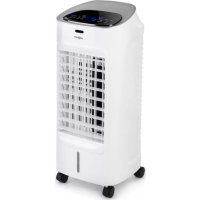
Coolster - Air Conditioning OneConcept - Free user manual and instructions
Find the device manual for free Coolster OneConcept in PDF.


| Product Type | Air Cooler / Humidifier |
| Brand | oneConcept |
| Model | Coolster |
| Reference | 10032346, 10032347 |
| Power Supply | 220-240 V ~ 50-60 Hz |
| Power | 60 W |
| Number of Speeds | 3 (Low, Medium, High) |
| Wind Types | Normal, Natural, Night |
| Louver Oscillation | Yes (front/back, manual adjustment) |
| Cooling Function | Yes (water pumping on evaporator) |
| Ionizer Function (anions) | Yes |
| Timer | 1 to 9 hours (scheduled on/off) |
| Remote Control | Yes, range 6 m |
| Water Tank | Removable, with MIN and MAX marks |
| Ice Cube Trays Included | Yes (2 pieces) |
| Swivel Casters | Yes (4) |
| Dust Filter | Yes (removable grille, washable) |
| Absorbent Pad (evaporator) | Yes (washable) |
| Maintenance | Clean filter, pad, tank regularly |
| Safety | Automatic shut-off via timer, overheat protection (do not cover) |
| Compliance | CE (EMC, LVD, RoHS, ErP) |
Frequently Asked Questions - Coolster OneConcept
User questions about Coolster OneConcept
0 question about this device. Answer the ones you know or ask your own.
Ask a new question about this device
Download the instructions for your Air Conditioning in PDF format for free! Find your manual Coolster - OneConcept and take your electronic device back in hand. On this page are published all the documents necessary for the use of your device. Coolster by OneConcept.
USER MANUAL Coolster OneConcept
10032346
10032347
Congratulations on purchasing this equipment. Please read this manual carefully and take care of the following hints to avoid damages. Any failure caused by ignoring the mentioned items and cautions mentioned in the instruction manual are not covered by our warranty and any liability.
CONTENTS
Technical Data 9
Declaration of Conformity 9
Safety Instructions 10
Product Description 11
Features 11
Use and Operation 12
Care and Cleaning 14
Hints on Disposal 14
TECHNICAL DATA
| Item number 10032346, 10032347 | |
| Power supply 220-240 V ~ 50-60 Hz | |
| Power consumption 60 W |
DECLARATION OF CONFORMITY

Producer:
Chal-Tec GmbH, Wallstraße 16, 10179 Berlin, Germany.
This product is conform to the following European Directives:
2014/30/EU (EMC)
2014/35/EU (LVD)
2011/65/EU (RoHS)
206/2012/EU (ErP)
SAFETY INSTRUCTIONS
• Use as per the rating voltage.
- Do not repair or remake the appliance by yourself, it should be repaired by the repairmen.
- Do not operate the appliance with wet hands, in order to avoid damage.
- If the supply cord is damaged, it must be replaced by a special cord or assembly available from the manufacturer or its service agents.
- When the appliance is not in use, switch it off and unplug it.
- Do not insert things to air outlets and inlets, in order to avoid damage.
- Do not use the appliance near explosive and combustible gas.
- Use the appliance only on a flat surface.
- Do not use outdoors.
- The level of water tank should not over "MAX" scale at any time, when humidifying, the total level of water tank should not below "MIN" scale.
- After adding water to the water tank, do not tilt or knock over the appliance when you put or move it. If you want to move, please drive it at side, in order to avoid spilling the water.
- Do not turnover the appliance. If it is toppled over, and there have some water in the body, should unplug the power supply. Then send it to repair department or after-sales service and overhaul.
- Do not put things on the appliance, do not cover air vent. (WARNING: Do not cover heater, in order to avoid over heat.)
- Clean the appearance with a lightly damp cloth. Do not use any type of detergents or solutions. Do not rinse with water.
- Do not make air outlets and inlets near the wall or curtain.
- Do not knock or shake the body when use, otherwise it may cause stop.
- The water in water tank can easily metamorphose and have odour at summer, renew the water frequently.
- The appliance must not be located immediately below a socket outlet. The rating current of socket should exceed 10A.
- Do not use the appliance in the immediate surroundings of a bath, a shower or a swimming pool.
- This appliance is not intended for use by persons (including children) with reduced physical, sensory or mental capabilities, or lack of experience and knowledge, unless they have been given supervision or instruction concerning use of the appliance by a person responsible for their safety.
• Children should be supervised to ensure that they do not play with the appliance.
PRODUCT DESCRIPTION
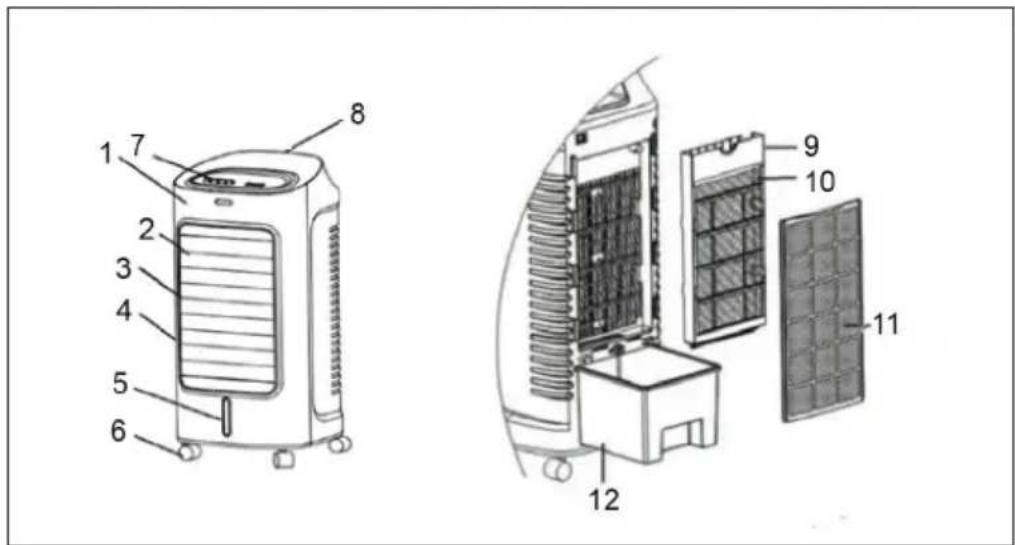
| 1 Panel 7 Control panel | |
| 2 Panel decoration strip 8 Handle | |
| 3 Air outlet 9 Curtain bracket | |
| 4 Front housing 10 Water curtain | |
| 5 Water tank 11 Dust gaze | |
| 6 Casters 12 Water tank |
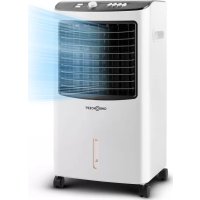
Principle of Cooling: Water is taken from the water tank by pump to the top, then the water drops into paper evaporator. When the water in paper evaporator evaporates to water vapour, the air is cooled. People will feel cool wind when the cool air is delivered by fan.
FEATURES
- Adjustable speed and fan type: have three speeds and fan types, and it can send wind from side to side neatly.
- Cooling: Through air evaporating, cut down the air temperature and raise relative humidity.
- Deliver wind at wide angle: swing the blades automatically, deliver wind at wide angle. Also swing the blades transversely by your hands, choose the wind direction up and down..
- Remote control: 6 meters far away, receive at 60 degree wide angle.
USE AND OPERATION
Assembling and Watering
1 Assembling castors: put the appliance on a flat surface, take out the wrench from foam box, then assemble the castors.
2 Watering: pull 1/3 water tank, then add clean water.
Important notes on the tank:
- Pay attention to the level of water tank when add water.
- The level of water tank should not over "MAX" scale at any time, when humidifying, the total level of water tank should not below "MIN" scale.
- Put ice or frozen ice box to the water tank if you want to strengthen the efficiency of cooling. But the total level of water tank should not over "MAX" scale.
Operation and Functions
1 ON/OFF on control panel: Press the key, turn on the appliance, second press, shut it down.
2 Speed: press this key, start the appliance, the corresponding function changes as follows when you press the key serially: LOW - MEDIUM - HIGH - LOW.
NOTE: Pay attention to the indications on the display.
3 Wind type: press this key, you can choose the normal wind, natural wind and sleeping wind.
4 Swing : press this key, the wind direction can swing flatly, and the swing indicator light is on. It cancels this function when you press again.
NOTE: You also can swing the transverse blades by your hands, choose the wind direction up and down.
6 Timer settings:
When the product is working: press this key, the timer from 1 to 9 hours options with step 1 hours. It will shutdown when the timer finished.
When the product is under stand-by state: press this key, you could reserve the time to start the the product, the timer from 1 to 9 hours options with step 1 hours and you also could choose the wind speed, wind type, negative ion, swing function in the meanwhile. It will start follow your demand when the timer finished.
7 Cooling: press the key to start cooling system. It cancels this function when you press again.
IMPORTANT: Please be sure there is enough water in the water tank before press this key. Do not press the key "cool" without water!
8 Anion: purified and sterilized air by generating negative ion.
The Use of Ice Box
The ice crystal has a particular feature of keeping cool, it can absorb heat from water and let the water temperature in the water tank below environmental temperature, so the air will be much cooler.
a. add water to the ice box(not full) and put it into the refrigerating chamber of refrigerator to make sure that it icing absolutely.
b. Open the door, put the frozen ice box into the water tank.
c. There have two air boxes, can use circularly.
CARE AND CLEANING
Note: Ensure that the fan is switched off from the supply mains before removing the air filter screen.
Clean the air filter screen
Cut off the power supply, pull the handle of air filter screen, remove it from appliance. Clean the air filter screen with neutral detergent and banister brush, then clean it with clear water. Finally, reinstall to the appliance.
Clean the wetted pad
Cut off the power supply, take down the air filter screen, then draw the wetted pad from support. Clean the wetted pad with neutral detergent and banister brush, then clean it with clear water. Finally, reinstall to the appliance.
Attention: the wetted pad must be installed horizontally, in order to avoid leaking.
Clean the water tank
Cut off the power supply, open the door, take out the water tank, clean it with neutral detergent, and wash it with clear water, then reinstall to the appliance.
Clean the shell
Clean with neutral detergent and soft cloth.
Attention: cut off the power supply when clean the appliance as there have a high pressure in the body. Do not leave any water on the surface of control panel.
HINTS ON DISPOSAL
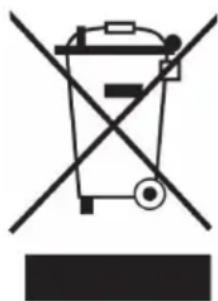
According to the European waste regulation 2012/19/EU this symbol on the product or on its packaging indicates that this product may not be treated as household waste. Instead it should be taken to the appropriate collection point for the recycling of electrical and electronic equipment. By ensuring this product is disposed of correctly, you will help prevent potential negative consequences for the environment and human health, which could otherwise be caused by inappropriate waste handling of this product. For more detailed information about recycling of this product, please contact your local council or your household waste disposal service.
Estimado cliente:
DÉCLARATION DE CONFORMITÉ

Fabricant :
Chal-Tec GmbH, Wallstraße 16, 10179 Berlin, Allemagne.
- CONTENTS
- DECLARATION OF CONFORMITY
- SAFETY INSTRUCTIONS
- PRODUCT DESCRIPTION
- FEATURES
- USE AND OPERATION
- ASSEMBLING AND WATERING
- OPERATION AND FUNCTIONS
- THE USE OF ICE BOX
- CARE AND CLEANING
- CLEAN THE AIR FILTER SCREEN
- CLEAN THE WETTED PAD
- CLEAN THE WATER TANK
- CLEAN THE SHELL
- HINTS ON DISPOSAL
- ESTIMADO CLIENTE
- DÉCLARATION DE CONFORMITÉ
Brand : OneConcept
Model : Coolster
Category : Air Conditioning