Watch D - Smartwatch HUAWEI - Free user manual and instructions
Find the device manual for free Watch D HUAWEI in PDF.



| Product Type | Smartwatch with wrist blood pressure monitor (medical device) |
| Models | MLY-B10, MLY-B11 |
| Intended Use | Measurement of blood pressure and pulse in adults (wrist circumference 13.0-20.0 cm) |
| Measurement Method | Oscillometric |
| Pressure Measurement Range | 0-300 mmHg |
| Pressure Accuracy | ±3 mmHg |
| Pulse Measurement Range | 40-180 beats/min |
| Pulse Accuracy | ±5 % |
| Power Supply | Rechargeable Li-ion battery 451 mAh, 3.87 V |
| Battery Life (typical use) | 7 days (6 blood pressure measurements/day, 5 ECG/day, notifications) |
| Water Resistance | IP68 (1.5 m fresh water, 30 min) |
| Connectivity | Bluetooth 4.2 or later, NFC |
| Included Accessories | Wireless charger (cable), air bags sizes M and L, strap size M (without buckle), separate cover, replacement cover, measuring tape, guides |
| Maintenance | Clean with a dry cloth; replace air bag cover every 6 months; do not disassemble |
| Spare Parts | Air bags, straps, charger (model CP81-1), air bag covers |
| Safety | Do not use on children, pregnant women, pacemaker wearers (distance >15 cm); consult a doctor in case of arrhythmia, diabetes, etc. |
| Operating Temperature | 5 °C to 40 °C |
| Operating Humidity | 10% RH to 95% RH (non-condensing) |
| Operating Atmospheric Pressure | 80 kPa to 105 kPa |
| Storage | Temperature: -20 °C to +55 °C, humidity: 10-95% RH |
| Service Life | Device: 3 years, air bag and strap: 1 year, cover: 6 months |
| Standards | CEI 80601-2-30, ISO 81060-2:2018/A1:2020 |
| Regulatory Information | See electronic label in Settings > About |
Frequently Asked Questions - Watch D HUAWEI
User questions about Watch D HUAWEI
0 question about this device. Answer the ones you know or ask your own.
Ask a new question about this device
Download the instructions for your Smartwatch in PDF format for free! Find your manual Watch D - HUAWEI and take your electronic device back in hand. On this page are published all the documents necessary for the use of your device. Watch D by HUAWEI.
USER MANUAL Watch D HUAWEI
Manufacturer Name: Huawei Device Co., Ltd.
Manufacturer's registered address: No.2 of Xincheng Road, Songshan Lake Zone,
Dongguan, 523808 Guangdong, P.R.China
Issue Date: 2022-04
MLY-B10
MLY-B11
Quick Start Guide
0. Safe Use
This device is a household product and is suitable for wrist blood pressure measurement for adults aged 18 and above.
This device complies with IEC 80601-2-30.

[Warnings]
- Do not diagnose or treat yourself based on the measurement results. Follow your doctor's advice instead, because self-diagnosis may worsen the condition. Send your measurement results to your doctor or medical staff who are familiar with your physical condition.
- Do not use this device in areas containing high frequency (HF) surgical equipment, magnetic resonance imaging (MRI) equipment, and computerized tomography (CT) scanners. This may result in incorrect operation of the device and/or cause an inaccurate reading.
- Consult with your physician before using this device if you have common arrhythmias such as atrial or ventricular premature beats or atrial fibrillation; arterial sclerosis; poor perfusion; diabetes; pregnancy; preeclampsia or renal disease. NOTE that any of these conditions in addition to patient moving, trembling, or shivering may affect the blood pressure measurement reading.
- Measurements may be inaccurate for patients suffering from blood circulation disorders and blood diseases.
- Do not use this monitor on infants, toddlers, children or persons who cannot express themselves.
- This device has not been validated for use on pregnant patients.
- Consult with your physician before using this device if you have had a mastectomy.
- The following should use this product for blood pressure measurements under the guid
ance of a doctor:
Patients with limb shaking syndrome and people who cannot bend their arms by themselves.
- People who have wounds or inflammation in their arms or wrists.
- People whose arms or wrists are having an infusion, blood transfusion, or a catheter inserted.
- Patients who are using monitoring medical equipment.
-
The parts of the product do not support repair and maintenance when it is in use.
-
The user must be an intended operator.
- Keep the charging base (with the power cable) away from infants, toddlers or children to avoid the risk of strangulation.
12.DO NOT disassemble or attempt to repair this device by yourself.
![HUAWEI Watch D - [Warnings] - 1](/content/2026/03/549435/images/36b949b512195b9f5c4298f43f20e29139e98a0a15c6d5684ac0c31891499c1b.jpg)
[Precautions]
- This device supports a wrist circumference range of 13.0cm to 20.0cm for blood pressure measurements. If the wrist circumference exceeds the range, the accuracy of blood pressure measurement may be affected.
- Observe your arm during the measurement to ensure that this device is not affecting the blood flow.
- If the airbag is excessively inflated, it may cause discomfort to your wrist and cause blood stasis or paralysis. In this case, remove the device.
- Do not take blood pressure measurements too often as bruising may occur due to blood flow interference.
-
Portable and RF communication devices may affect this device. Do not place the device near or on top of other devices. Otherwise, the radiation may increase and the anti-interference capability may decrease.
-
This product may cause adverse events such as allergies. In this case, stop wearing it and consult a doctor.
- Ensure that the electromagnetic interference is no more than 3V / m . Possible sources of interference include microwaves and X-rays.
- The device may worsen the conditions for people who have wounds or inflammation in their arms or wrists.
- The device may cause harm to people whose arms or wrists are having an infusion, blood transfusion, or a catheter inserted due to its temporary interference with the flow of blood.
- Use of this device may cause the temporary loss of function of the monitoring medical electrical (ME) equipment used simultaneously on the same limb.
- You can view the remaining power of the device on the device screen.
- If the measured blood pressure is abnormal, you can take a measurement again 5 minutes later or consult your doctor.
- The accuracy of the pressure sensor has been strictly tested, so you do not need to check it. If you have any questions, please call the customer service hotline.
- If you use a defibrillator while wearing the watch, the blood pressure measurement feature of the watch may be affected. Please contact the customer service hotline if you have any questions about it.
The validity period of this product is 3 years.
1. Product Information
1. Intended Use
The Wrist Blood Pressure Monitor is a digital monitor intended for use in measuring blood pressure and pulse rate in adult patient population with wrist circumference ranging from 13.0 to 20.0cm (5.12-7.87 inches).
1.2 Contraindications
Allergic reactions to this product.
1.3 Performance Indicators
| General Specifications | |
| Name Wrist Blood Pressure Monitor | |
| Models MLY-B10, MLY-B11 | |
| Embedded Software Version Blood Pressure V1 | |
| Type of Protection Against Electric Shock | Internal power supply |
| Degree of Protection Against Electric Shock | Type BF (Airbag, the bottom of the device) |
| Level of Protection Against Harmful Liquids and Particles Entering Inside | IP68 (Complies with the IP68 protection level of IEC 60529) |
| Level of Safety Against Flammable Anesthetic Gas Mixed with Air, Oxygen, or Nitrous Oxide | Non-AP/APG type |
| Running Mode Continuous running | |
| Power Supply Rechargeable Li-ion Polymer Battery (Rated capacity: 451 mAh/1.74 Wh; rated voltage: 3.87 V) | |
| Battery Life Information Typical usage: 7 | daysTypical application scenario: default settings; heart rate monitoring: always on; TruSleep™: on at night; blood pressure measurement: 6 times per day; ECG measure-ment: 5 times per day; average weekly exercise: 90 min-utes; message notifications: enabled (with 50 messages, 6 incoming calls, and 3 alarms per day); screen-on: 200 times per day. The battery life depends on the usage habits and storage environment.Typical battery life: A new battery on a full charge will last for approximately 500 cycles when operating at room temperature (25°C). |
| Durable period (Service life) Device body | 3 years; airbag & strap: 1 year; airbag clothings (spare): 0.5 years |
| Blood Pressure Measurement | |
| Measuring Method Oscillometric method | |
| Measurement Range Pressure: 0–300 mmHg (0–40 kPa)Pulse rate: 40–180 times/minDiastolic blood pressure: 40–130 mmHg (5.3–17.3 kPa)Systolic blood pressure: 60–230 mmHg (8–30.7 kPa) | |
| Precision Error Pressure: ±3 mmHg (±0.4 kPa)Pulse rate: ±5% | |
| Inflation Method Automatic pressure pump | |
| Deflation Method Automatic fast deflation | |
| Measurable Wrist Circumference M-sized | airbag: 13.0-16.0 cm/5.12-6.30 in L-sized airbag: 16.1-20.0 cm/6.34-7.87 in Please select the appropriate airbag according to your measured wrist circumference. |
| This device has been clinically investigated according to the requirements of ISO 81060-2:2018/A1: 2020. In the clinical validation study, K5 was used on 85 subjects for determination of diastolic blood pressure. For details, call the customer service hotline. | |
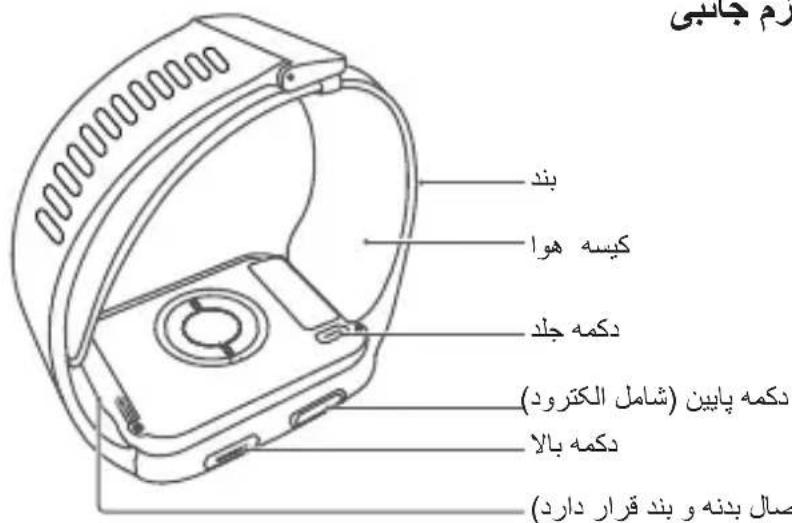
1.4 Structure Diagram and Packing List
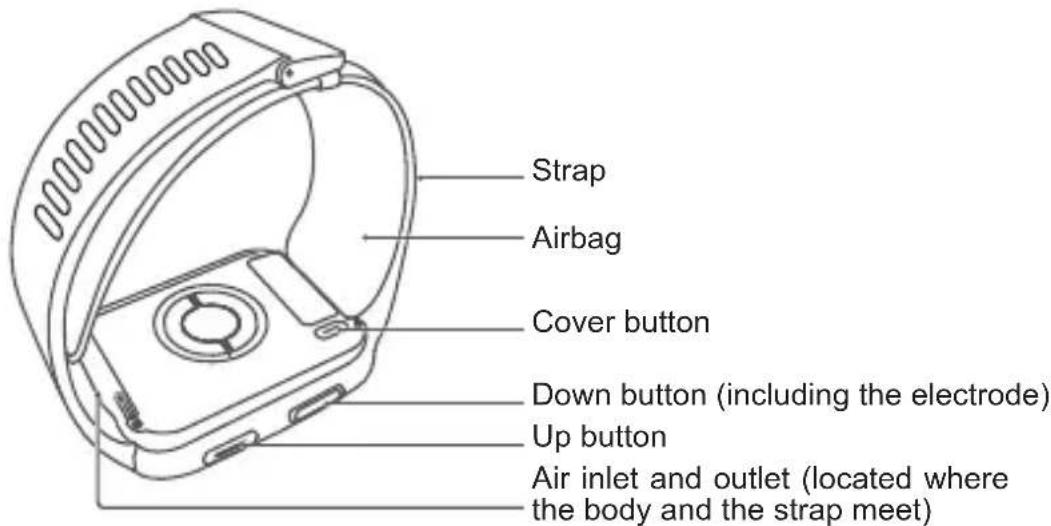
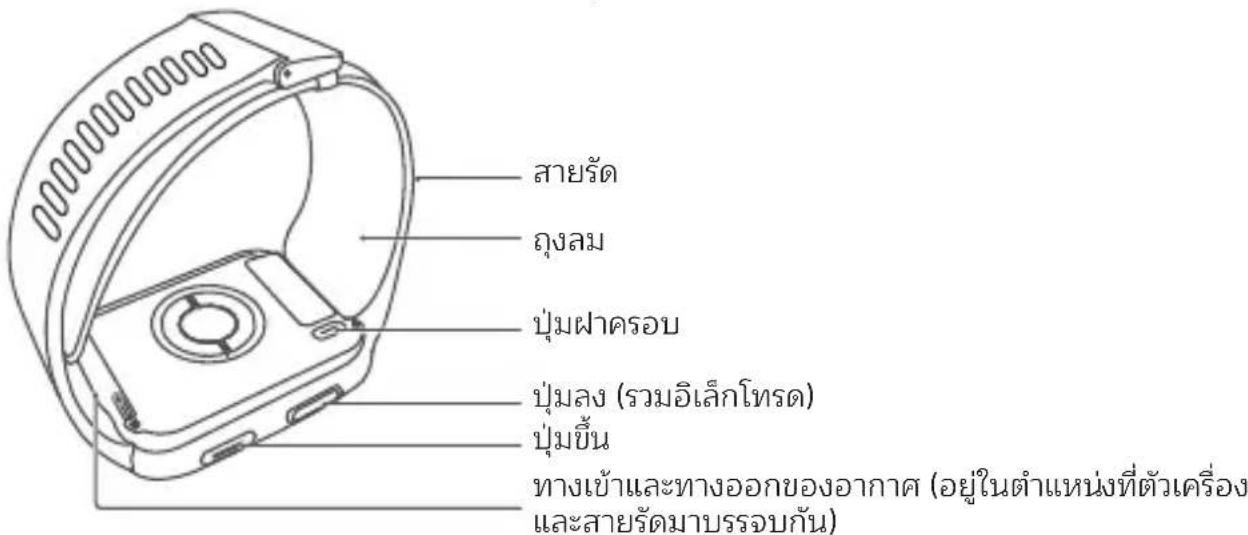
This product consists of a device body, a cuff (strap), and a wireless charging cradle. For its materials, see the label on the package.
Packing list:
Device (with an L-sized strap and an L-sized airbag) x 1
- Independent cover x 1
- Quick Start Guide x 1
- M-sized airbag x 1
-
L-sized and M-sized airbag clothings (spare) x 1
Wearing Guide x 1 -
M-sized strap (without the clasp) x 1
- Wrist circumference ruler x 1
- Charging cradle (with the power cable) x 1
2. Blood Pressure Measurement
2.1 Principles
This device measures blood pressure by using the oscillometric method. As the strap (airbag) pressure increases, the device extracts and analyzes the signals of pressure oscillations in the airbag using the pressure sensor, and automatically calculates the high pressure (systolic pressure), low pressure (diastolic pressure), and pulse rate.
2.2 Working Environment
| Network Environment Bluetooth 4.2 or later |
| Temperature 5°C to 40°C |
| Humidity 10% RH to 95% RH (excluding condensation) |
| Atmospheric pressure 80 kPa to 105 kPa |

Precautions
- Keep the device away from electromagnetic interference, vibration, and noise.
- Failure to comply with the working environment requirements specified in this guide will cause the product to fail to reach the claimed performance specifications or damage the parts.
2.3 Measurement Requirements
Any blood pressure measurement data may be influenced by the location of the measurement, posture (standing, sitting, or lying down), movement, or physiological conditions.
To ensure the accuracy of the measurements, observe the following requirements:
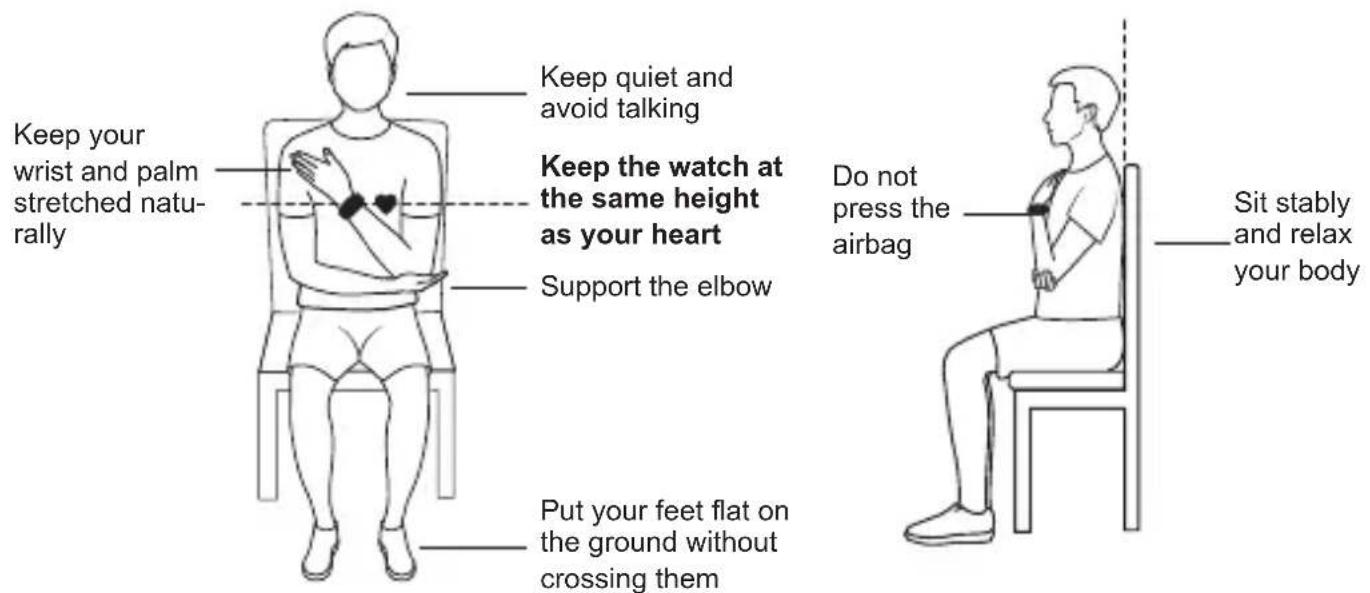
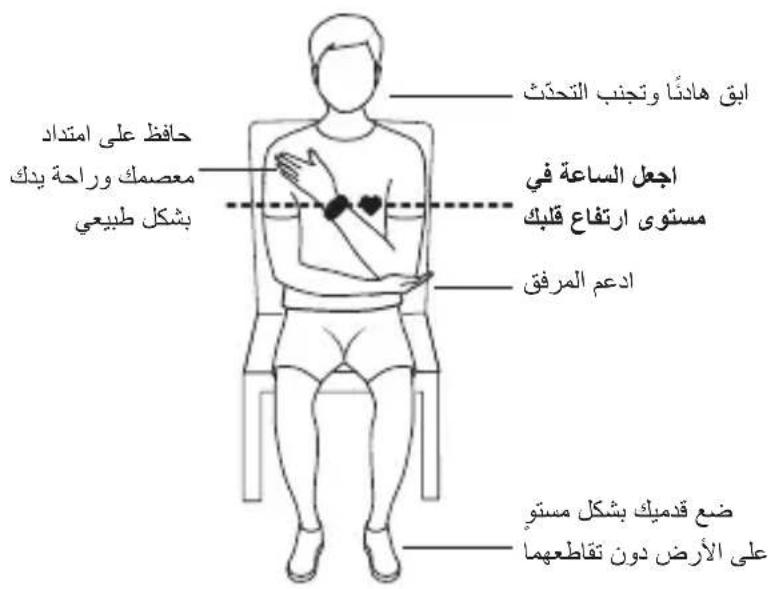
- Rest for 5 minutes before a measurement and keep your body naturally relaxed until the measurement is complete. Do not perform the measurement when you feel emotional or stressed.
- Perform a measurement in a quiet environment. Do not speak, bend your fingers, or move your body or arms during the measurement.
- Rest your wrist for 1 to 2 minutes or longer before you perform the next measurement. During this period of time your arteries will return to how they were before the blood pressure was measured.
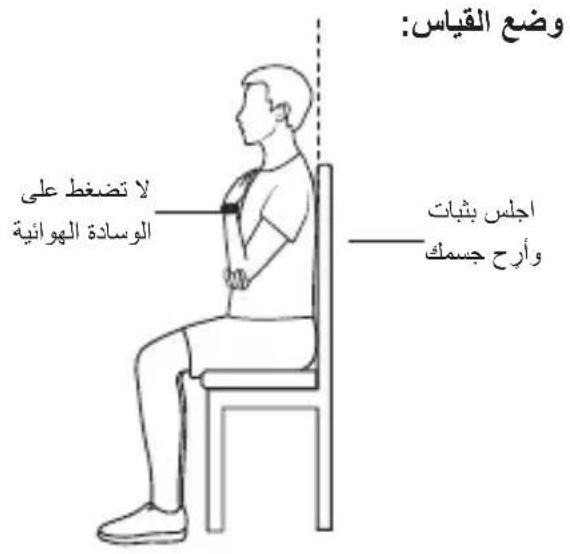
Measurement posture:
- Remove the device if it does not start deflating during a blood pressure measurement.
- Press and hold the Up button for more than 15 seconds to restart the device.
Description of GUI abbreviations
| No. Abbreviation Full Name |
| 1 SY$ SYSTOLIC BLOOD PRESSURE |
| 2 DIA DIASTOLIC BLOOD PRESSURE |
| 3 cm centimeter |
| 4 in inch |
For details about precautions, operation instructions, maintenance, calibration, and FAQs, see the user guide in the Huawei Health app.
2.4 Entering the Static Mode
This feature is mainly for professionals to enter the static pressure test mode of this device, and to use the standard pressure gauge to test its static performance.
3. Storage and Maintenance
The accuracy of the pressure sensor in this device has been strictly tested, so you do not need to check it by yourself. If you have any questions, please call the customer service hotline.
3.1 Storage Requirements
Storage and transportation conditions:
Temperature: -20^ to +55^
Humidity: 10% RH to 95% RH (excluding condensation)
Atmospheric pressure: 80kPa to 105kPa
Do not store the device in the following environments:
- Environments with water, high temperatures, dampness, direct sunlight, dust, or salt.
-
Environments that can generate tilts, vibrations, or impacts.
-
Environments where chemicals are stored or corrosive gases are generated.
It is recommended that you put the airbag in a box or storage bag when you are not using it.
Do not put the device in places that are exposed to direct sunlight, such as on a car dashboard or on a window sill.
Keep the device away from heat sources or exposed fire sources, such as electric heaters, microwaves, ovens, water heaters, fireplaces, candles, and other places that may generate high temperatures.
To prevent injuries, malfunctions, or explosions, do not allow children or pets to swallow or bite the device or its accessories.
3.2 Transportation Conditions
Avoid strong impacts, direct collisions, and exposure to sunlight or rain during transportation.
3.3 Cleaning/Accessory Replacement
For details, open the Huawei Health app, touch Devices and then the connected device, and view the User Guide on the device details screen.
Note: Replacing the original parts with third-party parts may cause measurement errors.
3.4 Replace the airbag clothings
Replace the airbag clothing when it becomes dirty. It is recommended that you replace the clothing after six months of use. For details, open the Huawei Health app, touch Devices and then the connected device, and view the User Guide on the device details screen.

[Precautions]
Do not perform any maintenance by yourself. If the product has quality issues or you have any questions about how to use its blood pressure measurement feature properly, call the customer service hotline.
4. Explanations of Symbols and Figures
| Figures and Symbols Description | |
| Type BF Applied Part | |
| Notice. Indicates caution should be taken because random documents are referred to. | |
| IP68 | Degree of protection of the enclosure |
| Main chip trademark | |
| Indicates that the product is capable of being recycled. | |
| Bluetooth® | Short-distance radio technology, Bluetooth certification mark. |
| FSC | Forest Stewardship Council |
| Recycle the object when it is discarded. | |
| Non-ionizing radiation | |
| CE | CE mark |
| MD | The operation guide must be read. |
| Medical device | |
| 21PAP | Recyclable non-corrugated fiberboard (board) |
| Manufacturer | |
| Remove the packaging and dispose of it in the appropriate recycling bin according to local laws and regulations. | |
| The range of temperature to which the medical device can be safely exposed. | |
| % | The range of humidity to which the medical device can be safely exposed. |
| The range of atmospheric pressure to which the medical device can be safely exposed. | |
5. Declaration of Electromagnetic Compatibility (EMC)
MLY-B10/MLY-B11 manufactured by Huawei Device Co., Ltd. conforms to IEC 60601-1-2:2014/ AMD1:2020 Electromagnetic Compatibility (EMC) standard.
Further documentation in accordance with this EMC standard is available at https://consumer.huawei.com/en/. Refer to the EMC information for MLY-B10/MLY-B11 on the website.
Copyright © Huawei 2022. All rights reserved.
THIS DOCUMENT IS FOR INFORMATION PURPOSE ONLY, AND DOES NOT CONSTITUTE ANY KIND OF WARRANTY.
Trademarks and Permissions
The Bluetooth® word mark and logos are registered trademarks owned by Bluetooth SIG, Inc. and any use of such marks by Huawei Technologies Co., Ltd. is under license. Huawei Device Co., Ltd. is an affiliate of Huawei Technologies Co., Ltd.
Other trademarks, product, service and company names mentioned may be the property of their respective owners.
Privacy Policy
To better understand how we protect your personal information, please see the privacy policy at https://consumer.huawei.com/privacy-policy.
Blasting Caps and Areas
Turn off your mobile phone or wireless device when in a blasting area or in areas posted turn off "two-way radios" or "electronic devices" to avoid interfering with blasting operations.
Petrol stations and explosive atmospheres
In locations with potentially explosive atmospheres, obey all posted signs to turn off wireless devices such as your phone or other radio equipment. Areas with potentially explosive atmospheres include fuelling areas, below decks on boats, fuel or chemical transfer or storage facilities, areas where the air contains chemicals or particles, such as grain, dust, or metal powders.
Operation and safety
- Using an unapproved or incompatible power adapter, charger or battery may cause fire, explosion or other hazards.
-
Ideal temperatures are 5^ to 40^ .
-
Avoid placing metal objects on the surface of the wireless charging cradle, as they could cause the equipment to heat up and malfunction. Only use the wireless charging cradle in environments with an ambient temperature ranging from 5^ to 40^ .
- If the ambient temperature is too high, the wireless charger may stop working. If this occurs, you are advised to stop wireless charging.
- To keep the wireless charger in good condition, avoid using it inside a vehicle.
- Adult supervision is advised if children are to use or come into contact with this product.
- Please consult your doctor and the device manufacturer to determine if operation of your device may interfere with the operation of your medical device.
- Switch off your wireless device when requested to do so in hospitals, clinics or health care facilities. These requests are designed to prevent possible interference with sensitive medical equipment.
- Some wireless devices may affect the performance of hearing aids or pacemakers. Consult your service provider for more information.
- Pacemaker manufacturers recommend that a minimum distance of 15cm be maintained between a device and a pacemaker to prevent potential interference with the pacemaker. If you are using a pacemaker, hold the device on the side opposite the pacemaker and do not carry the device in your front pocket.
- Keep the device and the battery away from excessive heat and direct sunlight. Do not place them on or in heating devices, such as microwave ovens, stoves, or radiators.
- Observe local laws and regulations while using the device. To reduce the risk of accidents, do not use your wireless device while driving.
- To prevent damage to your device's parts or internal circuits, do not use it in dusty, smoky, damp or dirty environments or near magnetic fields.
- Do not use, store or transport the device where flammables or explosives are stored (in
a gas station, oil depot, or chemical plant, for example). Using your device in these environments increases the risk of explosion or fire.
- Dispose of this device, the battery, and accessories according to local regulations. They should not be disposed of in normal household waste. Improper battery use may lead to fire, explosion, or other hazards.
- The device has undergone testing and has demonstrated water resistance in certain environments.
- The device has a built-in, non-removable battery. Do not attempt to remove the battery, otherwise the device may be damaged.
- If the battery leaks, ensure that the electrolyte does not make direct contact with your skin or eyes. If the electrolyte touches your skin or splashes into your eyes, immediately flush with clean water and consult a doctor.
- When charging the device, make sure the power adapter is plugged into a socket near the devices and is easily accessible. Unplug the charger from the electric socket and from the device when the device is not used for a long time.
- Unplug the charger from electrical outlets and the device when not in use.
- Do not place sharp metal objects, such as pins, near the microphone. The microphone may attract these objects and result in injury.
- Wireless devices may interfere with the airplane's flight system. Do not use your device where wireless devices are not allowed according to the airplane company's regulations.
- To ensure the best audio performance of your device's microphone, use a cloth to wipe the area of the microphone which has been exposed to water. Do not use the microphone until the wet areas are totally dry.
- Switch off your wireless device whenever you are instructed to do so by airport or airline staff. Consult the airline staff about the use of wireless devices on board the aircraft, if
your device offers a "flight mode", this must be enabled prior to boarding an aircraft.
- Ensure that the power adapter meets the requirements of IEC/EN 62368-1 and has been tested and approved according to national or local standards.
- Protect the wearable and its accessories from strong impact, strong vibration, scratches, and sharp objects, as these may damage the device.
- Make sure that the wearable and its accessories stay clean and dry.
Disposal and recycling information
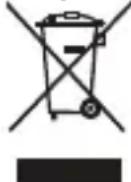
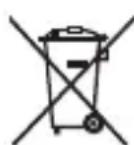
The crossed-out wheeled-bin symbol on your product, battery, literature or packaging reminds you that all electronic products and batteries must be taken to separate waste collection points at the end of their working lives; they must not be disposed of in the normal waste stream with household garbage. It is the respon
sibility of the user to dispose of the equipment using a designated collection point or service for separate recycling of waste electrical and electronic equipment (WEEE) and batteries according to local laws.
Proper collection and recycling of your equipment helps ensure electrical and electronic equipment (EEE) waste is recycled in a manner that conserves valuable materials and protects human health and the environment, improper handling, accidental breakage, damage, and/or improper recycling at the end of its life may be harmful for health and environment. For more information about where and how to drop off your EEE waste, please contact your local authorities, retailer or household waste disposal service or visit the website https://consumer.huawei.com/en/.
Reduction of hazardous substances
This device and any electrical accessories are compliant with local applicable rules on the restriction of the use of certain hazardous substances in electrical and electronic equip-
ment, such as EU REACH, RoHS and Batteries (where included) regulations, etc. For declarations of conformity about REACH and RoHS, please visit our website
https://consumer.huawei.com/certification.
EU regulatory conformance
RF exposure requirements
Your device is a low-power radio transmitter and receiver. As recommended by international guidelines, the device is designed not to exceed the limits established by the European Commission for exposure to radio waves.
Statement
Hereby, Huawei Device Co., Ltd. declares that this device MLY-B10/MLY-B11 is in compliance with the essential requirements and other relevant provisions of Directive 2014/53/EU.
The most recent and valid version of the DoC (Declaration of Conformity) can be viewed at https://consumer.huawei.com/certification.
This device may be operated in all member states of the EU.
Observe national and local regulations where the device is used.
This device may be restricted for use, depending on the local network.
Frequency bands and power
(a) Frequency bands in which the radio equipment operates: Some bands may not be available in all countries or all areas. Please contact the local carrier for more details.
(b) Maximum radio-frequency power transmitted in the frequency bands in which the radio equipment operates: The maximum power for all bands is less than the highest limit value specified in the related Harmonized Standard.
When charging the device, ensure it is 20~cm away from your body.
The frequency bands and transmitting power (radiated and/or conducted) nominal limits
applicable to this radio equipment are as follows: MLY-B10/MLY-B11: Bluetooth: 12 dBm, NFC: 42dBμA/m@10 m, WPT: 100 kHz-119 kHz, 135 kHz-140 kHz: 42dBμA/m@10 m, 119 kHz~135 kHz: 66 descending 10 dB/dec above 0.119 MHz@10m, 140 kHz-148.5 kHz: 37.7dBμA/m@10 m.
Accessories and Software Information
It is recommended that the following accessories should be used:
Charging cradle: CP81-1 Wrist circumference ruler Independent cover
The product software version is 2.1.0.127
Software updates will be released by the manufacturer to fix bugs or enhance functions after the product has been released. All software versions released by the manufacturer have been verified and are still compliant with the related rules.
All RF parameters (for example, frequency range and output power) are not accessible to the user, and cannot be changed by the user.
For the most recent information about accessories and software, please see the DoC (Declaration of Conformity) at https://consumer.huawei.com/certification.
Please go to Settings > About > Regulatory information on the device to view the E-label screen.
Forest Stewardship Council
Marca commercial del chip principal

https://consumer.huawei.com/certification.
a
0.
18 1
Jnnu IEC 80601-2-30

[ən]
- 1
- 1 (MR) uauuuaaunueanwaaeae (CT) vaaa a nnuuuuuaa /
- 1
- 4
-
1
6. -
15977777777777777777777777777777777
- 1
-
-
W
-
1
- (W)
12.

[ya]
- 13.0 wu. 20.0 wu.
- 2
- wannawwovwnuunnuuonnueoanrueoovouauanrnnuaaynnaaunnnaaunnna
- 4
- 5
-
wannnnn nn nnnnnnnnnnnnnnnnnnnnnnnnnnnnnnnnnnnnnnnnnnnnnnnnnnnnnnnnnnnnnnnnnnnnnnnnnnnnnnnnnnnnnnnnnnn
-
7
- 1
- 1uunuunnuunnuunnuunnuunnuunnuunnuunnuunnuunnuunnuunnuunnuunnuunnuunnuunnu
- nssnnsnnnnaeennnneaaee (ME) wwnnnnnnnaaann
- wannnnaaunnnnnaan nnnn nn ananrnnnnae 5 nnnnnaaennnnnne
- 1
- wannuueoovnneauounuuunw nwoonrnnnnaaunnuuwnnnaeun
3
1. 乌乌aWan
1. 1
13.0 20.0 wu. (5.12 - 7.87)
1.2
nsswnwannnn
1.3
| ยงรีรีรีรีรีรีclid) | |
| rupMLY-B10,MLY-B11 | |
| rupMLY-B11 | rupLAMIN V1 |
| rupLAMINrupLAMINrupLAMINrupLAMIN | rupLAMINrupLAMINrupLAMINrupLAMINrupLAMINrupLAMINrupLAMINrupLAMINrupLAMINrupLAMINrupLAMINrupLAMINrupLAMINrupLAMINrupLAMINrupLAMINrupLAMINrupLAMINrupLAMINrupLAMINrupLAMINrupLAMINrupLAMINrupLAMINrupLAMINrupLAMIMrupLAMINrupLAMINrupLAMINrupLAMINrupLAMINrupLAMINrupLAMINrupLAMINrupLAMINrupLAMINrupLAMINrupLAMINrupLAMINrupLAMINrupLAMINrupLAMINrupLAMINrupLAMINrupLAMINrupLAMINrupLAMINrupLAMINrupLAMINrupLAMINrupLAMInrupLAMINrupLAMINrupLAMINrupLAMINrupLAMINrupLAMINrupLAMINrupLAMINrupLAMINrupLAMINrupLAMINrupLAMINrupLAMINrupLAMINrupLAMINrupLAMINrupLAMINrupLAMINrupLAMINrupLAMINrupLAMINrupLAMINrupLAMINrupLAMINrupLAMNrupLAMINrupLAMINrupLAMINrupLAMINrupLAMINrupLAMINrupLAMINrupLAMINrupLAMINrupLAMINrupLAMINrupLAMINrupLAMINrupLAMINrupLAMINrupLAMINrupLAMINrupLAMINrupLAMINrupLAMINrupLAMINrupLAMINrupLAMINrupLAMINrupLAM INrupLAMINrupLAMINrupLAMINrupLAMINrupLAMINrupLAMINrupLAMINrupLAMINrupLAMINrupLAMINrupLAMINrupLAMINrupLAMINrupLAMINrupLAMINrupLAMINrupLAMINrupLAMINrupLAMINrupLAMINrupLAMINrupLAMINrupLAMINrupLAMINrupLAMANrupLAMINrupLAMINrupLAMINrupLAMINrupLAMINrupLAMINrupLAMINrupLAMINrupLAMINrupLAMINrupLAMINrupLAMINrupLAMINrupLAMINrupLAMINrupLAMINrupLAMINrupLAMINrupLAMINrupLAMINrupLAMINrupLAMINrupLAMINrupLAMINrupLAMIDrupLAMINrupLAMINrupLAMINrupLAMINrupLAMINrupLAMINrupLAMINrupLAMINrupLAMINrupLAMINrupLAMINrupLAMINrupLAMINrupLAMINrupLAMINrupLAMINrupLAMINrupLAMINrupLAMINrupLAMINrupLAMINrupLAMINrupLAMINrupLAMINrupLAM |
| 泰国語語語語語語語語語語語語語語語語語語語語語語語語語語語語語語語語語語語語語語語語語語語語語語語語語語語語語語語語語語語語語語語語語語語語語語語語語語語語語語語語語語語語語語語語語語語語語語語語語語語語语語語語語語語語語語語語語語語語語語語語語語語語語語語語語語語語語語語語語語語語語語語語語語語語語語語語語語語語語語語語語語語語語語語語語語語語語語語語語語語語語語語語語語語語語語語語語語語語語語語語 | |
| 泰国語語語語語語語語語語語語語語語語語語語語語語語語語語語語語語語語語語語語語語語語語語語語語語語語語語語語語語語語語語語語語語語語語語語語語語語語語語語語語語語語語語語語語語語語語語語語語語語語語语語语語語語語語語語語語語語語語語語語語語語語語語語語語語語語語語語語語語語語語語語語語語語語語語語語語語語語語語語語語語語語語語語語語語語語語語語語語語語語語語語語語語語語語語語語語語語語語語語語語语語 | |
| 泰国語語語語語語語語語語語語語語語語語語語語語語語語語語語語語語語語語語語語語語語語語語語語語語語語語語語語語語語語語語語語語語語語語語語語語語語語語語語語語語語語語語語語語語語語語語語語語語语語语語语語语語语語语語语語语語语語语語语語语語语語语語语語语語语語语語语語语語语語语語语語语語语語语語语語语語语語语語语語语語语語语語语語语語语語语語语語语語语語语語语語语語语語语語语語语語语語语語語語语語语語语語语語语語语語语語语語语語语語语語语語语語语語语語语語语語语語语語语語语語语語语語语語语語语語语語语語语語语語语語语語语語语語语語语語语語语語语語语語语語语語语語语語语語语語语語语語語語語語語語語語語語語語語語語語語語語語語語語語語語語語語語語語語語語語語語語語語語語語語語語語語語語語語語語語語語語語語語語語語語語語語語語語語語語語語語語語語語語語語語語語語語語語語語语語语語语语语语语语语语语语语语语语语语语语语语语语语语语语语语语语语语语语语语语语语语语语语语语语语语语语语语语语语语语语语语语语语语语语语语语语语语语语语语语语语语语语语语语语语语语语语语语语语语语语语语 | |
| 请输入您的联系方式 | |
| 请输入您的联系方式 | |
| 请输入您的联系方式 | |
| 请输入您的联系方式 | |
| 请输入您的联系方式 | |
| 请输入您的联系方式 | |
| 请输入您的联系方式 | |
| 请输入您的联系方式 | |
| 请输入您的联系方式 | |
| 请输入您的联系方式 | |
| 请输入您的联系方式 | |
| 请输入您的联系方式 | |
| 请输入您的联系方式 | |
| 请输入您的联系方式 | |
| 请输入您的联系方式 | |
| 请选择以下联系方式 | |
| 请输入您的联系方式 | |
| 请输入您的联系方式 | |
| 请输入您的联系方式 | |
| 请输入您的联系方式 | |
| 请输入您的联系方式 | |
| 请输入您的联系方式 | |
| 请输入您的联系方式 | |
| 请输入您的联系方式 | |
| 请输入您的联系方式 | |
| 请输入您的联系方式 | |
| 请输入您的联系方式 | |
| 请输入您的联系方式 | |
| 请输入您的联系方式 | |
| 请输入您的联系方式 | |
1.4 WwWwWwWwWwWwWwWwWwWw
nannnnnnaeennnne nnnnnaa aannnnn (an) naunnuuuvuuu uanuauu uus
77777777777777
- uunu (wouanauuua L uas. yauuuu M x 1 - aauuua M (uiu) x 1
Waaas x 1 - 1
山x1
2. nssnnnnaa
2.1 nanns
MLY-B10/MLY-B11 wānhuawei Device Co., Ltd. wānhuawu wānnu wānnu wānnu wānnu wānnu wānnu wānnu wānnu wānnu wānnu wānnu wānnu wānnu wānnu wānnu wānnu wānnu wānnu wānnu wānnu wānnu wānnu wānnu wānnu wānnu wānν (EMC) IEC 60601-1-2:2014/AMD1:2020
anunanaananaanannnnae EMC nhttps://consumer.huawei.com/en/ you EMC mLY-B1O/MLY-B11 u
auan 念 Huawei 2022 auaanns
nnaaannnnnnaanennnnnnaanrnnnnaanrnnnnaanrnnnnaanrnnnnaanrnnnnaanrnnnnaanrnnnnaanrnnnnaanrnnnnaanrnnnnaanrnnnnaanrnnnnaanrnnnnaanrnnnnaanrnnnnaanrnnnnaanrnnnnaanrnnnnaanrnnnnaanrnnnnaan
1
Bluetooth® Bluetooth® Bluetooth® Bluetooth® Bluetooth® Bluetooth® Bluetooth® Bluetooth® Bluetooth® Bluetooth® Bluetooth® Bluetooth® Bluetooth® Bluetooth® Bluetooth® Bluetooth® Bluetooth® Bluetooth® Bluetooth® Bluetooth® Bluetooth® Bluetooth® Bluetooth® Bluetooth® Bluetooth® Bluetooth® Bluetooth® Bluetooth® Bluetooth® Bluetooth® Bluetooth® Bluetooth® Bluetooth® Bluetooth® Bluetooth® Bluetooth® Bluetooth® Bluetooth® Bluetooth® Bluetooth® Bluetooth® Bluetooth® Bluetooth® Bluetooth® Bluetooth® Bluetooth® Bluetooth® Bluetooth® Bluetooth® Bluetooth® Bluetooth®Bluetooth®Bluetooth®Bluetooth®Bluetooth®Bluetooth®Bluetooth®Bluetooth®Bluetooth®Bluetooth®Bluetooth®Bluetooth®Bluetooth®Bluetooth®Bluetooth®Bluetooth®Bluetooth®Bluetooth®Bluetooth®Bluetooth®Bluetooth®Bluetooth®Bluetooth®Bluetooth®Bluetooth®Bluetooth®Bluetooth®Bluetooth®Bluetooth®Bluetooth®Bluetooth®Bluetooth®Bluetooth®Bluetooth®Bluetooth®Bluetooth®Bluetooth®Bluetooth®Bluetooth®Bluetooth®Bluetooth®Bluetooth®Bluetooth®Bluetooth®Bluetooth®Bluetooth®Bluetooth®Bluetooth®Bluetooth®Bluetooth®Bluetooth®蓝牙蓝牙蓝牙蓝牙蓝牙蓝牙蓝牙蓝牙蓝牙蓝牙蓝牙蓝牙蓝牙蓝牙蓝牙蓝牙蓝牙蓝牙蓝牙蓝牙蓝牙蓝牙蓝牙蓝牙蓝牙蓝牙蓝牙蓝牙蓝牙蓝牙蓝牙蓝牙蓝牙蓝牙蓝牙蓝牙蓝牙蓝牙蓝牙蓝牙蓝牙蓝牙蓝牙蓝牙蓝牙蓝牙蓝牙蓝牙蓝牙蓝牙蓝牙蓝牙蓝牙蓝牙蓝牙蓝牙蓝牙蓝牙蓝牙蓝牙蓝牙蓝牙蓝牙蓝牙蓝牙蓝牙蓝牙蓝牙蓝牙蓝牙蓝牙蓝牙蓝牙蓝牙蓝牙蓝牙蓝牙蓝牙蓝牙蓝牙蓝牙蓝牙蓝牙蓝牙蓝牙蓝牙蓝牙蓝牙蓝牙蓝牙蓝牙蓝牙蓝牙蓝牙蓝牙蓝牙蓝牙蓝牙蓝牙蓝牙BTB
Jn
uunnnnnaa
Wvntu u 15 17 17 17 17 17 17 17 17 17 17 17 17 17 17 17 17 17 17 17 17 17 17 17 17 17 17 17 17 17 17 17 17 17 17
y
"“”
y
nnaanannnnnnaaannnnnnaanennnnnnaanennnnnnaanannnnnnaanannnnnnaanannnnnnaanannnnnnaanannnnnnaanannnnnnaanannnnnnaanannnnnnaanannnnnnaanannnnnnaanannnnnnaanannnnnnaanannnnnnaanannnnnnaanannnnnnaanannnnnnaanannnnnnaanannnnnnaanannnnnnaanannnnnnaanennnnaanannnnnnaanannnnnnaanannnnnnaanannnnnnaanannnnnnaanannnnnnaanannnnnnaanannnnnnaanannnnnnaanannnnnnaanannnnnnaanannnnnnaanannnnnnaanannnnnnaanannnnnnaanannnnnnaanannnnnnaanannnnnnaanannnnnnaanann
nivnuuaaanaa
- nssvnuuunnuuunnuwWnVnnuuunnuuunnuuunnuuunnuuunnuuunnuuunnuuunnuuunnuuunnuuunnuuunnuuunnuuunnuuunnuuunnuuunnuuunnuuunnuuunnuuunnuuunnuuunnuuunnuuunnu
- 5°C 40°C
- wannnnaanrnnn nnnnnnnnnnnnnnnnnnnnnnnnnnnnnnnnnnnnnnnnnnnnnnnnnnnnnnnnnnnnnnnnnnnnnnnnnnnnnnnnnnnnnnnnnnnnnnnnnnnnnnnnnnnnnnnnnnnnnnnnnnnnnnnnnnnnnnnnnnnnnnnnnnn
-
wannnnnnaeauuunnnn uynrnnn nn nnnnnnnnnnnnnnnnnnnnnnnnnnnnnnnnnnnnnnnnnnnnnnnnnnnnnnnnnnnnnnnnnnnnnnnnnnnnnnnnnnnnnnnnnnnnnnnnnnnnnnnnnnnnnnnnnnnnnnnnnnn
·
·
- -
1
·
15 1 - 1
- 100000000000000000000000000000000000000000000000000000
-
1
-
wunnsu uunnue uunununununununununun unununununununun unununununun ununununun ununununun un
· - 4
- 1
- 1
- -
aannnnnnaan an aannnnnnaan nnnnnnnnnnnnnnnnnnnnnnnnnnnnnnnnnnnnnnnnnnnnnnnnnnnnnnnnnnnnnnnnnnnnnnnnnnnnnnnnnnnnnnnnnnnnnnn
“”
IEC/EN 62368-1
- 1
-
yannnnaaannnnnna
(WEEE)
W
JUANOS MURUGUL (EEE) JUANOS MURUGUL (EEE) JUANOS MURUGUL (EEE) JUANOS MURUGUL (EEE) JUANOS MURUGUL (EEE) JUANOS MURUGUL (EEE) JUANOS MURUGUL (EEE) JUANOS MURUGUL (EEE) JUANOS MURUGUL (EEE) JUANOS MURUGUL (EEE) JUNUS HUWEI (EEE) JUNUS HUWEI (EEE) JUNUS HUWEI (EEE) JUNUS HUWEI (EEE) JUNUS HUWEI (EEE) JUNUS HUWEI (EEE) JUNUS HUWEI (EEE) JUNUS HUWEI (EEE) JUNUS HUWEI (EEE) JUNUS HUWEI (EEE) JUNUS HUWEII (EEE) JUNUS HUWEII (EEE) JUNUS HUWEII (EEE) JUNUS HUWEII (EEE) JUNUS HUWEII (EEE) JUNUS HUWEII (EEE) JUNUS HUWEII (EEE) JUNUS HUWEII (EEE) JUNUS HUWEII (EEE) JUNUS HUWEII (EEE) JUNUS HUWEI (EEE) JUNUS HUWEI (EEE) JUNUS HUWEI (EEE) JUNUS HUWEI (EEE) JUNUS HUWEI (EEE) JUNUS HUWEI (EEE) JUNUS HUWEI (EEE) JUNUS HUWEI (EEE) JUNUS HUWEI (EEE) JUNUS HUWE!
nraanrnn
https://consumer.huawei.com/certification
T
yannnnnnaaannnnnnaananaananaanana
y
#
Huawei Device Co., Ltd. MLY-B10/MLY-B11 2014/53/EU
DoC (uusuaananaaannnnae) uanaananaaunau
https://consumer.huawei.com/certification
Jnnaaannnnnnnnnnnnnnnnnnnnnnnnnnnnnnnnnnnnnnnnnnnnnnnnnnnnnnnnnnnnnnnnnnnnnnnnnnnnnnnnnnnnnnnnnnnnnnnnnnnnnnnnnn
1
uunnnnnae ne nne nne nne nne nne nne nne nne nne
yuaanuuaa
(n):
(u)nnaaunnaananaananaananaananaananaananaananaananaananaananaananaananaananaananaananaananaananaananaananaananaananaananaananaananaananaananaananaananaananaananaananaananaananaananaananaananaananaananaananaananaananaananaananaananaananaananaananaananaananaananaanaraannnnnnnnnnnnnnnnnnnnnnnnnnnnnnnnnnnnnnnnnnnnnnnnnnnnnnnnnnnnnnnnnnnnnnnnnnnnnnnnnnnnnnnnnnnnnnnnnnnn
20 20
()
:MLY-B1O/MLY-B11:uans:12 dBm,NFC:42dBμA/m@10 m,WPT:1OO kHz-119
kHz, 135 kHz-140 kHz: 42dBμA/m@10 μ., 119 kHz~135 kHz: 66 aav 10 dB/dec avn
0,119 Mhz@10 u., 140 kHz-148.5 kHz: 37.7dBμA/m@10 u.
yuaan yuanyuanyuanyuanyuanyuanyuanyu
y
nivv: CP81-1
2.1.0.127
Wnwnnnn nn nnnnnnnnnnnnnnnnnnnnnnnnnnnnnnnnnnnnnnnnnnnnnnnnnnnnnnnnnnnnnnnnnnnnnnnnnnnnnnnnnnnnnnnnnnnnnnnnnnnnnnnnnnn
d
Jnnnnaa
WwJwJwJwJwJwJwJwJwJwJwJwJwJwJwJwJwJwJwJwJwJwJwJwJwJwJwJwJwJwJwJwJwJwJwJwJwJwJwJwJwJwJwJwJwJwJwJwJwJwJw
00n)
Uuuuuaaannnnnnaaennnnnnnnnnnnnnnnnnnnnnnnnnnnnnnnnnnnnnnnnnnnnnnnnnnnnnnnnnnnnnnnnnnnnnnnnnnnnnnnnnnnnnnnnnnnnnnnnnnnnnnnnnnnnnnnnn
https://consumer.huawei.com/certification
[1]n> [u> u(Settings About Regulatory
information)
Panduan Permulaan Pantas
m = 311 ;
Radian bukan penguin

Tanda CE.

Panduan operasi hendaklah dibaca.

Peranti perubatan
Slijbs 1000 j Jd Dldi dDgDgDgDgDgDgDgDgDgDgDgDgDgDgDgDgDgDgDgDgDgDgDgDgDgDgDgDgDgDgDgDgDgDgDgDgDgDgDgDgDgDgDgDgDgDgDgDgDgDgD
y
(RF)
1 1
4
yMLY-B10/MLY-B11Huawei Device Co., Ltd.
2014/53/EU Jd
https://consumer.huawei.com/certification
U (EU) 1 y 1 1 1 1 1 1 1 1 1 1 1 1 1 1
1 1
y 1 y
i j g j w j s j sjjj
1 4 4 4 4 4 4 4 4 4 4 4 4 4 4 4 4 4 4 4 4 4 4 4 4 4 4 4 4 4 4 4 4 4 4 4 4 4 4 4 4 4 4 4 4
.
gao zilislailljz jy jia jia jia jia jia jia jia jia jia jia jia jia jia jia jia
J 1 J 1 1 1 1 1 1 1 1 1 1 1 1 1 1 1 1 1 1 1 1 1
100 100
J 1
i
y 111111111111111111111111111
y
120 120
x ≤ 1
4y jia 1j pluai jie jia jia jia jia jia jia jia jia jia jia jia
glaal 45 gala jdiy daii laia jj y i
yki oolaiuol gokoi jil cui jlao p w sl oikw jol oaii
i 1
olalj j 121 o0s Sds JolS gab y jg s gla aas gla j li ay Sj j olalaiy
S OBC = S COD + S_ BOC
1J 1
254 1 200000000000000000000000000000000000000000000000000000000000000000000000000000000000
Huawei 2022
la jgaa 5 gi jia pide
o 1
Huawei Device Co., Ltd. Huawei Technologies Co., Ltd.
Huawei Technologies Co., Ltd.
J 1 J 1 J 1 J 1 J 1 J 1 J 1 J 1 J 1 J 1 J 1
a5 0daiio ooioo
[blalclal]
i 1
1 = 2
J 1 J 2 J 3 J 4 J 5 J 6 J 7 J 8 J 9 J 10
S AOB = S COD + S BDO - S BOC
i j 1.4
y 1 y
:
X1(0j)buao oJdai jdu 1
X1
X1(3yJSLalaa)jzla 10aiaolglai
X
:iiS oiaiun jz jzj0jz jz jz jz jz jz jz
1 1
.
.
5 = =
iiS 1i
- 105
1
1
[al]
1 1
S ACD = S COD + S_ CDA
J 1 J 1 J 1 J 1 J 1 J 1 J 1 J 1 J 1 J 1 J 1 J 1 J 1 J 1 J 1 J 1 J 1 J 1 J 1 J 1 J 1 J 1 J 1 J 1 J 1 J 1 J 1 J 1 J 1 J 1 J 1 J 1 J 1 J 1 J
gss
#
J 11
IEC 80601-2-30
[la]
1 1
L
(MRI) 1 (HF) yL s Jy L a Jy 45 000000000000000000000000000000000000000
J 1
1 1
- 1,2,3,4 1,2,3,4 2,3,4
a 1
i 1
C. 1000
S 1
aall aal l j: sLxJgll Jgll Jgll 2d dall tll b i Js Lss 2d 1 (b)
aall g d wlll jll l l l l l l l l l l l
20 1uoujue jie oaiy jia sli jaoi jiu
:11 jll l 15 aai (algo g / g a) JwJl ai bia jie y 20d jill tbl bi y
10 12:MLY-B10/MLY-B11
135~j 119. 10 42: j 135
37.7:148.5 140 10 0,119 66
10 10
a
y
CP81-1:Jol
2.1.0.127 1
g jn 10.
aallll 10gall gao aagai jilagaaal lgljzal
4J 2g (j1y 10 g 23 j11 10 10 10 10 10 10 10 10 10
.
e (DoC) aIblll 1 e 1 1 1 1 1 1 1 1 1 1 1 1 1 1
.https://consumer.huawei.com/certification
Regulatory information < About < Settings)
1
jaiyiaaiyaiyaiyaiyaiyaiyaiyaiyaiyaiyaiyaiyaiyaiyaiyaiyaiyaiyaiyaiyaiyaiyaiyaiyaiyaiyaiyaiyaiyaiyaiyaiyaiyaiyaiyaiyaiyaiyaiyaiyaiyaiyaiyaiyaiyaiyaiyaiyaiyaiyai
| الإستعمالية الحرفية الحرفية الحرفية الحرفية الحرفية الحرفية الحرفية الحرفية الحرفية الحرفية الحرفية الحرفية الحرفية الحرفية الحرفية الحرفية الحرفية الحرفية الحرفية الحرفية الحرفية الحرفية الحرفية الحرفية الحرفية الحرفية الح註冊 الإستعمالية الحرفية الح註冊 الإستعمالية الح註冊 الإستعمالية الح註冊 الإستعمالية الح註冊 الإستعمالية الح註冊 الإستعمالية الح註冊 الإستعمالية الح註冊 الإستعمالية الح註冊 الإستعمالية الح註冊 الإستعمالية الح註冊 الإستعمالية الح註冊 الإستعمالية الح註冊 الإستعمالية الح註冊 الإستعمالية الح註冊 ال,enrollment ال enrollin ال enrollin ال enrollin ال enrollin ال enrollin ال enrollin ال enrollin ال enrollin ال enrollin ال enrollin ال enrollin ال enrollin ال enrollin ال enrollin ال enrollin ال enrollin ال enrollin ال enrollin ال enrollin ال enrollin ال enrollin ال enrollin ال enrollin ال enrollin ال enrollin ال enroll in ال enroll in ال enroll in ال enroll in ال enroll in ال enroll in ال enroll in ال enroll in ال enroll in ال enroll in ال enroll in ال enroll in ال enroll in ال enroll in ال enroll in ال enroll in ال enroll in ال enroll in ال enroll in ال enroll in ال enroll in ال enroll in ال enroll in ال enroll in ال enroll in ال enrollin ال enroll in ال enroll in ال enroll in ال enroll in ال enroll in ال enroll in ال enroll in ال enroll in ال enroll in ال enroll in ال enroll in ال enroll in ال enroll in ال enroll in ال enroll in ال enroll in ال enroll in ال enroll in ال enroll in ال enroll in ال enroll in ال enroll in ال enroll in ال enrollin ال enrollin ال enroll in ال enroll in ال enroll in ال enroll in ال enroll in ال enroll in ال enroll in ال enroll in ال enroll in ال enroll in ال enroll in ال enroll in ال enroll in ال enroll in ال enroll in ال enroll in ال enroll in ال enroll in ال enroll in ال enroll in ال enroll in ال enroll in ال enrollin ال enroll in ال enrollin ال enroll in ال enroll in ال enroll in ال enroll in ال enroll in ال enroll in ال enroll in ال enroll in ال enroll in ال enroll in ال enroll in ال enroll in ال enroll in ال enroll in ال enroll in ال enroll in ال enroll in ال enroll in ال enroll in ال enroll in ال enroll in ال enroll in ال enrollin ال enrollin ال enrollin ال enroll in ال enroll in ال enroll in ال enroll in ال enroll in ال enroll in ال enroll in ال enroll in ال enroll in ال enroll in ال enroll in ال enroll in ال enroll in ال enroll in ال enroll in ال enroll in ال enroll in ال enroll in ال enroll in ال enroll in ال enroll in ال enrollin ال enroll in ال enroll in ال enrollin ال enroll in ال enroll in ال enroll in ال enroll in ال enroll in ال enroll in ال enroll in ال enroll in ال enroll in ال enroll in ال enroll in ال enroll in ال enroll in ال enroll in ال enroll in ال enroll in ال enroll in ال enroll in ال enroll in ال enroll in ال enroll in ال enrollin ال enroll in ال enrollin ال enrollin ال enroll in ال enroll in ال enroll in ال enroll in ال enroll in ال enroll in ال enroll in ال enroll in ال enroll in ال enroll in ال enroll in ال enroll in ال enroll in ال enroll in ال enroll in ال enroll in ال enroll in ال enroll in ال enroll in ال enroll in ال enroll in ال enrollin ال enrollin ال enroll in ال enrollin ال enroll in ال enroll in ال enroll in ال enroll in ال enroll in ال enroll in ال enroll in ال enroll in ال enroll in ال enroll in ال enroll in ال enroll in ال enroll in ال enroll in ال enroll in ال enroll in ال enroll in ال enroll in ال enroll in ال enroll in ال enroll in ال enrollin ال enrollin ال enrollin ال enrollin ال enrollin ال enrollin ال enrollin ال enrollin ال enrollin ال enrollin ال enrollin ال enrollin ال enrollin ال enrollin ال enrollin ال enrollin ال enrollin ال enrollin ال enrollin ال enrollin ال enrollin ال enrollin ال enrollin ال enrollin ال enroll-in ال enrollin ال enrollin ال enrollin ال enrollin ال enrollin ال enrollin ال enrollin ال enrollin ال enrollin ال enrollin ال enrollin ال enrollin ال enrollin ال enrollin ال enrollin ال enrollin ال enrollin ال enrollin ال enrollin ال enrollin ال enrollin ال enrollin ال enrollin ال enrollin ال enroll在 ال enroll in ال enroll in ال enroll in ال enroll in ال enroll in ال enroll in ال enroll in ال enroll in ال enroll in ال enroll in ال enroll in ال enroll in ال enroll in ال enroll in ال enroll in ال enroll in ال enroll in ال enroll in ال enroll in ال enroll in ال enroll in ال enroll in ال enroll in ال enroll in ال enroll In ال enroll in ال enroll in ال enroll in ال enroll in ال enroll in ال enroll in ال enroll in ال enroll in ال enroll in ال enroll in ال enroll in ال enroll in ال enroll in ال enroll in ال enroll in ال enroll in ال enroll in ال enroll in ال enroll in ال enroll in ال enroll in ال enroll in ال enroll in ال enroll in ال enroll 在 ال enroll in ال enroll in ال enroll in ال enroll in ال enroll in ال enroll in ال enroll in ال enroll in ال enroll in ال enroll in ال enroll in ال enroll in ال enroll in ال enroll in ال enroll in ال enroll in ال enroll in ال enroll in ال enroll in ال enroll in ال enroll in ال enroll in ال enroll in ال enroll in ال enroll i - - - - - - - - - - - - - - - - - - - - - - - - - - - - - - - - - - - - - - - - - - - - - - - - - - - - - - - - - - - - - - - - - - - - - - - - - - - - - - - - - - - - - - - - - - - - - - - - - - - - - - Bluetooth° |
| FSC |
| A. All rights reserved. You may not copy,edit or post a text on this page. |
| C. CE© |
| D. MD |
3.3
Jaaa aalg 1y jn y aai aiaa aag aag aag aag aag aag aag
j
aill 111 111 111 111 111 111 111 11
3.4
gbi jil, jalil 10jol jol jol jol jol jol jol jol jol jol jol jol jol jol jol jol jol jol jol jol jol jol jol jol jol jol jol jol jol jol jol jol jol jol jol jol jol jol jol jol jol jol jol jol jol jol jol jol jol jol jol
jieaill juaaiiaaiie gaoiinall iis jaiw gaiiaaiaiy jaeiy jai y jaiy jaiy jaiy
[Tab]
Jy 1
e aal 1olj jlll billy Juaa
JL
y jyjll baii yia jia jia iit jia jia jia jia jia jia jia jia jia jia jia jia jia jia jia jia jia jia jia jia jia jia jia jia jia jia jia jia jia jia jia jia jia jia jia jia jia jia
2.3
aaii i aie 1 (eaiia)
auii ciailily jill iuljial
J 5 5
.
J 1
aill bina Jia jie
p山
2.1
Jl (a)gll sLw) al jall bia 3y j g. aaii iil aipn p 10000000000000000000000000000000000000000000000000000000000
J2.2
aill l lal lal lal lal lal lal lal lal lal lal lal lal lal lal lal lal lal lal lal lal lal lal lal lal lal lal lal lal lal lal lal lal lal lal lal lal lal lal lal lal lal lal lal lal lal lal lal lal lal lal lAL
3
4
Jolal gai jall co plaiuui Jglal 12a 6
yaii 111 111 111 111 111 111 7
8
J
e 1
MLY-B10
MLY-B11
31500HCP_01