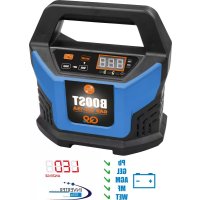
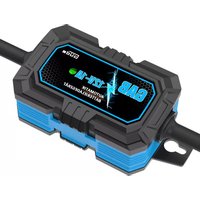
USER MANUAL BOOST GAB 12V15A Güde
Translation of the original instructions Automatic battery charger
ENGLISH Please read the instructions carefully before starting the machine.
| BATTERY CHARGER | GAB 12V/6V-10A | GAB 12V-15A |
| Art. No | 85142 | 85143 |
| Mains voltage / Mains frequency 230 V ~ 50 Hz 230 V ~ 50 Hz | | |
| Rated input 250 W 320 W | | |
| Output voltage 6 V / 12 V | — | 12 V— |
| Weight | 1,0 kg | 1,75 kg |
| Safety class II II | | |
| Rated capacity 2-150 Ah (6V) | 2-300 Ah (12V) | 2-400 Ah |
| Charging rms current 2/5 A (6V) | 2/5/10 A (12V) | 2/6/10/15 A |
| Number of cells in the battery to charge 3 / 6 6 | | |


Read and understand the operating instructions before using the appliance. Familiarise with the
control elements and how to use the appliance properly. Abide by all the safety measures stated in the service manual. Act responsibly toward third parties.
The operator is responsible for accidents or risks to third parties.
In case of any doubts about connection and operation refer please to our customer center
Safety Instructions

WARNING
Read all safety warnings and all instructions. Failure to follow the warnings and instructions may result in electric shock, fire and/or serious injury. Save all warnings and instructions for future reference.
The product is designed for use by persons aged 16 or older.
This appliance can be used by children aged from 8 years and above and persons with reduced physical, sensory or mental capabilities or lack of experience and knowledge if they have been given supervision or instruction concerning use of the appliance in a safe way and understand the hazards involved.
Children shall not play with the appliance.
Cleaning and user maintenance shall not be made by children without supervision. To avoid danger, a damaged mains supply pipe must be replaced by the manufacturer.

WARNING! Electric shock! There is a risk of very caused by electric shock!
Never operate the apparatus if a cable, the mains cord or plug are damaged. Damaged mains cords pose a hazard of electrocution.

Risk of fire! Risk of explosion!
A highly-explosive oxyhydrogen mixture occurs when batteries are charged.
- Fire, sparks, naked flames and smoking are forbidden.
- Provide adequate ventilation.
- Do not use the device in rooms in which easily flammable material or gases may be present.
Never use the charger in moist or wet conditions. Suitable for indoor areas only.
Make sure the cooling function is not limited by covering the cooling slots. Do not operate the appliance near heat sources or on a flammable surface.
Only connect or disconnect the battery connection cable if the charger is not connected to the mains.
Also pay attention to the instructions and information provided by the battery and vehicle manufacturer.
Ensure that the vehicle is switched off if the battery is mounted fixed in the vehicle! Switch off the ignition. Park the vehicle and secure it.
- First connect the red battery clip to the positive terminal of the battery.
- Then connect the black battery clip with the negative terminal of the battery (Mounted in the chassis, away from the battery and fuel line).
- Plug the charger into a mains socket.
- After charging: Disconnect the charger from the mains socket.
- First remove the black clip from the chassis and then the red clip from the battery.
This sequence must be followed!
Danger of short circuit! Make sure that the two clips of the pole connecting cables do not touch or are connected by a conductive object, such as a tool.
Handle the terminal connecting cable (一 " and +^ ) only by the insulated sections!
Never hold both clips at the same time when the device is running.
Specified Conditions Of Use
The battery charger is only to be used for charging and starting of vehicles taking all technical data into consideration.
Types of batteries:
- Lead acid batteries (liquid electrolyte) (PB)
-Gel battery (GEL)
- Absorbent glass mat battery (AGM))
-Wet-cell batteries (WET)
- Maintenance-free lead acid batteries (MF)

WARNING
It is not suitable for charging Li-ion, NiCad or NiMH batteries and other non-rechargeable batteries, for example.
Please note that our equipment has not been designed for commercial, craft or industrial use. If the equipment is used in commercial, craft or industrial operation or for similar activities, we cannot assume any liability.
Do not use this product in any other way as stated for normal use. Not observing general regulations in force and instructions from this manual does not make the manufacturer liable for damages.
F1: Terminals connected incorrectly, causing a short-circuit.
F2: Terminals not connected securely enough during the charging cycle.
F3: Voltage of connected battery is too high.
F4: The connected battery is defective.
Residual risks
Even when the device is used properly and all safety regulations are complied with, there still may be some residual risks.

WARNING!
Wear eye protective goggles! Wear gloves! Keep childrenaway from acids and filled batteries.

Corrosion Hazard!
Battery acid is highly caustic.

First Aid
Rinse out any acid splashed into the eyes immediately using clear water for several minutes. Consult a doctor immediately.
Neutralise acid splashes on skin or clothes immediately using acid neutraliser or soap suds and rinse with plenty of water.
If acid is consumed, consult a doctor immediately.
Emergency procedure
Conduct a first-aid procedure adequate to the injury and summon qualified medical attendance as quickly as possible. Protect the injured person from further harm and calm them down. If you seek help, state the following pieces of information: 1. Accident site, 2. Accident type, 3. Number of injured persons, 4. Injury type(s)
Mains Connection
Operation is only allowed with a safety switch against stray current (RCD max. stray current of 30mA).
Before putting into operation, a qualified electrician must check whether electric safety measures required are in place. Any national regulations in this regard must be complied with.
Electric connection to a socket.
It is necessary to make sure the connecting socket was not near water and humidity and the plug was protected against humidity.
Check the voltage. Technical data given on the type label must correspond with electric network voltage.
Only use splash proof extension cables approved for outdoor purposes.
Check the cable and/or socket for damages before the appliance putting into operation.
Never use the charger when the cable, plug or the machine is damaged by external influences. In case damage let repaired in authorized workshop
To avoid danger, a damaged mains supply pipe must be replaced by the manufacturer. Do not under any circumstances attempt any repair yourself.
Cable connections to be separated by pulling the plug only. Pulling the cable could damage both the cable and plug. As a result, electric safety would no longer be guaranteed.
Over-temperature protection
The power will automatically be reduced should the apparatus heat up too much during charging. This will protect the apparatus.
Symbols

WARNING/Caution!

Warning against dangerous electric voltage

Read the operating instructions to reduce the risk of injury.

Wear eye protective goggles!

Wear gloves!

Unplug the machine before any work on it.

Charger to be used in closed spaces only.

AC Current

Plus - positive terminal

Minus - negative terminal

This equipment is in safety class II.

Direct Current

CE marking
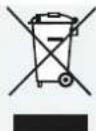
Any damaged or disposed electric or electronic devices must be delivered to appropriate collection centres.
Maintenance

Unplug the machine before any work on it.
The connection clamps, clips and the upper surface of the battery must be kept clean; if necessary clean the battery clips with a wire brush.
Repairs and works specified in these Instructions may only be performed by qualified authorised staff.
Use only original accessories and original spare parts.
Before using the appliance, perform a visual inspection at all times to make sure the power cord and the plug, in particular, are not damaged on the charger.
Clean only with dry cloth. Certain cleaning agents and solvents are harmful to plastics and other insulated parts. Keep the apparatus handle clean, dry and free of oil or grease.
Only a regularly maintained and treated appliance can serve as a satisfactory aid. Insufficient maintenance and care can lead to unforeseen accidents and injuries.
If necessary, a list of spare parts can be found at www.guide.com.
Disposal
Do not dispose of electric tools together with household waste material.
Pursuant to European Directive 2002 / 96 / EC on Electrical and Electronic waste and to national legislation, electrical and electronic waste must be collected separately and delivered to a recycling facility for environmentally responsible disposal.
Check with your local authority or retailer for recycling advice and collection point.
Battery disposal
Pursuant to the Battery Ordinance you, as the end user, will be obligated to return all used batteries/rechargeable batteries.
Flat batteries must not be disposed of with household waste. Care for the environment and take them to the collection points provided in accordance with national or local regulations. Please contact your local authority or your dealer for how to dispose of batteries properly.
Guarantee
Warranty period of 12 months applies to commercial use and 24 months applies to private use and commences on the day of purchase of the device.
The guarantee solely covers inadequacies caused by material defect or manufacturing defect. Original payment voucher with the sales date needs to be submitted for any claim in the guarantee period.
The guarantee does not cover any unauthorised use such as appliance overloading, use of violence, damage as a result of any unauthorised interference or caused by foreign items. Failing to follow the operating and assembly instructions and common wear are also not included in the guarantee.
Please be sure to know that returning the product in or after the warranty period must be made in the original packaging.
Service
Do you have any technical questions? Any claim? Do you need any spare parts or operating instructions? We will quickly help you and without needles bureaucracy at our web pages at www.guede.com in the Servicing part. Please help us be able to help you. In order to identify your device in case of claim we need the serial No., product No. and year of production. All this data can be found on the type label.
Tel.: +49 (0) 79 04 / 700-360
Fax: +49 (0) 7904 / 700-51999
E-Mail: support@ts.guide.com
GAB 12V/6V-10A #85142
MEANING OF THE ERROR CODES / CHARGING MODES
GAB 12V/6V-10A charger has seven (7) modes: STANDBY, 6V/2A, 6V/5A, 12V/2A, 12V/5A, 12V/10A and BOOST. Do not operate the charger until you confirm the appropriate charge mode for your battery.
| Mode Display Explanation |
| STAND BY Keep on
(Power) | Not charging or providing any power. If you want charging to pause, press ON/OFF button and it will enter STANDBY mode. |
| 6V/2A 02A Connected to battery, | it can turn into 2A by pressing CURRENT button. This mode is recommended for 2-60AH batteries. |
| 6V/5A 05A Connected to battery, | it can turn into 5A by pressing CURRENT button. This mode is recommended for 10-150AH batteries. |
| 12V/2A 02A Connected to battery, | it can turn into 2A by pressing CURRENT button. This mode is recommended for 2-60AH batteries. |
| 12V/5A 05A Connected to battery, | it can turn into 5A by pressing CURRENT button. This mode is recommended for 10-150AH batteries. |
| 12V/10A 10A Connected to battery, | it can turn into 10A by pressing CURRENT button. This mode is recommended for 40-300AH batteries. |
| BOOST | FAS Connected to battery, it can enter BOOST mode by pressing BOOST button. It takes 5minutes to charge. |
BOOST and SUPPLY modes are advanced charging modes that require your full attention before selecting.
ERROR MESSAGES
When ERROR LED is on and the digital display shows following messages, it means the charger detects the fault. Therefore, the user should solve the fault before use. If the user could not solve problems, please consult the professional person.
E01: Temperature inside charger is too high
E02: No-load or the battery voltage is rather low.
E03: Choose 6V charging modes for 12V batteries
E04: Battery cannot hold charge (dead battery)
E05 : Battery cannot reach to the threshold after charging for a period (dead battery)
E06:Reverse connection
GAB 12V-15A #85143
MEANING OF THE ERROR CODES / CHARGING MODES
GAB 12V-15A charger has seven (7) modes: STANDBY, 12V/2A, 12V/6A, 12V/10A, 12V/15A, BOOST and SUPPLY. Do not operate the charger until you confirm the appropriate charge mode for your battery.
| Mode Display Boost Light Explanation |
| SUPPLY P12 When the charger is not connected with battery, it automatically enter SUPPLY mode. If you want to switch Supply to Charge, connect the charger with a battery and press ON/OFF button twice. |
| STAND BY Blink (Power) Not charging or providing any power. If you want charging to pause, press ON/OFF button and it will enter STANDBY mode. |
| 12V/2A 02A Connected to battery, it can turn into 2A by pressing CURRENT button. This mode is recommended for 2-60AH batteries. |
| 12V/6A 06A Connected to battery, it can turn into 6A by pressing CURRENT button. This mode is recommended for 10-180AH batteries. |
| 12V/10A 10A Connected to battery, it can turn into 10A by pressing CURRENT button. This mode is recommended for 40-300AH batteries. |
| 12V/15A 15A Connected to battery, it can turn into 15A by pressing CURRENT button. This mode is recommended for 50-400AH batteries. |
| BOOST | FAS Keep on | Connected to battery, it can enter BOOST mode by pressing BOOST button. It takes 5minutes to charge. |
BOOST and SUPPLY modes are advanced charging modes that require your full attention before selecting.
ERROR MESSAGES
When ERROR light is on, it means the charger detects invisible fault. Therefore, the user should solve the fault before use. If the user could not solve problems, please consult the professional person.
The reasons may include the followings:
1) The battery voltage is rather low.
2) Reverse connection.
3) Overload.
4) When with buzzer sound, it indicates the temperature inside charger is too high.
After the internal temperature reduces, the charger will automatically start charging again.
\section*{Caracteristiques Techniques}
Protection anti-surchauffe
WAARSCHUWING/Opgelet!

We, hereby declare the conception and construction of the below mentioned appliances correspond - at the type of construction being launched - to appropriate basic safety and hygienic requirements of EC Directives.
In case of any change to the appliance not discussed with us the Declaration expires.
97/68/EC &2016/1628/EU
Emission No.:
2000/14/EC_2005/88/EC
97/68/EC &2016/1628/EU
Emission No.:
2000/14/EC_2005/88/EC