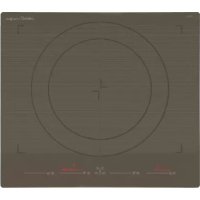
GIGA 600 SD - Cooker CATA - Free user manual and instructions
Find the device manual for free GIGA 600 SD CATA in PDF.



| Product Type | Built-in Induction Hob |
| Brand | CATA |
| Model | GIGA 600 SD |
| Number of Cooking Zones | 4 individual zones (configurable as dual zones or full zone) |
| Control Type | Touch slider with digital display |
| Maximum Total Power | Approximately 7200 W (depending on configuration) |
| Supply Voltage | 230 V ~ 50/60 Hz |
| Dimensions (W x D x H) | Approximately 590 x 520 x 50 mm (standard built-in) |
| Weight | Approximately 8 kg |
| Main Functions | Booster, automatic preheat, keep warm (3 temperature levels), independent timer (up to 7), pan detection, automatic switch-off |
| Safety | Child lock, residual heat indicator (H), automatic shut-off due to inactivity, protection against accidental activation (10 sec), automatic timed shut-off |
| Surface Material | Ceramic glass |
| Pan Compatibility | Magnetic bottom (steel, cast iron, ferritic stainless steel), diameter 12-25 cm depending on zone |
| Care and Cleaning | Scraper for residues, specific product and soft cloth, avoid abrasive sponges and aggressive cleaners |
| Installation | Built into worktop, requires qualified personnel, mandatory electrical grounding connection |
| Repairability Index | Not specified |
| Warranty | According to applicable legislation (2 years minimum in Europe) |
| General Information | Multilingual manual, manufacturer declares compliance with directives 2014/35/EU and 2014/30/EU |
Frequently Asked Questions - GIGA 600 SD CATA
User questions about GIGA 600 SD CATA
0 question about this device. Answer the ones you know or ask your own.
Ask a new question about this device
Download the instructions for your Cooker in PDF format for free! Find your manual GIGA 600 SD - CATA and take your electronic device back in hand. On this page are published all the documents necessary for the use of your device. GIGA 600 SD by CATA.
USER MANUAL GIGA 600 SD CATA
Operating and maintenance instructions for hobs
FR
THIS APPLIANCE IS CONCEIVED FOR DOMESTIC USE ONLY. THE MANUFACTURER SHALL NOT IN ANY WAY BE HELD RESPONSIBLE FOR WHATEVER INJURIES OR DAMAGES ARE CAUSED BY INCORRECT INSTALLATION OR BY UNSUITABLE, WRONG OR ABSURD USE.
The manufacturer declares that this product meets all the essential requirements for low voltage electrical material set out in European directive 2014/35/EU and for electromagnetic compatibility as required by European directive 2014/30/EU.
PRECAUTIONS
- When the hob is in use keep all magnetizable objects away (credit cards, floppy disks, calculators and so on).
- Do not use any aluminium foil or place any foodstuffs wrapped in aluminium foil directly on the hob - do not place any metal objects such as knives, forks, spoons and lids on the hob surface as they will heat up.
- When cooking in a non-stick pan without seasoning, do not exceed 1-2 minutes' preheating time.
- When cooking food that may easily stick, start at a low power output level and then slowly increase while regularly stirring.
- After cooking is finished, switch off using the control provided (turn down to "0"), and do not rely on the pan sensor.
- If the surface of the hob is damaged, children should be kept away. immediately disconnect the appliance from the mains to prevent the possibility of Insert in the fixed wiring electric shock. disconnection from the supply
- Never use a steam cleaner to clean the hob.
- The appliance and accessible parts may be
hot during operation.
Take care to avoid touching the heating elements.
- Children less than 8 years of age should be kept at a safe distance unless continuously supervised.
- This appliance may be used by children aged 8 or over and by persons with reduced physical, sensory or mental capabilities or lack of experience and knowledge, if they are supervised and have received suitable instructions on safe use of the appliance and understand the dangers involved. Children must not play with the appliance. User maintenance and cleaning should not be carried out by children except under constant supervision.
- Cooking with grease or oil may be dangerous and cause a fire if left unattended. NEVER try to extinguish a fire with water. Rather, disconnect the appliance and then cover the flames with a cover or sheet, for example.
- The cooking process has to be supervised. A short term cooking process has to be supervised continuously.
- Unattended cooking on a hob with fat or oil can be dangerous and may result in a fire.
- Fire hazard: do not store elements on cooking surfaces.
Only counter top protectors designed for use with the cooking appliance and listed in the manufacturer's instructions should be used as suitable protection for the counter top incorporated in the appliance. Use of unsuitable protectors may cause accidents.
- WARNING: Accessible parts will become hot when in use. To avoid burns and scalds, children should be kept away.
Insert in the fixed wiring a mean for disconnection from the supply mains having a contact separation in all poles that provide full disconnection under overvoltage category
III conditions, in accordance with the wiring rules. The plug or omnipolar switch must be easily reached on the installed equipment. This appliance is not intended to be used via an external timer or a remote control system. The manufacturers decline any responsibility in the event of non-compliance with what is described above and the accident prevention norms not being respected and followed.
To avoid all risk, if the power cable becomes damaged, it must only be replaced by the manufacturer, by an authorised service centre, or by a qualified electrician.
The operating principle (Fig. 1)
It operates thanks to electromagnetic properties and can be used with the majority of cooking pans.
The electronic circuit governs the operation of the coil (inductor) which creates a magnetic field.
Heat is transmitted from the pan to the food contained within. Induction cooking has the following characteristics.
- Minimal dispersion (high performance)
- Removing (or lifting) the pan from the hob automatically stops the cooking zone.
- The electronic system permits flexibility and precision control.
(Fig. 1)
1 Pan
2 Induced current
3 Magnetic field
4 Inductor
5 Electronic circuit
6 Electric power supply
Instructions for use (Fig. 2)
1ON/OFF
2 Individual Zone
3 Sliding Control
4 Sliding Control Indicator
5 Total Zone
6 Lock
7 Power Level Display
8 Timer Display
9 Double Zone Indicator
10 Timed Zone Indicator
11 Total Zone Indicator
12 Active Lock Indicator
13 Temperature Functions
14 Temperature Functions Indicator
15 Less (Timer)
16 More (Timer)
17 Stand-alone Timer Indicator
Installation
All operations relating to installation (electrical connection) must be carried out by qualified personnel in line with current regulations.
See the part reserved for fitters for specific instructions.
Switching the Touch Control on/off
After mains voltage is applied, the touch control initialises for approximately one second before it is ready for use.
All displays and LEDs flash for approximately one second after resetting.
Once this period is complete, all displays and LEDs switch off and the touch control is in standby mode.
Press the ON/OFF (1) button to switch the touch control on for 1 second. The Sliding Control Indicator (4) flashes for all cooking zones while awaiting the selection of the required function. If any cooking zone "burns" (high temperature), indicator (7) appears with a flashing "H".
After switching the touch control on, it will remain active for 20 seconds. If neither a cooking zone nor the timer function is selected, the Touch control automatically returns to standby mode. The touch control is only turned on by pressing the power button. If the power button is pressed at the same time as other buttons, no action is taken, and the touch control remains in stand-by mode.
The touch control can be switched off at any time using the power button. This is even the case when the control has been locked by the child safety feature.
The power button always takes priority in the switching off function.
Automatic off
Once switched on, the touch control automatically switches off after 20 seconds of inactivity.
Switching a cooking zone on/off
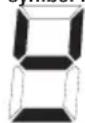
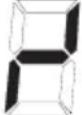
Place the pan on the appropriate cooking zone. If the pan is not in place, the system will not activate the corresponding zone and the following symbol is shown in the corresponding display, (7).
When the Touch Control is turned on, any of the cooking zones can be activated by pressing on the corresponding slide control, (3). By pressing and sliding the finger across the slide control, (3), it is possible to select a setting level in the range of 0 to 9. The setting level is shown in the corresponding display, (7).
To switch off the cooking zone, just select setting level 0 by pressing the corresponding sliding control. If the residual heat of the cooking zone is high, the corresponding display, (7), shows an "H".
Intelligent pan detection
The control automatically detects the presence / absence of a pan in every cooking zone. If a pan is detected, display (7) of the corresponding zone will constantly read "0" until the required power level is selected. If no pan is detected, display (7) will remain off and not display anything. If a pan is added / withdrawn, the control will detect it and will turn on/ off the "0" of the corresponding display (7).
Cooking zones
There are several possible combinations of cooking zone:
Individual zone (Fig. 7-A)
There are 4 square individual cooking zones (A,B,C,D) which can be used independently, by using the appropriate sliding control for each zone.
Approximate diameters of the pan bases: 12-20 cm
Double zone (Fig. 7-B)
Two individual zones may also be used together to form a single zone controlled by only one sliding control. The possible cooking zone combinations are A+B or C+D. This is done by simultaneously pressing the sliding control (3) of the zones to be combined. Next the symbol on indicator (9) of the selected zones will appear. Only the sliding control (3) and the display (7) located further on the left of the control panel will
remain active. This offers a rectangular cooking zone, particularly suited to rectangular or oval-shaped pans. Approximate diameters of the pan bases: 20 - 25cm
Total zone (Fig. 7-C)
Optionally, the 4 cooking zones located further on the left may function as a single zone (A + B + C + D) controlled by a single sliding control. Press button (5) to obtain a large square cooking zone suitable for large square or round pans. Approximate diameters of the pan bases: 30 - 40cm
Booster Function
The Booster function can be selected by pressing the "P" at the far right of the sliding control, (3), for the required cooking zone. With this function, all the cooking zones are able to receive a power supply above the nominal power (the number of zones with booster at the same time will depend on the power provided to the different zones, which must always be less than the maximum power of the hob). If the required zone is able to activate the booster function, the symbol "P" is displayed.
The booster activation time is limited to 10 minutes to protect cooking utensils. After the booster has automatically switched off, the cooking zone continues to operate at setting level "9". The booster can be reactivated after a few minutes.
If the pan is removed from the cooking zone during boosting, the booster function remains active and the disabling time continues its countdown.
Power management is based on the principle that the last modification to the setting level in the different zones has top priority. This means that the setting levels previously configured in the other zones may be automatically decreased
- If the induction detects that any of the cooking zones requires a reduction, the display for this zone flashes for 3 seconds to time for correction prior to modification.
- If the selected zone is re-adjusted within the correction period, power management analyses the power distribution again. If a reduction in power is not required the flashing stops and the original setting level remains on the corresponding display.
- Should power distribution be changed again by the user, the setting level will under no circumstances automatically increase in the zones where it has been automatically reduced.
Temperature Functions
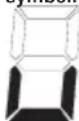
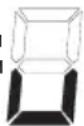
There are three temperature functions available that allow a given temperature level to be chosen for the required cooking zone. This temperature will remained fixed without changing over time. To activate this function, simply press the button (13) corresponding to the required cooking zone. The indicator (14) will display the symbol corresponding to the selected temperature level and display (7) will show the following
symbol:
There are three temperature functions available:
Level 1: 42^
Recommended for defrosting or melting (chocolate, for example).
Press button (13) once.
Level 2: 70^ C
Recommended for heating food or keeping it hot.
Press button (13) twice.
Level 3: 94^
Recommended for simmering.
Press button (13) three times.
To cancel this function, repeatedly press button (13) until the symbol on the indicator (14) disappears, or select a medium power level with the sliding control (3).
Residual heat indicator
This informs the user that the glass is at a dangerous temperature should the area around the cooking zone be touched.
After switching off the cooking zone, the corresponding display (7) will indicate "H" until the temperature in the zone has dropped below the critical level.
Automatic disconnection (operating time limit)
A maximum operating time is defined for each activated cooking zone. The maximum operating time depends on the selected cooking power. When the maximum operating time has passed, the cooking zone automatically switches off.
Each time that the cooking zone mode is activated (change in cooking power, etc.) the timer returns to the initial setting. The timer settings take priority over the operating time limits when adjusting the cooking power.
Protection against unintentional activation
If the Touch Control detects continued pressure on a button for more than 10 seconds:
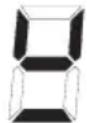
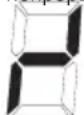
- If it is the ON/OFF button, (1), all the displays flash with the symbol shown below until the pressure is removed and any one of the buttons is pressed again.
- If it is the sliding control, the control produces a continuous acoustic signal and the symbol shown below flashes on the corresponding display (7). If the pressure is maintained, Touch Control switches off after a further 20 seconds.
Water or food spilt on the glass in the control zone may be detected as a continuous pressure on one or more buttons.
If no cooking zone is activated within 20 seconds after switching on the touch control, it will return to standby mode.
- When the control is switched on, the ON/OFF button takes priority over the other buttons, to allow the control to be switched off at any time, in the event of multiple or continuous pressure on the buttons.
- In standby mode, no effect will be caused by buttons being kept held down. In any case, to switch the electronic control back on, the control must have detected that no buttons are pressed down.
Button lock (child safety feature)
Activating locking button (6) in stand-by or active mode will lock the buttons and the allocated lock LED, (12), will remain lit. The activation times for the lock button should be observed in this case. The hotplate continues operating in the adjusted mode, but it is no longer possible to use any of the buttons, except the lock button or the On/Off button (1). When the buttons are locked, the On/Off button, (1) can be switched off. The allocated button lock LED, (12), goes out when the control is disabled. The button lock function LED is reactivated when it is switched on (in stand-by mode 20 s) until it is switched off by repeatedly pressing the lock button. The activation / deactivation of the button lock function is not possible when the unit is switched off. When the programmed timers end, the corresponding timer alarms can be confirmed by pressing buttons (15) or (16) or by turning off the unit with button (1). Repeatedly activating the locking button in stand-by or active mode will unlock the buttons and the allocated lock LED, goes out. All the sensor buttons can be used again in their normal way.
Automatic preheating
This simplifies the cooking process as it is not necessary to supervise the whole cooking cycle. The function establishes preheating of the cooking zone at maximum power to take the zone to the system temperature quickly. After a certain time, the setting level returns to the programmed level.
Activation of automatic preheating
In the required zone, select the setting level for the cooking on the sliding
control (3), and hold down for 3 seconds. The symbol "A" alternates in display (7) with the selected setting level.
If a higher setting level is then selected, the preheating function is maintained, and the preheating time is adapted to the new selected setting. If, on the other hand, a lower setting level is selected, the automatic preheating function is cancelled.
Sound signal (buzzer)
During use, the following activities are signaled by a buzzer:
Normal button pressing by a short sound.
- Buttons kept pressed down for more than 10 s by a continuous sound.
Timer Function
The timer function permits up to a maximum of 7 independent timers. That is, one timer for each individual cooking zone and one stand-alone timer (independent to the cooking zones).
Stand-alone timer
-If the touch control is turned on but no cooking zones are operating (all the indicators (4) are flashing), the stand-alone timer can be activated by simultaneously pressing buttons (15) and (16) until indicator (17) turns on. If, however, any of the zones is at a power level other than "0", the stand-alone timer can be activated
by simultaneously pressing buttons (15) and (16) several times until indicator (17) turns on. The timer display (8) shows "0.00". Now it is possible to select the required time between 0 and 119 minutes. If no value is selected, the timer is deactivated after 5 seconds.
- To select the required time, simply press the More button (16) to increase the time or the Less button (15) to reduce it.
- After the programmed time, an intermittent sound signal is activated and the display (8) shows an flashing "0.00". Both "0.00" and the sound signal turn off when any of buttons (15), (16) or (1) are pressed, or after 2 minutes have elapsed.
- If it is active, when the Touch Control is switched off using the ON/OFF button (1), the stand-alone timer continues the countdown.
Timer for the cooking zones
- If at least one cooking zone is operating, the timer can be activated by pressing buttons (15) and (16) at the same time.
- The timer display (8) shows "0.00" and the timer symbol (10) corresponding to the functioning cooking zone located further to the left turns on. At this point, you now have 5 seconds to select the time for the required cooking zone with the More (16) and Less (15) buttons. During this operation, all of the sliding controls
(3) for selecting the power level of the cooking zones remain active.
- To change the timer assigned to a cooking zone to the timer assigned to another zone, simply press buttons (15) and (16) repeatedly at the same time until the timer symbol (10) of the required zone lights up.
- At the end of the programmed time, an intermittent sound signal is activated and "0.00" flashes on the display (8), the corresponding cooking zone switches off and its display (7) shows "0" (alternating with "H" if there is any residual heat). Both "0.00" and the sound signal turn off when any of buttons (15), (16) or (1) are pressed, or after 2 minutes have elapsed.
Using the timer
- The required time value can be selected by using the More (16) and Less (15) buttons.
- The maximum time that can be selected is 1 hour 59 min.
- To deactivate the timer, the "0.00" value must be selected by pressing the Less (15) button repeatedly or by holding it down.
Pans (Fig. 3)
- A magnet-attracting pan may be suitable for induction cooking.
- Preferably use pans indicated as being suitable for induction cooking.
-
Flat and thick-bottomed pans.
-
A pan with the same diameter as the cooking zone ensures the maximum power is used.
- A smaller pan reduces the power but will not lead to energy loss. In any case, we do not recommend the use of pans with a diameter of less than 10cm .
- Stainless steel pans with multi-layer or ferritic stainless-steel bases if the base indicates: for induction cooking.
- If cast iron pans are used, these should preferably have an enamel bottom to avoid scratching the ceramic hob surface.
- The following types of pans are not suitable: glass, ceramic, earthenware, aluminium, copper or non-magnetic (austenitic) stainless steel.
Maintenance (Fig. 4)
Pieces of aluminium foil or food, fat splashes, spilt sugar or highly sugared foodstuffs should be removed immediately from the cooking surface using a spatula to avoid scratching the hob surface. Subsequently clean the surface with a suitable product and kitchen roll, rinse with water and dry with a clean cloth. Never use abrasive sponges or scourers and avoid the use of aggressive chemical detergents or stain removers.
Instructions for the fitter
Installation
These instructions are to be used by the fitter as a guide to installation, setting and maintenance in line with current regulations and standards. The appliance must be disconnected from the mains before any work is carried out.
Installation (Fig. 5)
The appliance is designed for fitting into a worktop, as shown in the figure.
Place the supplied sealant around the perimeter of the hob.
The hob should not be installed over an oven, although if this is the case, check that:
- the oven is equipped with an appropriate cooling system
- there is no warm-air leakage from the oven towards the hob.
- suitable air inlets are provided as shown in the figure.
Electrical connection (Fig. 6)
Check the following before the electrical connection is made:
- the installation characteristics are in line with that indicated on the specifications plate on the base of the hob surface
- the installation is fitted with an efficient earthing connection in line with current regulations and law. The earth connection is a legal requirement. Where the appliance is not supplied with a cable or plug, use suitable material for the current indicated on the specifications plate and for the operating temperature. The cable must never reach a temperature of more than 50^ above the ambient temperature.
FR
CE PRODUIT EST CONC U EXCLUSIVEMENT POUR USAGE DOMESTIQUE. LE CONSTRUCTEUR DÉCLINE TOUTE RESPONSABILITÉ POURDOMMAGES ET BLESSURESCAUSESPARUNEINSTALLATION INCORRECTE OU PAR UN USAGE IMPROPRE, ERRONE OU ABSURDE.
MOXET PnIBeCTN K BO3HmKHOBeHnIO HeCuaCTHbIX CnyuaeB.
BbINOHNHe NOKJIIOUeHne K CTAuHOApHOI npoBODKe C yueTOM TOrO, YTO OTKJIIOUeHne OT NITaIOUeI CETN DOJXHO OCyUeCTBJIaTBcA C 3a3OpAMM MeKdy BCEMN KOHTaKTAmN, oBeCneuBaIOUmN PONHbI pa3pbIB ZeEN Ipn IpeHaIpJxKeHn,BCOTBeTCTBmNCTpe6OBaHnMaNKateropn III n npaBnAmn IpoklaAdKn. Po3etKa MmMHorONoIOChbI NepeKlIOUaTeNb DoJXHbI 6bItb IpocTb I DoCTyINHbI DnI NOKJIIOUeHnYCTaHOBJeHHoro annapata.
Даньи пибор He npedHa3Hauen Дя ИспьзOBAHЯ C BHeшнм TaIMepom ИИ СИСТЕМОД INCTaHцIOHOrO ynpabIeHЯ. КончтPyTOpCHIMaETCSe6BcIOBTBeTCTBeHHOCTbB ТOMСИЧАE,ecnBCEБblseуKa3aHHbIe Tpe6OBaHЯ ИобIHье HopMbI npedocTopoXHOCTHn He 6ydyT co6JIIODeHbI.
B cnyae nobpekdeHua whypa numaHua, 6pamumecbKΦa6puKaHmydIe2o3aMeHbI, UuO6pamumecb BynONHomOueHHbI ueHmp mexHuueckou nomouu, UuJe 6pamumecb K mexHuueckomy cneuaunucmy IIO602o ueHmpa c noo6hbIMu nohHomOuymu, dJa npedombaueHua BO3HukHObeHua IIO602o buda puckoe.
PnHunbpa60t(b(Pn c.1)
PpHnCnbl paObTb OCH OBaHb H a 3JNeKTPomarHnTHbIX CBOB CTBAX KAcTPOJIb,CKOB opoDOK IN OH ON pOcyDbI D JN PnPiroTOB IeHNA NIIuN. IHdyKUHOHHa KAtyUka ynpabIaeTc3neKTPoHH OxemOINr CO3d ANHc NbHOrO MaHn TH ORO NOJIA.
Ten no neped aetc npodykam nitaHnO t camo n ocdyb.
Bapka n pod ykTob n npri roTOBneH e nnu ocUeCTb JareTcra cnedyuom m obpa30m:
-MHIM MaJIbHaJ DN CnepCnR (BbICOKN BbIXOJ)
-CHYNEKACTPNOIN30HbBapKN(NnPiPOCTOeN OJHRTNEBBepx) ABTOMATueckN6IOKIPyETCNCTEMy.
-3JIeKToPOHH aCnCTema OBycnaBnBaET MaKCN MaIbH yIO rIO KOCTb IN TOHKOCTb peyIN POBKN.
(Pn c. 1)
1KactpoJia
2 INH yUcpOBaHHbI TOK
3 MarHHTHOe n one
4 mHd ykTOp
53neKtpoHH a cxema
6 3eKTPnueckoe noKnHouehne e
Hnctpykun nI np nOnb3oBaTeJra (Pn c. 2)
1BKN/ BbIKN
2OTdJIbHa30Ha
3 CdBoeHHa 30Ha,JIeBa CTOpOHa
3 Cnaidep
4 INDnikaTOp CnaiJep
5 Ośza 30Ha
6Блokировka
7DucnneyypOBHaCTpoKn
8Диспелтаймера
9 INdkaTop KOM6bHINPOBaHHO30HbI
10 INHINKATOP 3OHbCOTcETOM BpeMeHN
11 INdikatop 06eJ 30hbl
12 INDkaTop 6JIOKIpOBKn
13Функи TempepatypbI
14 INdikatop fynkui TempeaTypb
15 Mehhe (TaHMeP)
16 BoIbIe (TaIIMep)
17 INDnKaTOp aBTOHOMHOro TaMepa
MOHTAX
Bce onepaunn n o montax y (3Jektpnueckn e n odklno cheHn a) donxh bI npOn3BOoNTbCRAJbKO KB aINpUu n poBaHH bIM n epcoHaON M B COOTBECTBn C CyueCTByIOU Mn HOpMaTn Bamn.
B Pa3d eene "Д Ля моHTaЖн Ka"п риБeДн bI BCE n Ondpo6HocTn MOHTaKa.
BkIIOueH e n BbIKIOueH e ceHCOPHBIM ynpaBHeHEm
Pocne n Odkno yehn K cetn nitaHn yK e uepe3 cekyHdy Touch Control byet akTbnpoBaH.
Iocne c6 poca Bex DN CnneeB, DIOu BI LEDs 6 yD yT Mm rAtpb npi6 IIN3nteHb O B Teu EHe OE HcKyHd bI. Pocne 3TOrO BCE DnCNIen n DIObl LEDs norach yT, N Touch Control nepe det B coctoHne OKUdaHn J.
HaxMMTe KHNkY BKNIOueHn/ByIKIOueHn (1)IINBKNIOueHn CEHCOPHOrO ynpabNeHn.
Дя Вс ex BapOchbix 30H INDkaTOp cnaIepa (4) Mraet B OxuaHn Bbl6opa HxKHO fYHKUIN. B cnyae paobToI OHOH n3 BapOchbix 30H (BbICOKaTeMnepeTaPHa) Ha INDkaTope (7) NOBtCmraIOuN CmBOJ «H».
Iocne BkHoueHn a, Touch Control 6 ydet akTbUpoBaH B Teue Hne 20 ckynd. B T om cn yuae, ecn BbI He bIb paan Hn 3oh y B apkn, Hn taH MEP, Touch Control abTomaTuYeCKn e BepHeTcB peKm OxndaHn a.
Touch Control B KJIIOUaYeTcB pa60T y H aXaTneM BCero Nn OJH OI KJIABUNI NITAHIN.
B cnyae eni Bb haxan Ond Obpemehn o klaunu npTaHn n Dpyrne klaunu, He 6y d t POn3BeDe H NkAKoT Oe CTBn, N Touch Control octah etcra B pexime oKND anHn.
Touch Control MoKH O B JIO6 OJ MOMENT BbIKIouH T KNaBn Wei NTaH N. 3TO MOKH O CdeJaTb DaKe B Tex Cny aX, KOrd a ynpabHeH e 3a6bOKIpOBaH o nocpeCTBOM npn Cnocob HeH n Be3oNacHOCTn DJIaTeH.
Knabu ⅢnTaHb Cerga IMeet npnpntET nBbIKIOueHn.
ABTOM aTHueck oe BbIK JIOUeHn e
Iocnie BkIIOueHn, Touch Control BbIKIOaETcA bTOMaTH eckupe3 20 cekyn d np OTCyTCTBn d e CTBn.
BknHoueH e/B bIK JIOueH e 3OhBi BapKn.
IocTabTe KAcTPOIO HA COOT BcTByIO 3OHy B apKn. E cnn KAcTPOJIa He CT ONT Ha MeCTe, CN CTEMA He AKTN BnpyET COOTBeTCTB yOuio 30H y, a HAnCn Nee (7) nOBITcN CneDyUoIN CNMBON:
Korda cehcnphoe ynpablenne BkIIOyeHO, IIO6a BapOyHa 30Ha MoXeT 6bIT BkIOUeHa HaxKaTNEM COOTBeTCTByIOe rCnAdepa (3).HaxaB IN PPOBeJa nAubem NO CnAIDepy (3),MOxHO Bbl6paTb yPoBeHb HAcTpoKn B dNanAzoHe oT O do 9. Bbl6paHHb IyPoBeH bHAcTpoKn OTobpaXaetc Ha COOTBeTCTByIOe MdnCnIee (7).
YTo6bl OTKHNoHTB BApOHyU 30Hy, HaxKMITE Ha COOTBeTCTByIOuI cnAaJep N BbIbepnte yPoBeHb HAcTPOKn 0. EcINB OTKIOUHeHHO BapOHyO 30He CoXpAHReTcBAICOKN HarpeB, Ha COOTBeTCTByIOuEM DInCnlee (7) OTo6paKaetc CmBON «H».
HHTenNekTayabHoe o6hApyKeHne nocydbI
CnCTema ynpableneny abTomatueckn onpepeJrE Hannue/OTcyTCTBne nocdyI dna kackdoi Bapouho 30hI. B cnyaeobHapuykenia nocdyI Ha dinCpnee (7) COOTBeTCTByOuSe 30hIIOCToHHO OTo6paKaTaCra 0 , noka
He 6ydt Bb6paH HxhHbI ypoBeH hAcTPOKn. Ecnn Nocya He 6ydt ObhApyeHa, DcNne (7) 6ydt OCTaBaTbCBAIKHoueHHbIM Ha HEM He 6ydt HnHero OToBpaXaTbCra. Pn yCTaHOBKe/CHrTIN Nocdybl CnCTema YnpabNeHnO bOpAynBaET 3TO n OToBpaXaet/ rACNT CmBOJ 0 HA COOTBeTCTByIOUeM DcNpJe (7).
Bapouhhe 30HbI
CyueCTByeT HeCKOJIbKO BO3MOKHeIX KOHpyaui BapouHoi 3OHbl: OTeIbHaJ30Ha (pnc.7-A)
CyueCTBye4OTdEnbHbIXBapOHybIX30hI(A,B,C,D),IMeOuixΦopMy KBaDpata,KOTOpbIE MOKHO BKNHOaTb NO OTdEnbHOCTN,NCONb3yARCOBTBeCTBYUoI CnaIdep KAKDo30hI.
Donyctnmbie DnAmetpbl DHa kactphonn:12-20cm CboeHHa 30Ha (Pnc.7-B)
DBe OTdEnbHbIe 30HbI MOrY IcNOnb3OaTbCobMecCTHO,OBpa3yEHNHyO 30Hy,ynpABLReMyoONHM CnAIDepOM. MoXHO peAn3OBATBcNeYIOUne KcObMNHaUN 3OH:A+B ININ C+D. Jnra 3TOrEOHeo6xOIMOnOHNOBpeMeHHo Haxatb Ha cNAdep (3)Tex 3OH,KOTOpbe HyKHOObEeMHNTb. 3aTeM HA INHdKaTope (9) BbIBpaHHbIX 3OH NOBHTCB
CMBON. AKTNBbIMN OCTaOTcTc TOnbKO cnaIep (3) n DnCnnei (7), paCNOJIOKeHHbIe JNeEe Ha NaHEnu npApaBHeH.NTO NO3BOJIaRcO3dA Tb PpMoyrBoHyo BApOHyO 30Hy, KOTOPaB OOC6eHHocTHyDObHa dNkactpOJIb, IMeIoUx NpMoyrBoHyO INN OBaBHyOΦopMy. DOnycTmMbIe DnAmETpbI dHa KaCTpOIN: 20-25 cm O6uaa 30Ha (Pnc.7-C)
EcTB BO3MOXHOCTb CDenAe TaK, YTO6bl BCE 4 BapOuHbIe 30HbI, paCNOIOXeHHBeJeBee, INcOJIb3OBAJINCb KaK EUNHa 3OHa (A + B + C + D) ,ynpabInMaM aOnHM cnaIepOM. YTO6bl CO3dAtb 6oNbUyIO KBaDpaTHyIO 3OHy, yO6HyIO dIra 6OJIbIX KBaDpaTHbIX INn KpyrBbIX KAcTPOJb, HAKMITE KONKy (5).
Donyctnmbie DnaametpbI dHa Kacptponn:30-40cm
Функциа Booster (Byctep)
Функшу NGHNTEN MOUHCTM MOXHO Bb6paTb, HaxaB KONIKY PpacnoJoxeHHyHa npabOM KOHcE cnaIepa (3) COOTBeTCTByIOuEBApoCHNO 30Hbl.
Pn n OMOu nn DAnH on yh KUnn OTJeBn Bie 30h bI BapKn Moryt NOnyHT MoOHOCTb, n peBbIaIOU yHO HOMN aIbH yO (KoJIueCTBO 3OH C ONOBpeMeHNbIM nCn OJb3OBAHmE BOOSTER 3ABNCNTOT MOUHCTn, n CN OJb3YeMOBn BA p3NJHbX 3O h Ax, n X cyMMapn AOnMooHCTb H e DOJNk A pReBbIaATb MaCImMaBn H yO MOUHCTb I NITb). Pn n AJIuNN Bo3MOxH OCTn AKTNaBcMn F yHKmN BOOSTER B ONPeDeHHe 3OH e, HaONn Jee n ORAIBTCn 6O3H aYeH e "P".
Bpemr akTbauqn BOOSTER orpaHueH o 10 Mm yTaMn nIpbocneueHH a63oNaCh OCTN KxOHNbIX npHaadJIeKn OCTeI.
Iocne abTomatuecko DeaakTbaucn BOOSTER, 3oh a 6 ydet npdojkaTb paobTaH ha ypOBHe moUchoTn «9». M oKHO CHOBA B KIOHTB BOOSTER B paOby T O nCTeueHn H eCKoJIbKO MNHYT.
EcnB nepn od BkHoueHn BOOSTER Bby ybepeTe kactpHIOu n3 30hB BapKn, f yHKnra BOOSTER He 6 ydet OTKIOueH a n erO uKn npoDOnKITcR.
UnpaBHeHne MoUH OCTbO OCH OBAHO HA TOM, YTO pNOpn TeTHOH CHTaETcN OcNEH RA KOHpyaUNpYepyINPOBKn yPOBH MaOuHOCTN B 30H Ax BapKn. 3TO 03H aHaet, YTO MOXHO ABTomaTneCKN CH3NTb yPOBHN MOUH OCTN, PpeD BApNTeJIbH O 3aJ aHHbIe B OCTaJIbHbIX 30Hax BapKn.
-
E cn n ykni onpeenre Heo xOIMOCb CHJKeHN MoCH OCTB OHOH N3 3OH BAPKN, INDnKaTOp 30h bI, rTe Tpe6yeTcN 3INTb MOUHOCTb, 6 yET Mn rTaB 3 cekyHdbI, 3TO n epNOKOPKETN POBKn nepepe n CTpaueH n 3MeHEN n apaMeTpa.
-
E cIn neped okOHuaHem n epnoa kOppeKTHpOBKn BHOcTcN3MeHeHnBn apametpbBbIbpaHH O3No,ynpaBHeHneMOUHOCTbIO CH OBA aHaJIIN 3n pyET ee pacnpedeHHe. E cIn B3TOM cN yUae yX e H e TpeByeTcN CHXKeHN e MOUHOCTN, MN rAHN pekpaAaETcA, a COOTBeTcTB yOUsn INDkaTop NOKk et YPOBeHb3aDaHHoMooHocTN.
-
E cπn π Μβ3OBaTeJIb CH OBA n3MeHnI paCπpeI eJIeHne MOUH OCTN, He npON3OJET ABOTMATUeCKOr yBEnIyEHHy yPOBnRA MOUH OCTN B TEX 30H ax, rIe OH a 6bJa NA ABOTMATUeCKn CHIXKeH a.
Функци TempepaTypbl
Imeetc TpN FyHKuTN TemnepaTpybl, N03BOJIOUe BbI6paTb OnpeJeHbI yPoBeHb TemnpaTpybl IIN HxKHOB BApOHOH 30HbI. 3Ta TemnpaTpya 6ydet OCTaBaTbC HEN3MeHeHHoH.
ДяakTnBaun 3ToI ΦyHKUNIO DOCTaTOH HxKaTb KONky (13), COOTBETCTBYUH HYKHO BAPOHOI 3OHe. Ha INDnKaTope (14) NOBNTcra CmBOJ, COOTBETCTBYUH Bb6paHOMy yPOBHO TEMNepaTypbl aHa DnCnnee (7) 6yDet OTO6paxTaC8 CneDyUOu CmBOJ:
Imeetc3 ypoBnTeMnepaTpyb1:1-ynpOBeHb:42 PekomeHnyeTcI pya3MopaxNBAHnI nIpaBneHnI (HaNPmep, WOKoNa).
OuH pa3 haxmnte Ha KhoNky (13). 2-yn ypoBeHb: 70^ PekomeHdyetcIpa3orpeBa nui nn dnn noepxHa ene ropey.
Дba pa3a HaxMnTe Ha KhoNky (13). 3-иуpoBeHb: 94° PekOMeHnyetcДгЯ КИЯЧЕня Ha MeДпeHOM orHe. Tpr pa3a HaxMnTe Ha KhoNky (13).
Дя OTMнБИ 3TOI ФУнкUnHуЖнО HeCKONьКо pa3 HauKaTb Ha KHOKNy (13), nOKa He NcYe3HET CmBOn INHdNkaTopa (14), nI6O Ke BbIbpaTb yPoBeHb HAcTpOuKn pIn NOMOuCnAinepa (3).
HdkaTop octaToH oro ten na
Oh yka3bIaet nonb3oBateH aTo, YTO CTeknHO haoDITc npn onachOH TEMNEPAType B Cnyae KOnTaC 30HO H aD 30H O BapKn. Pocne toro, kak Bbl B bIKIOHN 30H y BapKn, H a COOTBeCTB yIOeM dncnnee (7) BBICBETNTcO 6 03NaueH e "H", NOKa TEMNepaTpa B 30He He ONyCTNTc HNXE 3HaueHnK pHTNUeCKORO yPOBN.
ABTomatueeckoe BbIKnHoueHne (orpaHueHne BpeMeH naoTbI)
MAKCMmaHbOe Bpempa60tI. MakcmaJIbHOe Bpempa60tI 3aBNCNT OT Bb6paHHo UpOBn npiroTOBHeHn.CnyCT MaKCMmaHbOe Bpempa60tI 30Ha npiroTOBHeHn aTOMaTHeCKN OTKIOUaETc. KaJDAA kTNBaCn CTAtyCa 30Hb npiroTOBHeHn (m3MeHHe N yPOBn npiroTOBHeHn n T.d.) C6paCbBaetc TaIMep Ha NCxOHD 3NaueHne. HAcToKn TaImepa IMeOT npInOpTeT dIg ORpanuHcHn Bpemn pa60tI C hAcToKnAMn BBICOKOro yPOBn npiroTOBHeHn.
3aunTa B Cnyae Hnpon 3B OnbHOrO BK JIOueHr
Ecnn yctpoCTBO cHcOpHOrO ynpabHeHnO 6hApyKnBaET HaxaTne KaKo-Ni60 KhoNKn, HenpepbBHO dIaueecr DoJIbwe 10 cekyHd:
- Ecn 3to KhONka BKN/ BbIKI (1), to npBedeHHb HnKe 3HaOK 6yET MIRaTb Ha BCex DncJIeRex Do Tex nop, Noka HaxKaTne He npEkpATNTc, n CHOBa He 6yET HaxKaTaa KaKaJ-Ni60 KhONka.
- Ecn 3TO cnaep, TO bidaetc HnpepbHb3ykoBOCnHaI, n Ha dncnlee (7) COOTBETCTBYUeB BapOuHO 30hI HaunhaET MIRaTb npedctabneHHb HNKe CmBOJ. Ecn HaxaTne npoONkaTeC, yCTPOCTBO CEHCOPHOrO ynpabNeHra eue uepe3 20 ckyHd OTKIOUaTeC. BpI3r BObl INI rOToBuaeIc NIIu, nonaBUnHe NaCTekNO 30HbI npabNeHra, Moryt 6bITb paCno3HaHbI CNCTEMOH KAK HnpepbIBHOE Hxatne OOnH INI HECKONbKX KHONOK.
BcnyaeecnBteeyene20cekyndnoeBknouenna Touch Control He 6 ydtakntbnpoBaHa HNOH a n3 3OH BapKn, KOHTpoBb BepHet PNTV B COCTOHN OKndaHn.
Пи Вклочenvн om Touch Control, Клави sha BKЛ/BblKЛ (1) IMeetпиорпет OTHOCI Teьно OCTaJIb bIX KnaBи. 3TOД aet BO3MOxH OCTb BblJIOU NTb ПИNT Y B JIO6 on MOMeHT, ДаЖЕВ CnYu ae ODHOB pemeHHoro HaxKaTЯ H a HeCKoJIbKO KlaBnIu N IIN D JInTeJIbHOrO HaxKaTЯ H a HIX.
BpeXnme OxuDAnH n octoHnoe HaxaTne Ha KnaBnHn He Okaket HNKAKORO BO3dEChTBn B JIOb om cn yuae, d Jn TOrO, YTObI CHOB a BKIOHn Tb 3JeKtPOHH bIn KOHTpOJIb, KOHTpONb Chauana ONpeDeJIReT, HaxaTaN KaKaA-NH6 yDb n3 Knab Ns.
BLOKPOBk aKnabu w (npnc oO6neH e dJy 6e3oN acHOCTn d ete) BLOKPOBka KhoNOK (doONIHHTenbHO)
BkHouHne FyHKUIN 6nOKpOBKn KHOON (6) B aKTUBHOM pEXHMe HnnpeXIME OxuHaHHN 6nOKpyET KnabNAtpy, a CBeToND daHHOHNKON (12) 3aRopaetc. YnpabHeHne npoOnKaet paBoTaB ByctAHOBHeHHOM pEXMme, Ho yke He perynHyptcH N ODHn 3KHOKN, 3a NCKJIOHeHem CamoFyHKUIN 6nOKpOBKn KHOON INN KHOKN BKN/BblKn (1). B 3a6nOKpOBBaHHom COCTOHn BO3MOHXoTAKKe OTKIOHeHne CamoN KHOKN BKN/BblKn (1). CBeToNDfPhHKUIN 6nOKpOBKn KHOON (12) racHet nocne OTKIOHeHnYnpaBHeHn. CBeTOND FyHKUIN 6nOKpOBKn KHOON 3aRopaetc PnIn BkIIOHeHm (B pEXMme OxuHaHHN 20 cek.) noka OH he 6ydetOTKIOHeH NOBtOpHBIM BkIOHeHem KHOON 6nOKpOBKn. BkIOHeHne/ BkIKIOHeHne KHOKN 6nOKpOBKn KHOON HEBO3MOXHO B pEXM
BbIKI. IIO 3aBepseHn OTCeTa 3anporpaMMnpoBaHHbx TaMepOB MOxHO NOITBepINb CnHrHaJIcoOTBeTcTBYIOUero Taimepa Nytem HaxatmK HONOK (15)nn (16)N60 nyTeM OTKNIOeHn N3dEInna KONKO (1).PnIO NBTOPHOM BKNIOUeHn KONKn 6NOKPOBKn B pexime OxNDAHn nn AKTNBHM pexime pa3bNOkpyETc KJNAHTypa, a COOTBETCTByuOHN CBeToNDn D6NOKPOBKn raChet. BCE KONKn CEHCOPa MOxHO BHOB bCNOLb3OBaTb, KaK paHBwe.
ABTomatueckn noDorpeB
CnCTema aBtOMaTnueckoro nOOrpeBa ynpoaaet npoueeb BapKn, TAK KAK B 3TOM Cnyuae He Tpe6yeTcR npucytCTBne YenOBeka HA npOTJeHmN BCero UKlna BapKn. 3Ta cyHKunr OnpedeJIeT NODOrpe 30hB BApKn Ha MaKcImaJIbHO MOpHOCHT, N b6IcTPO DOBoNDIT TEMnepaTyP B daHHo 3OHe Do HxHORO ypOBH. No ICTeEHmN ONpeDEHnHO nepMOda BpeMeHN, ypOBeHb MOUHOCTH BO3BpaJaueTcR K 3aDaHHOMy NapaMeTpY.
AKTUBAUNA ABIOMATUeCKORO NODORPeBa
B BbIbpaHNo BapOuH No 30He BbIbepnte Ha cnaJepe (3) ypOBeHb HAcTpOKn dJa npeDCToAero npiroToBHeHn NnU, n ydepXNBaTe Haxatne B TeueHne 3 cekyHd. Ha dncnnee (7) OTObpaxKeHne CmBcOna "A"YepeDyETc C nHdkauee BblbpaHHOrO ypOBHa HAcTPOKn. EcnN NocSe TTOBblbpaTB 6OJee BBcOKn ypOBeHb HAcTPOKn, TO fHyKcN pTeBapNTeBHO HarpeBa coxpanHcT, a yCTaHOBHeHHoe dJa npeBapNTeBHO HarpeBa BpeM aSyet npImeHraTcK T ToJIbKO qTO BblpaHHomY ypOBHn HAcTPOKn. C Dpyro CTopoHbI, eCNI BblpaTB 6OJee Hn3Kn ypOBeHb HAcTPOKn, TO fHyKcN ABtOMaTHueckoro npEbpantelbHOrO harpeBa 6ydet OTMeHeHa.
AkyctnYeckn CnHn aJ (3BOH OK)
Bo B pemn n cn OJIb3OBaHn r, Bby yCnblWnte 3B OHOK B CneDyUO uNX cn yuaX:
HopmaHbN Oe HaxmMaHn E Ha KNaBn 1n -KopoTKn CnH aI.
NoctoHH OE HaxaTne Ha KnaBn 1n B Teu Ehne 60nee 10 cekyHd -
npepbIBN CTbI DnNTeBb H bC n H aI.
ФУHKUЯТаMepa
Функцу Таймара Дonyckaet pa60у МakcIMyM 7 He3aBNCIMbIX Tаймеров. To ectb NO OJHOMY TaiMepy Ha KaKdyO OTdJIbHyO BapOCHyO 3OHy ПIIOC OJINH abTOHOMHbI TaiMep (He CB3aHHbI 3OHaMn). ABTOHOMHbI TaiMep
-Ecnn BKNIOUHO cHcOpHoe ynpabHe H He pa6oTaET H ODAH BApOuHAR 30Ha (BCE INDnKATOpbI (4) MNAOT), MOXHO AKTNIBPOBaT aBTOHMHb Taimep Nytem OJHOBpeMeHHOR Ho HxKaTnK HONOK (15) n (16); Noce 3toro 3aOpNTca INDnKATOp (17). EcnN He B KAKOHINBO 33 OH YPOBEHB HACPTPOKn OTINHAcTcAOT 0 ATOHOMhB TaIMep MOXHO AKTNIBPOBaT Nytem OJHOBpeMeHHOR HxKaTnK HONOK (15) n (16) HECKOBko pa3, Noka He 3aOpNTca INDnKATOp (17). HAcTPOKa (8) Taimepa OTobpaKaTeCk Ka0 "0.00", npn 3tOM HaDCnPee ropnt DecaTHHra ToCA. Tenepb MoXHO BblpTa COOTBeTCTByIOe BPEMa 0 t 119 mHyT. Ecnn 3HaHeHne He BblpHo, Upees 5 CEkyHD Taimep OTKIOUaTeCra.
-tyobblbpahtHyxHoeBpemr,IOCTaTOUHO HaxKaTbHa KhoNky BoIbwe(16),yOsbI yBeJIuHTb Bpemr,nHa KhoNky Mehwe(15), yTo6bl yMeHbWntb erO.
-
ПО OKOHан 3адан HorO nepnoDA BpeMeHn AKTNBn3npyETcN ppebInCTbI 3ByKOBo CInHa, a Na HncPnee (8) MInaet 3HaueHne "0.00". Пи Нжatm NIObo n3 KhoNok (15), (16), (1) Илл no nCTeueHn 2 MInyT nCHe3aet «0.00» n PpeKpaAaTeCn PodaHa 3ByKOBOrO CInHaHa.
-
Ecnn aTOHOMhI TaIMep pa6oTaeT, a ceHCOPHe ynpaBHeHne OTKIOUHO C NOMOsbIO KHOKN BKN/BbIKI (1), OTCHT BpemeHN npdoJXaeTcR.
TaimepnBapouhbx30H
-Ecni paobotaek MHNIMyM OJHa BapOchra 30Ha, TaImeP MoKHO AKTNBupOBaTb NyTeM OJHOBPemEHoro HkAATn KHONOK (15) n (16). Ha DmcNee TaImepa (8) OToBpaXaETcR «0.00» n 3aropaeTc R CmBOn Taimepa (10), CoTBeTcTBouHIO paoTaHOe BapOCHO 30He, PaCNOXeHHo NeeEe. Tocne 3TOr B TeUHeN 5 CeKYHd Heo6xOJIMO Bblbpat BpEM dJRA HyKHO BApOCHO 30HbI Pnnpomoo KNOHOK BoNbwe (16) nn MeHbWe (15). Pn BInOpJIHeH 3ToI onepaun BCE cnaJepeB (3) npoDOnKaOT OCTaBaTbc A kTINBupOBaHHbIMn IJRA BbOba yPOBn HAcTPOKn BAPOCHBIX 30H. -Ttobz 3ameHHT TaIMep, HsHaueHHbI OJHO BApOCHO 30He, Ha TaImeP, HsHaueHHbI dpyroT 30He, DoCTaTOH OJHOBPemEHHO HEckOJBko pa3 HAKaTb KONKn (15) n (16), noka He 3arOpNTc R CmBOn Taimepa (10) HxKHO 30HbI.
- No OkohyaHIN 3adaHHoro nepiOda BpeMeHn BKJIOaTeCnnpepbBnCTb 3ykoBOm CnHaN, Ha nCnIee (8) MInaet 3haueHne "0.00", a COOTBeTc7bUoAra BapouHaa 3OHa OTKJIOaTeCn, H Aee nCnIee (7) OTOpBaXaTc3 3HaueHne "0" (nonepemHeHco
3haeHnEM "H", ecnn Bapouhna 30Ha ehe He octbina). Pnp haxaTIN IIO6oN u3 KhoNOK (15), (16), (1) nnn no ncteehen 2 MmHyT Ncye3aet «0.00» n pnekpaauaetc npdaa 3BykoBOrO cnHnla.
IcnoB3OBAHue TaMepa
-HyXHoe 3HaueHHe BpeMeHN MoXHo BblpaTb Pn NOMOu KHOJOK BoJIbwe (16) n MeHbwe (15).
-MakmambHoe Bpem, KOtOpoe MOXHO BbIpaTb, COCTaBJIeT 1 aC 59 MInHyT.
-TO6bI OTKIOUHTb TaIMep, HxKHO BbIpaTb BeINuHHy «0.00» nyTEM MHOROKpAHorO INI NPOJOJKeTEnbHorO HaxaTnK KHONK Mehwe (15).
Kactpion (Pnc. 3)
-E CnMaHn T npnnnaet Kdy KAcTpIO nn npn pNp6nHexn N KO nHy, 3Ta KAcTpIO Ira IODNTcI JnBapKn H aH N DkyKUHOHH OI nIITE.
-П Okупайт e KacTpIO JI, cneu aJIbHO paCCHTaHHbIe Ha INHd YKlnoHHyBapKy.
-KaCTPHJN C NIOCKM M TOJCTbIM DH OM.
-
KACTPIOINI, DN AMETP INA KOTOPbIX TOH O COOTBETCTBYET DNAMETpy KOHΦ OPKN DnRA MAKCN MaNbHO R CN ONb3OBAHN MOUHOCTN.
-
KaTpIJIaMeH bIINx pa3MepOB CHNJaet MOUH OCTb, H O He npINB OINT K Notepe 3Heprn. B IIObOM cIyue He peKoMeHd yeTcN CNOJIb3OB aHne nOcydbIC dI amETPOM MeHee 10 cm.
-NCyda n3 H epjkaBEO uei CTaN C MHOROCNOH bIM DNOM I INI Ocyda n3 HePx ab eN Kn C feppITOM,ecIN Ha DHe NOCyD bI yKa3aHO: dIy IND ykuOHbIX PNT.
-
B CNYue A CNOB30B ANH YAUYHN O N Ocyd bI, NyU She, Y TObI N X DHO 6blIO 3MaNEBOE, BO I36eKaHn E NOBLeHn U apaHn Ha CTekJIe KepaMHeCKO PAHEN.
-
CπeNyUOJIaNOCyHaH e npI rOJaI N cNoIb3OBAHnI:CTeKIO, KepaMn Ka, OoOKeHH aRrInHa, nOcyda N 3 aNIO MmHnI, Meu IIN H e HamaTHmIB AIO UeICsCtAII (ayCTeHHTHO).
YxOa(Pn c. 4)
OCTaTOK aIIO MmHHeBOI OIbIIN, OCTaTK NIIuBExbIX npOdyKTOB, XnHPbIe IYTHa I6bp3rN, Caxap, npoD yKTbI C 6 OJIbUIM M COePkaHem cax ap a - BCE 3TO CNEyET HEmEJNeHHO CHNTb C BApOH OI paH eIN C II OMOuBcNEUaJIbHOJ ONATK - Ja6 epA, BO n36ExAHn E NOBEnH I cap anIH NaOBepXHOCTN. Cp3ay NoCJ ETOHOHECTN CneuaHbI N pOyKT N IN CNOJb3OBaT D IN OUYCTKN CAn AEJIIN bMyxHBe NIOTeHua. 3ATem PpOMbIT BOD OIN BBCyUHTB YHCToT TpRnoQkO. 3aPpeaetcN cNoJIb3OBAHme ABpa3NBbIX rY6 OK INM MOU aIOK, TAKGE He iC N OLb3OBaT aRpeccn BhIEe XmMueckn e npOdyKtB I CpeCTBa JIy UdaJIeHn I PATeH.
HnctpykunI Jn M OHTaxhNka
MOHTAX
HactoIyIe IN CTpyKuIN PpeIN a3HaueH bI Jn I cN OJb3ObaHN B NepNOJ MOHTaK INI MOH TAKHI Ka, 3TO PYKOBODCTBO JnMOHTaK a, perynIOB KIn YXoD a 3a nTOn BO COOTBETCTBNE C CyUeCTb YU OHMM HOpMaTIBAMn. He 3a6bIABaTe O TOM, TOHe OEOxOIMO OTKnIOHTb PINTy DnBblONHeHn KaKnx-1n60 OepaQuIN.
YCTAHOBKa(PnC.5)
IyctAHOBKnPiHnA PNOCKoN OBePxHocTN Obpatn Tecb K COOTBETCTBYUOEMYPucyHKY.
IJIraepMeTn3aunB Cero nepu MeTpap NITbI Ntbl Ntbl TcB 3an OJHNTeJeM, B XOJaUN M B COCTAB NOCTABKN.
He peKoMeHdyem yCTaHaBnBaTb nIHTy H aD yXOBKe, I N, B CnYue TaKOrO pOda yCTaH OBKn, y6eNITcB b TOM, YTO:
IicnBmikKaHH30H npiroTyBaHH,Ha BIDNOiHOMy DcNnei (7) Byde BiO6paKeHO H" nOKn TempePaTpya B 3oHi npiroTyBaHH He NOHNtbcra DO KpNTuHOro pIBH.
ABTomatnuehe BiKJIOUeHHa (O6mExeHHa yacy po60Tu)
MakcmaHnpoochyacB3HaayebcIgKoKHOaKTNBOaHO 30HnpiroTyBaHHa. MakcmaHn yac pObTo 3anExkntb BiD o6paHOI nOtYxHOcti npiroTyBaHHa. KOnMaKcmaHbHn ac pObTO cPNNHyB, 30Ha npiroTyBaHH BIMKaCTbCABTOMaTHNO.
Koxen pa3, konn akTbBycpekm 30H npiroTyBaHH (3MiHa noTyXhOCTi npiroTyBaHH i T.d.) TaMep nobepTaC B BuxiHe nOxKeHH. HactpoKn taMepa nepeDyIOb obMekeHHU acy poBToPi NaHAcToPi NoTyXhOCTi npiroTyBaHH.
3axnCT npoTH HeHaBMCHORO BBIMKHeHHA
KaHo HATnCKaHHa KHOHcy Ha CeHCOPHi NaHeI TpBae 6inbwe 10 CEkyHd:
-Якuto hatncHyTo KhoNky“ON/OFF”,(1),Ha BCixДиCπIeRx CπaIaxye CnMBoJ,якIMВаЗаHнЖYe,ДOKИ TnCK He NOHn3ntbCЯ i 6yDb-Яka 3 KhoNOK He 6уDE hatncHyTa 3HOBy.
-JaKuo HATNCHyTO NOB3yHKOBn peYrIaTOp, LyHae DOBn 3ByKObN CnIHan i CnMBoN, kMy Bka3aHO HNXe cnaJaxye Ha BiIDNOBiHOMy DnCnIe. JaKIO TnCK NiITpMmYcTBcA, ceHCOPHa naHeNb BmKHeTBcNicra NaCTynHnx 20 cekyHd.
Boda a6o ika, 10 no Tpannna Ha cKnlo B 30hi KepyBaHHa MoKe 6ytN BnBHeHa kTprBaIe HaNTCKAHHa OdHy a6o BinbWe KHOIOK.
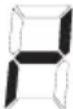
KJIO KOJHa 3 30N pIINOTyBaHH He AKTINBOBaHa IpOTaROM 20 cekyHnnicB MInKaHH CeHCOPHOro KepyBaHH, BOHO NOBepHeTbC B PekIM OUYVBAHH.
KepyBaHHa YBMKHHeHO, KONKa "ON/OFF" (1) BMnKaεTbca paHlwe Hwix KONOK, 06 KepyBaHHa BmKhynocb y 6yDb-akn Yac y BnnaKky uCnEHHoro a6o TpBaNOrO HaNTCKAHHa KONKn.
B peKIMOuyKyBaHHaTnCHyTI KONKn HE BnKInKaHObTb KOdHoroepeKTy.Y 6yNb-akomy BnnaIky, 106 3HOBy YBIIMKHyTN eNeKTpOHHe KepyBaHHa, KepyBaHHa NOBnHBO BnBAHTn, 10 KOdHy KOnkY He HAtnCHyTO.
Khonka 6nokvbaHH (dyHKi3a6e3neHHe 6e3neKn dite)
AknBaiai 6nKyoOoi KhoNk (6) B pexNmi OuyKyBaHHa 60 akTbHOMy pexNMI, 3a6nKye KhoNki cBtIoDioD 6nKyaBHn, (12), npoDobKnBcITINc. PInTa npoOboXypeauoBAty BldpeyrBoAHOMy peNMI, aene 6Ibue HeMOxKnBO BkOpNCTOBByATn 6ydb-aki KhoNk OKpim KhoNki 6nKyoBaHHa 60 KhoNki On/Off (1). KOni KhoNki 3a6nKOBaHI, KhoNky On/Off, (1) MoKHBAUMKHHTn. CbTIIOID KhoNki 6nKyoBaHHa, (12) rache, KOJI KepyBaHHB BmNkaCTbC.
CbitnoiodФyHKuBnKHNKnAknByTcBNOBTOHOKOBoHA yBIMKHeHa (B peKmI OkyBaHH-20c),NOKBOBA BIMNAeTbCnOBTOPnHM HATNCKAHNM KONKn 6NOKyBaHH. AKTBAU/DeakTNBaUg FyHKuBnKnHKnHKnE HEMoKJINBOO KOJI npnad BIMKHeNo. TabepeHHi BiNDkZanporpAmOBaHX TaMepiB MoXHa NiTBePdNTn CnHAni BiNDIOHOrTo TaMepa 1xJXOM HATNCKaHH KONOK (15) a60 (16) a60 1xJXOM BiKNHOeHH npCTPO KONKO (1). NOBTOPA AKNBaQI 6NkYHOOJ KNOK
B peximi OiyBaHHa 60 aKTHBOMy peximi po36nOKye KHOKN i CBITIOIO 6NOKyBaHHa 3raChe. Bci ceHCOPHI KHOKN MOKyTB BHKOPICTOBYBaTNCb k3a3Bnuai.
ABTomatnuehe p03irpiBaHHa
Lc yHKsir cpiupe npocep npirotybaHHr, Tomy hema Heo6xHocti KOHTpOIOBAtn ycTO pRbAicTh npiroTybaHH. FyHKiip 03irpiBaE 3OHy npiroTybaHH npm MAcMmaHni NotyKHOCTi, 06 WbNko DocBecTn 3OHy npiroTBaHH Do TemnepaTpy CnCTem. Ypee3 Deekn qac, pBeHb HactpoQKn NOBepTaetbcry nporpaMOBAHN pBeHb.
Taimepn30HnpuroTyBaHH
-JaKuo npaOoe JIKMIyM OJHa 30Ha npiroToBaHHa, TaMEp MoXHa
akTbByBAtn 7JXOM OJHOacHOro HATNcKaHHa KHONOK (15) i (16).
-Ha DnCnnei TaMepe (8) BiO6paKaAcTBcra 0.00 i 3aropaeTbcra
CmBOI TaMepe (10), 0o BiIOBIAe npauOohi 30Hi npiroToBaHHa,
Uo po3aIOBaha NIBOpuy. Pnic lyOro npotrrom 5 cekHyd Heo6XiHO
Bn6paTn YAC nIpyntio HOI npiroToBaHHa 3a DonomoroHO
KhONok BInbue (16) a6o MeHue (15). Ppi BnKoHaHHi ciie onepaui yci
NoB3yHKoi peryIantopn (3) npOboKxyHb 3aIIWATncra AKTBOBaHHm
DnBn6opy pibHn HAcTPOKn 30H npiroToBaHHa.
-Iloo 3amHNt TaMEp, np3HaueHm OJHI 30Hi npiroToBaHHa, Ha
TaMEp, np3HaueHm IHsI 30Hi, DocNTb OJHOacHO KINbKa pa3IB
HaTHNCHTN KHONIK (15) i (16), NOKn HE yBIMKHeTcBc CmBOI TaMepe
(10) notp6hoI 30HN.
-B KINi3anporpamOBaHORO yacy AKTNByeTBcnapeepnBactn 3BykoBn CnHAn iHa dnCnnei (8) cnaJaxye "0.00", BiNobiHa 30Ha npriroTyBaHH BmNKaetbcr i Ha dnCnnei (7) BiO6paKaETBCr "0" (3MiHOETBCr Ha "H" RkIO 3aIIWAeTBcR 6yIb-Ke 3aIIWkoBE TennOBinHeHH). Nicra HATnCKaHHK KOxHoi i3 KHOON (15), (16), (1) a6o nicra 2 XBNHN 3Hkae 0.00 i npinnHReTcnoDaa 3ByKOBOrO CnHany.
BnKOpncTaHH TaMepa
-Notpi6he 3haeHnHa Yacy MoXHa Bn6paTn 3a DonomoroIO KHOIOK BInbwe (16)iMeHwe (15).
-MakcImaJIbHnYac, kIIM MOXHa Bn6paTn, cTaHOBntb 1 roDHy 59 XBNIH.
-Ⅱo6 BiKIOHHTaTMeP,Notpi6HO Bn6paTH 3HaueHHA《0.00》
IJXOM 6aRaTopa3OBoro a6o TpNBaIoro HATNCKaHHa KhoKN MeHwe (15).
KactpoiJI/ckoBopiKn (MaHIOHok 3)
-Kactpion/ckOBopiKa,io npntarye MarHIT MOKe 3aCTOCOByBaTncB DnI INyKuiHoro pniroTuBaHHA iKi.
-Kpaue BnKOpNCTOBbATN KAcTPOJI/cKOBopiIKN,HaAKNX3a3HaueHO,
IIO BOHN iIXoOJrTB IINyKUIMHO npiroTyBaHHI iKi
-KacTPOJI/cKOBopiIKN 3PiackoIO iTBOCTOIO OCHOBOIO
- Kactpion/CKOBopiKa 3 Takm Camm Diametpom, 00 n 30Ha npiroTyBaHHa, 3a6e3neue BVKOpNCTAHMAkCMMaIbHOI NOyXHocTi. - MeHs KaTpOIN/CKOBopiKa 3MeHwE NOtyKHICTb, aNe He npin3BeDe Do BTPaTN eHepri. Y bdy-RAKOmy BNnAky, MHe peKOMeHyDyEMo BVKnOPNCTOBByATn KACTPOni/CKOBopiKn 3 diamETpom MEHue HIX 10 cm.
-Kactponi/ckobopiKn 3 Hepkabiooi CTani 3 BaratoapOBMN OCHOBAMn abo OCHOBAMn 3peppntHOHepdABIOOCTani, Raio Ha OCHOBI 3a3aHueo: nI INdyKuiHoro npiroTOBaHH.
1- 青卍 BINGKOPNCTOBYOTBCA YABYHHI KACTPONJI/CKOBOPIDKN, BOHN nepeBaXHO MAIOTB DHO BKPTe EMAJIIO, ⅢO6 3ANOBITN yTBOpEHNO NOpRnH Na NOBepxHi KEpaMHyOJ KOMΦopKn.
- HAcTynni Tnni KacTpOInb/CKOBopiIOK He nIxDxOJaTb, nIaBnKOpNCtAHH: cKJIaHI, KepamHi, rINHHi, aIOMHiEbi, MiHi a6o 3 HemaRHTHO (ayCTeHITHO) HEPXABIOOT CTani.

- FR
- PRECAUTIONS
- To avoid all risk, if the power cable becomes damaged, it must only be replaced by the manufacturer, by an authorised service centre, or by a qualified electrician.
- Booster Function
- Temperature Functions
- symbol:
- Automatic disconnection (operating time limit)
- Protection against unintentional activation
- Button lock (child safety feature)
- Automatic preheating
- Activation of automatic preheating
- Sound signal (buzzer)
- Timer Function
- Stand-alone timer
- Timer for the cooking zones
- Using the timer
- Pans (Fig. 3)
- Maintenance (Fig. 4)
- Instructions for the fitter
- Installation
- Installation (Fig. 5)
- Electrical connection (Fig. 6)
- B cnyae nobpekdeHua whypa numaHua, 6pamumecbKΦa6puKaHmydIe2o3aMeHbI, UuO6pamumecb BynONHomOueHHbI ueHmp mexHuueckou nomouu, UuJe 6pamumecb K mexHuueckomy cneuaunucmy IIO602o ueHmpa c noo6hbIMu nohHomOuymu, dJa npedombaueHua BO3HukHObeHua IIO602o buda puckoe.
- MOHTAX
- BkIIOueH e n BbIKIOueH e ceHCOPHBIM ynpaBHeHEm
- ABTOM aTHueck oe BbIK JIOUeHn e
- BknHoueH e/B bIK JIOueH e 3OhBi BapKn.
- HHTenNekTayabHoe o6hApyKeHne nocydbI
- Bapouhhe 30HbI
- Функциа Booster (Byctep)
- Функци TempepaTypbl
- HdkaTop octaToH oro ten na
- ABTomatueeckoe BbIKnHoueHne (orpaHueHne BpeMeH naoTbI)
- 3aunTa B Cnyae Hnpon 3B OnbHOrO BK JIOueHr
- BLOKPOBk aKnabu w (npnc oO6neH e dJy 6e3oN acHOCTn d ete) BLOKPOBka KhoNOK (doONIHHTenbHO)
- ABTomatueckn noDorpeB
- AKTUBAUNA ABIOMATUeCKORO NODORPeBa
- AkyctnYeckn CnHn aJ (3BOH OK)
- ФУHKUЯТаMepa
- TaimepnBapouhbx30H
- IcnoB3OBAHue TaMepa
- Kactpion (Pnc. 3)
- YxOa(Pn c. 4)
- HnctpykunI Jn M OHTaxhNka
- YCTAHOBKa(PnC.5)
- ABTomatnuehe BiKJIOUeHHa (O6mExeHHa yacy po60Tu)
- 3axnCT npoTH HeHaBMCHORO BBIMKHeHHA
- Khonka 6nokvbaHH (dyHKi3a6e3neHHe 6e3neKn dite)
- ABTomatnuehe p03irpiBaHHa
- Taimepn30HnpuroTyBaHH
- BnKOpncTaHH TaMepa
- KactpoiJI/ckoBopiKn (MaHIOHok 3)
Brand : CATA
Model : GIGA 600 SD
Category : Cooker