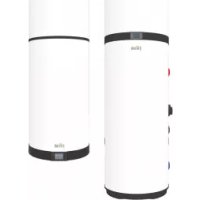
Egea Lt - Boiler FERROLI - Free user manual and instructions
Find the device manual for free Egea Lt FERROLI in PDF.



| Product type | Air-to-water heat pump for domestic hot water production |
| Brand | Ferroli |
| Model | Egea LT (90LT and 120LT versions) |
| Tank capacity | 89 L (90LT) / 118 L (120LT) |
| Height | 1303 mm (90LT) / 1555 mm (120LT) |
| Net weight | 60 kg (90LT) / 70 kg (120LT) |
| Power supply | 230 V / 1 / 50 Hz |
| Heating power (ISO) | 833 W |
| COP (ISO) | 3,08 |
| Energy class (EU) | A+ |
| Refrigerant | R290 (propane) - charge 150 g |
| Compressor | Rotary |
| Indoor noise level | 52 dB(A) |
| Protection rating | IP24 |
| Maximum set temperature | 75 °C (Boost mode) |
| Air temperature range (heat pump) | -5 °C to 43 °C |
| Operating modes | ECO, Automatic, Boost, Electric, Ventilation, Holiday |
| Special functions | Anti-legionella, Time schedules, Automatic defrost, Control via EGEA Smart app |
| Recommended maintenance | Check sacrificial anode every 2 years |
| Safety | Safety thermostat, 7 bar safety valve, frost protection |
| Compliance | CE, European directives (WEEE, RoHS, EMC, LVD, RED, etc.) |
Frequently Asked Questions - Egea Lt FERROLI
User questions about Egea Lt FERROLI
0 question about this device. Answer the ones you know or ask your own.
Ask a new question about this device
Download the instructions for your Boiler in PDF format for free! Find your manual Egea Lt - FERROLI and take your electronic device back in hand. On this page are published all the documents necessary for the use of your device. Egea Lt by FERROLI.
USER MANUAL Egea Lt FERROLI
6.5.8 Modo Off-PeakHP HP
1.1 Products 72
1.2 Disclaimer 72
1.3 Copyright 73
1.4 Available versions and configurations 73
- HANDLING AND TRANSPORT 73
2.1 Receipt 73
- CONSTRUCTION CHARACTERISTICS 74
3.1 Dimensional data 75
3.2 Technical characteristics 77
- IMPORTANT INFORMATION 78
4.1 Compliance with European regulations 78
4.2 Casing protection rating 78
4.3 Operating limits 78
4.4 Operating limits 78
4.5 Basic safety rules 79
4.6 Information on the refrigerant used 79
- INSTALLATION AND CONNECTIONS 79
5.1 Preparation of place of installation 79
5.2 Wall mounting 80
5.3 Aeraulic connections 80
5.4 Securing and connections of EGEA 81
5.5 Plumbing connections 81
5.6 Electrical connections 83
5.7 Wiring diagram 86
6.DESCRIPTION OF USER INTERFACE AND OPERATION OF EQUIPMENT 87
6.1 Turning the water heater on and off and unlocking the buttons 87
6.2 Setting the clock 88
6.3 Setting time bands 88
6.4 Setting the hot water set-point 88
6.5 Operating mode 88
6.6 Additional functions 89
6.7 Control of equipment via APP 90
6.8 Faults/protection 94
7.COMMISSIONING 95
7.1 Query, editing operating parameters 95
- TROUBLESHOOTING 98
8.1 Power board fuse replacement 99
8.2 Heating element safety thermostat reset 99
- MAINTENANCE 100
9.1 Sacrificial anode check/replacement 100
9.2 Boiler emptying 100
- MAINTENANCE OPERATIONS ACCORDING TO IEC EN 60335-2-40_A1_2007 (ANNEX DD) 101
10.1 Product maintenance 102
11.DISPOSAL 103
12.PRODUCT SHEET 103
1. INTRODUCTION
This installation and maintenance manual is an integral part of the heat pump (hereinafter equipment).
The manual must be kept for future reference until dismantling. It is intended for the specialist installer (installers - maintenance technicians) and the end user. The manual describes the installation procedures to be observed for correct and safe operation of the equipment, and the methods of use and maintenance. In case of sale or transfer to another user, the manual must stay with the unit.
Before installing and/or using the equipment, read this instruction manual carefully and in particular chapter 4 on safety.
The manual must be kept with the unit and always be available to qualified installation and maintenance personnel.
The following symbols are used in the manual for quickly finding the most important information:
| ! | Safety information |
| Procedures to be followed | |
| Information / Suggestions | |
| Danger, Flammable | |
| Installer Manual | |
| Operator Manual |
1.1 Products
Dear Customer,
Thank you for purchasing this product.
Our company, always attentive to environmental issues, uses low environmental impact technologies and materials for its products, in compliance with EU WEEE standards (2012/19/EU - RoHS 2011/65/EU).
1.2 Disclaimer
The conformity of these operating instructions with the hardware and the software has been carefully checked. Nevertheless there may be differences; and no responsibility is assumed for total conformity.
In the interest of technical improvement, we reserve the right to make construction or technical data changes at any time. Any claim based on indications, figures, drawings or descriptions is therefore excluded. They are subject to possible errors.
The supplier declines any liability for damage due to command errors, improper or inappropriate use, or due to unauthorized repairs or modifications.

ATTENTION!: The unit can be used by children aged 8 years and over and by persons with reduced physical, sensory or mental capacities, or lacking in experience or the necessary knowledge, provided they are supervised or have received instructions regarding safe use of the unit and understand the related hazards. Children must not play with the unit. Cleaning and maintenance intended to be performed by the user must not be performed by unsupervised children.
1.3 Copyright
These operating instructions contain information protected by copyright. No part of these operating instructions may be photocopied, duplicated, translated or recorded on storage media without prior permission from the supplier. Any violations will be subject to compensation for damage. All rights, including those resulting from the granting of patents or registration of utility models, are reserved.
1.4 Available versions and configurations
This equipment is a 0.83kW air-water heat pump for domestic hot water heating, available in versions with 90 L tank and 120 L tank.
| Version | Configuration description |
| 90LT | Air heat pump for domestic hot water (DHW) production |
| 120LT |
2. HANDLING AND TRANSPORT
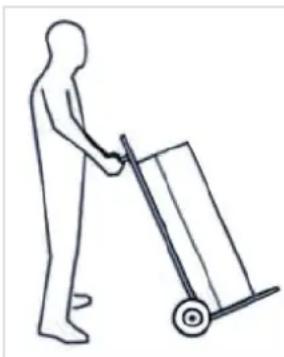
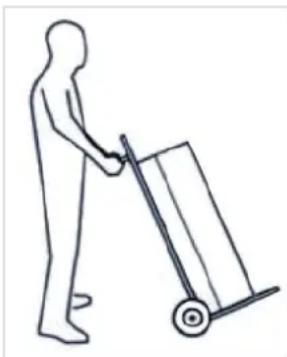
The equipment comes in a cardboard box on a wooden pallet.
For unloading operations use a forklift or pallet truck having a load capacity of at least 250kg . The packaged equipment must be kept upright during all loading operations.
Unpacking must done carefully so as not to damage the equipment casing
if using knives or cutters to open the cardboard packaging.
After removing the packaging, check the integrity of the unit. If in doubt, do not use the unit; contact authorized technical personnel.
Before eliminating the packaging, according to the applicable environmental protection regulations, make sure all the accessories supplied have been removed.

ATTENTION!: The packaging materials (clips, cardboard, etc.) must not be left within the reach of children as they are hazardous for them.
(*) Note: The type of packaging may undergo variations at the discretion of the manufacturer.
For the entire period the equipment remains idle, awaiting commissioning, it is advisable to put it in a place protected from atmospheric agents
2.1 Receipt
In addition to the units, the packages contain accessories and technical documentation for use and installation. Check that the following are present:
- User, Installation and Maintenance Manual
- Safety valve
- 6-core cable digital inputs
For the entire period the equipment remains idle, awaiting commissioning, it is advisable to put it in a place protected from atmospheric agents.
3. CONSTRUCTION CHARACTERISTICS
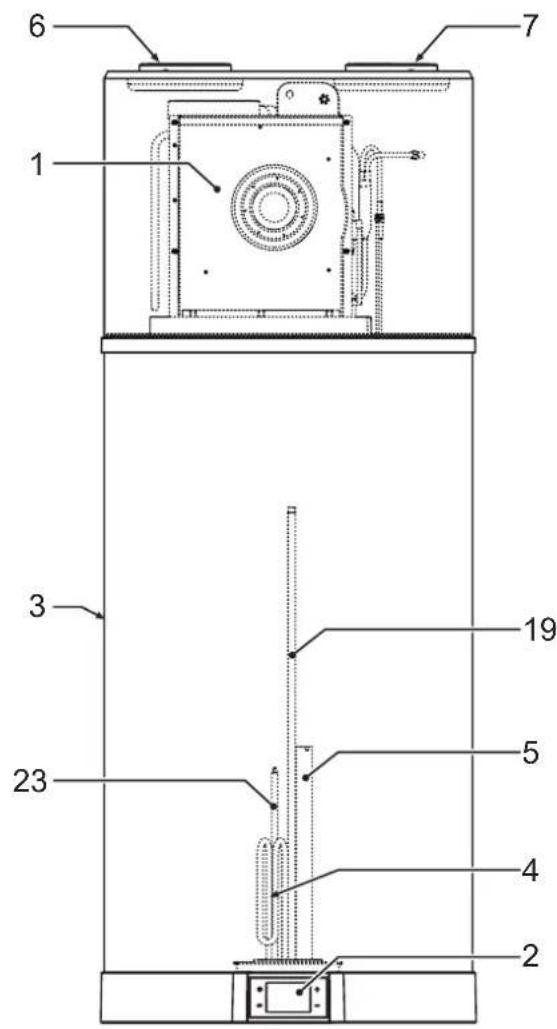
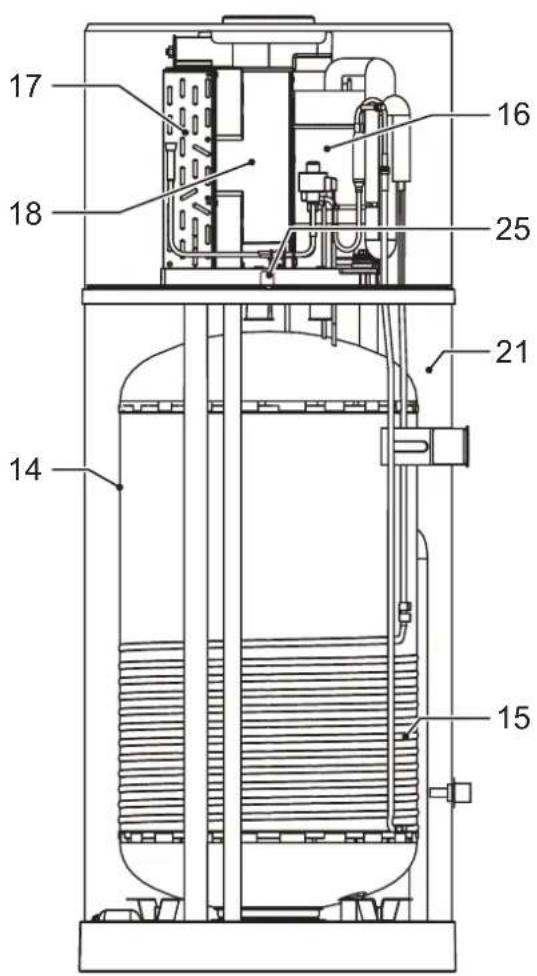
fig.1
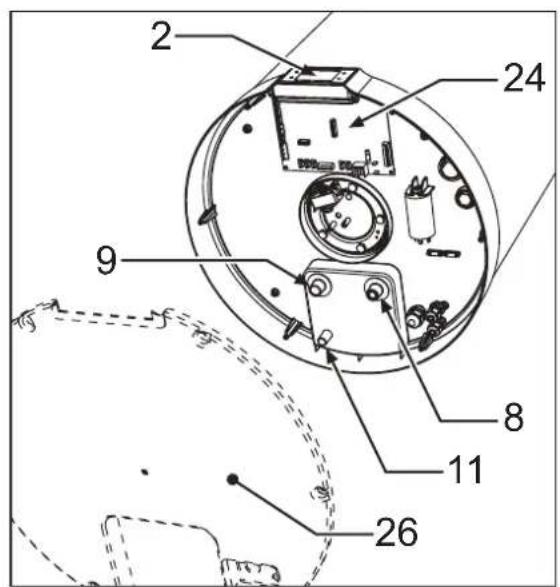
fig. 2
1 Heat pump
2 User interface
3 Steel casing
4 Heating element
5 Magnesium anode
6 Ventilation air outlet (0 125 mm)
7 Ventilation air inlet (0 125 mm)
8 Cold water inlet connection
9 Hot water outlet connection
11 Condensate drain
14 Steel tank with vitreous enamel coating according to DIN 4753-3
15 Condenser
16 Rotary compressor
17 Finned pack evaporator
18 Electronic fan
19 Boiler probes
21 Polyurethane insulation
23 Tube for safety thermostat bulb
24 Power board
25 Wi-Fi card
26 Cover for accessing heating element, safety thermostat bulb, boiler probes and power board
3.1 Dimensional data
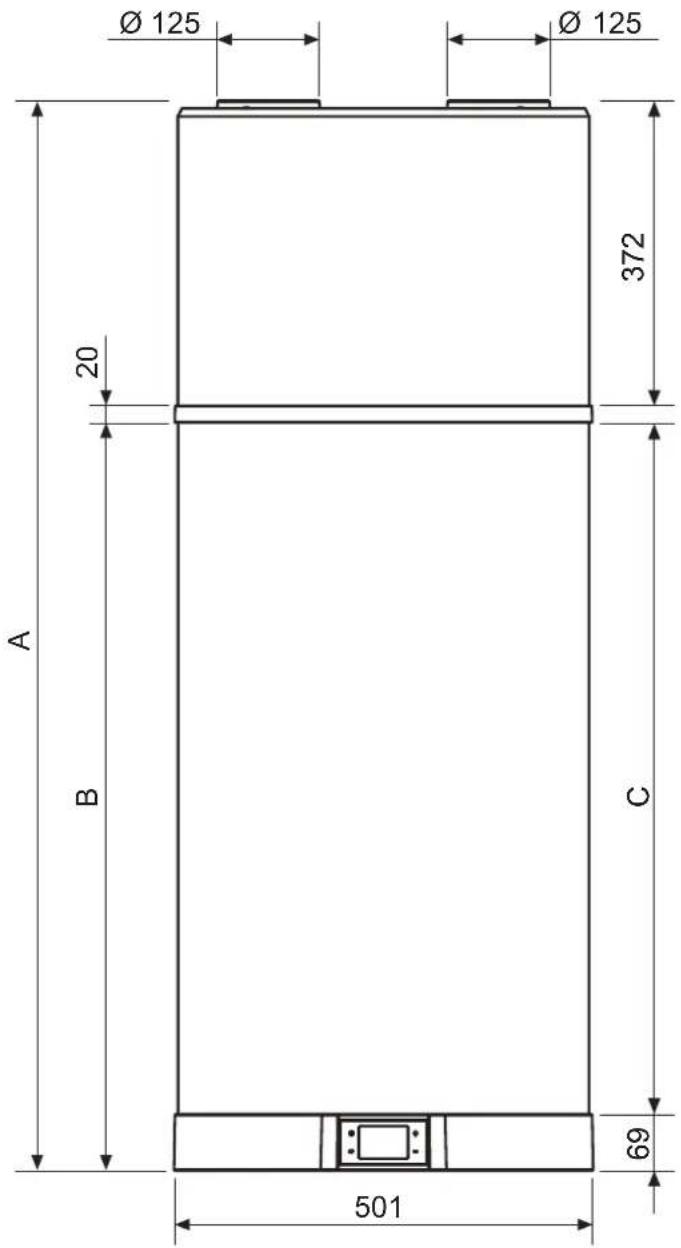
fig. 3
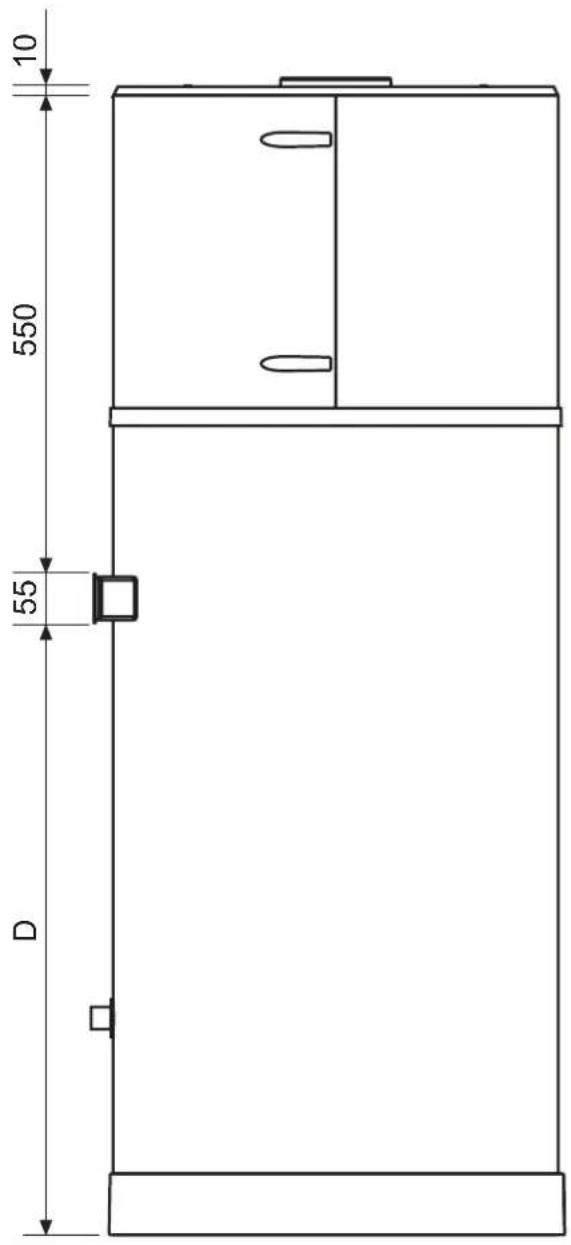
fig. 4
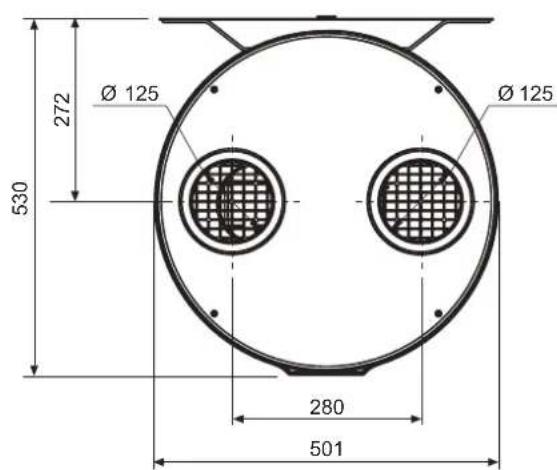
fig. 5
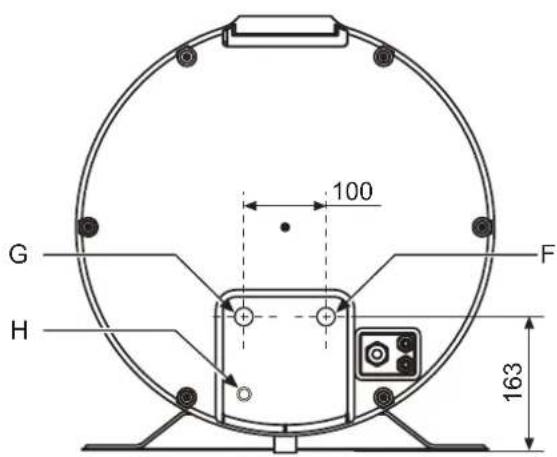
fig.6
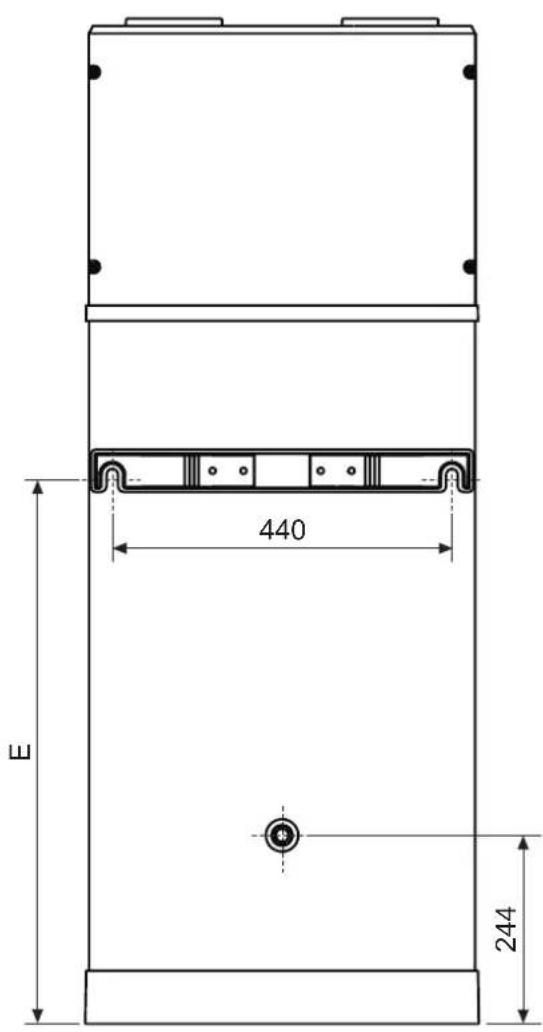
fig. 7
Table ref. fig. 3, fig. 4, fig. 6 and fig. 7
| Ref.ø 90LT 120LT UM | ||||
| A / 1303 1555 mm | ||||
| B / 912 1162 mm | ||||
| C / 843 1094 mm | ||||
| D / 690 940 mm | ||||
| E | / | 711 | 963 | mm |
| F (ref. 8 - fig. 2) | 1/2"G | 163 163 | mm | |
| G (ref. 9 - fig. 2) | 1/2"G | 163 163 | mm | |
| H (ref. 11 - fig. 2) | 16 mm* | 68 | 68 | mm |
*H - Outlet connection in plastic material
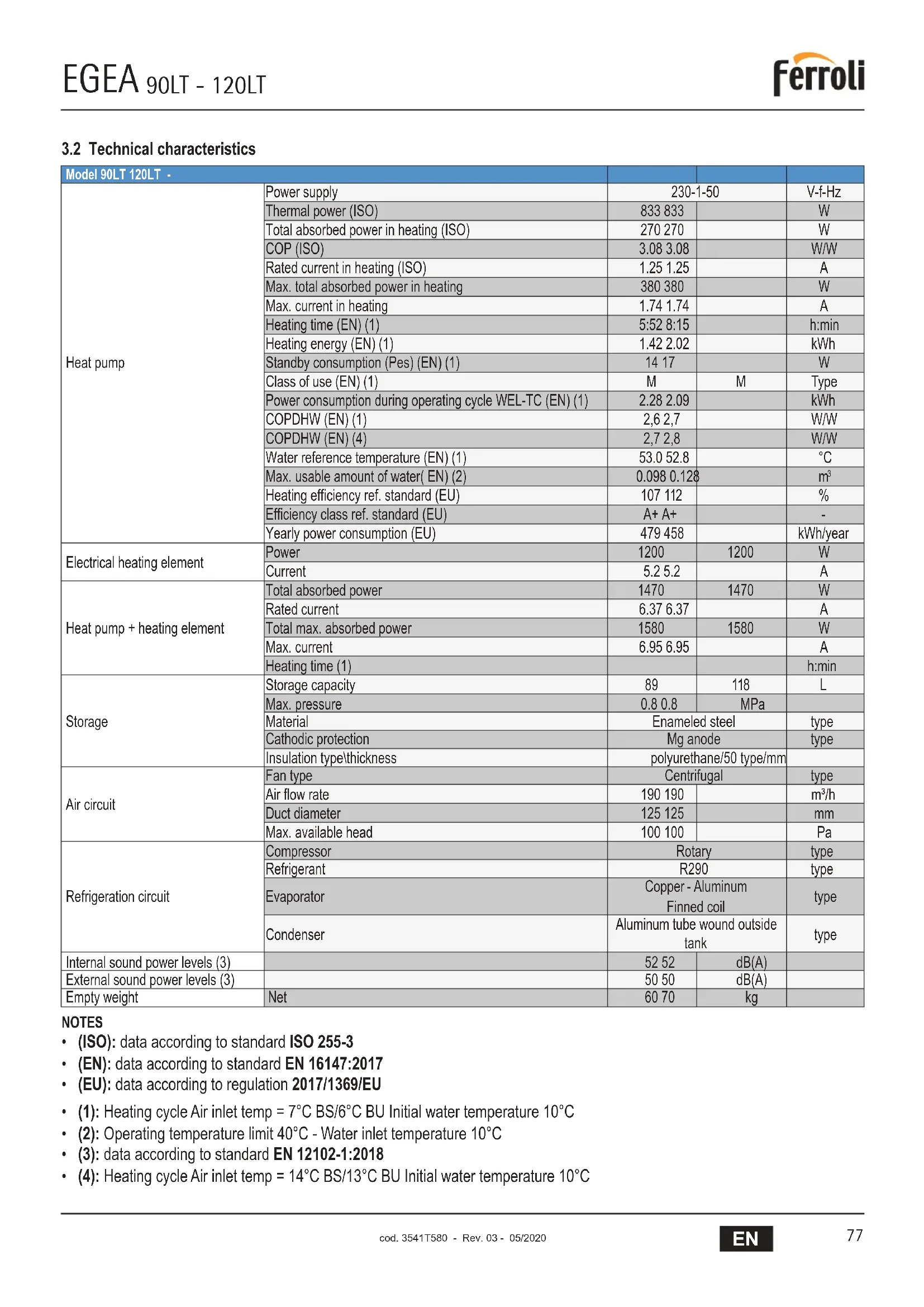
3.2 Technical characteristics
| Model 90LT 120LT - | ||||
| Heat pump | Power supply | 230-1-50 | V-f-Hz | |
| Thermal power (ISO) | 833 833 | W | ||
| Total absorbed power in heating (ISO) | 270 270 | W | ||
| COP (ISO) | 3.08 3.08 | W/W | ||
| Rated current in heating (ISO) | 1.25 1.25 | A | ||
| Max. total absorbed power in heating | 380 380 | W | ||
| Max. current in heating | 1.74 1.74 | A | ||
| Heating time (EN) (1) | 5:52 8:15 | h:min | ||
| Heating energy (EN) (1) | 1.42 2.02 | kWh | ||
| Standby consumption (Pes) (EN) (1) | 14 17 | W | ||
| Class of use (EN) (1) | M | M | Type | |
| Power consumption during operating cycle WEL-TC (EN) (1) | 2.28 2.09 | kWh | ||
| COPDHW (EN) (1) | 2,6 2,7 | W/W | ||
| COPDHW (EN) (4) | 2,7 2,8 | W/W | ||
| Water reference temperature (EN) (1) | 53.0 52.8 | °C | ||
| Max. usable amount of water( EN) (2) | 0.098 0.128 | m³ | ||
| Heating efficiency ref. standard (EU) | 107 112 | % | ||
| Efficiency class ref. standard (EU) | A+ A+ | - | ||
| Yearly power consumption (EU) | 479 458 | kWh/year | ||
| Electrical heating element | Power | 1200 | 1200 | W |
| Current | 5.2 5.2 | A | ||
| Heat pump + heating element | Total absorbed power | 1470 | 1470 | W |
| Rated current | 6.37 6.37 | A | ||
| Total max. absorbed power | 1580 | 1580 | W | |
| Max. current | 6.95 6.95 | A | ||
| Heating time (1) | h:min | |||
| Storage | Storage capacity | 89 | 118 | L |
| Max. pressure | 0.8 0.8 | MPa | ||
| Material | Enameled steel | type | ||
| Cathodic protection | Mg anode | type | ||
| Insulation type\thickness | polyurethane/50 type/mm | |||
| Air circuit | Fan type | Centrifugal | type | |
| Air flow rate | 190 190 | m³/h | ||
| Duct diameter | 125 125 | mm | ||
| Max. available head | 100 100 | Pa | ||
| Refrigeration circuit | Compressor | Rotary | type | |
| Refrigerant | R290 | type | ||
| Evaporator | Copper - Aluminum Finned coil | type | ||
| Condenser | Aluminum tube wound outside tank | type | ||
| Internal sound power levels (3) | 52 52 | dB(A) | ||
| External sound power levels (3) | 50 50 | dB(A) | ||
| Empty weight | Net | 60 70 | kg | |
NOTES
- (ISO): data according to standard ISO 255-3
- (EN): data according to standard EN 16147:2017
(EU): data according to regulation 2017/1369/EU
(1): Heating cycle Air inlet temp = 7^ BS/6°C BU Initial water temperature 10^
(2): Operating temperature limit 40^ - Water inlet temperature 10^
(3): data according to standard EN 12102-1:2018
(4): Heating cycle Air inlet temp = 14^ BS/13°C BU Initial water temperature 10^
4. IMPORTANT INFORMATION
4.1 Compliance with European regulations
This heat pump is a product intended for domestic use in compliance with the following European directives:
Directive 2012/19/EU (WEEE)
- Directive 2011/65/EU on the restriction of the use of certain hazardous substances in electrical and electronic equipment (RoHS)
- Directive 2014/30/EU electromagnetic compatibility (EMC)
- Directive 2014/35/EU low voltage (LVD)
- Directive 2009/125/EC eco-friendly design
- Directive 2014/53/EU radio equipment (RED)
- Regulation 2017/1369/EU energy labeling
4.2 Casing protection rating
The equipment protection rating is: IP24.
4.3 Operating limits

PROHIBITION! This product is not designed or intended for use in hazardous environments (due to the presence of potentially explosive atmospheres - ATEX or with required IP level higher than that of the unit) or in applications requiring safety features (fault-tolerant, fail-safe) which may be systems and/or technologies to support life or any other context in which the malfunction of an application can lead to death or injury to people or animals, or serious damage to property or the environment.

NBI: If the possibility of a product fault or failure can cause damage (to people, animals and property) it is necessary to provide for a separate functional surveillance system equipped with alarm functions in order to exclude such damage. It is also necessary to arrange the replacement operation!

EGEA is not designed for installation outdoors but in a "closed" place not exposed to the elements.
4.4 Operating limits
The product in question is designed exclusively for heating hot water for sanitary uses within the limits described below. For this purpose, it must be connected to the domestic water supply and the power supply (see chapter "5. INSTALLATION AND CONNECTIONS").
4.4.1 Temperature range
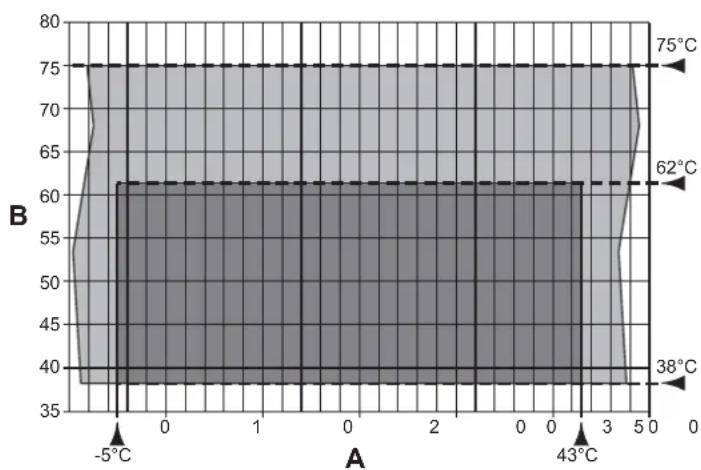
fig. 8 - Chart
A = Inlet air temperature (°C)
B = Hot water temperature (°C)
=Operating range for heat pump (HP)
= Integration with heating element only
4.4.2 Water hardness
The unit must not operate with water of hardness under 12^ ; however, with particularly hard water (above 25^ ), it is advisable to use a properly calibrated and monitored water softener, in this case the residual hardness must not fall below 15^ .

NB! The manufacturer declines any liability for uses different from those for which the equipment is designed, and for any installation errors or improper use of the unit.

PROHIBITION! Using the product for purposes other than that specified is prohibited. Any other use is deemed improper and not permitted.

NB!: In the design and construction phase of the plants, the applicable local regulations and provisions must be respected.
4.5 Basic safety rules
- The product must be used by adults.
- Do not open or disassemble the product when it is electrically powered.
- Do not touch the product if barefoot or with wet or damp parts of the body.
- Do not pour or spray water on the product.
- Do not climb, sit and/or place any type of object on the product.
4.6 Information on the refrigerant used
This product contains fluorinated greenhouse gases NOT included in the Kyoto protocol. R290 (propane) is one of the most environmentally friendly gases on the market, but being a flammable gas it must not be released into the atmosphere.
Type of refrigerant: R290.

NB!: Maintenance and disposal operations must only be carried out by qualified personnel.
5. INSTALLATION AND CONNECTIONS

ATTENTION! Product installation, commissioning and maintenance must be carried out by qualified and authorized personnel. Do not try to install the product yourself.
5.1 Preparation of place of installation
The product must be installed in a suitable place, i.e. to allow normal use and adjustment operations as well as routine and extraordinary maintenance.
The necessary operating space must therefore be prepared by referring to the dimensions given in fig. 9.
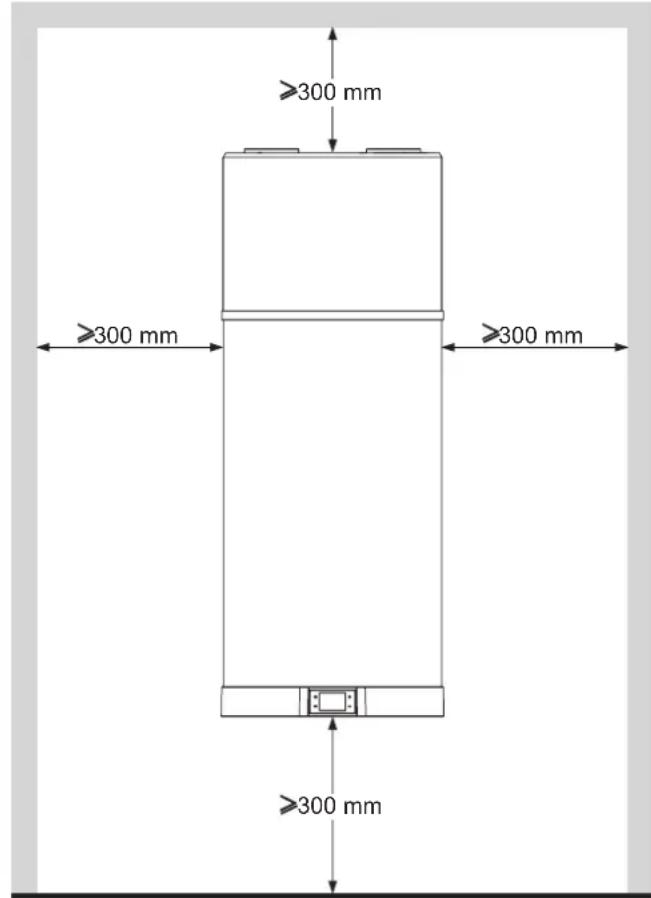
fig. 9 - Minimum spaces
The room must also be:
- Equipped with adequate water and electricity supply lines;
- Prearranged for the condensation water discharge connection;
- Prearranged with adequate water drains in case of boiler damage or safety valve intervention or the breakage of pipes/ connections;
- Equipped with possible containment systems in case of serious water leakage;
- Sufficiently illuminated (where required);
- Not less than 20 m3 in volume;
- Protected against frost and be dry.
5.2 Wall mounting
The product must be installed on a solid wall that is not subject to vibrations. For securing choose the most suitable type of expansion plug according to the specific wall type.
Drill as shown in fig. 10.
Hook the boiler with the special fastening bracket (fig. 11).
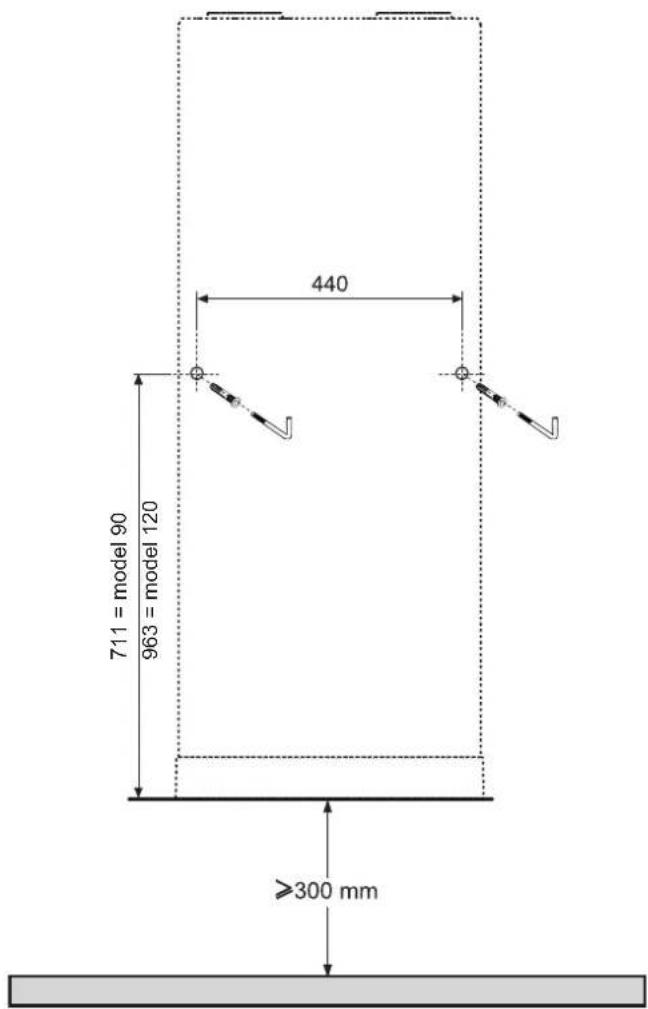
fig. 10 - Drilling

fig. 11 - Wall mounting
5.3 Aeraulic connections
In addition to the spaces indicated in 5.1, the heat pumprequires adequate air ventilation.
Create a dedicated air channel as indicated in fig. 12.
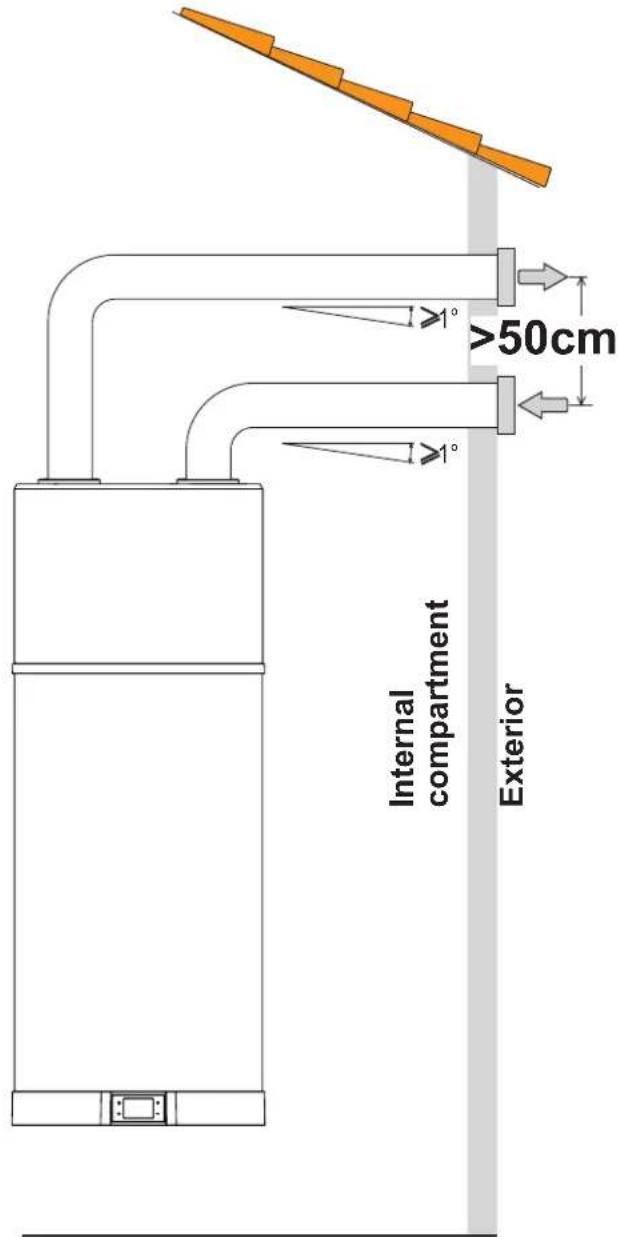
fig. 12 - Example of air outlet connection
Install each air channel, making sure:
- It does not weigh down on the equipment.
- It allows maintenance operations.
- It is adequately protected to prevent the accidental intrusion of materials inside the equipment.
- The connection to the outside must be done with suitable, non-flammable piping.
- The total equivalent length of the extraction pipes plus the delivery, including grilles, must not exceed 12m .
The table gives the characteristic data of commercial ducting components with reference to nominal air flows and diameters 125mm
| Data | Smooth straight pipe | Smooth 90° curve | Grille UM | |
| Type | ||||
| Effective length | 1\m | |||
| Equivalent length | 122m |

During operation, the heat pump tends to lower the room temperature if the air ducting is not to the outside.

A suitable protection grille must be installed at the air extraction pipe to the outside to prevent any foreign bodies from entering inside the equipment. To ensure maximum product performance, the grille must be selected from those with low pressure loss.

To avoid the formation of condensation water: insulate the air extraction pipes and the ducted air cover connections with a steam-tight thermal covering of adequate thickness.

Install silencers if deemed necessary to prevent noise due to the flow. Equip the pipes, wall outlets and connections to the heat pump with vibration-damping systems.

ATTENTION!: The simultaneous operation of an open-chamber hearth (e.g. open fireplace) and the heat pump causes a dangerous negative pressure in the room. The negative pressure can cause the return of exhaust gases into the room.
Do not operate the heat pump together with an open-chamber hearth.
Only use sealed-chamber hearths (approved) with separate combustion air supply.
Keep tight and sealed the doors of boiler rooms that do not have the inflow of combustion air in common with living areas.
5.4 Securing and connections of EGEA
The product must be installed on a stable, flat floor that is not subject to vibrations.
5.5 Plumbing connections
Connect the cold water supply line and the outlet line to the appropriate connection points (fig. 13).
The table below gives the characteristics of the connection points.
| Ref. | Model 90I / 120I | UM | ||
| 1 | Cold water inlet | 1/2"G | “ | |
| 5 | Hot water outlet | 1/2"G | “ | |
| 6 | Condensate drain | 16 | mm |

NOTE: To ensure the system works correctly, it is essential to fit the cold water intake with a 7 Bar pressure relief valve (lightweight, included in the supply), as well as fit anti-electrolysis sockets (not included in the supply) to the system's water intake and outtake
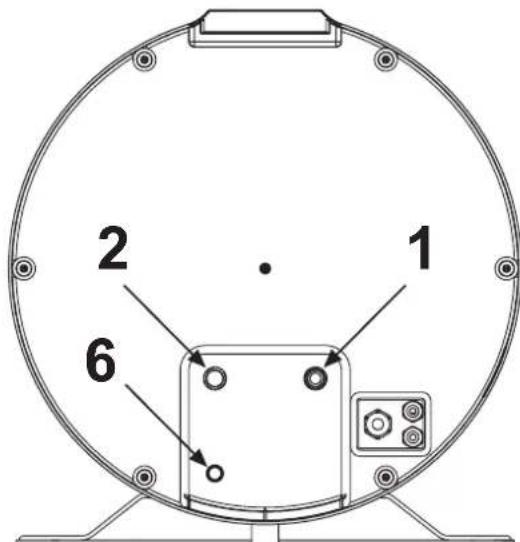
fig. 13
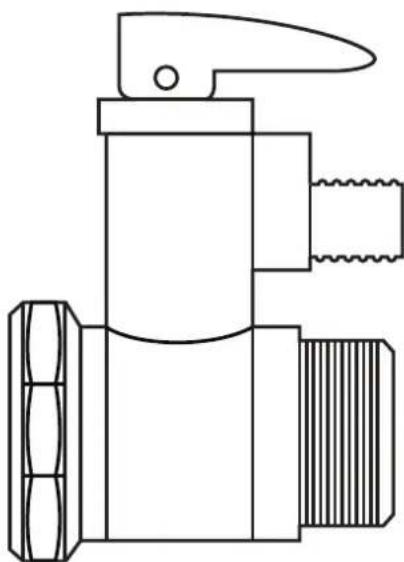
fig. 14 Safety valve 7 bar (0.7 MPa)
The following figure (fig. 15) illustrates an example of plumbing connection.
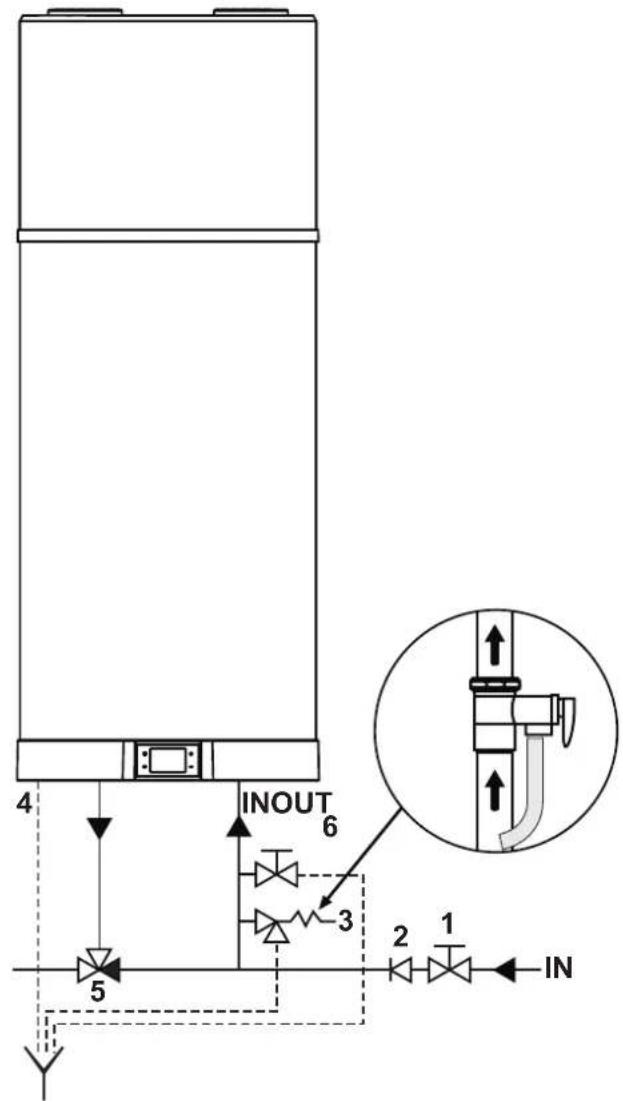
fig. 15 - Example of water system
Legend (fig. 15)
1 Shutoff cock
2 One-way valve
3 Safety valve (supplied)
4 Condensate drain
5 Automatic thermostatic mixing device
6 Drain cock

NB!: The overpressure device must be operated regularly, at least every 30 days, to remove scale deposits and to check that it is not blocked (fig. 14).

NB!: The discharge pipe connected to the overpressure device must be installed in a continuous downward slope and in a place protected against the formation of ice.

NB!: Connect a rubber hose to the condensate drain, taking care not to force too hard to avoid breaking the drain hose.
5.5.1 Condensate drain connection
The condensate forming during heat pump operation flows through a special drain pipe (1 / 2^ ) that runs inside the insulation casing and comes out the bottom of the equipment (fig. 13). It must be connected to a duct so that the condensate can flow regularly (see installation example fig. 16 and fig. 17).
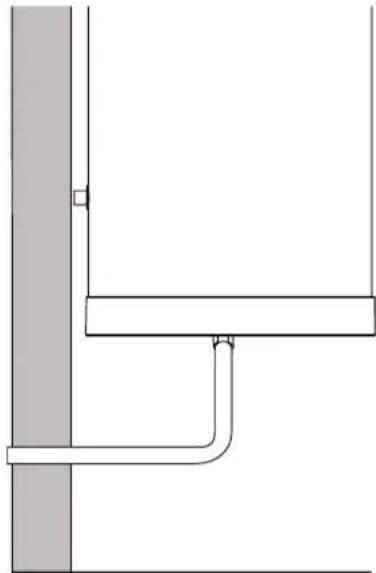
fig. 16 - Example of condensate drain connection without a trap
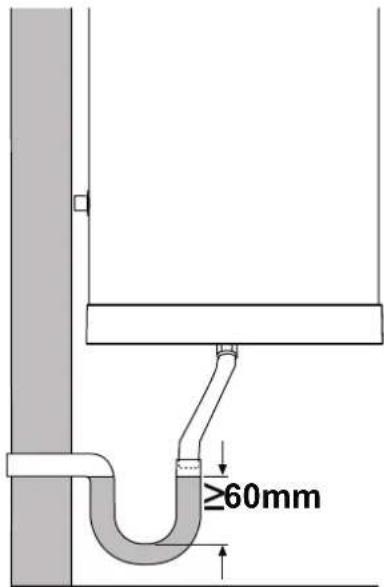
fig. 17 - Example of condensate drain connection with a trap
5.6 Electrical connections
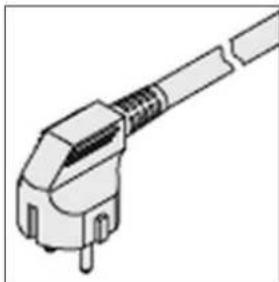
The product comes already wired for the mains supply. It is powered via a flexible cable and a combination plug/socket (fig. 18 and fig. 19). For connection to the mains, a Schuko socket with ground and separate protection is required.

ATTENTION!: The power supply line to which the equipment will be connected must be protected by a suitable differential switch.
The type of differential must be chosen according to the type of electrical devices used by the overall plant.
For the mains connection and the safety devices (e.g. differential switch), comply with IEC standard 60364-4-41.
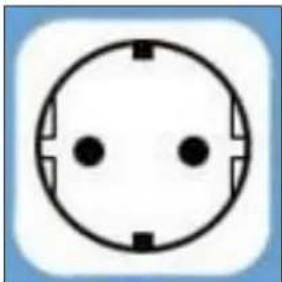
fig.18 - Schuko socket fig. 19 - Unit plug
5.6.1 Remote connections
The equipment is prearranged to be connected to other remote energy systems or energy meters (solar thermal, photovoltaic, Off-Peak)
INPUTS
Digital 1 (DIG1). NOT USABLE.
(THE TWO WIRES, WHITE AND BROWN, OF THE 6-CORE CABLE ARE NOT TO BE USED).
- Digital 2 (DIG2). Digital input for photovoltaic. In case of a photovoltaic system connected to the plant, it can be used to subtract energy in the form of hot water in times of overproduction. If there is a voltage-free contact, e.g. from the inverter, which closes when there is overproduction of energy, it can be connected to the two green and yellow wires of the 6-core cable supplied with the.equipment.
Set the parameter P23 = 1 to activate the supplement with photovoltaic.
- Digital 3 (DIG3). Input for Off-Peak. This function, available only in some countries, allows the equipment to be activated only when there is a signal coming from outside with preferential tariff. If the electric contactor has a voltage-free contact which closes when the preferential tariff is available, it can be connected to the two gray and pink wires of the 6-core cable supplied with the equipment.
Set the parameter P24 = 1 to activate Off-peak in ECO mode or P24 = 2 for Off-peak in AUTO mode.
5.6.1.1 Remote connection
For the connection to the digital inputs of the equipment, proceed as follows:
- Disconnect the power to the equipment.
- Remove the bottom cover.
- Connect the 6-core cable, supplied with the equipment, to connector CN5 on the power board.
- Secure the cable on the free jumper next to the power one.
- Use one of the two free cable glands present near the power cable for correct anchoring of the cable for the remote connection.
- Refit the bottom cover.
The following figures give an example of remote connection (fig. 20 and fig. 21) which must not be longer than 3m .
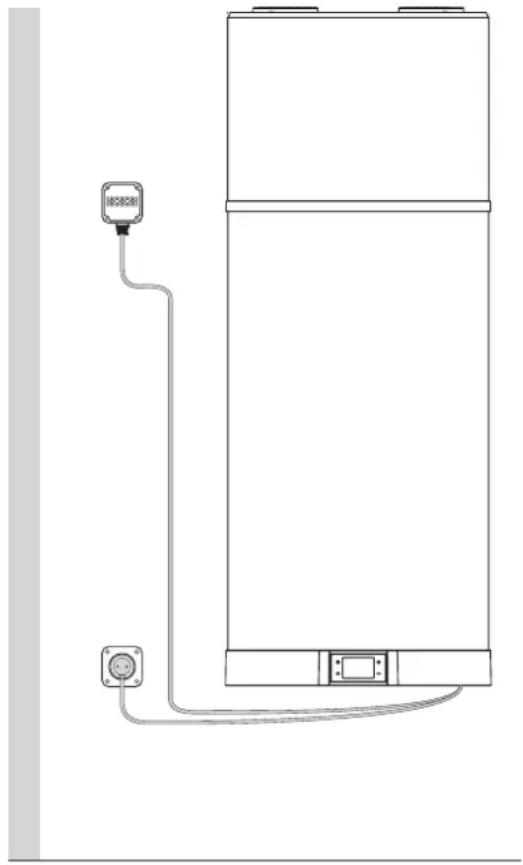
fig. 20 - Example of remote connection
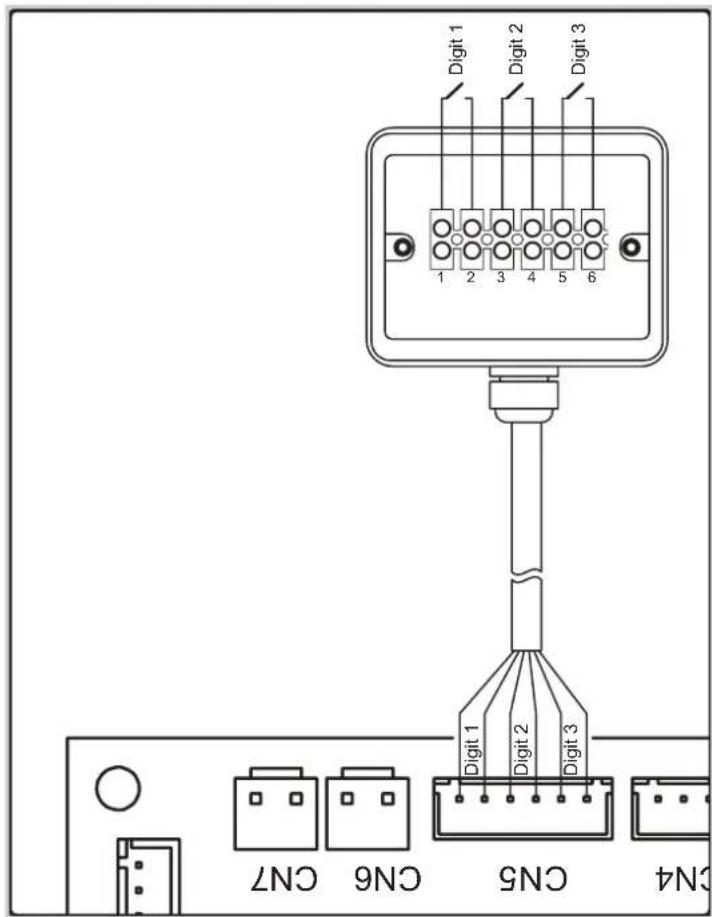
fig. 21

Any maintenance operation must be carried out by qualified personnel according that prescribed in the chapter 10 of this manual.
5.7 Wiring diagram
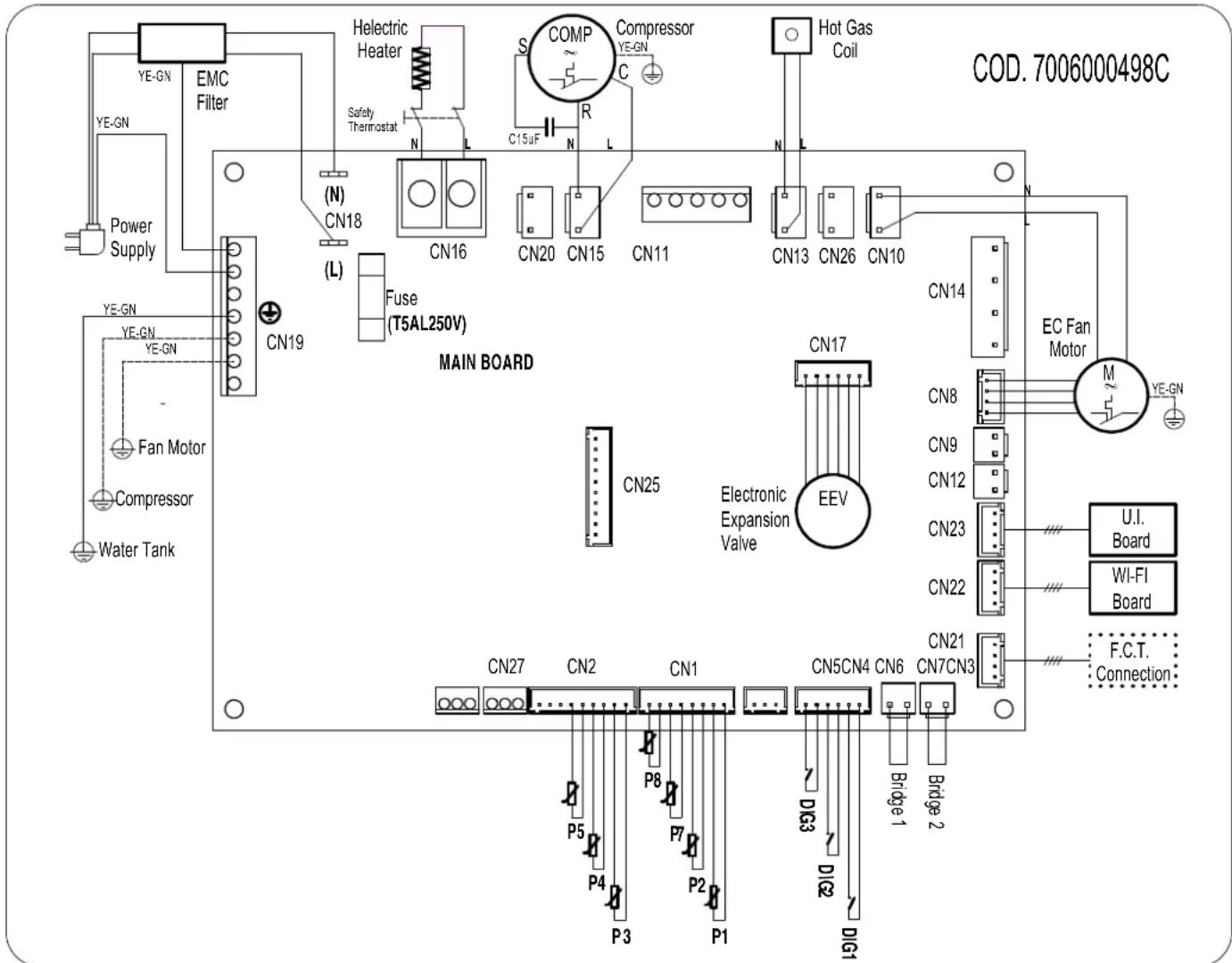
fig. 22 - Equipment wiring diagram
Description of connections available on the power board
| CN1 Air, defrost and water NTC probes | |
| CN2 | Compressor delivery, evaporator inlet and outlet NTC probes |
| CN3 Not usable | |
| CN4 Not usable | |
| CN5 Solar digital inputs (Not usable), PV, Off-peak | |
| CN6 Not usable | |
| CN7 Not usable | |
| CN8 Electronic fan PWM control (EC) | |
| CN9+CN12 Not usable | |
| CN10 Fan power supply EC, AC | |
| CN11 Not usable | |
| CN13 Hot gas defrost valve power supply | |
| CN14 Not usable | |
| CN15 Compressor power supply | |
| CN16 Heating element power supply | |
| CN17 Electronic expansion valve (EEV) power supply | |
| CN18 Main power supply | |
| CN19 Ground connections | |
| CN20 | 230 Vac power supply for impressed current anode converter |
| CN21 Connection with end of line inspection/test | |
| CN22 WI-FI card connection | |
| CN23 User interface connection | |
| CN25 Not usable | |
6. DESCRIPTION OF USER INTERFACE AND OPERATION OF EQUIPMENT
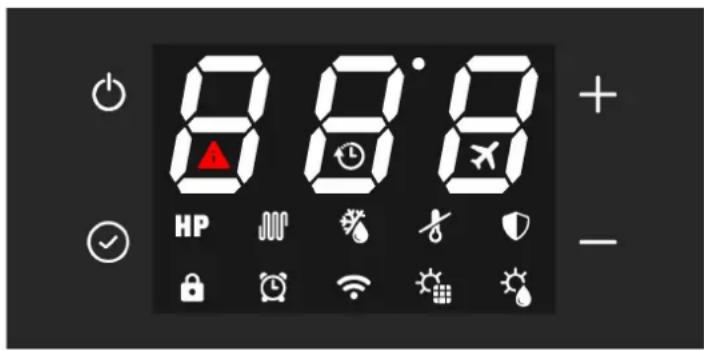
fig. 23
| Description Symbol | |
| "On/Off" button for switching on, putting the product in standby mode, unlocking buttons, saving changes | ◎ |
| "Set" button to edit the parameter value, confirm; | ◎ |
| "Increase" button to increase the set-point value, param-eter or password | + |
| "Decrease" button to decrease the set-point value, pa-rameter or password | - |
| Heat pump operation (ECO mode) | HP |
| Heating element operation (electric mode) | JMP |
| Automatic mode | HP + JMP |
| Boost mode (symbols flash) | HP + JMP |
| Button lock active | B |
| Defrost | F |
| Frost protection | F |
| Anti-legionella cycle | D |
| Holiday mode; | X |
| Operation with time bands | G |
| Clock setting (symbol flashes) | G |
| Connected with WI-FI(the symbol flashes when there is no connection) | ◎ |
| Photovoltaic mode(with symbol flashing the supplement is not active) | ◎ |
| NOT USABLE | ◎ |
| Fault or protection active | A |
| Off-Peak mode (with symbol flashing the equipment re-mains on standby) | ◎ |
The user interface of this water heater model consists of four capacitive buttons, and a LED display.
As soon as the water heater is powered the four buttons are
backlit and all the icons and display segments light up simultaneously for 3 s.
During normal operation of the product the three digits on the display show the water temperature in ^ C measured with the upper water probe if parameter P11 is set to 1 or with the lower water probe if P11 = 0
During modification of the selected operating mode set-point, the set-point temperature is shown on the display.
The icons indicate the selected operating mode, the presence or not of alarms, WI-Fi connection status, and other information on product status.
6.1 Turning the water heater on and off and unlocking the buttons
When the water heater is correctly powered it can be "ON" and, therefore, in one of the available operating modes (ECO, Automatic, etc.) or in standby mode.
During standby mode the four capacitive buttons are backlit for easy visibility, the Wi-Fi icon is lit up according to the connection status with an external Wi-Fi router (not supplied) and, in the absence of alarms or frost protection active, all other icons as well as the segments of the three digits are off.
Turning on
With the water heater in standby mode and "button lock" function active (padlock icon at the bottom left lit up), it is necessary to first "unlock" the buttons by pressing the ON/OFF button for at least 3 seconds (the padlock icon goes off), then press the ON/OFF button again for 3 seconds to turn on the water heater.
Turning off
With the water heater on and "button lock" function active, it is necessary to first "unlock" the buttons by pressing the ON/OFF button for at least 3 seconds, then press the ON/OFF button again for 3 seconds to turn off the water heater (putting in standby mode).
In any status, 60 seconds after the last press of any of the four user interface buttons, the button lock function is automatically activated to prevent possible interactions with the water heater, e.g. by children, etc. At the same time the backlighting level of the buttons and display decreases to reduce the unit's energy consumption.
By pressing any of the four buttons, the backlighting of the buttons and display will immediately return to its normal level for better visibility.
6.2 Setting the clock
With the buttons unlocked, press the button for 3 seconds to access the clock settings (the symbol flashes).
Set the time with the "+" and "-" buttons, press "☑" to confirm and then set the minutes.
Press the button to confirm and exit.
6.3 Setting time bands
The equipment clock must be set before activating the time bands.
Select the desired operating mode then set the time bands.
The time bands can be activated only in the ECO - AUTOMATIC - BOOST - ELECTRIC and VENTILATION modes.
With the buttons released, press th button and "-" button together for 3 seconds to set the time bands (the symbol displayed).
Set the switch-on time using the "+" and "-" buttons, press to confirm and then set the On minutes.
Press confirm and go to switch-off time setting.
Press confirm, then, using the "+" and "-" buttons, select the desired operating mode for the time band (ECO, AUTOMATIC, BOOST, ELECTRIC, VENTILATION).
Press to confirm and exit.
Note: At the end of the time band the equipment goes to stand-by mode and remains there until repetition of the time band the next day
To deactivate the time bands, set the on and off times to midnight (the symbol ② does off).
6.4 Setting the hot water set-point
It is possible to adjust the hot water set-point in the ECO, AUTOMATIC, BOOST and ELECTRIC modes
Select the desired mode with the button then adjust the setpoint with the "+" and "-" buttons.
Press the button to confirm and to exit.
| Mode | Hot water set-point | |
| Range Default | ||
| ECO 38÷62°C 53°C | ||
| AUTOMATIC 38÷62°C 53°C | ||
| BOOST 38÷75°C* | 53°C | |
| ELECTRIC | 38÷75°C 53°C | |
- In BOOST mode the maximum set-point value for the heat pump is 62^ . Therefore, by setting a higher value this is to be considered only for the heating element.
6.5 Operating mode
The following modes are available for this water heater
6.5.1 ECO
The display shows the symbol HP
With this mode only the heat pump is used within the product operating limits to ensure maximum possible energy saving.
The heat pump is switched on 5 minutes after selecting this mode or from the last switch-off.
In case of switching off, within the first 5 minutes, the heat pump will remain on anyway to ensure at least 5 minutes of continuous operation.
6.5.2 AUTOMATIC
The display shows the symbol HP +
With this mode the heat pump is used and, if necessary, also the heating element, within the product operating limits, to ensure best possible comfort.
The heat pump is switched on 5 minutes after selecting this mode or from the last switch-off.
In case of switching off, within the first 5 minutes, the heat pump will remain on anyway to ensure at least 5 minutes of continuous operation.
6.5.3 BOOST
The display shows the symbols HP + JM flashing.
This mode uses the heat pump and the heating element, within the product operating limits, to ensure faster heating.
The heat pump is switched on 5 minutes after selecting this mode or from the last switch-off.
In case of switching off, within the first 5 minutes, the heat pump will remain on anyway to ensure at least 5 minutes of continuous operation.
The heating element is switched on immediately.
6.5.4 ELECTRIC
The display shows the symbol
With this mode only the heating element is used within the product operating limits and is useful in situations of low inlet air temperatures.
6.5.5 VENTILATION
The display shows the message FR.
With this mode only the electronic fan inside the equipment is used and is useful for recirculating the air in the installation room if desired.
In automatic mode the fan will be adjusted to the minimum speed.
6.5.6 HOLIDAY
The display shows the symbol
This mode is useful when away for a limited time and then automatically finding the equipment working in automatic mode. Using the + and - buttons it is possible set the days of absence during which the equipment is to remain in standby mode. Press and then on off to confirm.
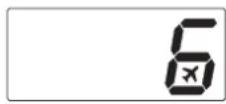
6.5.7 Photovoltaic ModeHR+ HP
When the photovoltaic mode is activated from the installer menu, only ECO - AUTOMATIC - HOLIDAY will be available.
When the symbol on the display flashes, the photovoltaic mode is not operating and the unit works in the set mode: ECO, AUTOMATIC or HOLIDAY.
When the symbol on the display is lit up, the energy produced by the photovoltaic system is used to heat the water inside the tank.
With ECO mode selected, the heat pump will operate until the set-point is reached and the heating element is switched on until the photovoltaic set-point set from the installer menu is reached. Otherwise, with AUTOMATIC mode selected, the heating element can also be switched on before reaching the set-point of this mode if the conditions require it.
6.5.8 Off-Peak ModeHPor + HP
When the photovoltaic mode is activated from the installer menu, only ECO - AUTOMATIC will be available.
When the symbol on the display flashes, the Off-Peak mode is not operating and the unit remains on standby and the heat pump and heating element are off.
Otherwise, when the symbol the display is lit up, the unit works in the ECO or AUTOMATIC mode.
6.6 Additional functions
6.6.1 Anti-Legionella
The display shows the symbol
Every two weeks, at the set time, a water heating cycle is carried out by means of the heating element inside the tank, up to the anti-legionella temperature, maintaining it for the set time.
If, on reaching the anti-legionella temperature, the cycle is not performed correctly within 10 hours, it is stopped and will be run again after 2 weeks.
If the request for the anti-legionella function occurs with HOLI-DAY mode selected, the anti-legionella cycle will be carried out immediately when the unit is reactivated after the set days of absence.
| Anti-legionella parameters Range Default | ||
| Anti-legionella temperature set-point (P3) 50÷75°C 75°C | ||
| Anti-legionella cycle duration (P4) 0÷90 min 30 min | ||
| Anti-legionella cycle activation time (P29) 0÷23 h 23 h |
6.6.2 Defrost function
The display shows the symbol
This equipment has an automatic evaporator defrost function which is activated, when the operating conditions require it, during heat pump operation.
Defrosting occurs through the injection of hot gas into the evaporator, allowing it to be rapidly defrosted.
During defrosting, the heating element, which the equipment is provided with, is switched off unless otherwise set via the installer menu (parameter P6).
The max. duration of defrosting is 8 minutes.
6.6.2.1 Frost protection
The display shows the symbol
This protection prevents the water temperature inside the tank from reaching values close to zero.
With the equipment in standby mode, when the water temperature inside the tank is below or equal to 5^ (parameter configurable via installer menu), the frost protection function activates, which switches on the heating element until 12^ is reached (parameter configurable via installer menu).
6.7 Control of equipment via APP
This water heater has a Wi-Fi module integrated in the product, enabling connection to an external Wi-Fi router (not supplied) and therefore being controlled via smartphone APP.
Depending on the availability of a smartphone with Android® or iOS® operating system, via the dedicated app.

Download and install the "EGEA Smart" app

Start the "EGEA Smart" app from your smartphone by pressing the icon as indicated above.
User registration
To use the "EGEA Smart" application for the first time, user registration is required: create a new account enter the mobile number/email address enter the verification code and set the password confirm.

fig. 24
Press the register button to register, then enter your mobile number or email address to obtain the verification code needed for registration.
Press the "+" button at the top right to select your water heater model: wall-mounted or pedestal version.

fig.25
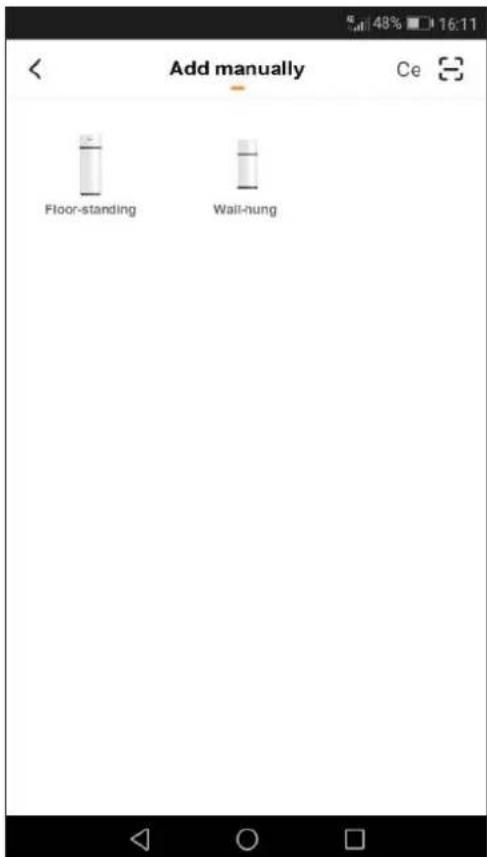
fig. 26
Make sure the equipment is powered.
With the buttons released, press the button together for 5 seconds. When the Wi-Fi symbol on the display flashes fast, press the confirm button on the app.
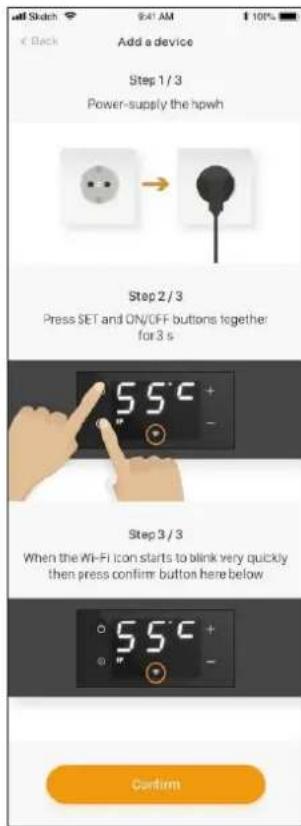
fig. 27
Select the Wi-Fi network and enter the password of the network for connecting the equipment, then press confirm on the app.
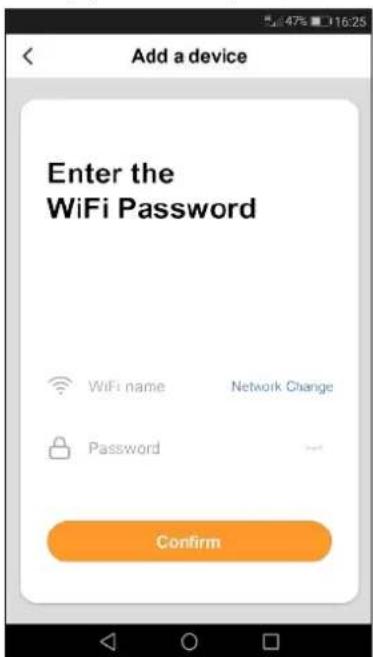
fig. 28
Wait for the equipment to be connected to the router.
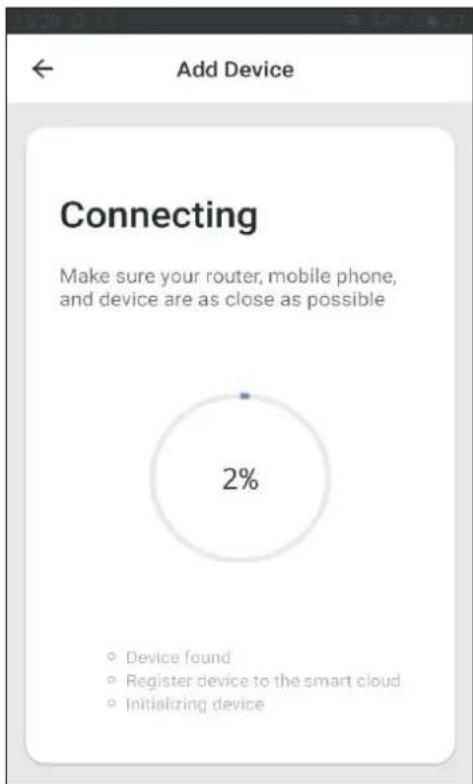
fig. 29
If the procedure for connection with the Wi-Fi router was successful, you will see your device added as shown below.
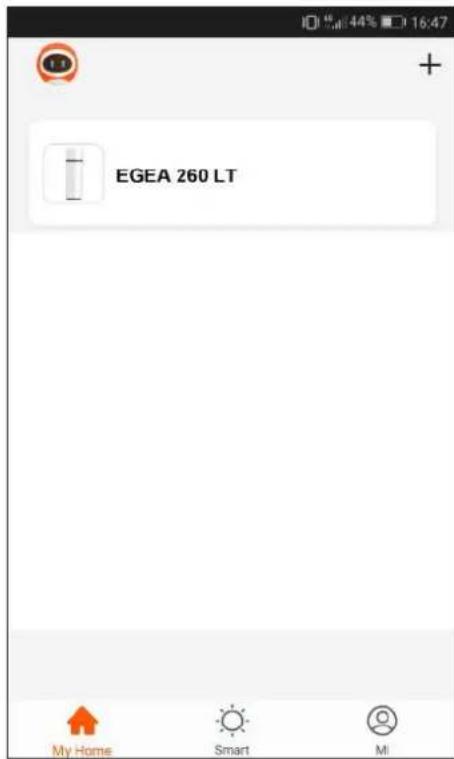
fig. 30
Press on the icon of the equipment to access the control panel
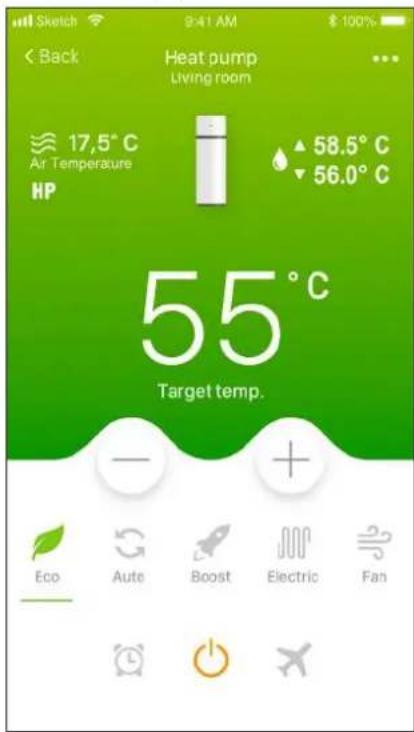
fig. 31
Press on the symbol to select, for example, the automatic operating mode.
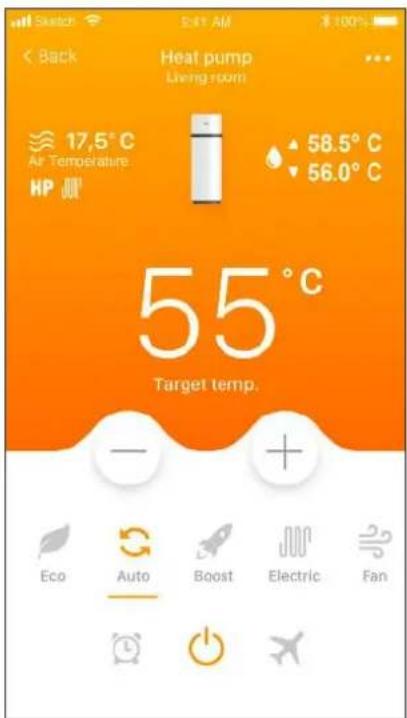
fig. 32
The time bands can be activated, in any operating mode except HOLIDAY, by pressing the symbol
Then press on the symbol of the following image.
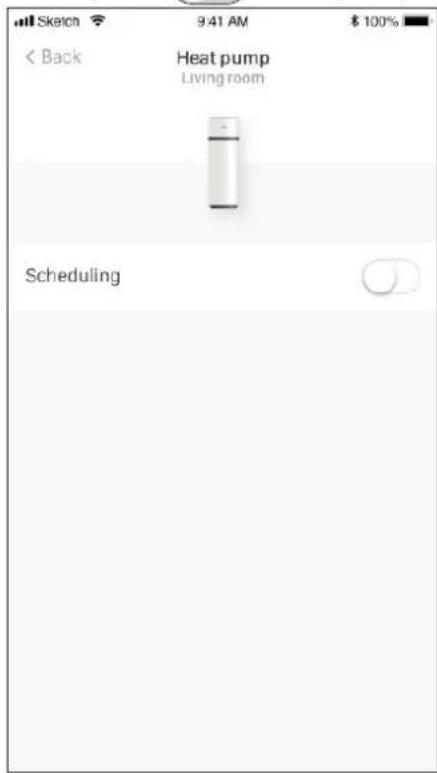
fig. 33
Set the operating mode desired during time band operation, the equipment switch-on and switch-off time and press the confirm button.
Now, press the back button at the top left.
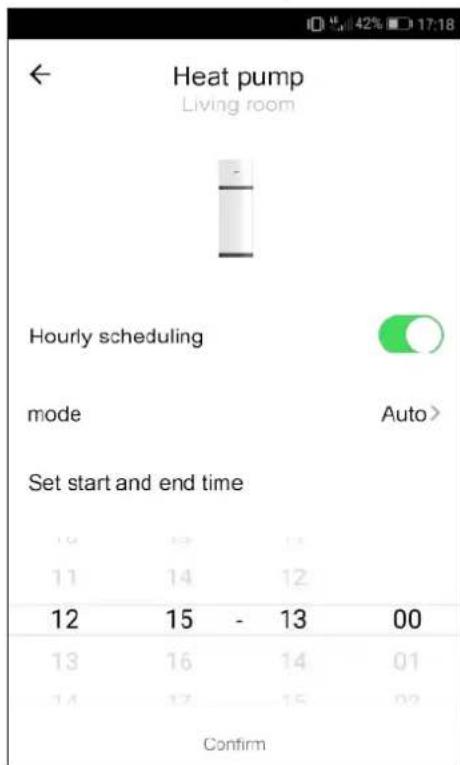
fig. 34
When time band operation is activated, outside the time band the equipment is in standby mode and this is the screen displayed.
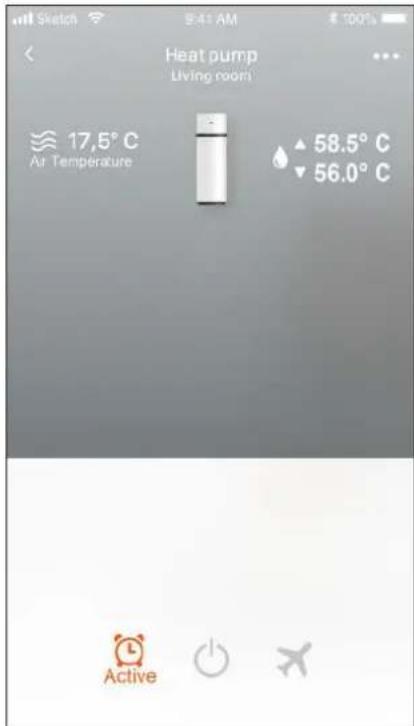
fig. 35
Holiday mode can be activated in any operating mode by pressing on the symbol. Then press on the symbol of the following image.
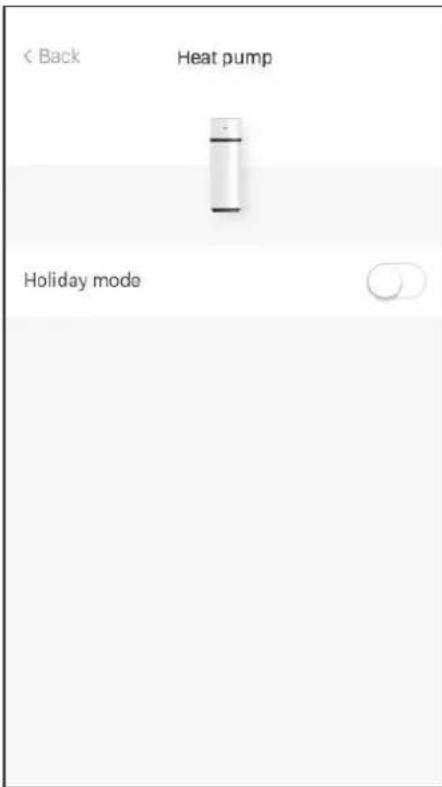
fig. 36
Set the number of days of absence and press confirm.
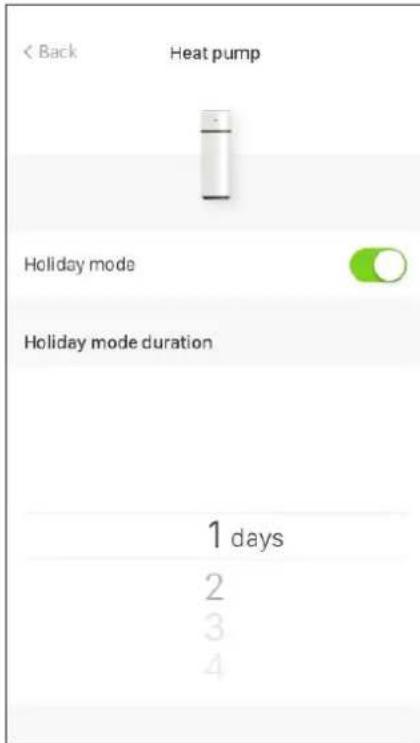
fig. 37
To disable the holiday mode before its end, press the holiday mode "disable" button.
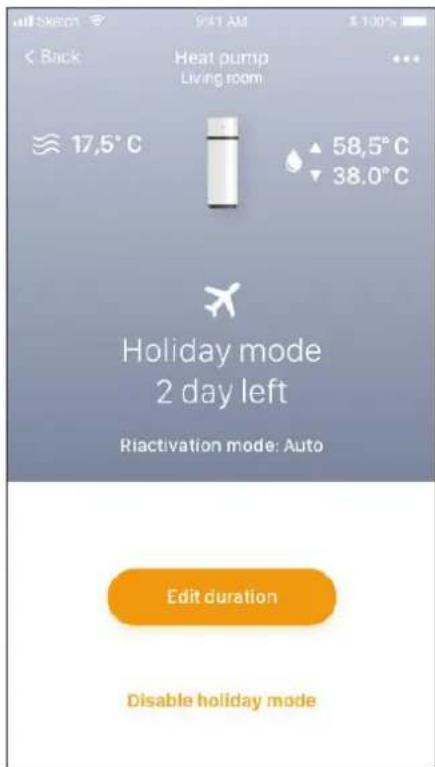
fig. 38
Then press confirm on the next screen.
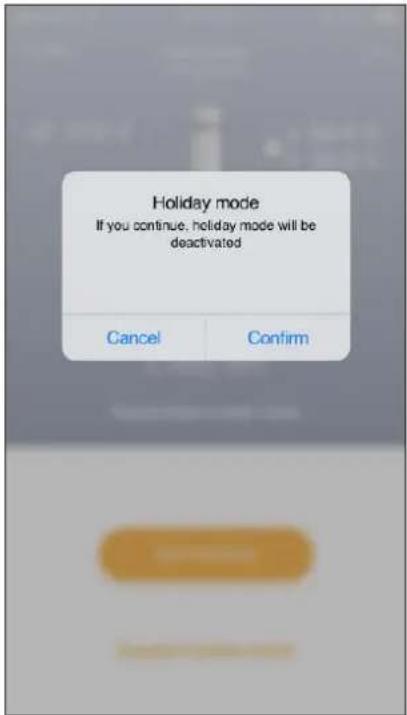
fig. 39
From the App it is possible to turn off the equipment by pressing on the on/off symbol (the symbol is orange when the equipment is on)
6.8 Faults/protection
This equipment has a self-diagnosis system that covers some possible faults or protections from anomalous operating conditions through: detection, signaling and adoption of an emergency procedure until resolution of the fault.
| Fault/Protection Error code Display indication | ||
| Tank lower probe fault P01 | i + P01 | |
| Tank upper probe fault P02 | i + P02 | |
| Defrost probe fault P03 | i + P03 | |
| Inlet air probe fault P04 | i + P04 | |
| Evaporator inlet probe fault P05 | i + P05 | |
| Evaporator outlet probe fault P06 | i + P06 | |
| Compressor flow probe fault P07 | i + P07 | |
| Solar collector probe fault (Not used) P08 | i + P08 | |
| High pressure protection E01 | i + E01 | |
| Recirculation circuit alarm E02 | i +E02 | |
| Temperature not suitable for heat pump operation alarm (With alarm active the water is heated only with heating element) | PA | i +PA |
| No communication (with alarm active the equipment does not work) | E08 | i + E08 |
| Electronic fan fault E03 | i + E03 |
In case of any of the above faults, it is necessary to contact the manufacturer's technical assistance service, indicating the error code shown on the display or on the APP for smartphone.
7.COMMISSIONING

ATTENTION!: Check that the equipment has been connected to the ground wire.

ATTENTION!: Check that the line voltage is that indicated on the equipment rating plate.
Proceed with the following operations for commissioning:
- Fill the tank completely via the inlet faucet and check that there are no water leaks from gaskets and connections.
- Do not exceed the max. permissible pressure indicated in the "general technical data" section.
- Check the water circuit safety devices.
- Plug the unit into the power outlet.
- When the plug is inserted, the boiler is in standby mode, the display remains off, the power button lights up.
- Press the On button, the unit is activated in "ECO" mode (factory setting).
In case of a sudden power outage, when restored the equipment will restart from the operating mode prior to the interruption.
7.1 Query, editing operating parameters
This equipment has two distinct menus, respectively, for consulting and editing the operating parameters (see "7.1.1 List of equipment parameters").
With the equipment operating, the parameters can be freely consulted at any time by unlocking the buttons (see "6.1 Turning the water heater on and off and unlocking the buttons") and pressing the " ⑦ "and "+" buttons together for 3 seconds. The label of the first parameter is shown on the display with the letter "A". Pressing the "+" button displays its value and, pressing this button again, the label of the second parameter "B" is displayed, and so on.
The entire parameter list can then be scrolled forward/back with the "+" and "-" buttons.
Press the "ON/OFF" button to exit.
Editing one or more operating parameters can only be done with the equipment in standby mode and requires the password to be entered.

NB!: "Use of the password is reserved for qualified personnel; any consequences due to incorrect parameter settings will be the sole responsibility of the customer. Therefore, any interventions requested by the customer from an authorized technical assistance center FERROLI during the standard warranty period, for product problems due to incorrect settings of password-protected parameters, will not be covered by the standard warranty."
With buttons unlocked, only in standby mode, press the " " and "+" buttons together for 3 seconds to access the equipment parameter editing menu (password protected: 35). The display shows the two digits "00". Press the " button. The digit "0" on the left flashes and with "+" and "-" select the first number to enter (3) and press " to confirm. Proceed in the same way for the second digit (5).
If the password is correct, the parameter P1 is displayed. Pressing the "+" button displays the default value of this parameter which can be modified by pressing and using the "+" and "-" buttons it is possible to change the value within the permissible range for this parameter. Then press to confirm and the "+" button to continue with the other parameters.
After editing the desired parameters, press the on/off button to save and exit.
The equipment now returns to standby mode.
7.1.1 List of equipment parameters
| Parameters Description Range Default Note | ||||
| A Lower water temperature probe -30+99°C Measured value Not modifiable | ||||
| B Upper water temperature probe -30+99°C Measured value Not modifiable | ||||
| C Defrosting temperature probe -30+99°C Measured value Not modifiable | ||||
| D Supply-air temperature probe -30+99°C Measured value Not modifiable | ||||
| E Evaporator inlet gas temperature probe | -30+99°C | Measured value / "0°C" if P33 = 0 | Not modifiable | |
| F Evaporator outlet gas temperature probe | -30+99°C | Measured value / "0°C" if P33 = 0 | Not modifiable | |
| G Compressor discharge gas temperature probe | 0+125°C | Measured value / "0°C" if P33 = 0 | Not modifiable | |
| H Solar collector temperature probe (PT1000) | 0+150°C | Measured value / "0°C" if P16 = 2 | Not modifiable (1) | |
| I EEV opening step | 30+500 | Measured value / P40 value if P39 = 1 | Not modifiable | |
| J Power-board firmware version | 0+99 | Current value | Not modifiable | |
| L User-interface firmware version | 0+99 | Current value | Not modifiable | |
| P1 Hysteresis on lower water probe for heat-pump working | 2+15°C | 7°C | Modifiable | |
| P2 Electrical heater switching-on delay | 0+90 min | 6 min | Function excluded | |
| P3 Antilegionella setpoint temperature | 50°C+75°C | 75°C | Modifiable | |
| P4 Antilegionella duration | 0+90 min | 30 min | Modifiable | |
| P5 Defrosting mode | 0 = compressor stop 1 = hot-gas | 1 | Modifiable | |
| P6 Electrical heater usage during defrosting | 0 = OFF 1 = ON | 0 | Modifiable | |
| P7 Delay between two consecutive defrosting cycle | 30+90 min | 45 min | Modifiable | |
| P8 Temperature threshold for defrosting start | -30+0°C | -2°C | Modifiable | |
| P9 Temperature threshold for defrosting stop | 2+30°C | 3°C | Modifiable | |
| P10 Maximum defrosting duration | 3min+12min | 8 min | Modifiable | |
| P11 Water temperature probe value shown on the display | 0 = lower 1 = upper | 1 | Modifiable | |
| P12 External pump usage mode | 0 = always OFF 1 = hot-water recirculation 2 = Thermal solar system | 1 | Modifiable (1) | |
| P13 Hot-water recirculation pump working mode | 0 = with heat-pump 1 = always ON | 0 | Modifiable (1) | |
| P14 Evaporator blower type (EC; AC; AC with double speed) | 0 = EC 1 = AC 2 = AC with double speed | 0 | Modifiable | |
| P15 Type of safety flow switch for hot-water / solar | 0 = NC 1 = NO | 0 | Modifiable (1) | |
| P16 Solar mode integration | 0 = permanently deactivated 1 = working with DIG1 2 = Direct control of thermal so-lar system | 0 | Modifiable (1) | |
| P17 Heat-pump starting delay after DIG1 opening | 10+60min | 20 min | Modifiable (1) | |
| P18 Lower water probe temperature value to stop the heat-pump in solar mode integration = 1 (working with DIG1) | 20+60°C | 40°C | Modifiable (1) | |
| P19 Hysteresis on lower water probe to start the pump in solar mode integration = 2 (direct control of thermal solar system solar) | 5+20°C | 10°C | Modifiable (1) | |
| P20 Temperature threshold for solar drain valve / solar collector roll-up shutter action in solar mode integration = 2 (direct control of thermal solar system solar) | 100+150°C | 140°C | Modifiable (1) | |
| P21 Lower water probe temperature value to stop the heat-pump in photovoltaic mode integration | 30+70°C | 62°C | Modifiable | |
| P22 Upper water probe temperature value to stop the electrical heater in photovoltaic mode integ-ration | 30+80°C | 75°C | Modifiable | |
| P23 Photovoltaic mode integration | 0 = permanently deactivated1 = activated | 0 Modifiable | ||
| P24 Off-peak working mode | 0 = permanently deactivated1 = activated with ECO2 = activated with AUTO | 0 Modifiable | ||
| P25 Offset value on upper water temp probe -25±25°C 0°C Modifiable | ||||
| P26 Offset value on lower water temp probe -25±25°C 0°C Modifiable | ||||
| P27 Offset value on air-inlet temp probe -25±25°C 0°C Modifiable | ||||
| P28 Offset value on defrosting temp probe -25±25°C 0°C Modifiable | ||||
| P29 Antillegionella starting hour 0÷23 hours 23 hours Modifiable | ||||
| P30 | Hysteresis on upper water probe for electrical heater working | 2±20°C | 7°C Modifiable | |
| P31 | Heat-pump working period in AUTO mode for heating rate calculation | 10+80 min | 30 min | Modifiable |
| P32 | Temperature threshold for electrical heater usage in AUTO mode | 0±20°C | 4°C Modifiable | |
| P33 Electronic-expansion valve (EEV) control | 0 = permanently deactivated1 = activated | 1 Modifiable | ||
| P34 | Superheating calculation period for EEV automatic control mode | 20+90s | 30 s | Modifiable |
| P35 | Superheating setpoint for EEV automatic control mode | -8÷15°C | 5°C Modifiable | |
| P36 | Desuperheating setpoint for EEV automatic control mode | 60÷110°C | 88°C | Modifiable |
| P37 | EEV step opening during defrosting mode (x10) | 5÷50 | 15 | Modifiable |
| P38 | Minimum EEV step opening with automatic control mode (x10) | 3~45 | 9 Modifiable | |
| P39 EEV control mode | 0= automatic1 = manual | 0 Modifiable | ||
| P40 | Initial EEV step opening with automatic control mode / EEV step opening with manual control mode (x10) | 5÷50 | 25 | Modifiable |
| P41 | AKP1 temperature threshold for EEV KP1 gain | -10+10°C | -1°C | Modifiable |
| P42 | AKP2 temperature threshold for EEV KP2 gain | -10÷10°C | 0°C | Modifiable |
| P43 | AKP3 temperature threshold for EEV KP3 gain | -10+10°C | 0°C | Modifiable |
| P44 EEV KP1 gain | -10+10 | 5 Modifiable | ||
| P45 EEV KP2 gain | -10+10 | 2 Modifiable | ||
| P46 EEV KP3 gain | -10+10 | 1 Modifiable | ||
| P47 | Maximum allowed inlet temperature for heat-pump working | 30÷50°C | 43°C | Modifiable |
| P48 | Minimum allowed inlet temperature for heat-pump working | -10+10°C -5°C | Modifiable | |
| P49 | Threshold on inlet temperature for evaporator EC or AC with double speed blower speed setting | 10+40°C | 25°C | Modifiable |
| P50 | Antifreeze lower water temperature setpoint | 0±15°C | 12°C | Modifiable |
| P51 | Evaporator EC blower higher speed setpoint | 60+100% | 90% | Modifiable |
| P52 | Evaporator EC blower lower speed setpoint | 10+60% | 60% | Modifiable |
(1) = NOT USABLE FOR THIS EQUIPMENT
8. TROUBLESHOOTING
If the equipment is not working properly, without any alarm signaling, before contacting the manufacturer's technical assistance service, it is advisable to carry out the following.
| Fault Recommended action | |
| The equipment does not switch on | ·Check that the product is actually powered by the mains. ·Disconnect the equipment then reconnect it after a few minutes. ·Check the power cable inside the product (Only for the installer). ·Check that the fuse on the power board is intact. If not, replace it with an IEC-60127-2/II certified time-delay 5 A fuse (Only for the installer). |
| Water cannot be heated via the heat pump in ECO or AUTOMATIC mode | ·Switch the equipment off, then switch it on again after a few hours. ·Disconnect the equipment from the mains, drain part of the water contained in the tank (approx. 50%) then refill it and switch the equipment on again in ECO mode (Only for the installer). |
| The heat pump remains on without ever stopping | ·Without drawing hot water from the product, check that in a few hours heating via heat pump occurs positively. |
| Water cannot be heated via the integrated heating element in AUTOMATIC mode | ·Switch off the equipment and check the safety thermostat of the heating element inside the equipment and reset it if necessary. Then switch on the equipment in AUTOMATIC mode (Only for the installer). ·Disconnect the equipment from the mains, drain part of the water contained in the tank (approx. 50%) then refill it and switch the equipment back on again in AUTOMATIC mode (Only for the installer). ·Access the installer menu and increase the value of parameter P32, e.g. to 7°C (Only for the installer). ·Check that the heating element safety thermostat has not intervened (see 8.2) |
| The product cannot be controlled via APP | ·Check that there is Wi-Fi network coverage, e.g. via smartphone where the product is installed, then carry out the configuration procedure again with the router. Make sure the Wi-Fi symbol on the display is lit up steady. |
8.1 Power board fuse replacement
Proceed as indicated below (reserved for qualified technical personnel only):
- Disconnect the power to the equipment.
- Remove the bottom cover.
- Remove the fuse cap, then the fuse, using a suitable screwdriver.
- Install a new IEC 60127-2/II (T5AL250V) certified time-delay 5 A 250V fuse, then refit the protective cap.
- Reassemble all the plastics and make sure the equipment is correctly installed before powering it.
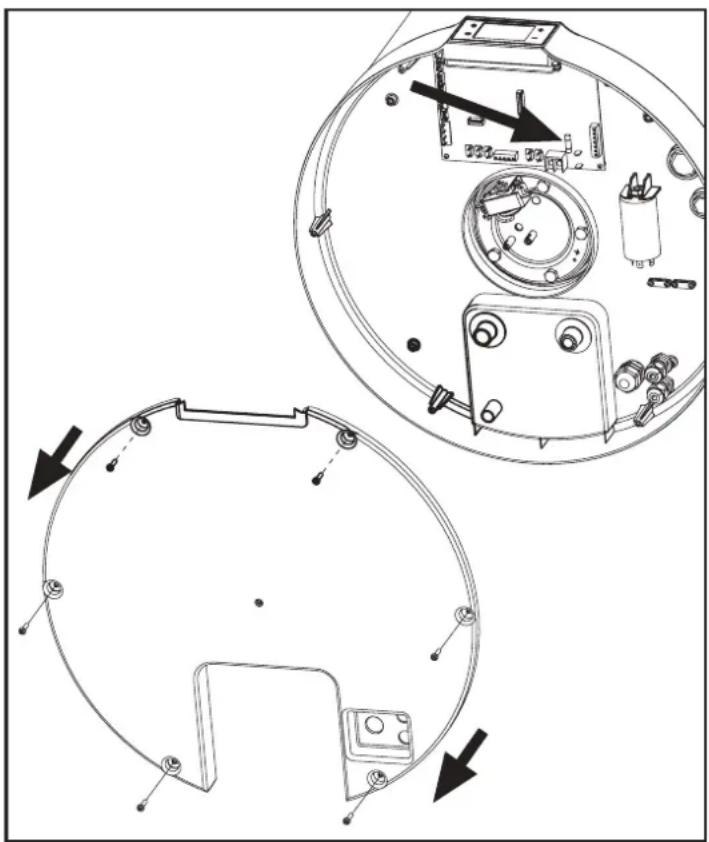
fig. 40
8.2 Heating element safety thermostat reset
This equipment has a manual-reset safety thermostat connected in series with the heating element immersed in water, which interrupts the power supply in case of overtemperature inside the tank.
If necessary, proceed as follows to reset the thermostat (reserved for qualified technical personnel):
- Unplug the product.
- Remove the bottom cover by first undoing the locking screws (fig. 40).
- Manually reset the tripped safety thermostat (fig. 41). In case of tripping, the central pin of the thermostat comes out by
about 2mm
- Refit the previously removed bottom cover.
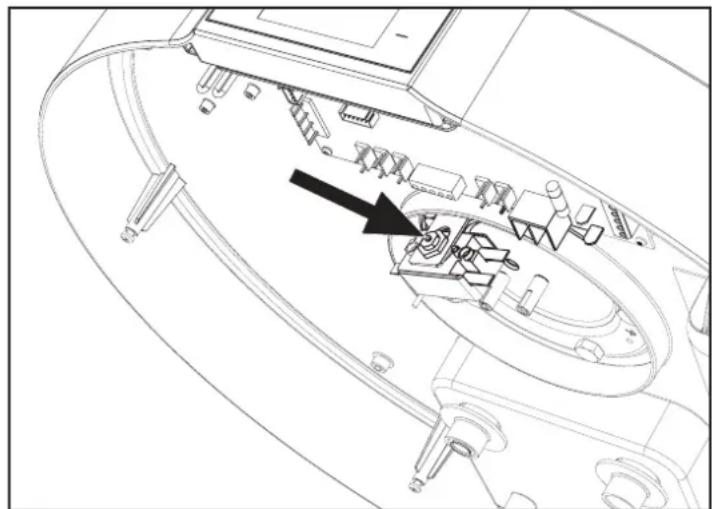
fig. 41 - Safety thermostat reset

Any maintenance operation must be carried out by qualified personnel according that prescribed in the chapter 10 of this manual.

ATTENTION!: Intervention of the safety thermostat can be caused by a fault linked to the control board or by no water inside the tank.

ATTENTION!: Carrying out repair work on parts with safety function compromises safe operation of the equipment. Replace faulty parts with original spare parts only.

NB!: Intervention of the thermostat excludes operation of the heating element but not the heat pump system within the permitted operating limits.

ATTENTION! If the operator is unable to eliminate the fault, switch off the equipment and contact the Technical Assistance Service, communicating the model of the product purchased.
9. MAINTENANCE

ATTENTION!: Any repairs to the equipment must be carried out by qualified personnel. Improper repairs can put the user in serious danger. If your equipment needs any repair, contact the service center.

ATTENTION! Before undertaking any maintenance operation make sure the equipment is not and cannot accidentally be electrically powered. Therefore, disconnect the power at every maintenance or cleaning operation.
9.1 Sacrificial anode check/replacement
The magnesium (Mg) anode, also called "sacrificial" anode, prevents any eddy currents generated inside the boiler from triggering surface corrosion processes.
In fact, magnesium is a weakly charged metal compared to the material of which the inside of the boiler is coated, therefore it attracts first the negative charges that form with the heating of water, consuming itself. The anode therefore "sacrifices" itself by corroding itself instead of the tank. The boiler has two anodes, one fitted in the lower part of the tank and one fitted in the upper part of the tank (area more subject to corrosion).
The integrity of the Mg anodes must be checked at least every two years (preferably once a year). The operation must be performed by qualified personnel.
Before doing the check:
- Close the cold water inlet.
- Proceed with emptying the boiler (see par. "9.2 Boiler emptying").
- Remove the bottom cover 1.
- Disconnect the heating element safety thermostat electrical connection from the power board and remove the water NTC probes from the dedicated pipe in the element flange.
- Remove the flange by unscrewing the bolts 3. The corrosion of the anode 4 can then be checked; if it affects more than 2/3 of the anode surface, proceed with replacement.
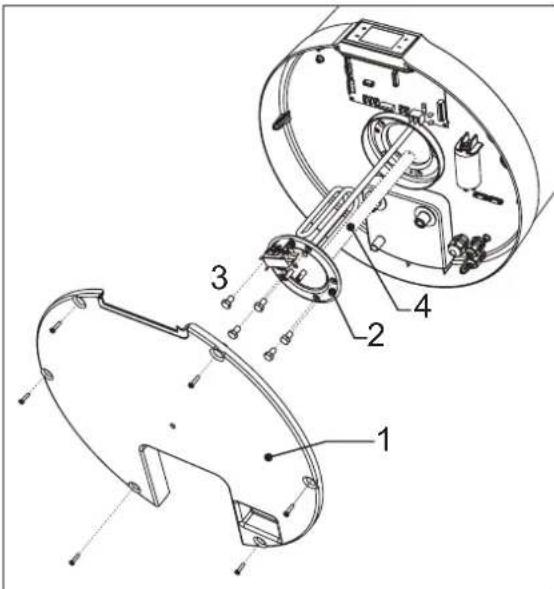
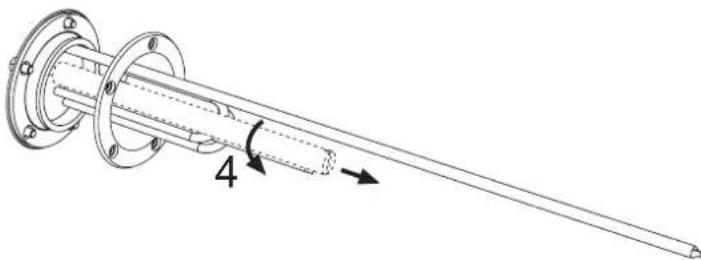
fig. 42
fig. 43
The flange has a special gasket which must be replaced if the anode is checked or replaced.
9.2 Boiler emptying
If not in use, especially in case of low temperatures, it is advisable to drain the water inside the boiler. For the equipment in question, just open the drain cock as per the example hydraulic connections chap. "Plumbing connections" on page 81 (see fig. 15).

NB! In case of low temperatures, remember to empty the system to avoid freezing.

Any maintenance operation must be carried out by qualified personnel according that prescribed in the chapter 10 of this manual.
10. MAINTENANCE OPERATIONS ACCORDING TO IEC EN 60335-2-40_A1_2007 (ANNEX DD)
ATTENTION

Do not use any means to accelerate the defrosting or cleaning process, other than those recommended by the manufacturer.

The unit must be placed in a room that does not have continuous ignition sources (e.g. naked flames, a gas appliance or electric heater in operation).

Do not pierce or burn.

Remember that refrigerant fluids may be odorless.

The unit must be placed, installed and operated in a room larger than 10m^2 with ceiling at least 2 meters high, the air inlet and outlet must be ducted to the outside according to that given in par. 5.3 of this manual.

The overall volume of the installation compartment must be greater than 20m^3

The product is supplied with an R290 refrigerant charge of 150g; any recharging operations can only be performed at the manufacturer's production site.

Any maintenance operation must be performed by qualified personnel in accordance with the instructions in this manual.
FIRE RISK

The product must be installed in a room equipped with adequate air change to prevent the risk of fire in case of a refrigerant gas leak.

In the above is not possible, the installer must carry out the necessary works to ensure that no refrigerant gas stagnation occurs.

Periodically check that there are no obstructions in the openings that ensure the change of air inside the installation room.

The product must not be installed in a compartment where there are naked flames, e.g. open-chamber gas boilers, wood stoves, electric stoves and in general any other possible source of ignition.

Smoking near or inside the installation compartment is prohibited.

Operating with naked flames near or inside the installation compartment is prohibited.
10.1 Product maintenance
Any maintenance operation on the product must be carried out by qualified personnel having an appropriate Refrigeration Engineer License regarding the knowledge and management of plants containing HC gases such as R290 (Propane). During any routine or extraordinary maintenance or failure the manufacturer recommends that maintenance personnel use a suitable HC gas detector equipped with the necessary safety devices to prevent ignition in the presence of a potentially explosive atmosphere. Always ensure adequate ventilation of the installation compartment before carrying out any work on the product, as the refrigerant gas used is odorless.
Maintenance personnel must therefore implement all the procedures and precautions necessary to prevent any dangerous situation in the presence of a flammable gas.
The product does not have a charging or recharging valve, as this operation cannot and must not be performed for any reason on site. In case of a leak in the refrigeration circuit or if it is partially or entirely empty, the maintenance technician must have the entire system replaced.
During maintenance operations, the operator in charge must check the following points.
Installation conditions
Check that:
- The dimensions of the installation compartment are those specified in this manual.
- Sufficient ventilation of the room is ensured.
- The markings and graphic signs on the product are present and legible.
- There are no signs of damage or corrosion on the product that could impair its operation or cause refrigerant gas to escape.
In case of differences in the product installation conditions, maintenance personnel are required to inform the owner and proceed with elimination of the non-conformities found.
Checks and repairs of electrical components
Check that:
- There are no conditions of imminent danger for the operator;
- The circuit is not powered.
- If it is not possible to operate without power supply, make sure the owner has been notified regarding the situation.
- The electric capacitors have been safely discharged without producing sparks.
- There is continuity in the ground connection.
- The electrical components are replaced only with original spare parts.
- No cuts or joints are made on the cables of the electrical components.
- The cables and wires do not have any damage which could compromise the integrity of the product and the safety of people and/or property.
Note: Only original replacement electrical components are guaranteed by the manufacturer as safe and tested by a third party for use with flammable refrigerants
Leak detection
- Do not use any kind of flame to detect refrigerant leakage.
- Use electric detectors only if sure of their efficiency and safety in an explosive environment; for this purpose the instrument must be able to detect an R290 leak equivalent to a maximum of 25% of the LFL (Lower Flammability Level).
- Alternatively, specific leak detector sprays can be used for refrigerant gases; the product used must be non-corrosive type.
In order to be used safely, the leak detection instruments must have a calibration tool normally called a calibrated leak. Checking the sensitivity of the detector with the aid of the calibration tool must be carried out far from the place of installation in order to ensure correct calibration.
11.DISPOSAL
At the end of use, the heat pumps must be disposed of in compliance with current regulations.

ATTENTION!: This equipment contains 150 grams of flammable gas (Propane R290). maintenance and disposal operations must only be performed by qualified personnel.
INFORMATION FOR USERS
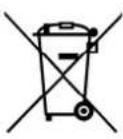
Pursuant to Directives 2011/65/EU and 2012/19/EU on the restriction of the use of hazardous substances in electrical and electronic equipment, as well as the disposal of waste.
The crossed-out bin symbol on the equipment or on its packaging indicates that, at the end of its useful life, the product must be collected separately from other waste.
Therefore, at the end of its life, the user must give the equipment to the appropriate recycling centers for electrical and
electronic equipment, or return it to the dealer when purchasing new, equivalent type equipment, on a one-to-one basis.
Adequate separate waste collection for subsequent sending of the decommissioned equipment to environmentally compatible recycling, treatment and/or disposal helps prevent negative effects on the environment and health and favors the reuse and/or recycling of the materials that make up the equipment.
Unauthorized disposal of the product by the user involves the application of the administrative sanctions provided for by current legislation.
The main materials that make up the equipment in question are:
steel
copper
magnesium
-
aluminum
-
plastic
polyurethane
12.PRODUCT SHEET
| Descriptions u.m. 90LT 120LT | |||
| Declared load profile M M | |||
| Energy efficiency class for heating water in average weather conditions A+ A+ | |||
| Energy efficiency of water heating in % in average weather conditions % 107 112 | |||
| Annual energy consumption in kWh in terms of final energy in average weather conditions | kWh | 479 | 458 |
| Water heater thermostat temperature settings | °C | 53 | 53 |
| Inside sound power level Lwa in dB | dB | 52 | 52 |
| The water heater can only work during off-peak hours | NO | NO | |
| Any specific precautions to be taken at the time of assembly, installation or maintenance of the water heater | See manual | ||
| Energy efficiency of water heating in % in coldest weather conditions | % | 91 | 86 |
| Energy efficiency of water heating in % in hottest weather conditions | % | 114 | 119 |
| Yearly energy consumption in kWh in terms of final energy in coldest weather conditions | kWh | 565 | 596 |
| Yearly energy consumption in kWh in terms of final energy in hottest weather conditions | kWh | 449 | 430 |
| Outside sound power level Lwa in dB | dB | 50 | 50 |
1. INTRODUÇÃO 105
6.5.8 Modo Off-PeakHPou + HP
- MANUTENTION ET TRANSPORT 138
2.1 Reception 138
- CARACTERISTIQUES DE CONSTRUCTION 139
2. MANUTENTION ET TRANSPORT
5.5 Raccordements hydrauliques
6.5.7 Mode photovoltaique Hpu + oHP 0



- Modo Off-PeakHP HP
- INTRODUCTION
- Products
- Disclaimer
- Copyright
- Available versions and configurations
- HANDLING AND TRANSPORT
- Receipt
- CONSTRUCTION CHARACTERISTICS
- Dimensional data
- Technical characteristics
- NOTES
- IMPORTANT INFORMATION
- Compliance with European regulations
- Casing protection rating
- Operating limits
- Operating limits
- Temperature range
- Water hardness
- Basic safety rules
- Information on the refrigerant used
- INSTALLATION AND CONNECTIONS
- Preparation of place of installation
- Wall mounting
- Aeraulic connections
- Securing and connections of EGEA
- Plumbing connections
- Legend (fig. 15)
- Condensate drain connection
- Electrical connections
- Remote connections
- INPUTS
- Remote connection
- Wiring diagram
- Description of connections available on the power board
- DESCRIPTION OF USER INTERFACE AND OPERATION OF EQUIPMENT
- Turning the water heater on and off and unlocking the buttons
- Turning on
- Turning off
- Setting the clock
- Setting time bands
- Setting the hot water set-point
- Operating mode
- ECO
- AUTOMATIC
- BOOST
- ELECTRIC
- VENTILATION
- HOLIDAY
- Photovoltaic ModeHR+ HP
- Off-Peak ModeHPor + HP
- Additional functions
- Anti-Legionella
- Defrost function
- Frost protection
- Control of equipment via APP
- User registration
- Faults/protection
- 7.COMMISSIONING
- Query, editing operating parameters
- TROUBLESHOOTING
- Power board fuse replacement
- Heating element safety thermostat reset
- MAINTENANCE
- Sacrificial anode check/replacement
- Boiler emptying
- MAINTENANCE OPERATIONS ACCORDING TO IEC EN 60335-2-40_A1_2007 (ANNEX DD)
- ATTENTION
- FIRE RISK
- Product maintenance
- Installation conditions
- Checks and repairs of electrical components
- Leak detection
- 11.DISPOSAL
- INFORMATION FOR USERS
- The main materials that make up the equipment in question are:
- 12.PRODUCT SHEET
- INTRODUÇÃO 105
- Modo Off-PeakHPou + HP
- MANUTENTION ET TRANSPORT
- Raccordements hydrauliques
- Mode photovoltaique Hpu + oHP 0
Brand : FERROLI
Model : Egea Lt
Category : Boiler