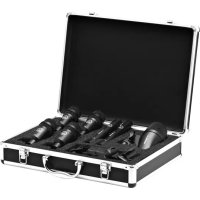
Drum Set Session I - Microphone AKG - Free user manual and instructions
Find the device manual for free Drum Set Session I AKG in PDF.



User questions about Drum Set Session I AKG
0 question about this device. Answer the ones you know or ask your own.
Ask a new question about this device
Download the instructions for your Microphone in PDF format for free! Find your manual Drum Set Session I - AKG and take your electronic device back in hand. On this page are published all the documents necessary for the use of your device. Drum Set Session I by AKG.
USER MANUAL Drum Set Session I AKG
Please read the manual before using the equipment!
MODE D'EMPLOI 18
1 Safety and the environment 11
Environment 11
2 Description 12
Introduction 12
P2 12
P4 12
P17 12
Optional accessories 12
3 Connecting to Audio Equipment 13
Pinout 13
Connecting the Microphone 13
4 Operation 14
5 Cleaning 15
Microphone 15
Internal Windscreen (P2, P4) 15
6 Troubleshooting 16
7 Technical data 17
P2 17
P4 17
P17 17
1 Safety and the environment

Risk of damage
Please make sure that the piece of equipment your microphone will be connected to fulfills the safety regulations in force in your country and is fitted with a ground lead.
Environment

- At the end of the lifetime of the product, disconnect the housing, electronics and cable from each other and discard all components according to applicable disposal regulations.
- The packaging is recyclable. Dispose of the packaging via an appropriate collection system provided for this purpose.
2 Description
Introduction
Thank you for your decision to buy an AKG product. Please read the user instructions carefully before using the unit and keep them in a safe place so that you can refer to them in the future at any time. We wish you a lot of fun!
P2
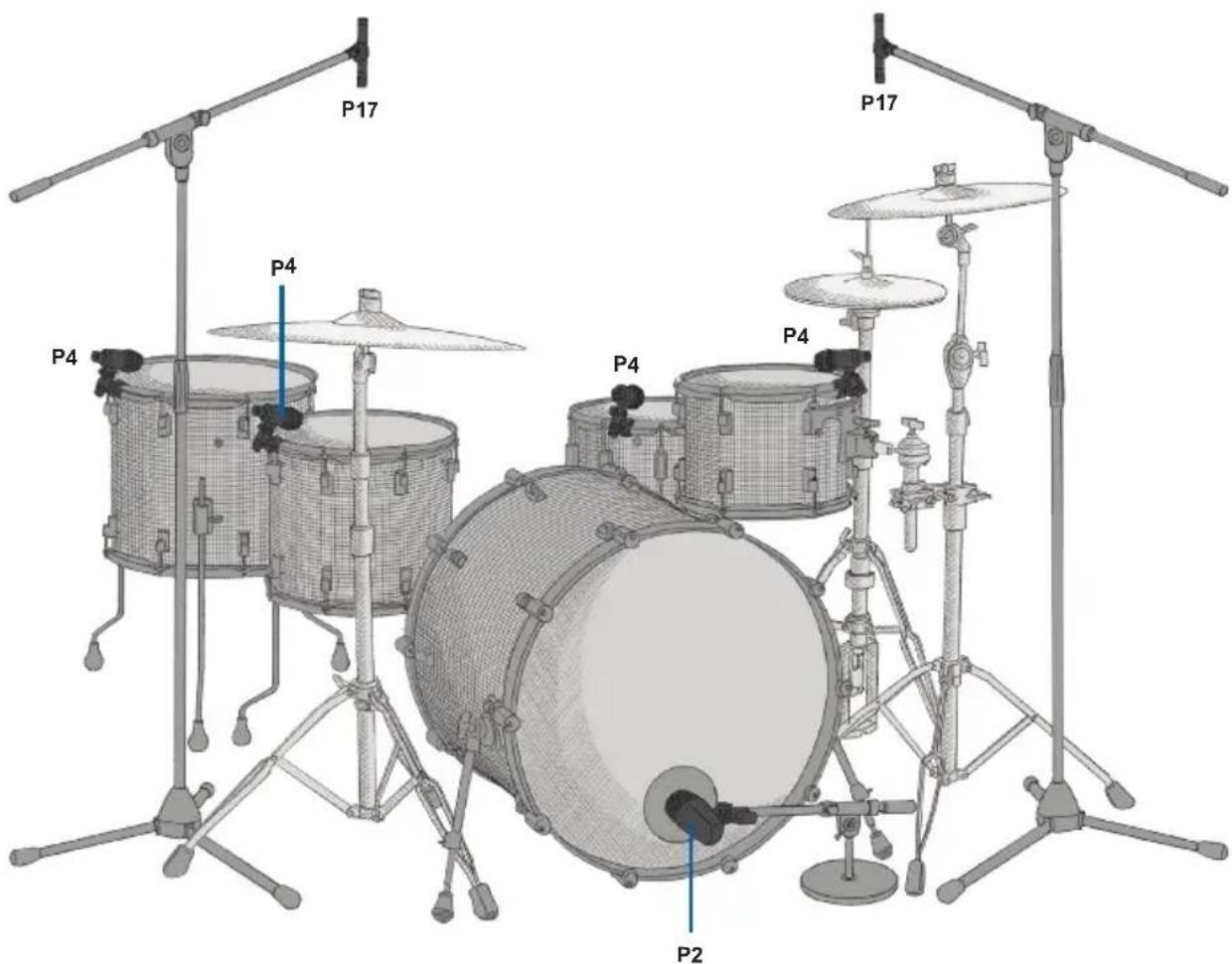
- Dynamic instrument microphone
Cardioid polar pattern - For kick drum, bass amps, wind instruments
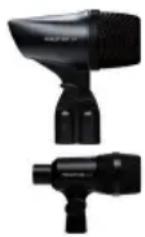
P4
- Dynamic instrument microphone
Cardioid polar pattern
H440 bracket - For toms, percussion, guitar amps, wind instruments, snare drum
P17
- Condenser instrument microphone
Cardioid polar pattern - For hi-hat, cymbals, condenser instrument microphone
The microphone uses a true condenser transducer designed for 48-volt phantom powering to IEC 61938. Neither the diaphragm nor the backplate are permanently polarized, so the microphone needs an external power supply.
Switchable preattenuation pad: The preattenuation switch (1) on the microphone rear lets you increase the headroom by 20 dB for distortion-free close-in recording. The preattenuation pad prevents the microphone's output level, particularly at low frequencies, from overloading the miniature transformers used in many mixer input stages, etc.
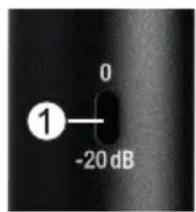
Figure 1: Preattenuation switch on microphone rear
Optional accessories
Optional accessories can be found at www.akg.com. Your dealer will be happy to advise you.
3 Connecting to Audio Equipment
Pinout
The microphone provides a balanced output on a 3-pin male XLR connector:
Pin 1: ground
Pin 2: hot
Pin 3: cold
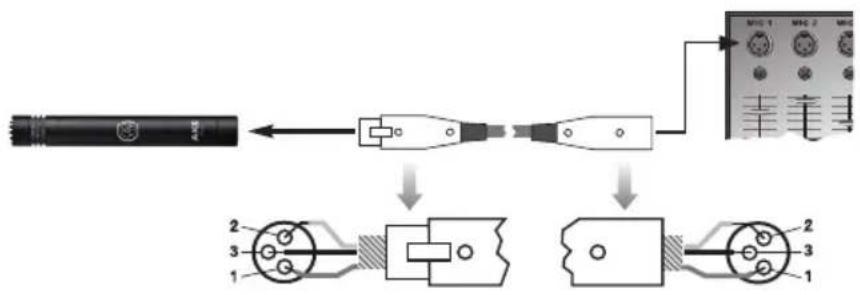
Figure 2: Connecting to a balanced input with phantom power
Connecting the Microphone
1) Use an XLR cable to connect the microphone to a balanced XLR input with phantom power.
2) Switch the phantom power on. (Refer to the user manual of the unit to which you connected your microphone.
4 Operation
5 Cleaning
Microphone
Internal Windscreen (P2, P4)
- Use a soft cloth moistened with water to clean the surface of the microphone body.
1) Unscrew the front grill from the microphone CCW.
2) Remove the windscreen from the front grill and wash the windscreen in soap suds.
3) Allow the windscreen to dry overnight.
4) Replace the windscreen in the front grill and screw the front grill on the microphone CW.
6 Troubleshooting
| Problem Possible Cause | Remedy | |
| No sound Channel or master fader | on mixer, or volume control on amplifier is at zero. | Set channel or master fader on mixer or volume control on amplifier to desired level. |
| Microphone is not connected to mixer or amplifier. | Connect microphone to mixer or amplifier. | |
| Cable connectors are seated loosely. | Check cable connectors for secure seat. | |
| Cable is defective. | Check cable and replace if damaged. | |
| Distortion Gain control on mixer or | transmitter module not set correctly. | Set gain control to stop distortion. |
| Microphone sounds dull | Internal or external windscreen attenuates high frequencies when soiled. | Clean internal or external windscreen. |
7 Technical data
| P2 | Type: | large diaphragm dynamic microphone |
| Polar pattern: | cardioid | |
| Frequency response: | 20 Hz to 16 kHz | |
| Recommended load impedance: | ≥ 2000 ohms | |
| Sensitivity: | 2.5 mV/Pa | |
| Max. SPL for 0.5% THD: | 157 dB SPL | |
| P4 | Type: | dynamic microphone |
| Polar pattern: | cardioid | |
| Frequency response: | 40 Hz to 18 kHz | |
| Recommended load impedance: | ≥ 2000 ohms | |
| Sensitivity: | 2.5 mV/Pa | |
| Max. SPL for 0.5% THD: | 152 dB SPL | |
| P17 | Type: | 1/2" diaphragm, true condenser pressure-gradient microphone |
| Polar pattern: | cardioid | |
| Frequency response: | 20 Hz to 20 kHz | |
| Recommended load impedance: | ≥ 1000 ohms | |
| Sensitivity: | 15 mV/Pa (-36,5 dBV) | |
| Max. SPL for 0.5% THD: | 135 / 155 dB SPL (0 / -20 dB) | |
| Phantom powering: | 48 V ±4 V to IEC 61938 | |
| Preattenuation pad: | -20 dB |
This product corresponds to the standards stated in the Declaration of Conformity. You can request the Declaration of Conformity by e-mail from sales@akg.com
Sommaire
For other products and distributors worldwide visit www.akg.com


ROHS OK
Technische Änderungen vorbehalten. Specifications subject to change without notice. Ces caractéristiques sont susceptibles de modifications. Ci riserviamo il diritto di effettuare modifiche tecniche. Nos reservamos el derecho de introducir modificaciones Tecnicas. Especificações sujeitas a mudanças sem aviso prévio. Printed in China (P.R.C.) 10/14/5049755