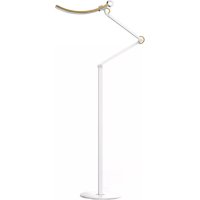
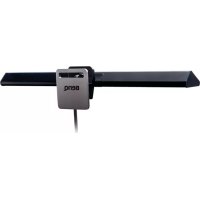
eReading Floor Lamp - Lamp BENQ - Free user manual and instructions
Find the device manual for free eReading Floor Lamp BENQ in PDF.



| Product Type | Floor Reading Lamp |
| Brand | BenQ |
| Model | eReading Floor Lamp (AR15_D / AR15_D hop) |
| Power Supply | 12V DC Adapter, 1.5A, 18W max |
| Color Temperature | Adjustable from 2700K (yellow) to 5700K (cool white) |
| Brightness | Continuously adjustable via knob |
| Lighting Modes | Manual, Auto Book Reading (5700K), Auto Digital Reading (4000K), Eye Protection |
| Sensor | Built-in ambient light sensor for auto modes |
| On/Off | By touching the metal ring or button |
| Adjustable Angle | Adjustable lamp arm |
| Mounting | Pedestal (included) or table clamp (optional) |
| Package Contents (AR15_D model) | Lamp, power adapter, pedestal, L-hex key |
| Package Contents (AR15_D hop model) | Lamp, adapter, base plate, stand post, screws, rubber pads, flat wrench, L-hex key |
| Care and Cleaning | Wipe with a soft, slightly damp cloth, no alcohol or solvents |
| Safety | Use only the provided adapter, stable surface, indoor use only, do not disassemble |
| Warranty | Warranty void if disassembled |
| Standards | CE, RoHS compliant, eco-design directives |
Frequently Asked Questions - eReading Floor Lamp BENQ
User questions about eReading Floor Lamp BENQ
0 question about this device. Answer the ones you know or ask your own.
Ask a new question about this device
Download the instructions for your Lamp in PDF format for free! Find your manual eReading Floor Lamp - BENQ and take your electronic device back in hand. On this page are published all the documents necessary for the use of your device. eReading Floor Lamp by BENQ.
USER MANUAL eReading Floor Lamp BENQ
Check the packaging for the following items according to the model you purchased. If any is missing or damaged, please contact the place of purchase immediately.
For the AR15_D Model
e-Reading Lamp × I · Power adapter × I · Pedestal base × I
- Hex L-key x 1
For the AR15_D Hop Model
- e-Reading Lamp x I • Power adapter x I • Stand base x I
- Stand pillar x 1 - Screw x 6 - Rubber cushion x 6
- Wrench x I - Hex L-key x I
The illustrations in this guide are for your reference only and may look different from the appearance of the product you purchased.
- The table clamp is available as a separate purchase.
For Your Safety
- Use only the supplied power adapter and connect only to a suitable outlet power (100-240V AC, 50-60 Hz). Otherwise the lamp will fail to work normally or result in a fire hazard.
- In order to prevent any damages to the lamp, do not hang or place any objects over the lamp.
- Route the power cord so as to avoid it from being walked on or pinched by items placed upon or against it.
- Place the lamp only on a solid, flat and stable surface. Otherwise the lamp may topple over and result in damages.
- If the lamp will not be used for a long period of time, unplug it from the power outlet.

In case of the following situations, unplug the lamp from the power outlet immediately and contact the authorized service center or a qualified service person for inspection or repair:
- When the outer casing of the lamp is broken
- When there are strange odors coming from the lamp
- When the lamp flickers
- When the insulation of the lamp's wiring is damaged or frayed, and the metal strings inside can be seen
Do not use the lamp in a humid environment (like in a bathroom or outdoors). Otherwise the components inside may short-circuit and result in accidents.
This lamp is designed for indoor use only. Do not use it outdoors.
Never disassemble the lamp or remove any components from it, as doing so may result in accidents and will void the product warranty.
Installation
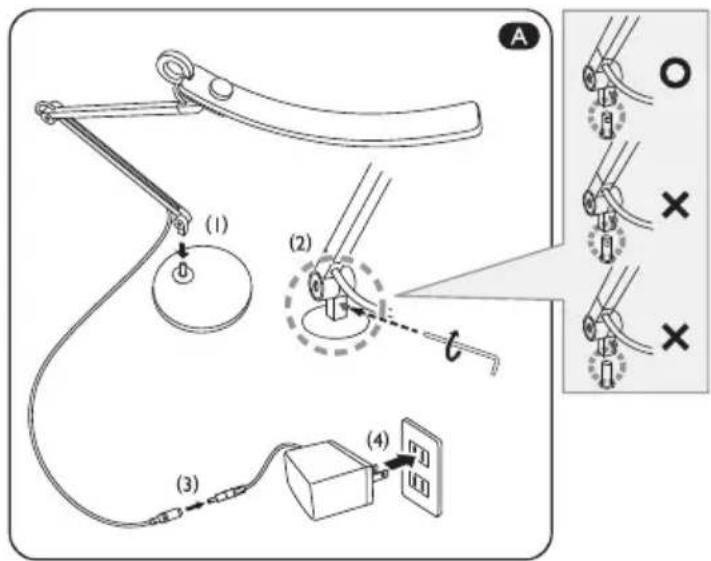
For the AR15_D Model with a Pedestal Base
I. Place the pedestal base on a solid, flat and stable surface.
2. Insert the shaft on the pedestal base all the way into the hole on the end of the lamp arm [Figure
A (I)] and then secure it by tightening the screw using the supplied Hex L-key [Figure
A2].
Be sure to tighten the screw to secure the pedestal base to the lamp arm. Otherwise the pedestal base will detach from the lamp arm and result in damages or personal injuries if the lamp is unwittingly moved by grasping the lamp arm.
- Connect the power cord to the power adapter [Figure A] and plug it into a power outlet [Figure A (4)].
For the AR15_D Model with a Table Clamp (Available Separately)
I. Place the table clamp onto the edge of the table surface [Figure B (1)] and then secure the table clamp by tightening the clamp screw [Figure 2]. The maximum clampable thickness of the table clamp is 6cm .
2. Insert the shaft on the table clamp all the way into the hole on the end of the lamp arm [Figure B (3)], and then secure it by tightening the screw using the supplied Hex L-key [Figure B (4)].
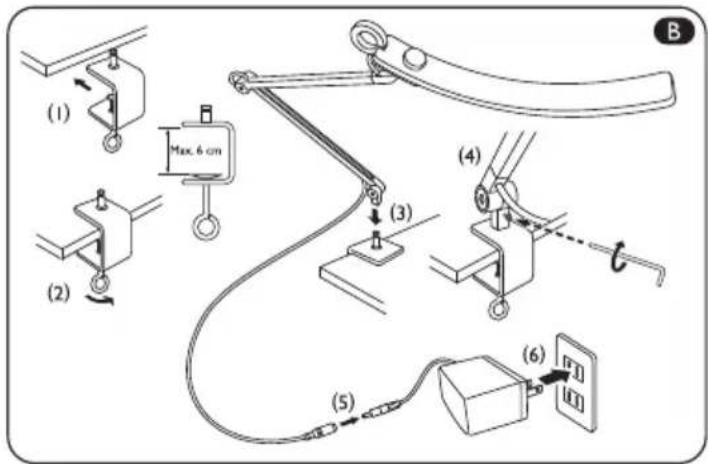
Be sure to tighten the screw to secure the table clamp to the lamp arm. Otherwise the table clamp will detach from the lamp arm and result in damages or personal injuries if the lamp is unwittingly moved by grasping the lamp arm.
- Connect the power cord to the power adapter [Figure 8] and plug it into a power outlet [Figure B (6)].
For the AR15_D Hop Model
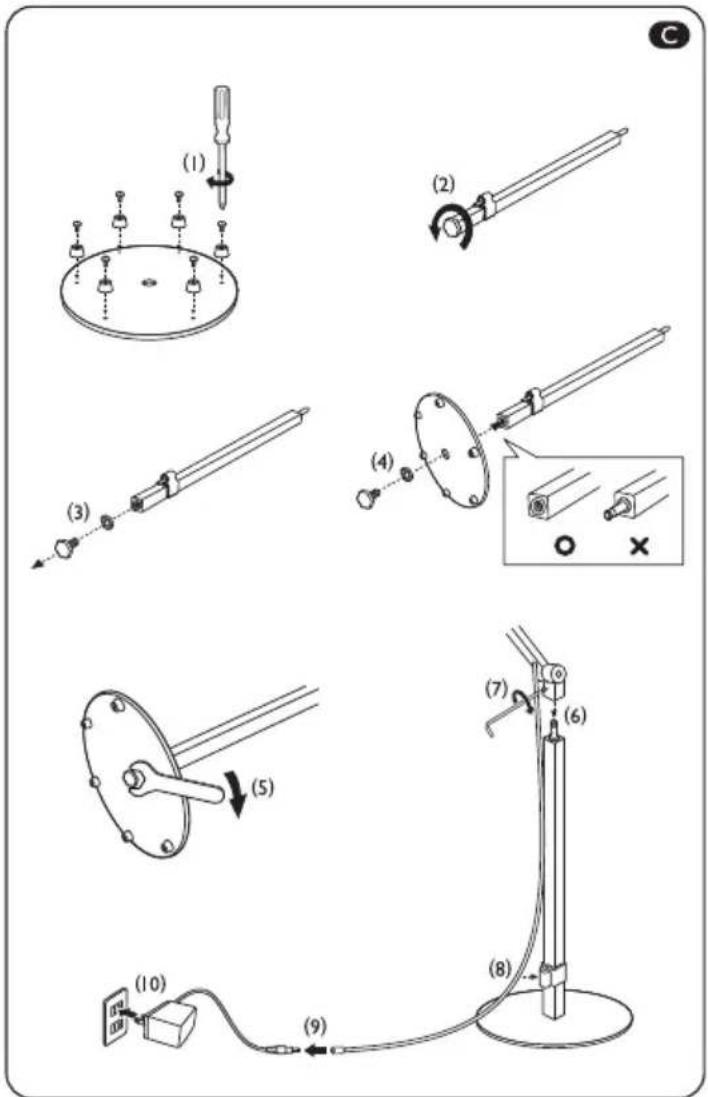
- Secure the six rubber cushions on the bottom side (the side with six screw holes) of the stand base using the six screws provided [Figure C (I)].
- Unscrew the hexagon bolt on the end of the stand pillar by turning it counterclockwise [Figure C].
- Temporarily remove the hexagon bolt and washer from the stand pillar [Figure C].
- Secure the stand base to the stand pillar using the hexagon bolt and washer removed in step 4 [Figure 4]. Pay attention to the correct orientation of the stand pillar.
- Tighten the hexagon bolt using the wrench provided [Figure C (5)].
- Insert the shaft on the stand pillar all the way into the hole on the end of the lamp arm [Figure
(6)] and then secure it by tightening the screw using the supplied Hex L-key [Figure (7)].
- Place the power cord in the clamp on the stand pillar [Figure
C8].Connect the power cord to the power adapter [Figure
(9)] and plug it into a power outlet [Figure (C)].
Using the Lamp
Identifying the Model of Your Lamp
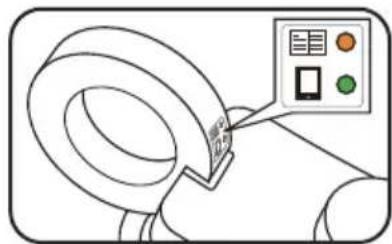
Check if the sticker is there on the metal ring of the
lamp.
- If yes, then you are using the model with dual auto-dimming mode. Refer to "Using the Model with Dual Auto-Dimming Mode" below for instructions.
- If no, then you are using the standard model. Refer to "Using the Standard Model" on page 4 for instructions.
Using the Model with Dual Auto-Dimming Mode
Turning On/Off the Lamp
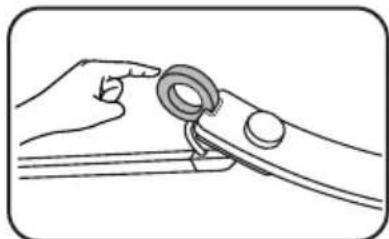
To turn on the lamp, gently touch the metal ring on the lamp. To turn off the lamp, touch the metal ring again. You can also turn the lamp on by pressing the knob on the lamp.
Adjusting Brightness and Color Temperature
The lamp provides one Manual lighting mode that allows you to adjust the brightness and color temperature manually and two Auto lighting modes for use in two different situations.
| Lighting mode | Setting | Lighting mode indicator color | ||
| Color temperature | Brightness level | |||
| Manual Adjustable None (off) | ||||
| Auto | Book reading 5700K Automatically optimized | Orange | ||
| Digital reading 4000K Green | according to ambient lighting condition | |||
Adjusting Brightness and Color Temperature Manually Using the Manual Lighting Mode
- When the lamp is on, turn the knob on the lamp [Figure
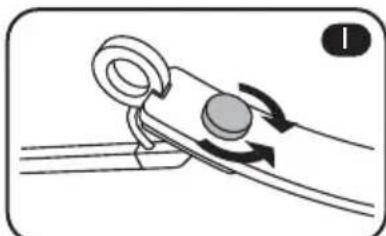
1] clockwise to increase brightness, or counter-clockwise to decrease it.
- When the lamp is on, press the knob on the lamp [Figure 2] to switch to the color temperature menu. Then, turn the knob clockwise to increase color temperature (the light becomes whitish), or counter-clockwise to decrease it (the light becomes yellowish).
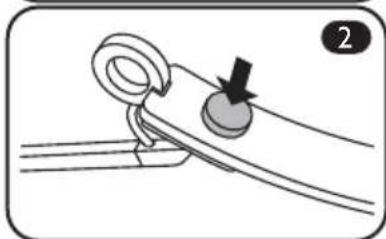

To switch back to the brightness menu, press the knob on the lamp again.
Using the Auto Lighting Modes
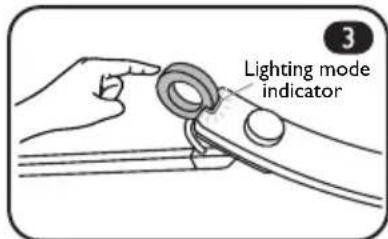
- To enter the Auto - Book reading mode, touch and hold the metal ring on the lamp [Figure 3] or approximately 2 seconds when the lamp is on. The Lighting mode indicator will light up orange. To switch to the Auto - Digital reading mode, touch and hold the metal ring on the lamp for approximately 2 seconds again, and the Lighting mode indicator will light up green.
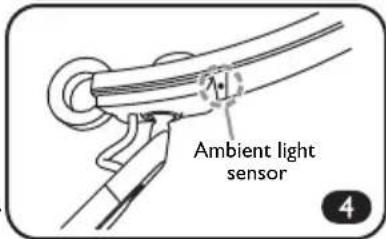
The Auto lighting modes protect your eyes by adjusting the lamp's brightness automatically according to the ambient lighting condition detected by the Ambient light sensor [Figure 4] and optimizing the color temperature settings for book and digital reading. - Do not block the Ambient light sensor on the lamp. Otherwise the Auto lighting modes will not function properly.
- Do not hold the metal ring when adjusting the angle of the lamp arm.
- The Auto lighting modes will exit automatically and the Lighting mode indicator will go off if you manually adjust the brightness and/or color temperature using the knob on the lamp.
Using the Standard Model
Turning on/off the Lamp and Entering Eye-care Mode
- To turn on the lamp, gently touch the metal ring on the lamp. To turn off the lamp, touch the metal ring again. You can also turn the lamp on by pressing the knob on the lamp.
-
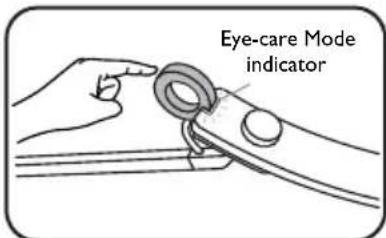
To enter Eye-care Mode, touch and hold the metal ring on the lamp for approximately 2 seconds when the lamp is on. The Eye-care Mode indicator will light up green. The Eye-care Mode protects your eyes by adjusting the lamp's brightness according to the ambient lighting condition automatically and optimizing the color temperature settings for screen reading.
-
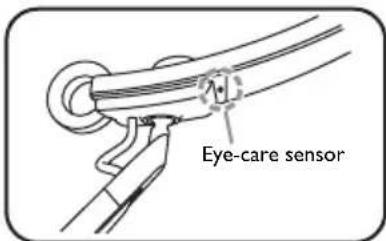
Do not block the Eye-care sensor on the lamp. Otherwise the Eye-care Mode will not function properly.
-
Do not hold the metal ring when adjusting the angle of the lamp arm.
- The Eye-care Mode will exit automatically and the Eye-care Mode indicator will go off if you manually adjust the brightness and/or color temperature using the knob on the lamp.
Adjusting Brightness and Color Temperature
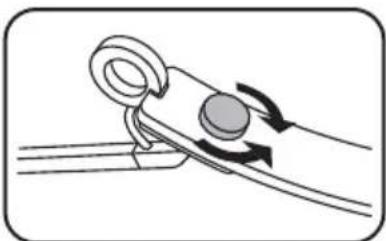
- When the lamp is on, turn the knob on the lamp clockwise to increase brightness, or counter-clockwise to decrease it.
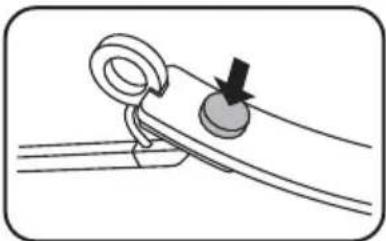
- When the lamp is on, press the knob on the lamp to switch to the Color Temperature menu. Then, turn the knob clockwise to increase color temperature (the light becomes whitish), or counter-clockwise to decrease it (the light becomes yellowish).
To switch back to the Brightness adjustment, press the knob on the lamp again.
Adjusting Angle
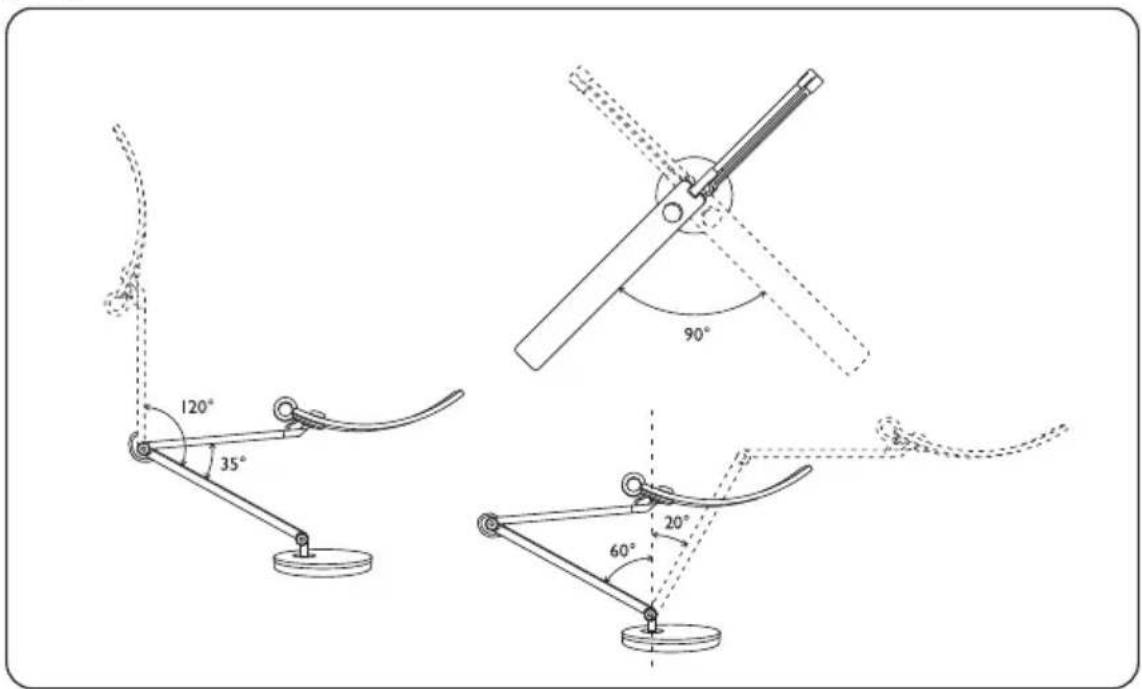
You can adjust the angle of the lamp arm according to your desktop space to obtain a suitable lighting effect.
Maintenance and Troubleshooting
Turn off the lamp first, and unplug the lamp from the power outlet. Wipe any smears or dusts off the lamp's outer casing using a soft, lint-free cloth lightly moistened with a mild detergent solvent. Do not use alcohol or any other chemical solvents like kerosene, naphtha and so on, as the lamp's casing may become damaged.
Do not rinse the lamp or any of its components directly with water.
If the lamp does not turn on, check to make sure that there are no loose connections between the power cord, power adapter, and the power outlet.
If the problem persists, please contact the original place of purchase for help.
Specifications
| Model AR15_D | |
| DC power input 12V, 1.5A | |
| Max. power consumption 18W | |
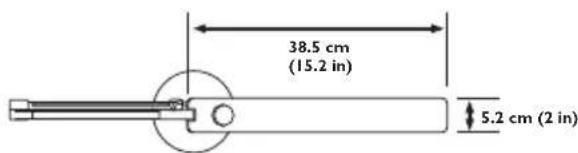
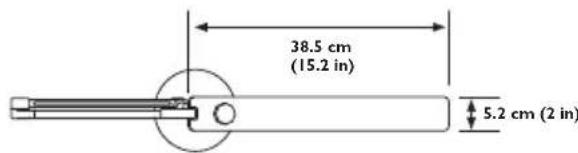
| Dimensions (Refer to the illustrations below) | |
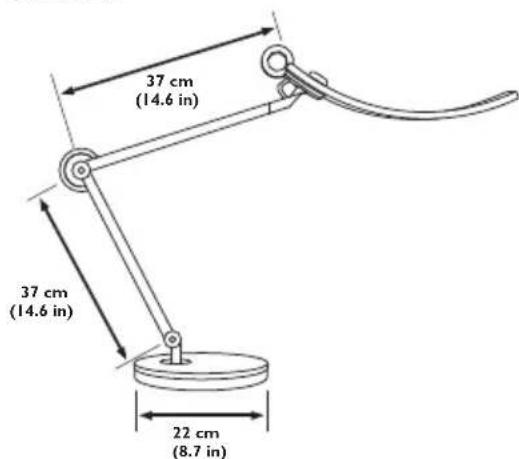
AR15_D
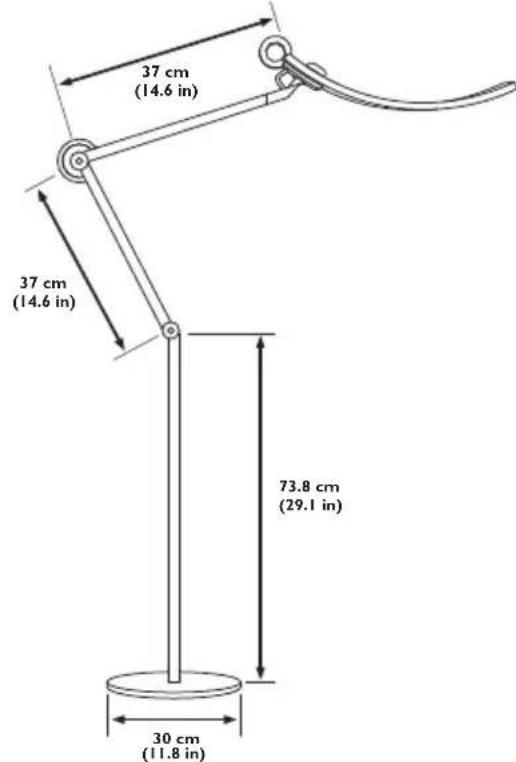
AR15_D Hop
Lieferumfang
LamF3eNnBnEaHnEaHnEaHnEaHnEaHnEaHnEaHnEaHnEaHnEaHnEaHnEaHnEaHnEaHnEaHnEaHnEaHnEaHnEaHnEaHnEaHnEaHnEaHnEaHnEaHnEaHaHaHaHaHaHaHaHaHaHaHaHaHaHaHaHaHaHaHaHaHaHaHaHaHaHaHaHaHaHaHaHaHaHaHaHaHaHaHaHaHaHaHaHaHaHaHaHaHaHaHaHaHaHaHaHaHaHaHaHaHaHaHaHaHaHaHaHaHaHaHaHaHaHaHaHaHaHaHaHaHaHaHaHaHaHaHaHaHaHaHaHaHaHaHaHaHaHaHaHa Ha
Disposal of Waste Electrical and Electronic Equipment and/or Battery by users in private households in the European Union.
This symbol on the product or on the packaging indicates that this can not be disposed of as household waste. You must dispose of your waste equipment and/or battery by handling it over to the applicable take-back scheme for the recycling of electrical and electronic equipment and/or battery. For more information about recycling of this equipment and/or battery, please contact your city office, the shop where you purchased the equipment or your household waste disposal service. The recycling of materials will help to conserve natural resources and ensure that it is recycled in a manner that protects human health and environment.
Recycling information: See http://www.beng.com/support/recycle for details.


http://www.beng.com/support/recycle.


DECLARATION OF CONFORMITY
The device complies with the requirements set out in the Council Directives on the Approximation of the Laws of the Member States relating Electromagnetic Compatibility (2004/108/EC) and Low Voltage Directive (2006/95/EC) and Radio and Telecommunications Terminal Equipment Directive (1999/5/EC), the Restriction of The Use of Certain Hazardous Substances in Electrical And Electronic Equipment Directive (2011/65/EU), Turkish EEE Directive; Turkish ErP (Decision 2010/643); the Commission Regulation (EC) No 1275/2008 implementing Directive 2005/32/EC of the European Parliament and of the Council with regard to eco-design requirements for standby and off mode electric power consumption of electrical and electronic household and office equipment, and the Commission Regulation (EC) No 1194/2012 implementing Directive 2009/125/EC of the European parliament and of the council establishing a framework for the setting of eco-design requirements for energy-related products.
Deutsch
Federal Communication Commission Interference Statement
This equipment has been tested and found to comply with the limits for a Class B digital device, pursuant to Part 15 of the FCC Rules. These limits are designed to provide reasonable protection against harmful interference in a residential installation. This equipment generates, uses and can radiate radio frequency energy and, if not installed and used in accordance with the instructions, may cause harmful interference to radio communications. However, there is no guarantee that interference will not occur in a particular installation. If this equipment does cause harmful interference to radio or television reception, which can be determined by turning the equipment off and on, the user is encouraged to try to correct the interference by one of the following measures:
Reorient or relocate the receiving antenna.
- Increase the separation between the equipment and receiver.
- Connect the equipment into an outlet on a circuit different from that to which the receiver is connected.
- Consult the dealer or an experienced radio/TV technician for help.
This device complies with Part 15 of the FCC Rules. Operation is subject to the following two conditions: (1) This device may not cause harmful interference, and (2) this device must accept any interference received, including interference that may cause undesired operation.
FCC Caution: Any changes or modifications not expressly approved by the party responsible for compliance could void the user's authority to operate this equipment.
China RoHS

- For the AR15_D Model
- For the AR15_D Hop Model
- For Your Safety
- Installation
- For the AR15_D Model with a Pedestal Base
- For the AR15_D Model with a Table Clamp (Available Separately)
- Using the Lamp
- Identifying the Model of Your Lamp
- Using the Model with Dual Auto-Dimming Mode
- Turning On/Off the Lamp
- Adjusting Brightness and Color Temperature
- Adjusting Brightness and Color Temperature Manually Using the Manual Lighting Mode
- Using the Auto Lighting Modes
- Using the Standard Model
- Turning on/off the Lamp and Entering Eye-care Mode
- Adjusting Angle
- Maintenance and Troubleshooting
- Specifications
- Lieferumfang
- DECLARATION OF CONFORMITY
- Deutsch
- Federal Communication Commission Interference Statement
- China RoHS
Brand : BENQ
Model : eReading Floor Lamp
Category : Lamp