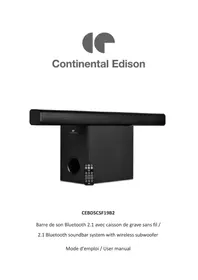
CEBDSCSF19B2 - Soundbar CONTINENTAL EDISON - Free user manual and instructions
Find the device manual for free CEBDSCSF19B2 CONTINENTAL EDISON in PDF.


| Product Type | Bluetooth 2.1 Soundbar with Wireless Subwoofer |
| Brand | Continental Edison |
| Model | CEBDSCSF19B2 |
| Output Power | 15 W x 2 + 30 W |
| Dimensions (Soundbar) | 81 x 6 x 6 cm |
| Dimensions (Subwoofer) | 20 x 15 x 26 cm |
| Total Weight | 3 kg |
| Power Supply | AC/DC Adapter 100-240 V~50/60 Hz, output 14 V, 1.2 A, 16.8 W |
| Bluetooth Version | 5.0 (A2DP, AVRCP) |
| Bluetooth Range | Up to 10 m |
| Input Functions | HDMI, Optical, Auxiliary, Line (RCA), Bluetooth |
| Remote Control | Yes, with CR2025 button battery included, range 6 m |
| Sound Effects | Music, Dialogue, Movie |
| Care and Cleaning | Soft, dry cloth; do not use solvents |
| Safety | Do not use near water, do not obstruct ventilation, do not expose to flames |
| Warranty | Does not cover wear parts or damage caused by improper use |
| Repairability | Must be repaired by a qualified technician |
| Package Contents | Soundbar, subwoofer, remote control, AC/DC adapter, RCA cable, user manual |
| Standby Consumption | 0.08 W |
| Average Efficiency in Active Mode | 87.1 % |
Frequently Asked Questions - CEBDSCSF19B2 CONTINENTAL EDISON
User questions about CEBDSCSF19B2 CONTINENTAL EDISON
0 question about this device. Answer the ones you know or ask your own.
Ask a new question about this device
Download the instructions for your Soundbar in PDF format for free! Find your manual CEBDSCSF19B2 - CONTINENTAL EDISON and take your electronic device back in hand. On this page are published all the documents necessary for the use of your device. CEBDSCSF19B2 by CONTINENTAL EDISON.
USER MANUAL CEBDSCSF19B2 CONTINENTAL EDISON
2.1 Bluetooth soundbar system with wireless subwoofer
Directive RoHS:IEC 62321-2:2013
IEC 62321-3-1:2013, IEC 62321-4:2013 & IEC 62321-5:2013
IEC 62321-7-2:2013, IEC 62321-6:2015
IDENTIFICATION DU SIGNATAIRE: Importateur
IMPORTANT WARNINGS AND SAFETY ADVICE
We encourage you to read this user guide carefully and completely before installing and using your device.
It is important that this user guide is kept with the device for any new consultation. If this device is to be transferred to another person, make sure that the user guide follows the device so that the new user can be informed of the operation of the device.


Read user manual before use
Caution : Read user manual before service
CAUTION:
Usage of controls or adjustments or performance of procedures other than those specified herein may result in hazardous radiation exposure.
This unit should not be adjusted or repaired by anyone except qualified service personnel.
- Do not use this device near water.
- Clean only with a slightly damp cloth.
- Do not cover or block any ventilation openings. When placing the device on a shelf, leave 5 cm (2") free space around the whole device.
- Install in accordance with the supplied user manual.
- Don't step on or pinch the power adaptor. Be very careful, particularly near the plugs and the
cable’s exit point. Do not place heavy items on the power adaptor, which may damage it. Keep the entire device out of children’s reach! When playing with the power cable, they can seriously injure themselves.
-
Keep the device away from heat sources such as radiators, heaters, stoves, candles and other heat- generating products or naked flame.
-
Avoid using the device near strong magnetic fields.
-
Electrostatic discharge can disturb normal usage of this device. If so, simply reset and restart the device following the instruction manual. During file transmission, please handle with care and operate in a static-free environment.
-
Warning! Never insert an object into the product through the vents
or openings. High voltage flows through the product and inserting an object can cause electric shock and/or short circuit internal parts. For the same reason, do not spill water or liquid on the product.
- Do not use in wet or moist areas such as bathrooms, steamy kitchens or near swimming pools.
- Do not use this device when condensation may occur.
- Although this device is manufactured with the utmost care and checked several times before leaving the factory, it is still possible that problems may occur, as with all electrical appliances. If you notice smoke, an excessive build-up of heat or any other unexpected phenomenon, you should disconnect the plug from the main power socket
immediately.
- This device must operate on a power source as specified on the specification label. If you are not sure of the type of power supply used in your home, consult your dealer or local power company.
- The socket outlet must be installed near the equipment and must be easily accessible.
- Keep away from rodents. Rodents enjoy biting on power cords.
- Always hold the plug when pulling it out of the main supply socket. Do not pull the power cord. This can cause a short circuit.
- Avoid placing the device on any surfaces that may be subject to vibrations or shocks.
- To clean the device, use a soft dry cloth. Do not use solvents or petrol based fluids. To remove severe stains, you may use a damp cloth
with dilute detergent.
-
Do not interrupt the connection when the device is formatting or transferring files. Otherwise, data may be corrupted or lost.
-
If the unit has USB playback function, the usb memory stick should be plugged into the unit directly. Don’t use an usb extension cable because it can cause interference resulting in failing of data.
-
The apparatus shall not be exposed to dripping or splashing and make sure that no objects filled with liquids, such as vases, are placed on or near the apparatus.
-
To completely disconnect the power input, the adaptor's plug of the apparatus shall be disconnected from the mains, as the disconnect device is the mains
plug of apparatus.
- Battery shall not be exposed to excessive heat such as sunshine, fire or the like.
- Attention should be drawn to the environmental aspects of battery disposal.
- The apparatus can only be used in moderate climate
- The rating label has been marked on the bottom or back panel of the apparatus.
- Make sure the unit is adjusted to a stable position. Damage caused by using this product in an unstable position or by failure to follow any other warning or precaution contained within this user manual will not be covered by warranty.
- Never remove the casing of this apparatus.
- Never place this apparatus on
other electrical equipment.
- Do not use or store this product in a place where it is subject to direct sunlight, heat, excessive dust or vibration.
- Do not allow children access to plastic bags.
- Only use attachments/accessories specified by the manufacturer.
- Prolonged exposure to loud sounds from personal music players may lead to temporary or permanent hearing loss.
- The ventilation should not be impeded by covering the ventilation openings with items, such as newspapers, table-cloths, curtains, etc.;
- No naked flame sources, such as lighted candles, should be placed on the apparatus;
- Batteries shall be disposed of in a safe way. Only dispose of batteries
in specific collection containers (contact the your retailer for more information) in order to protect the environment.
- Please use bundle adaptor only to operate this device.
- The supply cord of adaptor cannot be replaced. If the cord is damaged the appliance should be Scrapped
- CAUTION: Danger of explosion if battery is incorrectly replaced. Replace only with the same or equivalent type.
- Batteries installed shall not be exposed to excessive heat such as sunshine, fire or the like
WARNING
Do not ingest the battery, Chemical Burn Hazard
The remote control supplied with a coin button cell battery. If the coin button cell battery is swallowed, it
can cause severe internal burns in just 2 hours and can lead to death.
Keep new and used batteries away from children.
If the battery compartment does not close securely, stop using the product and keep it away from children.
If you think batteries might have been swallowed or placed inside any part of the body, seek immediate medical attention.
Information on the meaning of the conformity marking
C E
The marking indicates that the product meets the main requirements of the
European Directives 2014/53/EU, (Radio Equipment), 2014/35/EU (Low Voltage), 2014/30/EU (Electromagnetic Compatibility), 2011/65/EU (Reduction of the use of certain hazardous substances in Electronic Electrical Equipment).
SUMMARY
Important warnings and safety advice 1
I. Overview 12
II. Technical characteristics 14
III. Installation 15
IV. Operation 18
V. Trouble shooting 21
VI. Warranty 22
VII. Disposal 23
I. OVERVIEW
Product
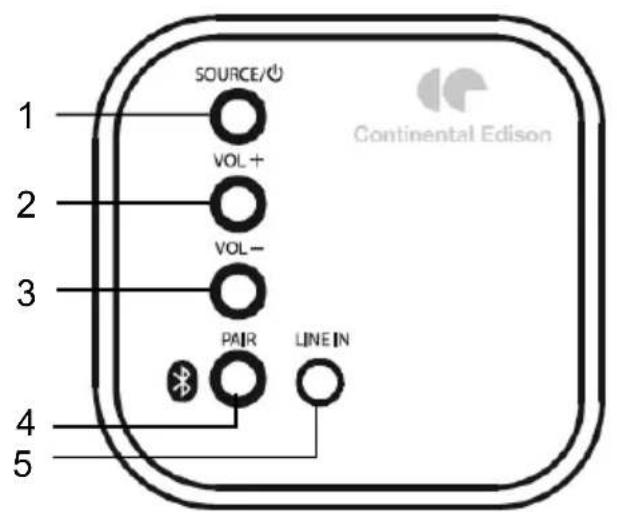
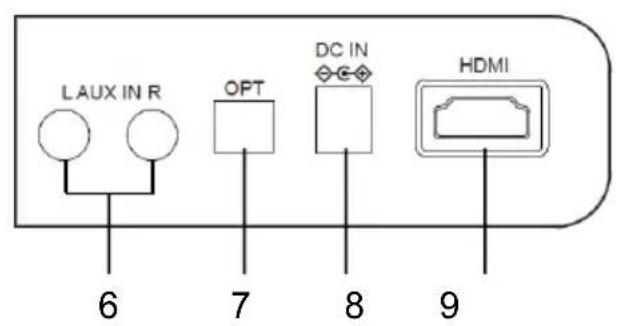
1: SOURCE: Short press to power on when off, after power on short press for function change, long press to standby;
5: LINE IN
2: VOL+: Short or long press for volume up;
6: AUX IN (L/R)
3: VOL-: Short or long press for volume down;
7: OPTICAL IN
4: PAIR: Short or long press Bluetooth pair;
8: DC IN
9: HDMI IN
Function indicator LED
- Red light: The light is on when standby, it's off when power on
- Blue light: use all functions of the soundbar
Remote
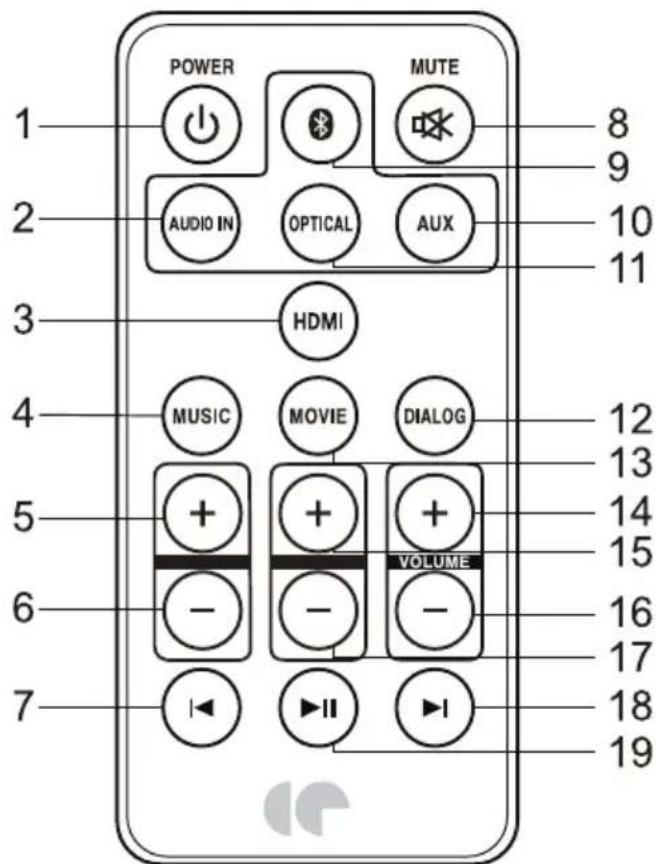
1: Short press to on or standby; 2:
Audio IN: Press to Audio IN mode; 3:
HDMI: Press to HDMI IN mode.
4: MUSIC: Press to Music sound effect.
5: Functions are disabled for this model.
6: Functions are disabled for this model.
7: Press to jump previous song in Bluetooth mode, and Short press to mute off when mute on;
8: MUTE: Press to mute on or off
9: Short press to Bluetooth mode; long press to Bluetooth pair;
10: AUX IN: Press to AUX IN mode;
11: Optical: Press to Optical IN mode;
12: DIALOG: Press to speech sound effect;
13: MOVIE: Press to cinema sound effect; In Movie mode, Bass and Treble adjustments are not working;
14: VOL+: Short or long press to volume up and Short press to mute off when mute on;
15: Functions are disabled for this model.
16: VOL:- Short or long press to volume down, and Short press to mute off when mute on;
17: Functions are disabled for this model.
18: Press to jump next song in Bluetooth mode, and Short press to mute off when mute on;
19: Press to play or pause music in Bluetooth mode, and Short press to mute off when mute on;
II. TECHNICAL CHARACTERISTICS
| Product name | CBEDSCSF19B2 |
| Output power | 15W*2+30W |
| AC/DC adaptor | 100-240V~ 50/60Hz Output: 14V --- 1.2A 16.8W |
| Speaker frequency | 50Hz-15KHz |
| Bluetooth version | 5.0, A2DP, AVRCP |
| Bluetooth range | Up to 10m |
| Included in the packaging | Soundbar, Remote control, AC/DC adapter, RCA cable, User manual |
| Dimensions | Sound bar: 81 x 6 x 6 cm |
| Subwoofer: 20 x 15 x 26 cm | |
| Weight | 3 KG |
Information for external power supplies for Commission Regulation 2019/1782/EU
| Value Unit | ||
| Model identification HB40-1401200SPA | ||
| Manufacturer's name or trade mark | SHENZHEN CITY HONG BEN ELECTRONIC CO.,LTD | |
| Input voltage | Input: 100-240V 0.8A | V |
| Input AC frequency | 50/60Hz, | Hz |
| Output voltage 14 V | ||
| Output current 1.2 A | ||
| Output power 16.8W W | ||
| Average active efficiency 87.1% | % | |
| Efficiency at low load (10%) | 80% | % |
| No-load power consumption | 0.08 | W |
III. INSTALLATION
- Unpack all parts and remove protective material.
-
- Do not connect the unit to the mains before checking the mains voltage and before all other connections have been made.
-
These instructions are related only to products using power cable or AC power adaptor.
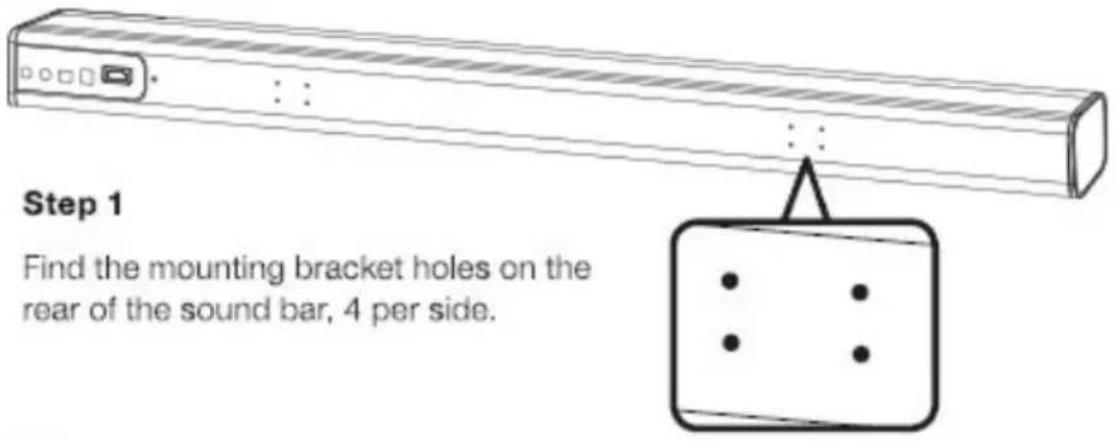
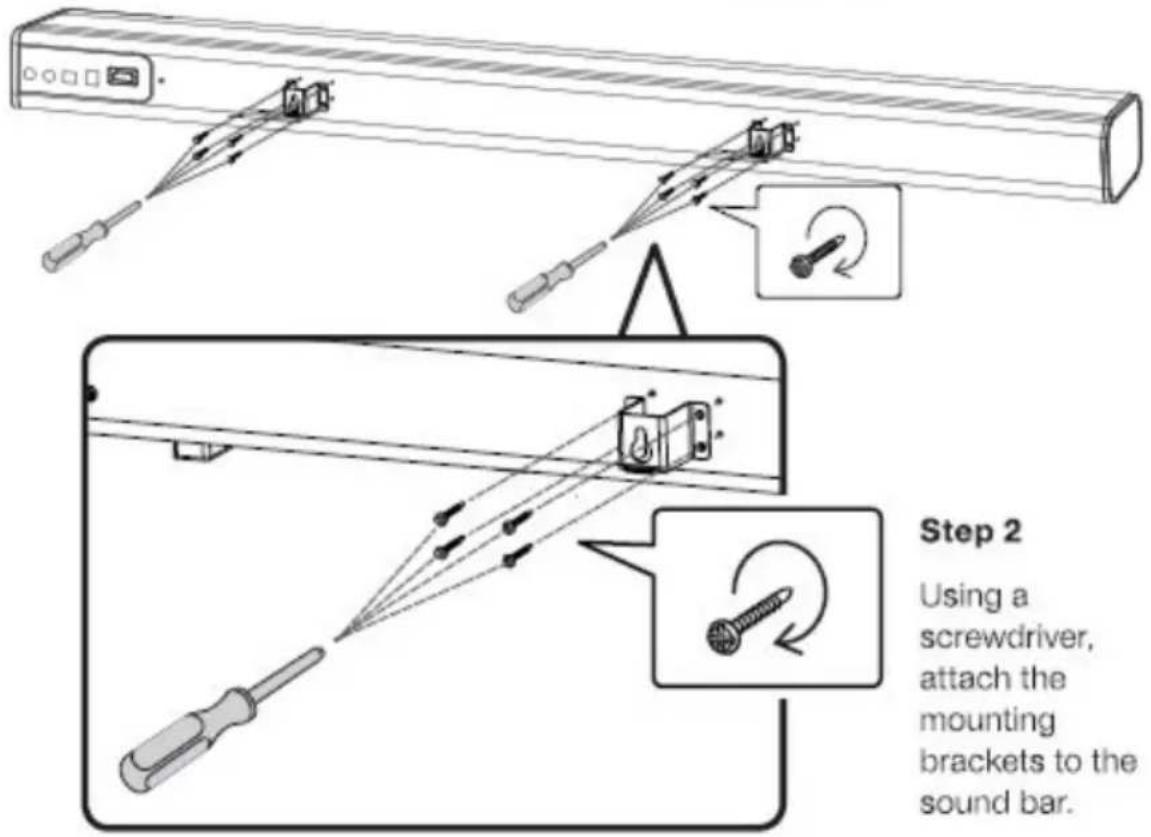
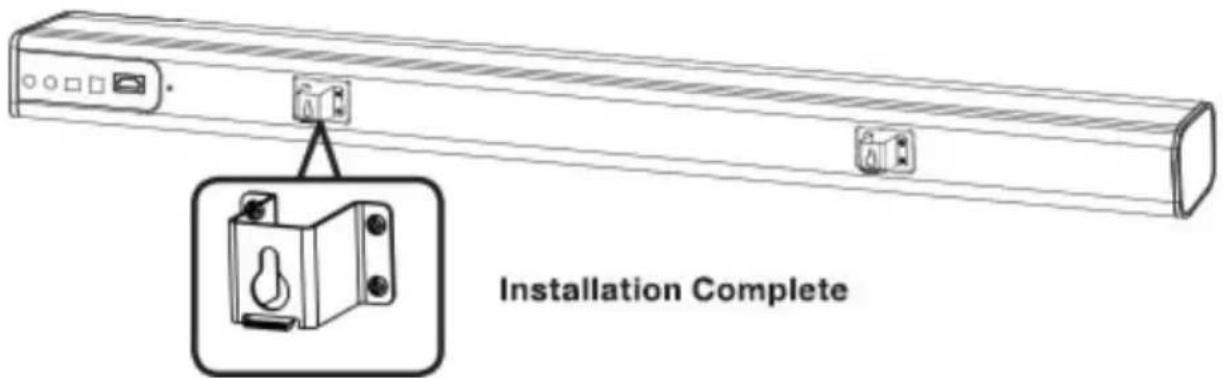
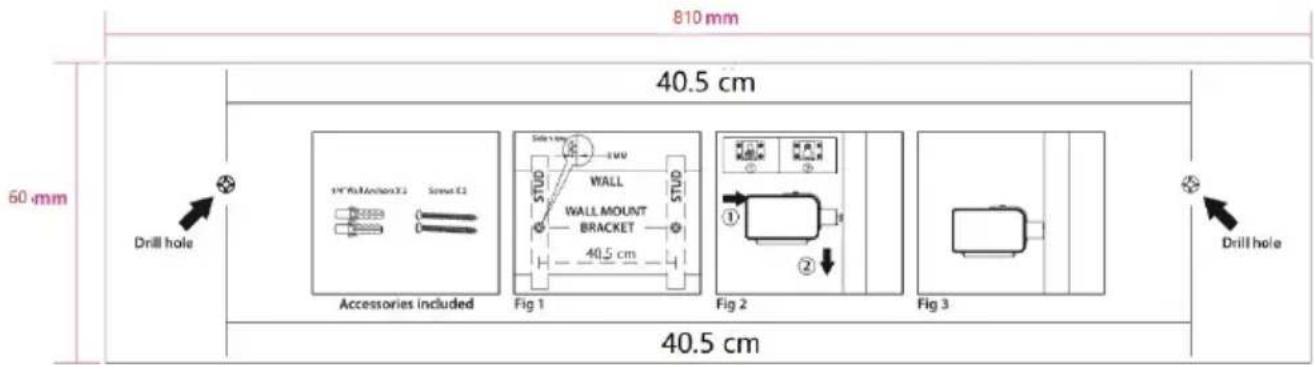
Wall Mount Bracket Installation
IV. OPERATION
Install the Remote Control:
The Remote Control has a pre-installed lithium CR2025 battery. Remove the protective tab to activate the Remote Control battery.
Note: The Remote Control works within a range of 6 meter.
Remote Batteries
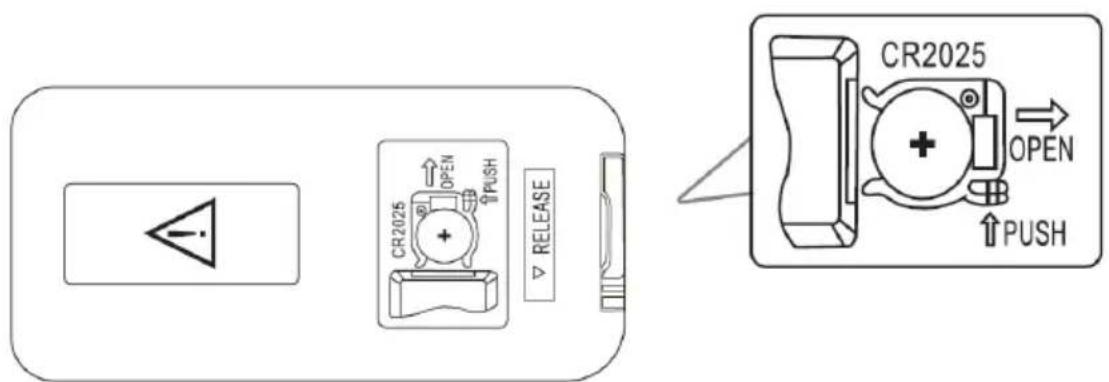
Remote control: requires 1 CR2025 button cell type battery (included).
Get Started:
- Make sure you have made all the necessary cable connections before connecting the Soundbar to a wall outlet, the soundbar will enter to standby mode, the indicator will light up in red.
- Make sure the subwoofer is connected to the power, and turn the button to "ON"
- Short press SOURCE on unit or on remote control to turn on the soundbar. The Bluetooth indicator will light up.
- Press the source button on unit or Remote Control to choose various source.
Note: The Soundbar will re-enter the Standby Mode again if there is no operation for 15 minutes.
Bluetooth Pairing:
- Press the Bluetooth button on the Remote control to enter the Bluetooth mode. You can also short press the Source button on the Soundbar to choose the Bluetooth Source.
- The indicator light will slowly be flashing in blue.
- Press the Pair button on the side of the unit. The pairing indicator will flash quickly.
- Turn on the Bluetooth function on your devices and the device will start to search for the Soundbar.
- Select "CEBDSCSF19B2" from the list of found devices.
- If asked, enter the password "0000" and press OK.
- When successfully paired with your device, the indicator light will be lit steadily. Note: The Bluetooth playback is controlled by your device and the buttons on the remote control.
Note: The operation range for the Bluetooth connection is 10 meters.
Note: If a mobile phone on which you are playing music receives a call, the music will be interrupted and not played. After call end, the devices are connected to each other again and playback continues.
- Press and hold the Bluetooth button on the Remote Control for 3 seconds to disconnect the Bluetooth pairing.
- To add a new device to the Bluetooth it is necessary imperatively to press the Bluetooth button of the remote control or the product or the sound will not be detected. Needless to do this if the product has already been connected to the bar of its
AUX Source:
- Ensure that the soundbar is connected to the TV or other audio device via an AUX cable.
- Press the AUX button on the Remote control to enter the mode. You can also short press the source button on the soundbar to choose the AUX source.
Note: The playback is controlled by your device and by the button on the remote control.
OPTICAL IN Source:
- Ensure that the soundbar is connected to the TV or other audio device via an Optical cable.
- Press the Optical button on the Remote control to enter the mode. You can also short press the source button on the soundbar to choose the Optical source.
Note: The playback is controlled by your device and by the button on the remote control.
LINE IN Source:
1: Ensure that the soundbar is connected to the TV or other audio device via an audio cable.
2: Press the LINE IN button on the remote control to enter the mode. You can also short press the source button on the soundbar to choose the LINE IN source.
Note: The playback is controlled by your device and by the buttons on the remote control.
HDMI Source
1: Ensure that the soundbar is connected to the TV or other audio device via HDMI cables.
2: Press the HDMI button on the remote.
Note: The device can synchronize the volume with the TV, and also with the switch.
V. TROUBLE SHOOTING
| Troubles Solutions | |
| Pairing connection via Bluetooth cannot be completed | Other mobile device has connected before use and the mobile device has not left as well as its Bluetooth is not off. When it connects, Bluetooth of this device will automatically find the Bluetooth device and connect. First, turn off Bluetooth of the connected Bluetooth devices, then the next Bluetooth device can be found and normally paired to connect. |
| Volume of playback via Bluetooth is small | After connections with mobile devices, volume of Bluetooth device is not up but at the default output level. Turn on the mobile device output. Output volume of Bluetooth device is low itself. |
| Connection distance via Bluetooth is short | Obstruction exists between mobile devices and Bluetooth device. Remove obstructions. |
| Connection via Bluetooth right, sometimes | Obstruction exists between mobile devices and Bluetooth device. Remove obstructions. Too far away from Bluetooth device to connected mobile devices, beyond the connection range. Shorten the distance between the Bluetooth device and mobile devices. |
| Silent play after connection via Bluetooth | After connections with mobile devices, Bluetooth device audio is off. Turn on the mobile's output volume. |
| Subwoofer not working | Turn on the soundbar then press and hold both the button of Volume+ and Volume -, then turn on the subwoofer, the red LED on Subwoofer will flash for 4 times. Plug off the AC adaptor from the soundbar, restart the device and complete the pair between the soundbar and Subwoofer. |
VI. WARRANTY
The warranty does not cover the wear parts of the product, nor the problems or damage resulting from:
(1) surface deterioration due to normal wear and tear of the product;
(2) defects or deterioration due to contact with liquids and corrosion caused by rust or the presence of insects;
(3) any incident, abuse, misuse, alteration, disassembly or unauthorized repair
(4) improper maintenance, improper use concerning the product or connection to an incorrect voltage;
(5) any use of accessories not supplied or not approved by the manufacturer.
The guarantee will be cancelled if the nameplate and / or serial number of the product are removed.
VII. DISPOSAL
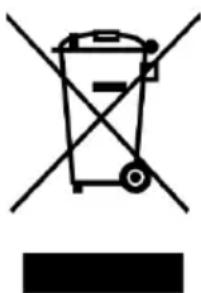
This appliance carries the selective sorting symbol for waste electrical and electronic equipment (WEEE).
This means that this product must be supported by a selective collection system in accordance with the European Directive 2012/19 / EU so that it can either be dismantled or recycled, and thus reduce the impact on the environment.
For more information, you can contact your local (town hall) or regional administration.
Electronic products that have not been sorted are potentially dangerous for the environment due to the presence of hazardous substances.
Under no circumstances should you throw this unit on public roads.
When this device reaches the end of its useful life, you must deposit it in a separate collection center for destruction and / or recycling.
Continental Edison - 120/126 quai de Bacalan - CS 11584 - 33000 Bordeaux
Imported by SCHNEIDER CONSUMER GROUP
12, rue Jules Ferry, 93110 Rosny-sous-Bois, France

Continental Edison
www.continentaledison.fr

- IMPORTANT WARNINGS AND SAFETY ADVICE
- CAUTION:
- WARNING
- SUMMARY
- OVERVIEW
- Product
- Function indicator LED
- Remote
- INSTALLATION
- Wall Mount Bracket Installation
- OPERATION
- Install the Remote Control:
- Remote Batteries
- Get Started:
- Bluetooth Pairing:
- AUX Source:
- OPTICAL IN Source:
- LINE IN Source:
- HDMI Source
- TROUBLE SHOOTING
- WARRANTY
- DISPOSAL
- Continental Edison
Brand : CONTINENTAL EDISON
Model : CEBDSCSF19B2
Category : Soundbar