CETDSB40B4 - Soundbar CONTINENTAL EDISON - Free user manual and instructions
Find the device manual for free CETDSB40B4 CONTINENTAL EDISON in PDF.


| Product type | Soundbar |
| Brand | Continental Edison |
| Model | CETDSB40B4 |
| Total power | 60 Watts (2 x 15 W speakers + 1 x 30 W subwoofer) |
| Bluetooth | Version 4.1, range 10 meters |
| Inputs | USB 2.0, Micro SD card, AUX-IN 3.5 mm |
| FM Radio | Range 87.5 - 108 MHz, automatic search |
| Power supply | AC adapter input 100-240 V ~ 50/60 Hz, output 5 V ⎓ 1.5 A |
| Dimensions (with stand) | 975 x 135 x 125 mm |
| Weight | 2.60 kg |
| Power consumption | 60 Watts |
| Signal-to-noise ratio | ≥ 78 dB |
| Frequency response | 60 Hz - 18 kHz |
| Operating temperature | 5 °C to 40 °C |
| Remote control | CR2025 3V button cell battery included |
| Pack contents | Soundbar, remote control, AUX cable, AC adapter, stand and screws |
| Maintenance | Unplug before cleaning; use a damp cloth, no solvents |
| Safety | Do not open the case; avoid moisture and water splashes |
| Repairability | Repair by qualified technician only |
| Compliance | CE, RED, EMC, LVD, RoHS directives |
Frequently Asked Questions - CETDSB40B4 CONTINENTAL EDISON
User questions about CETDSB40B4 CONTINENTAL EDISON
0 question about this device. Answer the ones you know or ask your own.
Ask a new question about this device
Download the instructions for your Soundbar in PDF format for free! Find your manual CETDSB40B4 - CONTINENTAL EDISON and take your electronic device back in hand. On this page are published all the documents necessary for the use of your device. CETDSB40B4 by CONTINENTAL EDISON.
USER MANUAL CETDSB40B4 CONTINENTAL EDISON
natural_image
Abstract geometric shapes resembling partial crescent and angular form (no text or symbols)Continental Edison
natural_image
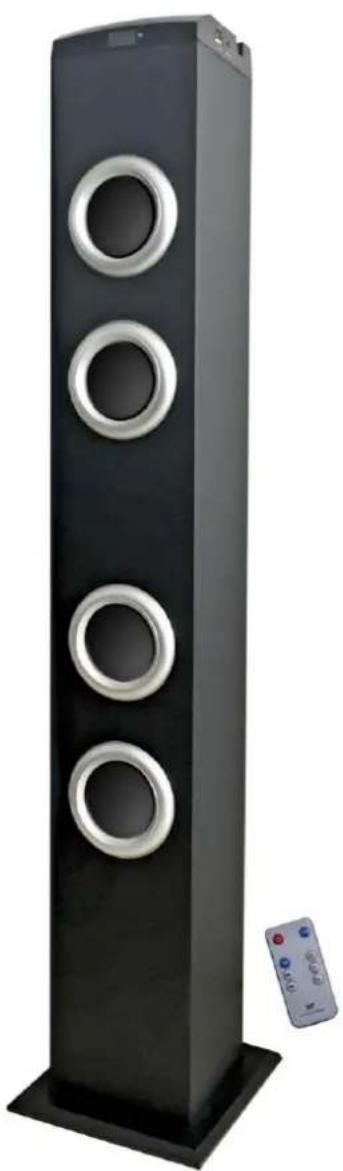
Black tall tower with three circular cutouts and a remote control unit on the right (no text or symbols visible)CETDSB40B4
Tour de son Bluetooth - Bluetooth sound tower
RISQUE D'ELECTROCUTION NE PAS OUVRIR
ATTENTION: POUR RÉDUIRE LE RISQUE DE CHOC ÉLECTRIQUE, NE PAS RETIRER LE COUVERCLE (OU L'ARRIERE). AUCUNE PIÈCE N'EST RÉPARABLE PAR L'UTILISATEUR. CONFIER LA RÉPARATION À UN PERSONNEL QUALIFIÉ.
natural_image
Simple line drawing of a person with a umbrella, a stack of books, and a stick figure (no text or symbols)natural_image
Simple line drawing of two cartoon characters pulling a cart with a bird flying nearby (no text or symbols)natural_image
Close-up of a black square base with a circular mounting hole and an arrow pointing to it, placed on a wooden surface (no text or symbols visible)ATTENTION
natural_image
Symbol of a trash bin crossed with a diagonal line and a horizontal bar below (no text or labels)Please read completely and thoroughly this instruction booklet before installing and using the unit.
We recommend you to keep together the unit and its booklet for any potential future consultation. Should this unit be passed to another person, please make sure that this booklet is also passed on so that the new user can read it before use.
The lighting flash and arrow head within the triangle is warning sign alerting you of dangerous voltage inside the product
CAUTION
RISK OF ELECTRIC SHOCK DO NOT OPEN
CAUTION : TO REDUCE THE RISK OF ELECTRIC SHOCK DO NOT REMOVE COVER (OR BACK). NO USER SERVICIABLE PARTS INSIDE. REFER SERVICING TO QUALIFIED SERVICE PERSONNEL.
The exclamation point within the triangle is a warning sign alerting you of important instructions accompanying the product
OVERALL SAFETY
- To avoid any risk of fire or electric shock, make sure the unit is not exposed to rain or to a moist environment!
- The unit must not be splashed with water; do not place on it any object containing liquids such as vases.
- This unit is designed to be used in a temperate only.
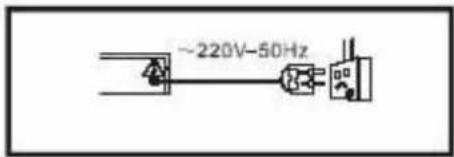
Power sources: this unit should only be used with sources as indicated on the marking label.
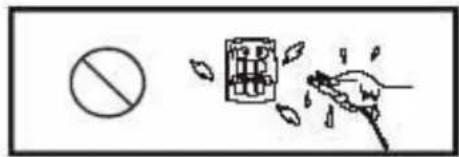
Never handle the power plug with wet hands.
natural_image
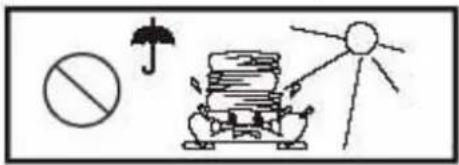
Simple line drawing of a person standing next to a stack of books, with a prohibition symbol and umbrella (no text or labels)Do not step on the unit, nor place heavy objects or it. Avoid leaving it under sunlight.
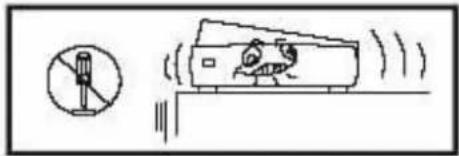
Never open the casing. Avoid dropping metal objects inside the unit.
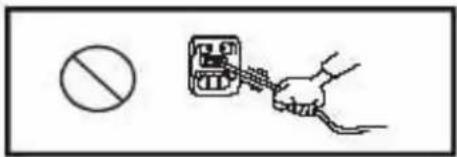
Protect power cable. Avoid high pressure and do not step on it. Do not pull it or bend it excessively.
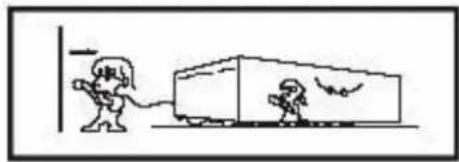
natural_image
Simple line drawing of a person pulling a cart with a bird flying nearby (no text or symbols)Unplug the power cord from the wall outlet when you do not use it for a long time.
POWER SUPPLY
THE POWER CORD SHOULD REMAIN EASILY AND PERMANENTLY ACCESSIBLE IN ORDER TO DISCONNECT THE UNIT IN CASE OF DANGER.
- Remember to unplug the unit if you are not going to use it for a long time.
- If the power cord is damaged, please contact the manufacturer or the customer service to have it replaced.
- This unit is to be connected to a 100-240V\~ 50/60Hz power supply.
- The mains plug must remain easy and permanently accessible.
- Hold the plug firmly whenever you plug/unplug the power cord.
- Keep the power cord away from any heat source.
-
Do not put heavy objects on the power cord.
-
Do not pull strongly on the power cord.
- This unit is equipped with a low power laser light. For safety reasons, do not open the unit casing: in case of dysfunction, please contact a technician.
IMPORTANT SAFETY INSTRUCTIONS
- Do not use the unit in extremely hot, cold, dusty or humid places.
- Do not keep the unit in a highly humid place, such as a bathroom, kitchen sink or swimming pool. Keep the unit away from heaters, stoves, etc. Never leave it in an area exposed to direct sunlight where it might get very hot.
- Do not expose the unit to dripping or splashing; no objects filled with liquids such as vases, should be placed on it.
- Do not block ventilation openings. Ventilation should not be impeded by covering the openings with items such as newspapers, table-cloths, curtains and the like.
- Please follow the manufacturer's instructions when installing the unit.
- Do not use cables/accessories not recommended by the manufacturer.
- Power cords should be routed so that they do not risk to be walked on, or pinched, particularly at plugs, jacks and ports.
- This unit must be powered only by source types as indicated on the marking label. If you are not sure of the type of power supply in your home, consult your seller or local power company. For products intended to be operate by battery or other sources, please refer to the operation instructions.
- The mains plug is used as a safety system: do not obstruct it! It should stay easily and quickly accessed during use. To completely disconnect the unit, the plug of the unit must be removed from the mains.
- An outside antenna system should not be located nearby
overhead power lines or other electric light or power circuits. When installing an outside antenna system, extreme care should be taken to avoid contact with such power lines or circuits as they might be fatal if touched.
- If the unit is not going to be used for a period of time, unplug the power cord.
- During lightning weather, unplug the power cord to prevent the unit from unwanted damages.
- Move this unit with care to avoid damage or injury.
- Never attempt to open the casing and touch the components inside to avoid electric shock or burns. if a problem needs to be fixed, require the service of a technician.
- Refer all servicing to a qualified technician in the following cases: repair, maintenance, the unit does not operate normally, the power cord has been damaged, liquid has entered into the unit, a heavy object has fallen on the unit, the unit has been dropped, the unit has been exposed to rain or moisture.
- Technical specifications are located at the back of the unit.
- Batteries should be disposed of in accordance with the environmental rules.
- Do not use the unit in extreme weather conditions.
- Never insert any object or your fingers inside the unit.
MAINTENANCE OF THE UNIT
- Pull the mains plug out of the socket before cleaning the unit.
- Use a piece of wet cloth for cleaning. Do not use strong detergents to avoid damaging the unit.
- Avoid using liquid detergents as it can penetrate into the unit and generate an electric shock. This kind of liquid can also spoil the surface of the unit.
-
If dust builds up on the lens, the disc playing may be impaired and at times impossible.
-
Under the following circumstances, condensed dew may build up on the lens:
a) When a heat source is just turned on nearby.
b) In a very damp place.
c) When the unit is moved from a colder place to a hotter one.
Regarding installation, handling, cleaning and disposal of the unit, please refer to the chapters contained in this instruction guide
Meaning of the CE conformity marking
CE
The C6arking indicates that the product complies with the main requirements of the European Directives: 2014/53/UE (Radio equipment), 2014/30/UE (Electromagnetic compatibility), 2014/35/EU (Low voltage) and 2011/65/UE (Restriction on the use of certain hazardous substances in electrical and electronic equipment).
TABLE OF CONTENT
I-DESCRIPTION OF THE UNIT 26
- FRONT PANEL....26
- SIDE PANEL 26
- BACK PANEL....27
II- TECHNICAL SPECIFICATIONS 28
III- INSTALLATION 29
- LOCATION....29
- UNPACKING AND DISPOSAL OF PACKING ITEMS 29
- INSTALLING THE BASE OF THE UNIT 29
- CONNECTION TO THE MAINS SUPPLY 30
IV- REMOTE CONTROL 31
- INSTALLING THE BATTERY INTO THE REMOTE....31
- DESCRIPTION OF THE REMOTE CONTROL....32
V- USE OF THE UNIT 33
- BLUETOOTH....33
- PLAY MUSIC....33
- AUX-IN FUNCTION....33
- FM RADIO....34
VI- TROUBLESHOOTING.... 34
VII- WARRANTY 35
VIII- DISPOSAL 35
This guide is available in the following languages:
- FR (original version)
- EN (translated from the original version)
- ES (traducido del original)
- PT (traduzido do original)
Any other translation would be a translation of the original version.
This guide is available on our website, as well as any potential modifications or new version.
I - DESCRIPTION OF THE UNIT
1. Front panel
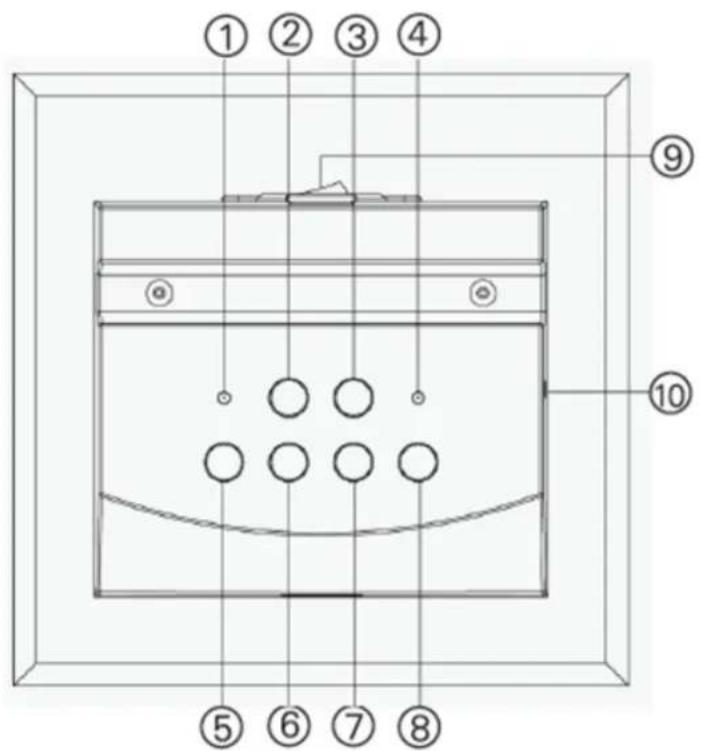
- FM Radio LED indicator.
- MODE Button: Switch between modes: Bluetooth/AUX-IN/USB/Micro SD/FM radio.
- Button
a. PAUSE/PLAY (Bluetooth/Music modes).
b. AUTO SEARCH (FM radio mode).
-
Aux IN/Bluetooth/Music LED indicator.
-
Button
a. PREVIOUS FILE (Bluetooth/Music modes).
b. PREVIOUS FM STATION (FM radio mode).
- Button
a. NEXT FILE (Bluetooth/Music modes).
b. NEXT FM STATION (FM radio mode).
- VOL ^™ : Decrease the volume.
- VOL+ : Increase the volume.
- ON/OFF button
- Carte TF / USB / AUX-IN input
2. Side panel
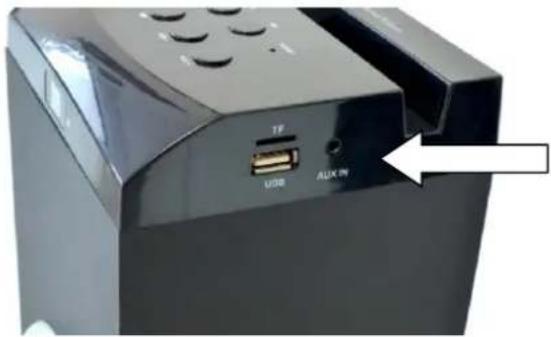
Micro SD Card/ USB / AUX-IN input
3. Back panel
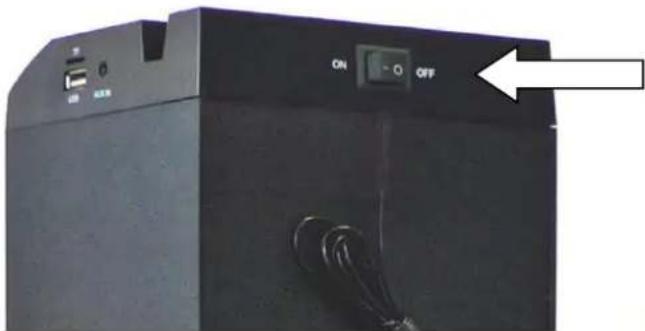
ON/OFF BUTTON
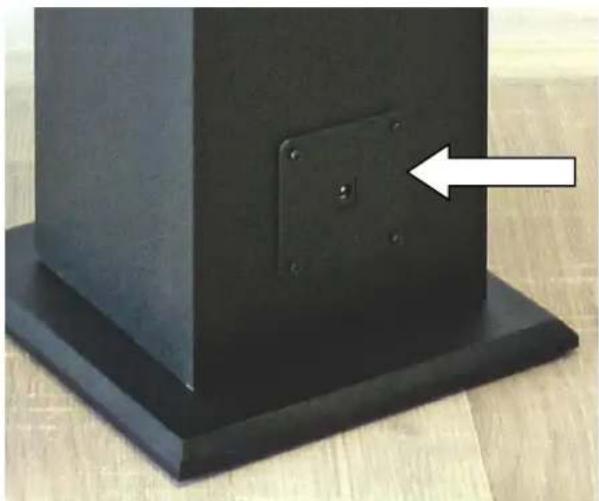
natural_image
Close-up of a black square base with a circular mounting bracket and a white arrow pointing to it, placed on a wooden surface (no text or symbols visible)AC ADAPTOR INPUT
II - TECHNICAL SPECIFICATIONS
| Brand | CONTINENTAL EDISON |
| Reference | CETDSB40B4 (SG-1510B) |
| Type of Product | BLUETOOTH SOUND TOWER |
| Total power | 60 Watts |
| Speakers Power | 2 x 15 Watt |
| Subwoofer Power | 1 x 30 Watt |
| Power Consumption | 60 Watts |
| Bluetooth | V4.1 |
| Bluetooth Frequency | 2402MHz~2480MHz |
| Bluetooth Range | 10 meters |
| Ports | USB 2.0Micro SD Memory Card3.5mm AUX-IN audio input |
| FM Frequency Range | 87.5Hz ~108MHz |
| Power Supply AC Adapter | Input: AC 110-240V ~50/60 HzOutput: DC 5V =1500 mA |
| Power Supply Tower | Input: 5V =1,5A |
| Voltage Output | DC 5V |
| Signal/ Noise Ratio | ≥ 78 Db |
| Frequency Response | 60Hz ~ 18kHz |
| Operating Temperature | 5°C ~ 40°C |
| Dimensions/ Weight | 975x135x125mm (with foot) / 2.60Kg |
PACK CONTENT
■ 1 sound tower
■ 1 remote control with 1 button battery type CR2025 3V included
■ 1 3.5mm AUX-IN cable
■ 1 AC adapter
■ 1 base and 4 screws
III – INSTALLATION
1- Location
- Install the unit on the horizontal flat surface and do not put any heavy object on it.
- Leave a distance of 5 cm at least around the unit to ensure sufficient ventilation.
2- Unpacking and disposal of packing items

Packaging carton and paper sheets are recyclable: they should be disposed of in appropriate collection bins.
Materials bearing the symbol are recyclable, e.g.:
$$ \begin{array}{l} > P E < = \text { polyethylene } \ > P S < = \text { polystyrene } \ > P P < = \text { polypropylene } \ \end{array} $$
This means that they can be recycled if they are disposed of in appropriate collection bins.
Other packaging materials (adhesive, fasteners, etc.) must be disposed of with household waste.
3. Installing the base of the unit
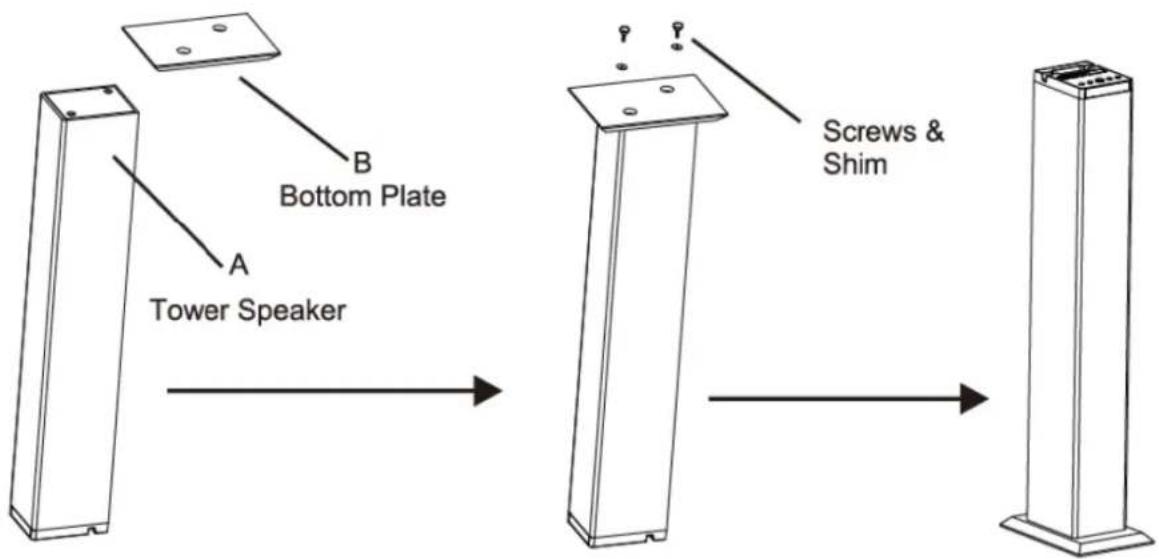
Put "B" onto the other side of "A", make sure the screw holes in same line.
To fix "B" onto "A" by using the screws & shims from the accessories.
Installation finished.
4- Connection to the mains supply
- Connect the AC adapter to the appropriate input on the back of the unit.
- Connect the unit to the power supply via its AC adapter to a wall outlet.
- Turn on the power by placing the switch on the back of the unit in the ON position.
Notes:
- Power supply: 100-240V \~50/60Hz.
- If the appliance is not going to be used for a long time, please unplug the unit from the mains supply.
- In case of stormy weather, please unplug the unit from the mains supply.
IV – REMOTE CONTROL
1. Installing the battery into the remote
- Before starting to use the remote, activate the button cell by removing the protective paper located inside the battery compartment.
Note: The 3V type CR2025 button battery is supplied
- To replace the battery, open the battery compartment and insert a new battery of the same type.
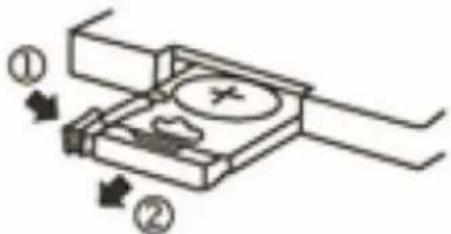
WARNING
Explosion hazard if the battery is not replaced properly. Replace batteries only with the same or equivalent type.
Note: Use the remote within 5 meters of the unit, and aim it at the unit at an angle not exceeding 30^ .
WARNING
Do not ingest the battery to avoid chemical burns.
The remote control supplied with the sound tower contains a button battery. Swallowing the button cell can generate serious internal burns within only 2 hours, and can even provoke death.
Keep new and used batteries out of the reach of children.
If the battery compartment fails to close properly, stop using the remote and keep it out of reach of children.
In case of doubt whether the batteries have been swallowed or introduced into any part of the body, please consult a doctor without delay.
Notes:
- Please do not use rechargeable batteries
- Do not mix different brand and type of batteries in the remote and do not mix new and old batteries.
- When the remote seems to have lost power, or the control range has shortened, please install 2 new batteries.
- If the remote will not be used for a long time, please take out the batteries and store them in a dry and cool place.
- Do not expose the remote to high temperature and humidity.
- Never try to disassemble the remote.
- Make sure to avoid reflections from mirrors or glass panels that could impair the infrared signal of the remote.
2. Description of the remote control
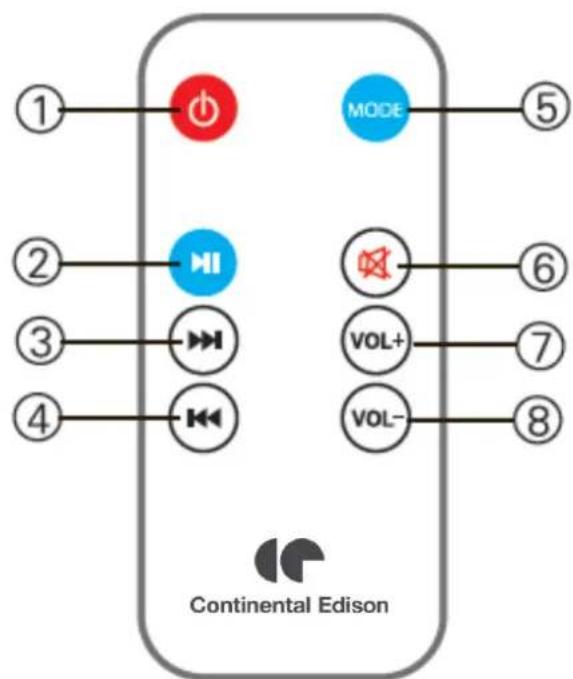
1. Power ON/OFF
-
Button a/. PAUSE/PLAY (Bluetooth/Music mode) b/. AUTO SEARCH (FM radio mode)
-
Button ▶▶▶ a/. NEXT FILE (Bluetooth/Music modes) b/. NEXT FM STATION (FM radio mode)
4. Button
a/. PREVIOUS FILE (Bluetooth/Music modes)
b/. PREVIOUS FM STATION (FM radio mode)
-
MODE Button: Switch between modes: Bluetooth/ AUX-IN/ USB/ Micro SD/ FM radio
-
:Mute mode
-
VOL+ : Increase the volume
-
VOL ^- : Decrease the volume
V - USE OF THE UNIT
1. Bluetooth
- Turn on the unit, and press MODE to activate Bluetooth mode. The Bluetooth LED indicator starts flashing quickly in BLUE.
- Search and pair CETDSB40B4 on your Bluetooth external device (smart phone, PC, etc.).
- If required, use password 0000.
- Once pairing is completed, the Bluetooth LED indicator will slowly blink in BLUE.
2. Play music
- Insert an external audio source (USB stick or micro SD card) into the unit. Press MODE to activate the MUSIC mode.
- Use VOL+ and VOL- to adjust the volume. Use the ◀◀ and ▶▶I buttons to select files, and ▶▶ to play or pause.
3. AUX-IN function
- Press MODE to activate the AUX mode. The Bluetooth LED indicator will start flashing in RED.
- Insert one end of the 3.5 mm audio cable (supplied) into the AUX-IN input of the unit, and the other end to a PC or an external Bluetooth device (PC, tablet, smartphone, etc.)
- Open a media player on the Bluetooth device, then press to start playback.
- Use the controls on the Bluetooth device to control playback and volume.
4. FM radio
- Press MODE to activate the FM mode: the FM LED indicator starts flashing in GREEN.
- On the unit or the remote control, press on key to search for available FM stations. The stations found will be automatically stored.
- When the search is complete, use the ◀ and buttons to scroll through the pre-stored stations.
- To start a new search, just press the key.
VI - TROUBLESHOOTING
Before calling on a technician, consult the table below to try to solve the problem(s).
| Problems | Causes | Solutions |
| No light and no sound | A cable is not properly connected. | Check all the cables. |
| There is light, but no sound | A cable is not properly connected. | Turn off the unit, then check all cables. |
| The Bluetooth device has not been detected | Repeat the Bluetooth searching and pairing procedure. | |
| Volume is set on « 0 » or on « Mute ». | Adjust the volume or check the position of the Mute button. | |
| If, after performing the above checks, the problem is not solved, please contact the appropriate service representative. Never try to open the case; if you do, we will not assume any responsibility. | ||
For any other dysfunction, please contact the After-Sales Service.
VI-WARRANTY
The warranty does not cover the wear and tear of components of the product, as well as any problem or damage resulting from:
(1) Surface deterioration due to normal wear and tear of the product;
(2) Damage or deterioration caused by contact of the product with food or liquids, or due to corrosion caused by rust;
(3) Any unauthorized incident, abuse, misuse, modification, disassembly or repair;
(4) Improper maintenance, improper use of the product, or incorrect voltage connection;
(5) Any use of accessories not supplied or approved by the manufacturer.

The warranty becomes void if the nameplate and / or the serial number of the product are removed.
VII -DISPOSAL
natural_image
Symbol of a trash bin with crossed lines indicating no waste or restriction, and a solid black rectangle below (no text or labels)This logo appended on the product indicates that this device (which is considered as waste) is registered in the European Directive 2012/19/EU regarding Waste Electrical and Electronic Equipment (WEEE). This directive states that old household electrical appliances must be collected separately in order to optimize the recovery and recycling of materials they contain, and thus reduce their impact on the environment and human health.
As end user, your role is of great importance in the reuse, recycling and other forms of recovery of this Electrical and Electronic Equipment.
You have to use the collection systems provided for this purpose.

This unit has a built-in removable rechargeable battery which can be replaced.
Used batteries must be disposed of in a selective collection system to be recycled, and thus reduce the impact on the environment.
When the battery reaches the end of its useful lifetime, you must drop it off in an appropriate selective collection system that will destroy and/or recycle it. Under no circumstances should you throw the device or battery in the household waste.
Ennery, le 21 Mars 2019,
INOVALLEY

natural_image
Abstract geometric shapes with overlapping semicircles (no text or symbols)Continental Edison
CETDSB40B8_IM_042019_V1
www.continentaledison.fr