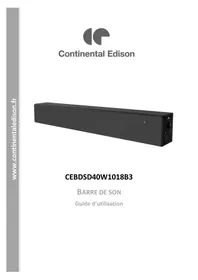
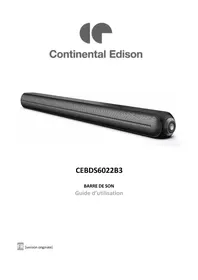
CEBDSD40W1018B3 - Soundbar CONTINENTAL EDISON - Free user manual and instructions
Find the device manual for free CEBDSD40W1018B3 CONTINENTAL EDISON in PDF.


| Product type | Bluetooth Soundbar |
| Brand | Continental Edison |
| Model | CEBDSD40W1018B3 |
| Material | Wood and PVC |
| Bluetooth version | 2.1 + EDR |
| Maximum power | 100 W |
| Frequency response | 30 Hz - 22 kHz |
| Signal-to-noise ratio | ≥ 90 dB |
| Inputs | USB, AUX 3.5 mm, optical, coaxial |
| Supported audio formats | MP2, MP3, WMA, WAV, FLAC |
| Power supply | 18 V / 1 A AC adapter (input 100-240 V~ 50/60 Hz) |
| Dimensions (soundbar) | 75.5 × 8.9 × 10 cm |
| Remote control | Yes (CR2025 battery included) |
| Wall mounting | Yes (brackets included, screws not provided) |
| Auto standby | Yes (after 15 min of inactivity or 240 min of playback) |
| Equalizer | 5 bands (DSP, VB, HiFi, Country, Classical, Pop, Rock, Jazz modes) |
| USB port | Playback and charging 5 V / 1.7 A |
| Included cables | AUX 3.5 mm cable (80 cm), coaxial cable (120 cm) |
| Usage | Indoor only |
Frequently Asked Questions - CEBDSD40W1018B3 CONTINENTAL EDISON
User questions about CEBDSD40W1018B3 CONTINENTAL EDISON
0 question about this device. Answer the ones you know or ask your own.
Ask a new question about this device
Download the instructions for your Soundbar in PDF format for free! Find your manual CEBDSD40W1018B3 - CONTINENTAL EDISON and take your electronic device back in hand. On this page are published all the documents necessary for the use of your device. CEBDSD40W1018B3 by CONTINENTAL EDISON.
USER MANUAL CEBDSD40W1018B3 CONTINENTAL EDISON
Please read and follow the instruction below to ensure that you can use this safely and in a correct method. Please keep this manual for future reference.
SAFETY INSTRUCTION
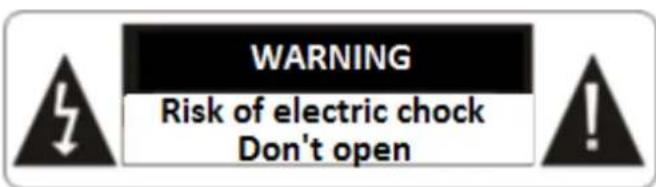
CAUTION: TO PREVENT SHOCK HAZARDS, DO NOT OPEN THE UNIT.
THIS DEVICE DOES NOT CONTAIN ANY SPARE PARTS THAT CAN BE REPAIRED OR REPLACED BY THE END USER.
DO NOT TRY TO REPAIR THIS UNIT BY YOURSELF OR YOU MAY CAUSE DAMAGE THAT IS NOT COVERED BY THE PRODUCT WARRANTY.
ONLY A QUALIFIED TECHICIAN SHOULD SERIVCE THIS PRODUCT
WARNING! To prevent any fire or electrical hazards:
- The apparatus shall not be exposed to dripping or splashing.
- No objects filled with liquids, such as vases, shall be placed on the apparatus.
-
Minimum distance around the apparatus for sufficient ventilation is 10 ~cm
-
The ventilation should not be impeded by covering the ventilation openings with items, such as newspapers, table-cloths, curtains, etc....
- No naked flame sources, such as lighted candles, should be placed on the apparatus.
- The apparatus shall be used in moderate climates only.
- The plug shall remain readily operable.
- If the supply cord is damaged, it must be replaced by the manufacturer, its service agent or similarly qualified persons in order to avoid a hazard.
WARNING: To avoid possible hearing damage, do not listen at high volume levels for a long time.
General precautions
- Do not let children to play with this unit and its accessories alone without adult supervision.
- Do not hit or slam this product. Don't walk on the unit.
Don't let the unit fall.
- Keep the device away from liquids, humid and dusty environment; put it away from excessive hot or cold temperature. It's recommended to use the device only with temperature indicated on the technical specification.
This device is not adapted to a tropical climate.
-
Keep the device away from all metallic objects (coins, keys...). Don't let it close to magnetic field which could damage the device.
-
Do not block the area above the speaker mesh
- This device is intended for domestic use and should not be used for any purpose or any other application.
- Respect the instruction of use of external devices that you connect to the tower (USB charging port connection and USB playing port connection)
Avoid electric shock, fire and explosions
- Do not use any damage power cords and cables or loose electrical outlets.
- Place cable in such a manner that it cannot be walked on, especially the ends connected to the device and the AC adapter.
- Do not twist or bend the power cord.
- Do not pull the power cord when removing it from the outlet
- Do not operate this appliance with wet hand, especially during charging.
- Do not touch the cord or plug if your hands are wet.
-
Do not cover or block any ventilation openings.
-
Do not overload the electrical outlet. Plug the product into a proper power source as described on the operating instructions.
-
In order to prevent any overheating, when the device is on, do not let it in a place without ventilation like a bag for example.
-
Do not short circuit in any way.
-
Do not drop the device or the AC adapter and avoid jolting shocks.
-
Unplug this apparatus during lightning storms or when unused for long periods of time.
-
To ensure normal operation of the equipment and your personal safety, we recommend you to choose a power adapter whose characteristics correspond to those provided by the manufacturer (see technical specification). Make sure that the adapter receives certification, as this could result in overheating and cause a fire, endangering your own life. Charging can cause interference that will disappear immediately after you have disconnected the device.
-
The unit must not be installed at sites with gas / flammable sources or explosives (in a petrol station for example).
-
Protect the unit from rain and excessive moisture. If water (or any liquids) is introduced into the apparatus, it must be turned off immediately and wipe it.
- Avoid exposing the device to high external pressure, which can lead to an internal short circuit and overheating
- Never put the device in or close to heating appliances such as microwave ovens, stoves, cooking tables, heaters or other (including audio amplifiers).
- Install away from electric or magnetic fields.
Protect the device and AC adapter for any damage.
- Do not use harsh chemicals, cleaning solvents or strong detergents to clean the unit otherwise promote corrosion. Clean it with soft and dry tissue.
- Never use any charger that is damaged.
- Never dispose the device in fire.

USING AND HANDLING OF BATTERIES:
- WARNING: Danger of explosion if the batteries are not inserted correctly or if they are replaced by non-like or no similar model.
-
Replaced the batteries only by same type of batteries or equivalent.
-
Batteries must not be exposed to excessive heat like sun or fire.
- Never throw batteries into fire or expose them to sources of heat.
- Different types of batteries, or new and used batteries must not be mixed.
- Batteries have to be inserted with the correct polarity like indicated on the remote control.
- Exhausted batteries have to be removed from the remote control.
- Only dispose of batteries in specific collection containers (contact your retailer for more information) in order to protect the environment.
- Don't ingest the battery, danger of chemical burn
- Keep news and used batteries out of reach of children.
- (The remote control supplied with) This product contains a button cell. If the battery is swallowed, it can cause serious intern burn in 2 hours only and cause the death.
- If the battery compartment doesn't close properly, stop using the product and keep away from children.
- In case of doubt concerning that the batteries may
have been swallowed or introduced into any part of the body, call immediately a doctor.
Information on the signification of the marking presents on the external power supply:
The marking indicates that the external power supply has an electrical insulation of type class II.
The marking indicates that the external power supply is designed to be used only indoor.
About the using, manipulation, cleaning and disposal, please see the chapters below of this notice
This instruction manual can be modified without prior notice
Information on the signification of the marking presents on the remote control:
The indicates that caution is necessary when operating the remote control or control
close to where the symbol is placed.
The indicates that the operating instructions should be considered when operating the remote control or control close to where the symbol is placed.
Information on the signification of CE marking C€
Marking indicates that this product meets the quality requirements set by the European Directives 2014/53/UE (RED), 2014/35/EU (Low voltage), 2014/30/EU (Electromagnetic Compatibility CEM), 2011/65/UE (restriction of the use of certain hazardous substances in electrical and electronic equipment RoHS).
SOMMAIRE
SAFETYINSTRUCTION
Page 21
I - PRODUCT DESCRIPTION
a. Back panel
Page 30
b. Remote control
Page 30
Page 31
II- TECHNICAL SPECIFICATION
Page 32
III- INSTALLATION
Page 34
1- Package contents
Page 34
2- Unpaking the product and disposal
Page 34
3- Emplacement
Page 34
IV- USING
Page 35
a. Panel control
Page 35
b. Bluetooth setting :
Page 35
c. Optical mode :
Page 36
d. COAXIAL mode
Page 36
e. AUX mode
Page 36
f. USB mode
Page 36
g. Automatic standby
Page 36
V-GARANTY
Page 37
VI- DISPOSAL
Page 37
I. PRODUCT DESCRIPTION
a. Back panel:
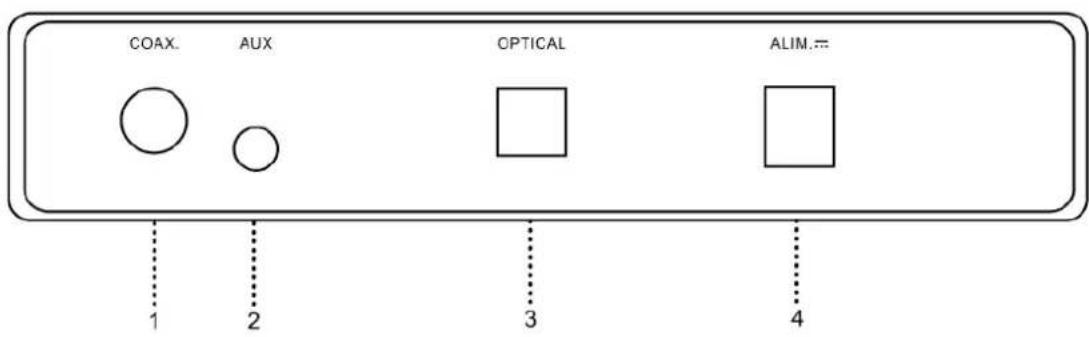
- Coaxial IN
- 3.5mm AUX Jack
- Optical IN
- Power supply
b. Remote control:
The remote control works with 1 battery type CR205 (supplied)
- Power On/Off
- DSP: long click to reset sound effect by default
Equalizer setting Press once to change the sound mode:
CON -country sound effect
CLS-classical sound effect
POP -popular sound effect
ROC -rock sound effect
JAZ -jazz sound effect
- Decrease volume
- Long click -fast backward
Short click -Skip to previous track
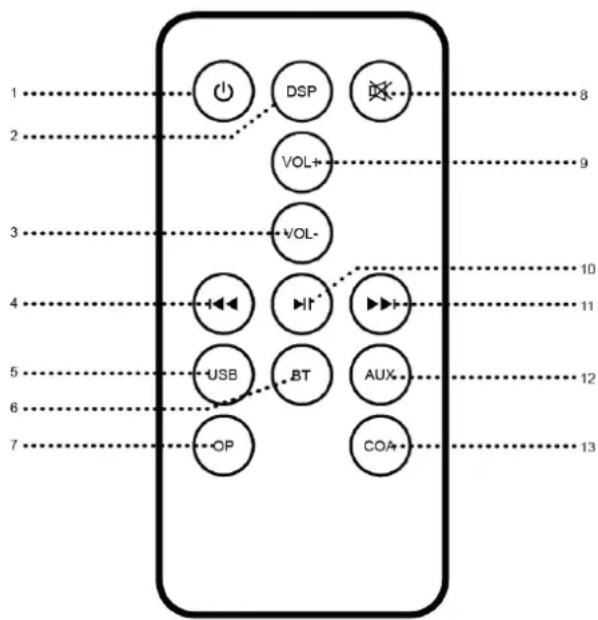
- Local mode : USB Mode
Press and hold the "USB" button for about 3 seconds to deactivate the automatic standby, - Bluetooth mode
- Optical mode
- Mute/unmute volume
- Increase volume
- Play/Pause
- Long click -fast forward
Short click -Skip to next track
- AUX mode
- COAXIAL mode
TECHNICAL SPECIFICATIONS
- Bluetooth sound bar with amplifier / Ref. CEBDSD40W1018B3 (model ISX700) Wooden and PVC cabinet structure
- Digital signal processing (DSP), sound effect up to CD level Sound effect: DSP, VB (virtual bass), Hifi and 5-band EQ
- Bluetooth 2.1 version +EDR
- Input interfaces:
1×USB playback port
1×3.5mm AUX in
1xOptical in
1xCoaxial in
Support MP2/MP3/WMA/WAV/FLAC lossless audio formats
Output interfaces
1×USB out for charging device
- Drivers units:
3" full frequency speaker x 2pcs; 1" tweeter x 1pcs
Power output: 100W MAX
Frequency response: 30Hz --22KHz
S/N ratio: ≥90dB
3.5mm line-in cable: 1pc, 80cm
Coaxial cable: 1pc, 120cm
Power supply: DC 18V 1A
Power adapter: Input AC 100-240V ~ 50/60 Hz
Ouptut DC 18V=1A
III. INSTALLATION
1. Package contents
From the opening of the gift box, please check the content of the list below:
1x Sound bar Bluetooth
1x Remote Control
1x Power Adapter & AC cable
1x 3.5mm AUX Cable
1x Coaxial Cable
1x Instruction Manual
2. Unpaking the product and disposal

Packaging materials
- The carton is recyclable.
- The materials marked with the symbol are recyclable:
PE <= polyethylene; > PS <= polystyrene; > PP <= polypropylene; ...
This means that they can be recycled by getting rid of them in appropriate collection containers.
- Other packaging materials (adhesive, fasteners, etc.) must be disposed of with household waste.
For more information: www.quefairedemesdechets.fr
3. Emplacement :
a. On TV stand
If you TV is placed on a TV stand, you can put directly your sound bar in front of your TV, centered in front of the screen.
Never place your sound bar above or below another device such as a Blu-ray player because this may cause a malfunction due to vibration.


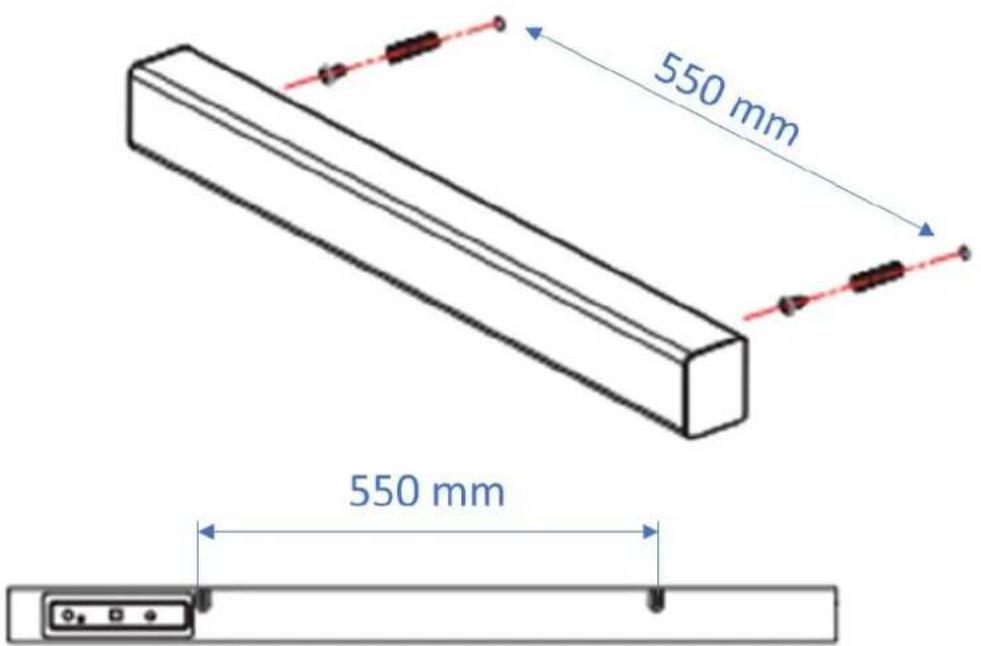
b. Hang the sound bar on the wall
If your TV is hang on the wall, you can mount the sound bar on the wall below the screen.
-
The wall mount brackets are included and directly mounted on the rear panel.
-
Measure the size on both sides of the wall mount brackets and mark two points on the wall for drilling based on the measurement.
Make sure the holes on the wall (concrete) are in proper positions before drilling.
- After drilling, fix the screws in the holes with dowels. The screws must enough overtake for mouting.
- Align the holes in the wall mount brackets with the screws, and then firmly connect the sound bar to the two screws. Connect the necessary cables before attaching it to the wall.
Note:
The wall plugs and screws are not included for mounting the sound bar.
If you are unfamiliar with power tools or placing electrical wiring in the walls of your home, consult a professional installer.
IV. USING
a. Control panel:
The symbols on screen show the main features of current working status
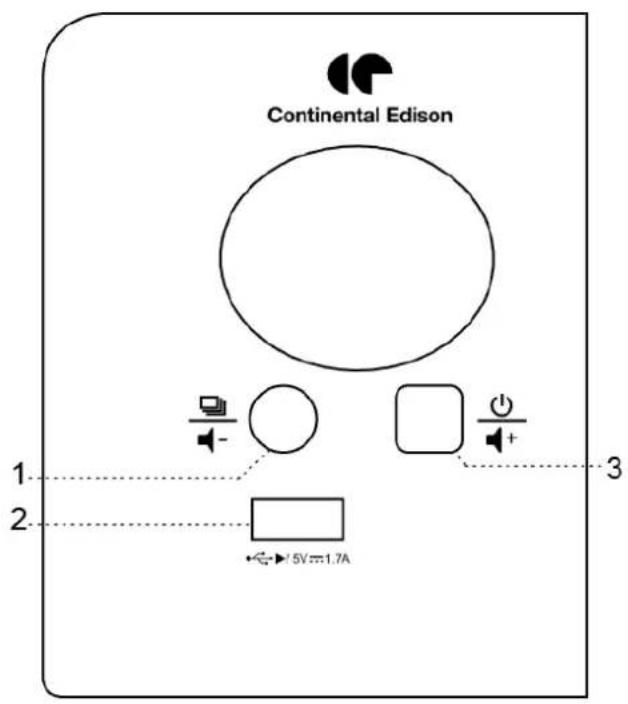
- Long press - Audio source switching
Short press -decease volume - USB Playback Port - Music and charge 5V = 1.7A for external device
- Long press - Power on/off
Short press - Increase Volume
b. Bluetooth mode:
Turn on the sound bar and then switch to Bluetooth Mode, the "BLUE" indicator will keep flashing
Keep the sound bar and Bluetooth enabled device within 20 30 feet or less of each other during paring process. Different environments may affect the transmission distance;
Set your mobile phone or the Bluetooth enabled device to search for Bluetooth devices;
When the Bluetooth enabled finds the speaker, select "CEBDSD40W1018B3" from the list of found devices:
If required, enter the password "0000". Select OK or YES to pair the two units;
After a successful pairing, the "BLUE" indicator will stop blinking
c. Optical mode:
If the source of your devices has digital connectors, using them will improve the audio quality. Optical cable is not supplied
Remove the cap of the optical cable and check the direction of the plug before inserting it into the connector.
Connect the end of the optical cable to the rear of the sound bar and the other end to the optical output of your TV (or digital device etc.).
Turn on the sound bar and switch to OPTICAL mode
d. Coaxial mode:
If the source of your devices has digital connectors, using them will improve the audio quality. Coaxial cable is supplied
Connect the coaxial jack on the back of the unit to coaxial out jack of your TV (or digital device etc.) by a supplied cable.
Turn on the unit and switch to coaxial mode.
e. AUX mode:
Keep the unit powered on.
Plug one end of the 3.5mm AUX cord to the headphone jack on your device;
Plug the other end of the 3.5mm AUX cord into the AUX jack on the speaker;
It successfully joins into the AUX Mode along with AUX icon lights up;
Use the connected device's audio controls for music playback.
f. USB mode:
Turn on the unit. Push USB disk with MP3 music files into USB port, it will switch to USB Playback Mode and then start to play music automatically.
g. Automatic standby
If the sound bar remains idle (no signal input) for about 15 min, it will shut down automatically; After about 240 mins continuous playback time, the sound bar will shut down automatically;
During normal use of the sound bar, make sure to set the amount of volume from sound bar and external devices (such as DVD, TV, or mobile phone) at normal volume, if the volumes in sound bar or external devices are indeed low, the sound bar may not detect the input signal and it will power off the sound bar automatically
To deactivate the automatic standby, press and hold the USB button on your remote control for about 3 seconds. The LED will simultaneously change to RED - GREEN - BLUE.
V. GUARANTY
The warranty does not cover product wear parts, neither problems or damage resulting from:
(1) superficial damage due to normal wear of the product
(2) defects or damage due to contact of the product with food or liquids, and due to corrosion caused by rust;
(3) any incident, abuse, misuse, modification, unauthorized removal or repair;
(4) any improper maintenance operation not in accordance with product instructions or connection to improper voltage use;
(5) any use of accessories not supplied or approved by CONTINENTAL EDISON.
The warranty will be cancel in case of elimination of the rating label and/or the serial number product.
VI. DISPOSAL
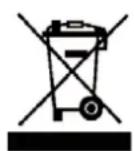
The European Directive 2012/19/EU on Waste Electrical and Electronic Equipment (WEEE), requires that old household electrical appliances must not be disposed of in the normal unsorted municipal waste stream. Old appliances must be collected separately in order to optimize the
recovery and recycling of the materials they contain and reduce the impact on human health and the environment.
The crossed out "wheeled bin" symbol on the product reminds you of your obligation, that when you dispose of the appliance it must be separately collected. Consumers should contact their local authority or retailer for information concerning the correct disposal of their old appliance.
As a responsible retailer, we care about the environment
As such we urge you to follow the correct disposal procedure for the product, packaging materials and if applicable, accessories and batteries. This will help conserve natural resources and ensure that the materials are recycled in a manner that protects health and the environment.
You must follow laws and regulations about disposal. Waste electrical products and batteries must be disposed of separately from household waste when the product reaches the end of its life.
Contact the store where you bought the product and your local authority to learn about disposal and recycling.
EU declaration of conformity
Nous.societe:
Hereby, we
VESTEL France
17 RUE DE LA COUTURE - PARC D'AFFAIRES SILIC
94563 RUNGIS - FRANCE
Declare that the product(s) here below
Complies (comply) to the essential provisions of the EC directive(s)
| Directive basse tension Low voltage directive | 2014/35/EU | × |
| Directive CEM EMC directive | 2014/30/EU | × |
| RED Directive | 2014/53/EU | × |
| Directive ErP ErP directive | EC regulation n° 1275/2008 EN regulation n° 801/2013 | × |
| RoHS | 2011/65/EU | × |
The essential provisions of the following harmonized standards
EN 60065:2014
EN 55032:2015
EN 55020:2007 + A12:2016
EN 55024:2010+A1:2015
EN 61000-3-3:2013
EN 61000-3-2 2014
EN 62479-2010
EN300328V2.1.1
EN301489-1V2.2.1
EN301489-17V3.1.1
IEC 62321:2008
IEC62321-1.2013
IEC 62321-2-2013
IEC62321-3-1:2013
IEC62321-4.2013
IEC62321-5:2013
IEC62321-6:2015
Date et lieu d'etabillisement: Rmys, 06/08/2018 Date and place of issue
Fonction:Commercial
Position
R e v i n E P a y
Company stamp & Signature
VESTEL FRANCE
SASU au capital de 2.000 000 €
RCS 2017年3月24日21
PACDaffare8BILIC
- 20 de la Couture - BP 10190
94083 RUNGIS CEDEX
DT 26 35 00 29 - Fax 01 41 80 99 31

Continental Edison
Continental Edison - 120-126 Quai de Bacalan - CS 11584 - 33000 Bordeaux Importé par / Imported by : VESTEL France S.A.S.U - 7 Rue de la Couture Parc Icade - BP 10190 - 94563 Rungis Cedex
- SAFETY INSTRUCTION
- ONLY A QUALIFIED TECHICIAN SHOULD SERIVCE THIS PRODUCT
- WARNING! To prevent any fire or electrical hazards:
- General precautions
- Avoid electric shock, fire and explosions
- Protect the device and AC adapter for any damage.
- USING AND HANDLING OF BATTERIES:
- Information on the signification of the marking presents on the external power supply:
- Information on the signification of the marking presents on the remote control:
- Information on the signification of CE marking C€
- SOMMAIRE
- SAFETYINSTRUCTION
- I - PRODUCT DESCRIPTION
- II- TECHNICAL SPECIFICATION
- III- INSTALLATION
- IV- USING
- V-GARANTY
- VI- DISPOSAL
- PRODUCT DESCRIPTION
- a. Back panel:
- b. Remote control:
- TECHNICAL SPECIFICATIONS
- INSTALLATION
- Package contents
- Unpaking the product and disposal
- Packaging materials
- Emplacement :
- a. On TV stand
- b. Hang the sound bar on the wall
- Note:
- USING
- a. Control panel:
- b. Bluetooth mode:
- c. Optical mode:
- d. Coaxial mode:
- e. AUX mode:
- f. USB mode:
- g. Automatic standby
- GUARANTY
- The warranty does not cover product wear parts, neither problems or damage resulting from:
- DISPOSAL
- EU declaration of conformity
- Continental Edison
Brand : CONTINENTAL EDISON
Model : CEBDSD40W1018B3
Category : Soundbar