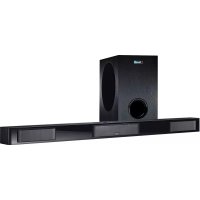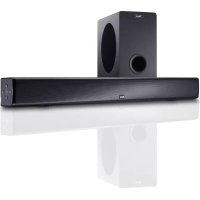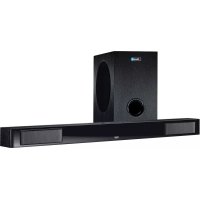
SBW 280 - Soundbar MAGNAT - Free user manual and instructions
Find the device manual for free SBW 280 MAGNAT in PDF.


| Product type | Active 2.1 soundbar with wireless subwoofer |
| Brand | Magnat |
| Model | SBW 280 |
| RMS output power | 2 × 30 W (L/R channels) + 1 × 70 W (subwoofer) |
| Max output power | 2 × 60 W (L/R channels) + 1 × 140 W (subwoofer) |
| Bluetooth version | Bluetooth 5.0 with aptX |
| Inputs | HDMI ARC, digital optical, analog audio (3.5 mm jack), USB (FAT16, max 8 GB) |
| Audio codecs | Dolby Audio (Dolby Digital) |
| Soundbar dimensions (W x H x D) | 1050 × 75 × 90 mm |
| Soundbar weight | 3.8 kg |
| Subwoofer dimensions (W x H x D) | 220 × 364 × 370 mm |
| Subwoofer weight | 7.6 kg |
| Power supply | 110–240 V AC, power cables supplied |
| Minimum safety distance | 10 cm from heat sources |
| Operating temperature | 10 °C to 45 °C |
| Sound features | Surround mode (3D), Night mode, Music, Movie, Vocal modes |
| Remote control | Yes, with CR2025 battery included |
| Wall mount | Possible, brackets supplied |
| Warranty | 5 years speakers, 2 years amplifier |
| Standby consumption | Less than 0.5 W (estimate) |
Frequently Asked Questions - SBW 280 MAGNAT
User questions about SBW 280 MAGNAT
0 question about this device. Answer the ones you know or ask your own.
Ask a new question about this device
Download the instructions for your Soundbar in PDF format for free! Find your manual SBW 280 - MAGNAT and take your electronic device back in hand. On this page are published all the documents necessary for the use of your device. SBW 280 by MAGNAT.
USER MANUAL SBW 280 MAGNAT
Important notes for installation / warranty card
The Bluetooth* word mark and logos are registered trademarks owned by Bluetooth SIG, Inc. and any use of such marks by Magnat Audio-Produkte GmbH is under license. Other trademarks and trade names are those of their respective owners.

Qualcomm aptX
Qualcomm® aptXTM is a product of Qualcomm Technologies, Inc. and/or its subsidiaries.
Qualcomm is a trademark of Qualcomm Incorporated, registered in the United States and other countries. aptX is a trademark of Qualcomm Technologies International, Ltd., registered in the United States and other countries.

Dolby Audio
Manufactured under license from Dolby Laboratories. Dolby, Dolby Audio, and the double-D symbol are trademarks of Dolby Laboratories Licensing Corporation.
HOMI
HIGH-DEFINITION MULTIMEDIA INTERFACE
The terms HDMI and HDMI High-Definition Multimedia Interface, and the HDMI Logo are trademarks or registered trademarks of HDMI Licensing LLC in the United States and other countries.

At the end of the product's useful life, please dispose of it at appropriate collection points provided in your country.
Dear MAGNAT Customer,
Congratulations on your fine new loudspeakers and thank you very much for choosing MAGNAT! You have made an excellent choice. The high-quality speakers produced by MAGNAT are renowned all over the world.
Please study the instructions and information below carefully before using your new loudspeakers.
IMPORTANT SAFETY PRECAUTIONS
Please read through the instruction manual carefully before starting to use the device. This manual contains important information concerning operation and safety aspects. It is imperative you observe all of the information. Keep the manual in a safe location.
WARNING NOTICES: All of the warning symbols on the speakers, accessories and in the instruction manual itself must be adhered to.
EXPOSURE TO HEAT: Only operate the speakers and accessories in a temperature range from 10^ to 45^ .
The speakers should not be positioned near heat sources (heaters, ovens, radiant heaters, naked flames, etc.). When setting up close to an amplifier a minimum distance of 10cm must be maintained.
No naked flame sources, such as lighted candleless, should be placed on the apparatus.
The metal plate and cooling fins of the amplifier at the rear of the device serve to cool the built-in amplifier; for this reason, they must not be covered (e.g. by a curtain).
EFFECT OF MOISTURE: The speakers should not be exposed to dripping or splash water. Neither should they be used to support vases or other containers filled with liquid. Do not expose the speakers to water or high levels of humidity. There is a danger of electric shock. In the event of contact with moisture or liquids remove the mains adapter immediately.
FOREIGN MATERIAL: Ensure that no foreign material enters through the speaker openings and into the interior. This could trigger short circuits and even result in electric shock and fire.
CLEANING: Please use a soft, dry cloth with no cleaning agents, sprays or chemical solvents, as these could damage the surfaces.
ELECTRICAL CONNECTION: Please note the voltage levels on the information signs. The mains adapter for the speaker should only be operated with the voltage and frequency values specified on the signs.
LIGHTNING PROTECTION/PREVENTIVE MEASURES: If the device is not going to be used for a prolonged period (e.g. when on holiday), it should be disconnected from the mains by removing the plug. The device should also be disconnected from the mains in the event of a thunderstorm. Doing this will prevent damage caused by lightning and overvoltage.
MAINS CABLE: The mains cable must always be suitable for operation and it should only ever be laid out in a manner that prevents it from being trodden on. It should not be pinched by objects either, as this can damage the cable. When using plugs and power strips it must be ensured that the cable is not kinked at the point where it emerges from the socket. Do not connect or remove the mains cable with damp hands.
The mains plug is used as the disconnect device, the disconnect devices shall remain readily operable.
OVERLOAD: Sockets, power strips and extension cables should not be overloaded. If an overload occurs, there is a risk of electric shock and fire.
SETTING UP: Please read the installation instructions.
The speakers should only be positioned or mounted on a solid surface and not on moving base frames, otherwise there is a risk of injury.
DAMAGE THAT MUST BE RECTIFIED BY A SPECIALIST:
If any of the following damage occurs, disconnect the device from the mains immediately and contact a specialist to conduct the repair work:
- Damage to the mains cable or the mains plug. A damaged cable should not be repaired, but must be replaced.
- If moisture or water has entered the device or foreign objects have fallen into the device.
- If the speaker has fallen and the housing is damaged.
If the device does not work properly, even though all of the information in the instruction manual has been observed.
Only those subsequent alterations approved by the manufacturer may be conducted.
Only original spare parts should be used for repair.
After conducting any repairs the safety of device should be checked to ensure it is functioning correctly and safely.
Repairs must always be conducted by qualified specialists, as you might otherwise be exposed to dangerous high voltage levels or other hazard

The triangle with a lightning symbol warns the user that high voltage is used within the device which can result in electric shock.

The triangle with an exclamation mark informs the user that important operating and maintenance instructions (repair) are contained in the accompanying instruction manual, which must be observed.

Do not open! Risk of electric shock!
CAUTION: In order to avoid electric shock do not open the speaker housing/mains adapters or remove the covers. The user is not to conduct any repairs him/herself. Repairs should only be conducted by qualified technicians! Do not use any sockets or extension cables that do not fully accommodate the plug of the device.

This is Class II apparatus with double insulation, and no protective earth provided.
INSTRUCTIONS FOR DISPOSAL
In accordance with European Directive 2012/19/EU all electrical and electronic appliances must be disposed of separately via local collection points. Please observe the local regulations and do not dispose of your old appliances with normal household waste.
Battery disposal
Old batteries are hazardous waste and must be disposed of in accordance with current regulations.
DECLARATION OF CONFORMITY C
Hereby, Magnat Audio-Produkte GmbH declares that the device Magnat SBW 280 is in compliance with the essential requirements and other relevant provisions of directive 2014/53/EU. The Declaration of Conformity can be found at www.mac-audio.de in the download area of the device.
USE AS DIRECTED
This device is designed for indoor use only.
CONTENTS
(A) 1 pc. Soundbar
(B) 1 pc. Subwoofer
(C) 1 pc. Mains cable for the soundbar
(D) 1 pc. Mains cable for the subwoofer
(E) 1 pc. Remote control including battery (button cell CR2025)
(F) 1 pc. Stereo audio cable, 3.5mm stereo jacks on both sides, 1.8m
(G) 2 pc. wall bracket with fixing screws (2pc.)
(H) 1 pc. Instruction manual
(I) 4 pc. Self-adhesive rubber feet
UNPACKING THE SET
Please unpack the speakers and accessories carefully and check the contents of the box using the list above. In the event of any transport damage, please contact your supplier. Keep the packing material in a safe location. The original packaging enables trouble-free transportation for any subsequent relocation or servicing requirements.
SETTING UP THE SYSTEM COMPONENTS
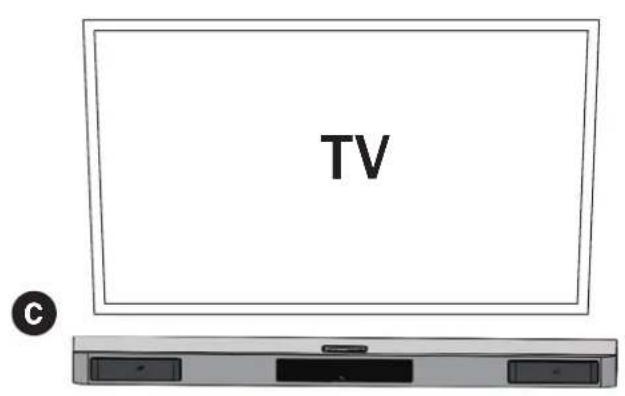
Soundbar: The soundbar should be positioned directly underneath the centre of the TV. If the TV is located on a shelf or sideboard, the soundbar can be positioned directly in front of the device. The supplied rubber feet (4 pc.) should be attached to the bottom of the box. If the TV is mounted on the wall, the soundbar should also be mounted on the wall directly below the screen. When doing this, use the wall mounting fixture at the rear of the device.
Subwoofer: The subwoofer should be positioned on the floor near the Soundbar, usually to the left or right-hand side of the TV. The distance to the screen should not be less than 100cm for CRT TVs and 50cm for flat screen TVs.
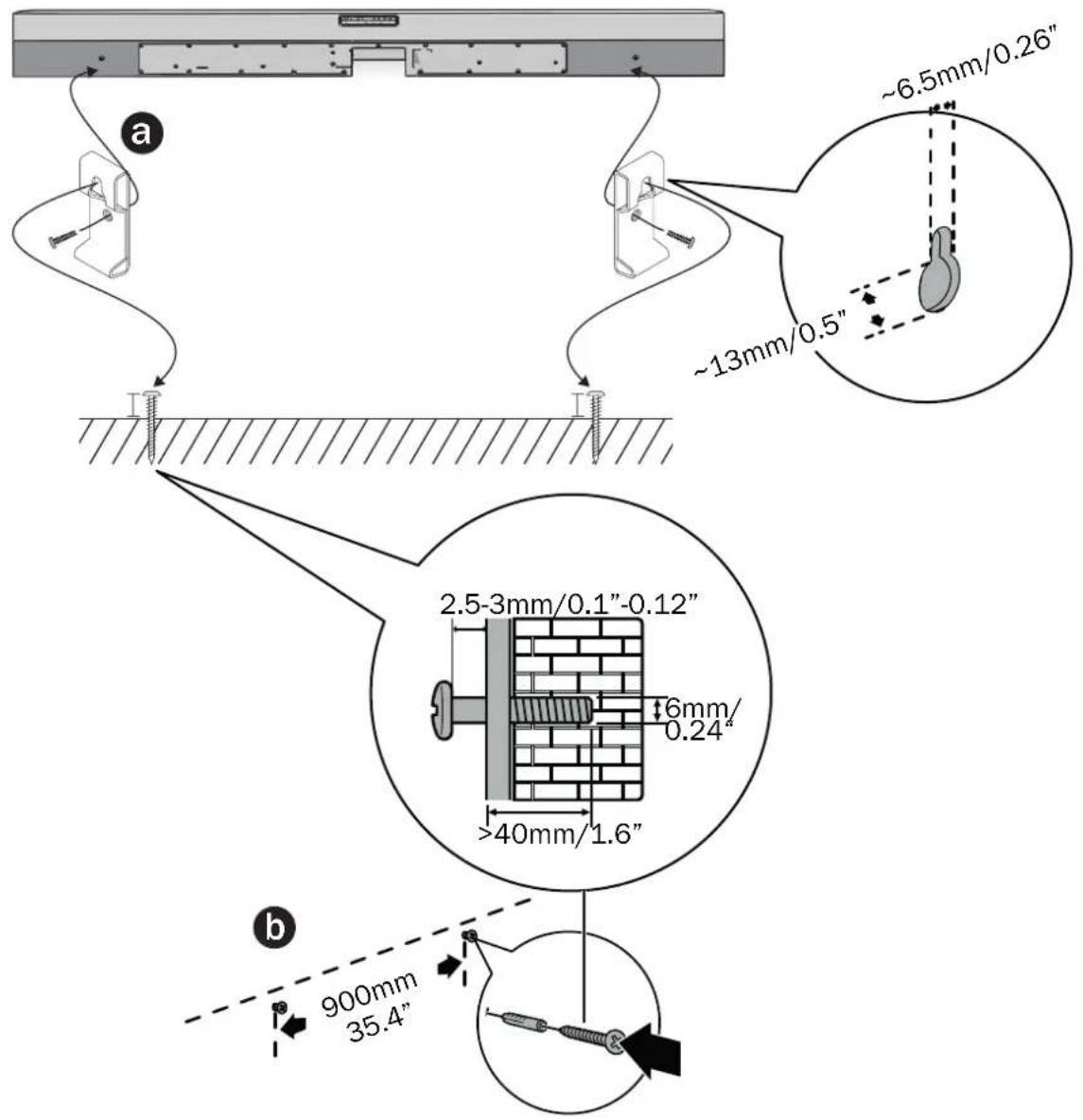
Soundbar wall mounting (optional) / Screw length/diameter (Fig. 1): Be sure to use screws of the appropriate length and diameter depending on the type of wall you plan to secure the soundbar to. Please note the information in Fig. 1.
- Attach the wall brackets included with the product to the soundbar as shown in Fig. 1a.
- Mark the position of the drill holes (gap 900mm) and drill two holes corresponding to the dowel size in the wall.
- Put the dowels in the drill holes and insert the screws as shown in Fig. 1b.
- Hang the soundbar onto the fastening screws (Fig. 1c).
Note:
- Improper wall mounting can result in accidents, injuries or damage. If you have any questions, please contact the customer service center in your country.
- Before wall mounting, make sure the wall can support the weight of the soundbar.
- Magnat is not liable for accidents, injuries or damage resulting from improper wall mounting.
- Only mount the soundbar on a stable vertical wall.
- If the soundbar is installed on a ceiling or slope, the device may fall down and cause serious injury.
- Do not use screws that are shorter than those specified. Otherwise, there is a risk of the soundbar falling down.
- During wall mounting, the mains plug must not be plugged in and the soundbar must not be switched on. Otherwise, there is a danger of electric shock.
SYSTEM INSTALLATION
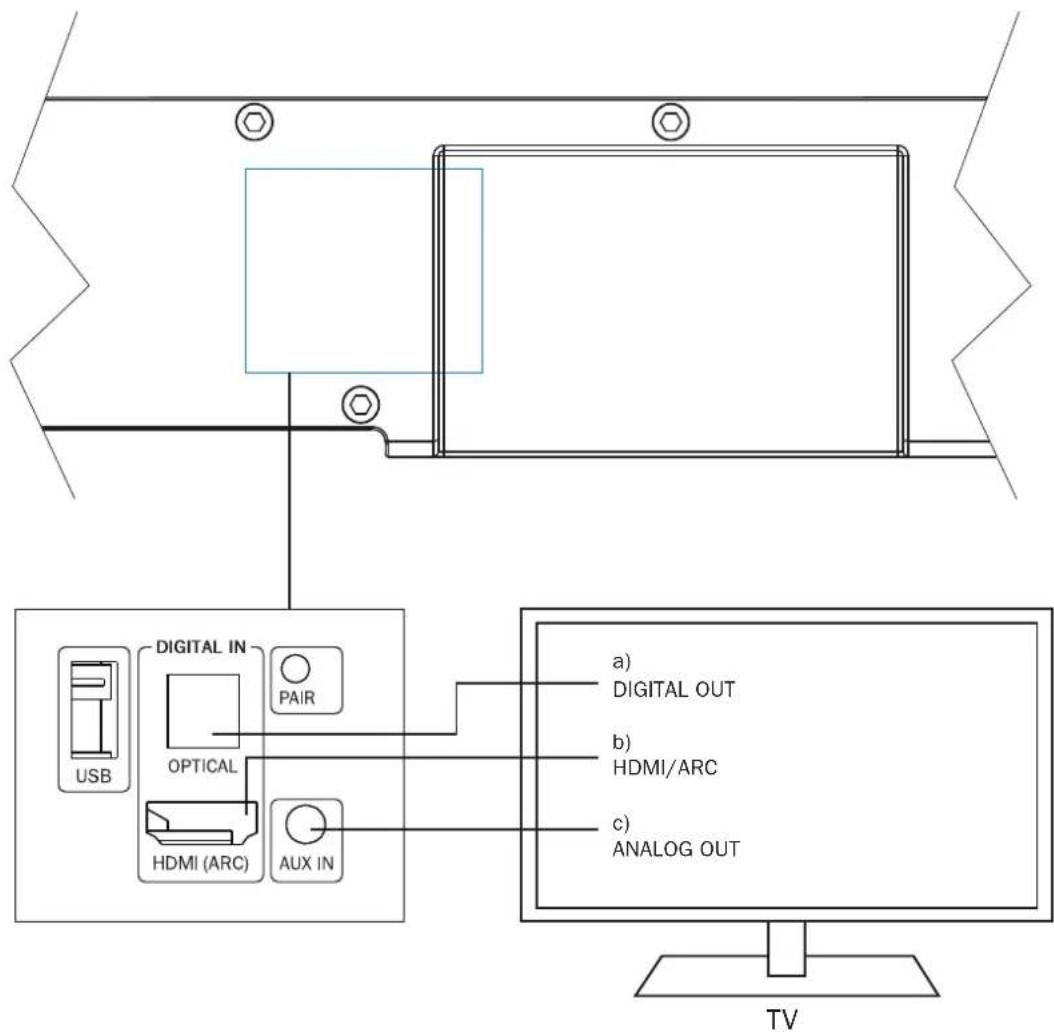
Connecting a television (Fig. 2):
The SBW 280 is designed to be connected directly to a TV. It can be connected in three different ways:
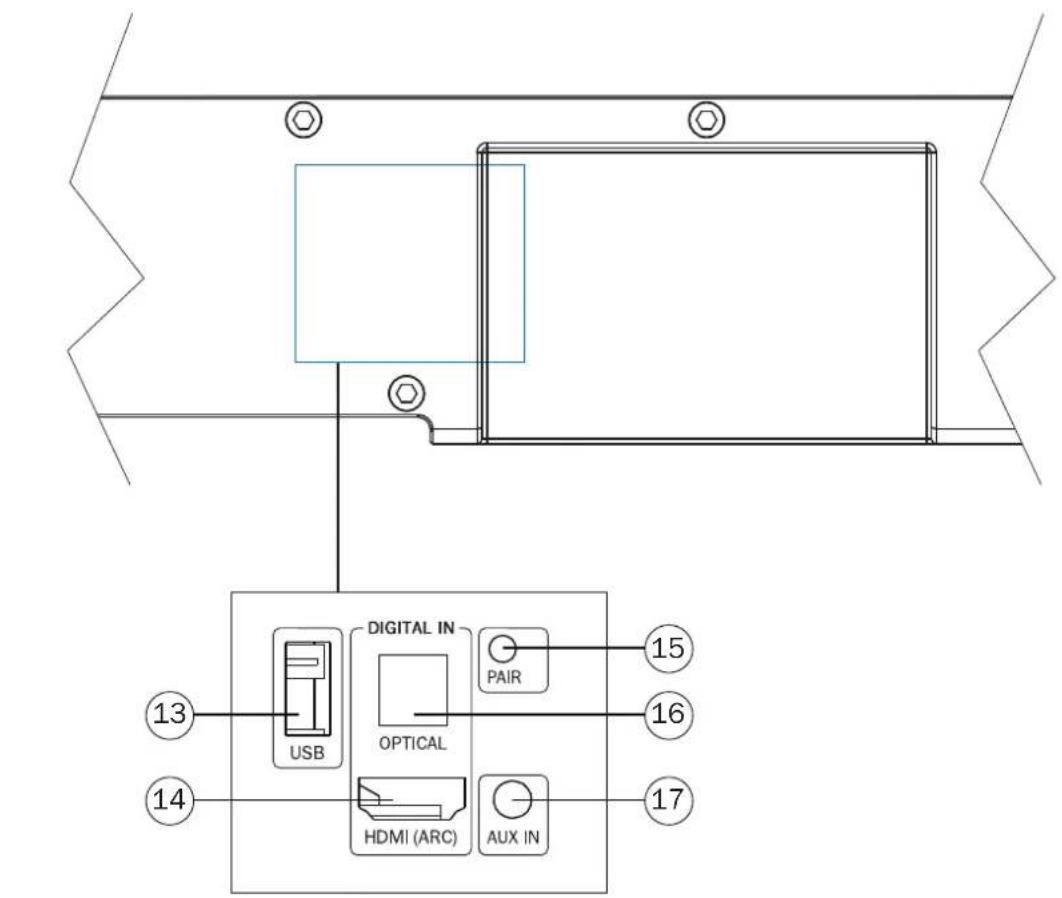
a) Connecting the TV to the HDMI® port HDMI/ARC (Fig. 5, Pos. 14):
Connect your TV to this port if it has an HDMI® socket with ARC functionality (Audio Return Channel, HDMI® 2.0 standard).
If the HDMI^空 port on your TV also supports CEC functionality (Consumer Electronics Control), then basic functions of the soundbar such as switching on/off, volume and mute can be controlled via your TV's remote control. The CEC functions that are available vary from TV to TV and should be checked in each individual case. Please refer to the operating instructions supplied with your TV for further information. Most manufacturers have their own name for the CEC function, however, most end in the term „Link". Note: for reasons of a technical nature the CEC function is only available via HDMI^空 ports.
These functions may need to be activated in the TV's settings. Dolby Audio-Dolby Digital encoded signals can also be reproduced via the built-in Dolby Audio.
The necessary HDMI® connecting cable is not included in delivery.
b) Connecting the TV to the optical digital input DIGITAL IN (Fig. 5, Pos. 16):
Use the supplied optical cable (F) and connect the digital audio output of your TV to the audio input DIGITAL IN (Abb. 5, Pos. 16) of the soundbar. Dolby Audio-Dolby Digital encoded signals can also be reproduced via the built-in Dolby Audio decoders. The necessary connecting cable is not included in delivery.
c) Connecting the TV to audio input AUX IN (Fig. 5, Pos. 17):
Use the supplied audio cable and connect the audio output on your TV to audio input AUX IN (Abb. 5, Pos. 17). If your TV has an audio output with fixed level, this is preferable to the audio output with variable level.
Connecting additional devices to the SBW 280 (Fig. 2)
Connecting the device to a Bluetooth audio source:
Use the remote control to switch the soundbar to the Bluetooth mode. If you have previously connected a Bluetooth device, the soundbar will automatically attempt to re-establish a connection with this device. If this is the case, you may be required to manually reconfirm the connection on the source device. The connection can be resumed from a previously paired source device at any time, as the Bluetooth function continues to operate in the background regardless of the input selected on the soundbar, and it is only switched off completely when the standby mode is selected.
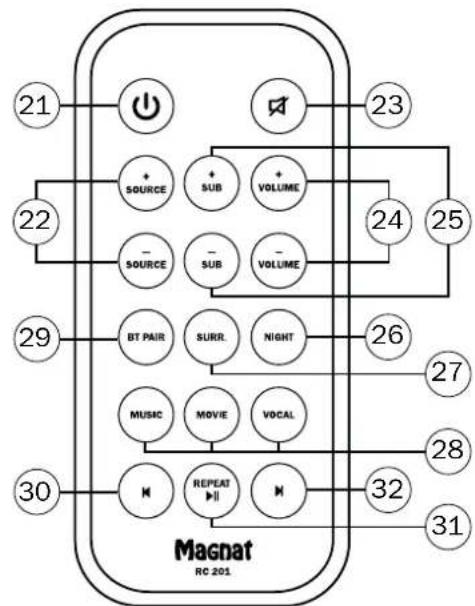
If a connection has not already been made or the connection cannot be re-established, the soundbar will automatically activate the, pairing mode'. To switch the soundbar to the pairing mode manually, press the BT PAIR button (Fig. 7, Pos. 29) on the remote control. The Display will flash, when the pairing mode is active.
Now activate the Bluetooth mode on your source device. The soundbar will appear in the list of Bluetooth devices as „SBW 280". If it is not displayed in the list, set your source device to search for Bluetooth devices manually and make sure that the soundbar has been switched to the pairing mode.
Depending on the source device, you may be asked whether the password is to be accepted during the pairing procedure. You can confirm this by simply pressing "Accept". If you are still asked for a password, use the default passwords "0000" or "1234". If you are asked if you want to establish a connection after pairing, please select "Yes". When the device has been paired and connected successfully, BT is displayed continuously.
The soundbar supports the "aptX" high quality audio transmission standard. If your source device also supports this standard, "aptX" will be selected automatically as the transfer mode when establishing a Bluetooth connection.
Connecting an analogue or digital audio source to the soundbar:
Additional audio sources such as CD players, MP3 players and satellite receivers can also be connected to the analog input AUX IN (Fig. 5, Pos. 17) and to the digital input DIGITAL IN (Fig. 5, Pos. 16) on the soundbar. When doing this proceed as described in the previous section.
Connecting a USB memory device to the soundbar
To playback MP3 or WMA audio data from a USB memory device (FAT 16, 8 GB formatation), the device can be connected to the USB port (Fig. 5, Pos. 13).
The playback is controlled over the buttons 30, 31 and 32 on the remote control.
Please note:
- The device might not be compatible with all USB device
-Some MP3 or WMA data might not be suitable for playback
-Do not remove the USB device while the Soundbar is accessing it
Copyrighted data (DRM) is not supported
-Power rating at the USB port: 5V = /1A
Connecting the power supply to the soundbar:
Included in delivery is the most commonly used mains cable. The mains cable used in your country, however, may be different. If the mains cable is not compatible with your power sockets or if you are in any doubt, please contact your Magnat dealer.
- Insert the 2-pin mains cable into the socket on the amplifier of the soundbar.
- Insert the mains cable into the socket. Make sure that you are using the mains plug that is compatible with the socket (refer to the information above).
Connecting the power supply to the subwoofer:
Included in delivery is the most commonly used mains cable. The mains cable used in your country, however, may be different. If the mains cable is not compatible with your power sockets or if you are in any doubt, please contact your Magnat dealer.
- Plug the 2-pole mains cable into the mains socket on the subwoofer amplifier.
- Insert the mains cable into the socket. Make sure that you are using the mains plug that is compatible with the socket.
INITIAL START-UP, WIRELESS PAIRING OF THE SOUNDBAR WITH THE SUBWOOFER
Switch on the soundbar using the remote control (Fig. 7, Pos. 21) or on the control panel at the top ((Fig. 4, Pos. 3).
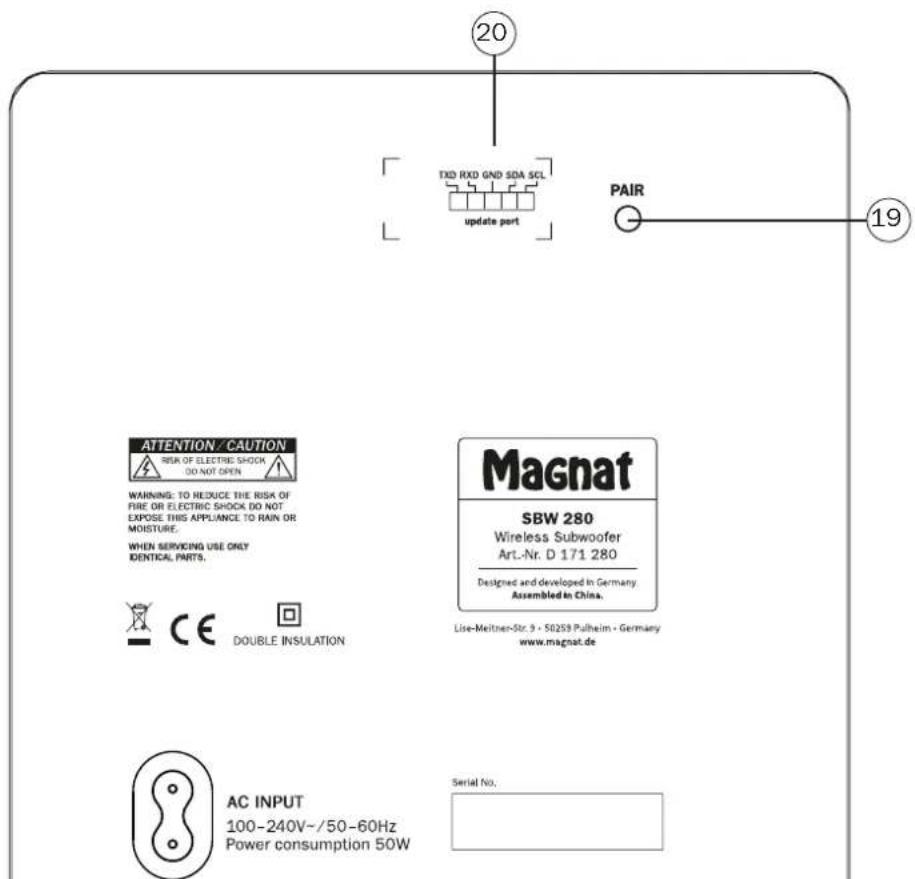
The soundbar and subwoofer will now be paired automatically. The blue LED on the subwoofer (Fig. 6a, Pos. 18) will flash rapidly during this process. When pairing is successful, the LED will illuminate permanently. This can take up to 30 seconds.
If the automatic pairing process fails (the LED flashes slowly), please press the PAIR button on the subwoofer (Fig. 6b, Pos. 19) and then on the soundbar (Fig. 5, Pos. 15) to repeat the pairing process.
When the subwoofer has been successfully paired, it will connect within a few seconds every time the soundbar is switched on.
Please note: If the soundbar is switched to standby mode, the subwoofer will also switch to standby mode automatically after approximately one minute. The blue LED on the subwoofer will flash initially and then go out.
OPERATION
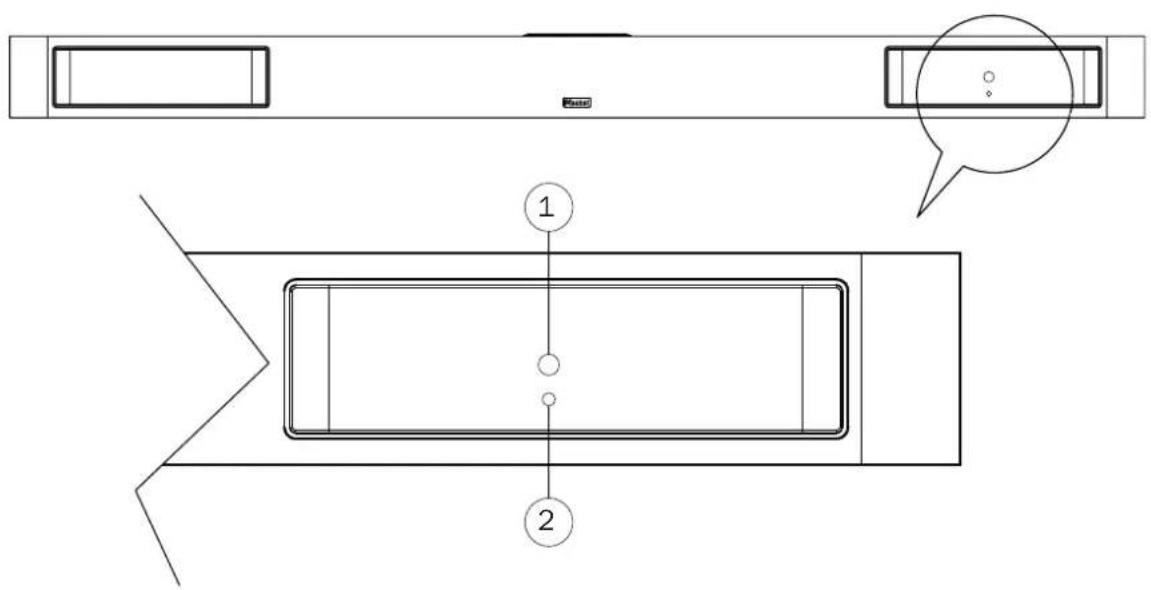
Soundbar controls (front) (Fig. 3)
(1) Sensor for remote control: Please aim at this sensor when using the remote control.
(2) Remote LED: This LED flashes when the Soundbar receives a signal via the remote control.
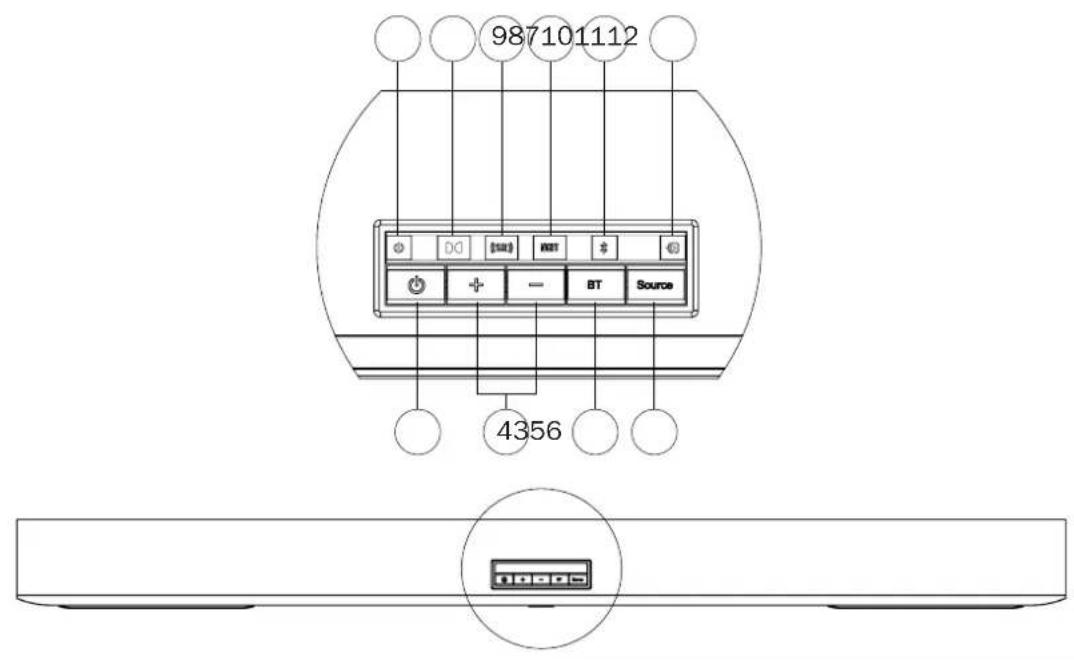
Top controls with LED display (Fig. 4)
(3) ON/STBY: Switches the device on when it is in the standby mode. Conversely the device can be switched from power operation to the standby mode.
(4) VOLUME - / + : Increases (+) or decreases (-) the volume.
(5) BLUETOOTH: Switches the device to the pairing mode when in Bluetooth operation to establish a connection to a Bluetooth source device. The blue LED status indicator (Fig. 4, pos. 11) flashes quickly.
(6) SOURCE: Selects the input.
(7) POWER (Standby Indicator): When the Soundbar is on standby, the standby indicator is red.
(8) DOLBY AUDIO: The symbol lights up when a Dolby Audio-Dolby Digital encoded signal is detected (digital and HDMI input only).
(9) SURROUND-MODUS: The symbol lights up when the surround mode is active.
(10) NIGHT-MODUS: The symbol lights up when the night mode is active.
(11) BLUETOOTH: The symbol flashes when the Bluetooth input is selected but there is no pairing with a device. The symbol lights up continuously when Bluetooth pairing is successful.
(12)SOURCE:The selected input is indicated by different colours:
Purple: HDMI input
- Green: Analogue input
- Blue: Bluetooth input
- Yellow: Digital input
Light Blue: USB input
Subwoofer controls (front) (Fig. 6a)
(18) LED-STATUS INDICATION: The LED lights up blue when the subwoofer is in operating mode. See the "Initial start-up".
Subwoofer controls (back) (Fig. 6b):
(19) PAIR: Starts the manual pairing mode on the subwoofer. See the "Initial start-up" section.
(20) UPDATE PORT: Connection for service only.
Operation with the system remote control (Fig. 7):
(21) ON/STBY: Switches the unit on when it is in standby mode. If the LED (Fig. 4, Pos. 7) does not light up, you must plug in the power cable on the back. Conversely, the unit can be switched from power mode to standby.
(22) SOURCE: Selects the audio input:
HDMI/ARC (HDMI/ARC input)
-AUX (analog input)
- BT (Bluetooth input)
- OPT (optical input)
- USB (USB input)
(23) MUTE: Switches the sound on and off. The Top Panel indicator flashes while Mute is activated.
(24) VOLUME: Increases (+) or decreases (-) the volume.
(25) SUB: Increases (+) or decreases (-) the volume of the subwoofer.
(26) NIGHT: Activates or deactivates a playback mode with reduced dynamics and a frequency response that is adapted for sound-sensitive situations (e.g. late at night).
(27) SURR: Switches the 3D surround sound function on or off.
(28) SOUND MODE:
MUSIC: Optimises the frequency response of the unit for music playback.
MOVIE: Optimises the frequency response of the unit for film sound reproduction.
VOCAL: Emphasises the vocal range for particularly good speech intelligibility.
(29) BT PAIR: Switches the device to the pairing mode when in Bluetooth operation to establish a connection to a Bluetooth source device.
(30)SKIP TRACK BACKWARDS:
Pressing this once starts the track currently being played on a Bluetooth/USB source device from the beginning. Repeatedly pressing the button allows you to skip to previous tracks.
(31) PLAY/PAUSE:
Pauses the current track on a Bluetooth/USB device or resumes playback.
(32)SKIPTRACKFORWARDS:
Pressing this once starts the track currently being played on a Bluetooth/USB source device from the beginning. Repeatedly pressing the button allows you to skip to subsequent tracks.
AUTO STANDBY FUNCTION
The unit has an Auto Standby function that automatically switches the device to stand-by mode if no audio signal is detected on the inputs or if there is no Bluetooth pairing over a period of approx. 15 minutes. This function implements an EU energy-saving regulation (1275/2008 EC), reducing power consumption if the device is accidentally left turned on after use.
MAINTENANCE
The surface is best cleaned with a mild household cleaner. On no account use furniture polish or similar products.
SPECIFICATIONS
Configuration: 2.1 full active
Output power RMS/Max.: 2 x 30 /60 watts (L+R-channel)
1× 70 / 140 watts (subwoofer)
Frequency range: 26 - 28.000 Hz
Crossover frequency: 160 / 3.250 Hz
Bluetooth Version: Bluetooth® 5.0 aptX®
Operating Frequency: 2402 - 2480 MHz
Maximum emitted power (EN 62479): -1.60 dBm
USB 2.0:5V/DC1A,FAT 16 maximum 8 GB,
MP3 and WMA files
Mains voltage: 110 - 240 V
Dimensions (BxHxT):
Soundbar: 1050 × 75 × 90 ~mm
Subwoofer: 220 × 364 × 370 ~mm
Weight:
Soundbar: 3.8 kg
- Subwoofer: 7.6 kg
SUBJECT TO TECHNICAL CHANGE
Très cher client,
DEKJIAPAUCA COOTBETCTBNA

Даньим Компань Мagnat Audio-Produkte GmbH у dioctobepaET,уTO yCTpoiCTBO SBW 280 OTbeuaET OCHOBHbIM Tpe6oBaHnIM ИpyrIM peIeBaTHbIM HopMaM ДиpeKTbBbI 2014/53/EU. ДeКларua coOTBeTcTBnHaXoIITcHa caTe www.magnat.de B pa3dene Downloads (MateprnaJIдЯ StkaunBaHn) кадоу yCTpoiCTBa.
HADJIEXKAUEE NCIPOJIb3OBAHNE
3To yctpoictBO npedHa3HaeHo TOnbKO dJa DomaHrO IcNoB3OBaHnA.
CODEPXXMOE:
(A) 1 x Akcytneuecka cnctema Soundbar
(B) 1 × Ca6B byΦep
(C) 1 x ceTeBoi Ka6eIb Iy cayH6apa
(D) 1 × CeTeBoi Ka6eBJI nIa c6Byepa
(E) 1 x Bnok dntaHcnoHHoro ynpabNeHnra, BKJIouy aKKymyIaTOpHyio 6aTaapeio (MmHaIopHbI 3JeMeHT NITAHnCR2025)
(F)1,8MCTepeo-aynokabn,cbyX CTOPOH TOnbnaHbI WTeKeP Ha 3,5 MM
(G) 2x HacTeHHbI KpOHHTeH, BKNIOyA 2 KpeNEXHBIXBNTa
(H)1xPyKoBOcTBo no kcnnytaun
(I) 4x CamokJneJnuecepe3nHOBBie HOKKN
PACNAKOBKA KOMJIIEKTA FPMKOTOBOPTEJEI
Octopokno paacakobatr pomkorobopnten npnaadnHexoctn npoBepntb coepxHMOe opunHaibhoK kaptonHO Kopo6kn Ha ochoBe Bblweynomhytoro cnncka. B cnyae TpaHcnpTHoro nobpeXdHnCneDyET o6paTtbcra K noCTabuNky. XpaHtBu ynapoBOHyMaTePnAIB HndexHom MeTe. OpunHaJIbHnay ynapoBKA n03BOJAE TocUeCTBnTb 6ecnpo6mHyu nepebo3ky npnNo3dHeIwem nepeez3e n B cnyae cepBVCHoro 0cbNyXbaHn.
YCTAHOBKA CNTEMHbIX KOMNOHEHTOB
Soundbar: Soundbardonjhenpa3meuatabceHnocpecdtbeHHNO TeneBn3OpnocepeneHe. EcnTeneBn3Op cOnHT naonke nIN B WkaftyepBaTe, akctneckcnaTeMaSoundbar moKet ycaHaBnBaTaC HnocpecdtBeHH nepeyctpoiCTBOM. Ecnn TeNeBn3Op yctaHOHN Ha CteHe, 3ByKOar NaHeB TaKKe DOJXHa 6bItb YCTaHOHeHa C NOMOsbIO pncnocobHnI dNkpenHnK CTHe Ha 3aHHe NaHeN yCTpOCTBA HnocpecdtBeHHo NOD kPaHOM.
Ca6byep: Ca6byepcneyet yctahabnBaTb Ha noIy Heaaleko OT akcytecko cnCTeMb Cayndap, o6bHcnpaba nncbea ot TeBn3opa. PacctOHaHEOT kpaHa TeBn3opa dna lamnoBix TeBn3opoB He doJXHO 6bITb Mehwe 100 cm, a daTeBn3OpOB C NIOCKMkPahOM -He doJXHO 6bITb Mehwe 50 cm.
HacteHHb moHTax 3BykoBo nahn (onua/ dHaHa / dHaMeTp BuHTa (pnc.1):
063aTeNbHO nCnOb3yIe BnHTb I NOxOJaIe IINHb I dNaMeTp a B 3aBNCIMocTn OT Tnna CTeHb, K KOtopoB Bbl nHaHpyeTe npKpeNITb 3ByKObyo naHeIb. O6paTte BnHaMaHne Ha INHΦopMaunio Ha pncyHke 1
- PnKpEnIe KPOHTeHbI dNk PpenHe N K CTHe, PnIIaRaemble K 3dEInHO, K 3BkyBOH naHn, KaK nokaHa HO pucyHke 1a.
2.OTMeTbe NIOJOxHHe OTBepCTn (paCToHHe 900 MM) INPOCSBePInTe B CTHe DBA OTBepCTn, COOTBeTCTByIOUne pa3Mepy dIO6eIa.
3.3aKpenTe IIO6eBn B npocBepEnHbIX OTBepCTnx N yCTaHOBnTE BnHTbI, KaN oKa3aHo Ha pncyHke 1b. - NobeBcTe 3ByKOByIO naHEnb Ha KpeNexKhIbe BInHTbl (pnc.1c).
BHHMaHHe
- HenpaBnblbHb HAcTeHHb MoHTaK MoKet npBecTn K HeCuaCTbHm Cnyaam, TpaBMam NIN NOBpeJdeHnM. Ecn y Bac ecTB KaKeI-Ni6o Bonpocb, o6paTntecb B cnky6by noDepKKn KIneHTOB BAwe CTpaHe.
-ПерднсггьIMMOHTaXOMy6eINTeCb,чTOCTHaMoKETBbIepxTaTBeC3ByKOBoI NaHeHl. - Magnat He Hecet OTBeTCTBHeHOctn 3a Hecuacthble Clyau, TpaMbI IINyUep6 B peyIbTaTe HEnpaBInbHorO HAcTeHHOro MoHTaxa.
- yCTaHaBnBaIte 3ByKOByIO nAneIb TOnIbKO Ha yCTOINMbYIO BepTnKaIbHyIO CTeHy.
- Ecn 3BykoBaa NaHeIb ycTaHOBneHa Ha NotOKe IIN Ha HAcKnIOHNOBepxHOCTn, OHa MoKTeYnaCTb HAHeCTn Cepbe3HyTO TaBMy.
He nnoB3yIte BnHb Kopoye yka3aHHoro pa3mepa.B npoTINBHom cnyae cyueCTBye T onaCHocT naDeHn 3BykoBoN naHnn.
Bo BpemHaHCTeHHOro MoHTaXa BnIKy PntaHn HEnb3B BCTaBnTb Bpo3eTKy,a 3ByKObyIO nHeNb HeNb3B BKIOuTaB.B npOTNBOM Cnyae cyueCTByeT OAnCHOct b nopaxeHn 3JeKtpnueckm TOKOM.
NHCTAJIYIaIcNCACTEMbl
IopknloeHne TeneBn3opa (pnc.2):
SBW 280 npedHa3Hauen dI npMoro NpOKnOueHn K TeLeBn3Opy. IJIr ETOrO IMeETcR TPN BO3MOXHOCTN:
a)Подклоченые Telebeи�ора K HDMI-npncoeHneHHIO HDMI/ARC (pnc.5, no3.14):
IopKJIouaTe TeneBn3Op K 3ToMg PnpcoeHHeHIO, ecN Ha HEM nMeTcpa3bem HDM|c fYHKuNei ARC (peBepcnBhbl 3BykoBoi KaHa, cTaHdpT HDM|2.0).
EcHDMpa3bem TeneBn3opa DononHnTebHo NmeeT yHKcHIO CEC (Consumer Electronics Control), oChOBhIMN yHKcHnM CayHd6ap, TaKMM KAK BkIIOueHne/BbIKIOueHne, rPOMKoCTb n OTKIOueHne 3Byka, MoXHO ynpabJIbTa cNyIbTa DY TeneBn3opa. KaKHe IMeHHO yHKcHn CEC DOctynb, 3ABNCIT OT KOHKpeTHoM moEHN TeneBn3opa. IIO tOMy NOBOdy CNEyET npOHTaTB pyKOBOCTBO NOb3OBAteHa TeneBn3Op. BoNBUNCTBO pON3BOJNTeHn ICNObl3yOT CO6CTBeHHoe Ha3BaHne dJa yHKcHn CEC, OHO npEnMyuieCTbeHHo 3aKaHnBaTeCn Ha CNoBo „Link". BHImAHHe: no TEXHnueCKm npUnHAm yHKcHn CEC DOctynHa ToIbKO npn oNDKnIOueHnn Upe3 HDM
Bo3MOxH0, 3TN FyHKuH NHyKHO BkIIOHTb B MeHIO TeleBnOpa. BnaOapra BCTpoEHOMy DeKOepy Dolby Audio MoryT TAKKe BOcPON3BOoNTbCnHAnbl B KOINPOBKe Dolby Audio-Dolby Digital.
Ka6eNbHDMI dny 3Toro B KOMnNeKt NOCTaBKn He BXoDNT.
b)Подключени TeleБиЗета К ONТИЧЕСКOMУ UINФpoBOMY BXOу DIGITAL IN (pnc.5, no3.16):
BocnoIb3yItec bOnTuecknM Ka6eIem n3 KomnIeKTA noCTabKn u coeHNHTe UHPOBoy ayIOOBbxOJ TeNEB30pa c ayIOOBxOdom DIGITAL IN (pnc. 5, no3. 16) CayNDbap. BnaOapra BcTpoEHHomy deKOepy Dolby Audio Moryr taKke BocnpoIN3BOIDbc rHnbl B KOIpOBKe Dolby Audio-Dolby Digital.
Ecnn paHbwe coeHNHe He yCTaHaBnBaNoCb NnOHO He MoXeT 6bITb BocTaHOBneHo, CayHd6ap aBTOMaTuYeCKN BKIOuayet pexm CoeINHeHH, KOtbp TaKHe Ha3bIaEcra pexMOM cnapuaHH. YTo6bl nepeKlIOUHTb CayHd6ap B pexm Pairing BpyHyu, HaxMITE KhoNky BT PAIR (pnc.7, no3.29) Ha nyIbTe DY. Poka pexm Pairing aKTUBeh, Ha dncnnee Miraet INdkaTop BT.
Tenepb BKIOHTpe jKIMM Bluetooth yCTPOINCTBa-NTOCHNka. CayH6ap BBIOINTCB B CnNCK ye cTPOINCTB Bluetooth kAK SBW 280". Ecnn OH He BBIOINTCB CnNcKe ycTPOINCTB, aKTUBpyyTe BpyHyIO NOICK ycTPOINCTB Bluetooth Ha ycTPOINCTBEHCTOHNKE n npOBepTe, BKIOUeH nn Ha CayH6ap peKIM cnapNBAHIA.
B 3aBnCmOcTb OT yCTpOJCTBa-NCToUHnKa BO BpeM npoCecca yCTaHOBHeHn CoeINHeHn MoKeT 6bIb 3aHaB BonPoc, cIeNyET IIN pInHrTb napOB. OTBetNTb HA BONPoc MOxHO npocTo HkaTne KhoNKn ,PpHrtb". EcnB BonPoc o napone NOBtOpTcR, nCOnb3yIte cTaHApTbIe napOI "0000" mnn "1234". EcnN CoeINHeHne yCTaHabNbaNoCb paHee, MoKeT 3aDaBaTcBc BONPoc, XOTNe IIN Bbl yCTaHOBHTb CoeINHeHne. Ha Hero TaKke OTBeuAite "Ja". PocNe ycNeHoro CoeINHeHn Ha dncnnee 3aropaeTc CmBbON BXoDa BT n He rachet.
Cayndap noidepknBaet oco6o KaueCTBHeHbI cTAndapt nepeaun ayduo aptX"。Ecn yctpoNCTBO-ntOHTHK TaKke noidepknBaet 3Tu texHOJorHIO, npu ycTaHOBneHm coeHNHeHn Bluteoth B KaueCTBe pekma nepeaun abToMaTNUeckn BblbnpaetcAptX"
IopKJIoueHne aHaIorOBoro nIIu cHpOBO raynIOCTOHyNka K CayH6ap:
Kaharorobomy Bxody AUX IN (pnc. 5, no3.17) undfpobbIM Bxody DIGITAL IN (pnc. 5, no3.16) Cayndap moryT nockuatabcn npdyae aynoctouhki, Hanpimep, npounpblatei KOMNaKT-dncOB, MP3-nneepbi, cnyTHNKOBbie pecnbepbi. nra 2toro nolbytecb onncaHHB BIIe npoeDpyoi.
IopKJIIOueHne USB-HaKoONITeN K CayHd6ap
IPABO HATEXHUNECKNE 3MEHEHENAHAMN
1
2
3
4
5

6a
Magnat
6b
7
Congratulations! You have made a wise selection in becoming the owner of a MAGNAT HiFi equipment. Due to high quality MAGNAT products have earned an excellent reputation through the western world. And this high quality standard enables us to grant a 5-years warranty for MAGNAT HiFi speakers and a 2-years warranty for Magnat HiFi-electronic components. The equipments are checked and tested continuously during the entire production process. In case you have problems with your MAGNAT HiFi equipment, kindly observe the following:
- The guarantee period commences with the purchase of the component and is applicable only to the original owner.
- During the guarantee period we will rectify any defects due to faulty material or workmanship by replacing or repairing the defective part at our discretion. Further claims, and in particular those for price reduction, cancellation of sale, compensation for damages or subsequent damages, are excluded. The guarantee period is not altered by the fact that we have carried out guarantee work.
- Unauthorized tampering with the equipment will invalidate this guarantee.
- Consult your authorized dealer first, if guarantee service is needed. Should it prove necessary to return the component to the factory, please insure that the component is packed in original factory packing in good condition the quality control card has been filled out and enclosed with the component, your enclose your receipt as proof of purchase.
- Excluded from the guarantee are: - Illuminates - Wear parts - Shipping damages, either readily apparent or concealed (claims for such damages must be lodged immediately with forwarding agent, the railway express office or post office). - Scratches in cases, metal components, front panels, etc. (You must notify your dealer directly of such defects within three days of purchase.) - Defects caused by incorrect installation or connection, by operation errors (see operating instructions), by overloading or by external force. - Equipments which have been repaired incorrectly or modified or where the case has been opened by persons other than us. - Consoquential damages to other equipments. - Reimbursement of cools, without our prior consent, when repairing damages by third parties.
Toutes nos félicitations!
No warranty without receipt!