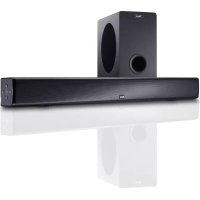
SBW 250 - Soundbar MAGNAT - Free user manual and instructions
Find the device manual for free SBW 250 MAGNAT in PDF.


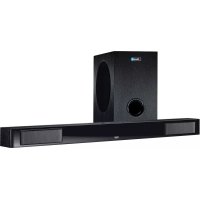
| Product type | Active soundbar with active wireless subwoofer |
| Soundbar dimensions (W x H x D) | 1000 x 79 x 60 mm |
| Subwoofer dimensions (W x H x D) | 196 x 334 x 370 mm |
| Soundbar weight | 2.5 kg |
| Subwoofer weight | 6.7 kg |
| Power supply | 110-240 V AC, 50/60 Hz via external power adapter (Dongguan Dongsong Electronic Co., Ltd., DYS602-210309W0) |
| RMS output power | 2 x 20 W (L/R channels) + 100 W (subwoofer) |
| Maximum output power | 2 x 40 W (L/R channels) + 200 W (subwoofer) |
| Frequency response | 25 - 28,000 Hz |
| Connectivity | HDMI with ARC, 3 HDMI inputs, digital optical input, stereo AUX input (3.5mm jack), Bluetooth (Qualcomm aptX), USB (firmware update) |
| Audio functions | Dolby Digital, 3D Surround sound, LINEAR, MUSIC, MOVIE, VOCAL modes, Night mode |
| Display | LED display for operational information |
| Remote control | Infrared remote control with batteries (CR2025 included) |
| Box contents | Soundbar, subwoofer, power adapter, subwoofer power cable, remote control, 3.5mm audio cable, digital optical cable, wall mount, user manual |
| Warranty | 5 years on speakers, 2 years on amplifier |
| Care and cleaning | Soft dry cloth, avoid any cleaning products or solvents |
| Safety instructions | Operating temperature 10-40 °C, do not expose to water, minimum distance of 10 cm from heat sources, ensure adequate ventilation |
Frequently Asked Questions - SBW 250 MAGNAT
User questions about SBW 250 MAGNAT
0 question about this device. Answer the ones you know or ask your own.
Ask a new question about this device
Download the instructions for your Soundbar in PDF format for free! Find your manual SBW 250 - MAGNAT and take your electronic device back in hand. On this page are published all the documents necessary for the use of your device. SBW 250 by MAGNAT.
USER MANUAL SBW 250 MAGNAT
Important notes for installation / warranty card
Declaration of Conformity
Hereby, Magnat Audio-Produkte GmbH declares that the SBW 250 is in compliance with the essential requirements and other relevant provisions of directive 2014/53/EU. The Declaration of Conformity can be found at http://www.magnat.de in the download area of the device.
The Bluetooth® word mark and logos are registered trademarks owned by Bluetooth SIG, Inc. and any use of such marks by Magnat is under license. Other trademarks and trade names are those of their respective owners.
Qualcomm aptX

Qualcomm aptX is a product of Qualcomm Technologies International, Ltd. Qualcomm is a trademark of Qualcomm Incorporated, registered in the United States and other countries, used with permission. aptX is a trademark of Qualcomm Technologies International, Ltd., registered in the United States and other countries, used with permission.

DOLBY DIGITAL
Manufactured under license from Dolby Laboratories. Dolby and the double-D symbol are trademarks of Dolby Laboratories.
HDMI
HIGH-DEFINITION MULTIMEDIA INTERFACE
The terms HDMI and HDMI High-Definition Multimedia Interface, and the HDMI Logo are trademarks or registered trademarks of HDMI Licensing LLC in the United States and other countries.
At the end of the product's useful life, please dispose of it at appropriate collection points provided in your country.
This symbol means that the product contains batteries covered by European Directive 2013/56/EU which cannot be disposed of with normal household waste. Inform yourself about the local separate collection system for electrical and electronic products and batteries. Follow local rules and never dispose of the product and batteries with normal household waste. Correct disposal of old products and batteries helps prevent negative consequences for the environment and human health.

Your product is designed and manufactured with high quality materials and components, which can be recycled and reused.
D 4
GB 10
F 16
22
E 28
RUS 34
Dongguan Dongsong Electronic Co., Ltd., DYS602-210309W0
Dear MAGNAT Customer,
Congratulations on your fine new loudspeakers and thank you very much for choosing MAGNAT! You have made an excellent choice. The high-quality speakers produced by MAGNAT are renowned all over the world.
Please study the instructions and information below carefully before using your new loudspeakers.
IMPORTANT SAFETY NOTICE
Please read through the instruction manual carefully before starting to use the device. This manual contains important information concerning operation and safety aspects. It is imperative you observe all of the information. Keep the manual in a safe location.
RISK OF SWALLOWING BATTERIES!
WARNING NOTICES: All of the warning symbols on the device, accessories and in the instruction manual itself must be adhered to.
- EXPOSURE TO HEAT: Only operate the device and accessories in a temperature range from 10^ to 40^ .
The device should not be positioned near heat sources (heaters, ovens, radiant heaters, naked flames, etc.). When setting up close to an amplifier a minimum distance of 10cm must be maintained.
- No naked flame sources, such as lighted candles, should be placed on the device.
- Pay attention to a sufficient ventilation of the device. The device may not be covered, e.g. by drapes, curtains. Maintain a distance of 20 cm to walls.
- EFFECT OF MOISTURE: The device should not be exposed to dripping or splash water. Neither should it be used to support vases or other containers filled with liquid. Do not expose the device to water or high levels of humidity. There is a danger of electric shock. In the event of contact with moisture or liquids remove the mains adapter immediately.
- FOREIGN MATERIAL: Ensure that no foreign material enters through the device openings and into the interior. This could trigger short circuits and even result in electric shock and fire.
- CLEANING: Please use a soft, dry cloth with no cleaning agents, sprays or chemical solvents, as these could damage the surfaces.
- ELECTRICAL CONNECTION: Please note the voltage levels on the information signs. The mains adapter for the device should only be operated with the voltage and frequency values specified on the signs.
LIGHTNING PROTECTION/PREVENTIVE MEASURES: If the device is not going to be used for a prolonged period (e.g. when on holiday), it should be disconnected from the mains by removing the plug. The device should also be disconnected from the mains in the event of a thunderstorm. Doing this will prevent damage caused by lightning and overvoltage.
- MAINS CABLE: The mains cable must always be suitable for operation and it should only ever be laid out in a manner that prevents it from being trodden on. It should not be pinched by objects either, as this can damage the cable. When using plugs and power strips it must be ensured that the cable is not kinked at the point where it emerges from the socket. Do not connect or remove the mains cable with damp hands.
- The mains plug is used as the disconnecting device. Disconnecting devices shall remain readily operable.
- OVERLOAD: Sockets, power strips and extension cables should not be overloaded. If an overload occurs, there is a risk of electric shock and fire.
- SETTING UP: Please read the installation instructions.
The device should only be positioned or mounted on a solid surface and not on moving base frames, otherwise there is a risk of injury.
- Only use attachments/accessories specified by the manufacturer.
Use only the following power supply adapter: Dongguan Dongsong Electronic Co., Ltd., DYS602-210309W0
- Batteries (battery pack or batteries installed) shall not be exposed to excessive heat, such as sunshine, fire and the like.
The product/remote control may contain a coin/buon type battery, which can be swallowed. Keep the battery out of reach of children at all times! If swallowed, the battery can cause serious injury or death. Severe internal burns can occur within two hours of ingestion.
If you suspect that a battery has been swallowed or placed inside any part of the body, seek immediate medical attention.
- When you change the batteries, always keep all new and used batteries out of reach of children. Ensure that the battery compartment is completely secure after you replace the battery.
- If the battery compartment cannot be completely secured, discontinue use of the product. Keep out of reach of children and contact the manufacturer.
DAMAGE THAT MUST BE RECTIFIED BY A SPECIALIST:
If any of the following damage occurs, disconnect the device from the mains immediately and contact a specialist to conduct the repair work:
- The device should not continue to be operated if there is visible damage to the mains cable. A damaged cable should not be repaired, but must be replaced.
- Damage to the mains socket at the device.
If moisture or water has entered the device or foreign objects have fallen into the device.
If the device has fallen and the housing is damaged.
If the device does not work properly, even though all of the information in the instruction manual has been observed.
Only those subsequent alterations approved by the manufacturer may be conducted.
Only original spare parts should be used for repair.
After conducting any repairs the safety of device should be checked to ensure it is functioning correctly and safely.
Repairs must always be conducted by qualified specialists, as you might otherwise be exposed to dangerous high voltage levels or other hazards.

The triangle with a lightning symbol warns the user that high voltage is used within the device which can result in electric shock.

The triangle with an exclamation mark informs the user that important operating and maintenance instructions (repair) are contained in the accompanying instruction manual, which must be observed.

Do not open! Risk of electric shock!
CAUTION: In order to avoid electric shock do not open the speaker housing/mains adapters or remove the covers. The user is not to conduct any repairs him/herself. Repairs should only be conducted by qualified technicians! Do not use any sockets or extension cables that do not fully accommodate the plug of the device.

Use only the power supplies listed in the user manual.

AC Voltage.

This is Class II apparatus with double insulation, and no protective earth provided.
INSTRUCTIONS FOR DISPOSAL
In accordance with European Directive 2012/19/EU all electrical and electronic appliances must be disposed of separately via local collection points. Please observe the local regulations and do not dispose of your old appliances with normal household waste.
BATTERY DISPOSAL
Old batteries are hazardous waste and must be disposed of in accordance with current regulations.
CONTENTS
(A) 1 pc. Soundbar
(B) 1 pc. Subwoofer
(C) 1 pc. Mains adapter for the soundbar incl. mains cable
(D) 1 pc. Mains cable for the subwoofer
(E) 1 pc. Remote control including battery (button cell CR2025)
(F) 1 pc. Stereo audio cable, 3.5mm stereo jacks on both sides, 1m
(G) 1 pc. Optical digital cable, 1.5m
(H) 1 pc. Wall bracket with securing material
(I) 1 pc. Instruction manual
UNPACKING THE SET
Please unpack the speakers and accessories carefully and check the contents of the box using the list above. In the event of any transport damage, please contact your supplier. Keep the packing material in a safe location. The original packaging enables trouble-free transportation for any subsequent relocation or servicing requirements.
SETTING UP THE SYSTEM COMPONENTS
Soundbar (A): The soundbar should be positioned directly underneath the centre of the TV. If the TV is located on a shelf or sideboard, the soundbar can be positioned directly in front of the device. If the TV is mounted on the wall, the soundbar should be mounted directly below the screen by using the supplied wall bracket.
Subwoofer (B): The subwoofer should be positioned on the floor near the Soundbar, usually to the left or right-hand side of the TV. The distance to the screen should not be less than 100 cm for CRT TVs and 50 cm for flat screen TVs.
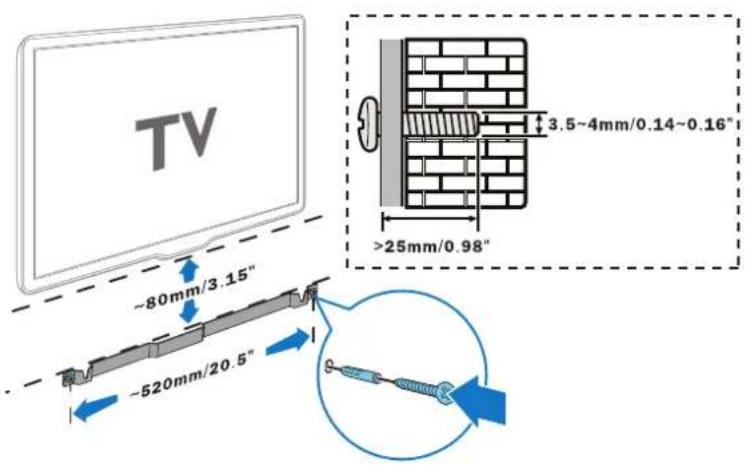
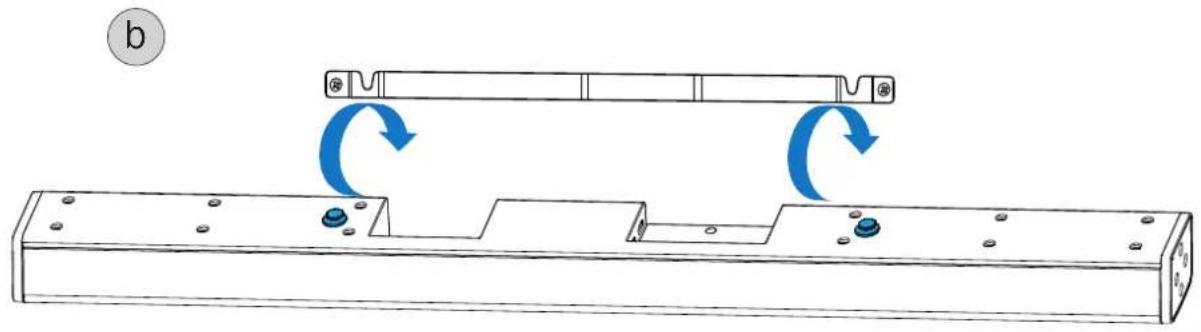
Use of the supplied wall bracket for the soundbar is illustrated in Fig.1.
a. Fit the wall bracket under the TV as shown. Please use securing screws and wall plugs (not supplied) suitable for the wall material.
b. Now hang the soundbar in the matching recesses of the wall bracket using the pre-assembled securing bolts.
Important information / safety instructions: The customer is solely responsible for the use of other wall brackets / attachments. The customer is also solely responsible for the secure attachment of the Soundbar bracket to the wall and the selection of suitable mounting material (e.g. screws, wall plugs, etc.), while taking account of the weight and construction of the Soundbar and the condition of the wall.
SYSTEM INSTALLATION
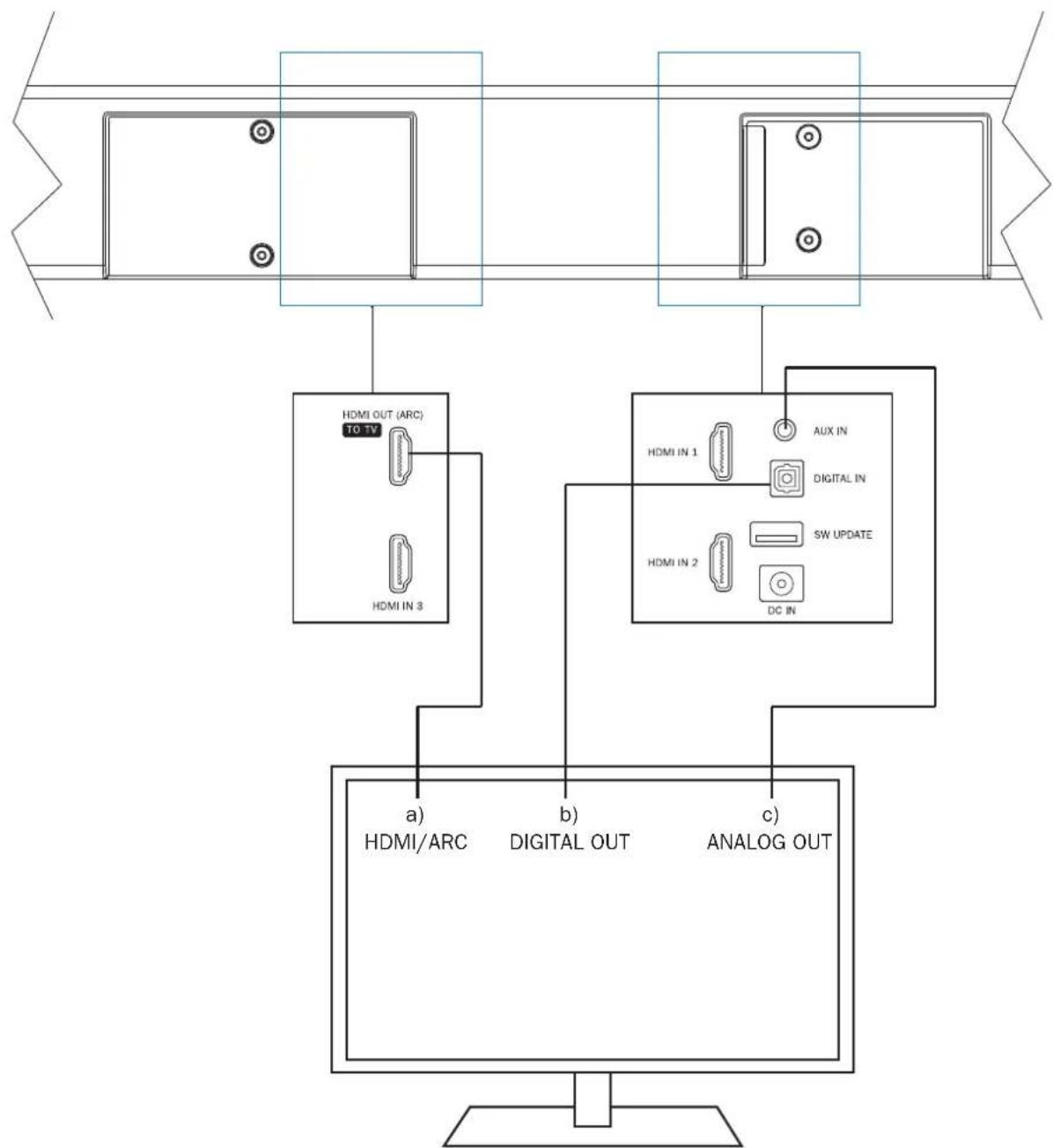
Connecting a television (fig. 2):
The SBW 250 is designed to be connected directly to a TV. It can be connected in three different ways:
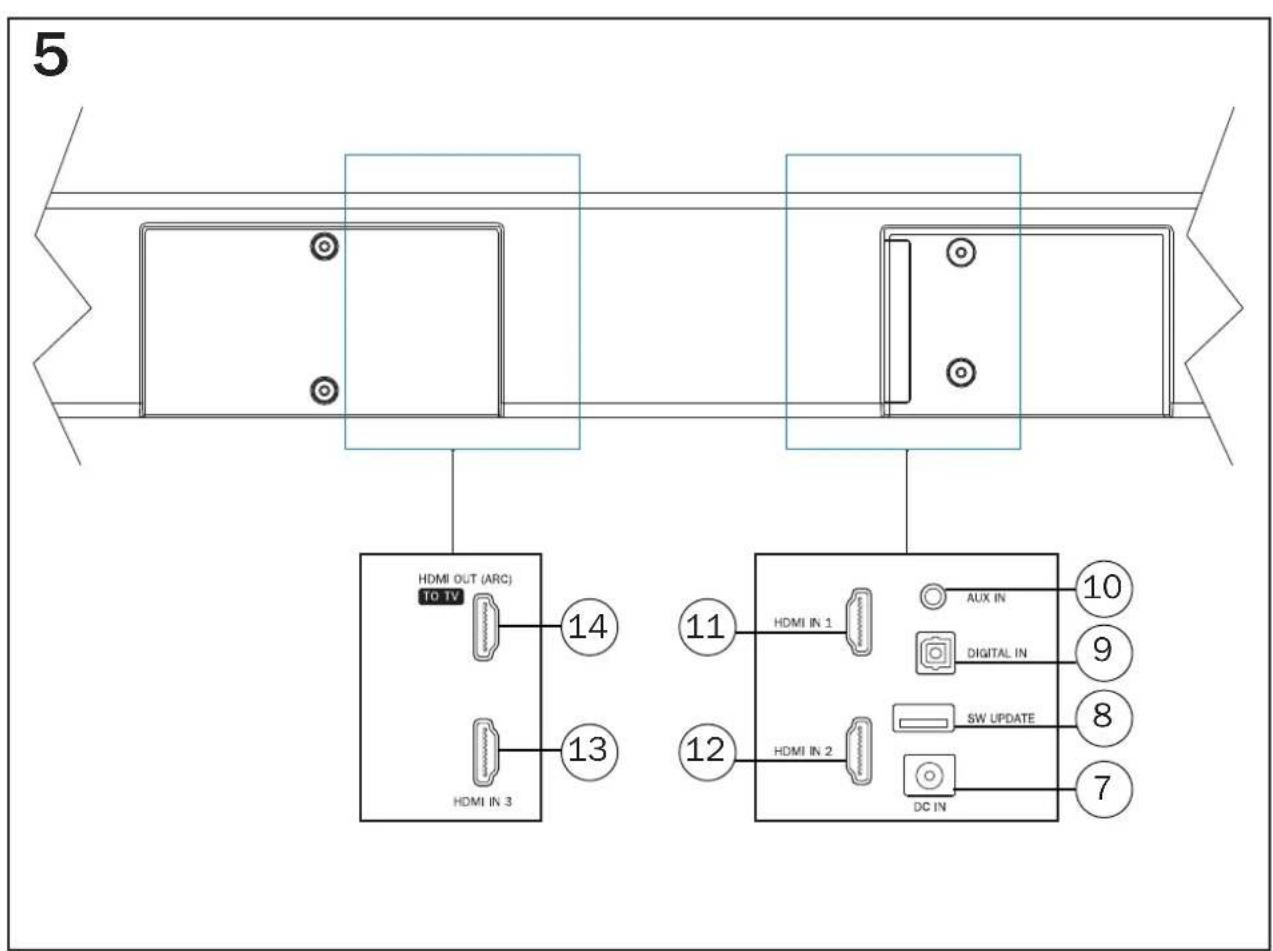
a) Connecting the TV to the HDMI® port HDMI/ARC (fig. 5, pos. 14):
Connect your TV to this port if it has an HDMI® socket with ARC functionality (Audio Return Channel, HDMI® 1.4 standard).
If the HDMI® port on your TV also supports CEC functionality (Consumer Electronics Control), then basic functions of the soundbar such as switching on/off, volume and mute can be controlled via your TV's remote control. The CEC functions that are available vary from TV to TV and should be checked in each individual case. Please refer to the operating instructions supplied with your TV for further information. Most manufacturers have their own name for the CEC function, however, most end in the term „Link". Note: for reasons of a technical nature the CEC function is only available via HDMI® ports.
These functions may need to be activated in the TV's settings. Dolby Digital encoded signals can also be reproduced via the built-in Dolby. The necessary connecting cable is not included in delivery.
b) Connecting the TV to the optical digital input DIGITAL IN (fig. 5, pos. 10):
Use the supplied optical cable (G) and connect the digital audio output of your TV to the audio input DIGITAL IN (fig. 5, pos. 9) of the soundbar. Dolby® Digital encoded signals can also be reproduced via the built-in Dolby® decoders. The necessary connecting cable is not included in delivery.
c) Connecting the TV to audio Input AUX IN (fig. 5, pos. 10):
Use the supplied audio cable and connect the audio output on your TV to audio input AUX IN (fig. 5, pos. 10). If your TV has an audio output with fixed level, this is preferable to the audio output with variable level.
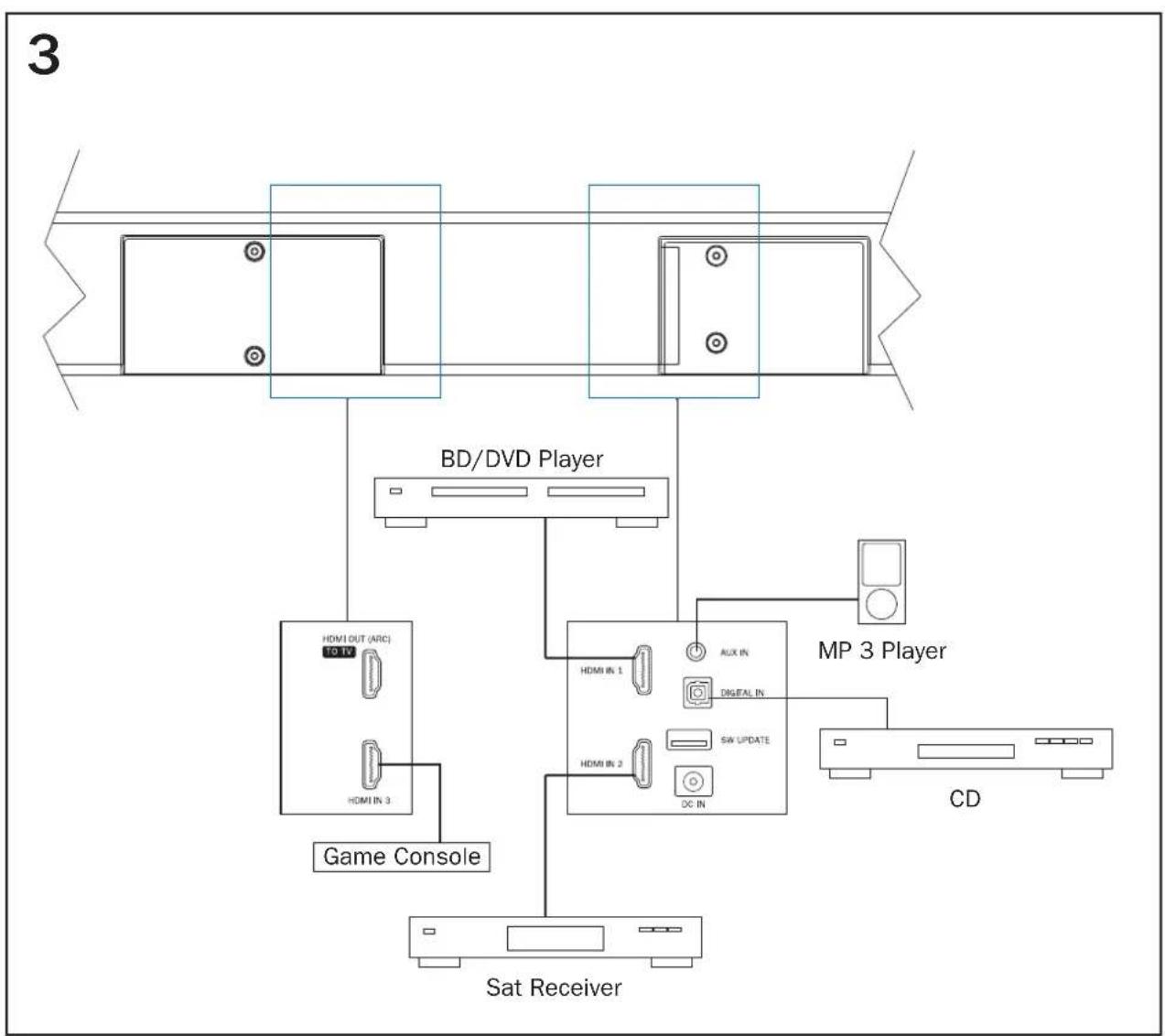
Connecting additional devices to the soundbar (fig. 3)
Connecting the device to a Bluetooth audio source:
Use the remote control to switch the sound deck to the Bluetooth mode. If you have previously connected a Bluetooth device, the sound deck will automatically attempt to re-establish a connection with this device. If this is the case, you may be required to manually reconfirm the connection on the source device. The connection can be resumed from a previously paired source device at any time, as the Bluetooth function continues to operate in the background regardless of the input selected on the sound deck, and it is only switched off completely when the standby mode is selected.
If a connection has not already been made or the connection cannot be re-established, the sound deck will automatically activate the 'pairing mode'. To switch the sound deck to the pairing mode manually, press the BT PAIR button (fig. 7, pos. 22) on the remote control. The Display will flash, when the pairing mode is active.
Now activate the Bluetooth mode on your source device. The sound deck will appear in the list of Bluetooth devices as „SBW 250". If it is not displayed in the list, set your source device to search for Bluetooth devices manually and make sure that the sound deck has been switched to the pairing mode.
Depending on the source device, you may be asked whether the password is to be accepted during the pairing procedure. You can confirm this by simply pressing "Accept". If you are still asked for a password, use the default passwords "0000" or "1234". If you are asked if you want to establish a connection after pairing, please select "Yes". When the device has been paired and connected successfully, BT is displayed continuously.
The sound deck supports the "Qualcomm® aptX™" high quality audio transmission standard. If your source device also supports this standard, "Qualcomm® aptX™" will be selected automatically as the transfer mode when establishing a Bluetooth connection.
Connecting an analogue or digital audio source to the soundbar:
Additional audio sources such as CD players, MP3 players and satellite receivers can also be connected to the analog input AUX IN (fig. 5, pos. 10) and to the digital inputs DIGITAL IN (Fig. 4, Pos. 6 and 7) on the soundbar. When doing this proceed as described in the previous sections b) and c).
Connecting HDMI sources (audio/video) to the soundbar:
Up to 3 other HDMI sources (e.g. BD/DVD player, SAT receiver, games console) can be connected to the HDMI inputs HDMI1, HDMI2 and HDMI3 (Fig. 5, items 11, 12, 13). The audio signal of the respective HDMI source is reproduced via the SBW 250 system, with the video signal forwarded to the HDMI output (HDMI OUT (ARC), Fig. 5, item 14).
In this configuration, the HDMI input connected to the HDMI output of the soundbar (Fig. 5, item 14) has to be selected on the TV.
Important: The USB port (Fig. 5, item 8) is provided exclusively for system updates and does not have any other function.
Connecting the power supply of the soundbar:
Included in delivery is a universal, external mains adapter (C) (110 - 240 V / AC 50/60 Hz). The mains cable used in your country, however, may be different. If the mains cable is not compatible with your power sockets or if you are in any doubt, please contact your Magnat dealer.
- Connect the output cable (jack connector) of the external mains adapter to the power supply jack of the soundbar (fig. 5, pos. 7).
- Insert the mains cable into the jack on the mains adapter.
- Insert the mains cable into the socket. Make sure that you are using the mains plug that is compatible with the socket (refer to the information above).
Connecting the power supply to the subwoofer:
Included in delivery is the most commonly used mains cable. The mains cable used in your country, however, may be different. If the mains cable is not compatible with your power sockets or if you are in any doubt, please contact your Magnat dealer.
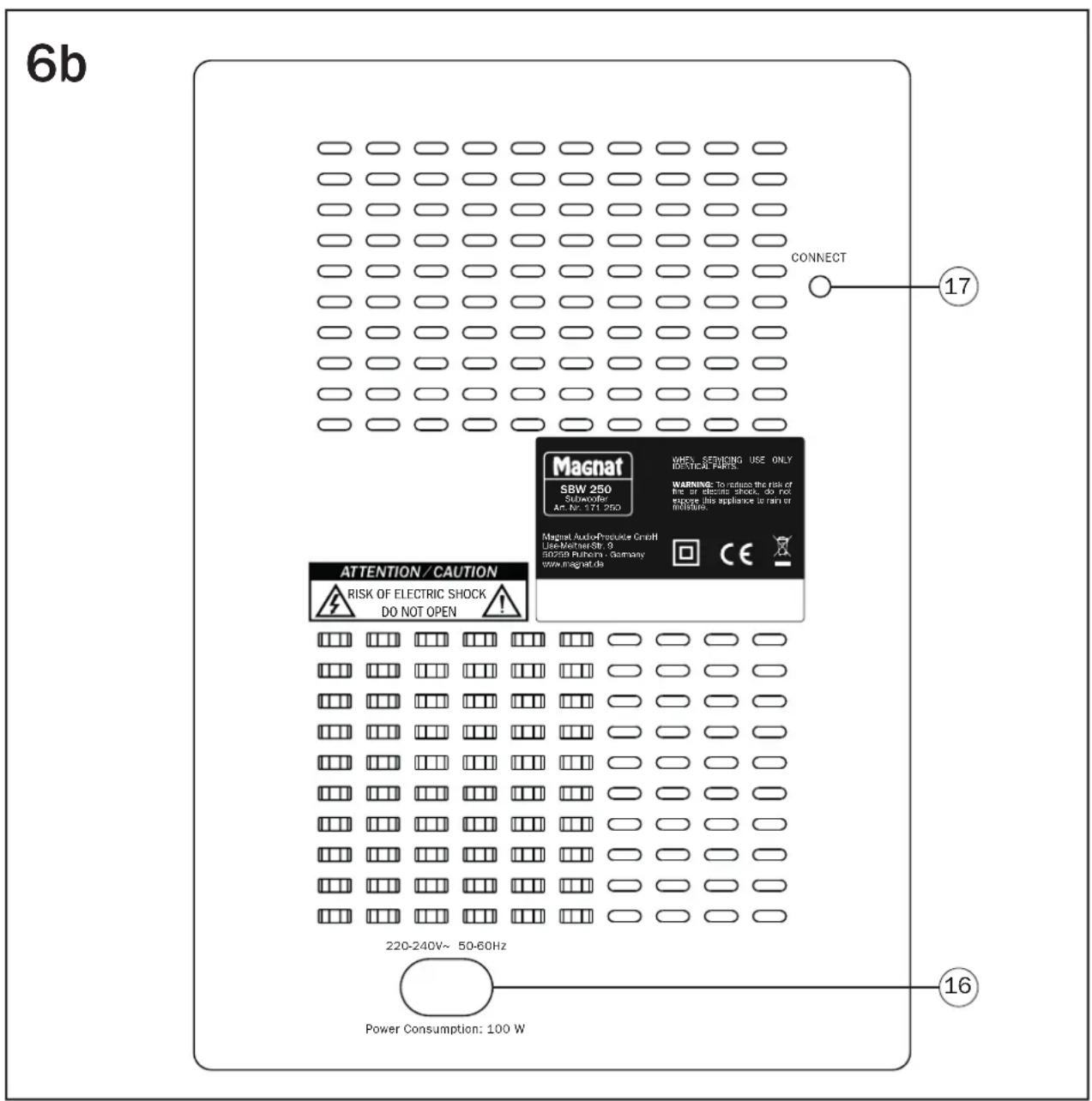
- Plug the 2-pole mains cable into the mains socket on the subwoofer amplifier (fig. 6b, pos. 16).
- Insert the mains cable into the socket. Make sure that you are using the mains plug that is compatible with the socket (refer to the information above).
INITIAL START-UP, WIRELESS PAIRING OF THE SOUNDBAR WITH THE SUBWOOFER
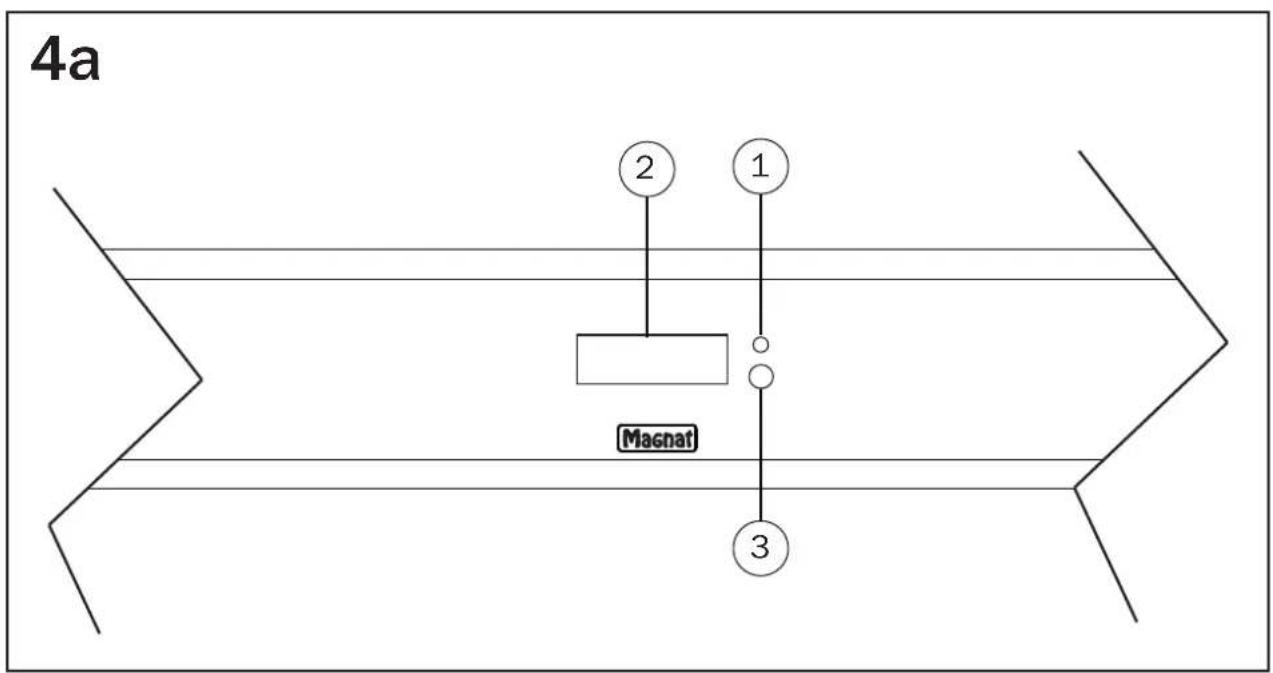
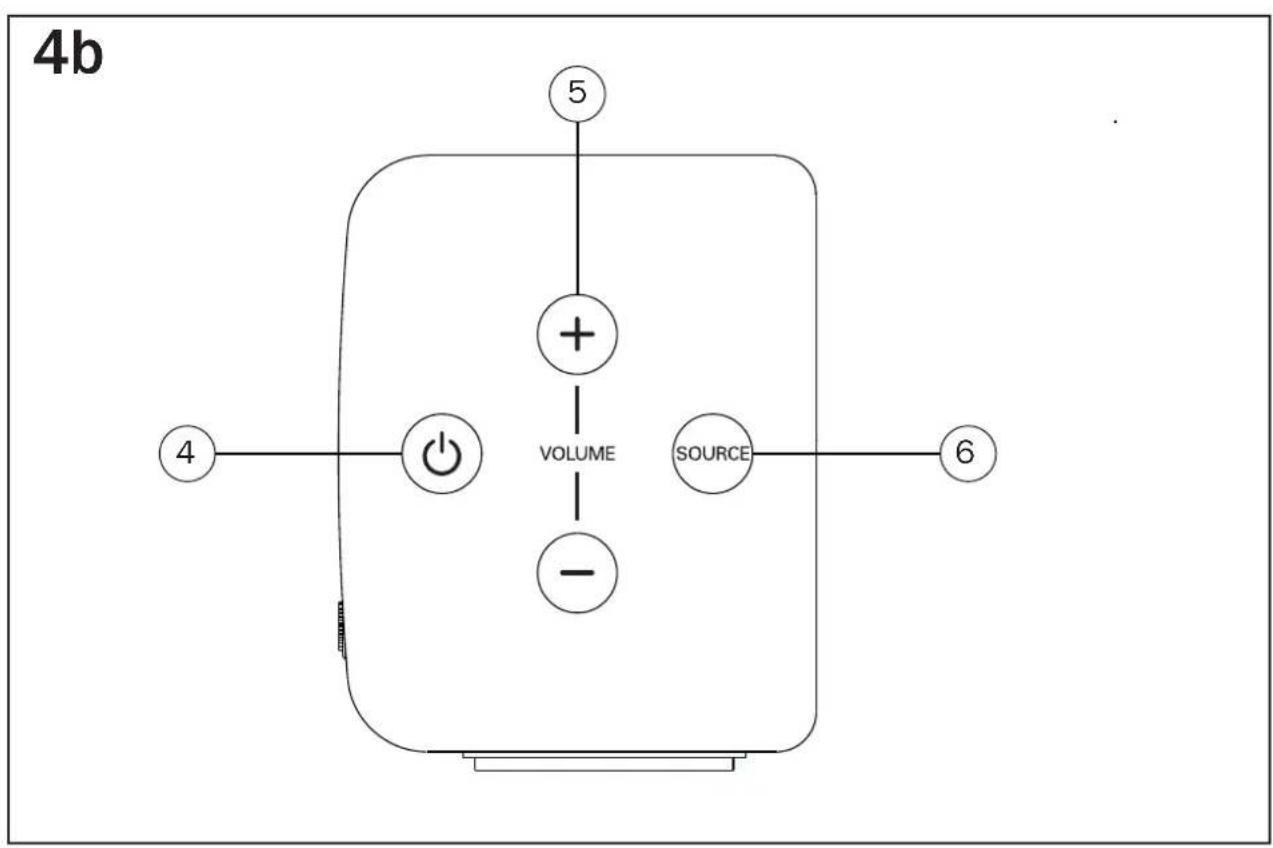
After all the signal cables and power supplies for the soundbar and subwoofer have been connected, switch the soundbar on using the remote control (Fig. 7, item 18) or via the control panel on the side (Fig. 4b, item 4).
The soundbar will connect to the subwoofer automatically every time it is switched on.
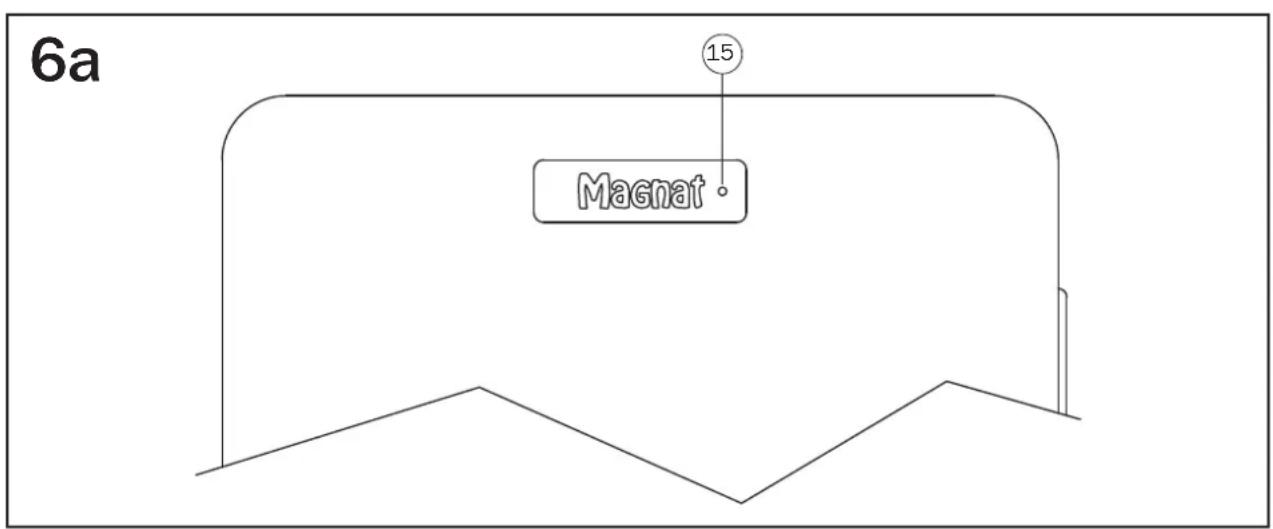
The LED status display on the soundbar (Fig. 4a, item 1) goes off. The LED status display of the subwoofer (Fig. 6a, item 15) changes from red to green.
If the subwoofer does not switch on automatically or the LED status display on the subwoofer flashes orange, the connection has failed. In this case, the connection has to be established manually. Proceed as follows:
- Select the AUX input (Fig. 7, item 24) using the remote control.
- Press the NIGHT button (Fig. 7, item 27) on the remote control for 5 seconds. WPAIR then appears in the display.
Now press the CONNECT button at the rear of the subwoofer (Fig. 6b, item 17). The LED status display on the subwoofer flashes green while the connection is being established. - When pairing is successful, SUCCE appears in the display and the LED status indicator on the subwoofer lights up green.
- If FAIL appears in the display, the process has to be repeated.
OPERATION
Operating elements of the Soundbar (front) (Fig. 4a)
(1) LED-status Indication: This LED illuminates red when the device is in standby mode.
(2) LED Display: Various information is shown on the Display:
-
Selected audio source
Sound and menu settings -
Audio format: if a Dolby digital signal is decoded, DOLBY appears on the display briefly.
In the event of incompatible audio formats, N/A appears on the display; there is no playback.
- When playing back content stored on a USB: title number, play time, repeat mode, random play setting, other playback information where applicable.
When not used, the display turns itself off after 10 seconds.
(3) Sensor for remote control: Please aim at this sensor when using the remote control.
Operating elements of the Soundbar (side) (Fig. 4b)
(4) ON/STBY: Switches the device on when it is in the standby mode. Conversely the device can be switched from power operation to the standby mode.
(5) VOLUME: Increases (+) or decreases (-) the volume.
(6) SOURCE: Selects the input.
Operating elements of the Subwoofer (front) (Fig. 6a)
(15) LED-status indication: This LED illuminates red when the device is in standby mode. The LED lights up green when the subwoofer is in operating mode. See the „Initial start-up“ section..
Operating elements of the Subwoofer (rear) (Fig. 6b)
(17) CONNECT: Starts the manual pairing mode on the subwoofer. See the „Initial start-up“ section.
Operation with the system remote control (fig. 7):
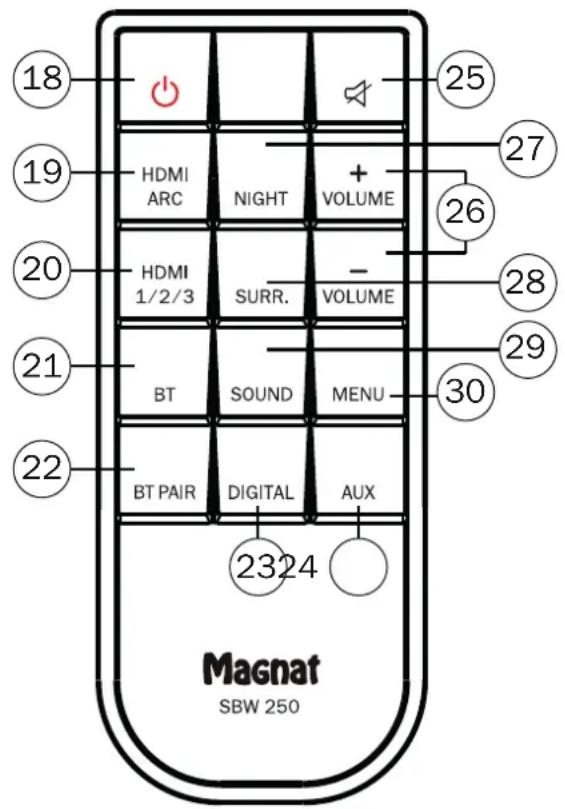
(18) ON/STBY: Switches the device on when it is in the standby mode. Conversely the device can be switched from power operation to the standby mode.
(19)HDMI/ARC: Selects the audio input HDMI/ARC:
(20) HDMI 1/2/3: Selects the additional audio / video inputs HDMI 1, 2, 3
(21) BT: Selects the audio input BLUETOOTH:
(22) BT PAIR: Switches the device to the pairing mode when in Bluetooth operation to establish a connection to a Bluetooth source device.
(23) DIGITAL: Selects the audio input DIGITAL IN:
(24) AUX: Selects the audio input AUX IN:
(25) MUTE: Switches the sound on and off.
(26) VOLUME: Increases (+) or decreases (-) the volume.
(27) NIGHT: Activates or deactivates a playback mode with reduced dynamics and a frequency response that is adapted for sound-sensitive situations (e.g. late at night).
(28) SURR: Switches the 3D surround sound function on or off.
(29) SOUND: Selects various sound settings:
LINEAR: Linear sound setting
MUSIC: Optimises the frequency response of the unit for music playback.
MOVIE: Optimises the frequency response of the unit for film sound reproduction.
VOCAL: Emphasises the vocal range for particularly good speech intelligibility.
(30) MENU: Opens the settings of the Soundbar
The following settings can be selected and changed with the VOL +/- buttons. (26). Pressing the menu button again will set these changes:
SUB: Increases (+) / decreases (-) the volume of the subwoofer.
EQ: Sound adjustment for different positioning of the soundbar
WALL: This setting optimises the sound when the soundbar is fitted to the wall.
DESK: This setting optimises the sound when the soundbar is positioned on a shelf in front of or under the TV.
ASTBY: This device switches off automatically after approx. 20 minutes to save energy. This function can be manually disabled. The factory setting is enabled.
RESET: Sets all settings back to default settings.
EXIT: Exits the setting menu.
SERVICE AND TECHNICAL PROBLEMS
If you should encounter any technical problems, please contact your specialist dealer or Magnat Audio-Produkte GmbH, Tel.: +49 (0) 2234807-0.
SPECIFICATIONS
Configuration: 2 x 2-ways, active
Powered bassreflex subwoofer
Output power RMS/Max.: 2 x 20 /40 watts (L+R-channel)
Cross-over frequency:
180/3100Hz
Sampling rates of the digital inputs: up to 96kHz / 24Bit
Operating frequency: BT: 2402 - 2480 MHz
Wireless: 5740 - 5840 MHz
Maximum emitted power according to EN 62479: xxx dBm
Power consumption:
wireless network disabled (standby mode): <0.5 W
wireless network enabled (operation mode, no audio signal): < 6.5 W
Dimensions Subwoofer (wxhxd): 1000 x 79 x 60 mm
Dimensions Subwoofer (wxhxd): 196 x 334 x 370 mm
Weight Soundbar: 2,5 kg
Weight Subwoofer: 6,7 kg
Power supply adapter: Dongguan Dongsong Electronic Co., Ltd., DYS602-210309W0
SUBJECT TO TECHNICAL CHANGE.
Très cher client,
RISQUE D'INGESTION DES PILES!
Dongguan Dongsong Electronic Co., Ltd., DYS602-210309WO
SOUS TOUTES RÉSERVES DE MODIFICATIONS TECHNIQUES
Dongguan Dongsong Electronic Co., Ltd., DYS602-210309WO
CON RIServa DI APPORTARE MODIFICHE TECNICHE
Dongguan Dongsong Electronic Co., Ltd., DYS602-210309W0
RESERVADO EL DERECHO A REALIZAR MODIFICACIONES TECNICAS.
Ybaxaembl noTpbe6ntel npodykunM MAGNAT!
Ppexde Bcero, no3BoIbte no6lanoapntBac 3aTo, yTo Bbl cIeIann BbIbOp B nOJIb3y I3denn MAGNAT. Co CBOei CTOpOnbl Mbl No3dpabnem Bac c 3Tm warom. Blaoroap cIeIahHomy BbIbOpBy Bbl cTAN BnaIeNBcEM KaueCTBeHHo npOdyKuIN, noIyUHBwe MeKdyHapodHoe npn3HaHne.
BAXHOE YKA3AHNE NO BE3ONACHOCTN
PykoOCTBO NO 3KcNpyatau Copeknt BaXhBte yka3aHnnopeKmny pa60bI 6e3onacHocTn.ObraTeNbHO co6nQdaTB BCE yka3aHn. XpaHnTB PykoOCTBO NO 3KcNpyatau B HAdexHOM MeTe.
- PNEyPENEITBHeIYKA3AHN: CneNyET npHIMaTb BO BHMaHHe BCE npEynpeTeBHeIe 063HaueHn Ha yctpoCTBe, npHaJNeKHOCTx N B PykoBOcTBe no 3KcnJyatau.
BINHHE TEMNEPATyPbI: 3KcNpyaTpyte yCTPOeCTBO C npHaJNeXHOCTMn B dnaNa3OHe TEMpepatypoT O 10^ Do 40^ YcTPOcTBo He DOnkHo yCTaHaBnBaTbcra B6JIm3u NCTOChNKOB Tepna (HarpeBaTeJI, neu, 3NeKTpOKAMHbI, OTKpbTOe PnAm). PnMOtaxe B6NJ3N yCNHTeJe HEnb3a YMeHbTa MmHMaJIbHOe pacCTOHHe 10 cm
He donyckaTe KOHTaYcTPOcTBa COTKpbITbIM NnMaHEm, HAnpMep, CO CBeaAM. - 06paTHe BnHMaHHe Ha DoCTaTOHy BOBHTINRAUHO yCTPOcTBa. HeIb3a HApbBaTb yCTPOcTBo, HAnpMep, WToPAMn, rapDInHAMN. YcTaHaBnBaTb Ha DOCTaTOuHOM pacCTOAHN (npm. 20 cm) OT cTeH.
BIIHHE BNAKHOCTN: YcTpoCTBO He DoJXHO NoDBePraTbCBAODeIcTBIO BOaHbIX KaneB Nn6pblr. TaKxe ero HnB3A HCNoJIb3OBaTb B KaueCTBe NOCTABKN DnB Ba3 NnDpyNX 3aONHeHHbIX KUdKOCTbIO cocyIDB. He noDBePraTe yctpoCTBO BO3deIcTBIO BObI INN BO3dyxA C BbICOKO BNAKHOCTbIO. CyueCTByET OnaCHOCTb NOPaxHn TOKOM. B cnyae KOHTAKTa C BIAIgON IIN XIKIOCTbIO HEmEINNEHO OTCOeHNHTb YcTPOCTBO OT CETNIITAHN. - NOCTOPOHHNE PPEDMETbI: CneNyet o6paatb BHIMAHHe Ha To, YTO6bi Yepe3 OTBepCTBa HE nonaDn BHYtpb NOCTOPOHHE PPEDMETbI. OHN MOrT CTaTB pInuHOB BO3HKnHOBeHnK KOpOTkX 3aMbKaHn, NopaxHeNr TOKOM ININ NOxapa.
- UNCTKA: Cnedyet npmehyb cyxyo mMykyo TkaHb n He nCnoB3OBaTb uCTraune cpectBa, cnpen nn Xmnueeckne pactBopnten, nHaue NoBepxHocTb MoKET noNyHTb NobpeXDeHn.
NIOCOEINHEHNE NITAHN: CneNyET co6IIOaTb npaMeTpbl HaprJKeHN, yka3aHHbte Ha 3aBOcknx Ta6nKax. BLOK NITAHN yCTPOiCBta MOXHO 3cKnpyaHTPOBaT TOlbKO c yka3aHHbMn Ha 3aBOcknx Ta6nKax npaMeTpamn HaprJKeHN n YACTOTbl.
3AUHTA OT MOJHINMEPbI PNEIOCTOPOXHOCTN: Ecn npn6bp dnttehoe Bpme (hanp.,BOTnycke) He ncoNb3yeTc, cneDyET OTcoeHNHtBeTeBOW uTeKep OT cTeuNTAHNA. Pnp60 CneDyET TAKKe OTcoeHNHrTb OT cTeuNTAHNA BO BpeM rpo3bl. Te m cambl pndotbpaaaetcnoBpeKdHeNe OT ydaP aMOHne N NOBbUeHHoro HANpRKeHn.
CETEBOKABENb: CTeBOH Ka6eNb DoJKeH 6b1b BcERda roTOB K3KnpyTaUIMn UyKaNaBbBaTcR ToIbKO TaKIM O6pa3OM, YTO6bl HIKTO He MOr Ha Hero HAcTyuNTb. TaXKe HeNb3aZkMaTb Ka6eNb npEdMeTAMn, KOtOpBle MOrY TNOpeDInb erO. PnnpimHeHH WTeNCeJIbHbIX BNIOK UyINHHTeJIbHbIX WTeNCeJIbHbIX PO3ETOK CNeDyET O6paAaTb BHMMHe Ha To, YTO6bl Ka6eNb He 6bl HApONmEH B MeTe BixOJa m3 WTeNCeJIbHO pO3ETKN. He DToParINBaTcR DO cTeBOrO Ka6eNn He NpOKNIOaTb erO BIAxHbIMPyKAMn.
CetBoI uTeNcEInb nCnOJIb3yETcra kAK OTKJIIOUaIOoee yCTPOINCTBO, IN K HEmy DOJIXeH 6bITb oEscneueH CBOOdHbI DoCTyB IIOboe Bpemr. - PEPERPY3KA: WtencenbHbe po3eTK, ydnHntbHbe wTencbHbe po3eTK n ydnHnteHn He doXhpaOtaB o npEbbweHem Harpy3K. Pnp neperpy3ke cyueCTBye ot achoctb nopaxeHHa TOKOM n noxapa.
- YCTAHOBKA: O6paTne BHHMaHHe Ha HnCTpyKuIO NO MOHTaXy.
- YcTpoIcTBO DOJONKHO yCTaHaBnBaTbCRA NIM MOHTnpoBaTbCRA TOJIbKO yCTOHNBOM OCHOBAHNI HENODBHXbIX NOCTaBKAX, TAK KAK INaHe CyUeCTByET ONaCHOCTb TpaBMATN3Ma.
- IcnoIb3yIte TOnIbKO BxOJaUeN B KOMnJIeK T NoCTaBKn IIn yKa3aHHbIe npOn3BOJTeNem OpINHaJIbHbIe npHaJdNexKHOCTN.
- YcTpoIcTBo MOxET 3KcIIyATnpOBaTbCra TOnbKO c 6LokOM NITAHnA „Dongguan Dongsong Electronic Co., Ltd., DYS602-210309W0" H3 KOMNKeTA NOCTABKN.
BaTapeH aKKyMnyTopbI He dONXHbI NOBepraTbcra Bo3DeiCTBnIO BbICOKNX TempeaTp, HApPmEp, cOnHeCHoro CBeta, orHry n T.I. -
ONACHOCTb IPOFJIATbIBAHNBAATAPEI!
-
YcTpoCTBO/nybT DnctaHIOHOr OynpaBneHn Moryt coepKaTB NyROBHyIe/DnCKOBbIe 6aTapeKn, KOTOpBIE MOXHO npOrNTb. XpaHIne 6aTapeN B HeOcTyHOM Ira DeTei MeCTe. PpOrIaTbIBAHne 6aTapeM MoKET pINBecTN K TRAKeJIbIM TpaBMam Hn CmeptN. Upe32 Yaca nocne npOrNaTbBAHn 6aTapeM MORYT Bo3HNKHYb TReKeIbe BHTpeHHne OKOrn.
- Pnnoo3peHnHa nporNaTBaHHe nIi nonaHaHna 6aTapeB OprAHm HEmeJeHHO obaTtEcB 3a MeuHckOJ NMOUbIO.
-Пи 3aMeHe 6aTape XpaHIne HOBHe N cNoIb3OBAHHbIe 6aTape B HEOCTVNHOM dIra DeTeMecTe.
Iocne 3aMeHb6atapeyue6eNTecbTOM,TOOTCEKdN86atapeynnoHOCtBIO3akpbIT. - Ecnnt OTeK dIg 6aTape HbO3MOxH NOJIHOCTbIO 3akpbITb, He nCnOJIb3yIe N3dEJIne. IomecNTte N3dEJIne B Heoctynhoe dIg DeTeMecTo N o6paTHeTcB K pOn3BOJntEnIO.
IOBPEKDEHNA, KOTOPbIE DOJXHBY YCTPAHRTBCNUEUJAINCTOM:
PnCneDyUOxH NOBpeKDeHNx, Pn6op Heo6xoJMo HEmeJNeHHO OTCoeJHHb OT cETn NITaHn I nepeTa b CneuaNCTy Ha npOBedeHe peMOHTa:
- Ecni Ha cTeBOM ka6ene 6dyt O6hApyKeHb NOBpeXJeHn, 3KcNpyaTnpoBaTb yCTpoCTBO 60nbwe HeIb3r. NOBpeXeHHbI Ka6eIb peMOHTNDoBaTb Hbl3r, eO HYXHO 3aMeHHTb.
-Повржденя pa3ьема петаня ha yctpoiCTBE. - Ecnn BHytpb yctpoiCTBa nonana Bnara nIIN NOCTOPOHHe npedMeTbI.
- Ecnn yctpoNCTBO ONpOKnHyIOCB n pni 3OM NOBpeuINcKOPNyc.
- EcIn yCToBHO HePpABUNbHO FyHKUHnHPyET, XOTa CO6JIIOHeHb BCE yKa3aHnPyKOBoDCTBa no 3KnNpyaTcIM.
IOnyctHMO npednpHHMaTb TOnbKO Te DoONHHTeBHe I3MeHHeN, KOtOpBe pa3peWeHb I3ROTOBtEnEM.
IpaHHTa Heo6xOIMIO hONb3OBaTb ToJIbKO opuHaHbHbe 3anaChbte DeTaHn.
Pocne pemonta Heo6xmo npOBepntb yctpoictBO Ha 6e3onacnoctb, YTObl oecneuHt haJnEkauee n HadeKHOe fYHKUOHPOBAHne.
PemOHThbpepa0bIdoJXhBbCerdaBbIOJIHrTbcKBAJIINΦU\POpBaHHbIMn CneuaJIInCTAMN,TAK KAK Haue MOKe TB03HNIKHHTb onaCHOe BbOCOe HAnpJxHeHnI DpyRn BeNDbl ONaCHOtN.

TpeyrolbHc C cmbonom moHHn npdynpkdaet noh3oBaTeJ O TOM, YTO BHytpn yctpOCTBa nCNOJb3yETcBbOCoe HapjKeHne, KOtOpoe MoKet BblBaT onChbIe ydApbl 3NeKTPueckm TOKOM.

TpeytobnHK C BOC NKIaTeBbHbIM 3HaKOM Opaaaet BHMaHHe NOnb3oBaTeNa Ha To, YTO B PnIraeMOM PykoOCTBe NO 3KnpyatauNo Coepxatc Baxhble ykaaHn No 3KnpyatauN n TexHnueckomy 06CnykBaHIO (pemHTy), KOTOpBie DoJnxbl So8aTeBHo co6IIOdaTbc.

He OTKpbBbTa! Onachocb 3neKtpnueckoro yapa!
BHIMAHHE: He oKpbIbTaB Kopnyc rpomKorOBopnteNe/cTeBbe 6nKn H He CHIMaTb KpbIuKN, TObb n36ExaTb yDapa ToKOM. NOnb3ObaTeNIO 3anpeSeHO npoBOdNTb KaOK-Nn6o peMOHT. PemOH TdoJIkeH BblONHrTbCra TObKO KBaINΦmUPOBaHHbIM TexHnueckM CneuaNtCTOM! He nCNOJb3OBaTb WTeNCeNbHbIe po3ETK INY yDNHNHTeN, KOToPbIE He npNHMAOTNONHocTb O TeKeP yCTpoCTBA.

IcnoIb3yIte ToIbKO ykaaHnB b pykoBOdCTBe no 3KcNpyaTaun 6nok nTahna.

HanpJxHeHne npemEnHoro ToKa

YcTpoIcTBo KNaCa 3aunTbI C DBoHn I3OJaNei. KOHTAK 3aunTHoro 3aemne Hn OTCyTCTByET.
YKA3AHNIO YTNIN3AUIN
Cornacno eBponecko dupeKTHBE 2012/19/EU Bce 3neKtpueeckne n 3neKtpoHHbIe np6opbln yTuHn3aun DoJXh bdaBaTbcr OTeNbHO B MeTHbIe c6OpHbIe NyHTbl. Ioxaanycta, BblOnHraTe MeCTHbIe npedncaHn H He Bbl6paCbBaIte Ctapble ycToPcTBa BMecTe C obHybIM DomauHHM Mycopom.
YTNJIN3AUINBATAPEEK
CTapbie 6aTapeKIOHOcTcKOCOsbIM OTOxam NIOJNexkatYTNIN3aUNCnGnACHOeIcTByUOUMnPpeDnMCHnM.
CODEPXMMOE:
(A) 1x AkycTmHecka CnCTema Soundbar
(B) 1 × Ca B B ep
(C) 1 x CeteBoi 6bnok dny akyctnuecko cnCTeMbI Soundbar, BKn. ceteBoi ka6eb
(D) 1x CTeBcKa6eBn Dnna ca6Byepa
(E) 1 x Bnok dntaHOnHO r npabHeN, Bknouy a kkyMnyTOpHy 6Taapeo (MNHaTOpHbI 3eMeHT nITAHn CR2025)
(F) 1 M CTepeo-aydnoka6eJIb, c DByx CTOpOH TIOJbNaHHbI WTeKeP Ha 3,5 MM
(G) 1,5 M ONTHUeCKM UΦpOBoK Ka6eB
(H) 1x HacteHHbIKpOHHTeH C KpeKHeIM MaTePnAJaM
(1) 1xPykoBOcTBo no 3Kcnnyatauun
PACNAKOBKA KOMJIJEKTA FPOMKOROBOPUTJEIEM
OcToPoxHo paCnakOBaTb rpoMkorOBOpntEn n npHaadNexKHOCTn npOBepNTb coedePkmoe opnHahBhoK KapTOHHo Kopo6Kn Ha oChObe BblweyOnmryToTOrO cncka. B cnYae TpaHcnpTHoro nobpeXdeHn CneDyET obaTbcr K noCTabuNky. XpaHtB ynakobOchHyMaTePAHnBa H naExHom MeTe. OpiHnHaBna YNAKOBA Na3BOJrE TocUeCTBnTb 6ecnpobEmHyIO nepeBo3Ky npi No3dHeIeM nepee3e N B cnYae cepBnCHOro 0cbnykBaHN.
YCTAHOBKA CNTTEMhblIX KOMNOHEHTOB
Soundbar (A): Soundbar должен pa3MeaTbcsr HenocpeDCTBcHNO noT TeNeBn3Op mnocepeHHe. EcN TeneBn3Op cTOnT ha noNKe нлВшkaФу-серВаTe, akycTneckar cnCTema Soundbar moKet yctahabnBaTcR HenocpeDCTBeHNo nepe yctpoiCTBOM. EcN TeJIeBn3Op cMOHTnpOBaH Ha cTeHe, akycTneckar cnCTema Soundbar dOлжEN pa3MeaTbcs r nomoub bXoJaux B KOMPJIeKT CTeHObIx kPOHtSeHOB HenocpeDCTBeHNO noT ekpaHOM.
Ca6Byep (B): Ca6Byep cIeNyET ycTaHbINBaTb Ha IONY HeJaJIeKO OT aKcYtUeCKo CnCTeMbI Soundbar, 06bHuO cnpaBIM nIcBeA OTeNeBn3Opa. PacCToHHe OTeKpHa TeNeBn3Opa dIy NaMnOBbIX TeNeBn3OpOB He DoJXHO 6bITb MeHbWe 100 cm, a dIra TneBn3OpOB C nIOckm 3kPaHOM - He DoJXHO 6bITb MeHbWe 50 cm.
PpMHeHHe BXoAUXB KOMNtCTeHOBbXKPOHHTeHOBnAkyctueckOcnTeMbISoundbar pa3bAcHReT PcyHok 1.
a. PnKpEnIte HAcTeHbI KPOHtEeH K CTEHe NOD TeLEB3OpOM, KaK NOKa3aHO Ha pncyHke. IcnoJIb3yIte NOxOJaNE K MaTePnAly CTeHb KpeNExHbIe BHTbI NIO6eII (HE BXoJrT B KOMJIneKT NoCTaBKn).
b. HabebcTe 3ByKObyIO nAHeIb CO CMOHTnPOBaHHbIMN KpeKExHbIMN BoNTaMn B NOxOJaUne Na3bI HAcTeHHORo KpOHtEHa
Baxhoe yka3aHne / yka3aHnno Texnke 6e3onachoctn: 3a npimeHeHne dpynx HacteHHbIX depKaTeen / kpenneHn OTBeTCTBeHHocTh Heecet ToJIbKO KIneHT. TaKke KIneHT eINHOJNUHcHe cet OTBeTCTBeHHocTh 3a HaJeXHOe KpenneHne depKaTeen HA CTHe H bIbOp COOTBeTCTByIOUero MOHTaXHOrO MaTePnana (HaNP., BNTbl, DIOBEN) C yYeTom BEca N KOHCTpykUNn AkyCTnuecko nCCTEmbl Soundbar n CBOITCB CTHebl.
NHCTAJIIARCNCCTEMbl
IopknquHne TeNeBn3opa (pnc. 2):
SBW 250 npeHa3NaeHnI pymoro noKIOUOeHnK TeEBN3Opy. IaI 3TOrO IMeETcTpB03MOxHOCTH:
a)Поdkнунени TeJebn3opa K HDMI@-прсоeДиненHIO HDMI/ARC (pnc.5, no3.14):
IopKIOuAte TeleBn3Op K 3ToMg IpucoeHHeHIO, ecH Ha HEM NMeTcpa3bE M HDMlC cyHKueN ARC (peBepcnBhbl 3BykoBo KaHa, cTaHdapt HDMl1.4).
EcnHDMi-pa3bem TeIeBn3Opa donoHHTenbHO IMeet fYHKUIO CEC (Consumer Electronics Control), oCHOBHMfYHKUNMnSoundbar, taKIMN KAK BKNIOueHHe/BbIKNUOyeHne, rPOMKCTb N OTKNIIOUeHne 3Byka, MOXHO ynpabnTc nyta DYTeIeBn3Opa. KaKHe IMeHHO fYHKUIMC CEC DOCTyHbI, 3aBcNTOT KOHNpeTHOH MOnEI N TeIeBn3Opa. No 3TOMY NOBOy CNEdyETnpouHTa pykoBOcTBo nOJIb3OBeTaHn Ha TeteBn3OP. BoJbnHCTBO npON3BOInTEeN HcONb3yOT co6ctBeHHoe Ha3BaHne dpyHKUICCE, OHO npENMyueCTBeHHO 3aKaHnBaEtca Ha cNoBo „Link". BHIMAHHE: NO TexHHueckm npuHHAM fYHKUINCE doCTynHa TOnkBo npNpNDKnIOueHenn Upe3 HDMIG
Bo3MOxH0, 3TN ΦyHKUHN HuyKHO BkIIOuHTb B MeHIO TeneBn3Opa. BnaOpaB A CTopeHHOMy DeKoJepy Dolby® Moryr TaKxe BocPOn3BOJNTbcraCnHaNb I KOnIpOBKe Dolby® Digital. Ka6eNb dIry 3TOrO B KomnNeKT NoCTabKn He BxOaNT.
b) IopknioeHne TeeneBn3opa K onTnueckomy uonpOBOmy BxOy DIGITAL IN (pnc. 54, no3. 9):
BocnoIb3yItec onTtueckm Ka6eJem n3 KOMnIeKta NoCTaBKn I CoeHNHTe UΦpOBo ayDnOBbIXo TeneBn3opa c ayDnOBxOdom DIGITAL IN (pnc. 5, no3.9) Soundbar. Bnaorapra BCTpoEHHomy DeKOepy Dolby® Moryr TaKke BocnpOn3BOuNTbcra cnHaJIb B KoINpOBKe Dolby® Digital.
c) IopcoeHHeHne TeneBn3opa K ayNoBxOy AUX IN (pnc. 5, no3. 10):
NcnoB3yteaynokabeH N3 KOMnIeKTA NOCTABKN I COeHNHTe ayINOBbIXOJ TeNEBImOp CA yINOBXoDM AUX IN ( pnc. 5, no3. 10). EcnBaW TeNEBIMOP OCHaueH ayINOBbIXOJOM C HEn3MeHHbIM yPOBHeM, eRcneDyET npEInooyctb ayINOBbIXOy c nepemehbbIM yPOBHeM.
IodKJIIOHcEHNEpyrNx yCTpoiCTB KSoundbar(pnc.3):
CoeHHeHne yctpoNCTBa caydnonctouHnKoM Bluetooth:
IpeeknOHTe Soundbar b pexim Bluetooth c nOmoBIO npIbTa DY. Ecn paHwe CBa3c 3TNM yCTPOIcTBOM Bluetooth yke yCTaHaBnBaIacb, npdPnHmMaetc aBTOMaTneckar nonbKa BOCCTaHOBNEHr CoEINHeHr. Pn 3OM MoXET Ntpe6oBaTcB BPuyHyIO NOdBEPNTb BOCCTaHOBNeHr CoEINHeHr Ha ycTPOIcTBe-NCTOHKe. CoEINHeHr c NoDcoEINHeHHbIM paHee nCTOHNKOM MOxET 6bIb YCTaHOBNEHO CHOB A JIOBO MOpENT, TAK KAc BLTeoth He3aBnCmO OT Bb6paHnHO Ha Soudbar BXODA BCERDA pa6oTaET B FOHOBOM pexime I NOJIHOCTbIO BkNIOyaeTc TOnko Nocne nepeXoDa B peXIM OKndaHn.
Ecni paHbIe coeHHe He yCTaHABnBaIOc bnn OHO He MoKet 6bITb BOCtAHOBJIeHO,Soundbar aTOMaTmueckn BKIOUaET peKIM CoeINHeHNA, KOtOpB TaXKe Ha3bIbaETcpeKIMOM cnapBaHNA. TTo6bI nepeKIOHTb Soundbar B pexIM Pairing BpyHyIO, HaxMITE KONky BT PAIR (pnc.7, no3.22)Ha nIbTe Dv. Ioka pexIM Pairing AKTNBEH,Ha dncnnee MnaeT mNdkaTop BT.
Tenepb BKIOHNTe peKIM Bluetooth ycTPOINCTBa-NCTOHnka. Soundbar BbIOInTCB C nCnke yCTPOINCTB Bluetooth kak ,SBW 250". EcIn OH He BbIOInTCB C nCnke ycTPOINCTB, AKTNBUPyIe BpyHyIO NOnCK ycTPOINCTB Bluetooth Ha ycTPOINCTBe-NCToHnke INpOBepTe, BKNouen Hn Ha Soundbar peKIM cnapnBAHn.
B 3aBnCmOCTN O t yctpojctBa-ntOchHnka Bo Bpem npoceca yctahOBnHeHn coeHNHeHn MOKeT bItb 3aHaB Bonpoc, cneDyET n npHnTb npaONb. OTBeNTb Ha Bonpoc MoKHO npocTo HaxKatne KhoNk "PnHrTb". EcnBONpO napone nobTopuTcR, nCNoIb3yIte cTaHdaptThbe napOnn "0000"nn "1234". EcIn coeHNHeHn yctaHabNBanoc paHee, MoKeT 3aDaBaTbcBONpoc, XOTITE JIN Bt YcTAHObITb coeHNHeHn. Ha Hero TAKke OTBeueaJe "Ja". Pocne ycNeWHorO coeHNHeHn Ha dncnnee 3aropaeTcR CmBOB BXoDa BT n He rachet.
Soundbar noDepKnBaet oco6o kaeeCTBHeHb CTaHapT nepeaay ayno ,Qualcomm® aptXTM".Ecn yctpoiCTBO-ntOHTNk TAKKe noDepKnBaet 3Ty TexHOrno, npy ycTaHOBJeHm CoeHNHeHry Bluetooth B KaeeCTBe pexIma nepeaay ABToMaTHueckn BBiHpaeTcra ,Qualcomm® aptXTM".
IopknouheHne aHaoroboro nIu cnpoBoro aymoctouHka kSoundbar:
K aHaIorOBomy BxOy AUX IN (pnc. 5, no3. 10) n uΦpObIM BXoAM DIGITAL IN (pnc. 5, no3. 9) Soundbar moryr noKnHouatbcn npdyne ayuOnctouHKn, HanpImep, npourpbBaTei KOMnakT-dNcKOB, MP3-npeepbl, cnTyHmKOBbe pecuBepbl. Ira 3toro nonb3yTEcb oncaHHo Bbiue npceDpyoi.
PoiKJIIOUeHHe NcTOUHKnOB HDMI-CnHana (ayDNO/BnDeo) K3BykoBoi NaHei:
Ko Bxoam HDMI -HDMI1, HDMI2 u HDMI3 (pnc. 5, no3. 11, 12, 13) moXHO noXk IIOuHTb do Tpx hctOHHKOB HDMI (hAnpIMep, npOnrpbBaTeNB BD/DVD, npneMnK SAT, irpoBaJ KOHcOB). AyDIOcRHaN nCTOHHKa HDMI npedaetca uepe3 cIcTeMy SBW-250, BnuDeocnHaN nepeaetcHa Ha BixoH HDMl (HDMl OUT (ARC), pnc. 5, no3. 14).
B 3toi KOHpyaun Ha TeleBnOpe Heo6xOdmo Bb6paTb BXoH HDMI, KOTOpBn noDKnIOueH K BbIXOy HDMI 3ByKOBOI naHEn (pnc.5, no3.14).
BaxHo: Pa3bEM USB (pnc. 5, no3. 8) npedHa3NaeH ncknOHTeNbHO nIg o6HOBHeHn CnCTEmbl nIa Dpynx ceen He nCnoNb3yeTcra.
PoiocoeHHeHne nctouHnKa nHTaHnAkyCTHuecko cnCTeMbI Soundbar:
B o6bem nocTbKn BxOHT yHnBepcAhn BHeuHoi CTeBOH 6NOK (C), KOTOpbIe pa6oTaIO T cHaNPKeHNEM 110-240 B/AC 50/60 T. IcNoB3yEmbI B BaWey CTpaHc CEteBOH Ka6eMb MoKET NMeTB HHyO KOHCTpyKlUIO. EcnI CEteBOH Ka6eNb He NOxOHT K BaWMIM WTENCeHBm PO3eTKam NnB bI He yBepeHb B KaHeCTBE erO NoDcoEINHeHNA, CneNyET O6paaTbcra B ToproByo opraH3aUHO KomnaHm Magnat.
- CoeHHTe BbIXoHoi Ka6enb (xpanOBaMyfTa) BHeuHero cTeBOrO 6noka C nIraHUM pa3beMOM aKycTuecko cnCTEmbl Soundbar (pnc.5, no3.7).
- BCTaBnTb ceTeBOI Ka6eJIb B pa3bEM Ha ceTeBOM 6Noke.
- BCTaBtbcTeBOKabeNB WTeNCeHbHyo po3eTKy. Obaaatb BHMaHne Ha npMeHeHne COOTBeTcByIOero wTeNCbHOI po3eTke CeTeBOrO WTeKepa (CMOTPN PnmuMeHaHne Bblie).
IodcoeHHeHHeNcToUHnKa HHTaHnAkyCTuYecko CnCTeMb1 SubWoofer
B o6bem noctabkn Bxodnt cambl paacnpoctpaehnbl cteboi ka6eI. IcnoIb3yembl B BaIeI cTpaH eTeBOI Ka6eI MoKet IMeTB HNYIO KOHCTpykUIO. Ecn CteBOI Ka6eJI He NOxOHT K BAuIM WTeNCEJBHIM PO3ETKAM NII BBy He yBepeHb I KaueCTbeero noDcoEINHeHn, cIeMyET ObaatbcraB ToprobyIO opraHn3auIO kOmnaHm Magnat.
- BCTaBbTe DByxNIOIOCHb KAbeIb CteBcOro NITAHnB Pa3bEm (3) Ha ycunntene ca6Bypepa (pnc. 6b, no3. 16).
- BCTaBt b cTeBoi Ka6eIb W TencenbHyIO po3eKy. O6paUaTb BHMaHne Ha npMHeHne COOTBeTcByIOe Ro TencenbHOI po3eTke CTeBOrO wTeKePA (CMoTPn PnpMeuHne Bblie).
IEPBbI BBOB B 3KcNJIYATAUIO, BEcPPOBOHOE NOdKJIIOUeHNE 3BYKOBOI PAHEJI K CABBYΦEPY:
Pocne noeknuehen Bex CnHabbix KaBene n KaBene n TAnHn K 3ByKOoN naHEn n ca6Bypey BkHouTe 3ByKOBYIO naHEn b cnooIbu npbTa dctaunooHoro ynpaBneHn (pnc.7, no3.18) nn Ha 6okobon naHEn npaBneHn (pnc.4b, no3.4).
Pn KaKdOM BKNIOHEn 3ByKObA NaHeJIb ABOTMaTHueCKN NOKNIIOVAeTcK Ca6Bypepy:
CBETODIOHDHnIHINKATOP COCTOHNHa 3BYKOBOI NaHEII (PNC.4a, no3.1) rachET.CBETODIOHDHnIHINKATOP COCTOHN HnC6Byepa (PNC.6a, no3.15) n3MeHReT cKpachoro Ha 3eHbI.
Ecni ca6byep He BkIOuHnIcA bTOMaTHueckn, nIe cIIN, CBTeODnOHyI INHnKaTOp COCToHnI Ca6Byepea MIRaeT opAHKeBbIM UBeTOM, npOn30UHa OwN6ka coeDInHeHry. B 3tOM cNyAe Heo6xOmO yCTaHOBnTB coeDInHeHne BpyHyIO. Iopraok DeiCTBNI:
-CnmoBIOyIbTaDnCTaHNOHOYnpABNeHbYbEpTe BxOdAUX (pnc.7, no3.24)
- Ha nyIbTe DnCTaHcNHOHoro ynpaBHeHHaHXMITE KONky NIGHT (pnc. 7, no3. 27) Ha 5 cek. Ha dncnnee noRbTcRA WPAIR.
- Haxmte KhoNkY CONNECT ha 3aHnei naHenn ca6Byepa (pnc. 6b, no3. 17). Bo BpeMa yctaHOBKn coeHNHeHn CBeToIONDhI INDkATOP COCTOHNrCa6Byepa MrrAet 3eNEHbIM UBeTOM.
-Bcnyae ycnueHoro coeHNHeHnHa nucnnee noaBraTcra coo6uHne SUCCSE cBeToNDnHbIn HndkaTOp coCTOHHa caBypepa NoctoHHoro ropt 3eHeHbIM CBETOM. - Ecnn ha dncnnee noBnocb coo6eHne FAIL, heo6xmo NOBtopnb npoueDpy.
YNPABJIEHNE
3nementbI ynpabHeHn Saoundbar (nepeHnctopoHa) (pnc. 4a):
(1)CNHnHKauncoCToHHN:3TOT CND ropnt KpaChbIM,ecJYN yCTPOINCTBO HAXOINTCB PEXKIM OEHNDAHNA.
(2) CBeToDnOHDhI DnCnJIe: Ha dncnnee noka3bBaetcpa3NHyH aHΦopMaUa;
-Bb6paHHbaydnoBxO
-3BykoBbIe HAcTpoKu M MeHO
-3BykoBoiΦopMaT:EcIn DeKoDpyetc CnHa Dolby Digital,Ha DncNnee Ha HeKOTope Bpem NoaBnctc HAdnscb DO LBY. PnHecOBMeCTMbIX 3BykOBbIXΦopMaTx Ha DncNnee BbIOuNTc N/A,BOcnPOn3BeDeHne He npOn3BOuNTc.
- Pn Bocnpon3BedeHnn PhaiNoB c USB: Homep Komno3uHn, npourpahHoe BpeM, pexm NobTopeHn, hactpoKa cnayauHoro Bocnpon3BedeHnn, no BO3M. DOnONHTenbHaN HOpMaun O BOCnpon3BedeHnn.
Dncnne raeh npimepno uepe3 10 c nocne nocneHero deyctbna no ynpabHeHHIO.
(3) DaTnK dncTaHUnOHHO ynpaBHeHn: Yo6bI BOCNoJIb3OBAtbc NyIbTom D, HApBaBte ero Ha 9To MecTO.
3nementbI ynpaBneHnSoundbar (ctopoha) (pnc. 4b):
(4) ON/STBY: BkIIOUaET yCTPOINCTBO, ecn OHO HAXOINTCB PexKIMe OXINAHN. HAObOpOT, yCTPOINCTBO MOXHO nepeKINCHB n3 peKIMa Power B pexIM OXINAHN.
(5)VOLUME:YBeJIuHbAeT (+) /ymeHbwaet(-]rpmKoCTb
(6) SOURCE: BbIbIpaTeBxOa.
3nementbI ynpabneHna ca6Byepea (nepeHnra cToPOHa) (pnc. 6a):
(15) CND INHINKauincoCToHn: 3TOT CND ropnt KpaChbIM, ecnn yctpoiCTBO HaxoDITcB Pexmme OxuaHn. CBetOIOID ropnt 3eHehM, ecnn ca6Bypep HaxoDITcB B pa6oem pexmme. CM. TAKKe pa3dEe (Iepbbu BBOD B 3kCnpyatauio).
3nementbI ynpabHeHH ca6Byeepa (tbInbHa cToPOHa) (pnc. 6b):
(17) CONNECT: 3anyckaet pekim pyhoro nooknoeHnca6byepa. Cm. TaKke pa3dien «IpeBbB B0D B kcnnyatauHO
YnpaBHeHne cnybTa DY cnCTeMbI (pnc.7):
(18) ON/STBY: BkIIOuAeT yCTpoiCTBO, ecn OHO HaxoIITcB pexIMe OxuaHna. I HAO6OpOT, yCTpoiCTBO MOXHO nepeKIOHTb n3 pexIma Power B pexIM OkndaHna.
(19)HDMI/ARC:BbIbIpaTeayDIOBxOHDMI/ARC.
(20)HDMI 1/2/3: BbIbpaet dononHntBhble ayno-/BnDeobxOdbi HDM11,2,3.
(21)BT:WaBbIb6npaertayuOboxoBDLUETOOTH.
(22) BT PAIR: Ipeeknouaet yctpoiCTBO B pexmte Bluetooth B pexm cnapnbHn, YTObI yctAHOBt b coeHNHe HcycTPOiCTBOMNCTOHHKOM Bluetooth..
(23) DIGITAL: Bыбрает aydnoBxod DIGITAL IN.
(24) AUX: BbIbnpaetaydnoBxoAUX IN.
(25) MUTE: OTKJIIOHauaET n CHOBa BKNIOHauaET 3ByK.
(26)VOLUME:YBENHNAET (+) /ymehbwaet(-)rpmKoctb
(27) NIGHT: Bknoaet n BbkiouaepekmBocnpn3BeHnC yMeHbueHHoINHAMKoN ONTUMNPOBAHHBMu YACTOTHBIMXapaKTepncnKaMn DnCtuaun, KOrDa He HxJHa 6oJIbua rPOMKOCTb (HAnp., No3DNHM Beepeom T.D.).
(28) SURR: BkIIOyaeT NnBbIKIOyaeT cyHKUIO 06bEMHOTO 3ByaHn 3D-Surround.
(29) SOUND: BbIbIpaeT pa3IINHbIe 3ByKOBbIe HAcTpOaIKM
LINEAR:INHeHnHaHacTpoKaNoIocbYacTOT
MUSIC: ONTUMN3Hpye TachToTHbIe xapakTePncTkn yCtpoCtBa dny BocnpOn3BedeHn My3bIK.
MOVIE: ONTNMn3npyET YacToTHbIe XapakTepeNCTKu YcTpoNCTBa IJRA BOCpOn3BeDeHn 3ByKa FmMbMOB.
VOCAL: Bdyenraet dnaanaoh roIoc aIry oecneueHn Oeyb xopoWero NOHMaHn, YTOROBOPT.
(30) MENU: OTKpbBaet MeHIO HAcTpoEk Soundbar
Moxho Bb6npaTb N 3MeHraTb C nOoBIO KHOK VOL+/- (26) cneDyUoune HAcToPOn. NOBTOpHOe HaxaTne MeHO IOdTBePckDaet HacToPouKy.
SUB: YBENuHbAeT (+)/ymEnbHaAe (-) rpoMkoCTb ca6Bypepa.
EQ: HactpoKa 3Byka dnya pa3nHbX BapnaHToB pa3MeueHnra 3BykoBo nHaHeN
WALL: 3Ta HactpoKa ONTmMn3npyET 3ByK npu pa3MeueHn 3ByKOBo NaHeJn Ha CTeHe.
DESK: 3Ta HacToPka ONTMMnpyET 3ByK npn paMaMeUeHnn 3ByKOBo NnHaHeN HaCTIaKe IIN NO TTeEBn3OpOM.
ASTBY:ДяэхOMHn 3JeKToP3HeprN yCTpoIcTBO ABtOMaTHueCKn OTKInOuaTeC nPmEpHO uepe3 20 MnyT,ecnHa Hero He Noctynaet CHTan. 3Ty cyHKUIO MOKHO BbIKNUOTb, npn NOCTABKe OHa BKIOUeHa.
RESET: C6poc BCEX HACTpoek Ha 3aBODCKne.
Exit: BixoN 13 MeHIO HAcTpoE.
CEPBNC INTEXHNUECKNE IPOBJIEMbl
EcnB03HnKHyT TexHnueckne npo6IeMbI, o6paTntecb B cneuaaunuropoBaHHbM mara3n HnHa qnpMy Magnat Audio-Produkte GmbH, Ten.: +49 (0) 2234807-0.
TEXHnueCKNE DAHHbIE
KoHcHpyaun: 2x2 nonocbl,akTnBbH
BbIXOHaH MoUHocTB RMS/MaKc.: 2x20/40 BaTT (kaHaL+R)
Ca6bypep:Bassreflex
100/200 BaTT (ca6byΦep)
Dnana3OH yactOT:
25-28000n
Pa3dienTeNbHaYacToTa:
180/3100
YactotaDnckpeiTaunuΦpoBbXBXoOB:
do96KU/246nT
Paboya yactota:
BT:2402-2480MHz
MaKcImaJIbHaN ⅢJlyaemar MoUhoCTb corJaHcHO EN 62479:
Wireless: 5740 - 5840 MHz
IOTpe6JrrMaMA MOUHOCTb:
xxx dBm
PaNOCB3b Bblk.(peKIM OxuHaHn):
<0,5 BaTT
PaDnOcB3b BKn. (paoboum peKIM, HET ayDnOcnHaIa):
<6,5 BaTT
Pa3MepbSoundbar(IXxBxΓ)
1000x79x60MM
Dongguan Dongsong Electronic Co., Ltd., DYS602-210309W0
PAPBO HA TEXHUNECKNE IN3MEHEHNAHAMI
1
a
2
TV
7

Congratulations! You have made a wise selection in becoming the owner of a MAGNAT HiFi equipment. Due to high quality MAGNAT products have earned an excellent reputation through the western world. And this high quality standard enables us to 5-years warranty for MAGNAT HiFi speakers and a 2-years warranty for Magnet HiFi-electronic components.
The equipments are checked and tested continuously during the entire production process. In case you have problems with your MAGNAT HiFi equipment, kindly observe the following:
- The guarantee period commences with the purchase of the component and is applicable only to the original owner.
- During the guarantee period we will rectify any defects due to faulty material or workmanship by replacing or repairing the defective part at our discretion. Further claims, and in particular those for price reduction, cancellation of sale, compensation for damages or subsequent damages, are excluded. The guarantee period is not altered by the fact that we have carried out guarantee work.
- Unauthorized tampering with the equipment will invalidate this guarantee.
-
Consult your authorized dealer first, if guarantee service is needed. Should it prove necessary to return the component to the factory, please insure that the component is packed in original factory packing in good condition - the quality control card has been filled out and enclosed with the component, - your enclose your receipt as proof of purchase.
-
Excluded from the guarantee are: - Illuminates - Wear parts - Shipping damages, either readily apparent or concealed (claims for such damages must be lodged immediately with forwarding agent, the railway express office or post office). - Scratches in cases, metal components, front panels, etc. (You must notify your dealer directly of such defects within three days of purchase.) - Defects caused by incorrect installation or connection, by operation errors (see operating instructions), by overloading or by external force. - Equipments which have been repaired incorrectly or modified or where the case has been opened by persons other than us. - Consequential damages to other equipments. - Reimbursement of cools, without our prior consent, when repairing damages by third parties.

Toutes nos felicitations!

- Declaration of Conformity
- DOLBY DIGITAL
- IMPORTANT SAFETY NOTICE
- RISK OF SWALLOWING BATTERIES!
- DAMAGE THAT MUST BE RECTIFIED BY A SPECIALIST:
- INSTRUCTIONS FOR DISPOSAL
- BATTERY DISPOSAL
- CONTENTS
- UNPACKING THE SET
- SETTING UP THE SYSTEM COMPONENTS
- SYSTEM INSTALLATION
- Connecting additional devices to the soundbar (fig. 3)
- Connecting the device to a Bluetooth audio source:
- Connecting an analogue or digital audio source to the soundbar:
- Connecting HDMI sources (audio/video) to the soundbar:
- Connecting the power supply of the soundbar:
- Connecting the power supply to the subwoofer:
- INITIAL START-UP, WIRELESS PAIRING OF THE SOUNDBAR WITH THE SUBWOOFER
- OPERATION
- Operating elements of the Soundbar (front) (Fig. 4a)
- SERVICE AND TECHNICAL PROBLEMS
- SPECIFICATIONS
- RISQUE D'INGESTION DES PILES!
- BAXHOE YKA3AHNE NO BE3ONACHOCTN
- IOBPEKDEHNA, KOTOPbIE DOJXHBY YCTPAHRTBCNUEUJAINCTOM:
- YKA3AHNIO YTNIN3AUIN
- YTNJIN3AUINBATAPEEK
- CODEPXMMOE:
- PACNAKOBKA KOMJIJEKTA FPOMKOROBOPUTJEIEM
- YCTAHOBKA CNTTEMhblIX KOMNOHEHTOB
- NHCTAJIIARCNCCTEMbl
- IopknouheHne aHaoroboro nIu cnpoBoro aymoctouHka kSoundbar:
- PoiKJIIOUeHHe NcTOUHKnOB HDMI-CnHana (ayDNO/BnDeo) K3BykoBoi NaHei:
- PoiocoeHHeHne nctouHnKa nHTaHnAkyCTHuecko cnCTeMbI Soundbar:
- IodcoeHHeHHeNcToUHnKa HHTaHnAkyCTuYecko CnCTeMb1 SubWoofer
- IEPBbI BBOB B 3KcNJIYATAUIO, BEcPPOBOHOE NOdKJIIOUeHNE 3BYKOBOI PAHEJI K CABBYΦEPY:
- YNPABJIEHNE
- CEPBNC INTEXHNUECKNE IPOBJIEMbl
- TEXHnueCKNE DAHHbIE
- Toutes nos felicitations!
Brand : MAGNAT
Model : SBW 250
Category : Soundbar