EasyManual
IK 400 S.B.EK. - Cooker STEBA - Free user manual and instructions
Find the device manual for free IK 400 S.B.EK. STEBA in PDF.



Download the instructions for your Cooker in PDF format for free! Find your manual IK 400 S.B.EK. - STEBA and take your electronic device back in hand. On this page are published all the documents necessary for the use of your device. IK 400 S.B.EK. by STEBA.
USER MANUAL IK 400 S.B.EK. STEBA
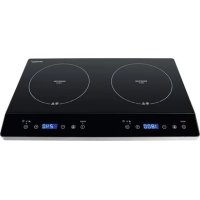
1) Left heating zone, 2000 Watt,
Heatingzones XXL-Zone / Left heating zone Right heating zone two independent Flexible heating zone Heatingzones Control panel Touch Controll:
1) Left heating zone
2) Right heating zone
Use Only touch the switching point 1-7 on the control panel with your fingers. Use cookware suitable for induction cooker, proof it with a magnet. Do not scratch the pot over the surface of the cooker. Press the On/Off button “…”3 seconds. The appliance beeps one time and the display shows “[0]--“ Pay attention that the glass surface and the base of the pot are dry and clean. Place the suitable pot/pan, with a minimum diameter of 14 cm, on the left or right marking “+”. If you place the pot eccentric up to more than a half, “…” flashes on the display and the appliance turns off after 2 minutes. Choose the plate (left or right) on the control panel. Set the power on the slide control. When „LO“ is flashing in the dis- play, then the child lock is activated. Touch the sensor area (Nr. 6) for 5 seconds and in the display “- -“ is visible. When “U” is flashing then15 the program will be deleted, as no pot is on the appliance. Choose the (left or right) cooking area and touch at the control panel Slide controll If you do not select a power level within one minute the appliance turns off. You can change the power setting while using the induction cooker. Finish cooking