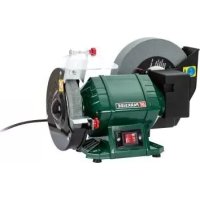
PNTS 250 C2 - Grinding wheel PARKSIDE - Free user manual and instructions
Find the device manual for free PNTS 250 C2 PARKSIDE in PDF.


| Product Type | Wet and dry bench grinder |
| Brand | Parkside |
| Model | PNTS 250 C2 |
| Rated Input Voltage | 230 V~, 50 Hz |
| Power Consumption | 250 W (S2 30 min) |
| No-load Power Consumption | 190 W |
| Protection Class | I |
| Protection Type | IPXO |
| No-load Speed (Wet Disc) | approx. 129.5 min⁻¹ |
| No-load Speed (Dry Disc) | approx. 2980 min⁻¹ |
| Weight | approx. 8.6 kg |
| Sound Pressure Level | 84.5 dB(A); K_pA=3 dB |
| Sound Power Level | 97.5 dB(A); K_WA=3 dB |
| Total Vibration Value | ≤2.5 m/s² |
| Wet Abrasive Disc (Diameter x Hole x Thickness) | ∅200 mm x ∅20 mm x 40 mm |
| Wet Disc Grit | 80 |
| Dry Abrasive Disc (Diameter x Hole x Thickness) | ∅150 mm x ∅12.7 mm x 20 mm |
| Dry Disc Grit | 36 |
| Main Functions | Dry and wet sharpening, deburring, sanding small metal tools |
| Safety | Adjustable spark guard, protective cover, On/Off switch |
| Maintenance and Cleaning | Clean with brush or cloth; empty water tank before storage |
| Spare Parts Available | Abrasive discs, clamping flanges, spark guards, workpiece support, cover |
| Warranty | 3 years |
| Intended Use | Domestic, by adults (young people under supervision) |
Frequently Asked Questions - PNTS 250 C2 PARKSIDE
User questions about PNTS 250 C2 PARKSIDE
0 question about this device. Answer the ones you know or ask your own.
Ask a new question about this device
Download the instructions for your Grinding wheel in PDF format for free! Find your manual PNTS 250 C2 - PARKSIDE and take your electronic device back in hand. On this page are published all the documents necessary for the use of your device. PNTS 250 C2 by PARKSIDE.
USER MANUAL PNTS 250 C2 PARKSIDE
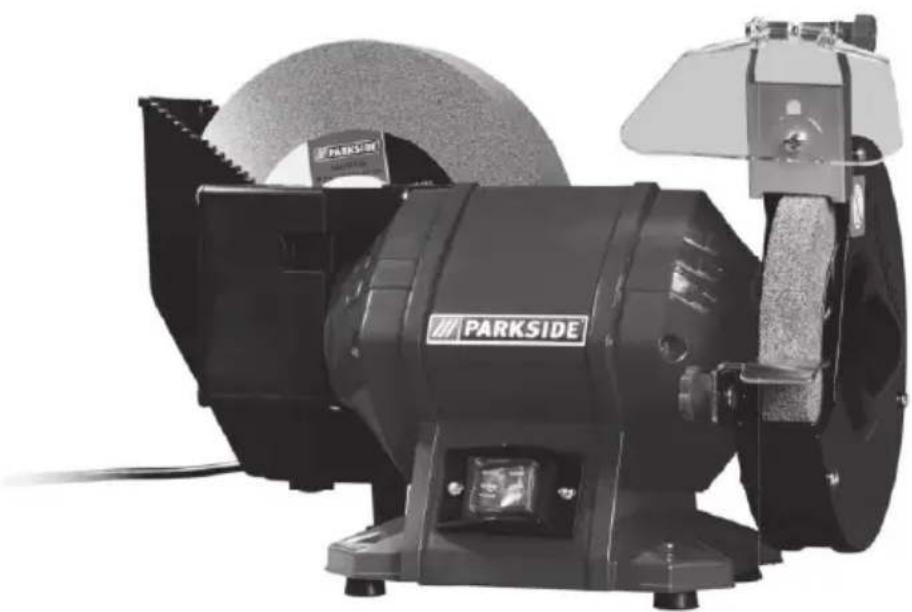

Nass-/Trockenschleifer / Wet & Dry Bench Grinder / Touret à meuler sec et humide PNTS 250 C2
DE AT CH
Nass-/Trockenschleifer
Wet & Dry Bench Grinder
Translation of the original instructions
NL BE
Nat-/droog-slijpmachine
Before reading, unfold the page containing the illustrations and familiarise yourself with all functions of the device.
FR BE
GB / IE Translation of the original instructions Page
Service-Center......21
Importeur 21
General description......23
Scope of delivery 23
Function description......23
Summary 23
Technical specifications......24
Safety Instructions......24
Symbols and icons 24
General Safety Directions for Power Tools 25
Safety information for bench grinders 27
Residual risks....28
Assembly....28
Assemble/set workpiece supports ..... 28
Assemble/adjust spark protection ..... 29
Screw device on to workbench ..... 29
Fill water into the water tank....29
Operation 29
Switching on and off 30
Grinding with the dry grinding disc...30
Grinding with the wet grinding disc .. 30
Change grinding disc....31
Cleaning and maintenance......32
Cleaning....33
General maintenance 33
Transport 33
Storage....33
Waste disposal and environmental protection ....33
Replacement parts/accessories...34
Trouble Shooting 35
Guarantee 36
Repair Service....37
Service-Center....37
Importer 37
Translation of the original EC declaration of conformity ....126
Exploded Drawing ......133
Introduction
Congratulations on the purchase of your new device. With it, you have chosen a high quality product.
During production, this equipment has been checked for quality and subjected to a final inspection. The functionality of your equipment is therefore guaranteed.

The operating instructions constitute part of this product. They contain important information on safety, use and disposal. Before using the product, familiarise yourself with all of the operating and safety instructions. Use the product only as described and for the applications specified.
Keep this manual safely and in the event that the product is passed on, hand over all documents to the third party.
Intended use
The wet/dry grinder is suitable for sharpening tools (e.g. knives, scissors, chisels), and deburring and grinding smaller metal workpieces.
The device is not intended for all other types of applications (e.g. grinding with unsuitable grinding tools, grinding with a coolant solution, grinding hazardous materials such as asbestos).
The equipment is intended for use in the field of DIY. It is not designed for commercial use.
The equipment is designed for use by adults. Young people under the age of 16 are permitted to use the equipment only under supervision. The manufacturer shall not be liable for damages caused by use other than for the intended purpose or by incorrect operation.
General description
The illustrations can be found on the front and rear fold-out pages.
Scope of delivery
Unpack the equipment and check that it is complete. Dispose of the packaging material correctly.
• Device with pre-assembled grinding discs
- Spark protection
- Assembly material for mounting the spark protection on the machine - adjusting screw incl. washer and snap ring, nut
- Workpiece support
- Assembly material for mounting the workpiece support on the machine - star grip nut, washer, lock washer and screw
• Rubber cap for water tank
- Instruction Manual
Function description
The wet/dry grinder is a combined device that is equipped with a dry grinding disc and a wet grinding disc with different grain sizes for coarse and fine grinding.
The device is provided with a spark protection and protective hoods for the protection of the user.
For the function of the operating parts, please refer to the descriptions below.
Summary
1 Wet grinding disc
2 Spark protection
3 Adjusting screw nut for spark protection
4 Dry grinding disc cover
5 Dry grinding disc
6 Workpiece support
7 Star grip nut to mount/adjust the workpiece support
8 On/off switch
9 Drillholes for table mounting
10 Rubber foot (water tank)
11 Rubber cap for water tank
12 Power cable
13 Water tank
14 Lock washer
15 Washer
16 Mounting screw for workpiece support
17 Nut
18 Spark protection holder
19 Washer
20 Spring ring
21 Adjusting screw for spark protection fastener
22 Grinding disc nut
23 Clamping flange
24 Intermediate layers made of cardboard
25 Protective hood for dry grinding disc
26 Clamping flange made of plastic
27 Clamping flange made of plastic
28 Gear unit housing
29 Washer
Technical specifications
Wet & Dry Bench Grinder .....PNTS 250 C2
Nominal input voltage U...230 V\~, 50 Hz No load power consumption P₀ ....190 W (S1) Power consumption P....250 W (S2 30 min)*
Safety class....I Mechanical rating....IPX0 Idling speed n0
wet grinding disc ... approx. 129,5 min -1
dry grinding disc .... approx. 2980 min 1
Weight (incl. accessories)..approx. 8.6 kg Sound pressure level
(LpA) 84,5 dB (A); KpA = 3 dB
Sound power level
(LWA) 97,5 dB(A); KWA = 3 dB
Vibration total value (ah) ...... ≤2.5 m/s 2
Wet grinding disc
Outer diameter ....∅ 200 mm
Bore hole ....∅ 20 mm
Thickness 40 mm
Grain size....80
Speed nmax 3820 min -1
Working speed vs .....max. 40 m/s
Dry grinding disc
Outer diameter ....∅ 150 mm
Bore hole ....∅ 12.7 mm
Thickness 20 mm
Grain size....36
Speed nmax 4500 min -1
Working speed vs .....max. 35 m/s
* A break is introduced after 30 minutes of uninterrupted operating duration until the device temperature differs 2 K (2°C) less than room temperature.
Noise and vibration values have been determined according to the standards and regulations mentioned in the declaration of conformity.
The specified noise emission value has been measured according to a standardised testing method and may be used for comparison with another power tool.
The specified noise emission value may also be used for an introductory assessment of the load.

Warning!
oise emissions may deviate from the specified values during actual use of the power tool, depending on how the power tool is being used and, in particular, what kind of material is being worked on.
Safety measures for the protection of the operator are to be determined that are based on an estimate of the actual vibration load under the real operating conditions (for this, all parts of the operating cycle are to be taken into account, for example, times in which the electric tool is turned off, and those during which it is turned on but running without a load).
Safety Instructions
Symbols and icons
Symbols in the manual:

Warning symbols with in- formation on damage and injury prevention.

Instruction symbols with information on preventing damage.

Connect the machine to the power supply..

Pull out the mains plug.

Help symbols with information on improving tool handling.
Symbols on the device:

Warning!

Risk of injury from the rotating tool! Keep hands away.

Risk of electric shock! Disconnect from the mains before carrying out maintenance and repair work.

Read the instruction manual.

Wear ear protection.

Wear eye protection.

Wear breathing protection.

Wear cut-resistant gloves.

Use grinding disc only for dry grinding.

Use grinding disc only for grinding with water.

Water level mark
Do not dispose of electrical equipment in household waste.
Other symbols on the discs:

Never use faulty grinding discs.
Graphical symbol on the packaging:

Corrugated cardboard
General Safety Directions for Power Tools

WARNING! Read all safety notices, instructions, illustrations and technical data that have been provided with this power tool. Omissions in the compliance with safety directions and instructions can cause electrical shock, fire and/or severe injuries.
Retain all safety directions and instructions for future use.
The term „power tool“ in the warnings refers to your mains-operated (corded) power tool or battery-operated (cordless) power tool).
1) WORK AREA SAFETY
a) Keep work area clean and well lit. Cluttered or dark areas invite accidents.
b) Do not operate power tools in explosive atmospheres, such as in the presence of flammable liquids, gases or dust. Power tools create sparks which may ignite the dust or fumes.
c) Keep children and bystanders away while operating a power tool. Distractions can cause you to lose control.
2) ELECTRICAL SAFETY
a) Power tool plugs must match the outlet. Never modify the plug in any way. Do not use any adapter plugs with earthed (grounded) power tools. Unmodified plugs and matching outlets will reduce risk of electric shock.
GB IE
b) Avoid body contact with earthed or grounded surfaces, such as pipes, radiators, ranges and refrigerators. There is an increased risk of electric shock if your body is earthed or grounded.
c) Do not expose power tools to rain or wet conditions. Water entering a power tool will increase the risk of electric shock.
d) Do not abuse the cord. Never use the cord for carrying, pulling or unplugging the power tool. Keep cord away from heat, oil, sharp edges or moving parts. Damaged or entangled cords increase the risk of electric shock.
e) When operating a power tool outdoors, use an extension cord suitable for outdoor use. Use of a cord suitable for outdoor use reduces the risk of electric shock.
f) If operating a power tool in a damp location is unavoidable, use a RCD (Residual Current Device) protected supply. Use of an RCD reduces the risk of electric shock.
3) PERSONAL SAFETY
a) Stay alert, watch what you are doing and use common sense when operating a power tool. Do not use a power tool while you are tired or under the influence of drugs, alcohol or medication. A moment of inattention white operating power tools may result in serious personal injury.
b) Use personal protective equipment. Always wear eye protection. Protective equipment such as dust mask, non-skid safety shoes, hard hat, or hearing protection used
for appropriate conditions will reduce personal injuries.
c) Prevent unintentional starting. Ensure the switch is in the off-position before connecting to power source and/or battery pack, picking up or carrying the tool. Carrying power tools with your finger on the switch or energising power tools that have the switch on invites accidents.
d) Remove any adjusting key or wrench before turning the power tool on. A wrench or a key left attached to a rotating part of the power tool may result in personal injury.
e) Do not overreach. Keep proper footing and balance at all times. This enables better control of the power tool in unexpected situations.
f) Dress properly. Do not wear loose clothing or jewellery. Keep your hair, clothing and gloves away from moving parts. Loose clothes, jewellery or long hair can be caught in moving parts.
g) If dust extraction and collection devices can be installed, make sure that these are connected and used correctly. Use of dust collection can reduce dust-related hazards.
h) Do not allow yourself to be lulled into a false sense of security and do not disregard the safety rules for power tools, even if you are familiar with the power tool after using it many times. Careless action can lead to serious injuries within a fraction of a second.
4) POWER TOOL USE AND CARE
a) Do not force the power tool. Use the correct power tool for your application. The correct power tool
will do the job better and safer at the rate for which it was designed.
b) Do not use the power tool if the switch does not turn it on and off. Any power tool that cannot be controlled with the switch is dangerous and must be repaired.
c) Remove the plug from the wall socket and/or remove the rechargeable battery before you change the device's settings, change accessory parts or put away the power tool. Such preventive safety measures reduce the risk of starting the power tool accidentally.
d) Store idle power tools out of the reach of children and do not allow persons unfamiliar with the power tool or these instructions to operate the power tool. Power tools are dangerous in the hands of untrained users.
e) Look after the power tool and application tool carefully. Check for misalignment or binding of moving parts, breakage of parts and any other condition that may affect the power tool's operation. If damaged, have the power tool repaired before use. Many accidents are caused by poorly maintained power tools.
f) Keep cutting tools sharp and clean. Properly maintained cutting tools with sharp cutting edges are less likely to bind and are easier to control.
g) Use the power tool, accessories and tool bits etc. in accordance with these instructions, taking into account the working conditions and the work to be performed. Use of the power tool for operations different from those intended could result in a hazardous situation.
h) Keep handles and grip surfaces dry, clean and free from oil and grease. Slippery handles and grip surfaces do not permit safe operation and control over the power tool in unexpected situations.
5) SERVICE
a) Have your power tool serviced by a qualified repair person using only identical replacement parts. This will ensure that the safety of the power tool is maintained.
Safety information for bench grinders
a) Never use damaged attachment tools. Check attachment tools such as grinding discs for chipping or cracks before each use. If you have checked the attachment tool and attached it, keep yourself and any nearby persons out of the plane of the rotating attachment tool and allow the device to run for 1 min. at the highest rotational speed. Damaged attachment tools usually break during this test period.
b) The permissible rotation speed of the attachment tools must be at least as high as the highest rotation speed indicated on the power tool. Accessories that run faster than the permissible speed can break and fly apart.
c) Never grind using the side surfaces of the grinding discs. Grinding using the side surfaces can cause the grinding disc to burst and fly apart.
d) Only use grinding discs that correspond to the permissible diameter.
e) Always ensure that the bench grinder is stable and secure (e.g. fixed to a workbench).
GB IE
f) Replace the worn grinding disc if these distances can no longer be maintained.
g) Always use the power tool with attachment tools on both spindles to limit the risk of contact with the rotating spindle.
h) Always use the protective hood, workpiece support, viewing window and spark arrester as required for the attachment tools.
i) Replace any damaged or heavily worn grinding discs.
j) If replacement of the connecting cable becomes necessary, this is to be carried out by the manufacturer or its agent in order to avoid safety risks.
Residual risks
Even if properly operating and handling this electric tool, some residual risks will remain. Due to its construction and build, this electric tool may present the following hazards:
a) Lung damage, if suitable respiratory protection is not worn.
b) Hearing damage, if suitable ear protection is not worn.
c) Damages to health due to
- touching the area of the grinding tool which was not covered;
- the ejection of pieces from workpiece or damaged grinding discs.
d) Damage to your health caused by swinging your hands and arms when operating the appliance for longer periods of time or if the unit is not held or maintained properly.

Warning! During operation, this electric tool generates an electromagnetic field which, under certain circumstances, may impair the func-
tionality of active or passive medical implants. To reduce the risk of serious or lethal injuries, we recommend that persons with medical implants consult their doctor and the manufacturer of their medical implant before operating the machine.
Assembly

Caution! Risk of injury!
- Ensure that you have sufficient space in which to work, and that you do not endanger other people.
- Always fasten the device on to the work surface with screws featuring the sufficient length and thickness in order to maintain control of the device.
- All covers and protective devices must be assembled properly before commissioning.
- Disconnect the mains plug before changing the setting on the device.
B
Assemble/set work- piece supports
- Screw the workpiece supports (6) on to the device.
To do this, use the screw (16), washer (15), toothed washer (14) and star nut (7) supplied. - Set the workpiece support (6) of the dry grinding disc with the star grip nut (7) so that the distance between the dry grinding wheel (5) and the workpiece support (6) must not exceed 2 mm.

Periodically readjust the workpiece support in order to offset the wear and tear of the grinding disc (distance max. 2 mm).
C
Assemble/adjust spark protection
-
Screw the spark protection holder (18) onto the protective hood (F 25). For this, use the adjusting screw (21) including the snap ring and washer (20/19) and the nut (17).
-
Adjust the spark protection holder (18) with the aid of the adjusting screw (21): The distance between the dry grinding wheel (A 5) and the spark arrester holder (18) must not exceed 2 mm.
i
Periodically readjust the spark protection in order to offset the wear and tear of the grinding disc (distance max. 2 mm).
- Fold down the spark arrester into working position. Loosen the adjusting nut (3) and tilt the spark arrester to the desired position. Retighten the adjusting nut (3).
#
Despite the spark protection, you should always wear protective glasses when working in order to avoid eye injuries.
D
Screw device on to workbench
- Remove the rubber foot (10) of the water container.
- Screw the device onto the flat workbench with 4 screws and nuts. Insert the screws through the 4 bore holes (9) on the base of the device.
i
The screws and nuts required for assembly are not part of the scope of delivery.
D
Fill water into the wa-ter tank
- Insert the rubber closure (11) into the drain opening of the water tank (13).
- Fill water into the water tank (13) up to the water level mark Ⓞ.
Operation
!
Caution! Risk of injury!
- Always disconnect the plug from the mains socket before working.
- Use only grinding discs and accessories recommended by the manufacturer. The use of other insertion tools and other accessories may cause risk of injury.
- Only use grinding tools which bear information about the manufacturer, type of binding, dimension and permitted number of revolutions.
- Only use grinding discs where the printed rotational speed is at least as high as what has been specified on the name plate of the device.
- Do not use broken, cracked or otherwise damaged grinding discs. Change any damaged or heavily worn grinding discs.
- Only use the device when both grinding belt and the grinding disc are assembled.
- Never operate the device without the visual protection disc.
- Always inspect the grinding disc before starting the device: Check the distance between the spark protection holder and grinding disc as well as workpiece support and grinding disc (distance maximum 2 mm).
GB IE
- The grinding disc must be replaced once the spark protection holder and workpiece support on the grinding disc do not have distance of max. 2 mm. - Switch on the equipment only when it is safely installed on the work surface.

Keep your hands away from the grinding disc when the device is in operation. Injury hazard!

Despite the spark protection, you should always wear protective glasses when working in order to avoid eye injuries.
Switching on and off

Ensure that the mains voltage matches the specifications on the rating plate.

Connect the equipment to the mains.
- To switch on, press the "I" On switch (A 8) and the device starts up.
- To switch off, press the "O" off switch (A 8) and the device switches off.
After switching on the device, wait until the device has reached its max. speed. Only then must you start with the grinding.

The disc will continue to run after the equipment is switched off. There is a risk of injury.
Test run:
Before starting work and after each change of grinding disc, carry out a test run of at least 60 seconds with no load. Switch off the equipment immediately if the disc runs lumpy, substantial vibrations occur, or abnormal noises are generated.
Grinding with the dry grinding disc
- Place the workpiece on the workpiece support (A 6) and slowly bring it to its desired angle on the dry grinding disc (A 5).
- Move the workpiece slightly from side to side in order to achieve an optimal grinding result. This way, the dry grinding disc is worn uniformly. Occasionally, allow the workpiece to cool down.
- Fold the spark protection device (A 2) downwards while grinding in order to avoid injury from sparks.
Grinding with the wet grinding disc
- Check the water level in the water tank: The wet grinding disc (A 1) is to be submerged in water up to the water level mark ⚙ on the water tank (D 13).
- Stand in front of the wet grinding disc (1).
- Hold the workpiece with both hands and lower it slowly onto the wet grinding disc.
- The workpiece can also be supported on the teeth of the water tank (A 13).
Change grinding disc

Information on replacement:
- Never operate the device without protective equipment.
- Ensure that the rotation speed stated on the grinding disc is the same or higher than the nominal rotation speed of the device.
- Ensure that the grinding disc dimensions match those of the device.
- Only use flawless grinding discs. Perform a ringing test. When striking the grinding disk with a plastic hammer, this should result in a clear sound.
- Never re-drill a locating hole which is too small to make it larger.
- Never use separate bushings or adapters in order to make grinding discs whose hole is too large fit the device.
- Do not use any saw blades.
- To clamp the grinding tools only use the clamping flange provided. The pads between the clamping flange and the grinding tools must be made of elastic materials e.g., rubber, soft cardboard etc.
- Always reassemble the device completely after replacing the grinding disc.

Switch the device off and remove the mains plug.
Allow the device to cool down.

Wear protective gloves when changing the grinding discs in order to avoid cutting damages.
Change dry grinding disc:

-
Remove the spark protection (A 2) (see „Assemble/adjust spark protection”).
-
Loosen the fixing screws and remove the dry grinding disc cover (F 4) from the protective hood (25).
-
Unscrew the grinding disc nut (22) with a screw wrench (AF 19 mm) and hold against the grinding disc with one hand wearing a glove.
Unscrew the nut (right-hand thread): turn counter-clockwise.

-
Remove the clamping flange (23) and the dry grinding disc (5) together with the two cardboard intermediate layers (24).
-
Fit on the new dry grinding disc (5) with the intermediate cardboard layers (24) and the clamping flange (23), and screw the grinding disc nut (22) manually onto the nut (right-hand thread): turn clockwise.
-
Tighten the grinding disc nut with a screw wrench (AF 19 mm) applying modest manual force.
-
Screw the dry grinding disc cover (4).
-
Adjust the spark protection holder (C 18) and the workpiece support (A 6) - The distance from the dry grinding wheel (5) must not exceed 2 mm (see „Assembly“).

The grinding disc nut must not be screwed too tightly in order to avoid a breaking of the grinding disc and nut.
- Test run: Before starting work and after each change of grinding disc, carry out a test run of at least 60 seconds with no load. Switch off the equipment immediately if the disc runs lumpy, substantial vibrations occur, or abnormal noises are generated.
Change wet grinding disc:

- Release the 4 attachment screws (13a/13b/13c/13d) on the gearbox housing (28) and take off the water tank (13).

- Unscrew the grinding disc nut (22) with a screw wrench (AF 19 mm) and hold against the wet grinding disc (1) with one hand wearing a glove. Unscrew the nut (right-hand thread): turn counter-clockwise.

-
Remove the plastic clamping flange (26) and the wet grinding disc (1).
-
Fit on the new wet grinding disc (1) and the plastic clamping flange (26) and screw the grinding disc nut (22) manually onto the right-side nut (right-hand thread): turn clockwise.

The two plastic clamping flanges (26/27) are not identical.
- Tighten the grinding disc nut with a screw wrench (AF 19 mm) applying modest manual force.

-
Push the water tank (13) back over the wet grinding disc (1) and onto the gear unit housing (28).
-
.Attach the water tank (13) with the attachment screws and washers to the gearbox housing (28).

The grinding disc nut must not be screwed too tightly in order to avoid a breaking of the grinding disc and nut.

Between the clamping flange (27) and the gearbox housing (28) there is a washer (29).
- Test run: Before starting work and after each change of grinding disc, carry out a test run of at least 60 seconds with no load. Switch off the equipment immediately if the disc runs lumpy, substantial vibrations occur, or abnormal noises are generated.
Cleaning and maintenance

Disconnect the plug before adjustment, maintenance or repair.

Have any work not described in these instructions carried out by a specialist workshop. Use only original components. Allow the equipment to cool before carrying out any maintenance and cleaning work. There is a risk of burns.
Cleaning

Do not use cleaning agents or solvents. Chemical substances may attack plastic parts of the equipment. Never clean the equipment under running water.
- Clean the equipment thoroughly after each use.
- Clean the surface of the equipment with a brush or cloth.
General maintenance
Before each use, check the equipment for obvious defects such as loose, worn or damaged components and check that screws or other parts are sitting correctly. In particular, check the grinding disc. Replace damaged parts.
Transport

Switch off the device and unplug the mains plug.

Allow the device to cool down.
The grinding disc still runs even after the device has been switched off. There is a risk of injury.
- Carry the device with two hands. Grip it at the device base and motor housing.
Storage
- Empty the water tank (D 13) before storage: Pull the rubber closure (11) from the drain opening of the water tank and allow the water to drain off
- Store the appliance in a dry place well out of reach of children.
- Grinding discs must be stored dry and upright and are not to be stacked.
Waste disposal and environmental protection
Be environmentally friendly. Return the tool, accessories and packaging to a recycling centre when you have finished with them.
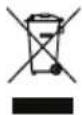
Machines are not to be place with domestic waste.

Recycle the corrugated cardboard outer packaging in an environmentally friendly manner.
- Hand over the device at an utilization location. The plastic and metal parts employed can be separated out into pure materials and recycling can be implemented. Ask your Service Center about this.
- Defective units returned to us will be disposed of for free.
Replacement parts/accessories
Spare parts and accessories can be obtained at www.grizzly-service.eu
If you have issues ordering, please use the contact form. If you have any other questions, contact the "Service-Center" (see page 37).
Position Exploded Drawing Description Order number
| 25 Dry grinding disc 91103553 | |
| 61 Wet grinding disc 30211041 | |
| 44,47,48,51,59 Set water tank 91105190 | |
| 60,62,63 Set clamping flange, wet 30211049 | |
| 26,27 Set clamping flange, dry 30211044 | |
| 13-21 Set spark protection | 30211045 |
| 30-34 Set workpiece support | 30211046 |
| 28,29 Set dry grinding disc cover | 30211047 |
| 22,23 Set protective hood for dry grinding disc | 30211048 |
Trouble Shooting

Always disconnect the plug from the mains socket before working. Danger of electric shock.
| Problem Possible Cause | Error correction | |
| Device doesn't start | Mains voltage missingMain circuit breaker is tripped | Check the socket, mains cable,line, mains plug, repairs to becarried out by qualified electrician if necessary, check maincircuit breaker. |
| On/off switch (A 8) may be defective | Repair by Customer Care | |
| Engine faulty | ||
| Grinding tools do not move although the engine is running | Grinding disc nut (F 22) loose | Tighten grinding disc nut (see “Changing the grinding disc”) |
| Workpiece, remaining work-pieces or remaining grinding tools block drive | Remove blockages | |
| Engine is slower and stops | Device is overloaded through workpiece | Reduce pressure on grinding tool |
| Workpiece unsuitable | ||
| Grinding disc does not rotate smoothly, abnormal noises can be heard | Grinding disc nut (F 22) loose | Tighten grinding disc nut (see “Changing the grinding disc”) |
| Grinding disc (A 1/5) faulty | Change grinding disc | |
| Spark protection (A 2) or workpiece support (6) set incorrectly | Set spark protection or work-piece support (see “Assembly”) |
Guarantee
Dear Customer, this equipment is provided with a 3-year guarantee from the date of purchase. In case of defects, you have statutory rights against the seller of the product. These statutory rights are not restricted by our guarantee presented below.
Terms of Guarantee
The term of the guarantee begins on the date of purchase. Please retain the original receipt. This document is required as proof of purchase.
If a material or manufacturing defect occurs within three years of the date of purchase of this product, we will repair or replace – at our choice – the product for you free of charge. This guarantee requires the defective equipment and proof of purchase to be presented within the three-year period with a brief written description of what constitutes the defect and when it occurred.
If the defect is covered by our guarantee, you will receive either the repaired product or a new product. No new guarantee period begins on repair or replacement of the product.
Guarantee Period and Statutory Claims for Defects
The guarantee period is not extended by the guarantee service. This also applies for replaced or repaired parts. Any damages and defects already present at the time of purchase must be reported immediately after unpacking. Repairs arising after expiry of the guarantee period are chargeable.
Guarantee Cover
The equipment has been carefully produced in accordance with strict quality guidelines and conscientiously checked prior to delivery.
The guarantee applies for all material and manufacturing defects. This guarantee does not extend to cover product parts that are subject to normal wear and may therefore be considered as wearing parts (e.g. grinding discs, carbon brushes, stopper, protective screen) or to cover damage to breakable parts (e.g. switches).
This guarantee shall be invalid if the product has been damaged, used incorrectly or not maintained. Precise adherence to all of the instructions specified in the operating manual is required for proper use of the product. Intended uses and actions against which the operating manual advises or warns must be categorically avoided.
The product is designed only for private and not commercial use. The guarantee will be invalidated in case of misuse or improper handling, use of force, or interventions not undertaken by our authorised service branch.
Processing in Case of Guarantee
To ensure quick handling of you issue, please follow the following directions:
- Please have the receipt and identification number (IAN 336935_2001) ready as proof of purchase for all enquiries.
- Please find the item number on the rating plate.
- Should functional errors or other defects occur, please initially contact the service department specified below by telephone or by e-mail. You will then receive further information on the processing of your complaint.
• After consultation with our customer service, a product recorded as defective can be sent postage paid to the service
address communicated to you, with the proof of purchase (receipt) and specification of what constitutes the defect and when it occurred. In order to avoid acceptance problems and additional costs, please be sure to use only the address communicated to you. Ensure that the consignment is not sent carriage forward or by bulky goods, express or other special freight. Please send the equipment inc. all accessories supplied at the time of purchase and ensure adequate, safe transport packaging.
Repair Service
For a charge, repairs not covered by the guarantee can be carried out by our service branch, which will be happy to issue a cost estimate for you. We can handle only equipment that has been sent with adequate packaging and postage.
Attention: Please send your equipment to our service branch in clean condition and with an indication of the defect.
Equipment sent carriage forward or by bulky goods, express or other special freight will not be accepted.
We will dispose of your defective devices free of charge when you send them to us.
Service-Center
GB Service Great Britain
Tel.: 0800 4047 657
E-Mail: grizzly@lidl.co.uk
IAN 336935_2001
Service Ireland
Tel.: 1890 930 034
(0,08 EUR/Min., (peak))
(0,06 EUR/Min., (off peak))
E-Mail: grizzly@lidl.ie
IAN 336935_2001
Importer
Please note that the following address is not a service address. Please initially contact the service centre specified above.
Service Réparations ....56
Importateur 56
28 Transmissiebehuizing
29 Onderlegring
Technische gegevens
Nat-/ droogslijpmachine........PNTS 250 C2
Nominale ingangsspanning U .... 230 V\~, 50 Hz Opgenomen vermogen bij onbelast bedrijf P₀....190 W (S1) Krachtontneming P ...250 W (S2 30 min)* Beschermingsniveau .... I Beschermingsklasse .... IPXO Toeren bij niet-belasting n₀ Natte slijpschijf .... ca. 129,5 min⁻¹ Droge slijpschijf .... ca. 2980 min⁻¹ Gewicht (incl. accessoires) .... ca. 8,6 kg Geluidsdrukniveau (LₚA) .... 84,5 dB (A); KₚA = 3 dB Geluidsvermogensniveau (LWA) .... 97,5 dB(A); KWA = 3 dB Totale trillingswaarde (qₙ) .... ≤2,5 m/s²
Natte slijpschijf
Buitendiameter....Ø 200 mm Gat....Ø 20 mm Dikte....40 mm Korreling....80 Toerental n max ....3820 min -1 Arbeidssnelheid v s ....max. 40 m/s
Droge slijpschijf
Buitendiameter....Ø 150 mm Gat....Ø 12,7 mm Dicke....20 mm Korreling....36 Toerental n max ....4500 min -1 Arbeidssnelheid v s ....max. 35 m/s
Service-Center....90
Importer 90
Service-Center......106
Dovozce....106
Service-Center......122
Dovozca....122
 Translation of the original EC declaration of conformity Translation of the original EC declaration of conformity | |
| We hereby confirm that the Wet & Dry Bench Grinder series PNTS 250 C2 Seriennummer 202006000001 - 202006049730 conforms with the following applicable relevant version of the EU guidelines: | |
| 2006/42/EC • 2014/30/EU • 2011/65/EU* | |
| In order to guarantee consistency, the following harmonised standards as well as national standards and stipulations have been applied: | |
| EN 62841-1:2015 • EN 62841-3-4:2016/A11:2017 • EN 12413:2019 EN 55014-1:2017 • EN 55014-2:2015 • EN 62321-1:2013 EN 61000-3-2:2014 • EN 61000-3-3:2013 | |
| This declaration of conformity is issued under the sole responsibility of the manufacturer: | |
 Grizzly Tools GmbH & Co. KG Stockstädter Straße 20 63762 Großostheim GERMANY 01.07.2020 Grizzly Tools GmbH & Co. KG Stockstädter Straße 20 63762 Großostheim GERMANY 01.07.2020 |  Christian Frank (Documentation Representative) Christian Frank (Documentation Representative) |
Translation of the original EC declaration of conformity
* The object of the declaration described above satisfies the provisions of Directive 2011/65/EU of the European Parliament and the Council of 8 June 2011 on limiting the use of certain harmful substances in electrical and electronic appliances.

IAN 336935_2001

- NASS-/TROCKENSCHLEIFER / WET & DRY BENCH GRINDER / TOURET À MEULER SEC ET HUMIDE PNTS 250 C2
- INTRODUCTION
- INTENDED USE
- GENERAL DESCRIPTION
- SCOPE OF DELIVERY
- FUNCTION DESCRIPTION
- SUMMARY
- TECHNICAL SPECIFICATIONS
- WET & DRY BENCH GRINDER .....PNTS 250 C2
- WET GRINDING DISC
- DRY GRINDING DISC
- WARNING
- SAFETY INSTRUCTIONS
- SYMBOLS AND ICONS
- SYMBOLS IN THE MANUAL
- WARNING SYMBOLS WITH IN- FORMATION ON DAMAGE AND INJURY PREVENTION
- SYMBOLS ON THE DEVICE
- OTHER SYMBOLS ON THE DISCS
- GRAPHICAL SYMBOL ON THE PACKAGING
- GENERAL SAFETY DIRECTIONS FOR POWER TOOLS
- RETAIN ALL SAFETY DIRECTIONS AND INSTRUCTIONS FOR FUTURE USE
- WORK AREA SAFETY
- ELECTRICAL SAFETY
- GB IE
- SERVICE
- SAFETY INFORMATION FOR BENCH GRINDERS
- RESIDUAL RISKS
- ASSEMBLY
- CAUTION! RISK OF INJURY
- B
- ASSEMBLE/SET WORK- PIECE SUPPORTS
- C
- ASSEMBLE/ADJUST SPARK PROTECTION
- I
- D
- SCREW DEVICE ON TO WORKBENCH
- FILL WATER INTO THE WA-TER TANK
- OPERATION
- KEEP YOUR HANDS AWAY FROM THE GRINDING DISC WHEN THE DEVICE IS IN OPERATION. INJURY HAZARD
- SWITCHING ON AND OFF
- THE DISC WILL CONTINUE TO RUN AFTER THE EQUIPMENT IS SWITCHED OFF. THERE IS A RISK OF INJURY
- TEST RUN
- GRINDING WITH THE DRY GRINDING DISC
- GRINDING WITH THE WET GRINDING DISC
- CHANGE GRINDING DISC
- INFORMATION ON REPLACEMENT
- CHANGE DRY GRINDING DISC
- CHANGE WET GRINDING DISC
- CLEANING AND MAINTENANCE
- CLEANING
- GENERAL MAINTENANCE
- TRANSPORT
- STORAGE
- WASTE DISPOSAL AND ENVIRONMENTAL PROTECTION
- REPLACEMENT PARTS/ACCESSORIES
- SPARE PARTS AND ACCESSORIES CAN BE OBTAINED AT WWW.GRIZZLY-SERVICE.EU
- TROUBLE SHOOTING
- GUARANTEE
- TERMS OF GUARANTEE
- GUARANTEE PERIOD AND STATUTORY CLAIMS FOR DEFECTS
- GUARANTEE COVER
- PROCESSING IN CASE OF GUARANTEE
- REPAIR SERVICE
- SERVICE-CENTER
- GB SERVICE GREAT BRITAIN
- SERVICE IRELAND
- IMPORTER
- TECHNISCHE GEGEVENS
- NAT-/ DROOGSLIJPMACHINE........PNTS 250 C2
- NATTE SLIJPSCHIJF
- DROGE SLIJPSCHIJF
- TRANSLATION OF THE ORIGINAL EC DECLARATION OF CONFORMITY
Brand : PARKSIDE
Model : PNTS 250 C2
Category : Grinding wheel