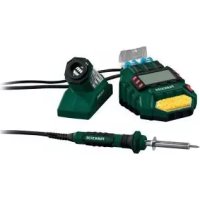
PLSD 48 B2 - Welding machine PARKSIDE - Free user manual and instructions
Find the device manual for free PLSD 48 B2 PARKSIDE in PDF.


| Brand | Parkside |
| Model | PLSD 48 B2 |
| Product type | Digital soldering station |
| Rated voltage | 230 V ~ (AC) |
| Rated frequency | 50 Hz |
| Heating power | 48 W |
| Temperature range | Approx. 200 to 450°C |
| Power cord length (station) | 1.5 m |
| Cord length (soldering iron) | 1.2 m |
| Display | LCD screen with actual and set temperature |
| Preset temperatures | 200°C, 300°C, 400°C |
| Standby mode | Automatic after 30 minutes of inactivity, temperature at 200°C |
| Package contents | 1 soldering station, 3 tips (1 pre-mounted), 2 spools of solder wire (1.0 mm and 1.5 mm, 10 g each), 1 sponge, 1 instruction manual |
| Intended use | Soldering of electronic components, DIY, hobby - non-industrial use |
| Safety | Automatic shutdown in standby mode, iron holder, burn protection |
| Maintenance and cleaning | Clean the housing with a soft cloth and mild cleaning agent; do not use solvents |
| Spare parts | Tips available via after-sales service |
| Warranty | 3 years from date of purchase |
| Customer service | Contact details in the instruction manual - contact by phone or email |
| Importer | CFH Lott- und Gasgeräte GmbH (info in manual) |
Frequently Asked Questions - PLSD 48 B2 PARKSIDE
User questions about PLSD 48 B2 PARKSIDE
0 question about this device. Answer the ones you know or ask your own.
Ask a new question about this device
Download the instructions for your Welding machine in PDF format for free! Find your manual PLSD 48 B2 - PARKSIDE and take your electronic device back in hand. On this page are published all the documents necessary for the use of your device. PLSD 48 B2 by PARKSIDE.
USER MANUAL PLSD 48 B2 PARKSIDE
DIGITALE LÖTSTATION / DIGITAL SOLDERING STATION / STATION DE SOUDAGE NUMÉRIQUE PLSD 48 B2
DE AT BE
DIGITALE LÖTSTATION
Gebrauchsanleitung
GB IE
DIGITAL SOLDERING STATION
Instructions for use
FR BE
STATION DE SOUDAGE NUMÉRIQUE
Mode d'emploi
NL BE
Before reading, please unfold the page with the illustrations and familiarise yourself with all the functions of the device.
FR BE
GB/IE Instructions for use Page 12
| FR | / | BE | Mode | d'emploi | |
| NL | / | BE | Gebruiksaanwijzing | Pagina | |
| PL | Instrukcja | obstugi | Strona | ||
| CZ | Námod | k | použití | Strana | |
| SK | Námod | na | použitie | Strana | |
Inhaltsverzeichnis
Einleitung. 2
Introduction. 13
Intended use 13
Features. 13
Items supplied. 14
Technical data. 14
Safety 14
Safety instructions 14
Preparing for first use. 16
Insert / replace the soldering tip. 16
First use 17
Switching on / off 17
Setting the temperature 17
Setting the working temperature 17
Setting up a programmed temperature 18
Standby mode 18
Switching off 18
Solder sponge. 18
Soldering. 18
Cleaning and maintenance 19
Disposal. 19
Device disposal. 19
Warranty from CFH Lott- und Gasgeräte GmbH . . . 20
Service & Importer 21
DIGITAL SOLDERING STATION PLSD 48 B2
Congratulations on the purchase of your new device
We congratulate you on the purchase of your new product. You have chosen a high quality product. The user manual is part of this product. It contains important information about safety, use and disposal. Before you use the product, familiarise yourself with all the operating and safety instructions. Only use the product as described and only for the stipulated application areas. Hand over all the documentation if you pass the products on to third parties.
Intended use
The device is intended for electronic soldering in the hobby and DIY sectors. It is intended for applications such as soldering, the welding of plastics and the application of ornaments. Only use the device as described and only for the indicated field of application. The device is not intended for commercial use. Any other use or modification of the device is considered to be unauthorised use and entails considerable risk of accidents. The manufacturer assumes no liability for damages resulting from unauthorised use.
Features
① ON/OFF switch
② Soldering iron holder
③ Soldering iron
④ Soldering tip
Soldering sponge
⑥ LC display
⑦ Temperature display
(8) POWER display (soldering tip being heated))
9^ + ^ button (working temperature)
10 "--" button (working temperature)
① Temperature selector (400^)
⑫ Temperature selector (300^)
⑬ Temperature selector (200^)
④ Temperature setting display
⑤ Actual/set temperature/Heating-up temperature
Soldering tip storage compartment
⑦ Solder
Items supplied
1 Digital soldering station PLSD 48 B2 incl. 3 standard soldering tips (1 x pre-fitted)
1 Solder, 1.0mm 10g 1 Solder, 1.5mm 10g 1 Solder sponge
1 Operating manual
Technical data
Rated voltage: 230V (AC)
Rated frequency: 50 Hz
Rated power consumption: 48 W
Temperature range: Approx. 200^ - 450^ Mains cable: 1.5 m from the mains plug to the station; 1.2 m from the soldering iron to the station

Safety
Safety instructions

WARNING!
Important notice: Read this manual carefully to familiarise yourself with the device. Please keep the instructions to be able to read them again. Assembly and adjustments made by the manufacturer must not be altered. It may be dangerous to carry out unauthorised structural modifications on the unit, to remove parts or to use other parts which are not approved by the manufacturer for the device (with unauthorised structural changes, there is a risk of burning for example).
The digital soldering station is intended exclusively for private, non-commercial operation in a dry indoor area.
- This device may be used by children over 8 years of age, as well as persons with reduced physical, sensory or mental capacities or lack of experience and knowledge, when they are supervised or have been instructed regarding the safe use of the device and understand the hazards resulting from its use. Children must never play with the device. Cleaning and user maintenance must never be
carried out by children without supervision.
- If the mains supply cable of this device gets damaged, it must be replaced by the manufacturer or its customer service or by a similarly qualified person in order to avoid hazards.
ATTENTION! DANGER OF ELECTRIC SHOCK! Do not use the digital soldering station if the handle, power cable or plug is damaged. Never open the device!
- RISK OF BURNS! Before using, check that the tool tip is properly attached to the device. Never touch the heated soldering tip or the molten solder. There is a risk of burns. The device must be allowed to cool down before changing, cleaning or checking any components. The hot tool tip and its mounting must not come into contact with skin, hair, etc. Risk of burns.
- After working, allow the soldering iron to cool down only in the air. Under no circumstances quench with water!
- BEWARE! DANGER OF FIRE! Only use the holder (2) for putting down the hot soldering iron.
- During work breaks, the soldering iron must be placed in the holder (2) and the device must be disconnected from the power source.
- Keep the device away from inflammable material.
- Do not apply excessive pressure to the tips during use. When pressure is applied, the thin tips may bend.
- A fire can be started if the device is not carefully handled.
- Never leave the device unattended when switched on.
BEWARE! RISK OF INJURY! Keep your hands away from the heated workpiece. Heat can be released through the workpiece.
DO not let the hot soldering tip touch the plastic parts of the holder (2). Otherwise this may result in damage to the device. -
In case of danger, immediately remove the plug from the mains socket.
-
CAUTION! RISK OF POISONING! Do not breathe fumes.
- In the case of working for prolonged periods, in which hazardous fumes may arise, always ensure adequate ventilation of the workplace. It is recommended to wear protective clothing such as protective gloves, mouth protection and a working apron.
- Avoid eating, drinking and smoking in rooms where soldering is taking place. Otherwise, traces of lead adhering to the hands could get into the human organism through food or cigarettes.
- Remove inflammable objects, liquids and gases from the working area of the device before use. Keep your work area clean to prevent accidents.
- Always thoroughly wash your hands after soldering.
- Never throw soldering waste into household waste. Soldering waste is hazardous waste. National and international safety, health and work safety regulations must be observed.
- After use, put the device in the holder (2) and allow it to cool off before packing it away.
- When the device is not being used, keep it in a safe place and protected from dust and moisture.
Preparing for first use
Inserting / replacing the soldering tip
BEWARE! RISK OF BURNS!
Never heat the soldering iron (3) without fitting a soldering tip (4).
- The soldering tip (4) is only to be removed after the device has been switched off and it has cooled down.
- The soldering tip (4) has a screw thread and can therefore be replaced quickly and easily in the soldering iron (3).
- To remove, turn the soldering tip (4) anti-clockwise.
- To secure, turn the soldering tip (4) clockwise.
NOTE
- Before use, remove the protective cap from the soldering tip (4).
- Before using the digital soldering station for the first time and also when using a new soldering tip (4), the soldering tip (4) must be tinned first.
First use
Switching on / off
Switching on
- Connect the plug into a suitable mains socket and move the ON / OFF switch (1) into position "l".
- The temperature (200^) is displayed on the LC display (6) for 3 seconds. The actual temperature (15) is displayed on the LC display (6) afterwards.
NOTE
- Before use, remove the protective cap from the soldering tip (4).
- Before using the digital soldering station for the first time and also when using a new soldering tip (4), the soldering tip (4) must be tinned first.
Setting the temperature
NOTE
- The prerequisite for perfect soldering is the use of suitable solder. In addition, perfect soldering can only be achieved when the correct soldering temperature is achieved. If the soldering temperature is too low, the solder does not flow sufficiently and causes dirty soldering joints (so-called cold soldering joints). Due to soldering temperatures which are too high, the solder burns and the solder does not flow. In addition, the materials to be processed can be destroyed.
The following temperature settings are for the most common applications. Differences are possible depending on the solder / manufacturer.
- Approx. 200^ C Melting point of the most commonly used soft solder.
- Approx. 300^ Normal operation, e.g. when using lead-free solder.
- Approx. 400^ high soldering temperature, e.g. for removing solder from small soldered joints.
- Approx. 450^ maximum soldering temperature, e.g. for removing solder from larger soldered joints.
Setting the working temperature
- Press the + / - button (9) / (10) to change the working temperature in 10^ increments.
- The current temperature setting (15) will be displayed on the LC display (6).
Note
- Hold the + / - button (9) / (10) down to continually change the working temperature in 10^ increments. Release the + / - button (9) / (10) when you
have reached the required temperature.
- The heating-up temperature (15) will be displayed in the LC display (6) after 3 seconds without you having to press the + / - button (9) / (10) again.
Setting up a programmed temperature
There are 3 programmed temperatures: 200^ / 300^ / 400^ available as well as the press the + / - button (9) / (10) option.
- Press the selected temperature (11), (12) or (13) to set up the required selection.
The selected temperature will be displayed on the screen (14) with an arrow.
Standby mode
The digital soldering station will switch over to standby mode if the soldering iron has not been used for the last 30 minutes.
-
The 200^ temperature will be displayed in standby mode and the entire LC display will flash simultaneously.
-
Press any button to terminate standby mode and then set up the required temperature as described in the following.
Switching off
NOTE
- Always put the soldering iron (3) back in its holder (2) after use.
- Move the ON / OFF switch (1) into position "0". When not in use, disconnect the plug from the mains socket.
Solder sponge

CAUTION
- The hot soldering tip (4) must never come into contact with a dry solder sponge (5). Otherwise, the solder sponge (5) might be damaged.
NOTE
- The soldering sponge (5) is used to clean the soldering tip (4).
- Moisten the soldering sponge (5) before using it.
Soldering

ling the vapours may lead to headaches and fatigue symptoms.
- The soldering iron with a rated power of 48 watts is ideal for electronic soldering.
-
Due to its design, it is particularly suitable for difficult to access and fine soldering work.
-
Clean the soldering tip (4) on a moist solder sponge (5).
After cleaning, the soldering tip (4) must be tinned. Tin the hot soldering tip (4) by melting solder on it (17). - Move the soldering tip (4) to the soldering point and heat it.
- Place the solder (17) (with flux) in between the soldering point and the soldering tip (4).
- Apply additional solder until the entire joint is covered in solder.
- Immediately remove the soldering tip to avoid overheating the molten solder.
- Let the solder solidify and avoid vibrations.
NOTE
The flux is either contained in the solder or it is applied separately. When purchasing, please find out about the type of application and the appropriate solder.
Cleaning and maintenance
WARNING! RISK OF INJURY! Always unplug the device from the mains socket and allow it to cool down before performing any work on the device.
- Clean the device after completing the work.
- Use a cloth and a mild detergent if required to clean the housing.
- Never use sharp objects, petrol, solvents or cleaners that can damage plastic.
- Do not allow liquids to enter the inside of the device.
NOTE
Spare parts (such as soldering tips) can be ordered from our service hotline.
Disposal
Device disposal
The packaging is made of environmentally friendly materials, which you can dispose of at local recycling points.

of throw power tools into your household waste!
According to the European Directive 2012/19/EU, used power tools must be collected separately and recycled in an environmentally friendly manner. You can find out the disposal options for the used device at your local or municipal authority.
Dispose of the packaging in an environmentally friendly manner. Take note of the labelling on the various
packaging materials and collect them separately if necessary. The packaging materials are marked with abbreviations (a) and numbers
(b) with the following meanings: 1-7: plastics, 20-22:
paper and cardboard, 80-98: composites.
contact your local or municipal authority for information about the disposal options for end-of-life products.
Your device is provided with a 3 year warranty starting with the purchase date. In the event of product defects, you are entitled to statutory rights against the vendor. These statutory rights are not restricted by our warranty presented in the following.
Warranty conditions
The warranty period starts with the purchase date. Please keep the original purchase receipt in a safe place. This document is required to verify the purchase. If within three years from the purchase date of this product a material or factory defect occurs, the product will be repaired or replaced by us - at our discretion - free of charge to you. This warranty implies that within the period of three years the defective device and the purchase receipt are presented, including a brief written description of the defect and the time it occurred.
If the defect is covered by our warranty, the repaired or new product will be returned to you. No new warranty period starts with a repair or replacement of the product.
Warranty period and statutory claims for defects
The warranty period is not extended when the warranty has been claimed. This also applies to replaced and repaired parts. Any damages and defects already existing at the time of purchase must be reported immediately upon unpacking.
Repairs arising after the expiration of the warranty period are subject to a charge.
Warranty coverage
The device was produced carefully according to strict quality guidelines and tested diligently prior to delivery.
The warranty applies to material or factory defects. Excluded from the warranty are wear parts subject to normal wear and damages to fragile parts e.g. switches, batteries or other parts manufactured from glass.
This warranty expires if the product is damaged, not used as intended or not serviced. For the proper use of the product, all instructions listed in the operating instructions must be observed carefully. Any form of use and handling that is advised against in the operating instructions or warned against must always be avoided.
The product is only intended for private and not for commercial use. In the case of incorrect and improper handling, use of force and interventions not performed by our authorised Service Centre, the warranty shall cease.
Handling in case of a warranty claim
In order to ensure prompt handling of your case, please observe the following notes:
- Please keep the article number (e.g. IAN 12345) and the purchase receipt as a verification of purchase for all inquiries.
- The article number can be found on the rating plate, an engraving, the title page of your instructions (at the bottom left) or as a sticker on the back or the underside of the device.
- If faulty operation or other defects occur, first contact the service centre listed in the following by telephone or email.
- Then you will be able to send a product reported as defective free of charge to the service address specified to you, including the purchase receipt and the information on the defect and when it occurred.
t www.lidl-service.com to download this and many
other manuals, product videos and software. Use this QR code in direct to the Lidl service-page
service.com) and you can open your instructions just by entering Article-No
IAN) 123456.
Service & Importer
Technical and visual changes reserved.

Table des matieres
Chere cliente, cher client,


- DIGITALE LÖTSTATION / DIGITAL SOLDERING STATION / STATION DE SOUDAGE NUMÉRIQUE PLSD 48 B2
- FR BE
- GB/IE Instructions for use Page 12
- Inhaltsverzeichnis
- DIGITAL SOLDERING STATION PLSD 48 B2
- Congratulations on the purchase of your new device
- Intended use
- Features
- Items supplied
- Technical data
- Safety
- Safety instructions
- WARNING!
- The digital soldering station is intended exclusively for private, non-commercial operation in a dry indoor area.
- ATTENTION! DANGER OF ELECTRIC SHOCK! Do not use the digital soldering station if the handle, power cable or plug is damaged. Never open the device!
- Preparing for first use
- BEWARE! RISK OF BURNS!
- NOTE
- First use
- Switching on / off
- Switching on
- Setting the temperature
- Setting the working temperature
- Setting up a programmed temperature
- Standby mode
- Switching off
- Solder sponge
- CAUTION
- Soldering
- Cleaning and maintenance
- Disposal
- Warranty conditions
- Warranty period and statutory claims for defects
- Warranty coverage
- Handling in case of a warranty claim
- Service & Importer
- Table des matieres
Brand : PARKSIDE
Model : PLSD 48 B2
Category : Welding machine