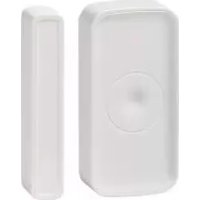
SDWZ 1 A1 - Connected door and window sensor SILVERCREST - Free user manual and instructions
Find the device manual for free SDWZ 1 A1 SILVERCREST in PDF.


| Product type | Connected door and window sensor |
| Brand | SilverCrest |
| Model | SDWZ 1 A1 |
| Sensor dimensions | 76 x 37 x 17 mm |
| Magnet dimensions | 76 x 14 x 17 mm |
| Power supply | 2 AAA 1.5 V batteries (included) |
| Battery life | Approx. 12 months (60 rings/day) |
| Communication protocol | ZigBee 3.0 |
| Transmission range | Approx. 70 m (clear surface) |
| Frequency range | 2.4 - 2.485 GHz |
| Max. transmission power | 13 dBm |
| Max. sensor/magnet distance (closed state) | ≤ 15 mm |
| Operating temperature | +5 to +35 °C |
| Operating air humidity | 10 to 80 % |
| Protection rating | IP21 |
| Supported operating systems | iOS 9.0 or higher, Android 5.0 or higher |
| Required app | Lidl Home |
| Required gateway | Yes (IAN 341809_1910) |
| Main functions | Open/close detection, tamper alarm, mobile notification |
| Mounting | Double-sided adhesive, no drilling |
| Care and cleaning | Wipe with a soft, dry cloth. Do not use chemicals. |
| Security | Tamper alarm if sensor is removed from bracket |
| Spare parts and repairability | Batteries can be replaced. No other spare parts available. |
Frequently Asked Questions - SDWZ 1 A1 SILVERCREST
User questions about SDWZ 1 A1 SILVERCREST
0 question about this device. Answer the ones you know or ask your own.
Ask a new question about this device
Download the instructions for your Connected door and window sensor in PDF format for free! Find your manual SDWZ 1 A1 - SILVERCREST and take your electronic device back in hand. On this page are published all the documents necessary for the use of your device. SDWZ 1 A1 by SILVERCREST.
USER MANUAL SDWZ 1 A1 SILVERCREST
TÜR- UND FENSTERSENSOR / SMART WINDOW OR DOOR SENSOR / DÉTECTEUR DE PORTE ET FENÊTRE CONNECTÉ SDWZ 1 A1
DE AT CH
TÜR- UND FENSTERSENSOR
Kurzanleitung
GB IE
SMART WINDOW OR DOOR SENSOR
Quick start guide
FR BE
DÉTECTEUR DE PORTE ET FENÊTRE CONNECTÉ
This quick start guide is a fixed part of the operating instructions, which enables you to start up your product immediately. Read the operating instructions before use, and pay particular attention to the safety instructions.
In order to fully understand all functions of the product, please select the Instruction Manual link in the app's Me tab. You may also download the full operating instructions from this website: http://www.lidl-service.com
Keep this quick start guide in a safe place. When passing this product on to third parties, be sure to include all documentation.
You will need...... Page 14
Description of parts...... Page 15
Technical data Page 16
Pairing product and mobile device...... Page 17
Unpairing product from mobile device...... Page 18
Mounting...... Page 19
Disconnecting product manually from network ..... Page 19
LED signals...... Page 20
Simplified EU declaration of conformity ...... Page 20
- Intended use
This smart window or door sensor (hereinafter called "product") is an Information Technology device.
This product is used for the surveillance of windows and doors. The product registers when a window or door is opened. The product transmits this information to your mobile device.
Suitable Not suitable
Private use Industrial/commercial purposes
Use in tropical climates
Any other use is considered improper. Any claims resulting from improper use or due to unauthorised modification of the product will be considered unwarranted. Any such use is at your own risk.
The Lidl Home app is required to control and set up the product.
- You will need
Gateway (IAN 341809_1910)
Router: 2.4 GHz, IEEE 802.11b/g/n
Mobile device: iOS 9.0 or higher Android 5.0 or higher
● Description of parts
A
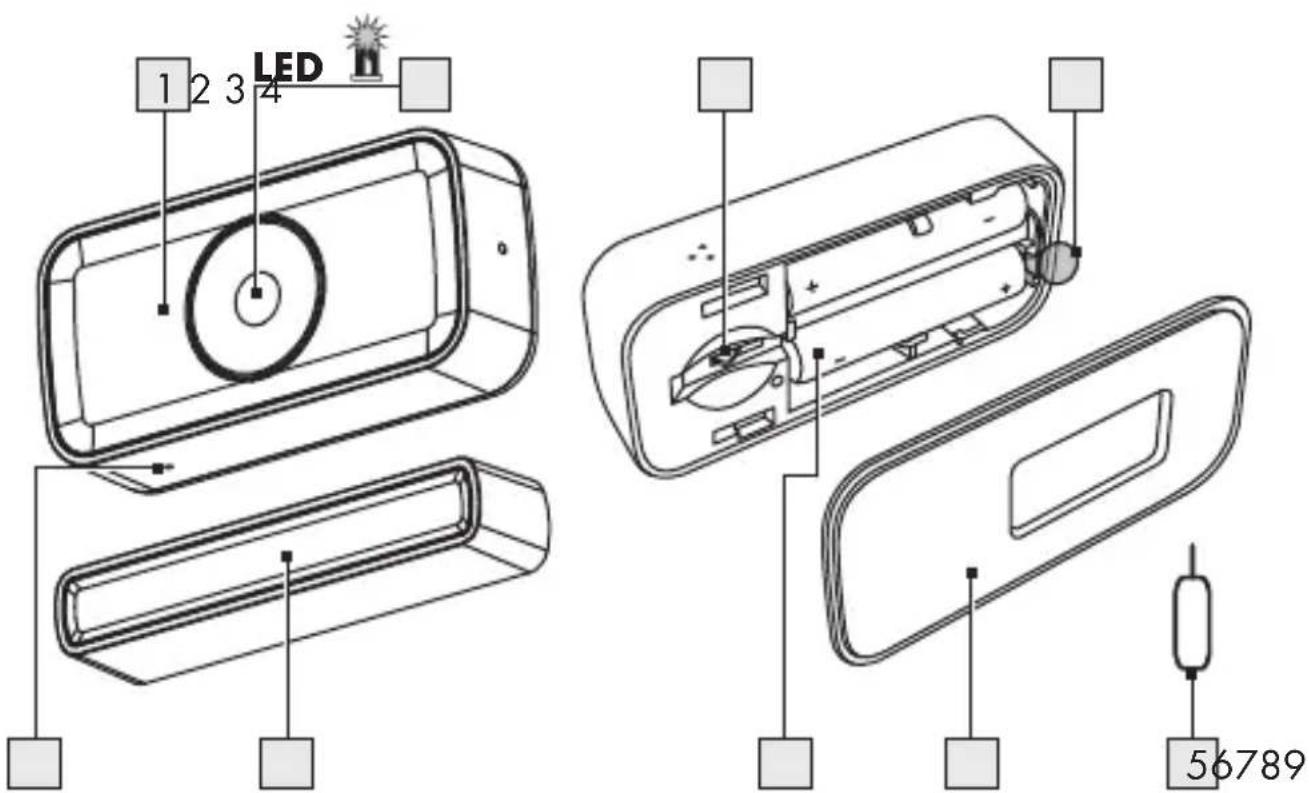
| 1 | Sensor |
| 2 | LED |
| 3 | Tamper alarm switch |
| 4 | Protective strip |
| 5 | Metal pin |
| 6 | Mounting bracket |
| 7 | Battery compartment (with batteries) |
| 8 | Magnet |
| 9 | Pin hole (Reset button / Network key) |
Not illustrated:
| 10 | Quick start guide |
| 11 | Safety instructions |
● Technical data
Operating voltage 3 V
Battery type 2 x 1.5 V (AAA)
Frequency band 2.4 to 2.485 GHz
Max. transmitted power 13 dBm
Operation time 12 months (based on 60 alarms/day)
Max. distance sensor to magnet ≤ 15 mm (when closed)
Communication protocol ZigBee 3.0
Reception range approx. 70 m (free area)
Operating temperature +5 to +35 °C
Operating humidity 10 to 80 %
Measurements approx. 76 x 37 x 17 mm (sensor)
approx. 76 x 14 x 17 mm (magnet)
Supported operating systems iOS 9.0 or higher
Android 5.0 or higher
Ingress protection IP21
● Pairing product and mobile device
Preparation
- Install Lidl Home app and setup Gateway (→Gateway instruction manual).
-
Pull protective strip 4 out of battery compartment 7.
-
Open Lidl Home app.
-
Home tab:
Tap + (add further devices)
-
Select category Sensors.
-
Tap Door Window Sensor (ZigBee)
-
Select Gateway.
Only necessary, if you have 2 or more gateways.
- Tap
OK - Push metal pin 5 into pin hole 9 for 5 s until green LED 2 flashes quickly (fig. B).
- Tap Connect
- Establishing connection.
- Tap and enter name.
- Tap one of the rooms to set location of product (selected room is grayed out).
- Tap Done
- Pairing completed.
● Unpairing product from mobile device
- Open Lidl Home app.
- Home tab:
Tap Door Window Sensor.
- Tap
- Tap Remove Device.
- Tap Confirm.
Mounting
- Pull protective strip 4 out of battery compartment 7.
- Select position with max. 15 mm distance between magnet 8 and sensor 1.
Mounting surface must be even, clean and dry.
3. Remove protective film from back of magnet 8 and sensor 1.
4. Mount:
- Magnet8 on door/window
- Sensor1 on frame
i Magnet 8 can be mounted on left/right of sensor 1.
● Disconnecting product manually from network
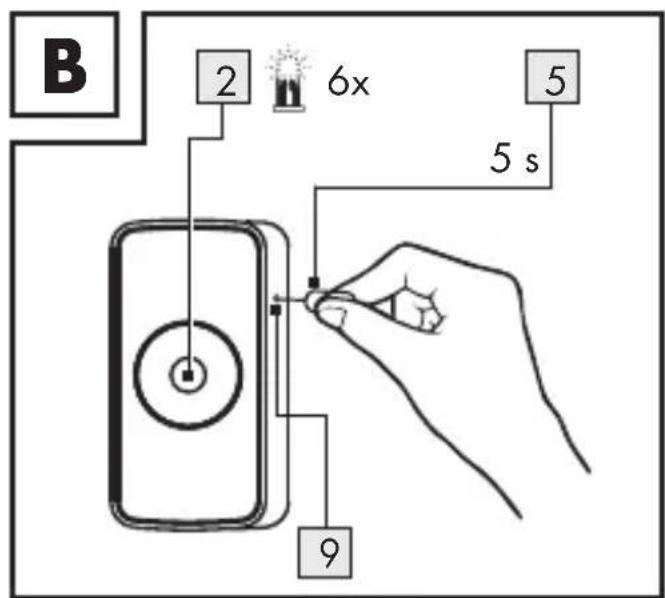
■ Push metal pin into pin hole 9 for 5 s until green LED 2 flashes quickly (fig. B).
Complete renewed pairing process within 3 minutes after reset.
LED signals
Signal Meaning
| Red | 1x | Door/window has been opened / Tamper alarm (sensor has been removed from mounting bracket 6) | |
| Green | (quickly) Product connecting to network | ||
| 3 s Successful pairing with network | |||
| 6x Successful unpairing from network | |||
Explanation of symbols
| LED on LED flashing |
● Simplified EU declaration of conformity
Hereby, OWIM GmbH & Co. KG, Stiftsbergstraße 1, 74167 Neckarsulm, GERMANY declares that the product SMART WINDOW OR DOOR SENSOR HG06336 is in compliance with Directive 2014/53/EU and 2011/65/EU.
The full text of the EU declaration of conformity is available at the following internet address: www.owim.com

20 GB/IE
DÉTECTEUR DE PORTE ET FENÊTRE CONNECTÉ
Utilisation conforme aux prescriptions...... Page 22
Signal Signification
pribl. 76 x 14 x 17 mm (magnet)
- TÜR- UND FENSTERSENSOR / SMART WINDOW OR DOOR SENSOR / DÉTECTEUR DE PORTE ET FENÊTRE CONNECTÉ SDWZ 1 A1
- TÜR- UND FENSTERSENSOR
- SMART WINDOW OR DOOR SENSOR
- DÉTECTEUR DE PORTE ET FENÊTRE CONNECTÉ
- - Intended use
- Suitable Not suitable
- - You will need
- ● Description of parts
- A
- ● Technical data
- ● Pairing product and mobile device
- Preparation
- ● Unpairing product from mobile device
- Mounting
- ● Disconnecting product manually from network
- LED signals
- ● Simplified EU declaration of conformity
Brand : SILVERCREST
Model : SDWZ 1 A1
Category : Connected door and window sensor