CFT6105XP - Basket CANDY - Free user manual and instructions
Find the device manual for free CFT6105XP CANDY in PDF.



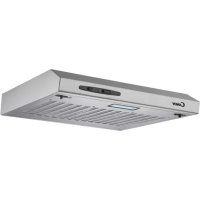
| Product type | Kitchen hood |
| Brand | Candy |
| Model | CFT6105XP |
| Color | Stainless steel |
| Power supply | 110-240 V ~ 50/60 Hz |
| Lighting power | 1 x 2 W (LED, rectangular) |
| Number of speeds | 3 speeds (low, medium, high) |
| Control type | Slide switch (on/off, lighting, speed) |
| Minimum distance above gas hob | 65 cm |
| Recommended distance above hob | 65 to 75 cm |
| Duct diameter | 120 mm |
| Extraction mode | External extraction or recirculation (with optional charcoal filter) |
| Grease filters | Metal cassette filters (washable) |
| Charcoal filter | Optional, to be replaced every 3 to 6 months |
| Installation type | Wall-mounted or under cabinet |
| Dimensions (W x D x H) approx. | 600 x 500 x 150 mm (estimate) |
| Weight approx. | 8 kg (estimate) |
| Energy class | Not specified |
| Noise level | Variable by speed (approx. 55-65 dB(A)) |
| Safety | Automatic shutdown not specified, backdraft protection |
Frequently Asked Questions - CFT6105XP CANDY
User questions about CFT6105XP CANDY
0 question about this device. Answer the ones you know or ask your own.
Ask a new question about this device
Download the instructions for your Basket in PDF format for free! Find your manual CFT6105XP - CANDY and take your electronic device back in hand. On this page are published all the documents necessary for the use of your device. CFT6105XP by CANDY.
USER MANUAL CFT6105XP CANDY
natural_image
Line drawing of a server rack with ventilation slots and ventilation ducts (no text or symbols)Content
- Safety instructions
2....Installation
3....Start using your cooker hood
4....Troubleshooting
5....Maintenance and cleaning
6 Environment protection
SAFETY INSTRUCTIONS
This manual explains the proper installation and use of your cooker hood, please read it carefully before using even if you are familiar with the product. The manual should be kept in a safe place for future reference.
Never to do:
- Do not try to use the cooker hood without the grease filters or if the filters are excessively greasy!
- Do not install above a cooker with a high level grill.
- Do not leave frying pans unattended during use because overheated fats or oils might catch fire.
● Never leave naked flames under the cooker hood.

- If the cooker hood is damaged, do not attempt to use.
● Do not flambé under the cooker hood.
● CAUTION: Accessible parts may become hot when used with cooking appliances.
● The minimum distance between the supporting surface for the cooking vessels on the hob and the lowest part of the cooker hood. (When the cooker hood is located above a gas appliance, this distance shall be at least 65 cm)
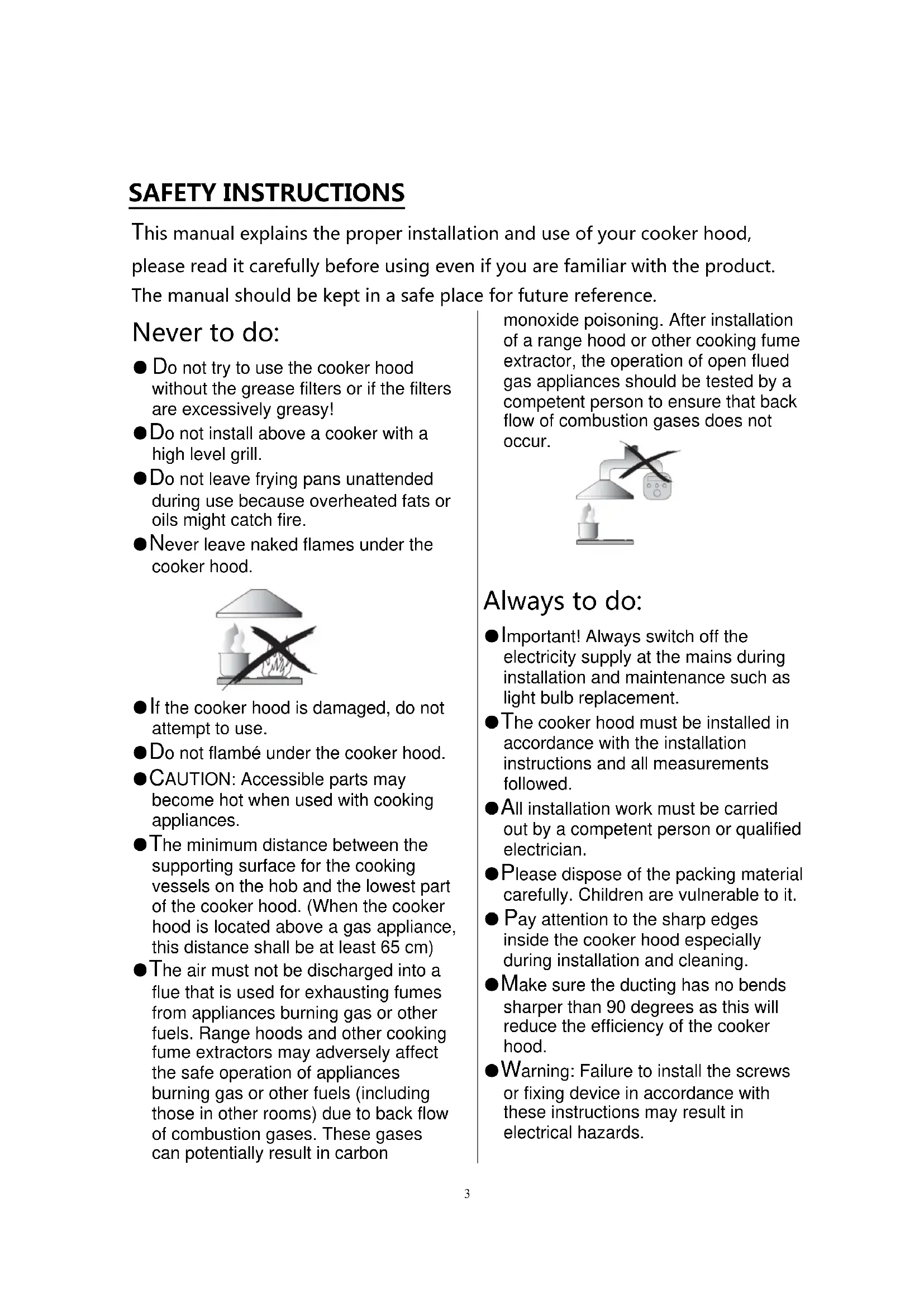
● The air must not be discharged into a flue that is used for exhausting fumes from appliances burning gas or other fuels. Range hoods and other cooking fume extractors may adversely affect the safe operation of appliances burning gas or other fuels (including those in other rooms) due to back flow of combustion gases. These gases can potentially result in carbon
monoxide poisoning. After installation of a range hood or other cooking fume extractor, the operation of open flued gas appliances should be tested by a competent person to ensure that back flow of combustion gases does not occur.
natural_image
Illustration of a laboratory setup with a lamp, beaker, and control unit (no text or symbols)Always to do:
● Important! Always switch off the electricity supply at the mains during installation and maintenance such as light bulb replacement.
● The cooker hood must be installed in accordance with the installation instructions and all measurements followed.
● All installation work must be carried out by a competent person or qualified electrician.
- Please dispose of the packing material carefully. Children are vulnerable to it.
● Pay attention to the sharp edges inside the cooker hood especially during installation and cleaning.
● Make sure the ducting has no bends sharper than 90 degrees as this will reduce the efficiency of the cooker hood.
● Warning: Failure to install the screws or fixing device in accordance with these instructions may result in electrical hazards.
● Warning: Before obtaining access to terminals, all supply circuits must be disconnected.
Always to do:
● Always put lids on pots and pans when cooking on a gas cooker.
- When in extraction mode, air in the room is being removed by the cooker hood. Please make sure that proper ventilation measures are being observed. The cooker hood removes odours from room but not steam.
● There shall be adequate ventilation of the room when the cooker hood is used at the same time as appliances burning gas or other fuels.
● Cooker hood is for domestic use only.

- If the supply cord is damaged, it must be replaced by the manufacturer, its service agent or similarly qualified persons in order to avoid a hazard.
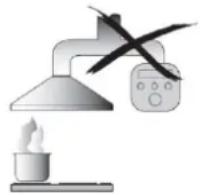
● This appliance can be used by children aged from 8 years and above and persons with reduced physical, sensory or mental capabilities or lack of experience and knowledge if they have been given supervision or instruction concerning use of the appliance in a safe way and understand the hazards involved. Children shall not play with the appliance. Cleaning and user maintenance shall not be made by children without supervision.
natural_image
Symbolic illustration of two people crossed out of a circle, no text or symbols presentAlways to do:
●Caution: The appliance and its accessible parts can become hot during operation. Be careful to avoid touching the heating elements. Children younger than 8 years old should stay away unless they are under permanent supervision.
● There is a fire risk if cleaning is not carried out in accordance with the instructions.
● Regulations concerning the discharge of air have to be fulfilled.
● Clean your appliance periodically by following the method given in the chapter MAINTENANCE.
- For safety reason, please use only the same size of fixing or mounting screw which are recommended in this instruction manual.
● Regarding the details about the method and frequency of cleaning, please refer to maintenance and cleaning section in the instruction manual.
● Cleaning and user maintenance shall not be made by children without supervision.
- When the cooker hood and appliances supplied with energy other than electricity are simultaneously in operation, the negative pressure in the room must not exceed 4 Pa(4 x 10 ^-5 bar).
●WARNING: Danger of fire: do not store items on the cooking surfaces.
●A steam cleaner is not to be used.
● NEVER try to extinguish a fire with water, but switch off the appliance and then cover flame e.g. with a lid or a fire blanket.
INSTALLATION(VENT OUTSIDE)
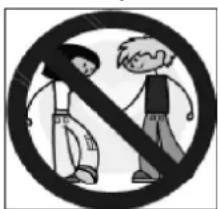
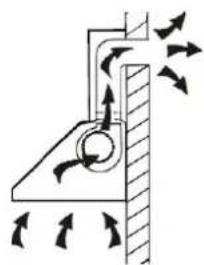
If you have an outlet to the outside, your cooker hood can be connected as below picture by means of an extraction duct (enamel, aluminum, flexible pipe or non-flammable material with an interior diameter of 120mm)
natural_image
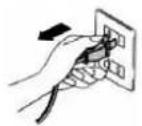
Diagram of airflow around a mechanical component with directional arrows indicating movement (no text or symbols)- Before installation, turn the unit off and unplug it from the outlet..
- The cooker hoods should be placed at a distance of 65-75cm from the cooking surface for best effect. See pic 1.
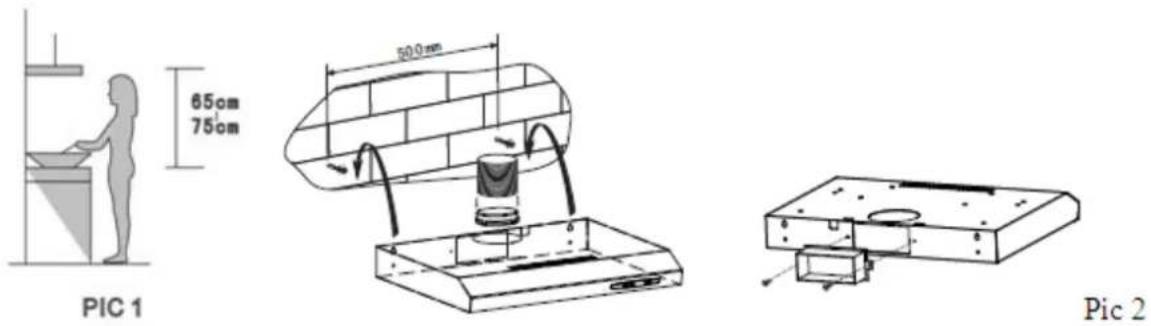
- To install onto the wall, drill 2 holes of ∅ 8mm on a suitable place according with the centre distance of hole in the back of the cooker hood. See pic 2
- Insert the wall plugs into the holes.
- Insert the ST4*30mm screws into the wall plugs and tight.
- Put up the cooker hood onto the fixed screws.
- Then use the attached accessories enclosed to turn the safety screws into the two holes of inside the hood, and then fix the screws to tighten the hood onto the wall. See picture below.
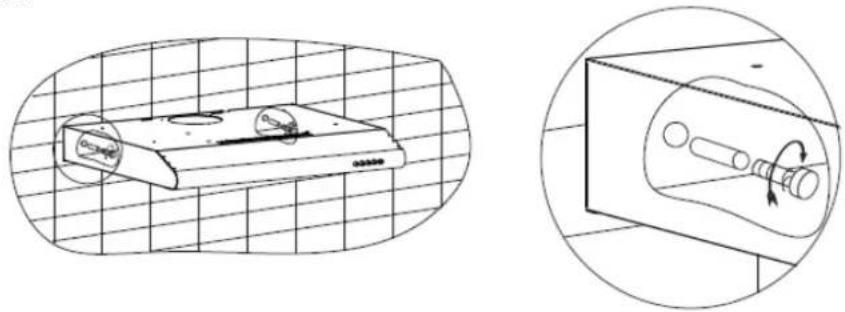
natural_image
Technical line drawing of a device with grid background and magnified view showing internal components (no text or symbols)- Put the expansion pipe on the outlet, then lead it to outdoor, or use the outlet cover to seal the outer outlet and open the inner exhaust valve. Note: the expansion pipe is not supplied.
Method B:
- Drill 4 holes of ∅ 6mm at the bottom of the hanging cupboard. See pic below.
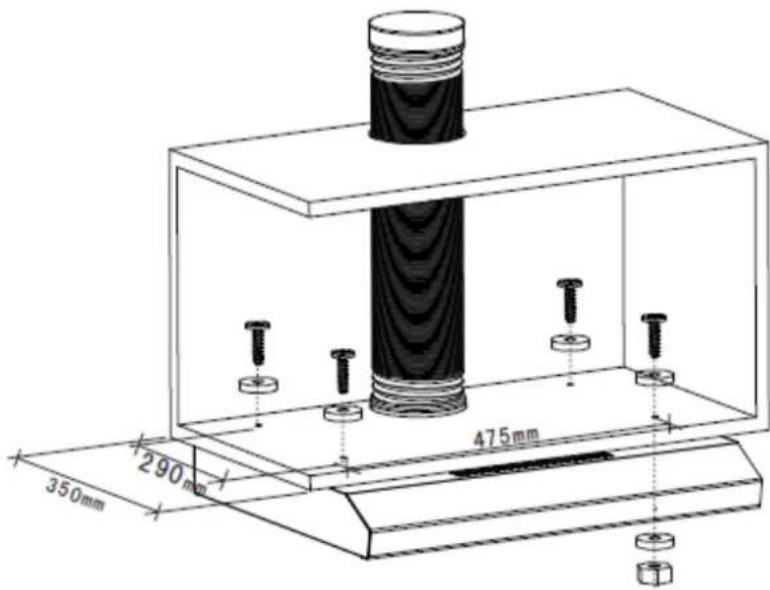
-
Install the cooker hood on the bottom of the cupboard, tighten the cooker hood with enclosed M4 screws + flat washers.
-
Put the expansion pipe on the outlet, then lead it to outdoor. Note: the expansion pipe is not supplied.
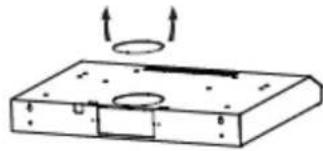
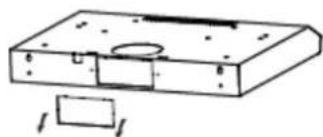
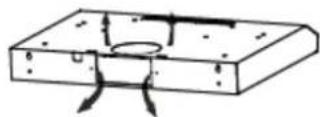
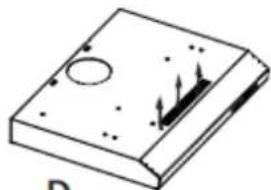
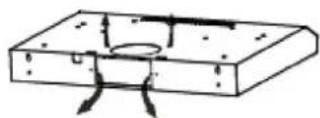
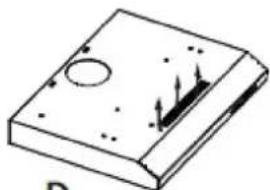
Noise: There are 2 methods for ventilation, including 'horizontal ventilation' and 'vertical ventilation. Please pay attention to the ventilation method when installation.
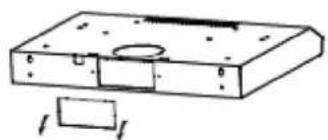
Horizontal ventilation: See pic A, please use the tool to knock out the outlet cover on the top, then the air can be vented from top.
Vertical ventilation: See pic B, please use the tool to knock out the outlet cover on the back, then the air can be vented from back.
natural_image
Simple line drawing of a rectangular block with circular holes and upward arrows indicating motion (no text or symbols)A
natural_image
Technical line drawing of a rectangular electronic component with mounting holes and a small rectangular base (no text or symbols)B
Air ventilation setting
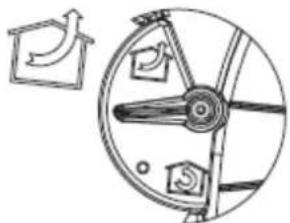
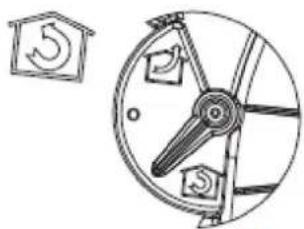
Outdoor air ventilation: Turn the adjuster to outdoor position(pic A), install the outlet, turn on the cooker hood, then the air will be vented from the outside outlet.
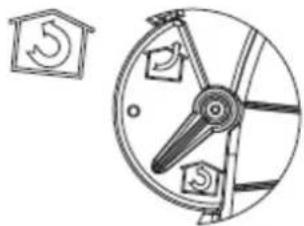
Indoor air ventilation: Turn the adjuster to indoor position (pic B), install the outlet cover, turn on the cooker hood, then the air can be vented from the inside outlet.
natural_image
Technical line drawing of a mechanical device with no visible text or symbolsA
natural_image
Diagram of a mechanical device with a circular component and a separate schematic symbol (no text or labels)B
C
natural_image
Isometric view of a rectangular electronic component with internal holes and mounting holes (no text or symbols)D
WARNING:

For safety reason, please use only the same size of fixing or mounting screws which are recommended in this instruction manual.
Failure to install the screws or fixing device in accordance with these instructions may result in electrical hazards.
Start Using Your Cooker Hood
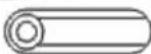
Toggle switch
3210


10
- Lamp – Turn on/off light
“O” – to switch off light
“1” – to switch on light
Power – Slide out drawer, power on; slide in drawer, power off.
2 .Speed -select speed to suit cooking conditions
“O” – to switch off motor
Low(1)- light frying/boiling
Medium(2) – frying/wok cooking/heavy boiling
High (3) – grilling, intensive frying and wok cooking
Power – Slide out drawer, power on; slide in drawer, power off.
TROUBLESHOOTING
| Fault Possible Cause Solution | ||
| Light on, but motor does not work | Fan switch turned off Select a fan switch position. | |
| Fan switch failed Contact service center. | ||
| Motor failed Contact service center. | ||
| Light does not work, motor does not work | House fuses blown Reset/Replace fuses. | |
| Mains power cable is loose or disconnected | Refit mains power cable to power outlet.Switch power outlet on. | |
| Oil leakage | One way valve and the outlet are not tightly sealed | Take down the one way valve and seal with sealant. |
| Leakage from the connection of chimney and cover | Take chimney down and seal. | |
| Lights not working Broken or faulty bulbs | Replace bulbs as per this instruction. | |
| Insufficient suction | The distance between the cooker hood and the gas top is too far | Refit the cooker hood to the correct distance. |
| The Cooker hood inclines | The fixing screw is not tight enough | Tighten the hanging screw and make it horizontal. |
NOTE:
Any electrical repairs to this appliance must conform to your local, state and federal laws. Please contact the service centre if in any doubt before
undertaking any of the above. Always disconnect the unit from the power source when opening the unit.
MAINTENANCE AND CLEANING
Caution:
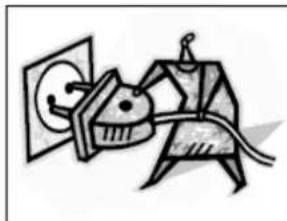
- Before maintenance or cleaning is carried out, the cooker hood should be disconnected from the mains power supply. Ensure that the cooker hood is switched off at the wall socket and the plug removed.
natural_image
Abstract line drawing of a stylized animal figure interacting with a wall (no text or symbols)- External surfaces are susceptible to scratches and abrasions, so please follow the cleaning instructionsto ensure the best possible result is achieved withoutdamage.
GENERAL
Cleaning and maintenance should be carried out with the appliance cold especially when cleaning. Avoid leaving alkaline or acid substances (lemonjuice, vinegar etc.) on the surfaces.
STAINLESS STEEL
The stainless steel must be cleaned regularly (e.g.weekly) to ensure long life expectancy.Dry with a clean soft cloth. A specialized stainlesssteel cleaning fluid may be used.
NOTE:
Ensure that wiping is done along with the grain of the stainless steel to prevent any unsightly crisscross scratching patterns fromappearing.
CONTROL PANEL SURFACE
The inlay control panel can be cleaned using warmsoapy water. Ensure the cloth is clean and well wrungbefore cleaning. Use a dry soft cloth to remove anyexcess moisture left after cleaning.
Important
Using neutral detergents and avoid using harsh cleaning chemicals, strong household detergents or products containing abrasives, as this will affect the appearance of the appliance and potentially remove any printing of artwork on the control panel and will void manufactures warrantee.
GREASE MESH FILTERS
The mesh filters can be cleaned by hand. Soak them for about 3 minutes in water with a mild detergent and then brush it gently with a soft brush. Do not apply too much pressure so as to avoid any damage to it . (Leave to dry naturally out of direct sun light) Filters should be washed separately to crockery andkitchen utensils. It is advisable not to use rinse aid.
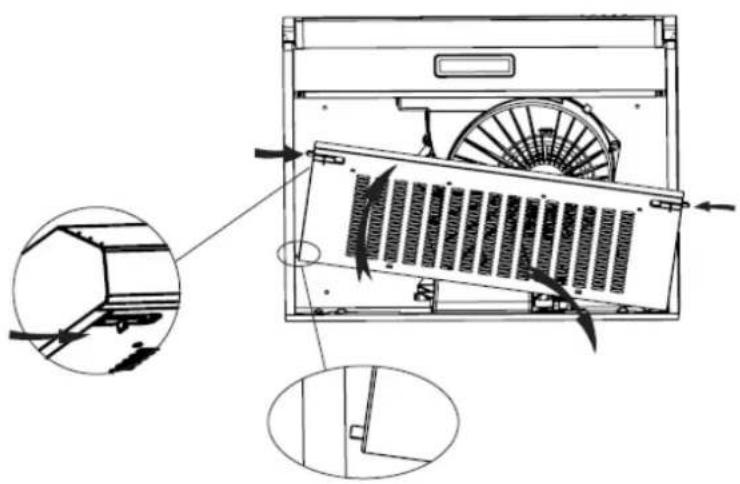
● Removing grease mesh filters
a. Push the grease mesh filter buckles forward and remove the front of the filters.
b. Then push the left or right lower side stops of the filter up until the hanging point at one side stop is not hanging the hood cavity.
c. Finally, take the whole mesh filters away.
natural_image
Technical line drawing of an air conditioner unit with fan and ventilation slots, showing internal structure and mounting details (no text or symbols)● Installing grease mesh filters
• To install filters for the following four steps:
- Angle the filter into slots at the back of the hood.
- Push the button on handle of the filter.
- Release the handle once the filter fits into a resting position.
- Repeat to install all filters.
CARBON FILTER
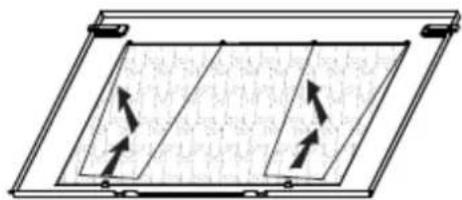
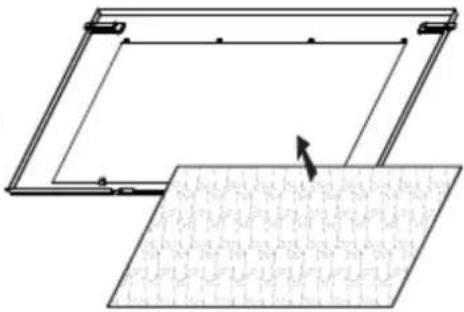
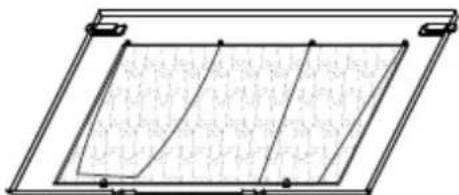
Activated carbon filter can be used to trap odors. Normally the activated carbon filter should be changed every 3 to 6 months according to your cooking habits. The installation procedure of activated carbon filter is as below:
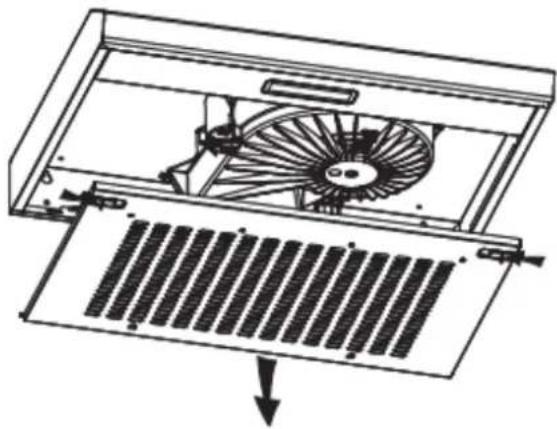
- Remove the grease filter.
- Place the carbon filter onto the grease filter.
- Fix the properly-adjusted carbon filter with the small steel wire.
- Reinstall the grease filter.
- Use carbon filters for recirculation mode only.
natural_image
Diagram of a rectangular panel with internal diagonal lines and directional arrows, no text or symbols present①
natural_image
Diagram showing a mechanical assembly with a rectangular frame and a textured surface, no text or symbols present.②
natural_image
Pure technical line drawing of a rectangular frame with internal grid pattern (no text or symbols)③
NOTE:
- Make sure the filter is securely locked. Otherwise, it would loosen and cause danger.
- When activated carbon filter attached, the suction power will be lowered.
BULB REPLACEMENT
Important :

The bulb must be replaced by the manufacturer, its service agent or similarly qualified persons.
Always switch off the electricity supply before carrying out any operations on the appliance. When handling bulb, make sure it has completely cooled down before any direct contact with hands.
When handling bulbs hold with a cloth or gloves to ensure perspiration does not come in contact with the bulb as this can reduce the life of the bulb.
Note:
- Before changing the lights, make sure that the appliance is turned off and unplugged.
● Protect against danger when changing lights, such as wearing gloves.
Changing the lights:
- Remove the grease filter.
- Loosen the 2pcs ST4*8mm screws from the lighting panel, then take out the lighting fixture.
- Disassembly the 3pcs ST3*12mm screws on the terminal box cover and take down the wire cover.
- Pull out the terminal from the PCB terminal block, disconnect the wire connector and replace the lamp.
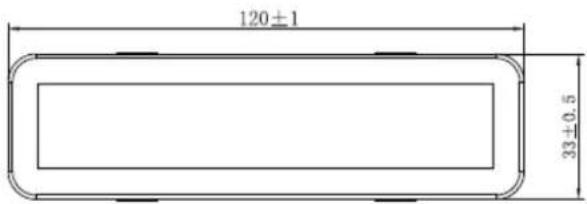
• ILCOS D code for this lamp is: DBS-2/65-H-120/33
- LED modules -rectangle lamp
- Max wattage: 1 × 2 W
– Voltage range: AC 110-240V
- Dimensions:
natural_image
Technical line drawing of a fan assembly inside a device, showing internal components and a downward arrow indicating motion (no text or symbols)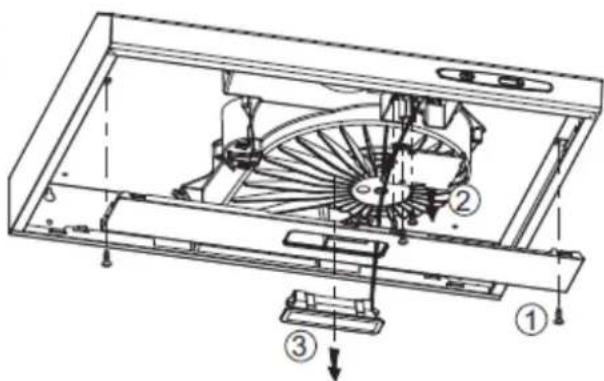
ENVIRONMENTAL PROTECTION:

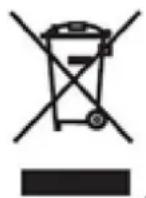
This appliance is labelled in accordance with European Directive 2012/19/EU on Waste Electrical and Electronic Equipment Regulations 2013 regarding electric and electronic appliances (WEEE). The WEEE contain both polluting substances (that can have a negative effect on the environment) and base elements (that can be reused). It is important that the WEEE undergo specific treatments to correctly remove and dispose of the pollutants and recover all the materials. Individuals can play an important role in ensuring that the WEEE do not become an environmental problem; it is essential to follow a few basic rules: - the WEEE should not be treated as domestic waste; - the WEEE should be taken to dedicated collection areas managed by the town council or a registered company. In many countries, domestic collections may be available for large WEEEs. When you buy a new appliance, the old one can be returned to the vendor who must accept it free of charge as a one-off, as long as the appliance is of an equivalent type and has the same functions as the purchased appliance.
NOTE:
The following shows how to reduce total environmental impact (e.g. energy use) of the cooking process).
(1) Install the cooker hood in a proper place where there is efficient ventilation.
(2) Clean the cooker hood regularly so as not to block the airway.
(3) Remember to switch off the cooker hood light after cooking.
(4) Remember to switch off the cooker hood after cooking.
INFORMATION FOR DISMANTLING
Do not dismantle the appliance in a way which is not shown in the user manual. The appliance could not be dismantled by user. At the end of life, the appliance should not be disposed of with household waste. Check with your Local Authority or retainer for recycling advice.
CANDY
CFT610/5X/P
CFT610/4W/P
CFT610/5S/P
Hotte de cuisson
natural_image
Line drawing of a server rack with ventilation slots and ventilation ducts (no text or symbols)Sommaire
INSTALLATION (EVACUATION EXTERNE)
natural_image
Diagram of airflow around a mechanical component with directional arrows indicating movement (no text or symbols)natural_image
Hand holding a wall socket with an arrow indicating left motion (no text or symbols)natural_image
Technical line drawing of a flatbed electronic device with a circular component, set against a grid background (no text or symbols)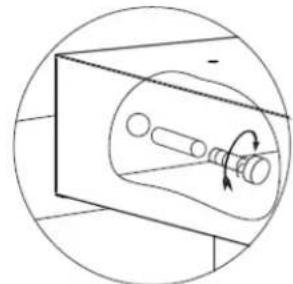
natural_image
Diagram of a mechanical component with rotating shaft and housing, enclosed in a circular frame (no text or symbols)natural_image
Simple line drawing of a rectangular electronic component with mounting holes and a circular feature, labeled A (no text or symbols on the diagram itself)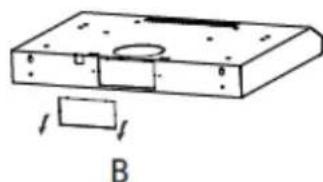
natural_image
Technical line drawing of a mechanical part with mounting holes and a rectangular base, labeled B (no text or symbols)natural_image
Abstract line drawing of a stylized figure holding a pig, with no text or symbols present.natural_image
Technical line drawing of an air conditioner unit with fan blades and internal structure, showing internal components and mounting details (no text or symbols)REEMPLACEMENT D'UN LAMPE
Important :

natural_image
Technical line drawing of a fan assembly inside a rack, showing internal blades and mounting bracket (no text or symbols)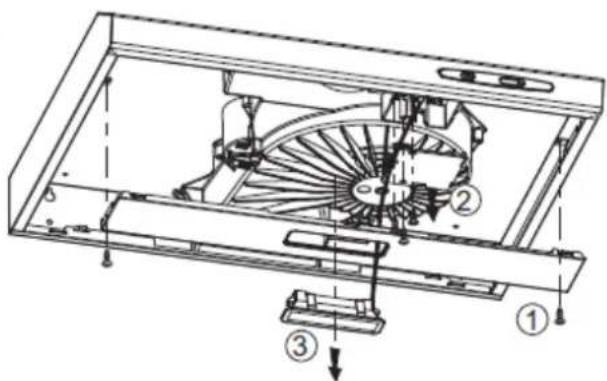
PROTECTION ENVIRONNEMENTALE :
natural_image
Line drawing of a kitchen appliance front panel with ventilation slots and control buttons (no text or symbols)Inhalt
natural_image
Diagram of airflow around a mechanical structure with directional arrows indicating movement (no text or symbols)natural_image
Technical line drawing of a mechanical assembly with a rectangular block and circular cutout (no text or symbols)Abb. 2.
natural_image
Technical line drawing of a mechanical component with internal features, set against a grid background (no text or symbols)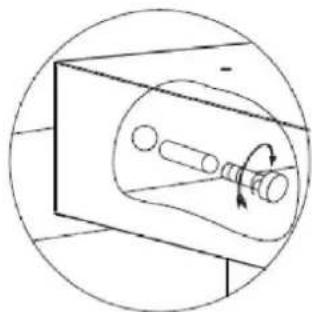
natural_image
Pure mechanical diagram showing a rotating shaft inside a rectangular housing, without any text or symbolsnatural_image
Simple line drawing of a rectangular object with circular holes and upward arrows, labeled 'A' at bottom (no text or symbols on the object itself)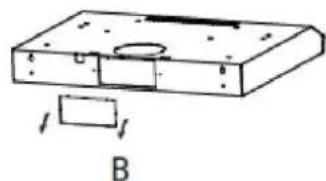
natural_image
Technical line drawing of a mechanical component with mounting holes and a rectangular base, labeled B (no text or symbols present)natural_image
Abstract line drawing of a stylized animal figure with a cat and a pig, connected by a string (no text or symbols)natural_image
Technical line drawing of an air conditioner unit with fan and ventilation slots, showing internal components and mounting details (no text or symbols)natural_image
Technical line drawing of a mechanical fan assembly with internal blades and a grid base, showing no text or symbols.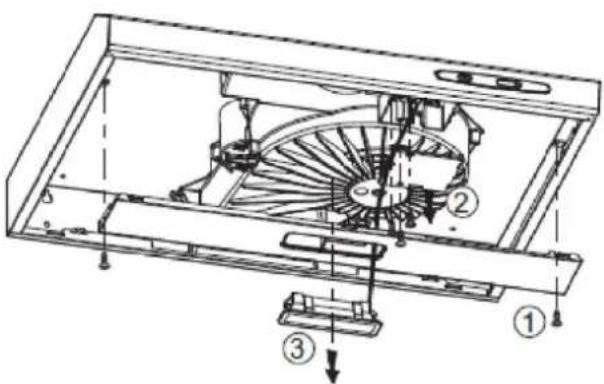
UMWELTSCHUTZ:
natural_image
Line drawing of a server rack with ventilation slots and mounting feet (no text or symbols)Tartalom
natural_image
Illustration of a laboratory setup with a lamp, heating element, and control panel (no text or symbols)natural_image
Diagram of airflow around a mechanical component with directional arrows indicating movement (no text or symbols)natural_image
Technical line drawing of a mechanical assembly with a rectangular component and circular features (no text or symbols)natural_image
Technical line drawing of a mechanical component with grid background and circular inset showing rotational motion (no text or symbols)natural_image
Simple line drawing of a mechanical component with arrows indicating upward motion (no text or symbols)A
natural_image
Technical line drawing of a mechanical housing or enclosure with mounting holes and a rectangular base (no text or symbols)B
natural_image
Technical line drawing of a mechanical component with no visible text or symbolsA
natural_image
Technical line drawing of a mechanical device with circular components and a small inset showing a circular component with a number 5 (no text or symbols present)B
C
natural_image
Isometric view of a rectangular electronic component with mounting holes and internal features (no text or symbols)D
FIGYELMEZTETÉS:

natural_image
Abstract line drawing of a stylized animal figure with a circular head and arrow, no text or symbols presentnatural_image
Technical line drawing of an air conditioner unit with fan blades and internal structure, showing internal components and mounting points (no text or symbols)natural_image
Technical line drawing of a fan assembly inside a rack, showing internal components and a downward arrow indicating motion (no text or symbols)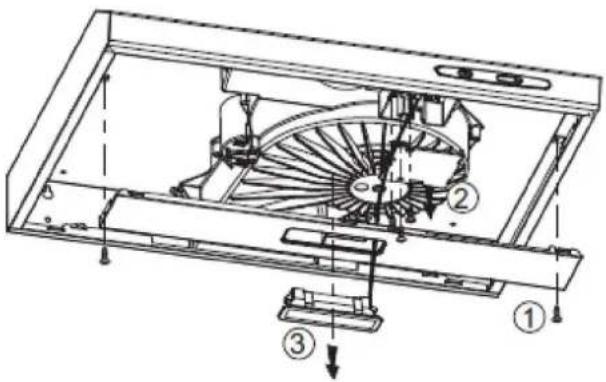
KÖRNYEZETVÉDELEM: