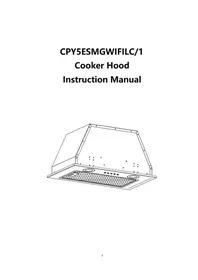
CPY5ESMGWIFILC/1 - Basket CANDY - Free user manual and instructions
Find the device manual for free CPY5ESMGWIFILC/1 CANDY in PDF.


| Product type | Extractor hood |
| Brand | Candy |
| Model | CPY5ESMGWIFILC/1 |
| Type of installation | Built-in (in a cabinet) |
| Minimum distance from cooking surface | 65 to 75 cm |
| Diameter of extraction duct | 150 mm (internal) |
| Evacuation mode | Extraction to the outside (with non-return flap) |
| Number of speeds | 3 (low, medium, high) |
| Control | Touch with LED display and Wi-Fi |
| Lighting | Adjustable LED (white/yellow), 2 x 5 W max, 12 V DC |
| Wi-Fi | Yes, compatible with hOn app (Android/iOS) |
| Timer function | Yes, automatic shut-off after 5 minutes |
| Grease filters | Metal mesh filters, hand washable |
| Activated carbon filter | Yes, replacement every 3 to 6 months |
| Bulb | Replaceable LED, ILCOS code DSR-3-S-64 |
| Power cord | 3 wires (brown = phase, blue = neutral, green/yellow = earth) |
| Protection class | Class I (earthing mandatory) |
| Material | Stainless steel |
| Maintenance and cleaning | Regular cleaning with neutral detergent; avoid abrasive products or steam cleaner |
| Safety | Do not use without filters; turn off before maintenance; respect distances |
| Net weight | Approximately 12 kg (estimated) |
| Power supply | 220-240 V, 50 Hz (standard estimate) |
Frequently Asked Questions - CPY5ESMGWIFILC/1 CANDY
User questions about CPY5ESMGWIFILC/1 CANDY
0 question about this device. Answer the ones you know or ask your own.
Ask a new question about this device
Download the instructions for your Basket in PDF format for free! Find your manual CPY5ESMGWIFILC/1 - CANDY and take your electronic device back in hand. On this page are published all the documents necessary for the use of your device. CPY5ESMGWIFILC/1 by CANDY.
USER MANUAL CPY5ESMGWIFILC/1 CANDY
natural_image
Technical line drawing of a kitchen ventilation duct with grating and mounting holes (no text or symbols)Content
1....Safety instructions
2....Installation
3....Start using your cooker hood
4....Troubleshooting
5....Maintenance and cleaning
6 Environment protection
SAFETY INSTRUCTIONS
This manual explains the proper installation and use of your cooker hood, please read it carefully before using even if you are familiar with the product.
The manual should be kept in a safe place for future reference.
Never to do:
- Do not try to use the cooker hood without the grease filters or if the filters are excessively greasy!
- Do not install above a cooker with a high level grill.
- Do not leave frying pans unattended during use because overheated fats or oils might catch fire.
● Never leave naked flames under the cooker hood.

- If the cooker hood is damaged, do not attempt to use.
● Do not flambé under the cooker hood.
● CAUTION: Accessible parts may become hot when used with cooking appliances.
● The minimum distance between the supporting surface for the cooking vessels on the hob and the lowest part of the cooker hood. (When the cooker hood is located above a gas appliance, this distance shall be at least 65 cm)
● The air must not be discharged into a flue that is used for exhausting fumes from appliances burning gas or other fuels. Cooker hoods and other cooking fume extractors may adversely affect the safe operation of appliances burning gas or other fuels (including those in other rooms) due to back flow of combustion gases. These gases can potentially result in carbon monoxide poisoning. After installation
of a cooker hood or other cooking fume extractor, the operation of open flued gas appliances should be tested by a competent person to ensure that back flow of combustion gases does not occur.
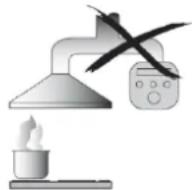
Always to do:
● Important! Always switch off the electricity supply at the mains during installation and maintenance such as light bulb replacement.
● The cooker hood must be installed in accordance with the installation instructions and all measurements followed.
● All installation work must be carried out by a competent person or qualified electrician.
● Please dispose of the packing material carefully. Children are vulnerable to it.
● Pay attention to the sharp edges inside the cooker hood especially during installation and cleaning.
● Make sure the ducting has no bends sharper than 90 degrees as this will reduce the efficiency of the cooker hood.
● Warning: Failure to install the screws or fixing device in accordance with these instructions may result in electrical hazards.
● Warning: Before obtaining access to terminals, all supply circuits must be disconnected.
- If the voltage rating of the lamp is less than therated voltage of the appliance, the voltagerating of the lamp shall also be marked on or near the lampholder.
Always to do:
● Always put lids on pots and pans when cooking on a gas cooker.
- When in extraction mode, air in the room is being removed by the cooker hood. Please make sure that proper ventilation measures are being observed. The cooker hood removes odours from room but not steam.
● There shall be adequate ventilation of the room when the cooker hood is used at the same time as appliances burning gas or other fuels.
● Cooker hood is for domestic use only.

- If the supply cord is damaged, it must be replaced by the manufacturer, its service agent or similarly qualified persons in order to avoid a hazard.
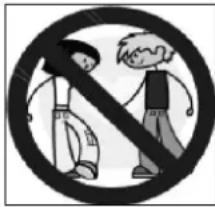
● This appliance is not intended for use by persons (including children) with reduced physical, sensory or mental capabilities, or lack of experience and knowledge, unless they have been given supervision or instruction concerning use of the appliance by a person responsible for their safety
● Children should be supervised to ensure that they do not play with the appliance.
● This appliance can be used by children aged from 8 years and above and persons with reduced physical, sensory or mental capabilities or lack of experience and knowledge if they have been given supervision or instruction concerning use of the appliance in a safe way and
understand the hazards involved. Children shall not play with the appliance. Cleaning and user maintenance shall not be made by children without supervision.
natural_image
Black and white pictogram showing two people crossed out of a diagonal line, no text or symbols presentAlways to do:
●Caution: The appliance and its accessible parts can become hot during operation. Be careful to avoid touching the heating elements. Children younger than 8 years old should stay away unless they are under permanent supervision.
● There is a fire risk if cleaning is not carried out in accordance with the instructions.
● Regulations concerning the discharge of air have to be fulfilled.
● Clean your appliance periodically by following the method given in the chapter MAINTENANCE.
● For safety reason, please use only the same size of fixing or mounting screw which are recommended in this instruction manual.
● Regarding the details about the method and frequency of cleaning, please refer to maintenance and cleaning section in the instruction manual.
● Regarding the information about how the appliance is to be fixed to its support, please refer to Operation section, the Installation procedures in this manual.
● Cleaning and user maintenance shall not be made by children without supervision.
- When the cooker hood and appliances supplied with energy other
than electricity are simultaneously in operation, the negative pressure in the room must not exceed 4 Pa ( 4 × 10^-5 bar).
●WARNING: Danger of fire: do not store items on the cooking surfaces.
● A steam cleaner is not to be used.
● NEVER try to extinguish a fire with water, but switch off the appliance and then cover flame e.g. with a lid or a fire blanket.
INSTALLATION (VENT OUTSIDE)
MOUNTING OF THE V-FLAP
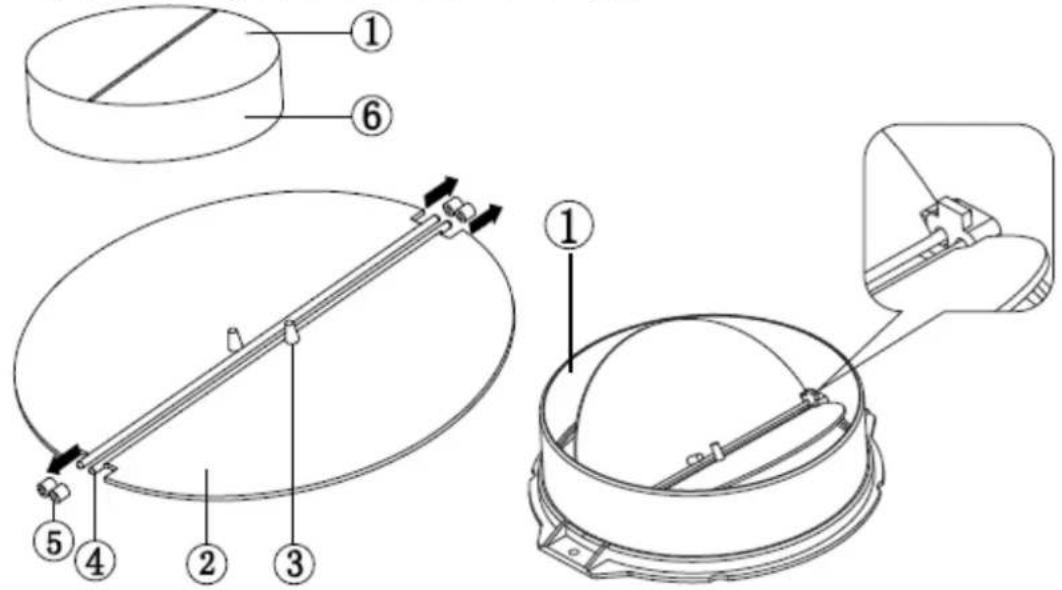
If the cooker hood does not have an assembled V-flap 1, you should mount the half-parts to its body. The images only show an example of how to mount the V-flap, because the outlet may vary according to different models and configurations.
To mount the V-flap 1 you should:
- Mount two half-parts 2 into the body 6
• the pin 3 should be top oriented; - the axis 4 should be inserted into the holes 5 on the body;
- repeat all the operations for the 2nd half-part
INSTALLATION
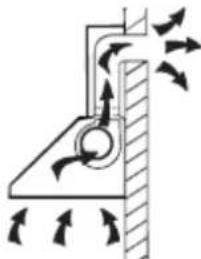
If you have an outlet to the outside, your cooker hood can be connected as below picture by means of an extraction duct (enamel, aluminum, flexible pipe or non-flammable material with an interior diameter of 150mm)
natural_image
Diagram of airflow around a mechanical component with directional arrows indicating movement (no text or symbols)-
Before installation, turn the unit off.
-
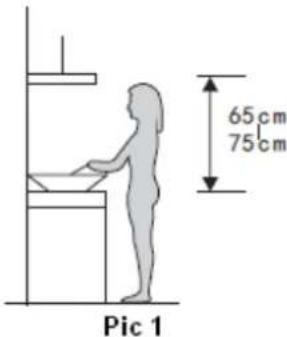
The cooker hood should be placed at a distance of 65\~75cm above the cooking surface for best effect.
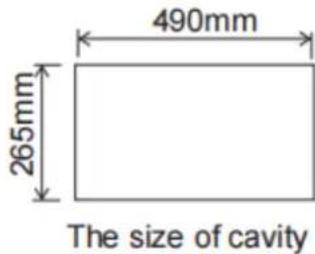
- Drill a hole in the cupboard according to the size in pic below. Make sure the distance between the edge of the hole and the edge of the cupboard edge is at least 35mm.
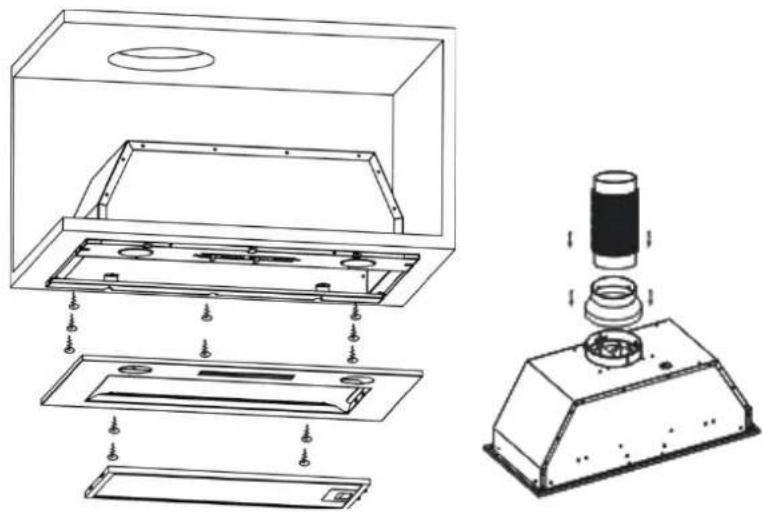
- Remove the aluminum filter and remove the two front panel screws.
- Use a screwdriver to secure the screws to the cabinet.
- Replace the front panel with the two screws and replace the filter.
- Install the converter to the outlet and fix the expansion pipe to the outlet with cable tie. See pic 4.
Note: The expansion pipe is not included in this product.
WARNING:

For safety reason, please use only the same size of fixing or mounting screws which are recommended in this instruction manual.
Failure to install the screws or fixing device in accordance with these instructions may result in electrical hazards.
Electrical Installation
All installation must be carried out by a competent person or qualified electrician.
Before connecting the mains supply ensure that the mains voltage corresponds to the voltage on the rating plate.
Direct Connection
The appliance must be connected directly to the mains using an omnipolar circuit breaker with a
minimum opening of 3mm between the contacts.
The installer must ensure that the correct electrical connection has been made and that it complies with the wiring diagram.
The cable must not be bent or compressed.
Regularly check the power plug and power cord for damage. If the supply cord is damaged, it must be replaced by a special cord or assembly available from the manufacturer or its service agent.
WARNING: This is a Class I appliance and MUST be earthed. This appliance is supplied with a 3 core mains cable coloured as follows:
Brown = L or Live
Blue = N or Neutral
Green and Yellow= E or Earth
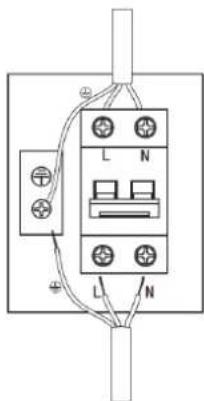
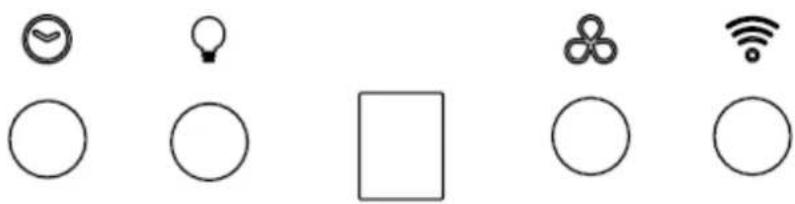
Start Using Your Cooker Hood Touch button with LED display & WIFI
natural_image
Six simple line drawings of basic symbols and icons: a clock, light bulb, square, clover, Wi-Fi, and circle (no text or labels)There are four buttons: (Time delay), (Lamp), (Speed), (WiFi). See picture above.
-
Power-on: After power supply to the hood, the backlight of all buttons will turn on and the buzzer sounds once. Then output shut off, the hood enters into stand-by mode.
-
(Lamp) button:
2.1 Short press (Lamp) button, the illuminating lamps( white and yellow) and lamp button indicator will light up. Short press again, the illuminating lamps and lamp button indicator will be off. The above steps can be operated repeatedly.
2.2 Long press the lamp button for 3s, the “” flashes, and it enters into lamp color setting mode, the lamp color starts to change automatically from cold to warm. At the beginning, the white lighting of the lamp is gradually brightened to the brightest, then the yellow lighting gradually lights up. When the yellow lighting reaches the brightest, the white lighting start to weak off gradually. The above cycle will repeat.
When you finds the desired color, short press the lamp button, the automatic changing cycle will be paused, and it will save the current color for illuminating.
Short press the lamp button again, the changing cycle continues until you short press it again, the current color will be saved. Then long press the lamp button for 3s to exit the lamp color setting mode, the illuminating lamps and the lamp button indicator will be off.
Next time when you short press the lamp button, the illuminating lamps will default to the memory color fixed last time.
- (Speed) button:
The cooker hood has three speed levels, they are low, mid, high, and the corresponding LED display will be "1", "2", "3".
3.1 Press (Speed) button and the indicator light will lit on, the hood starts to work at low speed and the LED display will display "1".
3.2 Press (Speed) button again when it works at low speed, the cooker hood works at mid speed and the LED display will display "2".
3.3 Press (Speed) button again when it works at mid speed, the cooker hood at the high speed and the LED display will display "3".
3.4 During the working, you can touch (Speed) button to change the speed circularly: "low→mid→high→off→low→mid……"
- (Time delay) button:
4.1 The time delay button is only used for the time delay function when the hood is working. (Press this button will be invalid when the hood is under standby mode or just turn on the lamp). Press this button once, the set time is 5 minutes and the indicator light of this button will lit on. Press this button once again will turn off the time delay function and the indicator light will turn off. The above steps can be operated repeatedly. After the set delay time is completed, the cooker hood will be turn off and the light will be off.
4.2 When the delay function is set, if adjusting the speeds, will automatically exit the delay function.
- (WIFI) button:
5.1 When first time power supply to the hood, the WIFI button slowly flashes for 3 mins, it indicates no connecting to the network, if no operation to connect the network, the WIFI button will stop flashing after 3 mins.
5.2 Operate in mobile APP, when it indicates to have the WIFI button quickly flashes, long press the WIFI button for 3s to enter into the network connecting status, the WIFI button will quickly flashes, then operate in APP to finish the connecting. After connecting network, the WIFI button will stop quickly flashing. When the hood is working, the WIFI button indicator will keep lighting on to display the network is well connecting.
WIFI + BLE function
- Search hOn APP in the mobile application market, click to download and install.

-
Open the hOn APP, if you do not have an account, you need to register a new user account. After completing the registration, enter the account and password to log in.
-
Then log into thehOn APP account, click to add and select the cooker hood item.
The first step is to select the WIFI network and enter the password. Then press
the WiFi button, it will start blinking. After the pairing process, the WiFi button will be on.
- After the pairing process has been successful completed, click on the hood card on the hOn App and you can use the APP function keys to control the working status of the hood.
TROUBLESHOOTING
| Fault | Possible Cause | Solution |
| Light on, but motor does not work | Fan switch turned off | Select a fan switch position. |
| Fan switch failed | Contact service center. | |
| Motor failed | Contact service center. | |
| Light does not work, motor does not work | House fuses blown | Reset/Replace fuses. |
| Mains power cable is loose or disconnected | Refit mains power cable to power outlet.Switch power outlet on. | |
| Oil leakage | One way valve and the outlet are not tightly sealed | Take down the one way valve and seal with sealant. |
| Leakage from the connection of chimney and cover | Take chimney down and seal. | |
| Lights not working | Broken or faulty bulbs | Replace bulbs as per this instruction. |
| Insufficient suction | The distance between the cooker hood and the gas top is too far | Refit the cooker hood to the correct distance. |
| The Cooker hood inclines | The fixing screw is not tight enough | Tighten the hanging screw and make it horizontal. |
NOTE:

Any electrical repairs to this appliance must conform to your local, state and federal laws. Please contact the service centre if in any doubt before
undertaking any of the above. Always disconnect the unit from the power source when opening the unit.
MAINTENANCE AND CLEANING
Caution:
- Before maintenance or cleaning is carried out, the cooker hood should be disconnected from the mains power supply. Ensure that the cooker hood is switched off at the wall socket and.
- External surfaces are susceptible to scratches and abrasions, so please follow the cleaning instruction to ensure the best possible result is achieved without damage.
GENERAL
Cleaning and maintenance should be carried out with the appliance cold especially when cleaning. Avoid leaving alkaline or acid substances (lemonjuice, vinegar etc.) on the surfaces.
STAINLESS STEEL
The stainless steel must be cleaned regularly (e.g. weekly) to ensure a long life expectancy. Dry with a clean soft cloth. A specialized stainless steel cleaning fluid may be used.
NOTE:
Ensure that wiping is done along with the grain of the stainless steel to prevent any unsightly crisscross scratching patterns from appearing.
CONTROL PANEL SURFACE
The inlay control panel can be cleaned using warmsoapy water. Ensure the cloth is clean and well wrungbefore cleaning. Use a dry soft cloth to remove anyexcess moisture left after cleaning.
Important
Using neutral detergents and avoid using harsh cleaning chemicals, stronghousehold detergents or products containing abrasives, as this will affect the appearance of the appliance and potentially remove any printing of artwork on the control panel and will void manufactures warrantee.
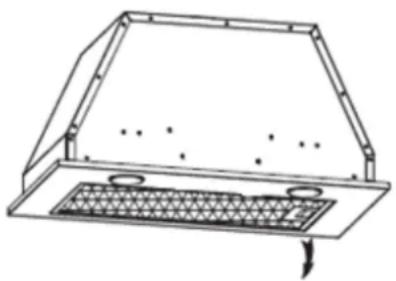
GREASE MESH FILTERS
The mesh filters can be cleaned by hand. Soak them for about 3 minutes in water with a mild detergent and then brush it gently with a soft brush. Do not apply too much pressure so as to avoid any damage to it. (Leave to dry naturally out of direct sun light)
Filters should be washed separately to crockery and kitchen utensils. It is advisable not to use rinse aid.
natural_image
Technical line drawing of a roof structure with ventilation grilles and mounting holes (no text or symbols)INSTALLING GREASE MESH FILTERS
- To install filters for the following four steps:
- Angle the filter into the slots at the back of the hood.
- Push the button on the handle of the filter.
- Release the handle once the filter fits into a resting position.
- Repeat to install all filters.
CARBON FILTER
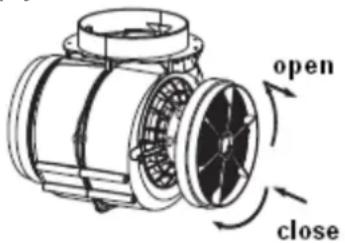
Activated carbon filter can be used to trap odors. Normally the activated carbon filter should be changed every 3 to 6 months according to your cooking habits. The installation procedure of activated carbon filter is as below:
- Before installing or replacing the carbon filters, disconnect the mains power to the unit.
- Press the filter lock and remove the mesh filter.
- Turn the carbon filter on both sides of the motor anti-clockwise. Replace thecarbon filters with the new carbon filters.
- Place the mesh filter.
- Connect the power supply to the wall socket.
NOTE:
- Make sure the filter is securely locked. Otherwise, it would loosen and cause danger.
- When activated carbon filter attached, the suction power will be lowered.
BULB REPLACEMENT
Important :

The bulb must be replaced by the manufacturer, its service agent or similarly qualified persons.
Always switch off the electricity supply before carrying out any operations on the appliance. When handling bulb, make sureit has completely cooled down before any direct contact with hands.
When handling bulbs hold with a cloth or gloves to ensure perspiration does not come in contact with the bulb as this can reduce the life of the bulb.
Note:
- Before Replacement light that the cooker hood can be isolated from the supply mains by means of a plug or an all-pole switch.
- Protect against danger when changing lights, such as wearing gloves.
Changing the lights:
Remove the grease filter.
Use a tool or the hand to press the spring splinter of both sides of LED light to the inside, until the light is pressed out. Then slightly pull the light connecting wire out, and dismantle the terminal of the light connecting wire.
- Apply the reverse procedure to install the light back.
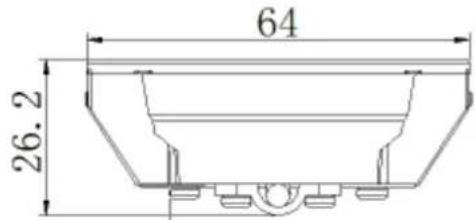
• ILCOS D code for this lamp is: DSR-3-S-64
- LED modules- round lamp
- Max wattage: 2×1.5 W
- Voltage range: DC 12V
- Dimensions:

natural_image
Technical line drawing of a mechanical housing or enclosure with internal components and an arrow indicating motion (no text or symbols)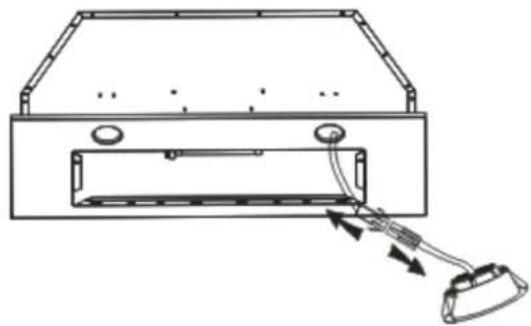
natural_image
Technical line drawing of a device with a cable and connector, no text or symbols presentENVIRONMENTAL PROTECTION:
This appliance is labelled in accordance with European Directive 2012/19/EU regarding electric and electronic appliances (WEEE). The WEEE contain both polluting substances (that can have a negative effect on the environment) and base elements (that can be reused). It is important that the WEEE undergo specific treatments to correctly remove and dispose of the pollutants and recover all the materials. Individuals can play an important role in ensuring that the WEEE do not become an environmental problem; It is essential to follow a few basic rules:
-the WEEE should not be treated as domestic waste;
-the WEEE should be taken to dedicated collection areas managed by the town council or a registered company.
In many countries, domestic collections may be available for large WEEEs. When you buy a new appliance, the old one can be returned to the vendor who must accept it free of charge as a one-off, as long as the appliance is of an equivalent type and has the same functions as the purchased appliance.
NOTE:
The following shows how to reduce total environmental impact (e.g. energy use) of the cooking process).
(1) Install the cooker hood in a proper place where there is efficient ventilation.
(2) Clean the cooker hood regularly so as not to block the airway.
(3) Remember to switch off the cooker hood light after cooking.
(4) Remember to switch off the cooker hood after cooking.
INFORMATION FOR DISMANTLING
Do not dismantle the appliance in a way which is not shown in the user manual. The appliance could not be dismantled by user. At the end of life, the appliance should not be disposed of with household waste. Check with your Local Authority or retainer for recycling advice.
CPY5ESMGWIFILC/1
Hotte aspirante Manuel d'instructions

natural_image
Technical line drawing of a kitchen chimney with ventilation grilles and mounting holes (no text or symbols)Contenu
À toujours faire :
INSTALLATION
natural_image
Diagram of airflow around a mechanical component with directional arrows indicating movement (no text or symbols)natural_image
Technical line drawing of a cabinet or enclosure with internal components and mounting holes (no text or symbols)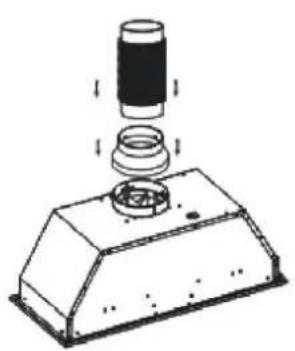
natural_image
Technical line drawing of a mechanical component with a cylindrical top and base, showing internal assembly (no text or symbols)AVERTISSEMENT :

natural_image
Technical line drawing of a mechanical component with a mesh grille and mounting holes (no text or symbols)natural_image
Technical line drawing of a mechanical component with a hand inserted into a housing (no text or symbols)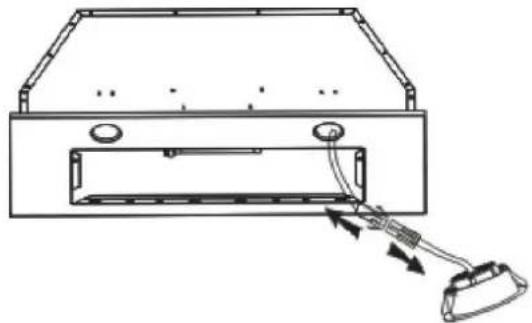
natural_image
Technical line drawing of a device with cable and connector, no text or symbols presentPROTECTION DE L'ENVIRONNEMENT :