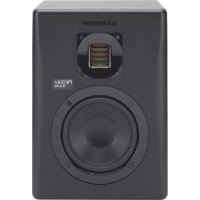
Resolv RXA6 - Speaker SAMSON - Free user manual and instructions
Find the device manual for free Resolv RXA6 SAMSON in PDF.


User questions about Resolv RXA6 SAMSON
0 question about this device. Answer the ones you know or ask your own.
Ask a new question about this device
Download the instructions for your Speaker in PDF format for free! Find your manual Resolv RXA6 - SAMSON and take your electronic device back in hand. On this page are published all the documents necessary for the use of your device. Resolv RXA6 by SAMSON.
USER MANUAL Resolv RXA6 SAMSON
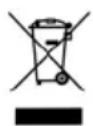
If you want to dispose this product, do not mix it with general household waste. There is a separate collection system for used electronic products in accordance with legislation that requires proper treatment, recovery and recycling.
Private household in the 28 member states of the EU, in Switzerland and Norway may
return their used electronic products free of charge to designated collection facilities or to a retailer (if you purchase a similar new one).
For Countries not mentioned above, please contact your local authorities for a correct method of disposal.
By doing so you will ensure that your disposed product undergoes the necessary treatment, recovery and recycling and thus prevent potential negative effects on the environment and human health.
Important Safety Information

AVIS RISQUE DE CHOC ELECTRONIQUE - NE PAS OUVRIR
CAUTION: TO REDUCE THE RISK OF ELECTRIC SHOCK, DO NOT REMOVE COVER (OR BACK). NO USER-SERVICEABLE PARTS INSIDE. REFER SERVICING TO QUALIFIED SERVICE PERSONNEL.
This lightning flash with arrowhead symbol within an equilateral triangle is intended to alert the user to the presence of non-insulated "dangerous voltage" within the product's enclosure that may be of sufficient magnitude to constitute a risk of electric shock.

The exclamation point within an equilateral triangle is intended to alert the user to the presence of important operating and maintenance instructions in the literature accompanying the appliance.
- Read these instructions.
- Keep these instructions.
- Heed all warnings.
- Follow all instructions.
- This apparatus shall not be exposed to dripping or splashing liquid and no object filled with liquid, such as a vase, should be placed on the apparatus.
- Clean only with a dry cloth.
- Do not block any of the ventilation openings. Install in accordance with the manufacturer's instructions.
- Do not install near any heat sources such as radiators, heat registers, stoves, or other apparatuses (including amplifiers) that produce heat.
- Only use attachments/accessories specified by the manufacturer.
- Unplug this apparatus during lightning storms or when not in use for long periods of time.
- Do not override the intended purpose of the polarized or grounding-type plug. A polarized plug has two blades, with one wider than the other. A grounding-type plug has two blades and a third grounding prong. The wide blade, or third prong, is provided for your safety. If the provided plug does not fit your outlet, consult an electrician to replace the obsolete outlet.
- Protect the power cord from being walked on or pinched, particularly at the prongs, convenience receptacles, the point where they exit from the apparatus.
-
Use only with the cart stand, tripod bracket, or table specified by the manufacture, or sold with the apparatus. When a cart is used, utilize caution when moving the cart/apparatus combination to avoid injury from tip-over.
-
Refer all servicing to qualified service personnel. Servicing is required if the apparatus has been damaged in any way, such as power-supply cord or plug breakage, damage due to liquid or objects falling onto the apparatus, exposure to rain or moisture, or if the apparatus does not operate normally, or has been dropped.
- POWER ON/OFF SWITCH: For products with a power switch, the power switch DOES NOT break the connection from the mains.
- MAINS DISCONNECT: The plug should remain readily operable. For rack-mount or installation where plug is not accessible, an all-pole mains switch with a contact separation of at least 3 mm in each pole shall be incorporated into the electrical installation of the rack or building.
- FOR UNITS EQUIPPED WITH EXTERNALLY ACCESSIBLE FUSE RECEPTACLE: Replace fuse with same type and rating only.
- MULTIPLE-INPUT VOLTAGE: This equipment may require the use of a different line cord, attachment plug, or both, depending on the available power source at installation. Connect this equipment only to the power source indicated on the equipment rear panel. To reduce the risk of fire or electric shock, refer servicing to qualified service personnel or equivalent.

Contents
Introduction 2
Features 3
Rear Panel Callouts 4
Connecting the Resolv RXA Monitors 5
Positioning your Studio Monitors 6
Connecting an Active Subwoofer 8
Specifications 9
Resolv RXA Wiring Guide 10
Introduction
Thank you for purchasing a Resolv RXA series studio reference monitor from Samson Technologies! The Resolv RXA studio monitors are extremely accurate professional active speakers that incorporate internal bi-amplified power (separate amps for both the woofer and tweeter) which reduces intermodulation distortion, as each amp is only responsible for a portion of the audio signal bandwidth. In addition, a multi-pole crossover provides optimal tonal balance, precise performance and maximum sound pressure level.
Each speaker features a Samson's high efficiency Air Displacement ribbon tweeter that can reproduce a linear frequency response, extended high frequency, accurate phase response and extremely low distortion. The tweeter is mounted in a waveguide that provides even dispersion of high-frequency content for a wide listening area and exceptional stereo imaging.
To deliver an accurate mid-range and tight low end, our engineers have carefully voiced each model utilizing copolymer low-frequency drivers with butyl surrounds. The cabinets are constructed out of medium density fiberboard (MDF) with internal bracing to create a rigid enclosure which reduces vibration and increases performance. The edges of the cabinets are rounded to reduce cabinet-edge diffraction.
The Resolv RXA monitors have been designed as near-field reference monitors ideal for use in studios, video post-production suites, gaming, or as playback speakers. The monitors have two M6 (6 mm) thread inserts to be mounted on wall brackets, ideal for fixed installations or as part of a multi-channel audio system.
In these pages, you'll find a detailed description of the features of the Resolv RXA5 and RXA6 models, as well as a guided tour through the control panel, and instructions for setup and use. You'll also find a warranty card enclosed—please don't forget to fill it out and mail it in so that you can receive online technical support, and so that we can send you updated information about these and other Samson products, in the future.
We recommend you record your serial number in the space provided below for future reference.
Serial number:
Date of purchase:
With proper care and maintenance, your Resolv RXA studio monitor will operate trouble-free for many years. Should your speaker ever require servicing, a Return Authorization (RA) number must be obtained before shipping your unit to Samson. Without this number, the unit will not be accepted. Please call Samson at 1-800-3SAMSON (1-800-372-6766) for an RA number prior to shipping your unit. Please retain the original packing materials and, if possible, return the unit in its original carton. If your Resolv monitor was purchased outside of the United States, contact your local distributor for warranty details and service information. Also, be sure to check out our website (www.samsontech.com) for information about our full product line.
Features
The Samson Resolv RXA series reference monitors provide smooth, accurate response for any mixing or critical listening situation. Here are some of their main features:
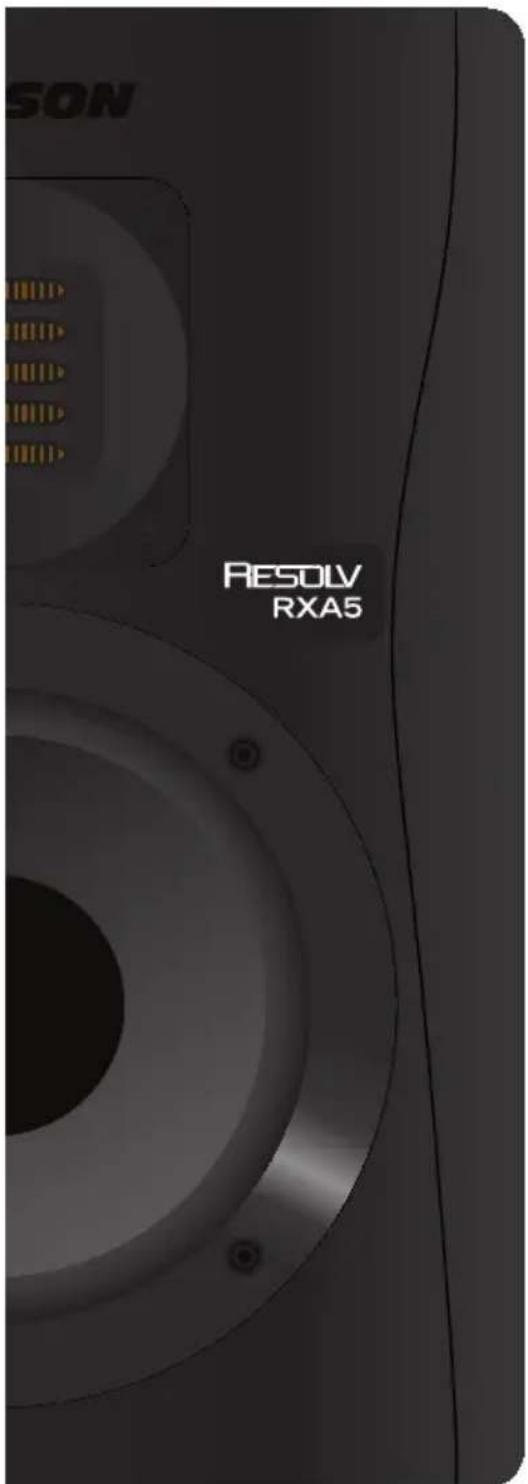
- Two-way, bass-reflex, active studio monitor providing extremely accurate monitoring for recording studio, post-production or multi-media applications
Air Displacement ribbon tweeter provides extended, accurate high frequency response with minimal distortion - Tweeter waveguide designed to provide even dispersion of high-frequency content for flat on- and off-axis listening areas
- Powered by an internal amplifier specifically designed for optimal performance and maximum SPL.
- Low Frequency and High Frequency variable level control allows the listener to contour the response curve to custom tailor the response that works best in their mixing environment
Active electronic crossover utilizing a multi-pole design for linear frequency response unaffected by signal level - Tight and controlled low frequency response produced by magnetically shielded, copolymer woofers with butyl surround and heavy-duty motor structures with large voice coils
- Extremely rigid, MDF (medium density fiberboard) construction, delivering maximum SPL
- Two M6 (6 mm) thread inserts for wall mounting
Rear Panel Callouts
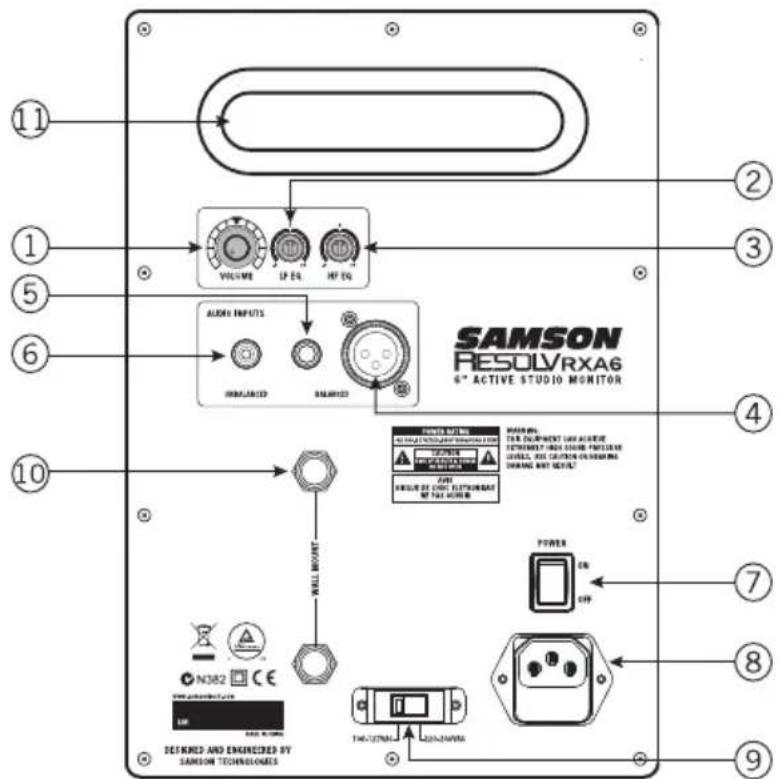
- VOLUME-Controls the amount of overall output level.
- LF EQ - Rotary control to raise or lower the low frequency shelving equalizer filter by +/-6 dB. This control should be used to "fine-tune" the speaker to match your listening environment.
- HF EQ - Rotary control to raise or lower the high frequency shelving equalizer filter by +/-6 dB. This control should be used to "fine-tune" the speaker to match your listening environment.
- XLR Input - Connect a balanced, +4dBu, line level signal here via standard XLR (microphone) cable.
- 14 " Input - Connect a balanced, +4dBu, line level signal here via a TRS (Tip, Ring, Sleeve), or unbalanced TS (Tip, Sleeve) 14 " cable.
- RCA Input - Used to connect signals from unbalanced, -10dBV devices.
- POWER Switch - Use this switch to turn the speakers on and off. When powered on, the front panel LED will light.
- AC Inlet - Connect the supplied IEC power cable here.
- Voltage Switch - Used to select the operating voltage. NOTE: Be sure to check that the voltage setting and fuse rating are correct for your country.
- Wall Mount Points - Two M6x10 thread inserts for mounting the speakers on a stand or wall.
- Bass Reflex Port - Rear firing port provides minimal air turbulence and enhances the linear low frequency response
Connecting the Resolv RXA Monitors
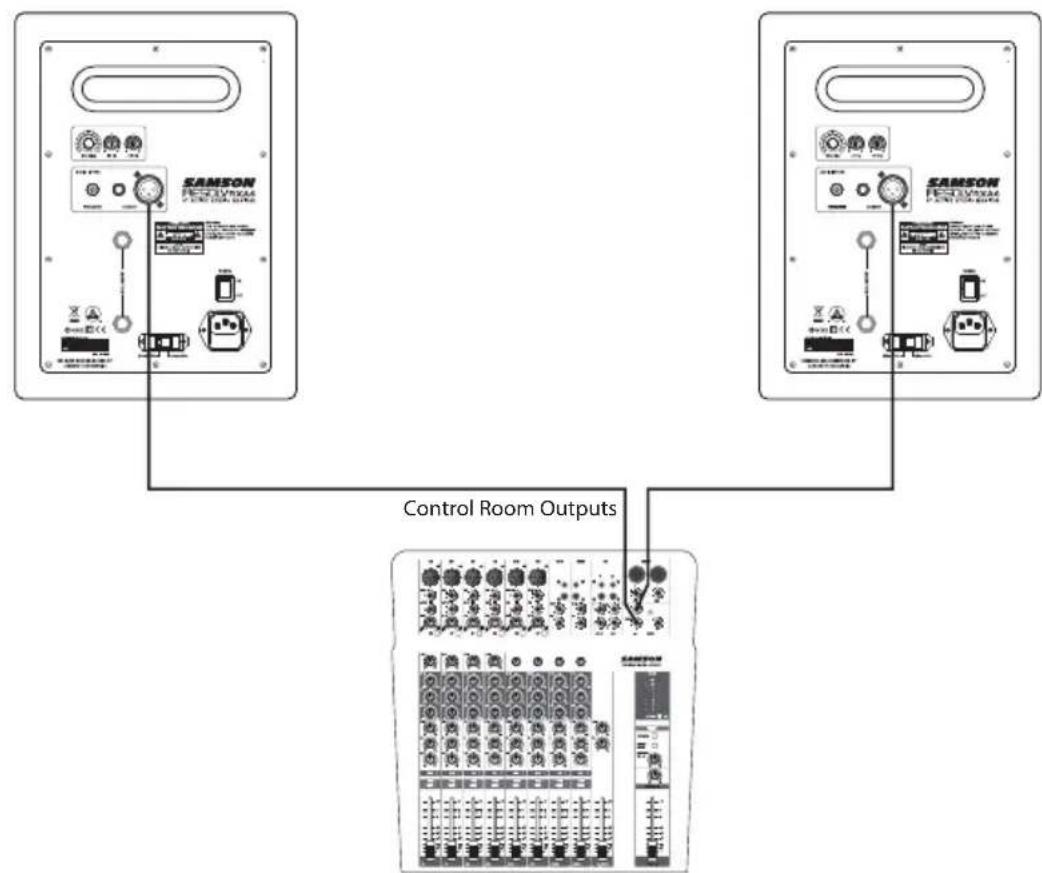
The Resolv RXA series monitors are the perfect addition to any studio. When connecting your monitors, you should utilize the control room outputs of your mixer so that you can independently control the level to the speakers without affecting the main mix output. Follow the simple steps and diagram in this section to quickly connect your monitors using a standard recording console's control room outputs.
- Lower your mixer's master outputs until they are completely off.
- Connect the mixer's Left Control Room output to the left-side Resolv RXA Series LINE INPUT and the mixer's Right Control Room output to the right-side Resolv RXA Series LINE INPUT. The Resolv RXA series connections can be made via one of the three rear panel Audio Inputs. You can use RCA inputs for unbalanced, -10dBV level signals, or either the 14 or XLR inputs for balanced, +4dBu level signals.
Note: Before plugging in and powering on the speakers, remember the "last on, first off" rule of power amplifiers (and powered monitors). When powering up your system, be sure that all the wires are connected, turn your mixer and any other outboard gear on, and then finally turn your Resolv RXA Series on. - Set the Resolv RXA Series input Volume control to the 12-o'clock (center detent) position.
- Run an audio signal (such as music from an MP3 player) through your mixer and raise the Control Room level to a comfortable listening volume.
Positioning your Studio Monitors
Positioning the Resolv RXA Series
Near field (close to the listener) monitoring has become the choice of many engineers because of the cost and complexities associated with mounting monitors onto the walls. Positioning your studio monitors correctly is very important. Correct placement not only creates the proper stereo image, but also minimizes the effects of your room's reflections. This is especially important in today's project studios since the budget for room acoustics is often close to nothing. By taking some time and using your ears when setting up your monitors, you can create an optimal listening environment.
The most important consideration when evaluating room acoustics is the presence of reflective surfaces near the monitoring area. These can include flat tabletops, glass mirrors or framed pictures, large open walls and even the surface of your mixing console. Most reflecting sound will eventually reach the listening position, but since it is slightly delayed from the direct source, the result is random cancellation of some frequencies, or comb filtering. If possible, remove any and all reflective surfaces. You may also want to hang some acoustic foam on walls near the monitors.
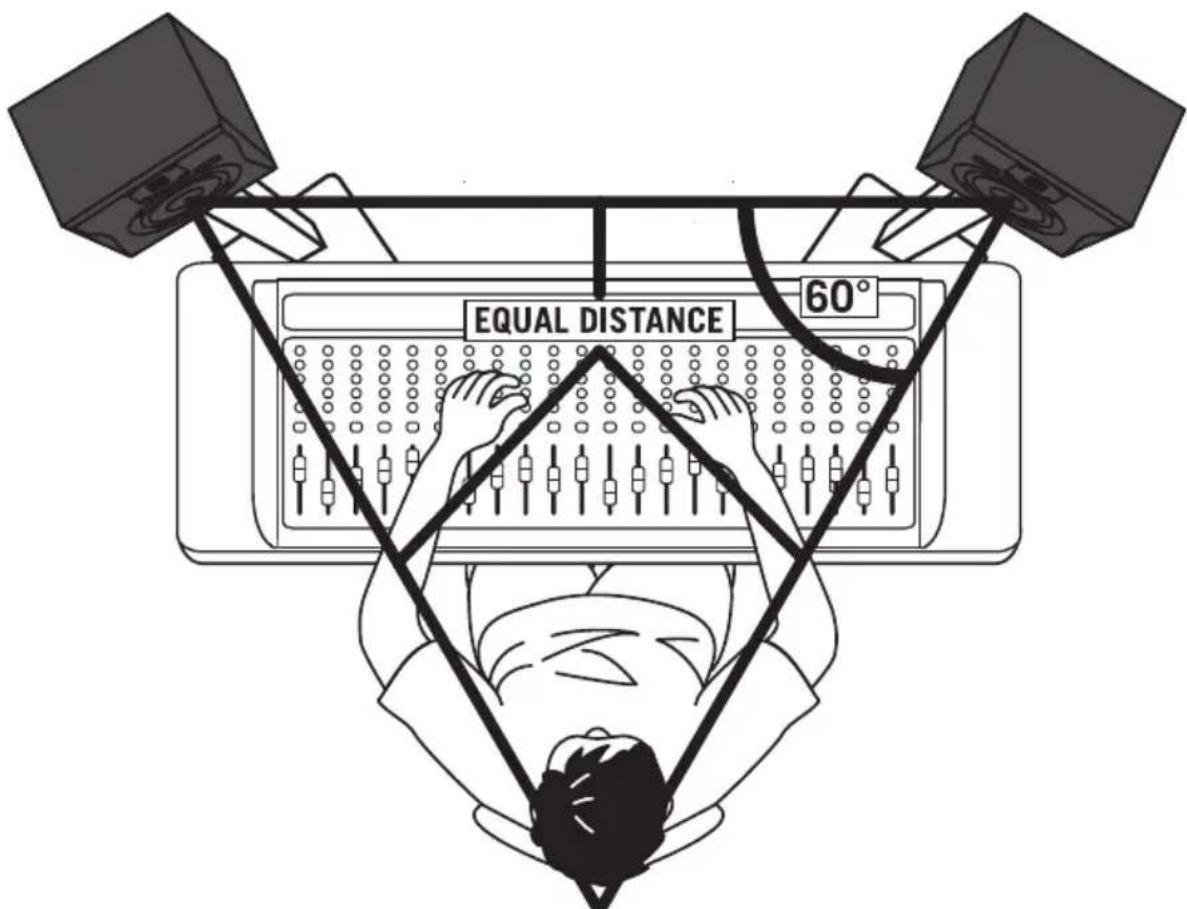
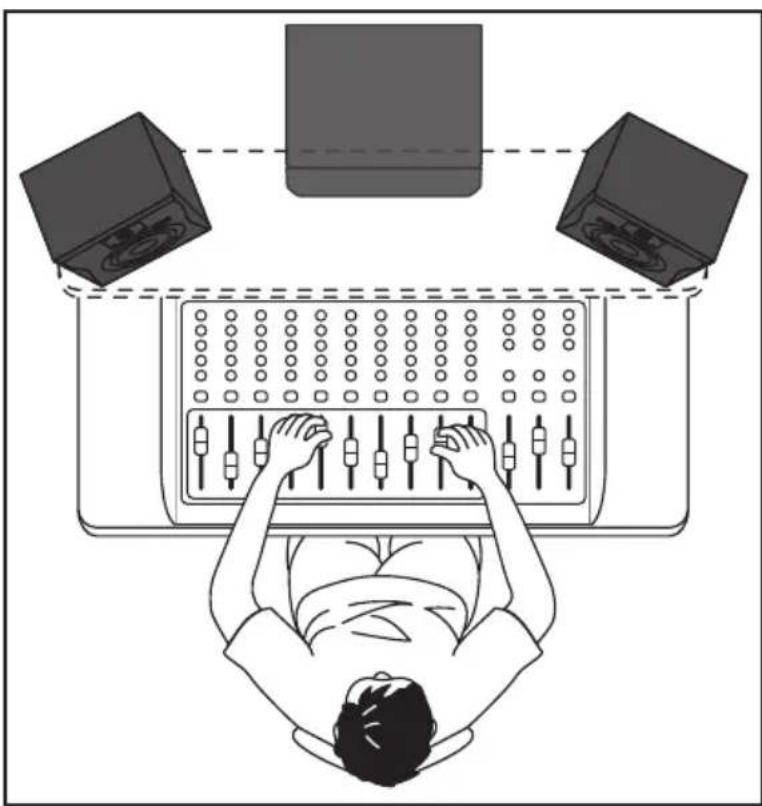
When positioning the monitors, you'll want to set up what is commonly referred to as the "mix triangle" (shown below). In this ideal configuration, the space between the left and right monitor is equal to the distance from the listener to each monitor, forming an equilateral triangle.
Positioning your Studio Monitors
Speaker Orientation
A major objective when setting up your studio monitors is to obtain the best possible stereo image. The Resolv RXA monitors are designed to be used in a vertical position, with the tweeter and woofer symmetrically in line. Placing the speaker on its side will cause an offset in sound
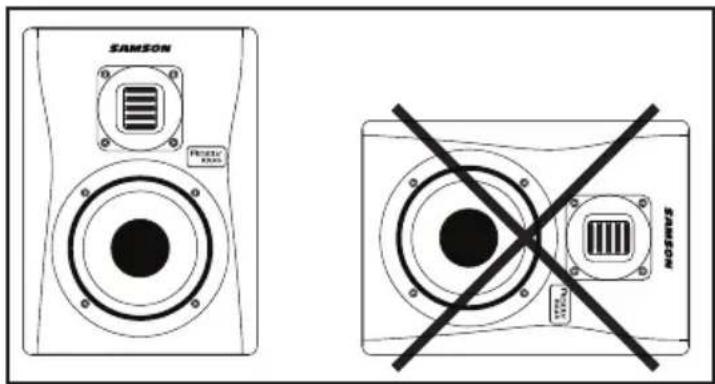
between the woofer and the tweeter, limiting your ability to find optimal listening positions.
A Moment of Reflection
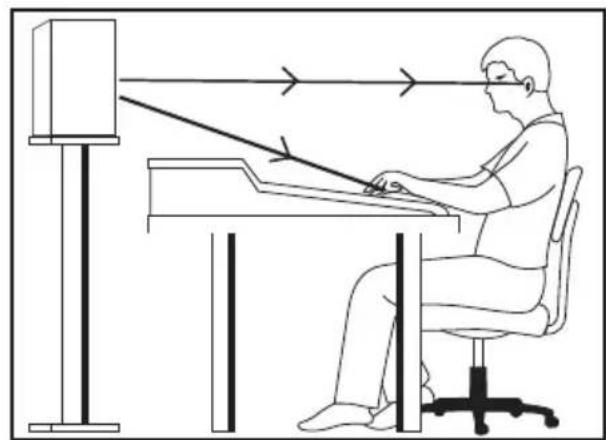
When setting the height of your monitor system, be careful to avoid reflections off the surface of the mixing console. These reflections arrive at the listening position slightly delayed from the original sound, resulting in cancellations and overall unpredictable response (Figure 1). Visualize straight lines representing the beams of sound radiating from the monitors and choose a height that reduces the occurrence of reflections that will end up in the prime listening spot. In most cases, the ideal position is slightly behind and above the mixing console's meter bridge (Figure 2). Always use your ears to find the best positioning for your room. Using monitor stands will assist in placing the speakers in the appropriate position.
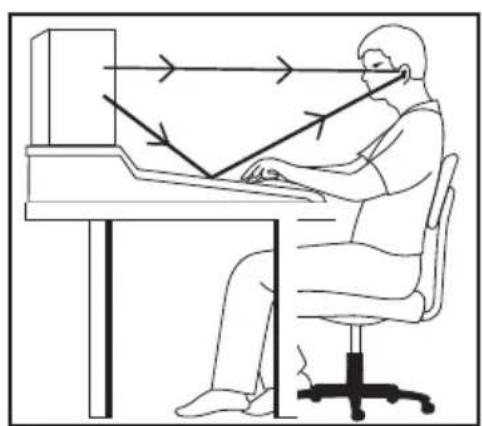
Figure 1 Figure 2
Connecting an Active Subwoofer
The Resolv RXA monitors are designed to be full-range speakers, but on occasion you may need to hear the extreme low end. Adding an active subwoofer to extend the low frequency response of your monitor system can be beneficial when mixing your music, for example. Typically, it is best to set the subwoofer level to be equal to that of the Resolv RXA main speakers.
Because deep-bass frequencies are non-directional, it is difficult for our ears to locate the sound source, and the precise placement of the subwoofer is not as critical as the main speakers. The ideal location is between the two main speakers. If you notice there are frequencies that sound quieter than others, move the subwoofer slightly to the left or right. If the subwoofer has a polarity switch, try setting the switch to the opposite phase setting to see if this provides an improved low frequency response.
To incorporate a subwoofer into your monitor system, connect Left and Right Control Room outputs of your mixer to the active subwoofer's line inputs. Then connect the subwoofer's line outputs to the Resolv RXA series left and right speakers. Run an audio signal (such as music from an MP3 player) through your mixer and raise the level to a comfortable listening volume. Finally, adjust the crossover frequency control (if applicable) of the subwoofer to the desired frequency.
Specifications
| Model Resolv RXA5 Resolv | RXA6 | ||
| Woofer 5" copolymer woofer with | butyl surround | 6" copolymer woofer with butyl surround | |
| Tweeter 34mm x 27mm RX Tweeter | 34mm x 27mm RX Tweeter | ||
| Enclosure Type 2-way Bass Reflex | System 2-way Bass Reflex System | ||
| Enclosure Vinyl wrapped 0.6" (15mm) MDF cabinet with painted front baffle | Vinyl wrapped 0.6" (15mm) MDF cabinet with painted front baffle | ||
| Frequency Response 50Hz - 27kHz | Hz 45Hz - 27kHz | ||
| Crossover Frequency 3kHz 12dB/oct Linkwitz-Riley 3.5kHz 12dB | Oct Linkwitz-Riley | ||
| Output Power | HF | 20 Watts RMS <1% | 25 Watts RMS <1% |
| LF | 50 Watts RMS <1% | 75 Watts RMS <1% | |
| Input Connectors | Unbalanced | RCA | RCA |
| Balanced | XLR / ¼" TRS Phone | XLR / ¼" TRS Phone | |
| Input Impedance | Unbalanced | 10k ohm | |
| Balanced | 10k ohm | ||
| Controls | VOLUME, HF EQ, LF EQ | VOLUME, HF EQ, LF EQ | |
| Power Consumption | 82W | 95.5W | |
| Fuse | 100V - 120V T1.25AL 220V - 240V T630mAL | 100V - 120V T1.25AL 220V - 240V T630mAL | |
| Dimensions (L x W x H) | 8.85" x 8.46" x 11.8" 225mm x 215mm x 300mm | 10.66" x 9.29" x 12.75" 271mm x 236mm x 324m | |
| Weight | 15lbs 6.85kg | 19lbs 8.68kg | |
Resolv RXA Wiring Guide
There are several ways to interface the Resolv RXA speakers, depending on your exact monitoring set-up. Follow the cable diagrams below for connecting your monitor system.
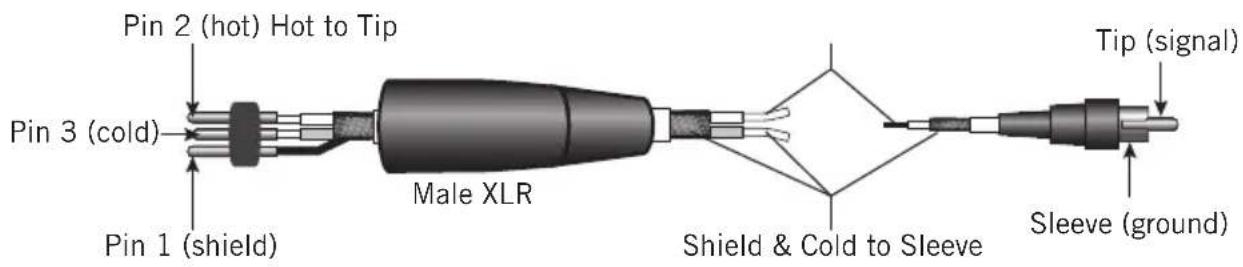
RCA
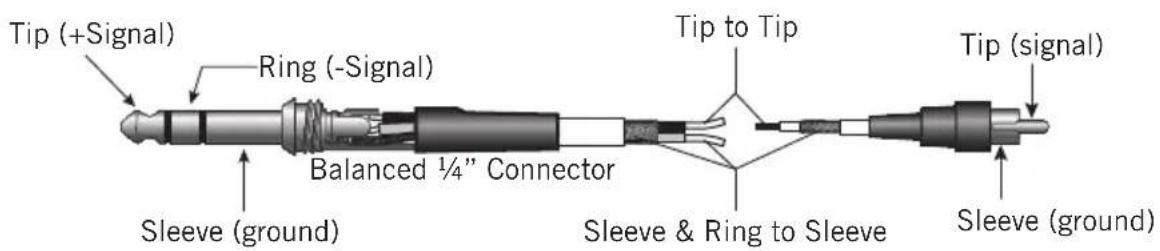
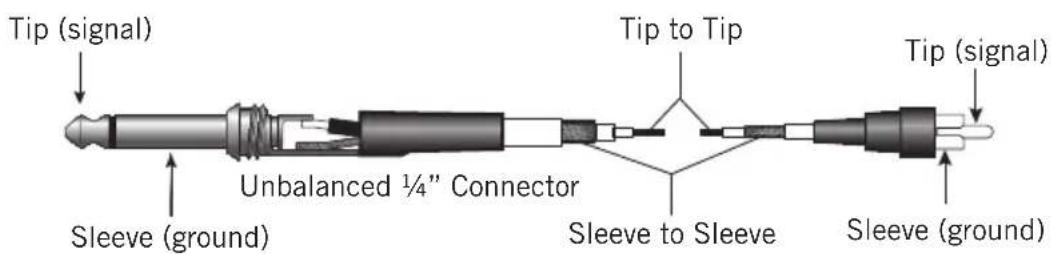
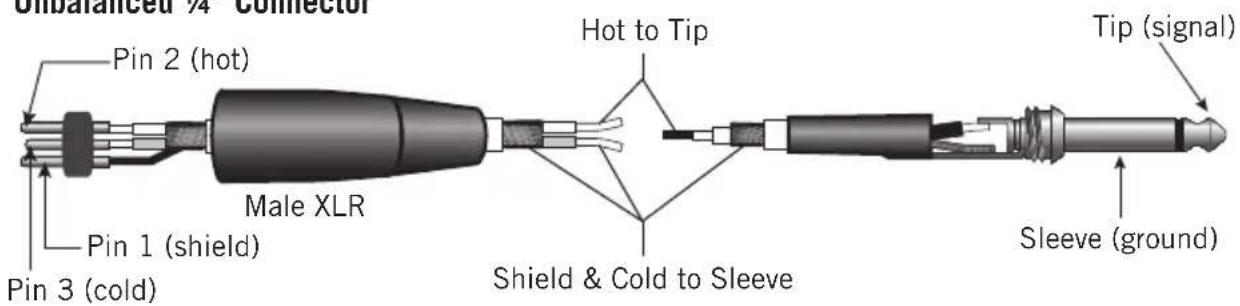
Unbalanced 14 Connector
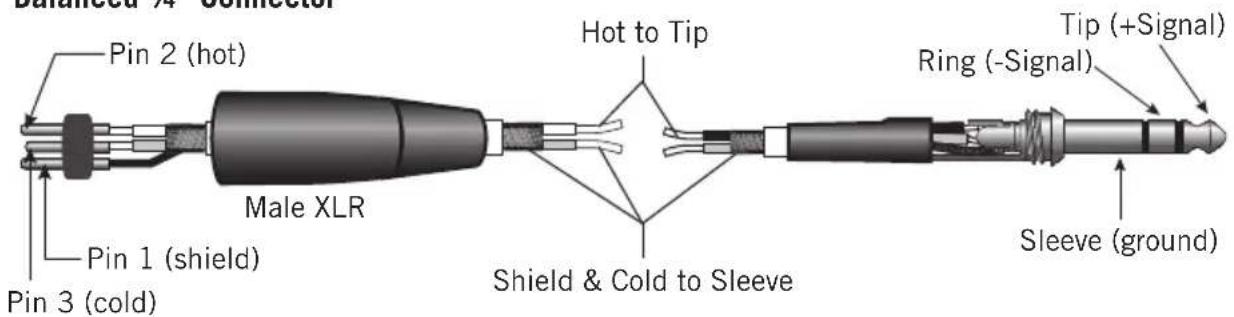
Balanced 14 Connector

AVIS RISQUE D'LECTROCUTION - NE PAS OUVRIR
ATTENTION! POUR ÉVITER TOUT RISQUE D'ÉLECTROCUTION, N'ÖTEZ PAS LE COUVERCLE (NI LE DOS) DU BOITIER. CET APPAREIL NE CONTIENT AUCUNE PIECE REMPLACABLE PAR L'UTILISATEUR. CONFIEZ TOUTES LES REPARATIONS A UN PERSONNEL QUALIFIE.