D21 - Cooker CASO - Free user manual and instructions
Find the device manual for free D21 CASO in PDF.

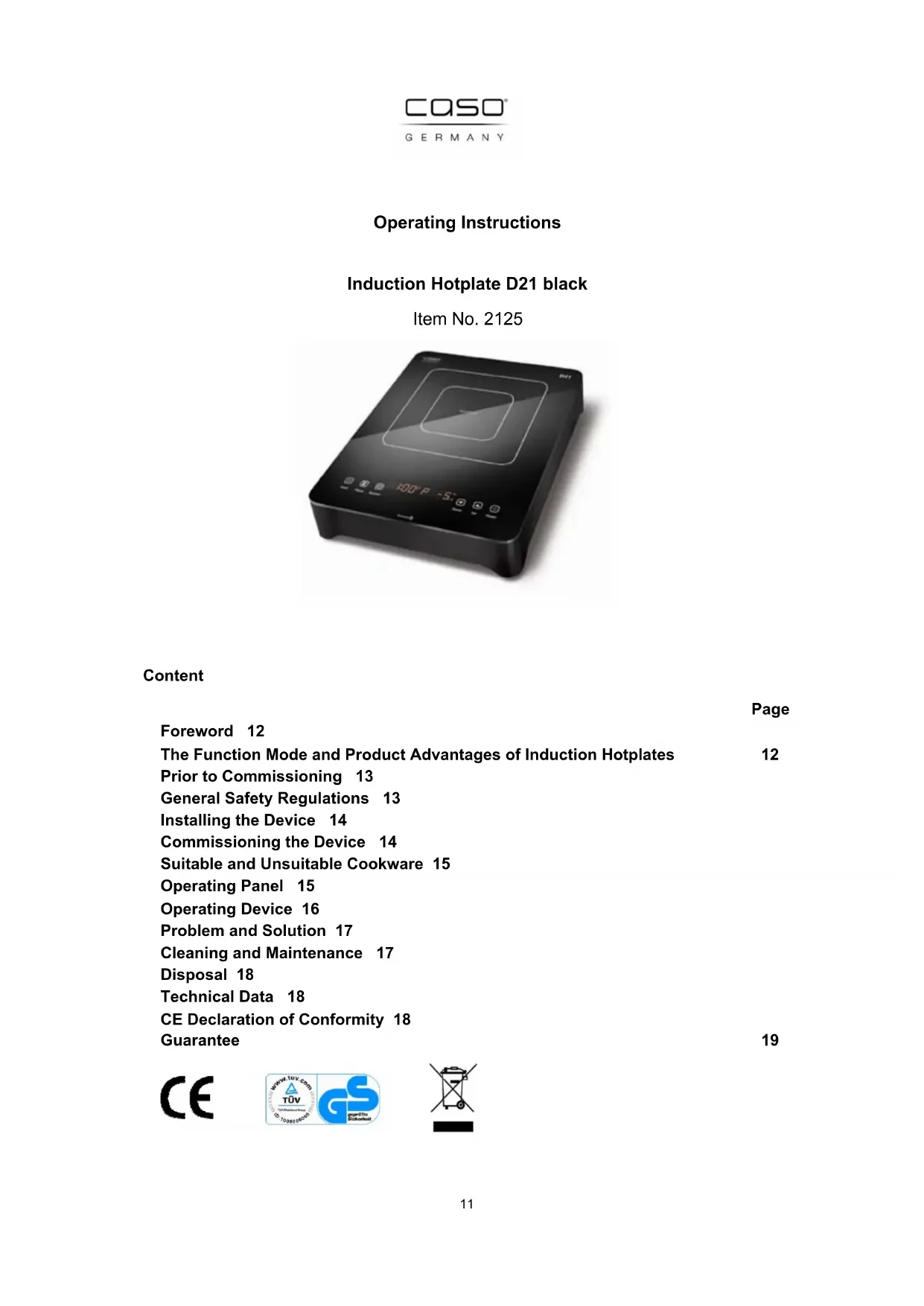


| Product type | Black induction hotplate D21 |
| Brand | Caso |
| Model | D21 |
| Item number | 2125 |
| Dimensions (W x D x H) | 360 x 280 x 68 mm |
| Weight | Approx. 2.5 kg |
| Power supply | 230 V / 50 Hz, 2100 W (max), standby 1.5 W |
| Power levels | 10 levels (1-10) |
| Temperature ranges | 60 °C to 220 °C (steps: 60, 80, 100, 120, 140, 160, 180, 200, 220 °C) |
| Timer | 1 to 120 minutes, automatic shut-off |
| Booster function | Maximum power (2100 W) for 30 seconds |
| Hold function | Locking settings (child safety) |
| Pan diameter | 12 to 26 cm, magnetic base |
| Max pan weight | 6 kg |
| Pan detection | Yes, automatic shut-off if no suitable pan |
| Overheat protection | Yes, with error codes E2/E6 |
| Cleaning | Damp cloth and mild detergent, do not immerse |
| Spare parts | Available from the manufacturer (Braukmann GmbH) |
| Warranty | 3 years |
| Manufacturer | Braukmann GmbH, Raiffeisenstraße 9, 59757 Arnsberg, Germany |
Frequently Asked Questions - D21 CASO
User questions about D21 CASO
0 question about this device. Answer the ones you know or ask your own.
Ask a new question about this device
Download the instructions for your Cooker in PDF format for free! Find your manual D21 - CASO and take your electronic device back in hand. On this page are published all the documents necessary for the use of your device. D21 by CASO.
USER MANUAL D21 CASO
natural_image
Black square electrical appliance with digital display and control buttons (no visible text or symbols)Inhalt
Seiten
Vorwort 2
Operating Instructions
Induction Hotplate D21 black
Item No. 2125
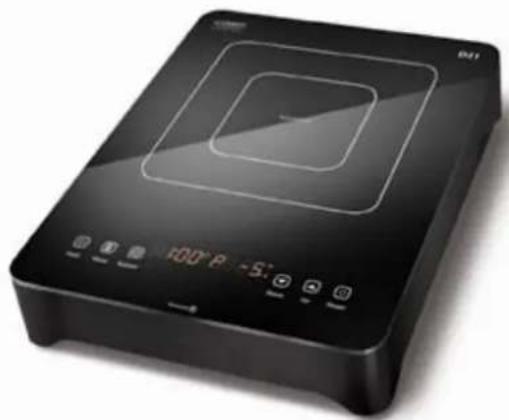
natural_image
Black rectangular electronic appliance with digital display and control buttons (no visible text or symbols)Content
Page
Foreword 12
The Function Mode and Product Advantages of Induction Hotplates 12
Prior to Commissioning 13
General Safety Regulations 13
Installing the Device 14
Commissioning the Device 14
Suitable and Unsuitable Cookware 15
Operating Panel 15
Operating Device 16
Problem and Solution 17
Cleaning and Maintenance 17
Disposal 18
Technical Data 18
CE Declaration of Conformity 18
Guarantee 19
CE

Foreword
Dear Customer,
please read these operating instructions carefully before commissioning the induction hotplate.
Please especially observe the safety notices on the following pages.
Keep these instructions for future reference and pass them on if you give the hotplate away to someone else.
The Function Mode and Product Advantages of Induction Hotplates
With induction hotplates, an electric voltage is applied on a conductor spool beneath the glass ceramics. This creates magnetic fields, which directly heat up the bottom of the cookware through a physical effect.
This means saving time and energy, because contrary to common hotplates, the cookware is heated up, not the heating element and the glass ceramics. Due to the technical characteristics described above, another advantage is the very short start-up cooking time.
In addition, the heat supply promptly adapts to changed settings and can be controlled in small steps. The induction hotplate reacts to changed settings just as fast as a gas stove, as the energy reaches the pot immediately without having to heat up other materials first. The induction technology combines this fast reaction with the basic advantage of electricity, meaning being able to exactly adjust the heat supply.
Additional advantages of an induction hotplate:
- As the hotplate is only heated up indirectly via the bottom of the cookware, over spilling food cannot stick and burn and there is hardly any danger of burns for the user. The glass ceramics is only heated up by the hot cookware.
- Once you take the cookware off the hotplate, the device automatically switches to standby mode.
- The device detects whether suitable cookware is placed on the hotplate. If this is not the case, no energy is transmitted.
Prior to commissioning
Check the device for visible damage.
The power connections and the plug may not show any damages. If you detect damage, have the device checked by a qualified technician prior to putting it into operation in order to avoid any danger.
This device is designed for private (domestic) use and its power is rated accordingly.
Any professional use is only covered by the warranty in as far as it is comparable with the demands of private use. It is not intended for any further professional use.
Improper use voids the warranty.
General safety regulations
The product you have purchased corresponds to the latest state of technology and the accepted safety regulations, still there are potential risks. Only operate the induction hotplate in an immaculate condition and observe these operating instructions!
Only use the device for its intended purpose.
Attention:
In order to prevent possible injuries or electric shock, please observe the following:
- Never touch the device and the power plug with wet hands,
- Do not connect the device to the same outlet with other devices,
- Connect the device to a suitable outlet.
- Never move the device by pulling on the power cable.
- Do not move the induction hotplate during cooking or with hot cookware on top of it.
- Do not place any empty containers on the device,
- Do not place any metal objects on the device.
- Do never heat sealed food such as canned goods before opening their covers.
- Check the mains connection cable for damage from time to time. Never operate the device when the cable is damaged. If the mains connection cable shows defects, let a qualified electrician exchange it.
- Never use the device when it does not function properly, shows damage or in case it was dropped.
- Do not leave the device unsupervised during operation. Keep children and other incompetent persons as well as persons under influence of drugs or alcohol away from the device.
- Do not submerge the device in water or other liquids and do not wash it in the dishwasher.
- Only qualified experts may perform repair and maintenance work on the device using original replacement and accessory parts. Never attempt to repair the device yourself!
- WARNING: This appliance is not intended for use by persons (including children) with limited physical, sensory or mental abilities or who lack the necessary experience and/or skills unless these persons act under the supervision of a person responsible for their safety or they were instructed by such a person on how to use the appliance.
- Scientific tests have proven that induction hotplates do not pose a risk. However, persons with a pacemaker should clear with their doctor wether to take care of some special handling advises.
Installing the device
- Place the device on a stable and level surface.
- Never place the device on a flammable surface (e.g. table cloth, carpet, etc.).
- Do not block the ventilation slots of the device. This may overheat the device. Keep a minimum distance of 5 to 10 cm to walls or other items.
- Do not place the induction hotplate next to devices or objects, which react sensitively to magnetic fields (e.g. radios, TVs, cassette recorders, computer, etc.).
- Do not place induction hotplates next to open fires, heaters or other sources of heat.
- The induction cooktop is not suitable for installation into other units.
- Make sure that the mains connection cable is not damaged or squashed beneath the device.
- Make sure that the mains connection cable does not come into contact with sharp edges and/or hot surfaces.
- The device should be connected to a rolled-out extension cable with a maximum length of 3 m and a cross-section of 2 mm. If an intermediate switch is used, it must be rated at min. 16 A.
Commissioning the device
- Prior to connecting the device, check whether the voltage indicated on the type plate corresponds to the voltage supply in your home. A wrong connection may lead to grave damage on the device and injury to persons.
- The two hotplate surfaces consist of temperature-resistant ceramics. In case of damage, even if this concern only a small tear, disconnect the device from the power supply immediately and contact the customer service.
- We recommend not placing any metal kitchen utensils, cookware or pan lids, knives or other metal objects on the hotplate. These may heat up when the device is turned on.
Attention:
Place the hot pans in the hob area only. Never place them on the control panel or the frame.
- Do not place any magnetically objects like credit cards, cassettes etc. on the glass surface while the device is in operation.
- On order to avoid overheating, do not place any aluminium foil or metal plates on the device. Warning: Please do not put the induction cooker on an iron/steel board, while operating.
- Due to electromagnetic reason, the iron/steel board may heat and damage the bottom of the induction cooker.
- Do not insert any objects like wires or tools into the ventilation slots. Attention: this may cause electric shocks.
- Do not touch the hot surface of the ceramic field. Please note: the induction hotplate does not heat up itself during cooking, but the temperature of the cookware heats up the hotplate!
- If you do not use the device for an extended period, we recommend you disconnect it from the electric outlet.
Suitable and unsuitable cookware
Suitable Cookware
- pots and pans with magnetic bottom, as stainless steel pots with iron bottom, cast iron, enamelled pans
- Flat-bottom pans and pots with a diameter of 12 to 26 cm with magnetic bottom
• Max. weight pot and content 6 kg
Unsuitable Cookware
- Pots/pans with a diameter of less than 12 cm
• Ceramic pots, heat-proof glass
• Copper pots and pans, aluminium pots and ans - Cookware with feet
- Containers with a curved bottom
Operating panel
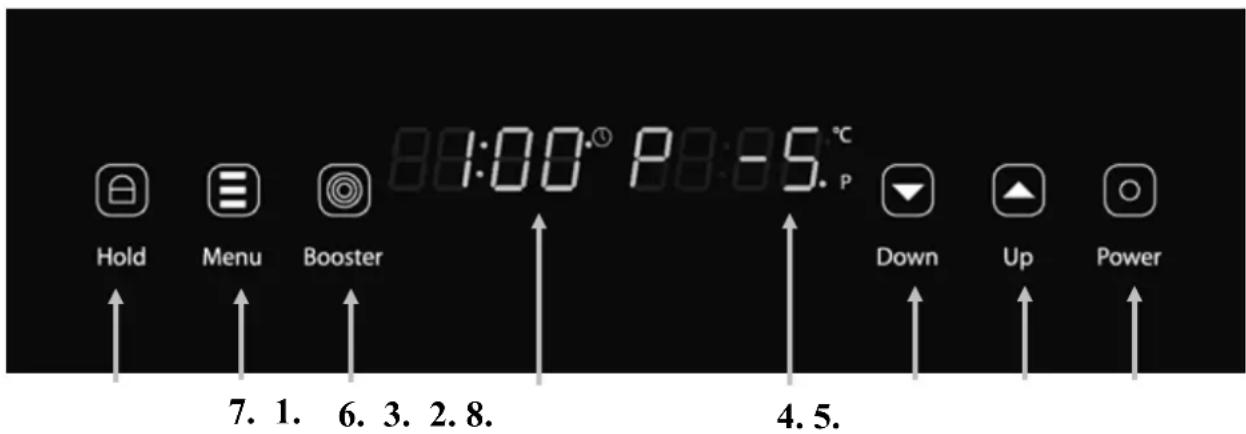
- Power switch
- Selection button (+), increase of the power stage, temperature or duration
- Selection button (-), reduction of the power stage, temperature or duration
- LED display: power stage / temperature
- LED display: timer
- Function key Booster
- Menu press 1x: power stage Menu press 2x: timer keep Menu pressed: change between power stage and temperature
- Function key Hold
Operating the device
- Connect the plug to a suitable power outlet.
- The control light of the „Power” button lights up and an audible signal sounds. The device is now in stand-by mode.
- Place a suitable cooking pot or pan centrally onto the cooking hob.
- Now press button 1. „Power” to turn on the induction cooker. An audible signal sounds. Then press button 7. Menu 1x. The power stage display 4. will blink.
- You can use the selection buttons 2. and 3. + / - to adjust the setting in the range 1-10. Then press button 7. Menu again to preset the temperature permanently. The temperature display 4. will blink.
- You can use the selection buttons 2. and 3. +/- to adjust the setting in the range 60 – 220°C. (Temperature levels: 60, 80, 100, 120, 140, 160, 180, 200 and 220 °C)
The temperature is measured by a sensor under the glass-ceramic plate so that the displayed temperature can differ from the temperature inside the pot.
Please note that the two functions „level” and „temperature” must be selected alternately. You can either use the power levels or the temperature selection. The most recently selected function is active and blinks.
- Timer function button: Press 7. Menu 2x.
- You can use the selection buttons 2. and 3. +/- to adjust the setting in the range 1 – 120 minutes. The selected duration is then counted down in the Display in 1 minute steps. When the time has elapsed an audible signal sounds and the device automatically switches to stand-by mode. Note: During timer operation the duration can be changed at any time with selection buttons. Due to the device's memory feature the set temperature level / power steps remains unchanged.
- When the induction cooker is set to general heating mode you can press button 6. Booster to turn on the full power of 2100 watts for the first 30 seconds. After that the power is reset to the preset level.
- Button 8. Hold: Press „Hold“ to lock all functions so that they cannot be changed. By pressing „Hold“ again for 5 seconds all functions are unlocked. This function can be used as a child protection feature. At the same time it prevents accidentally changing selected settings during cooking.
- Do not place empty cooking pots or pans onto the ceramic field. Heating an empty pot or pan activates the overheat protection and turns off the device.
- Do not use the device if it is damaged in any way or does not function properly.
- The use of accessories and spare parts not recommended by the manufacturer can result in damaging the devices and injuries.
- When „E2” or „E6” appears in the display this indicates that the overheat protection was activated to protect the device and cooking pots.
An activated overheat protection can be reset by unplugging the power cord. The device can then be used in the normal way.
As the temperature limit of 170^ C at the bottom of the pan is reached particularly rapidly when frying with very little fat you should switch to the „temperature” mode for frying. The upper temperature limit for this mode is 220^ C.
- For cooking we recommend you use the power steps 1-10 as used by conventional cookers.
Problem and solution
| Error Code Reason Solution | ||
| --- ---- | Waiting status | Place a suitable pot/pan onto the induction cooking field. The plate will work as usual |
| E0 | Cooking field does not work | Please return the device for repair |
| E1 | Use of wrong, too small a pot | Use a correct pot |
| E2 | Overheat protection | Allow the device to cool down, turn it off completely and then on again |
| E3, E4 | Voltage too low, too high | Connect the device to a correct power outlet |
| E5 | Open circuit | Please return the device for repair |
| E6 | Ceramic plate is overheated | Allow the device to cool down, turn it off completely and then on again |
Cleaning and maintenance
- Pull the power plug prior to cleaning the device. Do not use any caustic cleaning agents and make sure that no water penetrates the device.
- To protect yourself from electric shock, never immerse the device, its cables and the plug in water or other liquids.
- Wipe off the ceramic field with a damp cloth or use a mild, non-abrasive soap solution.
- Wipe off the casing and the operating panel with a soft cloth or a mild detergent.
- Do not use any petrol products to not damage the plastic parts and the casing/operating panel.
- Do not use any flammable, acidity or alkaline materials or substances near the device, as this may reduce the service life of the device and lead to deflagration when the device is turned on.
- Make sure that the bottom of the cookware does not scrape across the surface of the ceramic field, although a scratched surface does not impair the use of the device.
• Make sure that the device was properly cleaned before storing it in a dry place.
Disposal
Dispose of the packaging in the proper manner.
If at any time in the future you should need to dispose of this product please note that Waste electrical products should not be disposed of with household waste. Please
recycle where facilities exist. Check with your Local Authority or retailer for recycling advice.
(Waste Electrical and Electronic Equipment Directive)
Technical data
| Name Induction Hotplate D21 black | |
| Modell CJ-511A black | |
| Item no. 2125 | |
| Temperature range: 60° bis 220°C | |
| Power: 2100 Watt | |
| Stand-By 1,5 Watt | |
| Connection: 230 V 50 Hz | |
| Dimensions l/w/h : 360 x 280 x 68 mm | |
Changes reserved
For the caso Induction Hotplate D21 black we grant a
Guarantee of 3 years
For this device we grant a guarantee of 36 months, starting with the date of sale regarding defects due to faulty manufacture or material. Your legal warranty claims according to §439 ff. BGB-E are not affected by this. This guarantee does not accept defects due to inappropriate treatment or use as well as defects which do not influence the function or the value of the induction hotplate essentially. Furtheron we do not grant a guarantee for wear parts or damage in transit as well as for defects due to repairs which have not been effected by us.
This device is designed for private (domestic) use and its power is rated accordingly. Any professional use is only covered by the warranty in as far as it is comparable with the demands of private use. It is not intended for any further professional use.
In case of legitimate claims we will decide wether to repair the device or to send you a new one.
Apparent defects have to be indicated within 14 days after delivery.
Additional claims will not be accepted.
In order to assert your warranty claims please contact us before sending the device (always together with the sales slip!) to the following address.
CQSO®
GERMANY
Braukmann GmbH
Raiffeisenstraße 9
59757 Arnsberg
customer service: 02932 / 54766-99
kundenservice@caso-germany.de
Repairs beyond any guarantee claim will be charged as low as possible.
natural_image
Black rectangular electronic appliance with digital display and control buttons (no visible text or symbols)Sommaire
Page
Préface 21
natural_image
Black rectangular electronic appliance with digital display and control buttons (no visible text or symbols)S o m m a r i o
Introduzione 31



- Inhalt
- Seiten
- Operating Instructions
- Induction Hotplate D21 black
- Content
- Foreword
- The Function Mode and Product Advantages of Induction Hotplates
- Additional advantages of an induction hotplate:
- Prior to commissioning
- General safety regulations
- Attention:
- Installing the device
- Commissioning the device
- Place the hot pans in the hob area only. Never place them on the control panel or the frame.
- Suitable and unsuitable cookware
- Suitable Cookware
- Unsuitable Cookware
- Operating the device
- Cleaning and maintenance
- Disposal
- Guarantee of 3 years
- Sommaire
Brand : CASO
Model : D21
Category : Cooker