
Basic 2002 - Cooker CASO - Free user manual and instructions
Find the device manual for free Basic 2002 CASO in PDF.


| Product Type | Gas cooker |
| Brand | CASO |
| Model | Basic 2002 |
| Number of burners | 4 burners |
| Type of burners | Gas (burners) |
| Dimensions (W x D x H) | 50 x 50 x 85 cm (approx.) |
| Weight | 25 kg (approx.) |
| Gas supply | Town gas or propane cylinder |
| Total power | 8.4 kW (approx.) |
| Ignition | Automatic spark ignition |
| Gas safety | Gas shut-off safety device (thermocouple) |
| Oven function | Gas oven with convection (optional) |
| Oven capacity | 50 L (approx.) |
| Oven lighting | Yes |
| Hob | Enameled steel or ceramic glass (depending on version) |
| Care and cleaning | Enamel surfaces: damp cloth; removable burners for cleaning |
| Child safety | Control lock function (depending on model) |
| Spare parts | Grills, burners, thermocouples, knobs available from the manufacturer |
| Repairability | Repairability index of 7/10 (estimated) |
| Warranty | 2 years |
Frequently Asked Questions - Basic 2002 CASO
User questions about Basic 2002 CASO
0 question about this device. Answer the ones you know or ask your own.
Ask a new question about this device
Download the instructions for your Cooker in PDF format for free! Find your manual Basic 2002 - CASO and take your electronic device back in hand. On this page are published all the documents necessary for the use of your device. Basic 2002 by CASO.
USER MANUAL Basic 2002 CASO
natural_image
Black BASCAV2 electric stove with circular heating screen and control buttons (no visible text or symbols)Inhalt
Seiten
Vorwort 2
Operating Instructions
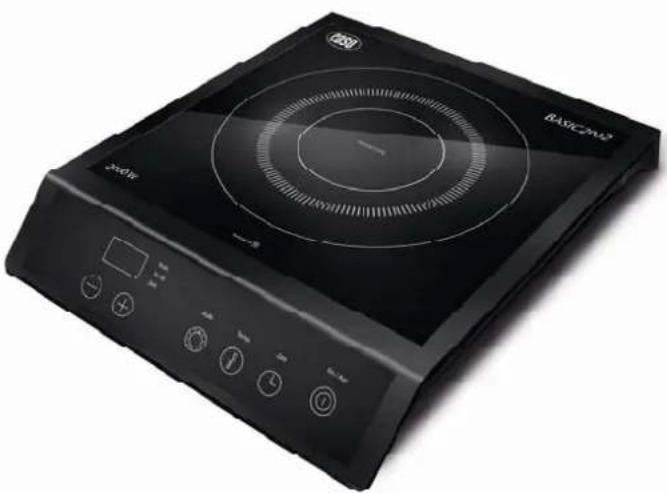
Induction Hotplate Basic 2002
Model No. 2005
natural_image
Black portable electrical stove with circular heating screen and control buttons (no visible text or symbols)Content
Page
Foreword 11
The Function Mode and Product Advantages of Induction Hotplates 11
Prior to Commissioning 11
General Safety Regulations 12
Installing the Device 13
Commissioning the Device 13
Suitable and Unsuitable Cookware 14
Operating Panel 14
Operating Device 15
Cleaning and Maintenance 16
Disposal 16
Technical Data 16
Guarantee 17
CE

caso
Foreword
Dear Customer,
please read these operating instructions carefully before commissioning the induction hotplate.
Please especially observe the safety notices on the following pages.
Keep these instructions for future reference and pass them on if you give the hotplate away to someone else.
The Function Mode and Product Advantages of Induction Hotplates
With induction hotplates, an electric voltage is applied on a conductor spool beneath the glass ceramics. This creates magnetic fields, which directly heat up the bottom of the cookware through a physical effect.
This means saving time and energy, because contrary to common hotplates, the cookware is heated up, not the heating element and the glass ceramics. Due to the technical characteristics described above, another advantage is the very short start-up cooking time.
In addition, the heat supply promptly adapts to changed settings and can be controlled in small steps. The induction hotplate reacts to changed settings just as fast as a gas stove, as the energy reaches the pot immediately without having to heat up other materials first. The induction technology combines this fast reaction with the basic advantage of electricity, meaning being able to exactly adjust the heat supply.
Additional advantages of an induction hotplate:
- As the hotplate is only heated up indirectly via the bottom of the cookware, over spilling food cannot stick and burn and there is hardly any danger of burns for the user. The glass ceramics is only heated up by the hot cookware.
- Once you take the cookware off the hotplate, the device automatically switches to standby mode.
- The device detects whether suitable cookware is placed on the hotplate. If this is not the case, no energy is transmitted.
Prior to commissioning
Check the device for visible damage.
The power connections and the plug may not show any damages. If you detect damage, have the device checked by a qualified technician prior to putting it into operation in order to avoid any danger.
This device is designed for private (domestic) use and its power is rated accordingly. Any professional use is only covered by the warranty in as far as it is comparable with the demands of private use. It is not intended for any further professional use.
Improper use voids the warranty.
caso
General safety regulations
The product you have purchased corresponds to the latest state of technology and the accepted safety regulations, still there are potential risks. Only operate the induction hotplate in an immaculate condition and observe these operating instructions!
Attention:
In order to prevent possible injuries or electric shock, please observe the following:
- Never touch the device and the power plug with wet hands.
- Do not connect the device to the same outlet with other devices. Connect the device to a suitable outlet.
- Never move the device by pulling on the power cable.
- Do not move the induction hotplate during cooking or with hot cookware on top of it.
- Do not place any empty containers on the device.
- Do not place any metal objects on the device.
- Do never heat sealed food such as canned goods before opening their covers.
- Check the mains connection cable for damage from time to time. Never operate the device when the cable is damaged. If the mains connection cable shows defects, let a qualified electrician exchange it.
- Never use the device when it does not function properly, shows damage or in case it was dropped.
- Do not leave the device unsupervised during operation. Keep children and other incompetent persons as well as persons under influence of drugs or alcohol away from the device.
- WARNING: This appliance is not intended for use by persons (including children) with limited physical, sensory or mental abilities or who lack the necessary experience and/or skills unless these persons act under the supervision of a person responsible for their safety or they were instructed by such a person on how to use the appliance.
- Do not submerge the device in water or other liquids and do not wash it in the dishwasher.
- Only qualified experts may perform repair and maintenance work on the device using original replacement and accessory parts. Never attempt to repair the device yourself!
- Scientific tests have proven that induction hotplates do not pose a risk. However, persons with a pacemaker should clear with their doctor wether to take care of some special handling advises.
caso
Installing the device
- Place the device on a stable and level surface.
- Never place the device on a flammable surface (e.g. table cloth, carpet, etc.).
- Do not block the ventilation slots of the device. This may overheat the device. Keep a minimum distance of 5 to 10 cm to walls or other items.
- Do not place the induction hotplate next to devices or objects, which react sensitively to magnetic fields (e.g. radios, TVs, cassette recorders, computer, etc.).
- Do not place induction hotplates next to open fires, heaters or other sources of heat.
- The induction cook top is not suitable for installation into other units.
- Make sure that the mains connection cable is not damaged or squashed beneath the device.
- Make sure that the mains connection cable does not come into contact with sharp edges and/or hot surfaces.
- The device should be connected to a rolled-out extension cable with a maximum length of 3 m and a cross-section of 2 mm. If an intermediate switch is used, it must be rated at min. 16 A.
- "The appliance is not intended to be operated by means of an external timer or separate remote control system."
Commissioning the device
- Prior to connecting the device, check whether the voltage indicated on the type plate corresponds to the voltage supply in your home. A wrong connection may lead to grave damage on the device and injury to persons.
- The two hotplate surfaces consist of temperature-resistant ceramics. In case of damage, even if this concern only a small tear, disconnect the device from the power supply immediately and contact the customer service.
- We recommend not placing any metal kitchen utensils, cookware or pan lids, knives or other metal objects on the hotplate. These may heat up when the device is turned on.
- Place the hot pans in the hob area only. Never place them on the control panel or the frame.
- Do not place any magnetically objects like credit cards, cassettes etc. on the glass surface while the device is in operation.
- On order to avoid overheating, do not place any aluminium foil or metal plates on the device. Warning: Please do not put the induction cooker on an iron/steel board, while operating. Due to electromagnetic reason, the iron/steel board may heat and damage the bottom of the induction cooker.
- Do not insert any objects like wires or tools into the ventilation slots. Attention: this may cause electric shocks.
- Do not touch the hot surface of the ceramic field. Please note: the induction hotplate does not heat up itself during cooking, but the temperature of the cookware heats up the hotplate!
- If you do not use the device for an extended period, we recommend you disconnect it from the electric outlet.

Suitable and unsuitable cookware
Suitable Cookware
- pots and pans with magnetic bottom, as stainless steel pots with iron bottom, cast iron, enamelled pans
- Flat-bottom pans and pots with a diameter of 12 to 26 cm with magnetic bottom
• Max. weight pot and content 6 kg
Unsuitable Cookware
- Pots/pans with a diameter of less than 12 cm
• Ceramic pots, heat-proof glass
• Copper pots and pans, aluminium pots and ans
• Cookware with feet - Containers with a curved bottom
Operating panel
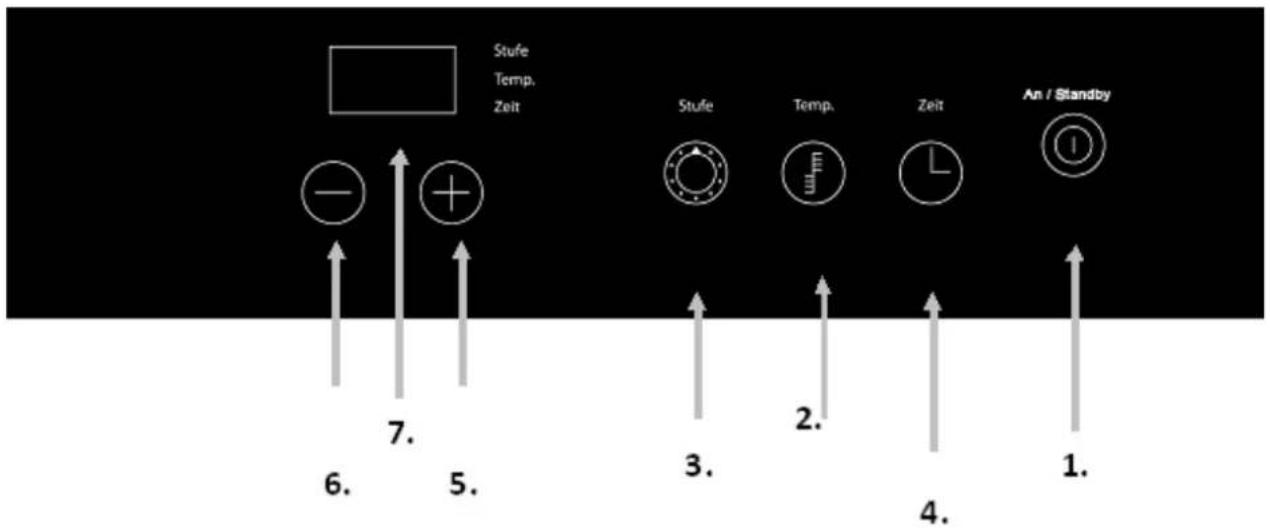
1 ON/Standby switch
2 Function key temperature
3 Function key duration
4 Function key time
5 Selection button (+), increase of the power stage, temperature or duration
6 Selection button (-), reduction of the power stage, temperature or duration
7 LED display
Operating the device

- Plug the power plug into a suitable outlet.
The control lamp of the ON/Standby switch lights up and the temperature of the cooker plate surface displayed: is the temperature of the surface of the induction cooker lower than 50^ C, the display shows "-L-". When the temperature of the cooker plate surface is over 50^ C, it is displaying "-H-". An acoustic signal sounds. Now the device is in standby mode.
- Place suitable cookware in the centre of the hotplate.
- Now press the ON/Standby switch 1. to turn on the induction hotplate, The control lamp "Stage" blinks and an acoustic signal sounds.
- Press the Function Key 3. The preset power stage "5" is selected and the device turns on.
- With the + / - Keys (5+6), you can change the settings at any time in a range from 1 – 10
- Press the Function Key 2. to select the temperature. The preset temperature stage "120°C" is selected and the device turns on.
- With the + / - keys, you can change the settings at any time in a range from 60 – 240°C. (Temperature stages: 60, 80, 100, 120, 140, 160, 180, 200, 220 and 240°C)
- Timer Function, After the selection of the temperature mode press the button Time 4. until the corresponding control lamps blink. The display shows the number "0". With the arrow keys, you can now select the operating time in 1-minute intervals (up to max. 180 minutes). Once the time is up, an acoustic signal sounds and the device automatically goes into standby mode. Notice: during timer operation, you can change the duration at any time with the arrow keys. With the memory function of the device, the power stage or temperature settings remain unchanged here.
You can also change to the power stage selection or the temperature stage selection with the "Function" button and change the settings there without changing the preset time.
- Do not place any empty cookware on the ceramic field. Heating an empty pot or pan activates the overheating protection and the device turns off.
- Do not operate the device if it is damaged in any way or does not function properly.
- The use of accessories and spare parts not recommended by the manufacturer may lead to damage on the device and injuries.
- In case of “E05” appearing in the display the over heat protection has been activated.
This means that the temperature had increased to a temperature of 170^ C. In this case the device turns off automatically in order to avoid damages.
Therefore we recommend to select the function "Stufe" in case of steaming food or boiling water for example.
In case of grilling or cooking deep fry food we would advise you to use the function "Temperatur" as in this case you can use temperatures up to 240°C.
In case of "E05" please pull the power plug in order to reset the device. After this you can use it again as usual.
When you switch off the device via "On/Standby" and the temperature of the cooker plate surface is lower than 50°C, the display shows "-L-". When the temperature of the cooker plate surface is over 50 °C, it is displaying "-H-".
caso
Cleaning and maintenance
- Pull the power plug prior to cleaning the device. Do not use any caustic cleaning agents and make sure that no water penetrates the device.
- To protect yourself from electric shock, never immerse the device, its cables and the plug in water or other liquids.
- Wipe off the ceramic field with a damp cloth or use a mild, non-abrasive soap solution.
- Wipe off the casing and the operating panel with a soft cloth or a mild detergent.
- Do not use any petrol products to not damage the plastic parts and the casing/operating panel.
- Do not use any flammable, acidity or alkaline materials or substances near the device, as this may reduce the service life of the device and lead to deflagration when the device is turned on.
- Make sure that the bottom of the cookware does not scrape across the surface of the ceramic field, although a scratched surface does not impair the use of the device.
• Make sure that the device was properly cleaned before storing it in a dry place.
Disposal

Dispose of the packaging in the proper manner.
If at any time in the future you should need to dispose of this product please note that Waste electrical products should not be disposed of with household waste. Please recycle where facilities exist. Check with your Local Authority or retailer for recycling advice.
(Waste Electrical and Electronic Equipment Directive)
Technical data
| Name | Induction HotplateBasic 2002 |
| Modell C20L | |
| Item no. 2005 | |
| Temperature range: 60° bis 240°C | |
| Power: | 2000 Watt |
| Stand-by 2 Watt | |
| The workplace related noise emission of this appliance | lower than 70 dB(A) |
| Connection: 220-240V / 50Hz | |
| Dimensions h/b/t 65x300x375mm | |
Changes reserved
For the caso Induction Hotplate Basic 2002 we grant a
Guarantee of 2 years
For this device we grant a guarantee of 24 months, starting with the date of sale
regarding defects due to faulty manufacture or material. Your legal warranty claims according to §439 ff. BGB-E are not affected by this. This guarantee does not accept defects due to inappropriate treatment or use as well as defects which do not influence the function or the value of the induction hotplate essentially. Furtheron we do not grant a guarantee for wear parts or damage in transit as well as for defects due to repairs which have not been effected by us.
This device is designed for private (domestic) use and its power is rated accordingly.
Any professional use is only covered by the warranty in as far as it is comparable with the demands of private use. It is not intended for any further professional use.
In case of legitimate claims we will decide wether to repair the device or to send you a new one.
Apparent defects have to be indicated within 14 days after delivery. Additional claims will not be accepted.
In order to assert your warranty claims please contact us before sending the device (always together with the sales slip!) to the following address.

Braukmann GmbH
Raiffeisenstraße 9
59757 Arnsberg
customer service: 02932 / 54766-99
kundenservice@caso-germany.de
Repairs beyond any guarantee claim will be charged as low as possible.
natural_image
Black BSCA2 electric stove with circular heating screen and control buttons (no visible text or symbols)Sommaire
Page
Préface 19
natural_image
Black electric stove with circular top and control buttons (no visible text or symbols)Sommario
Pagina
Introduzione 28
(Declaration of conformity/ Declaration de conformite/Diclaratione de conformita)


- Operating Instructions
- Induction Hotplate Basic 2002
- Content
- caso
- Foreword
- The Function Mode and Product Advantages of Induction Hotplates
- Prior to commissioning
- General safety regulations
- Attention:
- Installing the device
- Commissioning the device
- Suitable and unsuitable cookware
- Suitable Cookware
- Unsuitable Cookware
- Operating the device
- Cleaning and maintenance
- Disposal
- Guarantee of 2 years
- Sommaire
- Sommario
Brand : CASO
Model : Basic 2002
Category : Cooker