3500 - Security and Access Control System Pyramid Time Systems - Free user manual and instructions
Find the device manual for free 3500 Pyramid Time Systems in PDF.



| Product Type | Electronic Card Time Clock |
| Brand | Pyramid Time Systems |
| Model | 3500 |
| Power Supply | Mains 110-240V AC, 50/60Hz |
| Backup Battery | Yes, maintains data and time for up to 30 days |
| Battery Life | Greater than 10 years |
| Accuracy | Less than 30 seconds per year |
| Display | Digital display (AM/PM or military format) |
| Printing | Replaceable ink ribbon |
| Date Functions | Automatic calendar until 2099, handles leap years and daylight saving time |
| Available Languages | English, Spanish, French, German |
| Operating Temperature | 0°C to 50°C |
| Humidity | 10% to 95% RH non-condensing |
| Mounting | Desktop or wall mount |
| Certifications | UL, CUL |
| Warranty | 1 year limited (hardware) |
| Maintenance | Replacement of printing ribbon |
| Security | Key lock |
| Spare Parts | Ribbons (ref. 4000R2, 4000R6), time cards (ref. 35100-10D, etc.), pocket holder (400-3) |
Frequently Asked Questions - 3500 Pyramid Time Systems
2. Tilt the clock on its side, ribbon facing up.
3. Slide the cartridge holder to the left.
4. Press the button to remove the old cartridge.
5. Insert the new cartridge by turning the ribbon advance knob, ensuring the ribbon and plastic protector cover the print head.
6. Replace the cover and test.
User questions about 3500 Pyramid Time Systems
0 question about this device. Answer the ones you know or ask your own.
Ask a new question about this device
Download the instructions for your Security and Access Control System in PDF format for free! Find your manual 3500 - Pyramid Time Systems and take your electronic device back in hand. On this page are published all the documents necessary for the use of your device. 3500 by Pyramid Time Systems.
USER MANUAL 3500 Pyramid Time Systems
READ THESE INSTRUCTIONS BEFORE INSTALLING AND USING THIS PRODUCT.
Keep these instructions for future reference
USING YOUR PYRAMID 3000 SERIES TIME CLOCK
STEP1-UNPACKING
- Remove the Model 3500 / 3700HD / 3000HD from its box and place it on a firm surface.
- Plug unit into an outlet.
- Locate key packaged with the unit. Unlock and remove the top cover of the unit. Locate the programming buttons that are labeled SELECT, UP, and DOWN. Place your key in a safe place for future access.
4.
STEP 2 - PROGRAMMING THE MODEL 3500 / 3700HD / 3000HD
Programming the Model 3500 / 3700HD / 3000HD is extremely easy and can be done in less than 5 minutes.
STEP 3 - READY TO GO
Reinstall the top cover, lock the unit and you are ready to use your new Model 3500 / 3700HD / 3000HD.
PROGRAMMING YOUR PYRAMID 3000 SERIES TIME CLOCK
To change or set a feature, press the SELECT button until the desired feature is displayed. Use the UP or DOWN button to change the feature. After the displayed feature is changed, press the SELECT button to change other features and to return to the main display.
LANG=ENGLISH - Use the UP or DOWN key to select the desired language to print and program the Model 3500 / 3700HD / 3000HD. Select English, Spanish, French or German.
DATE FMT=YYMMDD - Use the UP or DOWN key to select the desired date format that will be printed and displayed. There are three selections: YYMMDD (Year, Month, Day), MMDDYY (Month, Day, Year) or DDMMYY (Day, Month, Year).
SET YEAR - Use the UP or DOWN key to set the desired year.
SET MONTH - Use the UP or DOWN key to set the desired month.
SET DAY - Use the UP or DOWN key to set the desired day of month.
DAYLIGHT SAV = - Allows Models 3500 / 3700HD / 3000HD to automatically adjust to daylight saving time. There are 5 options you can select with the UP or DOWN key:
USA07+ Automatically adjusts time to 2007 United States daylight saving time (starts Second Sunday of March and ends First Sunday of November).
USA06- Automatically adjusts time to Pre-2007 United States daylight saving time (starts First Sunday of April and ends Last Sunday of October).
EURO Automatically adjusts time to European daylight saving time. (Begins last Sunday in March and ends on the last Sunday in October).
OTHER Allows you to select a custom start and end Sunday for automatic daylight saving time changes. After SELECTING OTHER, use the UP or DOWN key to select the desired Sunday (only Sundays are allowed) you wish to START daylight saving time, press SELECT and again use the UP or DOWN key to select the desired Sunday to END daylight saving time. Note: The time will automatically change at 2 a.m. on the selected Sundays.
OFF- Unit will not adjust time for daylight saving time
TIME STD=LINE. This option should only be changed for areas outside of the U.S.A where there is frequency variation in the power lines. If you are operating this unit in an area that has problems with power line frequency resulting in the unit losing or gaining time or you are running the unit off a generator/inverter, use the UP or DOWN key to change the TIME STD to CRYSTAL which will cause the unit to keep time using an internal device.
DSPLY FMT=AM/PM - Selects how the time will be displayed on the front of the unit. Using the UP or DOWN keys, select one of the following options:
- AM/PM - Standard time (1-12 hours).
- MIL - Military time (0-24 hours).
PRINT FMT=AM/PM - Selects how time will be printed on the time card. Using the UP or DOWN keys, select one of the following options:
- AM/PM - Standard time (3:30PM)
- MIL- Military time (3:30PM = 15:30)
- ATAAP-Military time with minutes expressed in hundredths of hour (3:30PM = 15.50)
- 24H.1-Time with minutes expressed in tenths of an hour.
PRINT DIR=RIGHT - Use the UP or DOWN key to select print on the right side of the time card or the left side (almost all time cards in the USA are right-sided).
FMT=DATE TIME - Use the UP or DOWN key to select which of the following formats you want printed on time card:
- DATE TIME -Prints current date and time.
- DATE YR TIME -Prints current date, year, and time (small font).
- DATE YR APPD - Prints current date, year, and APPD (approved) message.
-
DATE YR FAXD -Prints current date, year, and FAXD (faxed) message.
-
DATE YR FILE -Prints current date, year, and FILE (filed) message.
- DATE YR IN -Prints current date, year, and IN message.
- DATE YR OUT -Prints current date, year, and OUT message.
- DATE YR PAID -Prints current date, year, and PAID message.
- DATE YR RCVD -Prints current date, year, and RCVD (received) message.
- DATE YR SENT -Prints current date, year, and SENT message.
- DATE YR ORIG - Prints current date, year, and ORIG (original) message.
- DATE YR Void -Prints current date, year, and Void message.
- DATE YR USED -Prints current date, year, and USED message.
- DATE YR CPLD - Prints current date, year, and CPLD (completed) message.
SET HOUR - Sets the current hour of day by using the UP or DOWN key.
SET MINUTES - Sets the current minute of day by using the UP or DOWN key.
TROUBLESHOOTING
MASTER RESET - This procedure will clear the entire time clock memory and reset the program to the original factory defaults. This procedure should only be used if the time clock is behaving completely erratic. Master reset is accomplished by unplugging the unit and then plugging the unit back in while depressing the center programming button (the UP button). Hold the center button until the front display is visible. All time, set-up, and payroll data will be set to the original factory defaults.
DISPLAY IS FLASHING Jan 1 12:01AM - Displays when power is lost for more than 30 days. To correct, reset the time by following these steps.
CHANGING THE PRINT RIBBON
- Unplug the clock and remove the cover using the key provided.
- Turn the clock on its side so the ribbon is on top.
- Manually move the ribbon cartridge holder to the left towards the display.
- Gently push the hold tab away from the ribbon cartridge and remove the ribbon cartridge.
- Snap the new ribbon cartridge into the holder while turning the ribbon advance knob. Make sure the ribbon and the clear plastic protector slide completely over the print head.
- Replace and lock the cover. Test the unit for proper installation by punching several times on a time card.
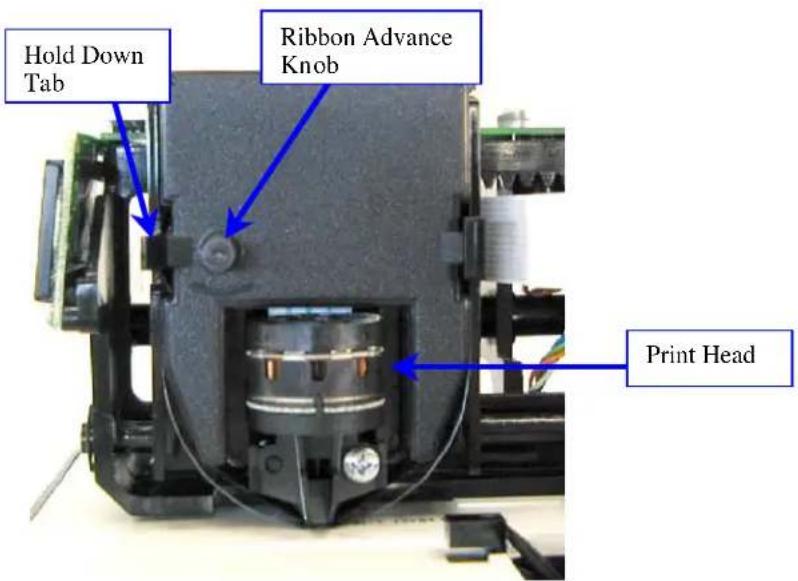
Note: If the ribbon is not completely over the print head, the resulting print will show incomplete characters. If the ribbon cartridge is not completely snapped in the holder, the resulting print will be increasingly lighter.
FREQUENTLY ASKED QUESTIONS
Do I have to use special cards?
PTI 35100-10 cards were designed for use with the 3500 / 3700HD / 3000HD when it is used for payroll purposes, or you may use your time recorder to date and time stamp other documents.
What does ATAAP mean?
ATAAP is the acronym used by the U.S. government that describes how time is accounted for using hundredths of hour. i.e. (one and a quarter hours equal 1.25 hours).
If further assistance is required, please contact our technical services department at 1-888-479-7264.
SUPPLIES AND OPTIONAL ACCESSORIES
Supplies and optional accessories for the Pyramid M-3500 / 3700HD / 3000HD are available through most office supply stores or by calling Pyramid Technologies toll free at 1-888-479-7264.
| Part Number | Description |
| 4000R2 | Ribbon 2-pack |
| 4000R6 | Ribbon 6-pack |
| 35100-10D Time Cards Single-sided 500 pack | |
| 35100-10DDS Time Cards Double-sided 500 pack | |
| 35100-10M Time Cards Single-sided 1000 pack | |
| 35100-10MDS Time Cards Double-sided 1000 pack | |
| 400-3 25 Pocket Time Card Rack | |
Limited Hardware Warranty
Your Pyramid time clock comes with a 1-year Limited Hardware warranty. If Customer Support cannot troubleshoot your problem over the phone, we will replace your unit free of charge Pyramid Technologies, LLC warrants this equipment to the original user against defective material or workmanship for a period of 1 year from the date of purchase. The manufacturer's responsibility under this warranty is limited to the repair or replacement of the defective part or parts. The manufacturer reserves the right to determine whether the parts failed because of defective material, workmanship, or other causes. Failure caused by accident, alteration, misuse, or improper packaging of returned unit is not covered by this warranty. Any repair to the equipment other than by Pyramid voids the warranty. Users in countries other than the USA should contact the Dealer from whom the unit was purchased. The rights under this warranty are limited to the original user and may not be transferred to subsequent users. Protect your equipment by investing in an extended warranty. Call Pyramid Today.
Returns
Returns on non-defective equipment can be made within 30-days of purchase for a full refund after inspection. Returns on non-defective equipment made after 30-days, but within 60 days of shipping will be accepted after inspection and are subject to a 15% restocking fee. Returns after 60 days will not be accepted.
Pyramid Technologies, LLC
48 Elm St. Meriden, CT 06450
(888) 479-7264 toll free phone
(203) 238-0550 phone
(203) 634-1696 fax
E-mail: CustomerService@pti.cc
Website: www.PyramidTechnologies.com
Specifications
Operating Conditions
Temperature 0C to 50C, (3F to 122F)
Humidity 10 to 95% RH, non condensing
Power Failure
Battery back-up of data and time for 30 days
Battery life (designed to last more than 10 years)
Calendar
Automatic Leap Year and Daylight Saving Time, Year up to 2099
Clock Accuracy
Less than 30 seconds/year
Certifications
UL and CUL
Mounting
Desktop Or Wall Mountable.
PYRAMID
MODELO 3500 / 3700HD / 3000HD
Pyramid Technologies, LLC
48 Elm St. Meriden, CT 06450
Linea gratuita: (888) 479-7264
Telfono: (203) 238-0550
Fax: (203) 634-1696
E-mail: CustomerService@pti.cc
Website: www.PyramidTechnologies.com
Especillasiones
Pyramid Technologies, LLC
48 Elm St. Meriden, CT 06450
(888) 479-7264 toll free phone
(203) 238-0550 phone
(203) 634-1696 fax
E-mail: CustomerService@pti.cc
Website: www.PyramidTechnologies.com
Spcifications
INSTALLATIONS- UND G INSTALLATIONS
Pyramid Technologies, LLC
48 Elm St. Meriden, CT 06450
(888) 479-7264 toll free phone
(203) 238-0550 phone
(203) 634-1696 fax
E-mail: CustomerService@pti.cc
Website: www.PyramidTechnologies.com